 Kartik
8.9 KiB
@mem0/openclaw-mem0
Long-term memory for OpenClaw agents, powered by Mem0.
Your agent forgets everything between sessions. This plugin fixes that — it watches conversations, extracts what matters, and brings it back when relevant. Automatically.
Requirements
Check your OpenClaw version:
openclaw --version
# OpenClaw 2026.4.15 (041266a)
| OpenClaw Version | Plugin Support |
|---|---|
>= 2026.4.15 |
Fully supported |
Quick Start
The fastest way is to install directly from your OpenClaw chat — no CLI or config editing needed.
Copy and paste this into your OpenClaw chat (Telegram, WhatsApp, default chat, or any channel where your agent lives):
Setup Mem0 from mem0.ai/claw-setup
OpenClaw installs the plugin, prompts you for your email, and connects your Mem0 account with OTP verification. See Chat Setup below for the full walkthrough.
If you prefer the OpenClaw CLI, or are setting up self-hosted / open-source mode, see Manual Config and Open-Source (Self-hosted) below.
Platform (Mem0 Cloud)
There are two ways to set up @mem0/openclaw-mem0 on the Mem0 platform:
- Chat setup (recommended) — run the setup inside any OpenClaw chat. No config editing, no API key handling.
- Manual config — edit
openclaw.jsondirectly.
Chat Setup (Recommended)
You no longer need manual config editing to get started. Everything happens inside the OpenClaw chat itself.
-
Send the setup command to your OpenClaw agent. Open any OpenClaw channel and paste:
Setup Mem0 from mem0.ai/claw-setupOpenClaw responds with a Mem0 setup card and asks: "What's your email address? I'll send you a verification code to connect your Mem0 account."
-
Enter your email. Type your email address and send it. Mem0 replies: "Check your email for a 6-digit code and paste it here."
-
Paste the OTP. Copy the 6-digit code from your email inbox and paste it into the chat. You'll see: "Connected to Mem0."
That's it. No API key, no config file editing, no environment variables. The plugin is now active and auto-capture and auto-recall are running on every turn.
The chat flow uses the same underlying config as manual setup — it writes
apiKeyanduserIdintoopenclaw.jsonfor you. You can still open the file to inspect or override values afterward.
Manual Config
-
Install the plugin via the OpenClaw CLI:
openclaw plugins install @mem0/openclaw-mem0 -
Get your API key from app.mem0.ai.
-
Select the plugin as your memory backend in
openclaw.json. Either initialize via the CLI:openclaw mem0 init --api-key <your-key> --user-id <your-user-id>Or add the full config to your
openclaw.json:{ "plugins": { "slots": { "memory": "openclaw-mem0" }, "entries": { "openclaw-mem0": { "enabled": true, "config": { "apiKey": "${MEM0_API_KEY}", "userId": "alice" } } } } }
Note: OpenClaw memory plugins load through an exclusive slot, so install alone does not activate the plugin. You must set
plugins.slots.memoryas shown above.
Open-Source (Self-hosted)
No Mem0 key needed. Requires OPENAI_API_KEY for default embeddings and LLM. Vectors are stored locally in SQLite at ~/.mem0/vector_store.db — no external database required.
Defaults: text-embedding-3-small for embeddings, gpt-5.4 for fact extraction.
{
  "plugins": {
    "slots": {
      "memory": "openclaw-mem0"
    },
    "entries": {
      "openclaw-mem0": {
        "enabled": true,
        "config": {
          "mode": "open-source",
          "userId": "alice"
        }
      }
    }
  }
}
Customize the embedder, vector store, or LLM via the oss block:
"config": {
  "mode": "open-source",
  "userId": "alice",
  "oss": {
    "embedder": { "provider": "openai", "config": { "model": "text-embedding-3-small" } },
    "vectorStore": { "provider": "qdrant", "config": { "host": "localhost", "port": 6333 } },
    "llm": { "provider": "openai", "config": { "model": "gpt-5.4" } }
  }
}
All oss fields are optional. See the Mem0 OSS docs for supported providers.
How It Works
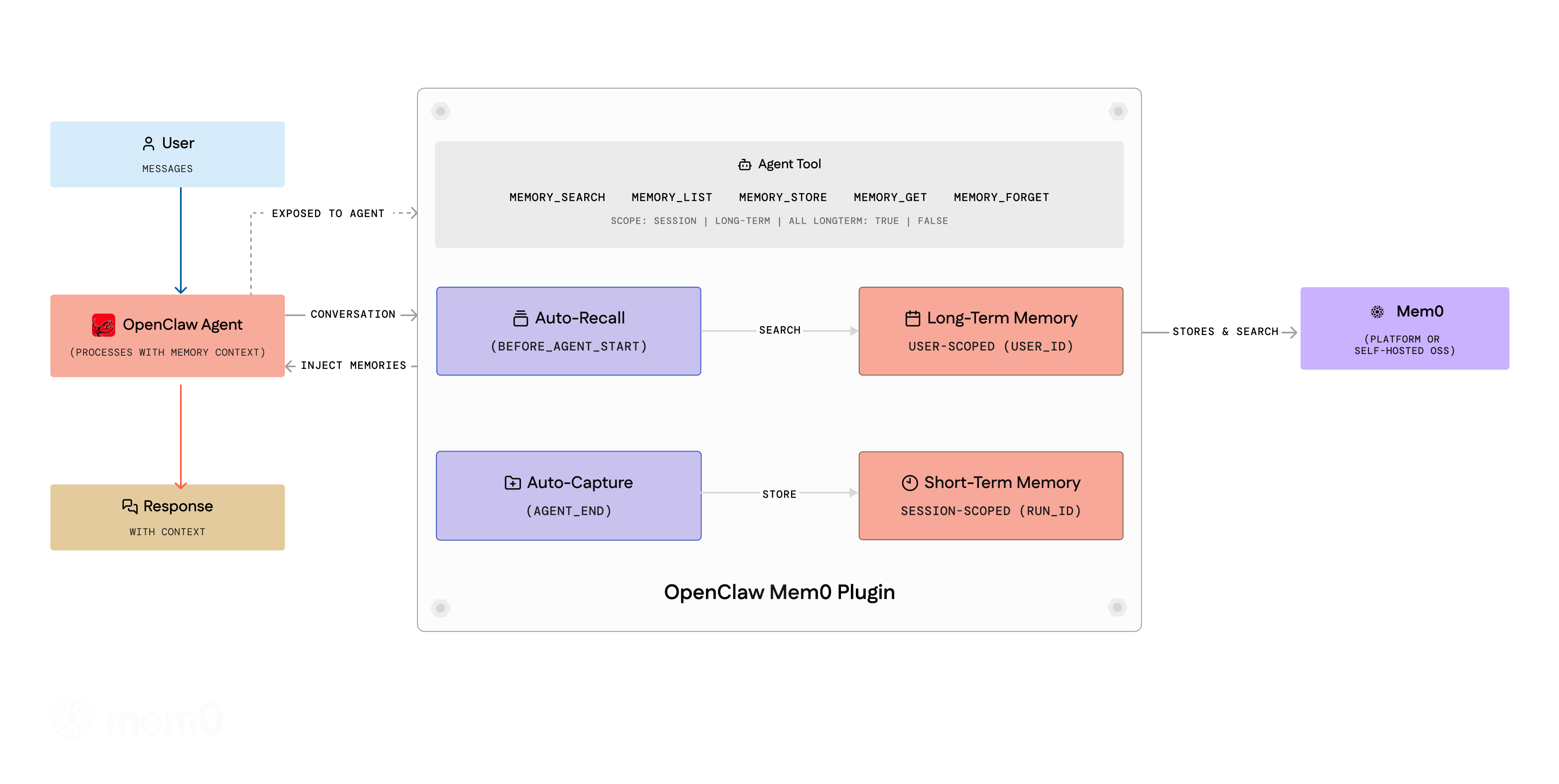
Auto-Recall — Before the agent responds, the plugin searches Mem0 for relevant memories and injects them into context.
Auto-Capture — After the agent responds, the conversation is filtered through a noise-removal pipeline and sent to Mem0. New facts get stored, stale ones updated, duplicates merged.
Both run silently. No prompting, no manual calls required.
Memory Scopes
- Session (short-term) — Scoped to the current conversation via
run_id. Recalled alongside long-term memories. - User (long-term) — Persistent across all sessions. Default for
memory_add.
Multi-Agent Isolation
Each agent gets its own memory namespace automatically via session key routing (agent:<name>:<uuid> maps to userId:agent:<name>). Single-agent setups are unaffected.
Agent Tools
Eight tools are registered for agent use:
| Tool | Description |
|---|---|
memory_search |
Search by natural language query. Supports scope (session, long-term, all), categories, filters, and agentId. |
memory_add |
Store facts. Accepts text or facts array, category, importance, longTerm, metadata. |
memory_get |
Retrieve a single memory by ID. |
memory_list |
List all memories. Filter by userId, agentId, scope. |
memory_update |
Update a memory's text in place. Preserves history. |
memory_delete |
Delete by memoryId, query (search-and-delete), or all: true (requires confirm: true). |
memory_event_list |
List recent background processing events. Platform mode only. |
memory_event_status |
Get status of a specific event by ID. Platform mode only. |
CLI
All commands: openclaw mem0 <command>.
# Memory operations
openclaw mem0 add "User prefers TypeScript over JavaScript"
openclaw mem0 search "what languages does the user know"
openclaw mem0 search "preferences" --scope long-term
openclaw mem0 get <memory_id>
openclaw mem0 list --user-id alice --top-k 20
openclaw mem0 update <memory_id> "Updated preference text"
openclaw mem0 delete <memory_id>
openclaw mem0 delete --all --user-id alice --confirm
openclaw mem0 import memories.json

# Management
openclaw mem0 init
openclaw mem0 init --api-key <key> --user-id alice
openclaw mem0 status
openclaw mem0 config show
openclaw mem0 config get api_key
openclaw mem0 config set user_id alice

# Events (platform only)
openclaw mem0 event list
openclaw mem0 event status <event_id>

# Memory consolidation
openclaw mem0 dream
openclaw mem0 dream --dry-run
Configuration Reference
General
| Key | Type | Default | Description |
|---|---|---|---|
mode |
"platform" | "open-source" |
"platform" |
Backend mode |
userId |
string |
OS username | User identifier. All memories scoped to this value. |
autoRecall |
boolean |
true |
Inject relevant memories before each turn |
autoCapture |
boolean |
true |
Extract and store facts after each turn |
topK |
number |
5 |
Max memories returned per recall |
searchThreshold |
number |
0.5 |
Minimum similarity score (0-1) |
Platform Mode
| Key | Type | Default | Description |
|---|---|---|---|
apiKey |
string |
— | Required. Mem0 API key (supports ${MEM0_API_KEY}) |
customInstructions |
string |
(built-in) | Custom extraction rules |
customCategories |
object |
(12 defaults) | Category name to description map |
Open-Source Mode
All fields optional. Defaults: text-embedding-3-small embeddings, local SQLite vector store (~/.mem0/vector_store.db), gpt-5.4 LLM.
| Key | Type | Default | Description |
|---|---|---|---|
customPrompt |
string |
(built-in) | Extraction prompt |
oss.embedder.provider |
string |
"openai" |
Embedding provider |
oss.embedder.config |
object |
— | Provider config (apiKey, model, baseURL) |
oss.vectorStore.provider |
string |
"memory" |
Vector store provider (see list above) |
oss.vectorStore.config |
object |
— | Provider config (host, port, collectionName, dbPath) |
oss.llm.provider |
string |
"openai" |
LLM provider |
oss.llm.config |
object |
— | Provider config (apiKey, model, baseURL) |
oss.historyDbPath |
string |
— | SQLite path for edit history |