Compare commits
78 Commits
| Author | SHA1 | Date | |
|---|---|---|---|
 Dev Khant Dev Khant
|
8e3ed634d1 | ||
|
Dev Khant
|
e9bc4cdc95 | ||
|
Dev Khant
|
a236aa2315 | ||
|
Dev Khant
|
5660fffa96 | ||
|
Dev Khant
|
eba6f77330 | ||
|
Dev Khant
|
b5d00e9b6c | ||
|
Dev Khant
|
1be0d70d02 | ||
|
Taranjeet Singh
|
edb53209ef | ||
|
Taranjeet Singh
|
7443e58a9d | ||
|
Dev Khant
|
7f25caba47 | ||
|
Dev Khant
|
c42934b7fb | ||
|
Dev Khant
|
17887b5959 | ||
|
Dev Khant
|
5d47f4f060 | ||
|
Dev-Khant
|
600c9fae63 | ||
|
Dev Khant
|
2d0c8fe94e | ||
|
Dev Khant
|
369d5325f9 | ||
|
Dev Khant
|
29d63306a4 | ||
|
Deshraj Yadav
|
96628d7791 | ||
|
Deshraj Yadav
|
244fd2231d | ||
|
Dev Khant
|
3db028c719 | ||
|
Dev Khant
|
c86b1e4d4c | ||
|
Dev Khant
|
5f5b738745 | ||
|
Dev Khant
|
acaf47ed54 | ||
|
cola
|
9734b2db7e | ||
|
Saket Aryan
|
3fe31e1c31 | ||
|
Seetha Rama Guptha
|
f4c0f98fde | ||
|
Dev Khant
|
6e781f616c | ||
|
Prateek Chhikara
|
dcba83186a | ||
|
Saket Aryan
|
a6d305f8d0 | ||
|
Lennex Zinyando
|
db512950b9 | ||
|
Dev-Khant
|
d4df9f6dfe | ||
|
Dev Khant
|
0e6b20982a | ||
|
Dev Khant
|
92e1a9b433 | ||
|
Dev-Khant
|
3be356a0e9 | ||
|
Dev Khant
|
760cd54ddf | ||
|
Deshraj Yadav
|
1436da18b1 | ||
|
Prateek Chhikara
|
cc9acb7493 | ||
|
Dev Khant
|
cbee71a63e | ||
|
Dev Khant
|
b052a86424 | ||
|
Saket Aryan
|
95f5fb3ab4 | ||
|
Dev Khant
|
04d7f2e48c | ||
|
Lennex Zinyando
|
be46f4eb40 | ||
|
Dev Khant
|
f16a580ef6 | ||
|
Dev Khant
|
095189d39a | ||
|
Dev Khant
|
064d28626b | ||
|
Dev Khant
|
cd31c5897a | ||
|
Prateek Chhikara
|
0bb6137877 | ||
|
Saket Aryan
|
2c63f4d866 | ||
|
Prateek Chhikara
|
3984b90f62 | ||
|
Prateek Chhikara
|
b08b50cbc6 | ||
|
Dev Khant
|
90096d6954 | ||
|
Prateek Chhikara
|
7581974805 | ||
|
Prateek Chhikara
|
a8fafb9368 | ||
|
Dev Khant
|
75a4a253f7 | ||
|
Dev Khant
|
f9995d144f | ||
|
junmo1215
|
8d3c8c695d | ||
|
Dev Khant
|
9f27b88843 | ||
|
Dev Khant
|
d2f0e23dc8 | ||
|
Dev Khant
|
6e23a6f00e | ||
|
Dev Khant
|
a06c9a99ae | ||
|
Dev Khant
|
63fbd2dc2c | ||
|
Dev Khant
|
203943919b | ||
|
Dev Khant
|
04bbad67ac | ||
|
Dev Khant
|
e1b527b73f | ||
|
Dev Khant
|
625846caf8 | ||
|
Dev Khant
|
c1bd4e19fe | ||
|
Dev Khant
|
8d172d6139 | ||
|
Dev Khant
|
a5355f7488 | ||
|
Yunsung Lee
|
f13f3b9283 | ||
|
Deshraj Yadav
|
56351d1f8d | ||
|
Dev Khant
|
a9d1383909 | ||
|
Dev Khant
|
80c9c6a577 | ||
|
Dev Khant
|
e4e5511642 | ||
|
Dev Khant
|
a4b085553a | ||
|
Prateek Chhikara
|
e12273c7cb | ||
|
Saket Aryan
|
ee2b5adfc0 | ||
|
Dev Khant
|
205a03a5f2 | ||
|
Dev Khant
|
7be029a26f |
@@ -13,7 +13,7 @@ install:
|
||||
install_all:
|
||||
poetry install
|
||||
poetry run pip install groq together boto3 litellm ollama chromadb sentence_transformers vertexai \
|
||||
google-generativeai elasticsearch
|
||||
google-generativeai elasticsearch opensearch-py
|
||||
|
||||
# Format code with ruff
|
||||
format:
|
||||
|
||||
@@ -45,50 +45,25 @@
|
||||
|
||||
[Mem0](https://mem0.ai) (pronounced as "mem-zero") enhances AI assistants and agents with an intelligent memory layer, enabling personalized AI interactions. Mem0 remembers user preferences, adapts to individual needs, and continuously improves over time, making it ideal for customer support chatbots, AI assistants, and autonomous systems.
|
||||
|
||||
<!-- Start of Selection -->
|
||||
<p style="display: flex;">
|
||||
<span style="font-size: 1.2em;">New Feature: Introducing Graph Memory. Check out our <a href="https://docs.mem0.ai/open-source/graph-memory" target="_blank">documentation</a>.</span>
|
||||
</p>
|
||||
<!-- End of Selection -->
|
||||
### Features & Use Cases
|
||||
|
||||
Core Capabilities:
|
||||
- **Multi-Level Memory**: User, Session, and AI Agent memory retention with adaptive personalization
|
||||
- **Developer-Friendly**: Simple API integration, cross-platform consistency, and hassle-free managed service
|
||||
|
||||
### Core Features
|
||||
|
||||
- **Multi-Level Memory**: User, Session, and AI Agent memory retention
|
||||
- **Adaptive Personalization**: Continuous improvement based on interactions
|
||||
- **Developer-Friendly API**: Simple integration into various applications
|
||||
- **Cross-Platform Consistency**: Uniform behavior across devices
|
||||
- **Managed Service**: Hassle-free hosted solution
|
||||
|
||||
### How Mem0 works?
|
||||
|
||||
Mem0 leverages a hybrid database approach to manage and retrieve long-term memories for AI agents and assistants. Each memory is associated with a unique identifier, such as a user ID or agent ID, allowing Mem0 to organize and access memories specific to an individual or context.
|
||||
|
||||
When a message is added to the Mem0 using add() method, the system extracts relevant facts and preferences and stores it across data stores: a vector database, a key-value database, and a graph database. This hybrid approach ensures that different types of information are stored in the most efficient manner, making subsequent searches quick and effective.
|
||||
|
||||
When an AI agent or LLM needs to recall memories, it uses the search() method. Mem0 then performs search across these data stores, retrieving relevant information from each source. This information is then passed through a scoring layer, which evaluates their importance based on relevance, importance, and recency. This ensures that only the most personalized and useful context is surfaced.
|
||||
|
||||
The retrieved memories can then be appended to the LLM's prompt as needed, enhancing the personalization and relevance of its responses.
|
||||
|
||||
### Use Cases
|
||||
|
||||
Mem0 empowers organizations and individuals to enhance:
|
||||
|
||||
- **AI Assistants and agents**: Seamless conversations with a touch of déjà vu
|
||||
- **Personalized Learning**: Tailored content recommendations and progress tracking
|
||||
- **Customer Support**: Context-aware assistance with user preference memory
|
||||
- **Healthcare**: Patient history and treatment plan management
|
||||
- **Virtual Companions**: Deeper user relationships through conversation memory
|
||||
- **Productivity**: Streamlined workflows based on user habits and task history
|
||||
- **Gaming**: Adaptive environments reflecting player choices and progress
|
||||
Applications:
|
||||
- **AI Assistants**: Seamless conversations with context and personalization
|
||||
- **Learning & Support**: Tailored content recommendations and context-aware customer assistance
|
||||
- **Healthcare & Companions**: Patient history tracking and deeper relationship building
|
||||
- **Productivity & Gaming**: Streamlined workflows and adaptive environments based on user behavior
|
||||
|
||||
## Get Started
|
||||
|
||||
The easiest way to set up Mem0 is through the managed [Mem0 Platform](https://app.mem0.ai). This hosted solution offers automatic updates, advanced analytics, and dedicated support. [Sign up](https://app.mem0.ai) to get started.
|
||||
Get started quickly with [Mem0 Platform](https://app.mem0.ai) - our fully managed solution that provides automatic updates, advanced analytics, enterprise security, and dedicated support. [Create a free account](https://app.mem0.ai) to begin.
|
||||
|
||||
If you prefer to self-host, use the open-source Mem0 package. Follow the [installation instructions](#install) to get started.
|
||||
For complete control, you can self-host Mem0 using our open-source package. See the [Quickstart guide](#quickstart) below to set up your own instance.
|
||||
|
||||
## Installation Instructions <a name="install"></a>
|
||||
## Quickstart Guide <a name="quickstart"></a>
|
||||
|
||||
Install the Mem0 package via pip:
|
||||
|
||||
@@ -96,8 +71,6 @@ Install the Mem0 package via pip:
|
||||
pip install mem0ai
|
||||
```
|
||||
|
||||
Alternatively, you can use Mem0 with one click on the hosted platform [here](https://app.mem0.ai/).
|
||||
|
||||
### Basic Usage
|
||||
|
||||
Mem0 requires an LLM to function, with `gpt-4o` from OpenAI as the default. However, it supports a variety of LLMs; for details, refer to our [Supported LLMs documentation](https://docs.mem0.ai/llms).
|
||||
@@ -105,101 +78,85 @@ Mem0 requires an LLM to function, with `gpt-4o` from OpenAI as the default. Howe
|
||||
First step is to instantiate the memory:
|
||||
|
||||
```python
|
||||
from openai import OpenAI
|
||||
from mem0 import Memory
|
||||
|
||||
m = Memory()
|
||||
openai_client = OpenAI()
|
||||
memory = Memory()
|
||||
|
||||
def chat_with_memories(message: str, user_id: str = "default_user") -> str:
|
||||
# Retrieve relevant memories
|
||||
relevant_memories = memory.search(query=message, user_id=user_id, limit=3)
|
||||
memories_str = "\n".join(f"- {entry['memory']}" for entry in relevant_memories)
|
||||
|
||||
# Generate Assistant response
|
||||
system_prompt = f"You are a helpful AI. Answer the question based on query and memories.\nUser Memories:\n{memories_str}"
|
||||
messages = [{"role": "system", "content": system_prompt}, {"role": "user", "content": message}]
|
||||
response = openai_client.chat.completions.create(model="gpt-4o-mini", messages=messages)
|
||||
assistant_response = response.choices[0].message.content
|
||||
|
||||
# Create new memories from the conversation
|
||||
messages.append({"role": "assistant", "content": assistant_response})
|
||||
memory.add(messages, user_id=user_id)
|
||||
|
||||
return assistant_response
|
||||
|
||||
def main():
|
||||
print("Chat with AI (type 'exit' to quit)")
|
||||
while True:
|
||||
user_input = input("You: ").strip()
|
||||
if user_input.lower() == 'exit':
|
||||
print("Goodbye!")
|
||||
break
|
||||
print(f"AI: {chat_with_memories(user_input)}")
|
||||
|
||||
if __name__ == "__main__":
|
||||
main()
|
||||
```
|
||||
|
||||
<details>
|
||||
<summary>How to set OPENAI_API_KEY</summary>
|
||||
|
||||
```python
|
||||
import os
|
||||
os.environ["OPENAI_API_KEY"] = "sk-xxx"
|
||||
```
|
||||
</details>
|
||||
|
||||
|
||||
You can perform the following task on the memory:
|
||||
|
||||
1. Add: Store a memory from any unstructured text
|
||||
2. Update: Update memory of a given memory_id
|
||||
3. Search: Fetch memories based on a query
|
||||
4. Get: Return memories for a certain user/agent/session
|
||||
5. History: Describe how a memory has changed over time for a specific memory ID
|
||||
|
||||
```python
|
||||
# 1. Add: Store a memory from any unstructured text
|
||||
result = m.add("I am working on improving my tennis skills. Suggest some online courses.", user_id="alice", metadata={"category": "hobbies"})
|
||||
|
||||
# Created memory --> 'Improving her tennis skills.' and 'Looking for online suggestions.'
|
||||
```
|
||||
|
||||
```python
|
||||
# 2. Update: update the memory
|
||||
result = m.update(memory_id=<memory_id_1>, data="Likes to play tennis on weekends")
|
||||
|
||||
# Updated memory --> 'Likes to play tennis on weekends.' and 'Looking for online suggestions.'
|
||||
```
|
||||
|
||||
```python
|
||||
# 3. Search: search related memories
|
||||
related_memories = m.search(query="What are Alice's hobbies?", user_id="alice")
|
||||
|
||||
# Retrieved memory --> 'Likes to play tennis on weekends'
|
||||
```
|
||||
|
||||
```python
|
||||
# 4. Get all memories
|
||||
all_memories = m.get_all()
|
||||
memory_id = all_memories["memories"][0] ["id"] # get a memory_id
|
||||
|
||||
# All memory items --> 'Likes to play tennis on weekends.' and 'Looking for online suggestions.'
|
||||
```
|
||||
|
||||
```python
|
||||
# 5. Get memory history for a particular memory_id
|
||||
history = m.history(memory_id=<memory_id_1>)
|
||||
|
||||
# Logs corresponding to memory_id_1 --> {'prev_value': 'Working on improving tennis skills and interested in online courses for tennis.', 'new_value': 'Likes to play tennis on weekends' }
|
||||
```
|
||||
For more advanced usage and API documentation, visit our [documentation](https://docs.mem0.ai).
|
||||
|
||||
> [!TIP]
|
||||
> If you prefer a hosted version without the need to set up infrastructure yourself, check out the [Mem0 Platform](https://app.mem0.ai/) to get started in minutes.
|
||||
> For a hassle-free experience, try our [hosted platform](https://app.mem0.ai) with automatic updates and enterprise features.
|
||||
|
||||
## Demos
|
||||
|
||||
- AI Companion: Experience personalized conversations with an AI that remembers your preferences and past interactions
|
||||
|
||||
[AI Companion Demo](https://github.com/user-attachments/assets/3fc72023-a72c-4593-8be0-3cee3ba744da)
|
||||
|
||||
<br/><br/>
|
||||
|
||||
- Enhance your AI interactions by storing memories across ChatGPT, Perplexity, and Claude using our browser extension. Get [chrome extension](https://chromewebstore.google.com/detail/mem0/onihkkbipkfeijkadecaafbgagkhglop?hl=en).
|
||||
|
||||
|
||||
### Graph Memory
|
||||
To initialize Graph Memory you'll need to set up your configuration with graph store providers.
|
||||
Currently, we support Neo4j as a graph store provider. You can setup [Neo4j](https://neo4j.com/) locally or use the hosted [Neo4j AuraDB](https://neo4j.com/product/auradb/).
|
||||
Moreover, you also need to set the version to `v1.1` (*prior versions are not supported*).
|
||||
Here's how you can do it:
|
||||
[Chrome Extension Demo](https://github.com/user-attachments/assets/ca92e40b-c453-4ff6-b25e-739fb18a8650)
|
||||
|
||||
```python
|
||||
from mem0 import Memory
|
||||
<br/><br/>
|
||||
|
||||
config = {
|
||||
"graph_store": {
|
||||
"provider": "neo4j",
|
||||
"config": {
|
||||
"url": "neo4j+s://xxx",
|
||||
"username": "neo4j",
|
||||
"password": "xxx"
|
||||
}
|
||||
},
|
||||
"version": "v1.1"
|
||||
}
|
||||
- Customer support bot using <strong>Langgraph and Mem0</strong>. Get the complete code from [here](https://docs.mem0.ai/integrations/langgraph)
|
||||
|
||||
|
||||
[Langgraph: Customer Bot](https://github.com/user-attachments/assets/ca6b482e-7f46-42c8-aa08-f88d1d93a5f4)
|
||||
|
||||
<br/><br/>
|
||||
|
||||
- Use Mem0 with CrewAI to get personalized results. Full example [here](https://docs.mem0.ai/integrations/crewai)
|
||||
|
||||
[CrewAI Demo](https://github.com/user-attachments/assets/69172a79-ccb9-4340-91f1-caa7d2dd4213)
|
||||
|
||||
m = Memory.from_config(config_dict=config)
|
||||
|
||||
```
|
||||
|
||||
## Documentation
|
||||
|
||||
For detailed usage instructions and API reference, visit our documentation at [docs.mem0.ai](https://docs.mem0.ai). Here, you can find more information on both the open-source version and the hosted [Mem0 Platform](https://app.mem0.ai).
|
||||
|
||||
## Star History
|
||||
|
||||
[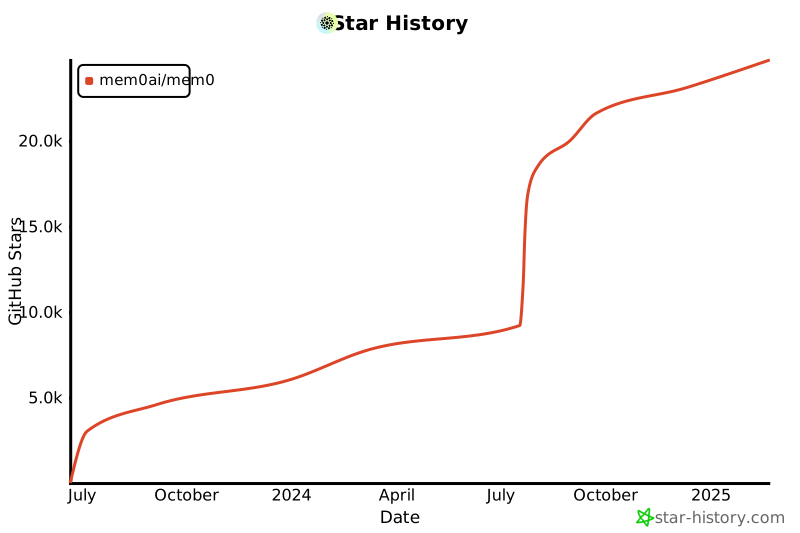](https://star-history.com/#mem0ai/mem0&Date)
|
||||
For detailed usage instructions and API reference, visit our [documentation](https://docs.mem0.ai). You'll find:
|
||||
- Complete API reference
|
||||
- Integration guides
|
||||
- Advanced configuration options
|
||||
- Best practices and examples
|
||||
- More details about:
|
||||
- Open-source version
|
||||
- [Hosted Mem0 Platform](https://app.mem0.ai)
|
||||
|
||||
## Support
|
||||
|
||||
@@ -209,20 +166,6 @@ Join our community for support and discussions. If you have any questions, feel
|
||||
- [Follow us on Twitter](https://x.com/mem0ai)
|
||||
- [Email founders](mailto:founders@mem0.ai)
|
||||
|
||||
## Contributors
|
||||
|
||||
Join our [Discord community](https://mem0.dev/DiG) to learn about memory management for AI agents and LLMs, and connect with Mem0 users and contributors. Share your ideas, questions, or feedback in our [GitHub Issues](https://github.com/mem0ai/mem0/issues).
|
||||
|
||||
We value and appreciate the contributions of our community. Special thanks to our contributors for helping us improve Mem0.
|
||||
|
||||
<a href="https://github.com/mem0ai/mem0/graphs/contributors">
|
||||
<img src="https://contrib.rocks/image?repo=mem0ai/mem0" />
|
||||
</a>
|
||||
|
||||
## Anonymous Telemetry
|
||||
|
||||
We collect anonymous usage metrics to enhance our package's quality and user experience. This includes data like feature usage frequency and system info, but never personal details. The data helps us prioritize improvements and ensure compatibility. If you wish to opt-out, set the environment variable MEM0_TELEMETRY=false. We prioritize data security and don't share this data externally.
|
||||
|
||||
## License
|
||||
|
||||
This project is licensed under the Apache 2.0 License - see the [LICENSE](LICENSE) file for details.
|
||||
|
||||
@@ -1,4 +1,4 @@
|
||||
---
|
||||
title: 'V1 Get Memories'
|
||||
title: 'Get Memories (v1 - Deprecated)'
|
||||
openapi: get /v1/memories/
|
||||
---
|
||||
|
||||
@@ -1,4 +1,4 @@
|
||||
---
|
||||
title: 'V1 Search Memories'
|
||||
title: 'Search Memories (v1 - Deprecated)'
|
||||
openapi: post /v1/memories/search/
|
||||
---
|
||||
---
|
||||
|
||||
@@ -1,74 +1,43 @@
|
||||
---
|
||||
title: 'V2 Get Memories'
|
||||
title: 'Get Memories (v2)'
|
||||
openapi: post /v2/memories/
|
||||
---
|
||||
|
||||
The v2 get memories API is powerful and flexible, allowing for more precise memory listing without the need for a search query. It supports complex logical operations (AND, OR) and comparison operators for advanced filtering capabilities. The comparison operators include:
|
||||
- `in`: Matches any of the values specified
|
||||
- `gte`: Greater than or equal to
|
||||
- `lte`: Less than or equal to
|
||||
- `gt`: Greater than
|
||||
- `lt`: Less than
|
||||
|
||||
Mem0 offers two versions of the get memories API: v1 and v2. Here's how they differ:
|
||||
<CodeGroup>
|
||||
```python Code
|
||||
memories = m.get_all(
|
||||
filters={
|
||||
"AND": [
|
||||
{
|
||||
"user_id": "alex"
|
||||
},
|
||||
{
|
||||
"created_at": {"gte": "2024-07-01", "lte": "2024-07-31"}
|
||||
}
|
||||
]
|
||||
},
|
||||
version="v2"
|
||||
)
|
||||
```
|
||||
|
||||
<Tabs>
|
||||
<Tab title="v1 Get Memories">
|
||||
<CodeGroup>
|
||||
```python Code
|
||||
memories = m.get_all(user_id="alex")
|
||||
```
|
||||
|
||||
```json Output
|
||||
[
|
||||
{
|
||||
"id":"f38b689d-6b24-45b7-bced-17fbb4d8bac7",
|
||||
"memory":"travelling to Paris",
|
||||
"user_id":"alex",
|
||||
"hash":"62bc074f56d1f909f1b4c2b639f56f6a",
|
||||
"metadata":null,
|
||||
"created_at":"2023-02-25T23:57:00.108347-07:00",
|
||||
"updated_at":"2024-07-25T23:57:00.108367-07:00"
|
||||
}
|
||||
```json Output
|
||||
[
|
||||
{
|
||||
"id":"f38b689d-6b24-45b7-bced-17fbb4d8bac7",
|
||||
"memory":"Name: Alex. Vegetarian. Allergic to nuts.",
|
||||
"user_id":"alex",
|
||||
"hash":"62bc074f56d1f909f1b4c2b639f56f6a",
|
||||
"metadata":null,
|
||||
"created_at":"2024-07-25T23:57:00.108347-07:00",
|
||||
"updated_at":"2024-07-25T23:57:00.108367-07:00"
|
||||
}
|
||||
]
|
||||
```
|
||||
</CodeGroup>
|
||||
</Tab>
|
||||
|
||||
<Tab title="v2 Get Memories">
|
||||
<CodeGroup>
|
||||
```python Code
|
||||
memories = m.get_all(
|
||||
filters={
|
||||
"AND": [
|
||||
{
|
||||
"user_id": "alex"
|
||||
},
|
||||
{
|
||||
"created_at": {
|
||||
"gte": "2024-07-01",
|
||||
"lte": "2024-07-31"
|
||||
}
|
||||
}
|
||||
]
|
||||
},
|
||||
version="v2"
|
||||
)
|
||||
```
|
||||
|
||||
```json Output
|
||||
[
|
||||
{
|
||||
"id":"f38b689d-6b24-45b7-bced-17fbb4d8bac7",
|
||||
"memory":"Name: Alex. Vegetarian. Allergic to nuts.",
|
||||
"user_id":"alex",
|
||||
"hash":"62bc074f56d1f909f1b4c2b639f56f6a",
|
||||
"metadata":null,
|
||||
"created_at":"2024-07-25T23:57:00.108347-07:00",
|
||||
"updated_at":"2024-07-25T23:57:00.108367-07:00"
|
||||
}
|
||||
]
|
||||
```
|
||||
</CodeGroup>
|
||||
</Tab>
|
||||
</Tabs>
|
||||
|
||||
Key difference between v1 and v2 get memories:
|
||||
|
||||
• **Filters**: v2 allows you to apply filters to narrow down memory retrieval based on specific criteria. This includes support for complex logical operations (AND, OR) and comparison operators (IN, gte, lte, gt, lt, ne, icontains) for advanced filtering capabilities.
|
||||
|
||||
The v2 get memories API is more powerful and flexible, allowing for more precise memory retrieval without the need for a search query.
|
||||
```
|
||||
</CodeGroup>
|
||||
|
||||
@@ -1,85 +1,51 @@
|
||||
---
|
||||
title: 'V2 Search Memories'
|
||||
title: 'Search Memories (v2)'
|
||||
openapi: post /v2/memories/search/
|
||||
---
|
||||
|
||||
Mem0 offers two versions of the search API: v1 and v2. Here's how they differ:
|
||||
The v2 search API is powerful and flexible, allowing for more precise memory retrieval. It supports complex logical operations (AND, OR) and comparison operators for advanced filtering capabilities. The comparison operators include:
|
||||
- `in`: Matches any of the values specified
|
||||
- `gte`: Greater than or equal to
|
||||
- `lte`: Less than or equal to
|
||||
- `gt`: Greater than
|
||||
- `lt`: Less than
|
||||
- `ne`: Not equal to
|
||||
- `icontains`: Case-insensitive containment check
|
||||
|
||||
<Tabs>
|
||||
<Tab title="v1 Search">
|
||||
<CodeGroup>
|
||||
```python Code
|
||||
related_memories = m.search(query="What are Alice's hobbies?", user_id="alice")
|
||||
```
|
||||
<CodeGroup>
|
||||
```python Code
|
||||
related_memories = m.vsearch(
|
||||
query="What are Alice's hobbies?",
|
||||
version="v2",
|
||||
filters={
|
||||
"AND": [
|
||||
{
|
||||
"user_id": "alice"
|
||||
},
|
||||
{
|
||||
"agent_id": {"in": ["travel-agent", "sports-agent"]}
|
||||
}
|
||||
]
|
||||
},
|
||||
)
|
||||
```
|
||||
|
||||
```json Output
|
||||
[
|
||||
{
|
||||
"id":"ea925981-272f-40dd-b576-be64e4871429",
|
||||
"memory":"Likes to play cricket and plays cricket on weekends.",
|
||||
"hash":"c8809002-25c1-4c97-a3a2-227ce9c20c53",
|
||||
"metadata":{
|
||||
"category":"hobbies"
|
||||
},
|
||||
"score":0.32116443111457704,
|
||||
"created_at":"2024-07-26T10:29:36.630547-07:00",
|
||||
"updated_at":"None",
|
||||
"user_id":"alice"
|
||||
}
|
||||
]
|
||||
```
|
||||
</CodeGroup>
|
||||
</Tab>
|
||||
|
||||
<Tab title="v2 Search">
|
||||
<CodeGroup>
|
||||
```python Code
|
||||
related_memories = m.vsearch(
|
||||
query="What are Alice's hobbies?",
|
||||
filters={
|
||||
"AND":[
|
||||
{
|
||||
"user_id":"alice"
|
||||
},
|
||||
{
|
||||
"agent_id":{
|
||||
"in":[
|
||||
"travelling",
|
||||
"sports"
|
||||
]
|
||||
}
|
||||
}
|
||||
]
|
||||
},
|
||||
version="v2"
|
||||
)
|
||||
```
|
||||
|
||||
```json Output
|
||||
{
|
||||
"memories": [
|
||||
{
|
||||
"id": "ea925981-272f-40dd-b576-be64e4871429",
|
||||
"memory": "Likes to play cricket and plays cricket on weekends.",
|
||||
"hash": "c8809002-25c1-4c97-a3a2-227ce9c20c53",
|
||||
"metadata": {
|
||||
"category": "hobbies"
|
||||
},
|
||||
"score": 0.32116443111457704,
|
||||
"created_at": "2024-07-26T10:29:36.630547-07:00",
|
||||
"updated_at": null,
|
||||
"user_id": "alice",
|
||||
"agent_id": "sports"
|
||||
}
|
||||
],
|
||||
}
|
||||
```
|
||||
</CodeGroup>
|
||||
</Tab>
|
||||
</Tabs>
|
||||
|
||||
Key difference between v1 and v2 search:
|
||||
|
||||
• **Filters**: v2 allows you to apply filters to narrow down search results based on specific criteria. This includes support for complex logical operations (AND, OR) and comparison operators (IN, gte, lte, gt, lt, ne, icontains) for advanced filtering capabilities.
|
||||
|
||||
The v2 search API is more powerful and flexible, allowing for more precise memory retrieval.
|
||||
```json Output
|
||||
{
|
||||
"memories": [
|
||||
{
|
||||
"id": "ea925981-272f-40dd-b576-be64e4871429",
|
||||
"memory": "Likes to play cricket and plays cricket on weekends.",
|
||||
"metadata": {
|
||||
"category": "hobbies"
|
||||
},
|
||||
"score": 0.32116443111457704,
|
||||
"created_at": "2024-07-26T10:29:36.630547-07:00",
|
||||
"updated_at": null,
|
||||
"user_id": "alice",
|
||||
"agent_id": "sports-agent"
|
||||
}
|
||||
],
|
||||
}
|
||||
```
|
||||
</CodeGroup>
|
||||
|
||||
@@ -1,4 +1,8 @@
|
||||
# Mem0 API Overview
|
||||
---
|
||||
title: Overview
|
||||
icon: "info"
|
||||
iconType: "solid"
|
||||
---
|
||||
|
||||
Mem0 provides a powerful set of APIs that allow you to integrate advanced memory management capabilities into your applications. Our APIs are designed to be intuitive, efficient, and scalable, enabling you to create, retrieve, update, and delete memories across various entities such as users, agents, apps, and runs.
|
||||
|
||||
@@ -34,30 +38,26 @@ Organizations and projects provide the following capabilities:
|
||||
|
||||
Example with the mem0 Python package:
|
||||
|
||||
<Tabs>
|
||||
<Tab title="Python">
|
||||
|
||||
```python
|
||||
from mem0 import MemoryClient
|
||||
|
||||
# Recommended: Using organization and project IDs
|
||||
client = MemoryClient(
|
||||
org_id='YOUR_ORG_ID', # It can be found on the organization settings page in dashboard
|
||||
project_id='YOUR_PROJECT_ID',
|
||||
)
|
||||
client = MemoryClient(org_id='YOUR_ORG_ID', project_id='YOUR_PROJECT_ID')
|
||||
```
|
||||
> **Note**: The use of `organization` and `project` parameters is deprecated and will be removed in version `0.1.40`. Please use `org_id` and `project_id` instead.
|
||||
|
||||
</Tab>
|
||||
|
||||
Example with the mem0 Node.js package:
|
||||
<Tab title="Node.js">
|
||||
|
||||
```javascript
|
||||
import { MemoryClient } from "mem0ai";
|
||||
|
||||
# Recommended: Using organization and project IDs
|
||||
const client = new MemoryClient({
|
||||
organizationId: "YOUR_ORG_ID",
|
||||
projectId: "YOUR_PROJECT_ID"
|
||||
});
|
||||
const client = new MemoryClient({organizationId: "YOUR_ORG_ID", projectId: "YOUR_PROJECT_ID"});
|
||||
```
|
||||
|
||||
</Tab>
|
||||
</Tabs>
|
||||
|
||||
## Getting Started
|
||||
|
||||
To begin using the Mem0 API, you'll need to:
|
||||
|
||||
@@ -1,4 +0,0 @@
|
||||
---
|
||||
title: 'Get Custom Instructions and Categories'
|
||||
openapi: get /api/v1/orgs/organizations/{org_id}/projects/{project_id}/custom-instructions-and-categories/
|
||||
---
|
||||
@@ -1,6 +0,0 @@
|
||||
---
|
||||
title: 'Update Custom Instructions and Categories'
|
||||
openapi: post /api/v1/orgs/organizations/{org_id}/projects/{project_id}/custom-instructions-and-categories/
|
||||
---
|
||||
|
||||
Please refer to the [how to use custom instructions/categories](/features/custom-instructions) for more information.
|
||||
@@ -0,0 +1,4 @@
|
||||
---
|
||||
title: 'Update Project'
|
||||
openapi: patch /api/v1/orgs/organizations/{org_id}/projects/{project_id}/
|
||||
---
|
||||
@@ -0,0 +1,9 @@
|
||||
---
|
||||
title: 'Create Webhook'
|
||||
openapi: post /api/v1/webhooks/projects/{project_id}/
|
||||
---
|
||||
|
||||
## Create Webhook
|
||||
|
||||
Create a webhook by providing the project ID and the webhook details.
|
||||
|
||||
@@ -0,0 +1,8 @@
|
||||
---
|
||||
title: 'Delete Webhook'
|
||||
openapi: delete /api/v1/webhooks/{webhook_id}/
|
||||
---
|
||||
|
||||
## Delete Webhook
|
||||
|
||||
Delete a webhook by providing the webhook ID.
|
||||
@@ -0,0 +1,9 @@
|
||||
---
|
||||
title: 'Get Webhook'
|
||||
openapi: get /api/v1/webhooks/projects/{project_id}/
|
||||
---
|
||||
|
||||
## Get Webhook
|
||||
|
||||
Get a webhook by providing the project ID.
|
||||
|
||||
@@ -0,0 +1,9 @@
|
||||
---
|
||||
title: 'Update Webhook'
|
||||
openapi: put /api/v1/webhooks/{webhook_id}/
|
||||
---
|
||||
|
||||
## Update Webhook
|
||||
|
||||
Update a webhook by providing the webhook ID and the fields to update.
|
||||
|
||||
@@ -1,15 +1,19 @@
|
||||
## What is Config?
|
||||
---
|
||||
title: Configurations
|
||||
icon: "gear"
|
||||
iconType: "solid"
|
||||
---
|
||||
|
||||
Config in mem0 is a dictionary that specifies the settings for your embedding models. It allows you to customize the behavior and connection details of your chosen embedder.
|
||||
|
||||
## How to Define Config
|
||||
## How to define configurations?
|
||||
|
||||
The config is defined as a Python dictionary with two main keys:
|
||||
- `embedder`: Specifies the embedder provider and its configuration
|
||||
- `provider`: The name of the embedder (e.g., "openai", "ollama")
|
||||
- `config`: A nested dictionary containing provider-specific settings
|
||||
|
||||
## How to Use Config
|
||||
## How to use configurations?
|
||||
|
||||
Here's a general example of how to use the config with mem0:
|
||||
|
||||
|
||||
@@ -1,5 +1,7 @@
|
||||
---
|
||||
title: Overview
|
||||
icon: "info"
|
||||
iconType: "solid"
|
||||
---
|
||||
|
||||
Mem0 offers support for various embedding models, allowing users to choose the one that best suits their needs.
|
||||
|
||||
@@ -1,10 +1,12 @@
|
||||
## What is Config?
|
||||
---
|
||||
title: Configurations
|
||||
icon: "gear"
|
||||
iconType: "solid"
|
||||
---
|
||||
|
||||
Config in mem0 is a dictionary that specifies the settings for your llms. It allows you to customize the behavior and connection details of your chosen llm.
|
||||
## How to define configurations?
|
||||
|
||||
## How to Define Config
|
||||
|
||||
The config is defined as a Python dictionary with two main keys:
|
||||
The `config` is defined as a Python dictionary with two main keys:
|
||||
- `llm`: Specifies the llm provider and its configuration
|
||||
- `provider`: The name of the llm (e.g., "openai", "groq")
|
||||
- `config`: A nested dictionary containing provider-specific settings
|
||||
@@ -72,7 +74,8 @@ Here's the table based on the provided parameters:
|
||||
| `ollama_base_url` | Base URL for Ollama API | Ollama |
|
||||
| `openai_base_url` | Base URL for OpenAI API | OpenAI |
|
||||
| `azure_kwargs` | Azure LLM args for initialization | AzureOpenAI |
|
||||
|
||||
| `deepseek_base_url` | Base URL for DeepSeek API | DeepSeek |
|
||||
| `xai_base_url` | Base URL for XAI API | XAI |
|
||||
|
||||
## Supported LLMs
|
||||
|
||||
|
||||
@@ -13,7 +13,7 @@ config = {
|
||||
"llm": {
|
||||
"provider": "anthropic",
|
||||
"config": {
|
||||
"model": "claude-3-5-sonnet-latest",
|
||||
"model": "claude-3-7-sonnet-latest",
|
||||
"temperature": 0.1,
|
||||
"max_tokens": 2000,
|
||||
}
|
||||
|
||||
@@ -0,0 +1,49 @@
|
||||
---
|
||||
title: DeepSeek
|
||||
---
|
||||
|
||||
To use DeepSeek LLM models, you have to set the `DEEPSEEK_API_KEY` environment variable. You can also optionally set `DEEPSEEK_API_BASE` if you need to use a different API endpoint (defaults to "https://api.deepseek.com").
|
||||
|
||||
## Usage
|
||||
|
||||
```python
|
||||
import os
|
||||
from mem0 import Memory
|
||||
|
||||
os.environ["DEEPSEEK_API_KEY"] = "your-api-key"
|
||||
os.environ["OPENAI_API_KEY"] = "your-api-key" # for embedder model
|
||||
|
||||
config = {
|
||||
"llm": {
|
||||
"provider": "deepseek",
|
||||
"config": {
|
||||
"model": "deepseek-chat", # default model
|
||||
"temperature": 0.2,
|
||||
"max_tokens": 1500,
|
||||
"top_p": 1.0
|
||||
}
|
||||
}
|
||||
}
|
||||
|
||||
m = Memory.from_config(config)
|
||||
m.add("Likes to play cricket on weekends", user_id="alice", metadata={"category": "hobbies"})
|
||||
```
|
||||
|
||||
You can also configure the API base URL in the config:
|
||||
|
||||
```python
|
||||
config = {
|
||||
"llm": {
|
||||
"provider": "deepseek",
|
||||
"config": {
|
||||
"model": "deepseek-chat",
|
||||
"deepseek_base_url": "https://your-custom-endpoint.com",
|
||||
"api_key": "your-api-key" # alternatively to using environment variable
|
||||
}
|
||||
}
|
||||
}
|
||||
```
|
||||
|
||||
## Config
|
||||
|
||||
All available parameters for the `deepseek` config are present in [Master List of All Params in Config](../config).
|
||||
@@ -0,0 +1,31 @@
|
||||
[XAI](https://x.ai/) is a new AI company founded by Elon Musk that develops large language models, including Grok. Grok is trained on real-time data from X (formerly Twitter) and aims to provide accurate, up-to-date responses with a touch of wit and humor.
|
||||
|
||||
In order to use LLMs from XAI, go to their [platform](https://console.x.ai) and get the API key. Set the API key as `XAI_API_KEY` environment variable to use the model as given below in the example.
|
||||
|
||||
## Usage
|
||||
|
||||
```python
|
||||
import os
|
||||
from mem0 import Memory
|
||||
|
||||
os.environ["OPENAI_API_KEY"] = "your-api-key" # used for embedding model
|
||||
os.environ["XAI_API_KEY"] = "your-api-key"
|
||||
|
||||
config = {
|
||||
"llm": {
|
||||
"provider": "xai",
|
||||
"config": {
|
||||
"model": "grok-2-latest",
|
||||
"temperature": 0.1,
|
||||
"max_tokens": 1000,
|
||||
}
|
||||
}
|
||||
}
|
||||
|
||||
m = Memory.from_config(config)
|
||||
m.add("Likes to play cricket on weekends", user_id="alice", metadata={"category": "hobbies"})
|
||||
```
|
||||
|
||||
## Config
|
||||
|
||||
All available parameters for the `xai` config are present in [Master List of All Params in Config](../config).
|
||||
@@ -1,5 +1,7 @@
|
||||
---
|
||||
title: Overview
|
||||
icon: "info"
|
||||
iconType: "solid"
|
||||
---
|
||||
|
||||
Mem0 includes built-in support for various popular large language models. Memory can utilize the LLM provided by the user, ensuring efficient use for specific needs.
|
||||
@@ -24,6 +26,8 @@ To view all supported llms, visit the [Supported LLMs](./models).
|
||||
<Card title="Google AI" href="/components/llms/models/google_ai"></Card>
|
||||
<Card title="AWS bedrock" href="/components/llms/models/aws_bedrock"></Card>
|
||||
<Card title="Gemini" href="/components/llms/models/gemini"></Card>
|
||||
<Card title="DeepSeek" href="/components/llms/models/deepseek"></Card>
|
||||
<Card title="XAI" href="/components/llms/models/xai"></Card>
|
||||
</CardGroup>
|
||||
|
||||
## Structured vs Unstructured Outputs
|
||||
|
||||
@@ -1,10 +1,12 @@
|
||||
## What is Config?
|
||||
---
|
||||
title: Configurations
|
||||
icon: "gear"
|
||||
iconType: "solid"
|
||||
---
|
||||
|
||||
Config in mem0 is a dictionary that specifies the settings for your vector database. It allows you to customize the behavior and connection details of your chosen vector store.
|
||||
## How to define configurations?
|
||||
|
||||
## How to Define Config
|
||||
|
||||
The config is defined as a Python dictionary with two main keys:
|
||||
The `config` is defined as a Python dictionary with two main keys:
|
||||
- `vector_store`: Specifies the vector database provider and its configuration
|
||||
- `provider`: The name of the vector database (e.g., "chroma", "pgvector", "qdrant", "milvus","azure_ai_search")
|
||||
- `config`: A nested dictionary containing provider-specific settings
|
||||
|
||||
@@ -0,0 +1,59 @@
|
||||
[OpenSearch](https://opensearch.org/) is an open-source, enterprise-grade search and observability suite that brings order to unstructured data at scale. OpenSearch supports k-NN (k-Nearest Neighbors) and allows you to store and retrieve high-dimensional vector embeddings efficiently.
|
||||
|
||||
### Installation
|
||||
|
||||
OpenSearch support requires additional dependencies. Install them with:
|
||||
|
||||
```bash
|
||||
pip install opensearch>=2.8.0
|
||||
```
|
||||
|
||||
### Usage
|
||||
|
||||
```python
|
||||
import os
|
||||
from mem0 import Memory
|
||||
|
||||
os.environ["OPENAI_API_KEY"] = "sk-xx"
|
||||
|
||||
config = {
|
||||
"vector_store": {
|
||||
"provider": "opensearch",
|
||||
"config": {
|
||||
"collection_name": "mem0",
|
||||
"host": "localhost",
|
||||
"port": 9200,
|
||||
"embedding_model_dims": 1536
|
||||
}
|
||||
}
|
||||
}
|
||||
|
||||
m = Memory.from_config(config)
|
||||
m.add("Likes to play cricket on weekends", user_id="alice", metadata={"category": "hobbies"})
|
||||
```
|
||||
|
||||
### Config
|
||||
|
||||
Let's see the available parameters for the `opensearch` config:
|
||||
|
||||
| Parameter | Description | Default Value |
|
||||
| ---------------------- | -------------------------------------------------- | ------------- |
|
||||
| `collection_name` | The name of the index to store the vectors | `mem0` |
|
||||
| `embedding_model_dims` | Dimensions of the embedding model | `1536` |
|
||||
| `host` | The host where the OpenSearch server is running | `localhost` |
|
||||
| `port` | The port where the OpenSearch server is running | `9200` |
|
||||
| `api_key` | API key for authentication | `None` |
|
||||
| `user` | Username for basic authentication | `None` |
|
||||
| `password` | Password for basic authentication | `None` |
|
||||
| `verify_certs` | Whether to verify SSL certificates | `False` |
|
||||
| `auto_create_index` | Whether to automatically create the index | `True` |
|
||||
| `use_ssl` | Whether to use SSL for connection | `False` |
|
||||
|
||||
### Features
|
||||
|
||||
- Fast and Efficient Vector Search
|
||||
- Can be deployed on-premises, in containers, or on cloud platforms like AWS OpenSearch Service.
|
||||
- Multiple Authentication and Security Methods (Basic Authentication, API Keys, LDAP, SAML, and OpenID Connect)
|
||||
- Automatic index creation with optimized mappings for vector search
|
||||
- Memory Optimization through Disk-Based Vector Search and Quantization
|
||||
- Real-Time Analytics and Observability
|
||||
@@ -30,7 +30,7 @@ Here's the parameters available for configuring pgvector:
|
||||
|
||||
| Parameter | Description | Default Value |
|
||||
| --- | --- | --- |
|
||||
| `dbname` | The name of the database | `postgres` |
|
||||
| `dbname` | The name of the | `postgres` |
|
||||
| `collection_name` | The name of the collection | `mem0` |
|
||||
| `embedding_model_dims` | Dimensions of the embedding model | `1536` |
|
||||
| `user` | User name to connect to the database | `None` |
|
||||
|
||||
@@ -26,7 +26,8 @@ config = {
|
||||
"embedding_model_dims": 1536,
|
||||
"redis_url": "redis://localhost:6379"
|
||||
}
|
||||
}
|
||||
},
|
||||
"version": "v1.1"
|
||||
}
|
||||
|
||||
m = Memory.from_config(config)
|
||||
|
||||
@@ -1,5 +1,7 @@
|
||||
---
|
||||
title: Overview
|
||||
icon: "info"
|
||||
iconType: "solid"
|
||||
---
|
||||
|
||||
Mem0 includes built-in support for various popular databases. Memory can utilize the database provided by the user, ensuring efficient use for specific needs.
|
||||
@@ -16,6 +18,7 @@ See the list of supported vector databases below.
|
||||
<Card title="Azure AI Search" href="/components/vectordbs/dbs/azure_ai_search"></Card>
|
||||
<Card title="Redis" href="/components/vectordbs/dbs/redis"></Card>
|
||||
<Card title="Elasticsearch" href="/components/vectordbs/dbs/elasticsearch"></Card>
|
||||
<Card title="OpenSearch" href="/components/vectordbs/dbs/opensearch"></Card>
|
||||
</CardGroup>
|
||||
|
||||
## Usage
|
||||
|
||||
@@ -0,0 +1,60 @@
|
||||
---
|
||||
title: Memory Operations
|
||||
description: Understanding the core operations for managing memories in AI applications
|
||||
icon: "gear"
|
||||
iconType: "solid"
|
||||
---
|
||||
|
||||
Mem0 provides two core operations for managing memories in AI applications: adding new memories and searching existing ones. This guide covers how these operations work and how to use them effectively in your application.
|
||||
|
||||
|
||||
## Core Operations
|
||||
|
||||
Mem0 exposes two main endpoints for interacting with memories:
|
||||
- The `add` endpoint for ingesting conversations and storing them as memories
|
||||
- The `search` endpoint for retrieving relevant memories based on queries
|
||||
|
||||
### Adding Memories
|
||||
|
||||
<Frame caption="Architecture diagram illustrating the process of adding memories.">
|
||||
<img src="../images/add_architecture.png" />
|
||||
</Frame>
|
||||
|
||||
The add operation processes conversations through several steps:
|
||||
|
||||
1. **Information Extraction**
|
||||
* An LLM extracts relevant memories from the conversation
|
||||
* It identifies important entities and their relationships
|
||||
|
||||
2. **Conflict Resolution**
|
||||
* The system compares new information with existing data
|
||||
* It identifies and resolves any contradictions
|
||||
|
||||
3. **Memory Storage**
|
||||
* Vector database stores the actual memories
|
||||
* Graph database maintains relationship information
|
||||
* Information is continuously updated with each interaction
|
||||
|
||||
### Searching Memories
|
||||
|
||||
<Frame caption="Architecture diagram illustrating the memory search process.">
|
||||
<img src="../images/search_architecture.png" />
|
||||
</Frame>
|
||||
|
||||
The search operation retrieves memories through a multi-step process:
|
||||
|
||||
1. **Query Processing**
|
||||
* LLM processes and optimizes the search query
|
||||
* System prepares filters for targeted search
|
||||
|
||||
2. **Vector Search**
|
||||
* Performs semantic search using the optimized query
|
||||
* Ranks results by relevance to the query
|
||||
* Applies specified filters (user, agent, metadata, etc.)
|
||||
|
||||
3. **Result Processing**
|
||||
* Combines and ranks the search results
|
||||
* Returns memories with relevance scores
|
||||
* Includes associated metadata and timestamps
|
||||
|
||||
This semantic search approach ensures accurate memory retrieval, whether you're looking for specific information or exploring related concepts.
|
||||
@@ -0,0 +1,48 @@
|
||||
---
|
||||
title: Memory Types
|
||||
description: Understanding different types of memory in AI Applications
|
||||
icon: "memory"
|
||||
iconType: "solid"
|
||||
---
|
||||
To build useful AI applications, we need to understand how different memory systems work together. This guide explores the fundamental types of memory in AI systems and shows how Mem0 implements these concepts.
|
||||
|
||||
## Why Memory Matters
|
||||
|
||||
AI systems need memory for three key purposes:
|
||||
1. Maintaining context during conversations
|
||||
2. Learning from past interactions
|
||||
3. Building personalized experiences over time
|
||||
|
||||
Without proper memory systems, AI applications would treat each interaction as completely new, losing valuable context and personalization opportunities.
|
||||
|
||||
## Short-Term Memory
|
||||
|
||||
The most basic form of memory in AI systems holds immediate context - like a person remembering what was just said in a conversation. This includes:
|
||||
|
||||
- **Conversation History**: Recent messages and their order
|
||||
- **Working Memory**: Temporary variables and state
|
||||
- **Attention Context**: Current focus of the conversation
|
||||
|
||||
## Long-Term Memory
|
||||
|
||||
More sophisticated AI applications implement long-term memory to retain information across conversations. This includes:
|
||||
|
||||
- **Factual Memory**: Stored knowledge about users, preferences, and domain-specific information
|
||||
- **Episodic Memory**: Past interactions and experiences
|
||||
- **Semantic Memory**: Understanding of concepts and their relationships
|
||||
|
||||
## Memory Characteristics
|
||||
|
||||
Each memory type has distinct characteristics:
|
||||
|
||||
| Type | Persistence | Access Speed | Use Case |
|
||||
|------|-------------|--------------|-----------|
|
||||
| Short-Term | Temporary | Instant | Active conversations |
|
||||
| Long-Term | Persistent | Fast | User preferences and history |
|
||||
|
||||
## How Mem0 Implements Long-Term Memory
|
||||
Mem0's long-term memory system builds on these foundations by:
|
||||
|
||||
1. Using vector embeddings to store and retrieve semantic information
|
||||
2. Maintaining user-specific context across sessions
|
||||
3. Implementing efficient retrieval mechanisms for relevant past interactions
|
||||
@@ -0,0 +1,313 @@
|
||||
{
|
||||
"$schema": "https://mintlify.com/docs.json",
|
||||
"theme": "maple",
|
||||
"name": "Mem0",
|
||||
"description": "Mem0 is a self-improving memory layer for LLM applications, enabling personalized AI experiences that save costs and delight users.",
|
||||
"colors": {
|
||||
"primary": "#6c60f0",
|
||||
"light": "#E6FFA2",
|
||||
"dark": "#a3df02"
|
||||
},
|
||||
"favicon": "/logo/favicon.png",
|
||||
"navigation": {
|
||||
"anchors": [
|
||||
{
|
||||
"anchor": "Documentation",
|
||||
"icon": "book-open",
|
||||
"tabs": [
|
||||
{
|
||||
"tab": "Documentation",
|
||||
"groups": [
|
||||
{
|
||||
"group": "Get Started",
|
||||
"icon": "rocket",
|
||||
"pages": [
|
||||
"overview",
|
||||
"quickstart",
|
||||
"faqs"
|
||||
]
|
||||
},
|
||||
{
|
||||
"group": "Core Concepts",
|
||||
"icon": "brain",
|
||||
"pages": [
|
||||
"core-concepts/memory-types",
|
||||
"core-concepts/memory-operations"
|
||||
]
|
||||
},
|
||||
{
|
||||
"group": "Platform",
|
||||
"icon": "cogs",
|
||||
"pages": [
|
||||
"platform/overview",
|
||||
"platform/quickstart",
|
||||
{
|
||||
"group": "Features",
|
||||
"icon": "star",
|
||||
"pages": [
|
||||
"features/platform-overview",
|
||||
"features/advanced-retrieval",
|
||||
"features/multimodal-support",
|
||||
"features/selective-memory",
|
||||
"features/custom-categories",
|
||||
"features/custom-instructions",
|
||||
"features/direct-import",
|
||||
"features/async-client",
|
||||
"features/memory-export",
|
||||
"features/webhooks"
|
||||
]
|
||||
}
|
||||
]
|
||||
},
|
||||
{
|
||||
"group": "Open Source",
|
||||
"icon": "code-branch",
|
||||
"pages": [
|
||||
"open-source/quickstart",
|
||||
{
|
||||
"group": "Features",
|
||||
"icon": "wrench",
|
||||
"pages": [
|
||||
"features/openai_compatibility",
|
||||
"features/custom-prompts",
|
||||
"open-source/multimodal-support",
|
||||
"open-source/features/rest-api"
|
||||
]
|
||||
},
|
||||
{
|
||||
"group": "Graph Memory",
|
||||
"icon": "spider-web",
|
||||
"pages": [
|
||||
"open-source/graph_memory/overview",
|
||||
"open-source/graph_memory/features"
|
||||
]
|
||||
},
|
||||
{
|
||||
"group": "LLMs",
|
||||
"icon": "brain",
|
||||
"pages": [
|
||||
"components/llms/overview",
|
||||
"components/llms/config",
|
||||
{
|
||||
"group": "Supported LLMs",
|
||||
"icon": "list",
|
||||
"pages": [
|
||||
"components/llms/models/openai",
|
||||
"components/llms/models/anthropic",
|
||||
"components/llms/models/azure_openai",
|
||||
"components/llms/models/ollama",
|
||||
"components/llms/models/together",
|
||||
"components/llms/models/groq",
|
||||
"components/llms/models/litellm",
|
||||
"components/llms/models/mistral_AI",
|
||||
"components/llms/models/google_AI",
|
||||
"components/llms/models/aws_bedrock",
|
||||
"components/llms/models/gemini",
|
||||
"components/llms/models/deepseek",
|
||||
"components/llms/models/xai"
|
||||
]
|
||||
}
|
||||
]
|
||||
},
|
||||
{
|
||||
"group": "Vector Databases",
|
||||
"icon": "database",
|
||||
"pages": [
|
||||
"components/vectordbs/overview",
|
||||
"components/vectordbs/config",
|
||||
{
|
||||
"group": "Supported Vector Databases",
|
||||
"icon": "server",
|
||||
"pages": [
|
||||
"components/vectordbs/dbs/qdrant",
|
||||
"components/vectordbs/dbs/chroma",
|
||||
"components/vectordbs/dbs/pgvector",
|
||||
"components/vectordbs/dbs/milvus",
|
||||
"components/vectordbs/dbs/azure_ai_search",
|
||||
"components/vectordbs/dbs/redis",
|
||||
"components/vectordbs/dbs/elasticsearch",
|
||||
"components/vectordbs/dbs/opensearch"
|
||||
]
|
||||
}
|
||||
]
|
||||
},
|
||||
{
|
||||
"group": "Embedding Models",
|
||||
"icon": "layer-group",
|
||||
"pages": [
|
||||
"components/embedders/overview",
|
||||
"components/embedders/config",
|
||||
{
|
||||
"group": "Supported Embedding Models",
|
||||
"icon": "list",
|
||||
"pages": [
|
||||
"components/embedders/models/openai",
|
||||
"components/embedders/models/azure_openai",
|
||||
"components/embedders/models/ollama",
|
||||
"components/embedders/models/huggingface",
|
||||
"components/embedders/models/vertexai",
|
||||
"components/embedders/models/gemini"
|
||||
]
|
||||
}
|
||||
]
|
||||
}
|
||||
]
|
||||
}
|
||||
]
|
||||
},
|
||||
{
|
||||
"tab": "Examples",
|
||||
"groups": [
|
||||
{
|
||||
"group": "💡 Examples",
|
||||
"icon": "lightbulb",
|
||||
"pages": [
|
||||
"examples/overview",
|
||||
"examples/mem0-with-ollama",
|
||||
"examples/personal-ai-tutor",
|
||||
"examples/customer-support-agent",
|
||||
"examples/personal-travel-assistant",
|
||||
"examples/llama-index-mem0"
|
||||
]
|
||||
}
|
||||
]
|
||||
},
|
||||
{
|
||||
"tab": "Integrations",
|
||||
"groups": [
|
||||
{
|
||||
"group": "Integrations",
|
||||
"icon": "plug",
|
||||
"pages": [
|
||||
"integrations/overview",
|
||||
"integrations/vercel-ai-sdk",
|
||||
"integrations/crewai",
|
||||
"integrations/autogen",
|
||||
"integrations/langchain",
|
||||
"integrations/langgraph",
|
||||
"integrations/llama-index",
|
||||
"integrations/langchain-tools"
|
||||
]
|
||||
}
|
||||
]
|
||||
},
|
||||
{
|
||||
"tab": "API Reference",
|
||||
"icon": "square-terminal",
|
||||
"groups": [
|
||||
{
|
||||
"group": "API Reference",
|
||||
"icon": "terminal",
|
||||
"pages": [
|
||||
"api-reference/overview",
|
||||
{
|
||||
"group": "Memory APIs",
|
||||
"icon": "microchip",
|
||||
"pages": [
|
||||
"api-reference/memory/add-memories",
|
||||
"api-reference/memory/v2-search-memories",
|
||||
"api-reference/memory/v1-search-memories",
|
||||
"api-reference/memory/v2-get-memories",
|
||||
"api-reference/memory/v1-get-memories",
|
||||
"api-reference/memory/history-memory",
|
||||
"api-reference/memory/get-memory",
|
||||
"api-reference/memory/update-memory",
|
||||
"api-reference/memory/batch-update",
|
||||
"api-reference/memory/delete-memory",
|
||||
"api-reference/memory/batch-delete",
|
||||
"api-reference/memory/delete-memories",
|
||||
"api-reference/memory/create-memory-export",
|
||||
"api-reference/memory/get-memory-export"
|
||||
]
|
||||
},
|
||||
{
|
||||
"group": "Entities APIs",
|
||||
"icon": "users",
|
||||
"pages": [
|
||||
"api-reference/entities/get-users",
|
||||
"api-reference/entities/delete-user"
|
||||
]
|
||||
},
|
||||
{
|
||||
"group": "Organizations APIs",
|
||||
"icon": "building",
|
||||
"pages": [
|
||||
"api-reference/organization/create-org",
|
||||
"api-reference/organization/get-orgs",
|
||||
"api-reference/organization/get-org",
|
||||
"api-reference/organization/get-org-members",
|
||||
"api-reference/organization/add-org-member",
|
||||
"api-reference/organization/delete-org"
|
||||
]
|
||||
},
|
||||
{
|
||||
"group": "Webhook APIs",
|
||||
"icon": "webhook",
|
||||
"pages": [
|
||||
"api-reference/webhook/create-webhook",
|
||||
"api-reference/webhook/get-webhook",
|
||||
"api-reference/webhook/update-webhook",
|
||||
"api-reference/webhook/delete-webhook"
|
||||
]
|
||||
}
|
||||
]
|
||||
}
|
||||
]
|
||||
}
|
||||
]
|
||||
},
|
||||
{
|
||||
"anchor": "Your Dashboard",
|
||||
"href": "https://app.mem0.ai",
|
||||
"icon": "chart-simple"
|
||||
},
|
||||
{
|
||||
"anchor": "Discord",
|
||||
"href": "https://mem0.dev/DiD",
|
||||
"icon": "discord"
|
||||
},
|
||||
{
|
||||
"anchor": "GitHub",
|
||||
"href": "https://github.com/mem0ai/mem0",
|
||||
"icon": "github"
|
||||
},
|
||||
{
|
||||
"anchor": "Support",
|
||||
"href": "mailto:founders@mem0.ai",
|
||||
"icon": "envelope"
|
||||
}
|
||||
]
|
||||
},
|
||||
"logo": {
|
||||
"light": "/logo/light.svg",
|
||||
"dark": "/logo/dark.svg",
|
||||
"href": "https://github.com/mem0ai/mem0"
|
||||
},
|
||||
"background": {
|
||||
"color": {
|
||||
"light": "#fff",
|
||||
"dark": "#0f1117"
|
||||
}
|
||||
},
|
||||
"navbar": {
|
||||
"primary": {
|
||||
"type": "button",
|
||||
"label": "Your Dashboard",
|
||||
"href": "https://app.mem0.ai"
|
||||
}
|
||||
},
|
||||
"footer": {
|
||||
"socials": {
|
||||
"discord": "https://mem0.dev/DiD",
|
||||
"x": "https://x.com/mem0ai",
|
||||
"github": "https://github.com/mem0ai",
|
||||
"linkedin": "https://www.linkedin.com/company/mem0/"
|
||||
}
|
||||
},
|
||||
"integrations": {
|
||||
"posthog": {
|
||||
"apiKey": "phc_hgJkUVJFYtmaJqrvf6CYN67TIQ8yhXAkWzUn9AMU4yX",
|
||||
"apiHost": "https://mango.mem0.ai"
|
||||
}
|
||||
}
|
||||
}
|
||||
@@ -0,0 +1,92 @@
|
||||
---
|
||||
title: FAQs
|
||||
icon: "question"
|
||||
iconType: "solid"
|
||||
---
|
||||
|
||||
|
||||
<AccordionGroup>
|
||||
<Accordion title="How does Mem0 work?">
|
||||
Mem0 utilizes a sophisticated hybrid database system to efficiently manage and retrieve memories for AI agents and assistants. Each memory is linked to a unique identifier, such as a user ID or agent ID, enabling Mem0 to organize and access memories tailored to specific individuals or contexts.
|
||||
|
||||
When a message is added to Mem0 via the `add` method, the system extracts pertinent facts and preferences, distributing them across various data stores: a vector database and a graph database. This hybrid strategy ensures that diverse types of information are stored optimally, facilitating swift and effective searches.
|
||||
|
||||
When an AI agent or LLM needs to access memories, it employs the `search` method. Mem0 conducts a comprehensive search across these data stores, retrieving relevant information from each.
|
||||
|
||||
The retrieved memories can be seamlessly integrated into the LLM's prompt as required, enhancing the personalization and relevance of responses.
|
||||
</Accordion>
|
||||
|
||||
<Accordion title="What are the key features of Mem0?">
|
||||
- **User, Session, and AI Agent Memory**: Retains information across sessions and interactions for users and AI agents, ensuring continuity and context.
|
||||
- **Adaptive Personalization**: Continuously updates memories based on user interactions and feedback.
|
||||
- **Developer-Friendly API**: Offers a straightforward API for seamless integration into various applications.
|
||||
- **Platform Consistency**: Ensures consistent behavior and data across different platforms and devices.
|
||||
- **Managed Service**: Provides a hosted solution for easy deployment and maintenance.
|
||||
- **Save Costs**: Saves costs by adding relevent memories instead of complete transcripts to context window
|
||||
</Accordion>
|
||||
|
||||
<Accordion title="How Mem0 is different from traditional RAG?">
|
||||
Mem0's memory implementation for Large Language Models (LLMs) offers several advantages over Retrieval-Augmented Generation (RAG):
|
||||
|
||||
- **Entity Relationships**: Mem0 can understand and relate entities across different interactions, unlike RAG which retrieves information from static documents. This leads to a deeper understanding of context and relationships.
|
||||
|
||||
- **Contextual Continuity**: Mem0 retains information across sessions, maintaining continuity in conversations and interactions, which is essential for long-term engagement applications like virtual companions or personalized learning assistants.
|
||||
|
||||
- **Adaptive Learning**: Mem0 improves its personalization based on user interactions and feedback, making the memory more accurate and tailored to individual users over time.
|
||||
|
||||
- **Dynamic Updates**: Mem0 can dynamically update its memory with new information and interactions, unlike RAG which relies on static data. This allows for real-time adjustments and improvements, enhancing the user experience.
|
||||
|
||||
These advanced memory capabilities make Mem0 a powerful tool for developers aiming to create personalized and context-aware AI applications.
|
||||
</Accordion>
|
||||
|
||||
|
||||
<Accordion title="What are the common use-cases of Mem0?">
|
||||
- **Personalized Learning Assistants**: Long-term memory allows learning assistants to remember user preferences, strengths and weaknesses, and progress, providing a more tailored and effective learning experience.
|
||||
|
||||
- **Customer Support AI Agents**: By retaining information from previous interactions, customer support bots can offer more accurate and context-aware assistance, improving customer satisfaction and reducing resolution times.
|
||||
|
||||
- **Healthcare Assistants**: Long-term memory enables healthcare assistants to keep track of patient history, medication schedules, and treatment plans, ensuring personalized and consistent care.
|
||||
|
||||
- **Virtual Companions**: Virtual companions can use long-term memory to build deeper relationships with users by remembering personal details, preferences, and past conversations, making interactions more delightful.
|
||||
|
||||
- **Productivity Tools**: Long-term memory helps productivity tools remember user habits, frequently used documents, and task history, streamlining workflows and enhancing efficiency.
|
||||
|
||||
- **Gaming AI**: In gaming, AI with long-term memory can create more immersive experiences by remembering player choices, strategies, and progress, adapting the game environment accordingly.
|
||||
|
||||
</Accordion>
|
||||
|
||||
<Accordion title="Why aren't my memories being created?">
|
||||
Mem0 uses a sophisticated classification system to determine which parts of text should be extracted as memories. Not all text content will generate memories, as the system is designed to identify specific types of memorable information.
|
||||
There are several scenarios where mem0 may return an empty list of memories:
|
||||
|
||||
- When users input definitional questions (e.g., "What is backpropagation?")
|
||||
- For general concept explanations that don't contain personal or experiential information
|
||||
- Technical definitions and theoretical explanations
|
||||
- General knowledge statements without personal context
|
||||
- Abstract or theoretical content
|
||||
|
||||
Example Scenarios
|
||||
|
||||
```
|
||||
Input: "What is machine learning?"
|
||||
No memories extracted - Content is definitional and does not meet memory classification criteria.
|
||||
|
||||
Input: "Yesterday I learned about machine learning in class"
|
||||
Memory extracted - Contains personal experience and temporal context.
|
||||
```
|
||||
|
||||
Best Practices
|
||||
|
||||
To ensure successful memory extraction:
|
||||
- Include temporal markers (when events occurred)
|
||||
- Add personal context or experiences
|
||||
- Frame information in terms of real-world applications or experiences
|
||||
- Include specific examples or cases rather than general definitions
|
||||
</Accordion>
|
||||
|
||||
</AccordionGroup>
|
||||
|
||||
|
||||
|
||||
|
||||
|
||||
@@ -1,5 +1,7 @@
|
||||
---
|
||||
title: Features
|
||||
icon: "wrench"
|
||||
iconType: "solid"
|
||||
---
|
||||
|
||||
## Core features
|
||||
@@ -13,46 +15,6 @@ title: Features
|
||||
|
||||
|
||||
|
||||
## How does Mem0 work?
|
||||
|
||||
Mem0 leverages a hybrid database approach to manage and retrieve long-term memories for AI agents and assistants. Each memory is associated with a unique identifier, such as a user ID or agent ID, allowing Mem0 to organize and access memories specific to an individual or context.
|
||||
|
||||
When a message is added to the Mem0 using add() method, the system extracts relevant facts and preferences and stores it across data stores: a vector database, a key-value database, and a graph database. This hybrid approach ensures that different types of information are stored in the most efficient manner, making subsequent searches quick and effective.
|
||||
|
||||
When an AI agent or LLM needs to recall memories, it uses the search() method. Mem0 then performs search across these data stores, retrieving relevant information from each source. This information is then passed through a scoring layer, which evaluates their importance based on relevance, importance, and recency. This ensures that only the most personalized and useful context is surfaced.
|
||||
|
||||
The retrieved memories can then be appended to the LLM's prompt as needed, making responses personalized and relevant.
|
||||
|
||||
|
||||
## Common Use Cases
|
||||
|
||||
- **Personalized Learning Assistants**: Long-term memory allows learning assistants to remember user preferences, strengths and weaknesses, and progress, providing a more tailored and effective learning experience.
|
||||
|
||||
- **Customer Support AI Agents**: By retaining information from previous interactions, customer support bots can offer more accurate and context-aware assistance, improving customer satisfaction and reducing resolution times.
|
||||
|
||||
- **Healthcare Assistants**: Long-term memory enables healthcare assistants to keep track of patient history, medication schedules, and treatment plans, ensuring personalized and consistent care.
|
||||
|
||||
- **Virtual Companions**: Virtual companions can use long-term memory to build deeper relationships with users by remembering personal details, preferences, and past conversations, making interactions more delightful.
|
||||
|
||||
- **Productivity Tools**: Long-term memory helps productivity tools remember user habits, frequently used documents, and task history, streamlining workflows and enhancing efficiency.
|
||||
|
||||
- **Gaming AI**: In gaming, AI with long-term memory can create more immersive experiences by remembering player choices, strategies, and progress, adapting the game environment accordingly.
|
||||
|
||||
## How is Mem0 different from RAG?
|
||||
|
||||
Mem0's memory implementation for Large Language Models (LLMs) offers several advantages over Retrieval-Augmented Generation (RAG):
|
||||
|
||||
- **Entity Relationships**: Mem0 can understand and relate entities across different interactions, unlike RAG which retrieves information from static documents. This leads to a deeper understanding of context and relationships.
|
||||
|
||||
- **Recency, Relevancy, and Decay**: Mem0 uses custom search algorithms to prioritize recent interactions and gradually forgets outdated information, ensuring the memory remains relevant and up-to-date for more accurate responses.
|
||||
|
||||
- **Contextual Continuity**: Mem0 retains information across sessions, maintaining continuity in conversations and interactions, which is essential for long-term engagement applications like virtual companions or personalized learning assistants.
|
||||
|
||||
- **Adaptive Learning**: Mem0 improves its personalization based on user interactions and feedback, making the memory more accurate and tailored to individual users over time.
|
||||
|
||||
- **Dynamic Updates**: Mem0 can dynamically update its memory with new information and interactions, unlike RAG which relies on static data. This allows for real-time adjustments and improvements, enhancing the user experience.
|
||||
|
||||
These advanced memory capabilities make Mem0 a powerful tool for developers aiming to create personalized and context-aware AI applications.
|
||||
|
||||
If you have any questions, please feel free to reach out to us using one of the following methods:
|
||||
|
||||
|
||||
@@ -0,0 +1,49 @@
|
||||
---
|
||||
title: Advanced Retrieval
|
||||
icon: "magnifying-glass"
|
||||
iconType: "solid"
|
||||
---
|
||||
|
||||
Mem0's **Advanced Retrieval** feature delivers superior search results by leveraging state-of-the-art search algorithms. Beyond the default search functionality, Mem0 offers the following advanced retrieval modes:
|
||||
|
||||
1. **Keyword Search**
|
||||
|
||||
This mode emphasizes keywords within the query, returning memories that contain the most relevant keywords alongside those from the default search. By default, this parameter is set to `false`. Enabling it enhances search recall, though it may slightly impact precision.
|
||||
|
||||
```python
|
||||
client.search(query, keyword_search=True, user_id='alex')
|
||||
```
|
||||
|
||||
2. **Reranking**
|
||||
|
||||
Reranking allows you to reorder the memories returned by the default search based on relevance. This parameter is set to `false` by default. When enabled, it reorders the memories based on the relevance score.
|
||||
|
||||
```python
|
||||
client.search(query, rerank=True, user_id='alex')
|
||||
```
|
||||
|
||||
3. **Filtering**
|
||||
|
||||
Filtering enables you to narrow down the search results by applying specific criteria. This parameter is set to `false` by default. Activating it enhances search precision, potentially reducing recall by a small margin.
|
||||
|
||||
```python
|
||||
client.search(query, filter_memories=True, user_id='alex')
|
||||
```
|
||||
|
||||
**Note:** You can enable or disable these search modes by passing the respective parameters to the `search` method. There is no required sequence for these modes, and any combination can be used based on your needs.
|
||||
|
||||
|
||||
### Latency Numbers
|
||||
|
||||
Here are the typical latency ranges for each search mode:
|
||||
|
||||
| **Mode** | **Latency** |
|
||||
|---------------------|------------------|
|
||||
| **Keyword Search** | **<10ms** |
|
||||
| **Reranking** | **150-200ms** |
|
||||
| **Filtering** | **200-300ms** |
|
||||
|
||||
|
||||
If you have any questions, please feel free to reach out to us using one of the following methods:
|
||||
|
||||
<Snippet file="get-help.mdx" />
|
||||
@@ -1,6 +1,8 @@
|
||||
---
|
||||
title: Async Client
|
||||
description: 'Asynchronous client for Mem0'
|
||||
icon: "bolt"
|
||||
iconType: "solid"
|
||||
---
|
||||
|
||||
The `AsyncMemoryClient` is an asynchronous client for interacting with the Mem0 API. It provides similar functionality to the synchronous `MemoryClient` but allows for non-blocking operations, which can be beneficial in applications that require high concurrency.
|
||||
@@ -12,13 +14,17 @@ To use the async client, you first need to initialize it:
|
||||
<CodeGroup>
|
||||
|
||||
```python Python
|
||||
import os
|
||||
from mem0 import AsyncMemoryClient
|
||||
client = AsyncMemoryClient(api_key="your-api-key")
|
||||
|
||||
os.environ["MEM0_API_KEY"] = "your-api-key"
|
||||
|
||||
client = AsyncMemoryClient()
|
||||
```
|
||||
|
||||
```javascript JavaScript
|
||||
const { MemoryClient } = require('mem0ai');
|
||||
const client = new MemoryClient('your-api-key');
|
||||
const client = new MemoryClient({ apiKey: 'your-api-key'});
|
||||
```
|
||||
|
||||
</CodeGroup>
|
||||
@@ -58,7 +64,7 @@ Search for memories based on a query asynchronously.
|
||||
<CodeGroup>
|
||||
|
||||
```python Python
|
||||
await client.search(query="What is Alice's favorite sport?", user_id="alice")
|
||||
await client.search("What is Alice's favorite sport?", user_id="alice")
|
||||
```
|
||||
|
||||
```javascript JavaScript
|
||||
|
||||
@@ -1,79 +1,39 @@
|
||||
---
|
||||
title: Custom Categories
|
||||
description: 'Enhance your product experience by adding custom categories tailored to your needs'
|
||||
icon: "tags"
|
||||
iconType: "solid"
|
||||
---
|
||||
|
||||
## How to set custom categories?
|
||||
|
||||
Users can now create custom categories tailored to their specific needs, in addition to the default categories such as travel, sports, music, and more. When custom categories are provided, they will override the default categories.
|
||||
To setup the custom categories, user has to specify the category name and a description of what that category signifies.
|
||||
Here’s how you can do it:
|
||||
You can now create custom categories tailored to your specific needs, instead of using the default categories such as travel, sports, music, and more (see [default categories](#default-categories) below). **When custom categories are provided, they will override the default categories.**
|
||||
|
||||
```python
|
||||
from mem0 import MemoryClient
|
||||
There are two ways to set custom categories:
|
||||
|
||||
m = MemoryClient(api_key="xxx")
|
||||
### 1. Project Level
|
||||
|
||||
custom_categories = [
|
||||
{"cooking": "For users interested in cooking, including recipes, cooking tips, and culinary experiences."},
|
||||
{"fitness": "Includes content related to fitness, such as workouts, exercises, and fitness tips."}
|
||||
]
|
||||
|
||||
messages = [
|
||||
{"role" : "user", "content" : "Hi, my name is Alice. I love to play badminton."},
|
||||
{"role" : "assistant", "content" : "Hello Alice! It's nice to meet you. Badminton is such an amazing sport. How can I assist you today?"},
|
||||
{"role" : "user", "content" : "I am a fitness freak, I go to gym daily."},
|
||||
{"role" : "assistant", "content" : "That's great! Regular exercise is very beneficial for health."},
|
||||
{"role" : "user", "content" : "Because of my gym plan, I mostly cook at home."},
|
||||
{"role" : "assistant", "content" : "Cooking at home is a good way to ensure you have a balanced diet."}
|
||||
]
|
||||
```
|
||||
|
||||
<CodeGroup>
|
||||
```python Code
|
||||
client.add(messages, user_id="alice", custom_categories=custom_categories)
|
||||
```
|
||||
|
||||
```markdown Memories with categories
|
||||
User's name is Alice (personal_details)
|
||||
Loves playing badminton (sports)
|
||||
User is a fitness freak. (fitness)
|
||||
Likes to go to gym daily. (fitness)
|
||||
Mostly cook at home because of gym plan. (fitness, cooking)
|
||||
```
|
||||
</CodeGroup>
|
||||
|
||||
<Note> The more detailed the description of categories is, the better output the user will receive. When custom categories are provided in the `add` API call, they will completely replace the default categories and will be directly assigned to the memory, so make sure to include all categories you want to use. </Note>
|
||||
|
||||
|
||||
## Setting Project-Level Custom Categories
|
||||
|
||||
You can also set custom categories at the project level, which will be applied to all memories added within that project. We will automatically assign relevant categories from your custom set to new memories based on their content.
|
||||
You can set custom categories at the project level, which will be applied to all memories added within that project. Mem0 will automatically assign relevant categories from your custom set to new memories based on their content. Setting custom categories at the project level will override the default categories.
|
||||
|
||||
Here's how to set custom categories:
|
||||
|
||||
<CodeGroup>
|
||||
```python Code
|
||||
import os
|
||||
from mem0 import MemoryClient
|
||||
|
||||
os.environ["MEM0_API_KEY"] = "your-api-key"
|
||||
|
||||
client = MemoryClient()
|
||||
|
||||
# Update custom categories
|
||||
new_categories = [
|
||||
{
|
||||
"cooking": "For users interested in cooking and culinary experiences. Includes recipes, cooking tips, meal prep ideas, healthy eating guides, kitchen hacks, and recommendations for cooking tools or ingredients."
|
||||
},
|
||||
{
|
||||
"gym": "Captures all the gym and workout-related content. Includes fitness plans, weightlifting techniques, cardio routines, yoga practices, recovery tips, and recommendations for gym equipment or supplements."
|
||||
},
|
||||
{
|
||||
"office-work": "Includes all the work-related content, focusing on productivity tips, team collaboration strategies, email management, remote work setup advice, time management techniques, and tools for boosting efficiency in a professional setting."
|
||||
},
|
||||
{
|
||||
"personal-life": "Includes all the personal life-related content, such as self-care routines, relationship advice, mindfulness practices, hobbies, life goals, and tips for maintaining a work-life balance."
|
||||
},
|
||||
{
|
||||
"cricket": "Captures all the cricket-related content. Includes match analysis, player statistics, tournament schedules, game highlights, tips for playing cricket, and updates on domestic and international cricket leagues."
|
||||
}
|
||||
]
|
||||
{"lifestyle_management_concerns": "Tracks daily routines, habits, hobbies and interests including cooking, time management and work-life balance"},
|
||||
{"seeking_structure": "Documents goals around creating routines, schedules, and organized systems in various life areas"},
|
||||
{"personal_information": "Basic information about the user including name, preferences, and personality traits"}
|
||||
]
|
||||
|
||||
response = client.update_project(custom_categories=new_categories)
|
||||
response = client.update_project(custom_categories = new_categories)
|
||||
print(response)
|
||||
```
|
||||
|
||||
@@ -84,14 +44,34 @@ print(response)
|
||||
```
|
||||
</CodeGroup>
|
||||
|
||||
This is how you will use these custom categories during the `add` API call:
|
||||
|
||||
<CodeGroup>
|
||||
```python Code
|
||||
messages = [
|
||||
{"role": "user", "content": "My name is Alice. I need help organizing my daily schedule better. I feel overwhelmed trying to balance work, exercise, and social life."},
|
||||
{"role": "assistant", "content": "I understand how overwhelming that can feel. Let's break this down together. What specific areas of your schedule feel most challenging to manage?"},
|
||||
{"role": "user", "content": "I want to be more productive at work, maintain a consistent workout routine, and still have energy for friends and hobbies."},
|
||||
{"role": "assistant", "content": "Those are great goals for better time management. What's one small change you could make to start improving your daily routine?"},
|
||||
]
|
||||
|
||||
# Add memories with custom categories
|
||||
client.add(messages, user_id="alice")
|
||||
```
|
||||
|
||||
```python Memories with categories
|
||||
# Following categories will be created for the memories added
|
||||
Wants to have energy for friends and hobbies (lifestyle_management_concerns)
|
||||
Wants to maintain a consistent workout routine (seeking_structure, lifestyle_management_concerns)
|
||||
Wants to be more productive at work (lifestyle_management_concerns, seeking_structure)
|
||||
Name is Alice (personal_information)
|
||||
```
|
||||
</CodeGroup>
|
||||
|
||||
You can also retrieve the current custom categories:
|
||||
|
||||
<CodeGroup>
|
||||
```python Code
|
||||
from mem0 import MemoryClient
|
||||
|
||||
client = MemoryClient(api_key="xxx")
|
||||
|
||||
# Get current custom categories
|
||||
categories = client.get_project(fields=["custom_categories"])
|
||||
print(categories)
|
||||
@@ -99,23 +79,11 @@ print(categories)
|
||||
|
||||
```json Output
|
||||
{
|
||||
"custom_categories": [
|
||||
{
|
||||
"cooking": "For users interested in cooking and culinary experiences. Includes recipes, cooking tips, meal prep ideas, healthy eating guides, kitchen hacks, and recommendations for cooking tools or ingredients."
|
||||
},
|
||||
{
|
||||
"gym": "Captures all the gym and workout-related content. Includes fitness plans, weightlifting techniques, cardio routines, yoga practices, recovery tips, and recommendations for gym equipment or supplements."
|
||||
},
|
||||
{
|
||||
"office-work": "Includes all the work-related content, focusing on productivity tips, team collaboration strategies, email management, remote work setup advice, time management techniques, and tools for boosting efficiency in a professional setting."
|
||||
},
|
||||
{
|
||||
"personal-life": "Includes all the personal life-related content, such as self-care routines, relationship advice, mindfulness practices, hobbies, life goals, and tips for maintaining a work-life balance."
|
||||
},
|
||||
{
|
||||
"cricket": "Captures all the cricket-related content. Includes match analysis, player statistics, tournament schedules, game highlights, tips for playing cricket, and updates on domestic and international cricket leagues."
|
||||
}
|
||||
]
|
||||
"custom_categories": [
|
||||
{"lifestyle_management_concerns": "Tracks daily routines, habits, hobbies and interests including cooking, time management and work-life balance"},
|
||||
{"seeking_structure": "Documents goals around creating routines, schedules, and organized systems in various life areas"},
|
||||
{"personal_information": "Basic information about the user including name, preferences, and personality traits"}
|
||||
]
|
||||
}
|
||||
|
||||
```
|
||||
@@ -123,15 +91,55 @@ print(categories)
|
||||
|
||||
These project-level categories will be automatically applied to all new memories added to the project.
|
||||
|
||||
## Default Categories
|
||||
Here is the list of **default categories**. Ensure you review these before creating custom categories to prevent duplication.
|
||||
|
||||
|
||||
### 2. During the `add` API call
|
||||
You can also set custom categories during the `add` API call. This will override any project-level custom categories for that specific memory addition. For example, if you want to use different categories for food-related memories, you can provide custom categories like "food" and "user_preferences" in the `add` call. These custom categories will be used instead of the project-level categories when categorizing those specific memories.
|
||||
|
||||
<CodeGroup>
|
||||
```python Code
|
||||
import os
|
||||
from mem0 import MemoryClient
|
||||
|
||||
os.environ["MEM0_API_KEY"] = "your-api-key"
|
||||
|
||||
client = MemoryClient(api_key="<your_mem0_api_key>")
|
||||
|
||||
custom_categories = [
|
||||
{"seeking_structure": "Documents goals around creating routines, schedules, and organized systems in various life areas"},
|
||||
{"personal_information": "Basic information about the user including name, preferences, and personality traits"}
|
||||
]
|
||||
|
||||
messages = [
|
||||
{"role": "user", "content": "My name is Alice. I need help organizing my daily schedule better. I feel overwhelmed trying to balance work, exercise, and social life."},
|
||||
{"role": "assistant", "content": "I understand how overwhelming that can feel. Let's break this down together. What specific areas of your schedule feel most challenging to manage?"},
|
||||
{"role": "user", "content": "I want to be more productive at work, maintain a consistent workout routine, and still have energy for friends and hobbies."},
|
||||
{"role": "assistant", "content": "Those are great goals for better time management. What's one small change you could make to start improving your daily routine?"},
|
||||
]
|
||||
|
||||
client.add(messages, user_id="alice", custom_categories=custom_categories)
|
||||
```
|
||||
|
||||
```python Memories with categories
|
||||
# Following categories will be created for the memories added
|
||||
Wants to have energy for friends and hobbies (seeking_structure)
|
||||
Wants to maintain a consistent workout routine (seeking_structure)
|
||||
Wants to be more productive at work (seeking_structure)
|
||||
Name is Alice (personal_information)
|
||||
```
|
||||
</CodeGroup>
|
||||
|
||||
<Note>Providing more detailed and specific category descriptions will lead to more accurate and relevant memory categorization.</Note>
|
||||
|
||||
|
||||
## Default Categories
|
||||
Here is the list of **default categories**. If you don't specify any custom categories using the above methods, these will be used as default categories.
|
||||
```
|
||||
- personal_details
|
||||
- family
|
||||
- professional_details
|
||||
- sports
|
||||
- travel
|
||||
- travel
|
||||
- food
|
||||
- music
|
||||
- health
|
||||
@@ -144,6 +152,51 @@ Here is the list of **default categories**. Ensure you review these before creat
|
||||
- misc
|
||||
```
|
||||
|
||||
<CodeGroup>
|
||||
```python Code
|
||||
import os
|
||||
from mem0 import MemoryClient
|
||||
|
||||
os.environ["MEM0_API_KEY"] = "your-api-key"
|
||||
|
||||
client = MemoryClient()
|
||||
|
||||
messages = [
|
||||
{"role": "user", "content": "Hi, my name is Alice."},
|
||||
{"role": "assistant", "content": "Hi Alice, what sports do you like to play?"},
|
||||
{"role": "user", "content": "I love playing badminton, football, and basketball. I'm quite athletic!"},
|
||||
{"role": "assistant", "content": "That's great! Alice seems to enjoy both individual sports like badminton and team sports like football and basketball."},
|
||||
{"role": "user", "content": "Sometimes, I also draw and sketch in my free time."},
|
||||
{"role": "assistant", "content": "That's cool! I'm sure you're good at it."}
|
||||
]
|
||||
|
||||
# Add memories with default categories
|
||||
client.add(messages, user_id='alice')
|
||||
```
|
||||
|
||||
```python Memories with categories
|
||||
# Following categories will be created for the memories added
|
||||
Sometimes draws and sketches in free time (hobbies)
|
||||
Is quite athletic (sports)
|
||||
Loves playing badminton, football, and basketball (sports)
|
||||
Name is Alice (personal_details)
|
||||
```
|
||||
</CodeGroup>
|
||||
|
||||
You can check whether default categories are being used by calling `get_project()`. If `custom_categories` returns `None`, it means the default categories are being used.
|
||||
|
||||
<CodeGroup>
|
||||
```python Code
|
||||
client.get_project(["custom_categories"])
|
||||
```
|
||||
|
||||
```json Output
|
||||
{
|
||||
'custom_categories': None
|
||||
}
|
||||
```
|
||||
</CodeGroup>
|
||||
|
||||
If you have any questions, please feel free to reach out to us using one of the following methods:
|
||||
|
||||
<Snippet file="get-help.mdx" />
|
||||
@@ -1,6 +1,8 @@
|
||||
---
|
||||
title: Custom Instructions
|
||||
description: 'Enhance your product experience by adding custom instructions tailored to your needs'
|
||||
icon: "pencil"
|
||||
iconType: "solid"
|
||||
---
|
||||
|
||||
## Introduction to Custom Instructions
|
||||
@@ -62,7 +64,7 @@ You can also retrieve the current custom instructions:
|
||||
<CodeGroup>
|
||||
```python Code
|
||||
# Retrieve current custom instructions
|
||||
response = client.update_project(fields=["custom_instructions"])
|
||||
response = client.get_project(fields=["custom_instructions"])
|
||||
print(response)
|
||||
```
|
||||
|
||||
|
||||
@@ -1,6 +1,8 @@
|
||||
---
|
||||
title: Custom Prompts
|
||||
description: 'Enhance your product experience by adding custom prompts tailored to your needs'
|
||||
icon: "pencil"
|
||||
iconType: "solid"
|
||||
---
|
||||
|
||||
## Introduction to Custom Prompts
|
||||
|
||||
@@ -1,6 +1,8 @@
|
||||
---
|
||||
title: Direct Import
|
||||
description: 'Bypass the memory deduction phase and directly store pre-defined memories for efficient retrieval'
|
||||
icon: "arrow-right"
|
||||
iconType: "solid"
|
||||
---
|
||||
|
||||
## How to use Direct Import?
|
||||
@@ -39,7 +41,7 @@ You can retrieve memories using the `search` method.
|
||||
<CodeGroup>
|
||||
|
||||
```python Python
|
||||
client.search(query="What is Alice's favorite sport?", user_id="alice", output_format="v1.1")
|
||||
client.search("What is Alice's favorite sport?", user_id="alice", output_format="v1.1")
|
||||
```
|
||||
|
||||
```json Output
|
||||
|
||||
@@ -1,6 +1,8 @@
|
||||
---
|
||||
title: Memory Export
|
||||
description: 'Export memories in a structured format using customizable Pydantic schemas'
|
||||
icon: "file-export"
|
||||
iconType: "solid"
|
||||
---
|
||||
|
||||
## Overview
|
||||
|
||||
@@ -0,0 +1,120 @@
|
||||
---
|
||||
title: Multimodal Support
|
||||
description: Integrate images into your interactions with Mem0
|
||||
icon: "image"
|
||||
iconType: "solid"
|
||||
---
|
||||
|
||||
Mem0 extends its capabilities beyond text by supporting multimodal data, including images. With this feature, users can seamlessly integrate images into their interactions—allowing Mem0 to extract relevant information from visual content and enrich the memory system.
|
||||
|
||||
## How It Works
|
||||
|
||||
When a user submits an image, Mem0 processes it to extract textual information and other pertinent details. These details are then added to the user's memory, enhancing the system's ability to understand and recall visual inputs.
|
||||
|
||||
<CodeGroup>
|
||||
```python Code
|
||||
import os
|
||||
from mem0 import MemoryClient
|
||||
|
||||
os.environ["MEM0_API_KEY"] = "your-api-key"
|
||||
|
||||
client = MemoryClient()
|
||||
|
||||
messages = [
|
||||
{
|
||||
"role": "user",
|
||||
"content": "Hi, my name is Alice."
|
||||
},
|
||||
{
|
||||
"role": "assistant",
|
||||
"content": "Nice to meet you, Alice! What do you like to eat?"
|
||||
},
|
||||
{
|
||||
"role": "user",
|
||||
"content": {
|
||||
"type": "image_url",
|
||||
"image_url": {
|
||||
"url": "https://www.superhealthykids.com/wp-content/uploads/2021/10/best-veggie-pizza-featured-image-square-2.jpg"
|
||||
}
|
||||
}
|
||||
},
|
||||
]
|
||||
|
||||
# Calling the add method to ingest messages into the memory system
|
||||
client.add(messages, user_id="alice")
|
||||
```
|
||||
|
||||
```json Output
|
||||
{
|
||||
"results": [
|
||||
{
|
||||
"memory": "Name is Alice",
|
||||
"event": "ADD",
|
||||
"id": "7ae113a3-3cb5-46e9-b6f7-486c36391847"
|
||||
},
|
||||
{
|
||||
"memory": "Likes large pizza with toppings including cherry tomatoes, black olives, green spinach, yellow bell peppers, diced ham, and sliced mushrooms",
|
||||
"event": "ADD",
|
||||
"id": "56545065-7dee-4acf-8bf2-a5b2535aabb3"
|
||||
}
|
||||
]
|
||||
}
|
||||
```
|
||||
</CodeGroup>
|
||||
|
||||
## Image Integration Methods
|
||||
|
||||
Mem0 supports incorporating images into user interactions using two primary methods: by providing an image URL or by using a Base64-encoded image. The examples below demonstrate both approaches.
|
||||
|
||||
## 1. Using an Image URL (Recommended)
|
||||
|
||||
You can include an image by providing its direct URL. This method is simple and efficient for online images.
|
||||
|
||||
```python {2, 5-13}
|
||||
# Define the image URL
|
||||
image_url = "https://www.superhealthykids.com/wp-content/uploads/2021/10/best-veggie-pizza-featured-image-square-2.jpg"
|
||||
|
||||
# Create the message dictionary with the image URL
|
||||
image_message = {
|
||||
"role": "user",
|
||||
"content": {
|
||||
"type": "image_url",
|
||||
"image_url": {
|
||||
"url": image_url
|
||||
}
|
||||
}
|
||||
}
|
||||
client.add([image_message], user_id="alice")
|
||||
```
|
||||
|
||||
## 2. Using Base64 Image Encoding for Local Files
|
||||
|
||||
For local images—or when embedding the image directly is preferable—you can use a Base64-encoded string.
|
||||
```python
|
||||
import base64
|
||||
|
||||
# Path to the image file
|
||||
image_path = "path/to/your/image.jpg"
|
||||
|
||||
# Encode the image in Base64
|
||||
with open(image_path, "rb") as image_file:
|
||||
base64_image = base64.b64encode(image_file.read()).decode("utf-8")
|
||||
|
||||
# Create the message dictionary with the Base64-encoded image
|
||||
image_message = {
|
||||
"role": "user",
|
||||
"content": {
|
||||
"type": "image_url",
|
||||
"image_url": {
|
||||
"url": f"data:image/jpeg;base64,{base64_image}"
|
||||
}
|
||||
}
|
||||
}
|
||||
client.add([image_message], user_id="alice")
|
||||
```
|
||||
|
||||
Using these methods, you can seamlessly incorporate images into your interactions, further enhancing Mem0's multimodal capabilities.
|
||||
|
||||
If you have any questions, please feel free to reach out to us using one of the following methods:
|
||||
|
||||
<Snippet file="get-help.mdx" />
|
||||
@@ -1,5 +1,7 @@
|
||||
---
|
||||
title: OpenAI Compatibility
|
||||
icon: "code"
|
||||
iconType: "solid"
|
||||
---
|
||||
|
||||
Mem0 can be easily integrated into chat applications to enhance conversational agents with structured memory. Mem0's APIs are designed to be compatible with OpenAI's, with the goal of making it easy to leverage Mem0 in applications you may have already built.
|
||||
|
||||
@@ -0,0 +1,42 @@
|
||||
---
|
||||
title: Overview
|
||||
icon: "info"
|
||||
iconType: "solid"
|
||||
---
|
||||
|
||||
Learn about the key features and capabilities that make Mem0 a powerful platform for memory management and retrieval.
|
||||
|
||||
## Core Features
|
||||
|
||||
<CardGroup>
|
||||
<Card title="Advanced Retrieval" icon="magnifying-glass" href="/features/advanced-retrieval">
|
||||
Superior search results using state-of-the-art algorithms, including keyword search, reranking, and filtering capabilities.
|
||||
</Card>
|
||||
<Card title="Multimodal Support" icon="photo-film" href="/features/multimodal-support">
|
||||
Process and analyze various types of content including images.
|
||||
</Card>
|
||||
<Card title="Memory Customization" icon="filter" href="/features/selective-memory">
|
||||
Customize and curate stored memories to focus on relevant information while excluding unnecessary data, enabling improved accuracy, privacy control, and resource efficiency.
|
||||
</Card>
|
||||
<Card title="Custom Categories" icon="tags" href="/features/custom-categories">
|
||||
Create and manage custom categories to organize memories based on your specific needs and requirements.
|
||||
</Card>
|
||||
<Card title="Custom Instructions" icon="list-check" href="/features/custom-instructions">
|
||||
Define specific guidelines for your project to ensure consistent handling of information and requirements.
|
||||
</Card>
|
||||
<Card title="Direct Import" icon="message-bot" href="/features/direct-import">
|
||||
Tailor the behavior of your Mem0 instance with custom prompts for specific use cases or domains.
|
||||
</Card>
|
||||
<Card title="Async Client" icon="bolt" href="/features/async-client">
|
||||
Asynchronous client for non-blocking operations and high concurrency applications.
|
||||
</Card>
|
||||
<Card title="Memory Export" icon="file-export" href="/features/memory-export">
|
||||
Export memories in structured formats using customizable Pydantic schemas.
|
||||
</Card>
|
||||
</CardGroup>
|
||||
|
||||
## Getting Help
|
||||
|
||||
If you have any questions about these features or need assistance, our team is here to help:
|
||||
|
||||
<Snippet file="get-help.mdx" />
|
||||
@@ -1,6 +1,8 @@
|
||||
---
|
||||
title: Memory Customization
|
||||
description: 'Mem0 supports customizing the memories you store, allowing you to focus on pertinent information while omitting irrelevant data.'
|
||||
icon: "filter"
|
||||
iconType: "solid"
|
||||
---
|
||||
|
||||
## Benefits of Memory Customization
|
||||
@@ -27,9 +29,12 @@ Users can define specific kinds of memories to store. This feature enhances memo
|
||||
Here’s how you can do it:
|
||||
|
||||
```python
|
||||
import os
|
||||
from mem0 import MemoryClient
|
||||
|
||||
m = MemoryClient(api_key="xxx")
|
||||
os.environ["MEM0_API_KEY"] = "your-api-key"
|
||||
|
||||
m = MemoryClient()
|
||||
|
||||
# Define what to include
|
||||
includes = "sports related things"
|
||||
|
||||
@@ -0,0 +1,201 @@
|
||||
---
|
||||
title: Webhooks
|
||||
description: 'Configure and manage webhooks to receive real-time notifications about memory events'
|
||||
icon: "webhook"
|
||||
iconType: "solid"
|
||||
---
|
||||
|
||||
## Overview
|
||||
|
||||
Webhooks enable real-time notifications for memory events in your Mem0 project. Webhooks are configured at the project level, meaning each webhook is tied to a specific project and receives events solely from that project. You can configure webhooks to send HTTP POST requests to your specified URLs whenever memories are created, updated, or deleted.
|
||||
|
||||
## Managing Webhooks
|
||||
|
||||
### Create Webhook
|
||||
|
||||
Create a webhook for your project; it will receive events only from that project:
|
||||
<CodeGroup>
|
||||
|
||||
```python Python
|
||||
import os
|
||||
from mem0 import MemoryClient
|
||||
|
||||
os.environ["MEM0_API_KEY"] = "your-api-key"
|
||||
|
||||
client = MemoryClient()
|
||||
|
||||
# Create webhook in a specific project
|
||||
webhook = client.create_webhook(
|
||||
url="https://your-app.com/webhook",
|
||||
name="Memory Logger",
|
||||
project_id="proj_123",
|
||||
event_types=["memory_add"]
|
||||
)
|
||||
print(webhook)
|
||||
```
|
||||
|
||||
```javascript JavaScript
|
||||
const { MemoryClient } = require('mem0ai');
|
||||
const client = new MemoryClient({ apiKey: 'your-api-key'});
|
||||
|
||||
// Create webhook in a specific project
|
||||
const webhook = await client.createWebhook({
|
||||
url: "https://your-app.com/webhook",
|
||||
name: "Memory Logger",
|
||||
projectId: "proj_123",
|
||||
eventTypes: ["memory_add"]
|
||||
});
|
||||
console.log(webhook);
|
||||
```
|
||||
|
||||
```json Output
|
||||
{
|
||||
"webhook_id": "wh_123",
|
||||
"name": "Memory Logger",
|
||||
"url": "https://your-app.com/webhook",
|
||||
"event_types": ["memory_add"],
|
||||
"project": "default-project",
|
||||
"is_active": true,
|
||||
"created_at": "2025-02-18T22:59:56.804993-08:00",
|
||||
"updated_at": "2025-02-18T23:06:41.479361-08:00"
|
||||
}
|
||||
```
|
||||
|
||||
</CodeGroup>
|
||||
|
||||
### Get Webhooks
|
||||
|
||||
Retrieve all webhooks for your project:
|
||||
|
||||
<CodeGroup>
|
||||
|
||||
```python Python
|
||||
# Get webhooks for a specific project
|
||||
webhooks = client.get_webhooks(project_id="proj_123")
|
||||
print(webhooks)
|
||||
```
|
||||
|
||||
```javascript JavaScript
|
||||
// Get webhooks for a specific project
|
||||
const webhooks = await client.getWebhooks({projectId: "proj_123"});
|
||||
console.log(webhooks);
|
||||
```
|
||||
|
||||
```json Output
|
||||
[
|
||||
{
|
||||
"webhook_id": "wh_123",
|
||||
"url": "https://mem0.ai",
|
||||
"name": "mem0",
|
||||
"owner": "john",
|
||||
"event_types": ["memory_add"],
|
||||
"project": "default-project",
|
||||
"is_active": true,
|
||||
"created_at": "2025-02-18T22:59:56.804993-08:00",
|
||||
"updated_at": "2025-02-18T23:06:41.479361-08:00"
|
||||
}
|
||||
]
|
||||
|
||||
```
|
||||
|
||||
</CodeGroup>
|
||||
|
||||
### Update Webhook
|
||||
|
||||
Update an existing webhook’s configuration by specifying its `webhook_id`:
|
||||
|
||||
<CodeGroup>
|
||||
|
||||
```python Python
|
||||
# Update webhook for a specific project
|
||||
updated_webhook = client.update_webhook(
|
||||
name="Updated Logger",
|
||||
url="https://your-app.com/new-webhook",
|
||||
event_types=["memory_update", "memory_add"],
|
||||
webhook_id="wh_123"
|
||||
)
|
||||
print(updated_webhook)
|
||||
```
|
||||
|
||||
```javascript JavaScript
|
||||
// Update webhook for a specific project
|
||||
const updatedWebhook = await client.updateWebhook({
|
||||
name: "Updated Logger",
|
||||
url: "https://your-app.com/new-webhook",
|
||||
eventTypes: ["memory_update", "memory_add"],
|
||||
webhookId: "wh_123"
|
||||
});
|
||||
console.log(updatedWebhook);
|
||||
```
|
||||
|
||||
```json Output
|
||||
{
|
||||
"message": "Webhook updated successfully"
|
||||
}
|
||||
```
|
||||
|
||||
</CodeGroup>
|
||||
|
||||
### Delete Webhook
|
||||
|
||||
Delete a webhook by providing its `webhook_id`:
|
||||
|
||||
<CodeGroup>
|
||||
|
||||
```python Python
|
||||
# Delete webhook from a specific project
|
||||
response = client.delete_webhook(webhook_id="wh_123")
|
||||
print(response)
|
||||
```
|
||||
|
||||
```javascript JavaScript
|
||||
// Delete webhook from a specific project
|
||||
const response = await client.deleteWebhook({webhookId: "wh_123"});
|
||||
console.log(response);
|
||||
```
|
||||
|
||||
```json Output
|
||||
{
|
||||
"message": "Webhook deleted successfully"
|
||||
}
|
||||
```
|
||||
|
||||
</CodeGroup>
|
||||
|
||||
## Event Types
|
||||
|
||||
Mem0 supports the following event types for webhooks:
|
||||
|
||||
- `memory_add`: Triggered when a memory is added.
|
||||
- `memory_update`: Triggered when an existing memory is updated.
|
||||
- `memory_delete`: Triggered when a memory is deleted.
|
||||
|
||||
## Webhook Payload
|
||||
|
||||
When a memory event occurs, Mem0 sends an HTTP POST request to your webhook URL with the following payload:
|
||||
|
||||
```json
|
||||
{
|
||||
"event_details": {
|
||||
"id": "a1b2c3d4-e5f6-4g7h-8i9j-k0l1m2n3o4p5",
|
||||
"data": {
|
||||
"memory": "Name is Alex"
|
||||
},
|
||||
"event": "ADD"
|
||||
}
|
||||
}
|
||||
```
|
||||
|
||||
## Best Practices
|
||||
|
||||
1. **Implement Retry Logic**: Ensure your webhook endpoint can handle temporary failures by implementing retry logic.
|
||||
|
||||
2. **Verify Webhook Source**: Implement security measures to verify that webhook requests originate from Mem0.
|
||||
|
||||
3. **Process Events Asynchronously**: Process webhook events asynchronously to avoid timeouts and ensure reliable handling.
|
||||
|
||||
4. **Monitor Webhook Health**: Regularly review your webhook logs to ensure functionality and promptly address any delivery failures.
|
||||
|
||||
If you have any questions, please feel free to reach out to us using one of the following methods:
|
||||
|
||||
<Snippet file="get-help.mdx" />
|
||||

|
After Width: | Height: | Size: 276 KiB |

|
Before Width: | Height: | Size: 2.8 MiB |

|
Before Width: | Height: | Size: 843 KiB |

|
Before Width: | Height: | Size: 4.6 MiB |

|
Before Width: | Height: | Size: 3.9 MiB |

|
Before Width: | Height: | Size: 180 KiB After Width: | Height: | Size: 601 KiB |

|
Before Width: | Height: | Size: 169 KiB After Width: | Height: | Size: 224 KiB |

|
After Width: | Height: | Size: 110 KiB |

|
After Width: | Height: | Size: 227 KiB |
@@ -30,9 +30,10 @@ USER_ID = "customer_service_bot"
|
||||
|
||||
# Set up OpenAI API key
|
||||
os.environ['OPENAI_API_KEY'] = OPENAI_API_KEY
|
||||
os.environ['MEM0_API_KEY'] = MEM0_API_KEY
|
||||
|
||||
# Initialize Mem0 and AutoGen agents
|
||||
memory_client = MemoryClient(api_key=MEM0_API_KEY)
|
||||
memory_client = MemoryClient()
|
||||
agent = ConversableAgent(
|
||||
"chatbot",
|
||||
llm_config={"config_list": [{"model": "gpt-4", "api_key": OPENAI_API_KEY}]},
|
||||
|
||||
@@ -164,3 +164,5 @@ By combining CrewAI with Mem0, you can create sophisticated AI systems that main
|
||||
|
||||
- For CrewAI documentation, visit [CrewAI Documentation](https://docs.crewai.com/)
|
||||
- For Mem0 documentation, refer to the [Mem0 Platform](https://app.mem0.ai/)
|
||||
|
||||
<Snippet file="get-help.mdx" />
|
||||
|
||||
@@ -25,9 +25,11 @@ from langchain_core.tools import StructuredTool
|
||||
from mem0 import MemoryClient
|
||||
from pydantic import BaseModel, Field
|
||||
from typing import List, Dict, Any, Optional
|
||||
import os
|
||||
|
||||
os.environ["MEM0_API_KEY"] = "your-api-key"
|
||||
|
||||
client = MemoryClient(
|
||||
api_key=your_api_key,
|
||||
org_id=your_org_id,
|
||||
project_id=your_project_id
|
||||
)
|
||||
@@ -325,4 +327,10 @@ All tools are implemented as Langchain `StructuredTool` instances, making them c
|
||||
2. Add the tools to your agent's toolset
|
||||
3. The agent can now use these tools to manage memories through natural language interactions
|
||||
|
||||
Each tool provides structured input validation through Pydantic models and returns consistent responses that can be processed by your agent.
|
||||
Each tool provides structured input validation through Pydantic models and returns consistent responses that can be processed by your agent.
|
||||
|
||||
## Help
|
||||
|
||||
In case of any questions, please feel free to reach out to us using one of the following methods:
|
||||
|
||||
<Snippet file="get-help.mdx" />
|
||||
@@ -37,7 +37,7 @@ os.environ["MEM0_API_KEY"] = "your-mem0-api-key"
|
||||
|
||||
# Initialize LangChain and Mem0
|
||||
llm = ChatOpenAI(model="gpt-4o-mini")
|
||||
mem0 = MemoryClient(api_key=os.environ["MEM0_API_KEY"])
|
||||
mem0 = MemoryClient()
|
||||
```
|
||||
|
||||
## Create Prompt Template
|
||||
|
||||
@@ -34,10 +34,11 @@ USER_ID = "your-user-id"
|
||||
|
||||
# Set up OpenAI API key
|
||||
os.environ['OPENAI_API_KEY'] = OPENAI_API_KEY
|
||||
os.environ['MEM0_API_KEY'] = MEM0_API_KEY
|
||||
|
||||
# Initialize Mem0 and MultiOn
|
||||
memory = Memory() # For local usage
|
||||
memory_client = MemoryClient(api_key=MEM0_API_KEY) # For API usage
|
||||
memory_client = MemoryClient() # For API usage
|
||||
multion = MultiOn(api_key=MULTION_API_KEY)
|
||||
```
|
||||
|
||||
@@ -209,3 +210,5 @@ These examples illustrate how combining memory management with web browsing capa
|
||||
- For more details and advanced usage, refer to the full [cookbooks here](https://github.com/mem0ai/mem0/blob/main/cookbooks).
|
||||
- Feel free to visit our [Github](https://github.com/mem0ai/mem0) or [Mem0 Platform](https://app.mem0.ai/).
|
||||
- For any questions or assistance, please reach out to `taranjeetio` on [Discord](https://mem0.dev/DiD).
|
||||
|
||||
<Snippet file="get-help.mdx" />
|
||||
@@ -5,7 +5,7 @@ title: Vercel AI SDK
|
||||
The [**Mem0 AI SDK Provider**](https://www.npmjs.com/package/@mem0/vercel-ai-provider) is a library developed by **Mem0** to integrate with the Vercel AI SDK. This library brings enhanced AI interaction capabilities to your applications by introducing persistent memory functionality.
|
||||
|
||||
<Note type="info">
|
||||
🎉 Exciting news! Mem0 AI SDK now supports **OpenAI**, **Anthropic**, **Cohere**, and **Groq** providers.
|
||||
🎉 Exciting news! Mem0 AI SDK now supports <strong>Tools Call</strong>.
|
||||
</Note>
|
||||
|
||||
## Overview
|
||||
@@ -43,11 +43,19 @@ npm install @mem0/vercel-ai-provider
|
||||
config: {
|
||||
compatibility: "strict",
|
||||
},
|
||||
// Optional Mem0 Global Config
|
||||
mem0Config: {
|
||||
user_id: "mem0-user-id",
|
||||
org_id: "mem0-org-id",
|
||||
project_id: "mem0-project-id",
|
||||
},
|
||||
});
|
||||
```
|
||||
|
||||
> **Note**: The `openai` provider is set as default. Consider using `MEM0_API_KEY` and `OPENAI_API_KEY` as environment variables for security.
|
||||
|
||||
> **Note**: The `mem0Config` is optional. It is used to set the global config for the Mem0 Client (eg. `user_id`, `agent_id`, `app_id`, `run_id`, `org_id`, `project_id` etc).
|
||||
|
||||
3. Add Memories to Enhance Context:
|
||||
|
||||
```typescript
|
||||
@@ -145,6 +153,44 @@ npm install @mem0/vercel-ai-provider
|
||||
}
|
||||
```
|
||||
|
||||
### 4. Generate Responses with Tools Call
|
||||
|
||||
```typescript
|
||||
import { generateText } from "ai";
|
||||
import { createMem0 } from "@mem0/vercel-ai-provider";
|
||||
import { z } from "zod";
|
||||
|
||||
const mem0 = createMem0({
|
||||
provider: "anthropic",
|
||||
apiKey: "anthropic-api-key",
|
||||
mem0Config: {
|
||||
// Global User ID
|
||||
user_id: "borat"
|
||||
}
|
||||
});
|
||||
|
||||
const prompt = "What the temperature in the city that I live in?"
|
||||
|
||||
const result = await generateText({
|
||||
model: mem0('claude-3-5-sonnet-20240620'),
|
||||
tools: {
|
||||
weather: tool({
|
||||
description: 'Get the weather in a location',
|
||||
parameters: z.object({
|
||||
location: z.string().describe('The location to get the weather for'),
|
||||
}),
|
||||
execute: async ({ location }) => ({
|
||||
location,
|
||||
temperature: 72 + Math.floor(Math.random() * 21) - 10,
|
||||
}),
|
||||
}),
|
||||
},
|
||||
prompt: prompt,
|
||||
});
|
||||
|
||||
console.log(result);
|
||||
```
|
||||
|
||||
## Key Features
|
||||
|
||||
- `createMem0()`: Initializes a new Mem0 provider instance.
|
||||
|
||||
@@ -1,252 +0,0 @@
|
||||
{
|
||||
"$schema": "https://mintlify.com/schema.json",
|
||||
"name": "Mem0.ai",
|
||||
"favicon": "/logo/favicon.png",
|
||||
"colors": {
|
||||
"primary": "#6c60f0",
|
||||
"light": "#E6FFA2",
|
||||
"dark": "#a3df02",
|
||||
"background": {
|
||||
"dark": "#0f1117",
|
||||
"light": "#fff"
|
||||
}
|
||||
},
|
||||
"logo": {
|
||||
"dark": "/logo/dark.svg",
|
||||
"light": "/logo/light.svg",
|
||||
"href": "https://github.com/mem0ai/mem0"
|
||||
},
|
||||
"topbarCtaButton": {
|
||||
"name": "Your Dashboard",
|
||||
"url": "https://app.mem0.ai"
|
||||
},
|
||||
"anchors": [
|
||||
{
|
||||
"name": "Your Dashboard",
|
||||
"icon": "chart-simple",
|
||||
"url": "https://app.mem0.ai"
|
||||
},
|
||||
{
|
||||
"name": "API Reference",
|
||||
"url": "api-reference",
|
||||
"icon": "square-terminal"
|
||||
},
|
||||
{
|
||||
"name": "Discord",
|
||||
"icon": "discord",
|
||||
"url": "https://mem0.dev/DiD"
|
||||
},
|
||||
{
|
||||
"name": "GitHub",
|
||||
"icon": "github",
|
||||
"url": "https://github.com/mem0ai/mem0"
|
||||
},
|
||||
{
|
||||
"name": "Support",
|
||||
"icon": "envelope",
|
||||
"url": "mailto:taranjeet@mem0.ai"
|
||||
}
|
||||
],
|
||||
"navigation": [
|
||||
{
|
||||
"group": "Get Started",
|
||||
"pages": [
|
||||
"overview",
|
||||
"quickstart",
|
||||
"playground",
|
||||
"features"
|
||||
]
|
||||
},
|
||||
{
|
||||
"group": "Platform",
|
||||
"pages": [
|
||||
"platform/overview",
|
||||
"platform/quickstart",
|
||||
{
|
||||
"group": "Features",
|
||||
"pages": ["features/selective-memory", "features/custom-categories", "features/custom-instructions", "features/direct-import", "features/async-client", "features/memory-export"]
|
||||
},
|
||||
"features/langchain-tools"
|
||||
]
|
||||
},
|
||||
{
|
||||
"group": "Open Source",
|
||||
"pages": [
|
||||
"open-source/quickstart",
|
||||
{
|
||||
"group": "Graph Memory",
|
||||
"pages": ["open-source/graph_memory/overview", "open-source/graph_memory/features"]
|
||||
},
|
||||
{
|
||||
"group": "LLMs",
|
||||
"pages": [
|
||||
"components/llms/overview",
|
||||
"components/llms/config",
|
||||
{
|
||||
"group": "Supported LLMs",
|
||||
"pages": [
|
||||
"components/llms/models/openai",
|
||||
"components/llms/models/anthropic",
|
||||
"components/llms/models/azure_openai",
|
||||
"components/llms/models/ollama",
|
||||
"components/llms/models/together",
|
||||
"components/llms/models/groq",
|
||||
"components/llms/models/litellm",
|
||||
"components/llms/models/mistral_AI",
|
||||
"components/llms/models/google_AI",
|
||||
"components/llms/models/aws_bedrock",
|
||||
"components/llms/models/gemini"
|
||||
]
|
||||
}
|
||||
]
|
||||
},
|
||||
{
|
||||
"group": "Vector Databases",
|
||||
"pages": [
|
||||
"components/vectordbs/overview",
|
||||
"components/vectordbs/config",
|
||||
{
|
||||
"group": "Supported Vector Databases",
|
||||
"pages": [
|
||||
"components/vectordbs/dbs/qdrant",
|
||||
"components/vectordbs/dbs/chroma",
|
||||
"components/vectordbs/dbs/pgvector",
|
||||
"components/vectordbs/dbs/milvus",
|
||||
"components/vectordbs/dbs/azure_ai_search",
|
||||
"components/vectordbs/dbs/redis",
|
||||
"components/vectordbs/dbs/elasticsearch"
|
||||
]
|
||||
}
|
||||
]
|
||||
},
|
||||
{
|
||||
"group": "Embedding Models",
|
||||
"pages": [
|
||||
"components/embedders/overview",
|
||||
"components/embedders/config",
|
||||
{
|
||||
"group": "Supported Embedding Models",
|
||||
"pages": [
|
||||
"components/embedders/models/openai",
|
||||
"components/embedders/models/azure_openai",
|
||||
"components/embedders/models/ollama",
|
||||
"components/embedders/models/huggingface",
|
||||
"components/embedders/models/vertexai",
|
||||
"components/embedders/models/gemini"
|
||||
]
|
||||
}
|
||||
]
|
||||
},
|
||||
{
|
||||
"group": "Features",
|
||||
"pages": ["features/openai_compatibility", "features/custom-prompts"]
|
||||
}
|
||||
]
|
||||
},
|
||||
{
|
||||
"group": "API Reference",
|
||||
"pages": [
|
||||
"api-reference/overview",
|
||||
{
|
||||
"group": "Memory APIs",
|
||||
"pages": [
|
||||
"api-reference/memory/v1-get-memories",
|
||||
"api-reference/memory/v2-get-memories",
|
||||
"api-reference/memory/add-memories",
|
||||
"api-reference/memory/delete-memories",
|
||||
"api-reference/memory/get-memory",
|
||||
"api-reference/memory/update-memory",
|
||||
"api-reference/memory/delete-memory",
|
||||
"api-reference/memory/v1-search-memories",
|
||||
"api-reference/memory/v2-search-memories",
|
||||
"api-reference/memory/history-memory",
|
||||
"api-reference/memory/batch-update",
|
||||
"api-reference/memory/batch-delete",
|
||||
"api-reference/memory/create-memory-export",
|
||||
"api-reference/memory/get-memory-export"
|
||||
]
|
||||
},
|
||||
{
|
||||
"group": "Entities APIs",
|
||||
"pages": [
|
||||
"api-reference/entities/get-users",
|
||||
"api-reference/entities/delete-user"
|
||||
]
|
||||
},
|
||||
{
|
||||
"group": "Organizations APIs",
|
||||
"pages": [
|
||||
"api-reference/organization/get-orgs",
|
||||
"api-reference/organization/get-org",
|
||||
"api-reference/organization/create-org",
|
||||
"api-reference/organization/delete-org",
|
||||
{
|
||||
"group": "Members APIs",
|
||||
"pages": [
|
||||
"api-reference/organization/get-org-members",
|
||||
"api-reference/organization/add-org-member",
|
||||
"api-reference/organization/update-org-member",
|
||||
"api-reference/organization/delete-org-member"
|
||||
]
|
||||
}
|
||||
]
|
||||
},
|
||||
{
|
||||
"group": "Projects APIs",
|
||||
"pages": [
|
||||
"api-reference/project/get-projects",
|
||||
"api-reference/project/get-project",
|
||||
"api-reference/project/create-project",
|
||||
"api-reference/project/delete-project",
|
||||
"api-reference/project/get-instructions-and-categories",
|
||||
"api-reference/project/update-instructions-and-categories",
|
||||
{
|
||||
"group": "Members APIs",
|
||||
"pages":[
|
||||
"api-reference/project/get-project-members",
|
||||
"api-reference/project/add-project-member",
|
||||
"api-reference/project/update-project-member",
|
||||
"api-reference/project/delete-project-member"
|
||||
]
|
||||
}
|
||||
]
|
||||
}
|
||||
]
|
||||
},
|
||||
{
|
||||
"group": "Integrations",
|
||||
"pages": [
|
||||
"integrations/vercel-ai-sdk",
|
||||
"integrations/crewai",
|
||||
"integrations/multion",
|
||||
"integrations/autogen",
|
||||
"integrations/langchain",
|
||||
"integrations/langgraph",
|
||||
"integrations/llama-index"
|
||||
]
|
||||
},
|
||||
{
|
||||
"group": "💡 Examples",
|
||||
"pages": [
|
||||
"examples/overview",
|
||||
"examples/mem0-with-ollama",
|
||||
"examples/personal-ai-tutor",
|
||||
"examples/customer-support-agent",
|
||||
"examples/personal-travel-assistant",
|
||||
"examples/llama-index-mem0"
|
||||
]
|
||||
}
|
||||
],
|
||||
"footerSocials": {
|
||||
"discord": "https://mem0.dev/DiD",
|
||||
"x": "https://x.com/mem0ai",
|
||||
"github": "https://github.com/mem0ai",
|
||||
"linkedin": "https://www.linkedin.com/company/mem0/"
|
||||
},
|
||||
"analytics": {
|
||||
"posthog": {
|
||||
"apiKey": "phc_hgJkUVJFYtmaJqrvf6CYN67TIQ8yhXAkWzUn9AMU4yX",
|
||||
"apiHost": "https://mango.mem0.ai"
|
||||
}
|
||||
}
|
||||
}
|
||||
@@ -0,0 +1,91 @@
|
||||
---
|
||||
title: REST API Server
|
||||
icon: "server"
|
||||
iconType: "solid"
|
||||
---
|
||||
|
||||
Mem0 provides a REST API server (written using FastAPI). Users can perform all operations through REST endpoints. The API also includes OpenAPI documentation, accessible at `/docs` when the server is running.
|
||||
|
||||
<Frame caption="APIs supported by Mem0 REST API Server">
|
||||
<img src="/images/rest-api-server.png" />
|
||||
</Frame>
|
||||
|
||||
## Features
|
||||
|
||||
- **Create memories:** Create memories based on messages for a user, agent, or run.
|
||||
- **Retrieve memories:** Get all memories for a given user, agent, or run.
|
||||
- **Search memories:** Search stored memories based on a query.
|
||||
- **Update memories:** Update an existing memory.
|
||||
- **Delete memories:** Delete a specific memory or all memories for a user, agent, or run.
|
||||
- **Reset memories:** Reset all memories for a user, agent, or run.
|
||||
- **OpenAPI Documentation:** Accessible via `/docs` endpoint.
|
||||
|
||||
## Running Locally
|
||||
|
||||
<Tabs>
|
||||
<Tab title="With Docker">
|
||||
|
||||
1. Create a `.env` file in the current directory and set your environment variables. For example:
|
||||
|
||||
```txt
|
||||
OPENAI_API_KEY=your-openai-api-key
|
||||
```
|
||||
|
||||
2. Either pull the docker image from docker hub or build the docker image locally.
|
||||
|
||||
<Tabs>
|
||||
<Tab title="Pull from Docker Hub">
|
||||
|
||||
```bash
|
||||
docker pull mem0/mem0-api-server
|
||||
```
|
||||
|
||||
</Tab>
|
||||
|
||||
<Tab title="Build Locally">
|
||||
|
||||
```bash
|
||||
docker build -t mem0-api-server .
|
||||
```
|
||||
|
||||
</Tab>
|
||||
</Tabs>
|
||||
|
||||
3. Run the Docker container:
|
||||
|
||||
``` bash
|
||||
docker run -p 8000:8000 mem0-api-server --env-file .env
|
||||
```
|
||||
|
||||
4. Access the API at http://localhost:8000.
|
||||
|
||||
</Tab>
|
||||
|
||||
<Tab title="Without Docker">
|
||||
|
||||
1. Create a `.env` file in the current directory and set your environment variables. For example:
|
||||
|
||||
```txt
|
||||
OPENAI_API_KEY=your-openai-api-key
|
||||
```
|
||||
|
||||
2. Install dependencies:
|
||||
|
||||
```bash
|
||||
pip install -r requirements.txt
|
||||
```
|
||||
|
||||
3. Start the FastAPI server:
|
||||
|
||||
```bash
|
||||
uvicorn main:app --reload
|
||||
```
|
||||
|
||||
4. Access the API at http://localhost:8000.
|
||||
|
||||
</Tab>
|
||||
</Tabs>
|
||||
|
||||
## Usage
|
||||
|
||||
Once the server is running (locally or via Docker), you can interact with it using any REST client or through your preferred programming language (e.g., Go, Java, etc.). You can test out the APIs using the OpenAPI documentation at [http://localhost:8000/docs](http://localhost:8000/docs) endpoint.
|
||||
@@ -1,6 +1,8 @@
|
||||
---
|
||||
title: Features
|
||||
description: 'Graph Memory features'
|
||||
icon: "list-check"
|
||||
iconType: "solid"
|
||||
---
|
||||
|
||||
Graph Memory is a powerful feature that allows users to create and utilize complex relationships between pieces of information.
|
||||
|
||||
@@ -1,6 +1,8 @@
|
||||
---
|
||||
title: Overview
|
||||
description: 'Enhance your memory system with graph-based knowledge representation and retrieval'
|
||||
icon: "database"
|
||||
iconType: "solid"
|
||||
---
|
||||
|
||||
Mem0 now supports **Graph Memory**.
|
||||
|
||||
@@ -0,0 +1,119 @@
|
||||
---
|
||||
title: Multimodal Support
|
||||
icon: "image"
|
||||
iconType: "solid"
|
||||
---
|
||||
|
||||
Mem0 extends its capabilities beyond text by supporting multimodal data, including images. Users can seamlessly integrate images into their interactions, allowing Mem0 to extract pertinent information from visual content and enrich the memory system.
|
||||
|
||||
## How It Works
|
||||
|
||||
When a user provides an image, Mem0 processes the image to extract textual information and relevant details, which are then added to the user's memory. This feature enhances the system's ability to understand and remember details based on visual inputs.
|
||||
|
||||
<CodeGroup>
|
||||
```python Code
|
||||
from mem0 import Memory
|
||||
|
||||
client = Memory()
|
||||
|
||||
messages = [
|
||||
{
|
||||
"role": "user",
|
||||
"content": "Hi, my name is Alice."
|
||||
},
|
||||
{
|
||||
"role": "assistant",
|
||||
"content": "Nice to meet you, Alice! What do you like to eat?"
|
||||
},
|
||||
{
|
||||
"role": "user",
|
||||
"content": {
|
||||
"type": "image_url",
|
||||
"image_url": {
|
||||
"url": "https://www.superhealthykids.com/wp-content/uploads/2021/10/best-veggie-pizza-featured-image-square-2.jpg"
|
||||
}
|
||||
}
|
||||
},
|
||||
]
|
||||
|
||||
# Calling the add method to ingest messages into the memory system
|
||||
client.add(messages, user_id="alice")
|
||||
```
|
||||
|
||||
```json Output
|
||||
{
|
||||
"results": [
|
||||
{
|
||||
"memory": "Name is Alice",
|
||||
"event": "ADD",
|
||||
"id": "7ae113a3-3cb5-46e9-b6f7-486c36391847"
|
||||
},
|
||||
{
|
||||
"memory": "Likes large pizza with toppings including cherry tomatoes, black olives, green spinach, yellow bell peppers, diced ham, and sliced mushrooms",
|
||||
"event": "ADD",
|
||||
"id": "56545065-7dee-4acf-8bf2-a5b2535aabb3"
|
||||
}
|
||||
]
|
||||
}
|
||||
```
|
||||
</CodeGroup>
|
||||
|
||||
## Image Integration Methods
|
||||
|
||||
Mem0 allows you to add images to user interactions through two primary methods: by providing an image URL or by using a Base64-encoded image. Below are examples demonstrating each approach.
|
||||
|
||||
## 1. Using an Image URL (Recommended)
|
||||
|
||||
You can include an image by passing its direct URL. This method is simple and efficient for online images.
|
||||
|
||||
```python
|
||||
# Define the image URL
|
||||
image_url = "https://www.superhealthykids.com/wp-content/uploads/2021/10/best-veggie-pizza-featured-image-square-2.jpg"
|
||||
|
||||
# Create the message dictionary with the image URL
|
||||
image_message = {
|
||||
"role": "user",
|
||||
"content": {
|
||||
"type": "image_url",
|
||||
"image_url": {
|
||||
"url": image_url
|
||||
}
|
||||
}
|
||||
}
|
||||
```
|
||||
|
||||
## 2. Using Base64 Image Encoding for Local Files
|
||||
|
||||
For local images or scenarios where embedding the image directly is preferable, you can use a Base64-encoded string.
|
||||
|
||||
```python
|
||||
import base64
|
||||
|
||||
# Path to the image file
|
||||
image_path = "path/to/your/image.jpg"
|
||||
|
||||
# Encode the image in Base64
|
||||
with open(image_path, "rb") as image_file:
|
||||
base64_image = base64.b64encode(image_file.read()).decode("utf-8")
|
||||
|
||||
# Create the message dictionary with the Base64-encoded image
|
||||
image_message = {
|
||||
"role": "user",
|
||||
"content": {
|
||||
"type": "image_url",
|
||||
"image_url": {
|
||||
"url": f"data:image/jpeg;base64,{base64_image}"
|
||||
}
|
||||
}
|
||||
}
|
||||
```
|
||||
|
||||
By utilizing these methods, you can effectively incorporate images into user interactions, enhancing the multimodal capabilities of your Mem0 instance.
|
||||
|
||||
<Note>
|
||||
Currently, we support only OpenAI models for image description.
|
||||
</Note>
|
||||
|
||||
If you have any questions, please feel free to reach out to us using one of the following methods:
|
||||
|
||||
<Snippet file="get-help.mdx" />
|
||||
@@ -1,6 +1,8 @@
|
||||
---
|
||||
title: Guide
|
||||
description: 'Get started with Mem0 quickly!'
|
||||
icon: "book"
|
||||
iconType: "solid"
|
||||
---
|
||||
|
||||
> Welcome to the Mem0 quickstart guide. This guide will help you get up and running with Mem0 in no time.
|
||||
@@ -245,6 +247,106 @@ m.delete_all(user_id="alice")
|
||||
m.reset() # Reset all memories
|
||||
```
|
||||
|
||||
## Configuration Parameters
|
||||
|
||||
Mem0 offers extensive configuration options to customize its behavior according to your needs. These configurations span across different components like vector stores, language models, embedders, and graph stores.
|
||||
|
||||
<AccordionGroup>
|
||||
<Accordion title="Vector Store Configuration">
|
||||
| Parameter | Description | Default |
|
||||
|-------------|---------------------------------|-------------|
|
||||
| `provider` | Vector store provider (e.g., "qdrant") | "qdrant" |
|
||||
| `host` | Host address | "localhost" |
|
||||
| `port` | Port number | 6333 |
|
||||
</Accordion>
|
||||
|
||||
<Accordion title="LLM Configuration">
|
||||
| Parameter | Description | Provider |
|
||||
|-----------------------|-----------------------------------------------|-------------------|
|
||||
| `provider` | LLM provider (e.g., "openai", "anthropic") | All |
|
||||
| `model` | Model to use | All |
|
||||
| `temperature` | Temperature of the model | All |
|
||||
| `api_key` | API key to use | All |
|
||||
| `max_tokens` | Tokens to generate | All |
|
||||
| `top_p` | Probability threshold for nucleus sampling | All |
|
||||
| `top_k` | Number of highest probability tokens to keep | All |
|
||||
| `http_client_proxies` | Allow proxy server settings | AzureOpenAI |
|
||||
| `models` | List of models | Openrouter |
|
||||
| `route` | Routing strategy | Openrouter |
|
||||
| `openrouter_base_url` | Base URL for Openrouter API | Openrouter |
|
||||
| `site_url` | Site URL | Openrouter |
|
||||
| `app_name` | Application name | Openrouter |
|
||||
| `ollama_base_url` | Base URL for Ollama API | Ollama |
|
||||
| `openai_base_url` | Base URL for OpenAI API | OpenAI |
|
||||
| `azure_kwargs` | Azure LLM args for initialization | AzureOpenAI |
|
||||
| `deepseek_base_url` | Base URL for DeepSeek API | DeepSeek |
|
||||
</Accordion>
|
||||
|
||||
<Accordion title="Embedder Configuration">
|
||||
| Parameter | Description | Default |
|
||||
|-------------|---------------------------------|------------------------------|
|
||||
| `provider` | Embedding provider | "openai" |
|
||||
| `model` | Embedding model to use | "text-embedding-3-small" |
|
||||
| `api_key` | API key for embedding service | None |
|
||||
</Accordion>
|
||||
|
||||
<Accordion title="Graph Store Configuration">
|
||||
| Parameter | Description | Default |
|
||||
|-------------|---------------------------------|-------------|
|
||||
| `provider` | Graph store provider (e.g., "neo4j") | "neo4j" |
|
||||
| `url` | Connection URL | None |
|
||||
| `username` | Authentication username | None |
|
||||
| `password` | Authentication password | None |
|
||||
</Accordion>
|
||||
|
||||
<Accordion title="General Configuration">
|
||||
| Parameter | Description | Default |
|
||||
|------------------|--------------------------------------|----------------------------|
|
||||
| `history_db_path` | Path to the history database | "{mem0_dir}/history.db" |
|
||||
| `version` | API version | "v1.0" |
|
||||
| `custom_prompt` | Custom prompt for memory processing | None |
|
||||
</Accordion>
|
||||
|
||||
<Accordion title="Complete Configuration Example">
|
||||
```python
|
||||
config = {
|
||||
"vector_store": {
|
||||
"provider": "qdrant",
|
||||
"config": {
|
||||
"host": "localhost",
|
||||
"port": 6333
|
||||
}
|
||||
},
|
||||
"llm": {
|
||||
"provider": "openai",
|
||||
"config": {
|
||||
"api_key": "your-api-key",
|
||||
"model": "gpt-4"
|
||||
}
|
||||
},
|
||||
"embedder": {
|
||||
"provider": "openai",
|
||||
"config": {
|
||||
"api_key": "your-api-key",
|
||||
"model": "text-embedding-3-small"
|
||||
}
|
||||
},
|
||||
"graph_store": {
|
||||
"provider": "neo4j",
|
||||
"config": {
|
||||
"url": "neo4j+s://your-instance",
|
||||
"username": "neo4j",
|
||||
"password": "password"
|
||||
}
|
||||
},
|
||||
"history_db_path": "/path/to/history.db",
|
||||
"version": "v1.1",
|
||||
"custom_prompt": "Optional custom prompt for memory processing"
|
||||
}
|
||||
```
|
||||
</Accordion>
|
||||
</AccordionGroup>
|
||||
|
||||
## Run Mem0 Locally
|
||||
|
||||
Please refer to the example [Mem0 with Ollama](../examples/mem0-with-ollama) to run Mem0 locally.
|
||||
@@ -324,8 +426,12 @@ Get started with using Mem0 APIs in your applications. For more details, refer t
|
||||
Here is an example of how to use Mem0 APIs:
|
||||
|
||||
```python
|
||||
import os
|
||||
from mem0 import MemoryClient
|
||||
client = MemoryClient(api_key="your-api-key") # get api_key from https://app.mem0.ai/
|
||||
|
||||
os.environ["MEM0_API_KEY"] = "your-api-key"
|
||||
|
||||
client = MemoryClient() # get api_key from https://app.mem0.ai/
|
||||
|
||||
# Store messages
|
||||
messages = [
|
||||
@@ -384,4 +490,4 @@ Please make sure your code follows our coding conventions and is well-documented
|
||||
|
||||
If you have any questions, please feel free to reach out to us using one of the following methods:
|
||||
|
||||
<Snippet file="get-help.mdx" />
|
||||
<Snippet file="get-help.mdx" />
|
||||
@@ -1,68 +1,52 @@
|
||||
---
|
||||
title: Overview
|
||||
icon: "info"
|
||||
iconType: "solid"
|
||||
---
|
||||
|
||||
<Note type="info">
|
||||
🎉 Exciting news! [CrewAI](https://crewai.com) now supports Mem0 for memory.
|
||||
🎉 We now support [Claude 3.7 Sonnet](components/llms/models/anthropic)! Enhance your AI assistants with the latest and most capable language model from Anthropic.
|
||||
</Note>
|
||||
|
||||
[Mem0](https://mem0.dev/wd) (pronounced "mem-zero") enhances AI assistants and agents with an intelligent memory layer, enabling personalized AI interactions. Mem0 remembers user preferences and traits and continuously updates over time, making it ideal for applications like customer support chatbots and AI assistants.
|
||||
# Introduction
|
||||
|
||||
[Mem0](https://mem0.dev/wd) (pronounced "mem-zero") enhances AI assistants by giving them persistent, contextual memory. AI systems using Mem0 actively learn from and adapt to user interactions over time.
|
||||
|
||||
Mem0's memory layer combines LLMs with vector based storage. LLMs extract and process key information from conversations, while the vector storage enables efficient semantic search and retrieval of memories. This architecture helps AI agents connect past interactions with current context for more relevant responses.
|
||||
|
||||
## Key Features
|
||||
|
||||
- **Memory Processing**: Uses LLMs to automatically extract and store important information from conversations while maintaining full context
|
||||
- **Memory Management**: Continuously updates and resolves contradictions in stored information to maintain accuracy
|
||||
- **Dual Storage Architecture**: Combines vector database for memory storage and graph database for relationship tracking
|
||||
- **Smart Retrieval System**: Employs semantic search and graph queries to find relevant memories based on importance and recency
|
||||
- **Simple API Integration**: Provides easy-to-use endpoints for adding (`add`) and retrieving (`search`) memories
|
||||
|
||||
## Use Cases
|
||||
|
||||
- **Customer Support Chatbots**: Create support agents that remember customer history, preferences, and past interactions to provide personalized assistance
|
||||
- **Personal AI Tutors**: Build educational assistants that track student progress, adapt to learning patterns, and provide contextual help
|
||||
- **Healthcare Applications**: Develop healthcare assistants that maintain patient history and provide personalized care recommendations
|
||||
- **Enterprise Knowledge Management**: Power systems that learn from organizational interactions and maintain institutional knowledge
|
||||
- **Personalized AI Assistants**: Create assistants that learn user preferences and adapt their responses over time
|
||||
|
||||
## Getting Started
|
||||
Mem0 offers two powerful ways to leverage our technology: our [managed platform](/platform/overview) and our [open source solution](/open-source/quickstart).
|
||||
## Getting Started
|
||||
|
||||
|
||||
<CardGroup cols={3}>
|
||||
<Card title="Quickstart" icon="rocket" href="/quickstart">
|
||||
Integrate Mem0 in a few lines of code
|
||||
</Card>
|
||||
<Card title="Playground" icon="play" href="playground">
|
||||
<Card title="Playground" icon="play" href="https://app.mem0.ai/playground">
|
||||
Mem0 in action
|
||||
</Card>
|
||||
<Card title="Examples" icon="lightbulb" href="/open-source/quickstart">
|
||||
<Card title="Examples" icon="lightbulb" href="/examples">
|
||||
See what you can build with Mem0
|
||||
</Card>
|
||||
</CardGroup>
|
||||
## Key Features
|
||||
|
||||
- OpenAI-compatible API: Easily switch between OpenAI and Mem0
|
||||
- Advanced memory management: Save costs by efficiently handling long-term context
|
||||
- Flexible deployment: Choose between managed platform or self-hosted solution
|
||||
<Card title="All Mem0 Features" icon="list" href="/features" horizontal="false">
|
||||
</Card>
|
||||
|
||||
# Memory Classification in mem0
|
||||
|
||||
Mem0 uses a sophisticated classification system to determine which parts of text should be extracted as memories. Not all text content will generate memories, as the system is designed to identify specific types of memorable information.
|
||||
|
||||
### When Memories Are Not Generated
|
||||
|
||||
There are several scenarios where mem0 may return an empty list of memories:
|
||||
|
||||
- When users input definitional questions (e.g., "What is backpropagation?")
|
||||
- For general concept explanations that don't contain personal or experiential information
|
||||
- Technical definitions and theoretical explanations
|
||||
- General knowledge statements without personal context
|
||||
- Abstract or theoretical content
|
||||
|
||||
### Example Scenarios
|
||||
|
||||
```
|
||||
Input: "What is machine learning?"
|
||||
No memories extracted - Content is definitional and does not meet memory classification criteria.
|
||||
|
||||
Input: "Yesterday I learned about machine learning in class"
|
||||
Memory extracted - Contains personal experience and temporal context.
|
||||
```
|
||||
|
||||
### Best Practices
|
||||
|
||||
To ensure successful memory extraction:
|
||||
- Include temporal markers (when events occurred)
|
||||
- Add personal context or experiences
|
||||
- Frame information in terms of real-world applications or experiences
|
||||
- Include specific examples or cases rather than general definitions
|
||||
|
||||
|
||||
## Need help?
|
||||
If you have any questions, please feel free to reach out to us using one of the following methods:
|
||||
|
||||
<Snippet file="get-help.mdx"/>
|
||||
@@ -1,6 +1,8 @@
|
||||
---
|
||||
title: Introduction
|
||||
description: 'Empower your AI applications with long-term memory and personalization'
|
||||
icon: "eye"
|
||||
iconType: "solid"
|
||||
---
|
||||
|
||||
## Welcome to Mem0 Platform
|
||||
@@ -27,6 +29,6 @@ Check out our [Platform Guide](/platform/guide) to start using Mem0 platform qui
|
||||
## Next Steps
|
||||
|
||||
- Sign up to the [Mem0 Platform](https://mem0.dev/pd)
|
||||
- Join our [Discord](https://mem0.dev/Did) or [Slack](https://mem0.ai/slack) with other developers and get support.
|
||||
- Join our [Discord](https://mem0.dev/Did) or [Slack](https://mem0.dev/slack) with other developers and get support.
|
||||
|
||||
We're excited to see what you'll build with Mem0 Platform. Let's create smarter, more personalized AI experiences together!
|
||||
|
||||
@@ -1,8 +1,14 @@
|
||||
---
|
||||
title: Guide
|
||||
description: 'Get started with Mem0 Platform in minutes'
|
||||
icon: "book"
|
||||
iconType: "solid"
|
||||
---
|
||||
|
||||
<Note type="info">
|
||||
🎉 Looking for TypeScript support? Mem0 has you covered! Check out an example [here](/platform/quickstart/#4-11-working-with-mem0-in-typescript).
|
||||
</Note>
|
||||
|
||||
## 1. Installation
|
||||
|
||||
<CodeGroup>
|
||||
@@ -27,8 +33,12 @@ npm install mem0ai
|
||||
|
||||
<CodeGroup>
|
||||
```python Python
|
||||
import os
|
||||
from mem0 import MemoryClient
|
||||
client = MemoryClient(api_key="your-api-key")
|
||||
|
||||
os.environ["MEM0_API_KEY"] = "your-api-key"
|
||||
|
||||
client = MemoryClient()
|
||||
```
|
||||
|
||||
```javascript JavaScript
|
||||
@@ -43,9 +53,12 @@ const client = new MemoryClient({ apiKey: 'your-api-key' });
|
||||
For asynchronous operations in Python, you can use the AsyncMemoryClient:
|
||||
|
||||
```python Python
|
||||
import os
|
||||
from mem0 import AsyncMemoryClient
|
||||
|
||||
client = AsyncMemoryClient(api_key="your-api-key")
|
||||
os.environ["MEM0_API_KEY"] = "your-api-key"
|
||||
|
||||
client = AsyncMemoryClient()
|
||||
|
||||
|
||||
async def main():
|
||||
@@ -154,7 +167,7 @@ curl -X POST "https://api.mem0.ai/v1/memories/" \
|
||||
</CodeGroup>
|
||||
|
||||
|
||||
<Note> The `add` method offers support for two output formats: `v1.0` (default) and `v1.1`. To enable the latest format, which provides enhanced detail for each memory operation, set the `output_format` parameter to `v1.1`. Note that `v1.0` will be deprecated in version `0.1.30`. </Note>
|
||||
<Note> The `add` method offers support for two output formats: `v1.0` (default) and `v1.1`. To enable the latest format, which provides enhanced detail for each memory operation, set the `output_format` parameter to `v1.1`. </Note>
|
||||
|
||||
<Note>
|
||||
Messages passed along with `user_id`, `run_id`, or `app_id` are stored as user memories, while messages from the assistant are excluded from memory. To store messages for the assistant, use `agent_id` exclusively and avoid including other IDs, such as user_id, alongside it. This ensures the memory is properly attributed to the assistant.
|
||||
@@ -389,20 +402,10 @@ curl -X POST "https://api.mem0.ai/v1/memories/search/" \
|
||||
{
|
||||
"id": "7f165f7e-b411-4afe-b7e5-35789b72c4a5",
|
||||
"memory": "Vegetarian. Allergic to nuts.",
|
||||
"input": [
|
||||
{
|
||||
"role": "user",
|
||||
"content": "Hi, I'm Alex. I'm a vegetarian and I'm allergic to nuts."
|
||||
},
|
||||
{
|
||||
"role": "assistant",
|
||||
"content": "Hello Alex! I've noted that you're a vegetarian and have a nut allergy. I'll keep this in mind for any food-related recommendations or discussions."
|
||||
}
|
||||
],
|
||||
"user_id": "alex",
|
||||
"hash": "9ee7e1455e84d1dab700ed8749aed75a",
|
||||
"metadata": {"food": "vegan"},
|
||||
"categories": ["food_preferences"],
|
||||
"immutable": false,
|
||||
"created_at": "2024-07-20T01:30:36.275141-07:00",
|
||||
"updated_at": "2024-07-20T01:30:36.275172-07:00"
|
||||
}
|
||||
@@ -415,20 +418,10 @@ curl -X POST "https://api.mem0.ai/v1/memories/search/" \
|
||||
{
|
||||
"id": "7f165f7e-b411-4afe-b7e5-35789b72c4a5",
|
||||
"memory": "Vegetarian. Allergic to nuts.",
|
||||
"input": [
|
||||
{
|
||||
"role": "user",
|
||||
"content": "Hi, I'm Alex. I'm a vegetarian and I'm allergic to nuts."
|
||||
},
|
||||
{
|
||||
"role": "assistant",
|
||||
"content": "Hello Alex! I've noted that you're a vegetarian and have a nut allergy. I'll keep this in mind for any food-related recommendations or discussions."
|
||||
}
|
||||
],
|
||||
"user_id": "alex",
|
||||
"hash": "9ee7e1455e84d1dab700ed8749aed75a",
|
||||
"metadata": {"food": "vegan"},
|
||||
"categories": ["food_preferences"],
|
||||
"immutable": false,
|
||||
"created_at": "2024-07-20T01:30:36.275141-07:00",
|
||||
"updated_at": "2024-07-20T01:30:36.275172-07:00"
|
||||
}
|
||||
@@ -469,20 +462,10 @@ curl -X POST "https://api.mem0.ai/v1/memories/search/?version=v2" \
|
||||
{
|
||||
"id": "7f165f7e-b411-4afe-b7e5-35789b72c4a5",
|
||||
"memory": "Name: Alex. Vegetarian. Allergic to nuts.",
|
||||
"input": [
|
||||
{
|
||||
"role": "user",
|
||||
"content": "Hi, I'm Alex. I'm a vegetarian and I'm allergic to nuts."
|
||||
},
|
||||
{
|
||||
"role": "assistant",
|
||||
"content": "Hello Alex! I've noted that you're a vegetarian and have a nut allergy. I'll keep this in mind for any food-related recommendations or discussions."
|
||||
}
|
||||
],
|
||||
"user_id": "alex",
|
||||
"hash": "9ee7e1455e84d1dab700ed8749aed75a",
|
||||
"metadata": {"food": "vegan"},
|
||||
"categories": ["food_preferences"],
|
||||
"immutable": false,
|
||||
"created_at": "2024-07-20T01:30:36.275141-07:00",
|
||||
"updated_at": "2024-07-20T01:30:36.275172-07:00"
|
||||
}
|
||||
@@ -493,7 +476,7 @@ curl -X POST "https://api.mem0.ai/v1/memories/search/?version=v2" \
|
||||
|
||||
#### Search using custom filters
|
||||
|
||||
Our advanced search allows you to set custom search filters. You can filter by user_id, agent_id, app_id, date, and more.
|
||||
Our advanced search allows you to set custom search filters. You can filter by user_id, agent_id, app_id, run_id, created_at, updated_at, categories, and text. The filters support logical operators (AND, OR) and comparison operators (in, gte, lte, gt, lt, ne, contains, icontains). For more details, see [V2 Search Memories](/api-reference/memory/v2-search-memories).
|
||||
|
||||
Here you need to define `version` as `v2` in the search method.
|
||||
|
||||
@@ -569,20 +552,10 @@ curl -X POST "https://api.mem0.ai/v1/memories/search/?version=v2" \
|
||||
{
|
||||
"id": "7f165f7e-b411-4afe-b7e5-35789b72c4a5",
|
||||
"memory": "Name: Alex. Vegetarian. Allergic to nuts.",
|
||||
"input": [
|
||||
{
|
||||
"role": "user",
|
||||
"content": "Hi, I'm Alex. I'm a vegetarian and I'm allergic to nuts."
|
||||
},
|
||||
{
|
||||
"role": "assistant",
|
||||
"content": "Hello Alex! I've noted that you're a vegetarian and have a nut allergy. I'll keep this in mind for any food-related recommendations or discussions."
|
||||
}
|
||||
],
|
||||
"user_id": "alex",
|
||||
"hash": "9ee7e1455e84d1dab700ed8749aed75a",
|
||||
"metadata": null,
|
||||
"categories": ["food_preferences"],
|
||||
"immutable": false,
|
||||
"created_at": "2024-07-20T01:30:36.275141-07:00",
|
||||
"updated_at": "2024-07-20T01:30:36.275172-07:00"
|
||||
}
|
||||
@@ -644,20 +617,10 @@ curl -X POST "https://api.mem0.ai/v1/memories/search/?version=v2" \
|
||||
{
|
||||
"id": "7f165f7e-b411-4afe-b7e5-35789b72c4a5",
|
||||
"memory": "Name: Alex. Vegetarian. Allergic to nuts.",
|
||||
"input": [
|
||||
{
|
||||
"role": "user",
|
||||
"content": "Hi, I'm Alex. I'm a vegetarian and I'm allergic to nuts."
|
||||
},
|
||||
{
|
||||
"role": "assistant",
|
||||
"content": "Hello Alex! I've noted that you're a vegetarian and have a nut allergy. I'll keep this in mind for any food-related recommendations or discussions."
|
||||
}
|
||||
],
|
||||
"user_id": "alex",
|
||||
"hash": "9ee7e1455e84d1dab700ed8749aed75a",
|
||||
"metadata": null,
|
||||
"categories": ["food_preferences"],
|
||||
"immutable": false,
|
||||
"created_at": "2024-07-20T01:30:36.275141-07:00",
|
||||
"updated_at": "2024-07-20T01:30:36.275172-07:00"
|
||||
}
|
||||
@@ -665,6 +628,81 @@ curl -X POST "https://api.mem0.ai/v1/memories/search/?version=v2" \
|
||||
```
|
||||
</CodeGroup>
|
||||
|
||||
Example 3: Search using metadata and categories Filters
|
||||
<CodeGroup>
|
||||
```python Python
|
||||
query = "What do you know about me?"
|
||||
filters = {
|
||||
"AND": [
|
||||
{"metadata": {"food": "vegan"}},
|
||||
{
|
||||
"categories":{
|
||||
"contains": "food_preferences"
|
||||
}
|
||||
}
|
||||
]
|
||||
}
|
||||
client.search(query, version="v2", filters=filters)
|
||||
```
|
||||
|
||||
```javascript JavaScript
|
||||
const query = "What do you know about me?";
|
||||
const filters = {
|
||||
"AND": [
|
||||
{"metadata": {"food": "vegan"}},
|
||||
{
|
||||
"categories": {
|
||||
"contains": "food_preferences"
|
||||
}
|
||||
}
|
||||
]
|
||||
};
|
||||
|
||||
client.search(query, { version: "v2", filters })
|
||||
.then(results => console.log(results))
|
||||
.catch(error => console.error(error));
|
||||
```
|
||||
|
||||
```bash cURL
|
||||
curl -X POST "https://api.mem0.ai/v1/memories/search/?version=v2" \
|
||||
-H "Authorization: Token your-api-key" \
|
||||
-H "Content-Type: application/json" \
|
||||
-d '{
|
||||
"query": "What do you know about me?",
|
||||
"filters": {
|
||||
"AND": [
|
||||
{
|
||||
"metadata": {
|
||||
"food": "vegan"
|
||||
}
|
||||
},
|
||||
{
|
||||
"categories": {
|
||||
"contains": "food_preferences"
|
||||
}
|
||||
}
|
||||
]
|
||||
}
|
||||
}'
|
||||
```
|
||||
|
||||
```json Output
|
||||
[
|
||||
{
|
||||
"id": "654fee-b411-4afe-b7e5-35789b72c4a5",
|
||||
"memory": "Name: Alex. Vegetarian. Allergic to nuts.",
|
||||
"user_id": "alex",
|
||||
"metadata": {"food": "vegan"},
|
||||
"categories": ["food_preferences"],
|
||||
"immutable": false,
|
||||
"created_at": "2024-07-20T01:30:36.275141-07:00",
|
||||
"updated_at": "2024-07-20T01:30:36.275172-07:00"
|
||||
}
|
||||
]
|
||||
```
|
||||
|
||||
</CodeGroup>
|
||||
|
||||
|
||||
### 4.3 Get All Users
|
||||
|
||||
@@ -756,6 +794,7 @@ curl -X GET "https://api.mem0.ai/v1/memories/?user_id=alex&page=1&page_size=50"
|
||||
"agent_id":"travel-assistant",
|
||||
"hash":"62bc074f56d1f909f1b4c2b639f56f6a",
|
||||
"metadata":None,
|
||||
"immutable": false,
|
||||
"created_at":"2024-07-25T23:57:00.108347-07:00",
|
||||
"updated_at":"2024-07-25T23:57:00.108367-07:00",
|
||||
"categories":None
|
||||
@@ -766,6 +805,7 @@ curl -X GET "https://api.mem0.ai/v1/memories/?user_id=alex&page=1&page_size=50"
|
||||
"agent_id":"travel-assistant",
|
||||
"hash":"35a305373d639b0bffc6c2a3e2eb4244",
|
||||
"metadata":"None",
|
||||
"immutable": false,
|
||||
"created_at":"2024-07-26T00:31:03.543759-07:00",
|
||||
"updated_at":"2024-07-26T00:31:03.543778-07:00",
|
||||
"categories":None
|
||||
@@ -788,6 +828,7 @@ curl -X GET "https://api.mem0.ai/v1/memories/?user_id=alex&page=1&page_size=50"
|
||||
"agent_id":"travel-assistant",
|
||||
"hash":"62bc074f56d1f909f1b4c2b639f56f6a",
|
||||
"metadata":None,
|
||||
"immutable": false,
|
||||
"created_at":"2024-07-25T23:57:00.108347-07:00",
|
||||
"updated_at":"2024-07-25T23:57:00.108367-07:00",
|
||||
"categories":None
|
||||
@@ -798,6 +839,7 @@ curl -X GET "https://api.mem0.ai/v1/memories/?user_id=alex&page=1&page_size=50"
|
||||
"agent_id":"travel-assistant",
|
||||
"hash":"35a305373d639b0bffc6c2a3e2eb4244",
|
||||
"metadata":"None",
|
||||
"immutable": false,
|
||||
"created_at":"2024-07-26T00:31:03.543759-07:00",
|
||||
"updated_at":"2024-07-26T00:31:03.543778-07:00",
|
||||
"categories":None
|
||||
@@ -841,6 +883,7 @@ curl -X GET "https://api.mem0.ai/v1/memories/?agent_id=ai-tutor&page=1&page_size
|
||||
"agent_id":"ai-tutor",
|
||||
"hash":"62bc074f56d1f909f1b4c2b639f56f6a",
|
||||
"metadata":None,
|
||||
"immutable": false,
|
||||
"created_at":"2024-07-25T23:57:00.108347-07:00",
|
||||
"updated_at":"2024-07-25T23:57:00.108367-07:00",
|
||||
"categories":None
|
||||
@@ -851,6 +894,7 @@ curl -X GET "https://api.mem0.ai/v1/memories/?agent_id=ai-tutor&page=1&page_size
|
||||
"agent_id":"ai-tutor",
|
||||
"hash":"35a305373d639b0bffc6c2a3e2eb4244",
|
||||
"metadata":None,
|
||||
"immutable": false,
|
||||
"created_at":"2024-07-26T00:31:03.543759-07:00",
|
||||
"updated_at":"2024-07-26T00:31:03.543778-07:00",
|
||||
"categories":None
|
||||
@@ -873,6 +917,7 @@ curl -X GET "https://api.mem0.ai/v1/memories/?agent_id=ai-tutor&page=1&page_size
|
||||
"agent_id": "ai-tutor",
|
||||
"hash": "62bc074f56d1f909f1b4c2b639f56f6a",
|
||||
"metadata":None,
|
||||
"immutable": false,
|
||||
"created_at": "2024-07-25T23:57:00.108347-07:00",
|
||||
"updated_at": "2024-07-25T23:57:00.108367-07:00"
|
||||
},
|
||||
@@ -882,6 +927,7 @@ curl -X GET "https://api.mem0.ai/v1/memories/?agent_id=ai-tutor&page=1&page_size
|
||||
"agent_id": "ai-tutor",
|
||||
"hash": "35a305373d639b0bffc6c2a3e2eb4244",
|
||||
"metadata":None,
|
||||
"immutable": false,
|
||||
"created_at": "2024-07-26T00:31:03.543759-07:00",
|
||||
"updated_at": "2024-07-26T00:31:03.543778-07:00"
|
||||
}
|
||||
@@ -923,6 +969,7 @@ curl -X GET "https://api.mem0.ai/v1/memories/?user_id=alex123&run_id=trip-planni
|
||||
"user_id":"alex123",
|
||||
"hash":"d2088c936e259f2f5d2d75543d31401c",
|
||||
"metadata":None,
|
||||
"immutable": false,
|
||||
"created_at":"2024-07-26T00:25:16.566471-07:00",
|
||||
"updated_at":"2024-07-26T00:25:16.566492-07:00",
|
||||
"categories":None
|
||||
@@ -933,6 +980,7 @@ curl -X GET "https://api.mem0.ai/v1/memories/?user_id=alex123&run_id=trip-planni
|
||||
"user_id":"alex123",
|
||||
"hash":"d2088c936e259f2f5d2d75543d31401c",
|
||||
"metadata":None,
|
||||
"immutable": false,
|
||||
"created_at":"2024-07-26T00:33:20.350542-07:00",
|
||||
"updated_at":"2024-07-26T00:33:20.350560-07:00",
|
||||
"categories":None
|
||||
@@ -943,6 +991,7 @@ curl -X GET "https://api.mem0.ai/v1/memories/?user_id=alex123&run_id=trip-planni
|
||||
"user_id":"alex123",
|
||||
"hash":"d2088c936e259f2f5d2d75543d31401c",
|
||||
"metadata":None,
|
||||
"immutable": false,
|
||||
"created_at":"2024-07-26T00:51:09.642275-07:00",
|
||||
"updated_at":"2024-07-26T00:51:09.642295-07:00",
|
||||
"categories":None
|
||||
@@ -965,6 +1014,7 @@ curl -X GET "https://api.mem0.ai/v1/memories/?user_id=alex123&run_id=trip-planni
|
||||
"user_id": "alex123",
|
||||
"hash": "d2088c936e259f2f5d2d75543d31401c",
|
||||
"metadata":None,
|
||||
"immutable": false,
|
||||
"created_at": "2024-07-26T00:25:16.566471-07:00",
|
||||
"updated_at": "2024-07-26T00:25:16.566492-07:00",
|
||||
"categories": ["food_preferences"]
|
||||
@@ -975,6 +1025,7 @@ curl -X GET "https://api.mem0.ai/v1/memories/?user_id=alex123&run_id=trip-planni
|
||||
"user_id": "alex123",
|
||||
"hash": "d2088c936e259f2f5d2d75543d31401c",
|
||||
"metadata":None,
|
||||
"immutable": false,
|
||||
"created_at": "2024-07-26T00:33:20.350542-07:00",
|
||||
"updated_at": "2024-07-26T00:33:20.350560-07:00",
|
||||
"categories": ["food_preferences"]
|
||||
@@ -985,6 +1036,7 @@ curl -X GET "https://api.mem0.ai/v1/memories/?user_id=alex123&run_id=trip-planni
|
||||
"user_id": "alex123",
|
||||
"hash": "d2088c936e259f2f5d2d75543d31401c",
|
||||
"metadata":None,
|
||||
"immutable": false,
|
||||
"created_at": "2024-07-26T00:51:09.642275-07:00",
|
||||
"updated_at": "2024-07-26T00:51:09.642295-07:00",
|
||||
"categories": None
|
||||
@@ -1023,6 +1075,7 @@ curl -X GET "https://api.mem0.ai/v1/memories/582bbe6d-506b-48c6-a4c6-5df3b1e6342
|
||||
"user_id":"alex123",
|
||||
"hash":"d2088c936e259f2f5d2d75543d31401c",
|
||||
"metadata":"None",
|
||||
"immutable": false,
|
||||
"created_at":"2024-07-26T00:25:16.566471-07:00",
|
||||
"updated_at":"2024-07-26T00:25:16.566492-07:00",
|
||||
"categories": ["travel"]
|
||||
@@ -1102,6 +1155,7 @@ curl -X GET "https://api.mem0.ai/v1/memories/?user_id=alex123&keywords=to play&p
|
||||
"user_id": "alex123",
|
||||
"hash": "d2088c936e259f2f5d2d75543d31401c",
|
||||
"metadata": null,
|
||||
"immutable": false,
|
||||
"created_at": "2024-07-26T00:25:16.566471-07:00",
|
||||
"updated_at": "2024-07-26T00:25:16.566492-07:00",
|
||||
"categories": ["likes", "food_preferences"]
|
||||
@@ -1112,6 +1166,7 @@ curl -X GET "https://api.mem0.ai/v1/memories/?user_id=alex123&keywords=to play&p
|
||||
"user_id": "alex123",
|
||||
"hash": "d2088c936e259f2f5d2d75543d31401c",
|
||||
"metadata": null,
|
||||
"immutable": false,
|
||||
"created_at": "2024-07-26T00:33:20.350542-07:00",
|
||||
"updated_at": "2024-07-26T00:33:20.350560-07:00",
|
||||
"categories": ["likes"]
|
||||
@@ -1124,7 +1179,7 @@ curl -X GET "https://api.mem0.ai/v1/memories/?user_id=alex123&keywords=to play&p
|
||||
|
||||
#### Get all memories using custom filters
|
||||
|
||||
Our advanced retrieval allows you to set custom filters when fetching memories. You can filter by user_id, agent_id, app_id, date, and more.
|
||||
Our advanced retrieval allows you to set custom filters when fetching memories. You can filter by user_id, agent_id, app_id, run_id, created_at, updated_at, categories, and keywords. The filters support logical operators (AND, OR) and comparison operators (in, gte, lte, gt, lt, ne, contains, icontains). For more details, see [v2 Get Memories](/api-reference/memory/v2-get-memories).
|
||||
|
||||
Here you need to define `version` as `v2` in the get_all method.
|
||||
|
||||
@@ -1250,6 +1305,7 @@ curl -X GET "https://api.mem0.ai/v1/memories/?version=v2&page=1&page_size=50" \
|
||||
"user_id":"alex",
|
||||
"hash":"62bc074f56d1f909f1b4c2b639f56f6a",
|
||||
"metadata":null,
|
||||
"immutable": false,
|
||||
"created_at":"2024-07-25T23:57:00.108347-07:00",
|
||||
"updated_at":"2024-07-25T23:57:00.108367-07:00",
|
||||
"categories": ["food_preferences"]
|
||||
@@ -1269,6 +1325,7 @@ curl -X GET "https://api.mem0.ai/v1/memories/?version=v2&page=1&page_size=50" \
|
||||
"user_id":"alex",
|
||||
"hash":"62bc074f56d1f909f1b4c2b639f56f6a",
|
||||
"metadata":null,
|
||||
"immutable": false,
|
||||
"created_at":"2024-07-25T23:57:00.108347-07:00",
|
||||
"updated_at":"2024-07-25T23:57:00.108367-07:00",
|
||||
"categories": ["food_preferences"]
|
||||
@@ -1460,6 +1517,7 @@ curl -X DELETE "https://api.mem0.ai/v1/memories/?user_id=alex" \
|
||||
```json Output
|
||||
{'message': 'Memories deleted successfully!'}
|
||||
```
|
||||
|
||||
</CodeGroup>
|
||||
|
||||
Delete all users.
|
||||
@@ -1480,6 +1538,33 @@ client.delete_users()
|
||||
{'message': 'All users, agents, and runs deleted.'}
|
||||
```
|
||||
|
||||
</CodeGroup>
|
||||
Delete specific user or agent or app or run.
|
||||
|
||||
<CodeGroup>
|
||||
```python Python
|
||||
# Delete specific user
|
||||
client.delete_users(user_id="alex")
|
||||
|
||||
# Delete specific agent
|
||||
# client.delete_users(agent_id="travel-assistant")
|
||||
```
|
||||
|
||||
```javascript JavaScript
|
||||
client.delete_users({ user_id: "alex" })
|
||||
.then(result => console.log(result))
|
||||
.catch(error => console.error(error));
|
||||
```
|
||||
|
||||
```bash cURL
|
||||
curl -X DELETE "https://api.mem0.ai/v1/entities/?user_id=alex" \
|
||||
-H "Authorization: Token your-api-key"
|
||||
```
|
||||
|
||||
```json Output
|
||||
{'message': 'Entity deleted successfully.'}
|
||||
```
|
||||
|
||||
</CodeGroup>
|
||||
|
||||
### 4.8 Reset Client
|
||||
@@ -1528,7 +1613,18 @@ curl -X POST "https://api.mem0.ai/v1/memories/" \
|
||||
```
|
||||
|
||||
```json Output
|
||||
{'message': 'ok'}
|
||||
[{'id': '3f4eccba-3b09-497a-81ab-cca1ababb36b',
|
||||
'memory': 'Is allergic to nuts',
|
||||
'event': 'DELETE'},
|
||||
{'id': 'f5dcfbf4-5f0b-422a-8ad4-cadb9e941e25',
|
||||
'memory': 'Is a vegetarian',
|
||||
'event': 'DELETE'},
|
||||
{'id': 'dd32f70c-fa69-4fc7-997b-fb4a66d1a0fa',
|
||||
'memory': 'Name is Alex',
|
||||
'event': 'DELETE'}]{'message': 'ok'}
|
||||
{'id': '3f4eccba-3b09-497a-81ab-cca1ababb36b',
|
||||
'memory': 'Likes Chicken',
|
||||
'event': 'DELETE'}
|
||||
```
|
||||
|
||||
</CodeGroup>
|
||||
@@ -1630,6 +1726,52 @@ curl -X DELETE "https://api.mem0.ai/v1/memories/batch/" \
|
||||
```
|
||||
</CodeGroup>
|
||||
|
||||
### 4.11 Working with Mem0 in TypeScript
|
||||
Manage memories using TypeScript with Mem0. Mem0 has completet TypeScript support Below is an example demonstrating how to add and search memories.
|
||||
|
||||
<CodeGroup>
|
||||
```typescript TypeScript
|
||||
import MemoryClient, { Message, SearchOptions, MemoryOptions } from 'mem0ai';
|
||||
|
||||
const apiKey = 'your-api-key-here';
|
||||
const client = new MemoryClient(apiKey);
|
||||
|
||||
// Messages
|
||||
const messages: Message[] = [
|
||||
{ role: "user", content: "Hi, I'm Alex. I'm a vegetarian and I'm allergic to nuts." },
|
||||
{ role: "assistant", content: "Hello Alex! I've noted that you're a vegetarian and have a nut allergy. I'll keep this in mind for any food-related recommendations or discussions." }
|
||||
];
|
||||
|
||||
// ADD
|
||||
const memoryOptions: MemoryOptions = {
|
||||
user_id: "alex",
|
||||
agent_id: "travel-assistant"
|
||||
}
|
||||
|
||||
client.add(messages, memoryOptions)
|
||||
.then(result => console.log(result))
|
||||
.catch(error => console.error(error));
|
||||
|
||||
// SEARCH
|
||||
const query: string = "What do you know about me?";
|
||||
const searchOptions: SearchOptions = {
|
||||
user_id: "alex",
|
||||
filters: {
|
||||
OR: [
|
||||
{ agent_id: "travel-assistant" },
|
||||
{ user_id: "alex" }
|
||||
]
|
||||
},
|
||||
threshold: 0.1,
|
||||
api_version: 'v2'
|
||||
}
|
||||
|
||||
client.search(query, searchOptions)
|
||||
.then(results => console.log(results))
|
||||
.catch(error => console.error(error));
|
||||
```
|
||||
</CodeGroup>
|
||||
|
||||
If you have any questions, please feel free to reach out to us using one of the following methods:
|
||||
|
||||
<Snippet file="get-help.mdx" />
|
||||
@@ -1,25 +0,0 @@
|
||||
---
|
||||
title: Interactive Playground
|
||||
---
|
||||
Watch Mem0 in action with our Playground tool.
|
||||
|
||||
<Steps>
|
||||
<Step title="Create Mem0 Account">
|
||||
You'll need to create a free Mem0 account to use the playground – this helps ensure responses are more tailored to you by associating interactions with an individual profile.
|
||||
<Card title="Sign up to Mem0" icon="right-to-bracket" href="https://mem0.dev/pd" horizontal="true">
|
||||
</Card>
|
||||
</Step>
|
||||
<Step title="Go to Playground">
|
||||
<Card title="Mem0 Playground" icon="play" href="https://mem0.dev/pd-pg" horizontal="true">
|
||||
</Card>
|
||||
</Step>
|
||||
<Step title="Start adding memories">
|
||||
Chat with the assistant to start adding memories.
|
||||

|
||||
</Step>
|
||||
<Step title="Experience the power of Mem0">
|
||||
Memories are stored in context for all future conversations, creating truly personal AI.
|
||||

|
||||
</Step>
|
||||
</Steps>
|
||||
|
||||
@@ -1,10 +1,14 @@
|
||||
---
|
||||
title: Quickstart
|
||||
icon: "bolt"
|
||||
iconType: "solid"
|
||||
---
|
||||
Mem0 offers two powerful ways to leverage our technology: [our managed platform](#mem0-platform-managed-solution) and [our open source solution](#mem0-open-source).
|
||||
|
||||
Check out our [Playground](https://mem0.dev/pd-pg) to see Mem0 in action.
|
||||
|
||||
<CardGroup cols={2}>
|
||||
<Card title="Mem0 Platform" icon="chart-simple" href="#mem0-platform-managed-solution">
|
||||
<Card title="Mem0 Platform (Managed Solution)" icon="chart-simple" href="#mem0-platform-managed-solution">
|
||||
Better, faster, fully managed, and hassle free solution.
|
||||
</Card>
|
||||
<Card title="Mem0 Open Source" icon="code-branch" href="#mem0-open-source">
|
||||
@@ -17,6 +21,8 @@ Mem0 offers two powerful ways to leverage our technology: [our managed platform]
|
||||
|
||||
Our fully managed platform provides a hassle-free way to integrate Mem0's capabilities into your AI agents and assistants. Sign up for Mem0 platform [here](https://mem0.dev/pd).
|
||||
|
||||
The Mem0 SDK supports both Python and JavaScript, with full [TypeScript](/platform/quickstart/#4-11-working-with-mem0-in-typescript) support as well.
|
||||
|
||||
Follow the steps below to get started with Mem0 Platform:
|
||||
|
||||
1. [Install Mem0](#1-install-mem0)
|
||||
@@ -53,8 +59,12 @@ npm install mem0ai
|
||||
<Accordion title="Instantiate client">
|
||||
<CodeGroup>
|
||||
```python Python
|
||||
import os
|
||||
from mem0 import MemoryClient
|
||||
client = MemoryClient(api_key="your-api-key")
|
||||
|
||||
os.environ["MEM0_API_KEY"] = "your-api-key"
|
||||
|
||||
client = MemoryClient()
|
||||
```
|
||||
|
||||
```javascript JavaScript
|
||||
@@ -68,16 +78,20 @@ const client = new MemoryClient({ apiKey: 'your-api-key' });
|
||||
|
||||
```python Python
|
||||
messages = [
|
||||
{"role": "user", "content": "Hi, I'm Alex. I'm a vegetarian and I'm allergic to nuts."},
|
||||
{"role": "assistant", "content": "Hello Alex! I've noted that you're a vegetarian and have a nut allergy. I'll keep this in mind for any food-related recommendations or discussions."}
|
||||
{"role": "user", "content": "Thinking of making a sandwich. What do you recommend?"},
|
||||
{"role": "assistant", "content": "How about adding some cheese for extra flavor?"},
|
||||
{"role": "user", "content": "Actually, I don't like cheese."},
|
||||
{"role": "assistant", "content": "I'll remember that you don't like cheese for future recommendations."}
|
||||
]
|
||||
client.add(messages, user_id="alex")
|
||||
```
|
||||
|
||||
```javascript JavaScript
|
||||
const messages = [
|
||||
{"role": "user", "content": "Hi, I'm Alex. I'm a vegetarian and I'm allergic to nuts."},
|
||||
{"role": "assistant", "content": "Hello Alex! I've noted that you're a vegetarian and have a nut allergy. I'll keep this in mind for any food-related recommendations or discussions."}
|
||||
{"role": "user", "content": "Thinking of making a sandwich. What do you recommend?"},
|
||||
{"role": "assistant", "content": "How about adding some cheese for extra flavor?"},
|
||||
{"role": "user", "content": "Actually, I don't like cheese."},
|
||||
{"role": "assistant", "content": "I'll remember that you don't like cheese for future recommendations."}
|
||||
];
|
||||
client.add(messages, { user_id: "alex" })
|
||||
.then(response => console.log(response))
|
||||
@@ -90,15 +104,22 @@ curl -X POST "https://api.mem0.ai/v1/memories/" \
|
||||
-H "Content-Type: application/json" \
|
||||
-d '{
|
||||
"messages": [
|
||||
{"role": "user", "content": "Hi, I'm Alex. I'm a vegetarian and I'm allergic to nuts."},
|
||||
{"role": "assistant", "content": "Hello Alex! I've noted that you're a vegetarian and have a nut allergy. I'll keep this in mind for any food-related recommendations or discussions."}
|
||||
{"role": "user", "content": "I live in San Francisco. Thinking of making a sandwich. What do you recommend?"},
|
||||
{"role": "assistant", "content": "How about adding some cheese for extra flavor?"},
|
||||
{"role": "user", "content": "Actually, I don't like cheese."},
|
||||
{"role": "assistant", "content": "I'll remember that you don't like cheese for future recommendations."}
|
||||
],
|
||||
"user_id": "alex"
|
||||
}'
|
||||
```
|
||||
|
||||
```json Output
|
||||
{'message': 'ok'}
|
||||
[{'id': '24e466b5-e1c6-4bde-8a92-f09a327ffa60',
|
||||
'memory': 'Does not like cheese',
|
||||
'event': 'ADD'},
|
||||
{'id': 'e8d78459-fadd-4c5a-bece-abb8c3dc7ed7',
|
||||
'memory': 'Lives in San Francisco',
|
||||
'event': 'ADD'}]
|
||||
```
|
||||
</CodeGroup>
|
||||
</Accordion>
|
||||
@@ -111,24 +132,45 @@ curl -X POST "https://api.mem0.ai/v1/memories/" \
|
||||
<CodeGroup>
|
||||
|
||||
```python Python
|
||||
query = "What can I cook for dinner tonight?"
|
||||
client.search(query, user_id="alex")
|
||||
# Example showing location and preference-aware recommendations
|
||||
query = "I'm craving some pizza. Any recommendations?"
|
||||
filters = {
|
||||
"AND": [
|
||||
{
|
||||
"user_id": "alex"
|
||||
}
|
||||
]
|
||||
}
|
||||
client.search(query, version="v2", filters=filters)
|
||||
```
|
||||
|
||||
```javascript JavaScript
|
||||
const query = "What can I cook for dinner tonight?";
|
||||
client.search(query, { user_id: "alex" })
|
||||
const query = "I'm craving some pizza. Any recommendations?";
|
||||
const filters = {
|
||||
"AND": [
|
||||
{
|
||||
"user_id": "alex"
|
||||
}
|
||||
]
|
||||
};
|
||||
client.search(query, { version: "v2", filters })
|
||||
.then(results => console.log(results))
|
||||
.catch(error => console.error(error));
|
||||
```
|
||||
|
||||
```bash cURL
|
||||
curl -X POST "https://api.mem0.ai/v1/memories/search/" \
|
||||
curl -X POST "https://api.mem0.ai/v1/memories/search/?version=v2" \
|
||||
-H "Authorization: Token your-api-key" \
|
||||
-H "Content-Type: application/json" \
|
||||
-d '{
|
||||
"query": "What can I cook for dinner tonight?",
|
||||
"user_id": "alex"
|
||||
"query": "I'm craving some pizza. Any recommendations?",
|
||||
"filters": {
|
||||
"AND": [
|
||||
{
|
||||
"user_id": "alex"
|
||||
}
|
||||
]
|
||||
}
|
||||
}'
|
||||
```
|
||||
|
||||
@@ -136,22 +178,21 @@ curl -X POST "https://api.mem0.ai/v1/memories/search/" \
|
||||
[
|
||||
{
|
||||
"id": "7f165f7e-b411-4afe-b7e5-35789b72c4a5",
|
||||
"memory": "Name: Alex. Vegetarian. Allergic to nuts.",
|
||||
"input": [
|
||||
{
|
||||
"role": "user",
|
||||
"content": "Hi, I'm Alex. I'm a vegetarian and I'm allergic to nuts."
|
||||
},
|
||||
{
|
||||
"role": "assistant",
|
||||
"content": "Hello Alex! I've noted that you're a vegetarian and have a nut allergy. I'll keep this in mind for any food-related recommendations or discussions."
|
||||
}
|
||||
],
|
||||
"memory": "Does not like cheese",
|
||||
"user_id": "alex",
|
||||
"hash": "9ee7e1455e84d1dab700ed8749aed75a",
|
||||
"metadata": null,
|
||||
"created_at": "2024-07-20T01:30:36.275141-07:00",
|
||||
"updated_at": "2024-07-20T01:30:36.275172-07:00"
|
||||
"updated_at": "2024-07-20T01:30:36.275172-07:00",
|
||||
"score": 0.92
|
||||
},
|
||||
{
|
||||
"id": "8f165f7e-b411-4afe-b7e5-35789b72c4b6",
|
||||
"memory": "Lives in San Francisco",
|
||||
"user_id": "alex",
|
||||
"metadata": null,
|
||||
"created_at": "2024-07-20T01:30:36.275141-07:00",
|
||||
"updated_at": "2024-07-20T01:30:36.275172-07:00",
|
||||
"score": 0.85
|
||||
}
|
||||
]
|
||||
```
|
||||
@@ -163,40 +204,66 @@ curl -X POST "https://api.mem0.ai/v1/memories/search/" \
|
||||
<CodeGroup>
|
||||
|
||||
```python Python
|
||||
user_memories = client.get_all(user_id="alex")
|
||||
filters = {
|
||||
"AND": [
|
||||
{
|
||||
"user_id": "alex"
|
||||
}
|
||||
]
|
||||
}
|
||||
|
||||
all_memories = client.get_all(version="v2", filters=filters, page=1, page_size=50)
|
||||
```
|
||||
|
||||
```javascript JavaScript
|
||||
client.getAll({ user_id: "alex" })
|
||||
const filters = {
|
||||
"AND": [
|
||||
{
|
||||
"user_id": "alex"
|
||||
}
|
||||
]
|
||||
};
|
||||
|
||||
client.getAll({ version: "v2", filters, page: 1, page_size: 50 })
|
||||
.then(memories => console.log(memories))
|
||||
.catch(error => console.error(error));
|
||||
```
|
||||
|
||||
```bash cURL
|
||||
curl -X GET "https://api.mem0.ai/v1/memories/?user_id=alex" \
|
||||
-H "Authorization: Token your-api-key"
|
||||
curl -X GET "https://api.mem0.ai/v1/memories/?version=v2&page=1&page_size=50" \
|
||||
-H "Authorization: Token your-api-key" \
|
||||
-H "Content-Type: application/json" \
|
||||
-d '{
|
||||
"filters": {
|
||||
"AND": [
|
||||
{
|
||||
"user_id": "alice"
|
||||
}
|
||||
]
|
||||
}
|
||||
}'
|
||||
```
|
||||
|
||||
```json Output
|
||||
[
|
||||
{
|
||||
"id":"f38b689d-6b24-45b7-bced-17fbb4d8bac7",
|
||||
"memory":"是素食主义者,对坚果过敏。",
|
||||
"agent_id":"travel-assistant",
|
||||
"hash":"62bc074f56d1f909f1b4c2b639f56f6a",
|
||||
"metadata":"None",
|
||||
"created_at":"2024-07-25T23:57:00.108347-07:00",
|
||||
"updated_at":"2024-07-25T23:57:00.108367-07:00"
|
||||
},
|
||||
{
|
||||
"id":"0a14d8f0-e364-4f5c-b305-10da1f0d0878",
|
||||
"memory":"Will maintain personalized travel preferences for each user. Provide customized recommendations based on dietary restrictions, interests, and past interactions.",
|
||||
"agent_id":"travel-assistant",
|
||||
"hash":"35a305373d639b0bffc6c2a3e2eb4244",
|
||||
"metadata":"None",
|
||||
"created_at":"2024-07-26T00:31:03.543759-07:00",
|
||||
"updated_at":"2024-07-26T00:31:03.543778-07:00"
|
||||
}
|
||||
{
|
||||
"id": "7f165f7e-b411-4afe-b7e5-35789b72c4a5",
|
||||
"memory": "Does not like cheese",
|
||||
"user_id": "alex",
|
||||
"metadata": null,
|
||||
"created_at": "2024-07-20T01:30:36.275141-07:00",
|
||||
"updated_at": "2024-07-20T01:30:36.275172-07:00",
|
||||
"score": 0.92
|
||||
},
|
||||
{
|
||||
"id": "8f165f7e-b411-4afe-b7e5-35789b72c4b6",
|
||||
"memory": "Lives in San Francisco",
|
||||
"user_id": "alex",
|
||||
"metadata": null,
|
||||
"created_at": "2024-07-20T01:30:36.275141-07:00",
|
||||
"updated_at": "2024-07-20T01:30:36.275172-07:00",
|
||||
"score": 0.85
|
||||
}
|
||||
]
|
||||
```
|
||||
</CodeGroup>
|
||||
@@ -240,11 +307,16 @@ m = Memory()
|
||||
<CodeGroup>
|
||||
```python Code
|
||||
# For a user
|
||||
result = m.add("I like to take long walks on weekends.", user_id="alice", metadata={"category": "hobbies"})
|
||||
result = m.add("I like to drink coffee in the morning and go for a walk.", user_id="alice", metadata={"category": "preferences"})
|
||||
```
|
||||
|
||||
```json Output
|
||||
{'message': 'ok'}
|
||||
[{'id': '3dc6f65f-fb3f-4e91-89a8-ed1a22f8898a',
|
||||
'data': {'memory': 'Likes to drink coffee in the morning'},
|
||||
'event': 'ADD'},
|
||||
{'id': 'f1673706-e3d6-4f12-a767-0384c7697d53',
|
||||
'data': {'memory': 'Likes to go for a walk'},
|
||||
'event': 'ADD'}]
|
||||
```
|
||||
</CodeGroup>
|
||||
</Accordion>
|
||||
@@ -256,48 +328,37 @@ result = m.add("I like to take long walks on weekends.", user_id="alice", metada
|
||||
<Accordion title="Search for relevant memories">
|
||||
<CodeGroup>
|
||||
```python Code
|
||||
related_memories = m.search(query="Help me plan my weekend.", user_id="alice")
|
||||
related_memories = m.search("Should I drink coffee or tea?", user_id="alice")
|
||||
```
|
||||
|
||||
```json Output
|
||||
[
|
||||
{
|
||||
"id":"ea925981-272f-40dd-b576-be64e4871429",
|
||||
"memory":"Likes to take long walks on weekends.",
|
||||
"hash":"c8809002-25c1-4c97-a3a2-227ce9c20c53",
|
||||
"metadata":{
|
||||
"category":"hobbies"
|
||||
},
|
||||
"score":0.32116443111457704,
|
||||
"created_at":"2024-07-26T10:29:36.630547-07:00",
|
||||
"updated_at":"None",
|
||||
"user_id":"alice"
|
||||
}
|
||||
{
|
||||
'id': '3dc6f65f-fb3f-4e91-89a8-ed1a22f8898a',
|
||||
'memory': 'Likes to drink coffee in the morning',
|
||||
'user_id': 'alice',
|
||||
'metadata': {'category': 'preferences'},
|
||||
'categories': ['user_preferences', 'food'],
|
||||
'immutable': False,
|
||||
'created_at': '2025-02-24T20:11:39.010261-08:00',
|
||||
'updated_at': '2025-02-24T20:11:39.010274-08:00',
|
||||
'score': 0.5915589089130715
|
||||
},
|
||||
{
|
||||
'id': 'e8d78459-fadd-4c5a-bece-abb8c3dc7ed7',
|
||||
'memory': 'Likes to go for a walk',
|
||||
'user_id': 'alice',
|
||||
'metadata': {'category': 'preferences'},
|
||||
'categories': ['hobby', 'food'],
|
||||
'immutable': False,
|
||||
'created_at': '2025-02-24T11:47:52.893038-08:00',
|
||||
'updated_at': '2025-02-24T11:47:52.893048-08:00',
|
||||
'score': 0.43263634637810866
|
||||
}
|
||||
]
|
||||
```
|
||||
</CodeGroup>
|
||||
</Accordion>
|
||||
<Accordion title="Get all memories of a user">
|
||||
<CodeGroup>
|
||||
```python Code
|
||||
# Get all memories
|
||||
all_memories = m.get_all(user_id="alice")
|
||||
```
|
||||
|
||||
```json Output
|
||||
[
|
||||
{
|
||||
"id":"13efe83b-a8df-4ec0-814e-428d6e8451eb",
|
||||
"memory":"Likes to take long walks on weekends",
|
||||
"hash":"87bcddeb-fe45-4353-bc22-15a841c50308",
|
||||
"metadata":"None",
|
||||
"created_at":"2024-07-26T08:44:41.039788-07:00",
|
||||
"updated_at":"None",
|
||||
"user_id":"alice"
|
||||
}
|
||||
]
|
||||
```
|
||||
</CodeGroup>
|
||||
</Accordion>
|
||||
</AccordionGroup>
|
||||
|
||||
|
||||
@@ -2,7 +2,7 @@
|
||||
title: 'Full Stack'
|
||||
---
|
||||
|
||||
The Full Stack app example can be found [here](https://github.com/embedchain/embedchain/tree/main/examples/full_stack).
|
||||
The Full Stack app example can be found [here](https://github.com/mem0ai/mem0/tree/main/embedchain/examples/full_stack).
|
||||
|
||||
This guide will help you setup the full stack app on your local machine.
|
||||
|
||||
|
||||
@@ -1,4 +1,4 @@
|
||||
# This file is automatically @generated by Poetry 1.8.3 and should not be changed by hand.
|
||||
# This file is automatically @generated by Poetry 1.8.4 and should not be changed by hand.
|
||||
|
||||
[[package]]
|
||||
name = "aiohttp"
|
||||
@@ -2805,13 +2805,13 @@ files = [
|
||||
|
||||
[[package]]
|
||||
name = "mem0ai"
|
||||
version = "0.1.29"
|
||||
version = "0.1.54"
|
||||
description = "Long-term memory for AI Agents"
|
||||
optional = false
|
||||
python-versions = "<4.0,>=3.9"
|
||||
files = [
|
||||
{file = "mem0ai-0.1.29-py3-none-any.whl", hash = "sha256:07bbfd4238d0d7da65d5e4cf75a217eeb5b2829834e399074b05bb046730a57f"},
|
||||
{file = "mem0ai-0.1.29.tar.gz", hash = "sha256:42adefb7a9b241be03fbcabadf5328abf91b4ac390bc97e5966e55e3cac192c5"},
|
||||
{file = "mem0ai-0.1.54-py3-none-any.whl", hash = "sha256:026c3262d714ebe536fb796c53e553051dbe6da66a8a313587efebfd420a0f7a"},
|
||||
{file = "mem0ai-0.1.54.tar.gz", hash = "sha256:f7a0dd2303e59a0131c1dea72058ba165d91e2b3e36d159cc7bbbb062610cc87"},
|
||||
]
|
||||
|
||||
[package.dependencies]
|
||||
@@ -2822,6 +2822,9 @@ pytz = ">=2024.1,<2025.0"
|
||||
qdrant-client = ">=1.9.1,<2.0.0"
|
||||
sqlalchemy = ">=2.0.31,<3.0.0"
|
||||
|
||||
[package.extras]
|
||||
graph = ["langchain-community (>=0.3.1,<0.4.0)", "neo4j (>=5.23.1,<6.0.0)", "rank-bm25 (>=0.2.2,<0.3.0)"]
|
||||
|
||||
[[package]]
|
||||
name = "milvus-lite"
|
||||
version = "2.4.8"
|
||||
@@ -6667,4 +6670,4 @@ weaviate = ["weaviate-client"]
|
||||
[metadata]
|
||||
lock-version = "2.0"
|
||||
python-versions = ">=3.9,<=3.13"
|
||||
content-hash = "98ab80c76f001e35dd37dd705b4d8e88ecd4377383457aab38c0c94d3b872f33"
|
||||
content-hash = "d7b43f88a863fa5f6835deebeaa1f454a423439e8c9b4b3e923c4d0a2a96e4c6"
|
||||
|
||||
@@ -1,6 +1,6 @@
|
||||
[tool.poetry]
|
||||
name = "embedchain"
|
||||
version = "0.1.126"
|
||||
version = "0.1.127"
|
||||
description = "Simplest open source retrieval (RAG) framework"
|
||||
authors = [
|
||||
"Taranjeet Singh <taranjeet@embedchain.ai>",
|
||||
@@ -103,7 +103,7 @@ beautifulsoup4 = "^4.12.2"
|
||||
pypdf = "^5.0.0"
|
||||
gptcache = "^0.1.43"
|
||||
pysbd = "^0.3.4"
|
||||
mem0ai = "^0.1.37"
|
||||
mem0ai = "^0.1.54"
|
||||
tiktoken = { version = "^0.7.0", optional = true }
|
||||
sentence-transformers = { version = "^2.2.2", optional = true }
|
||||
torch = { version = "2.3.0", optional = true }
|
||||
|
||||
@@ -12,9 +12,9 @@
|
||||
},
|
||||
"aliases": {
|
||||
"components": "@/components",
|
||||
"utils": "@/lib/utils",
|
||||
"utils": "@/libs/utils",
|
||||
"ui": "@/components/ui",
|
||||
"lib": "@/lib",
|
||||
"lib": "@/libs",
|
||||
"hooks": "@/hooks"
|
||||
}
|
||||
}
|
||||
@@ -3,12 +3,12 @@ import { Card } from "@/components/ui/card";
|
||||
import { ScrollArea } from "@radix-ui/react-scroll-area";
|
||||
import { Memory } from "../types";
|
||||
import GlobalContext from "@/contexts/GlobalContext";
|
||||
import { useContext, useEffect, useState } from "react";
|
||||
import { AnimatePresence, motion } from "framer-motion";
|
||||
import { useContext } from "react";
|
||||
import { motion } from "framer-motion";
|
||||
|
||||
|
||||
// eslint-disable-next-line @typescript-eslint/no-unused-vars
|
||||
const MemoryItem = ({ memory, index }: { memory: Memory; index: number }) => {
|
||||
const MemoryItem = ({ memory }: { memory: Memory; index: number }) => {
|
||||
return (
|
||||
<motion.div
|
||||
layout
|
||||
@@ -39,14 +39,6 @@ const MemoryItem = ({ memory, index }: { memory: Memory; index: number }) => {
|
||||
const Memories = (props: { isMemoriesExpanded: boolean }) => {
|
||||
const { isMemoriesExpanded } = props;
|
||||
const { memories } = useContext(GlobalContext);
|
||||
|
||||
// eslint-disable-next-line @typescript-eslint/no-unused-vars
|
||||
const [prevMemories, setPrevMemories] = useState<Memory[]>([]);
|
||||
|
||||
// Track memory positions for animation
|
||||
useEffect(() => {
|
||||
setPrevMemories(memories);
|
||||
}, [memories]);
|
||||
|
||||
return (
|
||||
<Card
|
||||
@@ -73,9 +65,8 @@ const Memories = (props: { isMemoriesExpanded: boolean }) => {
|
||||
<ScrollArea className="flex-1 p-4">
|
||||
<motion.div
|
||||
className="space-y-4"
|
||||
layout
|
||||
>
|
||||
<AnimatePresence mode="popLayout">
|
||||
{/* <AnimatePresence mode="popLayout"> */}
|
||||
{memories.map((memory: Memory, index: number) => (
|
||||
<MemoryItem
|
||||
key={memory.id}
|
||||
@@ -83,7 +74,7 @@ const Memories = (props: { isMemoriesExpanded: boolean }) => {
|
||||
index={index}
|
||||
/>
|
||||
))}
|
||||
</AnimatePresence>
|
||||
{/* </AnimatePresence> */}
|
||||
</motion.div>
|
||||
</ScrollArea>
|
||||
</Card>
|
||||
|
||||
@@ -3,7 +3,7 @@
|
||||
import * as React from "react"
|
||||
import * as AvatarPrimitive from "@radix-ui/react-avatar"
|
||||
|
||||
import { cn } from "@/lib/utils"
|
||||
import { cn } from "@/libs/utils"
|
||||
|
||||
const Avatar = React.forwardRef<
|
||||
React.ElementRef<typeof AvatarPrimitive.Root>,
|
||||
|
||||
@@ -1,7 +1,7 @@
|
||||
import * as React from "react"
|
||||
import { cva, type VariantProps } from "class-variance-authority"
|
||||
|
||||
import { cn } from "@/lib/utils"
|
||||
import { cn } from "@/libs/utils"
|
||||
|
||||
const badgeVariants = cva(
|
||||
"inline-flex items-center rounded-md border px-2.5 py-0.5 text-xs font-semibold transition-colors focus:outline-none focus:ring-2 focus:ring-ring focus:ring-offset-2",
|
||||
|
||||
@@ -2,7 +2,7 @@ import * as React from "react"
|
||||
import { Slot } from "@radix-ui/react-slot"
|
||||
import { cva, type VariantProps } from "class-variance-authority"
|
||||
|
||||
import { cn } from "@/lib/utils"
|
||||
import { cn } from "@/libs/utils"
|
||||
|
||||
const buttonVariants = cva(
|
||||
"inline-flex items-center justify-center gap-2 whitespace-nowrap rounded-md text-sm font-medium transition-colors focus-visible:outline-none focus-visible:ring-1 focus-visible:ring-ring disabled:pointer-events-none disabled:opacity-50 [&_svg]:pointer-events-none [&_svg]:size-4 [&_svg]:shrink-0",
|
||||
|
||||
@@ -1,6 +1,6 @@
|
||||
import * as React from "react"
|
||||
|
||||
import { cn } from "@/lib/utils"
|
||||
import { cn } from "@/libs/utils"
|
||||
|
||||
const Card = React.forwardRef<
|
||||
HTMLDivElement,
|
||||
|
||||
@@ -2,7 +2,7 @@ import * as React from "react"
|
||||
import * as DialogPrimitive from "@radix-ui/react-dialog"
|
||||
import { Cross2Icon } from "@radix-ui/react-icons"
|
||||
|
||||
import { cn } from "@/lib/utils"
|
||||
import { cn } from "@/libs/utils"
|
||||
|
||||
const Dialog = DialogPrimitive.Root
|
||||
|
||||
|
||||
@@ -1,6 +1,6 @@
|
||||
import * as React from "react"
|
||||
|
||||
import { cn } from "@/lib/utils"
|
||||
import { cn } from "@/libs/utils"
|
||||
|
||||
export interface InputProps
|
||||
extends React.InputHTMLAttributes<HTMLInputElement> {}
|
||||
|
||||
@@ -2,7 +2,7 @@ import * as React from "react"
|
||||
import * as LabelPrimitive from "@radix-ui/react-label"
|
||||
import { cva, type VariantProps } from "class-variance-authority"
|
||||
|
||||
import { cn } from "@/lib/utils"
|
||||
import { cn } from "@/libs/utils"
|
||||
|
||||
const labelVariants = cva(
|
||||
"text-sm font-medium leading-none peer-disabled:cursor-not-allowed peer-disabled:opacity-70"
|
||||
|
||||
@@ -1,7 +1,7 @@
|
||||
import * as React from "react"
|
||||
import * as ScrollAreaPrimitive from "@radix-ui/react-scroll-area"
|
||||
|
||||
import { cn } from "@/lib/utils"
|
||||
import { cn } from "@/libs/utils"
|
||||
|
||||
const ScrollArea = React.forwardRef<
|
||||
React.ElementRef<typeof ScrollAreaPrimitive.Root>,
|
||||
|
||||
@@ -9,7 +9,7 @@ import {
|
||||
} from "@radix-ui/react-icons"
|
||||
import * as SelectPrimitive from "@radix-ui/react-select"
|
||||
|
||||
import { cn } from "@/lib/utils"
|
||||
import { cn } from "@/libs/utils"
|
||||
|
||||
const Select = SelectPrimitive.Root
|
||||
|
||||
|
||||
@@ -119,7 +119,7 @@ const GlobalState = (props: any) => {
|
||||
try {
|
||||
const smemories = await searchMemories(messages, {
|
||||
user_id: selectedUser || "",
|
||||
mem0ApiKey: import.meta.env.VITE_MEM0_API_KEY,
|
||||
mem0ApiKey: selectedMem0Key,
|
||||
});
|
||||
|
||||
const newMemories = smemories.map((memory: any) => ({
|
||||
|
||||
@@ -0,0 +1,6 @@
|
||||
import { clsx, type ClassValue } from "clsx"
|
||||
import { twMerge } from "tailwind-merge"
|
||||
|
||||
export function cn(...inputs: ClassValue[]) {
|
||||
return twMerge(clsx(inputs))
|
||||
}
|
||||
@@ -6,13 +6,11 @@ from typing import Any, Dict, List, Optional, Union
|
||||
|
||||
import httpx
|
||||
|
||||
from mem0.memory.setup import get_user_id, setup_config
|
||||
from mem0.memory.telemetry import capture_client_event
|
||||
|
||||
logger = logging.getLogger(__name__)
|
||||
|
||||
# Setup user config
|
||||
setup_config()
|
||||
warnings.filterwarnings("default", category=DeprecationWarning)
|
||||
|
||||
|
||||
class APIError(Exception):
|
||||
@@ -48,8 +46,6 @@ class MemoryClient:
|
||||
api_key (str): The API key for authenticating with the Mem0 API.
|
||||
host (str): The base URL for the Mem0 API.
|
||||
client (httpx.Client): The HTTP client used for making API requests.
|
||||
organization (str, optional): (Deprecated) Organization name.
|
||||
project (str, optional): (Deprecated) Project name.
|
||||
org_id (str, optional): Organization ID.
|
||||
project_id (str, optional): Project ID.
|
||||
user_id (str): Unique identifier for the user.
|
||||
@@ -59,8 +55,6 @@ class MemoryClient:
|
||||
self,
|
||||
api_key: Optional[str] = None,
|
||||
host: Optional[str] = None,
|
||||
organization: Optional[str] = None,
|
||||
project: Optional[str] = None,
|
||||
org_id: Optional[str] = None,
|
||||
project_id: Optional[str] = None,
|
||||
):
|
||||
@@ -70,8 +64,6 @@ class MemoryClient:
|
||||
api_key: The API key for authenticating with the Mem0 API. If not provided,
|
||||
it will attempt to use the MEM0_API_KEY environment variable.
|
||||
host: The base URL for the Mem0 API. Defaults to "https://api.mem0.ai".
|
||||
organization: (Deprecated) The name of the organization. Use org_id instead.
|
||||
project: (Deprecated) The name of the project. Use project_id instead.
|
||||
org_id: The ID of the organization.
|
||||
project_id: The ID of the project.
|
||||
|
||||
@@ -80,29 +72,18 @@ class MemoryClient:
|
||||
"""
|
||||
self.api_key = api_key or os.getenv("MEM0_API_KEY")
|
||||
self.host = host or "https://api.mem0.ai"
|
||||
self.organization = organization
|
||||
self.project = project
|
||||
self.org_id = org_id
|
||||
self.project_id = project_id
|
||||
self.user_id = get_user_id()
|
||||
|
||||
if not self.api_key:
|
||||
raise ValueError("Mem0 API Key not provided. Please provide an API Key.")
|
||||
|
||||
if organization or project:
|
||||
warnings.warn(
|
||||
"Using 'organization' and 'project' parameters is deprecated and will be removed in version 0.1.40. "
|
||||
"Please use 'org_id' and 'project_id' instead.",
|
||||
DeprecationWarning,
|
||||
stacklevel=2,
|
||||
)
|
||||
|
||||
self.client = httpx.Client(
|
||||
base_url=self.host,
|
||||
headers={"Authorization": f"Token {self.api_key}", "Mem0-User-ID": self.user_id},
|
||||
timeout=60,
|
||||
headers={"Authorization": f"Token {self.api_key}"},
|
||||
timeout=300,
|
||||
)
|
||||
self._validate_api_key()
|
||||
self.user_email = self._validate_api_key()
|
||||
capture_client_event("client.init", self)
|
||||
|
||||
def _validate_api_key(self):
|
||||
@@ -110,16 +91,23 @@ class MemoryClient:
|
||||
try:
|
||||
params = self._prepare_params()
|
||||
response = self.client.get("/v1/ping/", params=params)
|
||||
data = response.json()
|
||||
|
||||
response.raise_for_status()
|
||||
|
||||
if response.status_code == 200:
|
||||
data = response.json()
|
||||
if data.get('org_id') and data.get('project_id'):
|
||||
self.org_id = data.get('org_id')
|
||||
self.project_id = data.get('project_id')
|
||||
if data.get("org_id") and data.get("project_id"):
|
||||
self.org_id = data.get("org_id")
|
||||
self.project_id = data.get("project_id")
|
||||
|
||||
except httpx.HTTPStatusError:
|
||||
raise ValueError("Invalid API Key. Please get a valid API Key from https://app.mem0.ai")
|
||||
return data.get("user_email")
|
||||
|
||||
except httpx.HTTPStatusError as e:
|
||||
try:
|
||||
error_data = e.response.json()
|
||||
error_message = error_data.get("detail", str(e))
|
||||
except:
|
||||
error_message = str(e)
|
||||
raise ValueError(f"Error: {error_message}")
|
||||
|
||||
@api_error_handler
|
||||
def add(self, messages: Union[str, List[Dict[str, str]]], **kwargs) -> Dict[str, Any]:
|
||||
@@ -136,6 +124,14 @@ class MemoryClient:
|
||||
APIError: If the API request fails.
|
||||
"""
|
||||
kwargs = self._prepare_params(kwargs)
|
||||
if kwargs.get("output_format") != "v1.1":
|
||||
warnings.warn(
|
||||
"Using default output format 'v1.0' is deprecated and will be removed in version 0.1.70. "
|
||||
"Please use output_format='v1.1' for enhanced memory details. "
|
||||
"Check out the docs for more information: https://docs.mem0.ai/platform/quickstart#4-1-create-memories",
|
||||
DeprecationWarning,
|
||||
stacklevel=2,
|
||||
)
|
||||
payload = self._prepare_payload(messages, kwargs)
|
||||
response = self.client.post("/v1/memories/", json=payload)
|
||||
response.raise_for_status()
|
||||
@@ -169,7 +165,7 @@ class MemoryClient:
|
||||
|
||||
Args:
|
||||
version: The API version to use for the search endpoint.
|
||||
**kwargs: Optional parameters for filtering (user_id, agent_id, app_id, limit).
|
||||
**kwargs: Optional parameters for filtering (user_id, agent_id, app_id, top_k).
|
||||
|
||||
Returns:
|
||||
A list of dictionaries containing memories.
|
||||
@@ -203,7 +199,7 @@ class MemoryClient:
|
||||
Args:
|
||||
query: The search query string.
|
||||
version: The API version to use for the search endpoint.
|
||||
**kwargs: Additional parameters such as user_id, agent_id, app_id, limit, filters.
|
||||
**kwargs: Additional parameters such as user_id, agent_id, app_id, top_k, filters.
|
||||
|
||||
Returns:
|
||||
A list of dictionaries containing search results.
|
||||
@@ -304,16 +300,61 @@ class MemoryClient:
|
||||
return response.json()
|
||||
|
||||
@api_error_handler
|
||||
def delete_users(self) -> Dict[str, str]:
|
||||
"""Delete all users, agents, or sessions."""
|
||||
def delete_users(
|
||||
self,
|
||||
user_id: Optional[str] = None,
|
||||
agent_id: Optional[str] = None,
|
||||
app_id: Optional[str] = None,
|
||||
run_id: Optional[str] = None,
|
||||
) -> Dict[str, str]:
|
||||
"""Delete specific entities or all entities if no filters provided.
|
||||
|
||||
Args:
|
||||
user_id: Optional user ID to delete specific user
|
||||
agent_id: Optional agent ID to delete specific agent
|
||||
app_id: Optional app ID to delete specific app
|
||||
run_id: Optional run ID to delete specific run
|
||||
|
||||
Returns:
|
||||
Dict with success message
|
||||
|
||||
Raises:
|
||||
ValueError: If specified entity not found
|
||||
APIError: If deletion fails
|
||||
"""
|
||||
params = self._prepare_params()
|
||||
entities = self.users()
|
||||
for entity in entities["results"]:
|
||||
|
||||
# Filter entities based on provided IDs using list comprehension
|
||||
to_delete = [
|
||||
entity
|
||||
for entity in entities["results"]
|
||||
if (user_id and entity["type"] == "user" and entity["name"] == user_id)
|
||||
or (agent_id and entity["type"] == "agent" and entity["name"] == agent_id)
|
||||
or (app_id and entity["type"] == "app" and entity["name"] == app_id)
|
||||
or (run_id and entity["type"] == "run" and entity["name"] == run_id)
|
||||
]
|
||||
|
||||
# If filters provided but no matches found, raise error
|
||||
if not to_delete and (user_id or agent_id or app_id or run_id):
|
||||
raise ValueError("No entity found with the provided ID.")
|
||||
# If no filters provided, delete all entities
|
||||
elif not to_delete:
|
||||
to_delete = entities["results"]
|
||||
|
||||
# Delete entities and check response immediately
|
||||
for entity in to_delete:
|
||||
response = self.client.delete(f"/v1/entities/{entity['type']}/{entity['id']}/", params=params)
|
||||
response.raise_for_status()
|
||||
|
||||
capture_client_event("client.delete_users", self)
|
||||
return {"message": "All users, agents, and sessions deleted."}
|
||||
capture_client_event(
|
||||
"client.delete_users", self, {"user_id": user_id, "agent_id": agent_id, "app_id": app_id, "run_id": run_id}
|
||||
)
|
||||
return {
|
||||
"message": "Entity deleted successfully."
|
||||
if (user_id or agent_id or app_id or run_id)
|
||||
else "All users, agents, apps and runs deleted."
|
||||
}
|
||||
|
||||
@api_error_handler
|
||||
def reset(self) -> Dict[str, str]:
|
||||
@@ -407,7 +448,7 @@ class MemoryClient:
|
||||
return response.json()
|
||||
|
||||
@api_error_handler
|
||||
def get_project(self, fields: Optional[List[str]]=None) -> Dict[str, Any]:
|
||||
def get_project(self, fields: Optional[List[str]] = None) -> Dict[str, Any]:
|
||||
"""Get instructions or categories for the current project.
|
||||
|
||||
Args:
|
||||
@@ -433,7 +474,9 @@ class MemoryClient:
|
||||
return response.json()
|
||||
|
||||
@api_error_handler
|
||||
def update_project(self, custom_instructions: Optional[str]=None, custom_categories: Optional[List[str]]=None) -> Dict[str, Any]:
|
||||
def update_project(
|
||||
self, custom_instructions: Optional[str] = None, custom_categories: Optional[List[str]] = None
|
||||
) -> Dict[str, Any]:
|
||||
"""Update the project settings.
|
||||
|
||||
Args:
|
||||
@@ -451,15 +494,23 @@ class MemoryClient:
|
||||
raise ValueError("org_id and project_id must be set to update instructions or categories")
|
||||
|
||||
if custom_instructions is None and custom_categories is None:
|
||||
raise ValueError("Currently we only support updating custom_instructions or custom_categories, so you must provide at least one of them")
|
||||
raise ValueError(
|
||||
"Currently we only support updating custom_instructions or custom_categories, so you must provide at least one of them"
|
||||
)
|
||||
|
||||
payload = self._prepare_params({"custom_instructions": custom_instructions, "custom_categories": custom_categories})
|
||||
payload = self._prepare_params(
|
||||
{"custom_instructions": custom_instructions, "custom_categories": custom_categories}
|
||||
)
|
||||
response = self.client.patch(
|
||||
f"/api/v1/orgs/organizations/{self.org_id}/projects/{self.project_id}/",
|
||||
json=payload,
|
||||
)
|
||||
response.raise_for_status()
|
||||
capture_client_event("client.update_project", self, {"custom_instructions": custom_instructions, "custom_categories": custom_categories})
|
||||
capture_client_event(
|
||||
"client.update_project",
|
||||
self,
|
||||
{"custom_instructions": custom_instructions, "custom_categories": custom_categories},
|
||||
)
|
||||
return response.json()
|
||||
|
||||
def chat(self):
|
||||
@@ -470,6 +521,97 @@ class MemoryClient:
|
||||
"""
|
||||
raise NotImplementedError("Chat is not implemented yet")
|
||||
|
||||
@api_error_handler
|
||||
def get_webhooks(self, project_id: str) -> Dict[str, Any]:
|
||||
"""Get webhooks configuration for the project.
|
||||
|
||||
Args:
|
||||
project_id: The ID of the project to get webhooks for.
|
||||
|
||||
Returns:
|
||||
Dictionary containing webhook details.
|
||||
|
||||
Raises:
|
||||
APIError: If the API request fails.
|
||||
ValueError: If project_id is not set.
|
||||
"""
|
||||
|
||||
response = self.client.get(f"api/v1/webhooks/projects/{project_id}/")
|
||||
response.raise_for_status()
|
||||
capture_client_event("client.get_webhook", self)
|
||||
return response.json()
|
||||
|
||||
@api_error_handler
|
||||
def create_webhook(self, url: str, name: str, project_id: str, event_types: List[str]) -> Dict[str, Any]:
|
||||
"""Create a webhook for the current project.
|
||||
|
||||
Args:
|
||||
url: The URL to send the webhook to.
|
||||
name: The name of the webhook.
|
||||
event_types: List of event types to trigger the webhook for.
|
||||
|
||||
Returns:
|
||||
Dictionary containing the created webhook details.
|
||||
|
||||
Raises:
|
||||
APIError: If the API request fails.
|
||||
ValueError: If project_id is not set.
|
||||
"""
|
||||
|
||||
payload = {"url": url, "name": name, "event_types": event_types}
|
||||
response = self.client.post(f"api/v1/webhooks/projects/{project_id}/", json=payload)
|
||||
response.raise_for_status()
|
||||
capture_client_event("client.create_webhook", self)
|
||||
return response.json()
|
||||
|
||||
@api_error_handler
|
||||
def update_webhook(
|
||||
self,
|
||||
webhook_id: int,
|
||||
name: Optional[str] = None,
|
||||
url: Optional[str] = None,
|
||||
event_types: Optional[List[str]] = None,
|
||||
) -> Dict[str, Any]:
|
||||
"""Update a webhook configuration.
|
||||
|
||||
Args:
|
||||
webhook_id: ID of the webhook to update
|
||||
name: Optional new name for the webhook
|
||||
url: Optional new URL for the webhook
|
||||
event_types: Optional list of event types to trigger the webhook for.
|
||||
|
||||
Returns:
|
||||
Dictionary containing the updated webhook details.
|
||||
|
||||
Raises:
|
||||
APIError: If the API request fails.
|
||||
"""
|
||||
|
||||
payload = {k: v for k, v in {"name": name, "url": url, "event_types": event_types}.items() if v is not None}
|
||||
response = self.client.put(f"api/v1/webhooks/{webhook_id}/", json=payload)
|
||||
response.raise_for_status()
|
||||
capture_client_event("client.update_webhook", self, {"webhook_id": webhook_id})
|
||||
return response.json()
|
||||
|
||||
@api_error_handler
|
||||
def delete_webhook(self, webhook_id: int) -> Dict[str, str]:
|
||||
"""Delete a webhook configuration.
|
||||
|
||||
Args:
|
||||
webhook_id: ID of the webhook to delete
|
||||
|
||||
Returns:
|
||||
Dictionary containing success message.
|
||||
|
||||
Raises:
|
||||
APIError: If the API request fails.
|
||||
"""
|
||||
|
||||
response = self.client.delete(f"api/v1/webhooks/{webhook_id}/")
|
||||
response.raise_for_status()
|
||||
capture_client_event("client.delete_webhook", self, {"webhook_id": webhook_id})
|
||||
return response.json()
|
||||
|
||||
def _prepare_payload(
|
||||
self, messages: Union[str, List[Dict[str, str]], None], kwargs: Dict[str, Any]
|
||||
) -> Dict[str, Any]:
|
||||
@@ -501,21 +643,12 @@ class MemoryClient:
|
||||
A dictionary containing the prepared parameters.
|
||||
|
||||
Raises:
|
||||
ValueError: If both org_id/project_id and org_name/project_name are provided.
|
||||
ValueError: If either org_id or project_id is provided but not both.
|
||||
"""
|
||||
|
||||
if kwargs is None:
|
||||
kwargs = {}
|
||||
|
||||
has_new = bool(self.org_id or self.project_id)
|
||||
has_old = bool(self.organization or self.project)
|
||||
|
||||
if has_new and has_old:
|
||||
raise ValueError(
|
||||
"Please use either org_id/project_id or org_name/project_name, not both. "
|
||||
"Note that org_name/project_name are deprecated."
|
||||
)
|
||||
|
||||
# Add org_id and project_id if both are available
|
||||
if self.org_id and self.project_id:
|
||||
kwargs["org_id"] = self.org_id
|
||||
@@ -523,13 +656,6 @@ class MemoryClient:
|
||||
elif self.org_id or self.project_id:
|
||||
raise ValueError("Please provide both org_id and project_id")
|
||||
|
||||
# Add deprecated org_name and project_name if both are available
|
||||
if self.organization and self.project:
|
||||
kwargs["org_name"] = self.organization
|
||||
kwargs["project_name"] = self.project
|
||||
elif self.organization or self.project:
|
||||
raise ValueError("Please provide both org_name and project_name")
|
||||
|
||||
return {k: v for k, v in kwargs.items() if v is not None}
|
||||
|
||||
|
||||
@@ -548,16 +674,14 @@ class AsyncMemoryClient:
|
||||
self,
|
||||
api_key: Optional[str] = None,
|
||||
host: Optional[str] = None,
|
||||
organization: Optional[str] = None,
|
||||
project: Optional[str] = None,
|
||||
org_id: Optional[str] = None,
|
||||
project_id: Optional[str] = None,
|
||||
):
|
||||
self.sync_client = MemoryClient(api_key, host, organization, project, org_id, project_id)
|
||||
self.sync_client = MemoryClient(api_key, host, org_id, project_id)
|
||||
self.async_client = httpx.AsyncClient(
|
||||
base_url=self.sync_client.host,
|
||||
headers=self.sync_client.client.headers,
|
||||
timeout=60,
|
||||
timeout=300,
|
||||
)
|
||||
|
||||
async def __aenter__(self):
|
||||
@@ -654,14 +778,59 @@ class AsyncMemoryClient:
|
||||
return response.json()
|
||||
|
||||
@api_error_handler
|
||||
async def delete_users(self) -> Dict[str, str]:
|
||||
async def delete_users(
|
||||
self,
|
||||
user_id: Optional[str] = None,
|
||||
agent_id: Optional[str] = None,
|
||||
app_id: Optional[str] = None,
|
||||
run_id: Optional[str] = None,
|
||||
) -> Dict[str, str]:
|
||||
"""Delete specific entities or all entities if no filters provided.
|
||||
|
||||
Args:
|
||||
user_id: Optional user ID to delete specific user
|
||||
agent_id: Optional agent ID to delete specific agent
|
||||
app_id: Optional app ID to delete specific app
|
||||
run_id: Optional run ID to delete specific run
|
||||
|
||||
Returns:
|
||||
Dict with success message
|
||||
|
||||
Raises:
|
||||
ValueError: If specified entity not found
|
||||
APIError: If deletion fails
|
||||
"""
|
||||
params = self.sync_client._prepare_params()
|
||||
entities = await self.users()
|
||||
for entity in entities["results"]:
|
||||
|
||||
# Filter entities based on provided IDs using list comprehension
|
||||
to_delete = [
|
||||
entity
|
||||
for entity in entities["results"]
|
||||
if (user_id and entity["type"] == "user" and entity["name"] == user_id)
|
||||
or (agent_id and entity["type"] == "agent" and entity["name"] == agent_id)
|
||||
or (app_id and entity["type"] == "app" and entity["name"] == app_id)
|
||||
or (run_id and entity["type"] == "run" and entity["name"] == run_id)
|
||||
]
|
||||
|
||||
# If filters provided but no matches found, raise error
|
||||
if not to_delete and (user_id or agent_id or app_id or run_id):
|
||||
raise ValueError("No entity found with the provided ID.")
|
||||
# If no filters provided, delete all entities
|
||||
elif not to_delete:
|
||||
to_delete = entities["results"]
|
||||
|
||||
# Delete entities and check response immediately
|
||||
for entity in to_delete:
|
||||
response = await self.async_client.delete(f"/v1/entities/{entity['type']}/{entity['id']}/", params=params)
|
||||
response.raise_for_status()
|
||||
|
||||
capture_client_event("async_client.delete_users", self.sync_client)
|
||||
return {"message": "All users, agents, and sessions deleted."}
|
||||
return {
|
||||
"message": "Entity deleted successfully."
|
||||
if (user_id or agent_id or app_id or run_id)
|
||||
else "All users, agents, apps and runs deleted."
|
||||
}
|
||||
|
||||
@api_error_handler
|
||||
async def reset(self) -> Dict[str, str]:
|
||||
@@ -744,37 +913,83 @@ class AsyncMemoryClient:
|
||||
return response.json()
|
||||
|
||||
@api_error_handler
|
||||
async def get_project(self, fields: Optional[List[str]]=None) -> Dict[str, Any]:
|
||||
async def get_project(self, fields: Optional[List[str]] = None) -> Dict[str, Any]:
|
||||
if not (self.sync_client.org_id and self.sync_client.project_id):
|
||||
raise ValueError("org_id and project_id must be set to access instructions or categories")
|
||||
|
||||
|
||||
params = self._prepare_params({"fields": fields})
|
||||
params = self.sync_client._prepare_params({"fields": fields})
|
||||
response = await self.async_client.get(
|
||||
f"/api/v1/orgs/organizations/{self.sync_client.org_id}/projects/{self.sync_client.project_id}/",
|
||||
params=params,
|
||||
)
|
||||
response.raise_for_status()
|
||||
capture_client_event(
|
||||
"async_client.get_project", self.sync_client, {"fields": fields}
|
||||
)
|
||||
capture_client_event("async_client.get_project", self.sync_client, {"fields": fields})
|
||||
return response.json()
|
||||
|
||||
@api_error_handler
|
||||
async def update_project(self, custom_instructions: Optional[str], custom_categories: Optional[List[str]]) -> Dict[str, Any]:
|
||||
async def update_project(
|
||||
self, custom_instructions: Optional[str] = None, custom_categories: Optional[List[str]] = None
|
||||
) -> Dict[str, Any]:
|
||||
if not (self.sync_client.org_id and self.sync_client.project_id):
|
||||
raise ValueError("org_id and project_id must be set to update instructions or categories")
|
||||
|
||||
payload = self.sync_client._prepare_params({"custom_instructions": custom_instructions, "custom_categories": custom_categories})
|
||||
if custom_instructions is None and custom_categories is None:
|
||||
raise ValueError(
|
||||
"Currently we only support updating custom_instructions or custom_categories, so you must provide at least one of them"
|
||||
)
|
||||
|
||||
payload = self.sync_client._prepare_params(
|
||||
{"custom_instructions": custom_instructions, "custom_categories": custom_categories}
|
||||
)
|
||||
response = await self.async_client.patch(
|
||||
f"/api/v1/orgs/organizations/{self.sync_client.org_id}/projects/{self.sync_client.project_id}/",
|
||||
json=payload,
|
||||
)
|
||||
response.raise_for_status()
|
||||
capture_client_event(
|
||||
"async_client.update_project", self.sync_client, {"custom_instructions": custom_instructions, "custom_categories": custom_categories}
|
||||
"async_client.update_project",
|
||||
self.sync_client,
|
||||
{"custom_instructions": custom_instructions, "custom_categories": custom_categories},
|
||||
)
|
||||
return response.json()
|
||||
|
||||
async def chat(self):
|
||||
raise NotImplementedError("Chat is not implemented yet")
|
||||
|
||||
@api_error_handler
|
||||
async def get_webhooks(self, project_id: str) -> Dict[str, Any]:
|
||||
response = await self.async_client.get(
|
||||
f"api/v1/webhooks/projects/{project_id}/",
|
||||
)
|
||||
response.raise_for_status()
|
||||
capture_client_event("async_client.get_webhook", self.sync_client)
|
||||
return response.json()
|
||||
|
||||
@api_error_handler
|
||||
async def create_webhook(self, url: str, name: str, project_id: str, event_types: List[str]) -> Dict[str, Any]:
|
||||
payload = {"url": url, "name": name, "event_types": event_types}
|
||||
response = await self.async_client.post(f"api/v1/webhooks/projects/{project_id}/", json=payload)
|
||||
response.raise_for_status()
|
||||
capture_client_event("async_client.create_webhook", self.sync_client)
|
||||
return response.json()
|
||||
|
||||
@api_error_handler
|
||||
async def update_webhook(
|
||||
self,
|
||||
webhook_id: int,
|
||||
name: Optional[str] = None,
|
||||
url: Optional[str] = None,
|
||||
event_types: Optional[List[str]] = None,
|
||||
) -> Dict[str, Any]:
|
||||
payload = {k: v for k, v in {"name": name, "url": url, "event_types": event_types}.items() if v is not None}
|
||||
response = await self.async_client.put(f"api/v1/webhooks/{webhook_id}/", json=payload)
|
||||
response.raise_for_status()
|
||||
capture_client_event("async_client.update_webhook", self.sync_client, {"webhook_id": webhook_id})
|
||||
return response.json()
|
||||
|
||||
@api_error_handler
|
||||
async def delete_webhook(self, webhook_id: int) -> Dict[str, str]:
|
||||
response = await self.async_client.delete(f"api/v1/webhooks/{webhook_id}/")
|
||||
response.raise_for_status()
|
||||
capture_client_event("async_client.delete_webhook", self.sync_client, {"webhook_id": webhook_id})
|
||||
return response.json()
|
||||
|
||||
@@ -14,10 +14,10 @@ class BaseLlmConfig(ABC):
|
||||
def __init__(
|
||||
self,
|
||||
model: Optional[str] = None,
|
||||
temperature: float = 0,
|
||||
temperature: float = 0.1,
|
||||
api_key: Optional[str] = None,
|
||||
max_tokens: int = 3000,
|
||||
top_p: float = 0,
|
||||
top_p: float = 0.1,
|
||||
top_k: int = 1,
|
||||
# Openrouter specific
|
||||
models: Optional[list[str]] = None,
|
||||
@@ -33,6 +33,10 @@ class BaseLlmConfig(ABC):
|
||||
azure_kwargs: Optional[AzureConfig] = {},
|
||||
# AzureOpenAI specific
|
||||
http_client_proxies: Optional[Union[Dict, str]] = None,
|
||||
# DeepSeek specific
|
||||
deepseek_base_url: Optional[str] = None,
|
||||
# XAI specific
|
||||
xai_base_url: Optional[str] = None,
|
||||
):
|
||||
"""
|
||||
Initializes a configuration class instance for the LLM.
|
||||
@@ -69,6 +73,10 @@ class BaseLlmConfig(ABC):
|
||||
:type azure_kwargs: Optional[Dict[str, Any]], defaults a dict inside init
|
||||
:param http_client_proxies: The proxy server(s) settings used to create self.http_client, defaults to None
|
||||
:type http_client_proxies: Optional[Dict | str], optional
|
||||
:param deepseek_base_url: DeepSeek base URL to be use, defaults to None
|
||||
:type deepseek_base_url: Optional[str], optional
|
||||
:param xai_base_url: XAI base URL to be use, defaults to None
|
||||
:type xai_base_url: Optional[str], optional
|
||||
"""
|
||||
|
||||
self.model = model
|
||||
@@ -92,5 +100,11 @@ class BaseLlmConfig(ABC):
|
||||
# Ollama specific
|
||||
self.ollama_base_url = ollama_base_url
|
||||
|
||||
# DeepSeek specific
|
||||
self.deepseek_base_url = deepseek_base_url
|
||||
|
||||
# AzureOpenAI specific
|
||||
self.azure_kwargs = AzureConfig(**azure_kwargs) or {}
|
||||
|
||||
# XAI specific
|
||||
self.xai_base_url = xai_base_url
|
||||
|
||||
@@ -0,0 +1,41 @@
|
||||
from typing import Any, Dict, Optional
|
||||
|
||||
from pydantic import BaseModel, Field, model_validator
|
||||
|
||||
|
||||
class OpenSearchConfig(BaseModel):
|
||||
collection_name: str = Field("mem0", description="Name of the index")
|
||||
host: str = Field("localhost", description="OpenSearch host")
|
||||
port: int = Field(9200, description="OpenSearch port")
|
||||
user: Optional[str] = Field(None, description="Username for authentication")
|
||||
password: Optional[str] = Field(None, description="Password for authentication")
|
||||
api_key: Optional[str] = Field(None, description="API key for authentication (if applicable)")
|
||||
embedding_model_dims: int = Field(1536, description="Dimension of the embedding vector")
|
||||
verify_certs: bool = Field(False, description="Verify SSL certificates (default False for OpenSearch)")
|
||||
use_ssl: bool = Field(False, description="Use SSL for connection (default False for OpenSearch)")
|
||||
auto_create_index: bool = Field(True, description="Automatically create index during initialization")
|
||||
|
||||
@model_validator(mode="before")
|
||||
@classmethod
|
||||
def validate_auth(cls, values: Dict[str, Any]) -> Dict[str, Any]:
|
||||
# Check if host is provided
|
||||
if not values.get("host"):
|
||||
raise ValueError("Host must be provided for OpenSearch")
|
||||
|
||||
# Authentication: Either API key or user/password must be provided
|
||||
if not any([values.get("api_key"), (values.get("user") and values.get("password"))]):
|
||||
raise ValueError("Either api_key or user/password must be provided for OpenSearch authentication")
|
||||
|
||||
return values
|
||||
|
||||
@model_validator(mode="before")
|
||||
@classmethod
|
||||
def validate_extra_fields(cls, values: Dict[str, Any]) -> Dict[str, Any]:
|
||||
allowed_fields = set(cls.model_fields.keys())
|
||||
input_fields = set(values.keys())
|
||||
extra_fields = input_fields - allowed_fields
|
||||
if extra_fields:
|
||||
raise ValueError(
|
||||
f"Extra fields not allowed: {', '.join(extra_fields)}. " f"Allowed fields: {', '.join(allowed_fields)}"
|
||||
)
|
||||
return values
|
||||
@@ -22,6 +22,8 @@ class LlmConfig(BaseModel):
|
||||
"openai_structured",
|
||||
"azure_openai_structured",
|
||||
"gemini",
|
||||
"deepseek",
|
||||
"xai"
|
||||
):
|
||||
return v
|
||||
else:
|
||||
|
||||
@@ -0,0 +1,84 @@
|
||||
import json
|
||||
import os
|
||||
from typing import Dict, List, Optional
|
||||
|
||||
from openai import OpenAI
|
||||
|
||||
from mem0.configs.llms.base import BaseLlmConfig
|
||||
from mem0.llms.base import LLMBase
|
||||
|
||||
|
||||
class DeepSeekLLM(LLMBase):
|
||||
def __init__(self, config: Optional[BaseLlmConfig] = None):
|
||||
super().__init__(config)
|
||||
|
||||
if not self.config.model:
|
||||
self.config.model = "deepseek-chat"
|
||||
|
||||
api_key = self.config.api_key or os.getenv("DEEPSEEK_API_KEY")
|
||||
base_url = self.config.deepseek_base_url or os.getenv("DEEPSEEK_API_BASE") or "https://api.deepseek.com"
|
||||
self.client = OpenAI(api_key=api_key, base_url=base_url)
|
||||
|
||||
def _parse_response(self, response, tools):
|
||||
"""
|
||||
Process the response based on whether tools are used or not.
|
||||
|
||||
Args:
|
||||
response: The raw response from API.
|
||||
tools: The list of tools provided in the request.
|
||||
|
||||
Returns:
|
||||
str or dict: The processed response.
|
||||
"""
|
||||
if tools:
|
||||
processed_response = {
|
||||
"content": response.choices[0].message.content,
|
||||
"tool_calls": [],
|
||||
}
|
||||
|
||||
if response.choices[0].message.tool_calls:
|
||||
for tool_call in response.choices[0].message.tool_calls:
|
||||
processed_response["tool_calls"].append(
|
||||
{
|
||||
"name": tool_call.function.name,
|
||||
"arguments": json.loads(tool_call.function.arguments),
|
||||
}
|
||||
)
|
||||
|
||||
return processed_response
|
||||
else:
|
||||
return response.choices[0].message.content
|
||||
|
||||
def generate_response(
|
||||
self,
|
||||
messages: List[Dict[str, str]],
|
||||
response_format=None,
|
||||
tools: Optional[List[Dict]] = None,
|
||||
tool_choice: str = "auto",
|
||||
):
|
||||
"""
|
||||
Generate a response based on the given messages using DeepSeek.
|
||||
|
||||
Args:
|
||||
messages (list): List of message dicts containing 'role' and 'content'.
|
||||
response_format (str or object, optional): Format of the response. Defaults to "text".
|
||||
tools (list, optional): List of tools that the model can call. Defaults to None.
|
||||
tool_choice (str, optional): Tool choice method. Defaults to "auto".
|
||||
|
||||
Returns:
|
||||
str: The generated response.
|
||||
"""
|
||||
params = {
|
||||
"model": self.config.model,
|
||||
"messages": messages,
|
||||
"temperature": self.config.temperature,
|
||||
"max_tokens": self.config.max_tokens,
|
||||
"top_p": self.config.top_p,
|
||||
}
|
||||
|
||||
if tools:
|
||||
params["tools"] = tools
|
||||
params["tool_choice"] = tool_choice
|
||||
|
||||
response = self.client.chat.completions.create(**params)
|
||||
return self._parse_response(response, tools)
|
||||
@@ -63,6 +63,7 @@ class OpenAILLM(LLMBase):
|
||||
response_format=None,
|
||||
tools: Optional[List[Dict]] = None,
|
||||
tool_choice: str = "auto",
|
||||
max_tokens: int = 100,
|
||||
):
|
||||
"""
|
||||
Generate a response based on the given messages using OpenAI.
|
||||
@@ -80,7 +81,7 @@ class OpenAILLM(LLMBase):
|
||||
"model": self.config.model,
|
||||
"messages": messages,
|
||||
"temperature": self.config.temperature,
|
||||
"max_tokens": self.config.max_tokens,
|
||||
"max_tokens": max_tokens,
|
||||
"top_p": self.config.top_p,
|
||||
}
|
||||
|
||||
|
||||
@@ -0,0 +1,48 @@
|
||||
import os
|
||||
from typing import Dict, List, Optional
|
||||
|
||||
from openai import OpenAI
|
||||
|
||||
from mem0.configs.llms.base import BaseLlmConfig
|
||||
from mem0.llms.base import LLMBase
|
||||
|
||||
|
||||
class XAILLM(LLMBase):
|
||||
def __init__(self, config: Optional[BaseLlmConfig] = None):
|
||||
super().__init__(config)
|
||||
|
||||
if not self.config.model:
|
||||
self.config.model = "grok-2-latest"
|
||||
|
||||
api_key = self.config.api_key or os.getenv("XAI_API_KEY")
|
||||
base_url = self.config.xai_base_url or os.getenv("XAI_API_BASE") or "https://api.x.ai/v1"
|
||||
self.client = OpenAI(api_key=api_key, base_url=base_url)
|
||||
|
||||
def generate_response(
|
||||
self,
|
||||
messages: List[Dict[str, str]],
|
||||
response_format=None
|
||||
):
|
||||
"""
|
||||
Generate a response based on the given messages using XAI.
|
||||
|
||||
Args:
|
||||
messages (list): List of message dicts containing 'role' and 'content'.
|
||||
response_format (str or object, optional): Format of the response. Defaults to "text".
|
||||
|
||||
Returns:
|
||||
str: The generated response.
|
||||
"""
|
||||
params = {
|
||||
"model": self.config.model,
|
||||
"messages": messages,
|
||||
"temperature": self.config.temperature,
|
||||
"max_tokens": self.config.max_tokens,
|
||||
"top_p": self.config.top_p,
|
||||
}
|
||||
|
||||
if response_format:
|
||||
params["response_format"] = response_format
|
||||
|
||||
response = self.client.chat.completions.create(**params)
|
||||
return response.choices[0].message.content
|
||||
@@ -9,7 +9,7 @@ from typing import Any, Dict
|
||||
|
||||
import pytz
|
||||
from pydantic import ValidationError
|
||||
|
||||
from mem0.memory.utils import parse_vision_messages
|
||||
from mem0.configs.base import MemoryConfig, MemoryItem
|
||||
from mem0.configs.prompts import get_update_memory_messages
|
||||
from mem0.memory.base import MemoryBase
|
||||
@@ -114,6 +114,8 @@ class Memory(MemoryBase):
|
||||
if isinstance(messages, str):
|
||||
messages = [{"role": "user", "content": messages}]
|
||||
|
||||
messages = parse_vision_messages(messages)
|
||||
|
||||
with concurrent.futures.ThreadPoolExecutor() as executor:
|
||||
future1 = executor.submit(self._add_to_vector_store, messages, metadata, filters)
|
||||
future2 = executor.submit(self._add_to_graph, messages, filters)
|
||||
@@ -143,7 +145,7 @@ class Memory(MemoryBase):
|
||||
|
||||
if self.custom_prompt:
|
||||
system_prompt = self.custom_prompt
|
||||
user_prompt = f"Input: {parsed_messages}"
|
||||
user_prompt = f"Input:\n{parsed_messages}"
|
||||
else:
|
||||
system_prompt, user_prompt = get_fact_retrieval_messages(parsed_messages)
|
||||
|
||||
@@ -174,7 +176,10 @@ class Memory(MemoryBase):
|
||||
)
|
||||
for mem in existing_memories:
|
||||
retrieved_old_memory.append({"id": mem.id, "text": mem.payload["data"]})
|
||||
|
||||
unique_data = {}
|
||||
for item in retrieved_old_memory:
|
||||
unique_data[item["id"]] = item
|
||||
retrieved_old_memory = list(unique_data.values())
|
||||
logging.info(f"Total existing memories: {len(retrieved_old_memory)}")
|
||||
|
||||
# mapping UUIDs with integers for handling UUID hallucinations
|
||||
@@ -432,7 +437,7 @@ class Memory(MemoryBase):
|
||||
return {"results": original_memories}
|
||||
else:
|
||||
warnings.warn(
|
||||
"The current get_all API output format is deprecated. "
|
||||
"The current search API output format is deprecated. "
|
||||
"To use the latest format, set `api_version='v1.1'`. "
|
||||
"The current format will be removed in mem0ai 1.1.0 and later versions.",
|
||||
category=DeprecationWarning,
|
||||
|
||||
@@ -1,89 +1,93 @@
|
||||
import sqlite3
|
||||
import uuid
|
||||
import threading
|
||||
|
||||
|
||||
class SQLiteManager:
|
||||
def __init__(self, db_path=":memory:"):
|
||||
self.connection = sqlite3.connect(db_path, check_same_thread=False)
|
||||
self._lock = threading.Lock()
|
||||
self._migrate_history_table()
|
||||
self._create_history_table()
|
||||
|
||||
def _migrate_history_table(self):
|
||||
with self.connection:
|
||||
cursor = self.connection.cursor()
|
||||
with self._lock:
|
||||
with self.connection:
|
||||
cursor = self.connection.cursor()
|
||||
|
||||
cursor.execute("SELECT name FROM sqlite_master WHERE type='table' AND name='history'")
|
||||
table_exists = cursor.fetchone() is not None
|
||||
cursor.execute("SELECT name FROM sqlite_master WHERE type='table' AND name='history'")
|
||||
table_exists = cursor.fetchone() is not None
|
||||
|
||||
if table_exists:
|
||||
# Get the current schema of the history table
|
||||
cursor.execute("PRAGMA table_info(history)")
|
||||
current_schema = {row[1]: row[2] for row in cursor.fetchall()}
|
||||
if table_exists:
|
||||
# Get the current schema of the history table
|
||||
cursor.execute("PRAGMA table_info(history)")
|
||||
current_schema = {row[1]: row[2] for row in cursor.fetchall()}
|
||||
|
||||
# Define the expected schema
|
||||
expected_schema = {
|
||||
"id": "TEXT",
|
||||
"memory_id": "TEXT",
|
||||
"old_memory": "TEXT",
|
||||
"new_memory": "TEXT",
|
||||
"new_value": "TEXT",
|
||||
"event": "TEXT",
|
||||
"created_at": "DATETIME",
|
||||
"updated_at": "DATETIME",
|
||||
"is_deleted": "INTEGER",
|
||||
}
|
||||
# Define the expected schema
|
||||
expected_schema = {
|
||||
"id": "TEXT",
|
||||
"memory_id": "TEXT",
|
||||
"old_memory": "TEXT",
|
||||
"new_memory": "TEXT",
|
||||
"new_value": "TEXT",
|
||||
"event": "TEXT",
|
||||
"created_at": "DATETIME",
|
||||
"updated_at": "DATETIME",
|
||||
"is_deleted": "INTEGER",
|
||||
}
|
||||
|
||||
# Check if the schemas are the same
|
||||
if current_schema != expected_schema:
|
||||
# Rename the old table
|
||||
cursor.execute("ALTER TABLE history RENAME TO old_history")
|
||||
# Check if the schemas are the same
|
||||
if current_schema != expected_schema:
|
||||
# Rename the old table
|
||||
cursor.execute("ALTER TABLE history RENAME TO old_history")
|
||||
|
||||
cursor.execute(
|
||||
cursor.execute(
|
||||
"""
|
||||
CREATE TABLE IF NOT EXISTS history (
|
||||
id TEXT PRIMARY KEY,
|
||||
memory_id TEXT,
|
||||
old_memory TEXT,
|
||||
new_memory TEXT,
|
||||
new_value TEXT,
|
||||
event TEXT,
|
||||
created_at DATETIME,
|
||||
updated_at DATETIME,
|
||||
is_deleted INTEGER
|
||||
)
|
||||
"""
|
||||
CREATE TABLE IF NOT EXISTS history (
|
||||
id TEXT PRIMARY KEY,
|
||||
memory_id TEXT,
|
||||
old_memory TEXT,
|
||||
new_memory TEXT,
|
||||
new_value TEXT,
|
||||
event TEXT,
|
||||
created_at DATETIME,
|
||||
updated_at DATETIME,
|
||||
is_deleted INTEGER
|
||||
)
|
||||
"""
|
||||
)
|
||||
|
||||
# Copy data from the old table to the new table
|
||||
cursor.execute(
|
||||
"""
|
||||
INSERT INTO history (id, memory_id, old_memory, new_memory, new_value, event, created_at, updated_at, is_deleted)
|
||||
SELECT id, memory_id, prev_value, new_value, new_value, event, timestamp, timestamp, is_deleted
|
||||
FROM old_history
|
||||
""" # noqa: E501
|
||||
)
|
||||
# Copy data from the old table to the new table
|
||||
cursor.execute(
|
||||
"""
|
||||
INSERT INTO history (id, memory_id, old_memory, new_memory, new_value, event, created_at, updated_at, is_deleted)
|
||||
SELECT id, memory_id, prev_value, new_value, new_value, event, timestamp, timestamp, is_deleted
|
||||
FROM old_history
|
||||
""" # noqa: E501
|
||||
)
|
||||
|
||||
cursor.execute("DROP TABLE old_history")
|
||||
cursor.execute("DROP TABLE old_history")
|
||||
|
||||
self.connection.commit()
|
||||
self.connection.commit()
|
||||
|
||||
def _create_history_table(self):
|
||||
with self.connection:
|
||||
self.connection.execute(
|
||||
with self._lock:
|
||||
with self.connection:
|
||||
self.connection.execute(
|
||||
"""
|
||||
CREATE TABLE IF NOT EXISTS history (
|
||||
id TEXT PRIMARY KEY,
|
||||
memory_id TEXT,
|
||||
old_memory TEXT,
|
||||
new_memory TEXT,
|
||||
new_value TEXT,
|
||||
event TEXT,
|
||||
created_at DATETIME,
|
||||
updated_at DATETIME,
|
||||
is_deleted INTEGER
|
||||
)
|
||||
"""
|
||||
CREATE TABLE IF NOT EXISTS history (
|
||||
id TEXT PRIMARY KEY,
|
||||
memory_id TEXT,
|
||||
old_memory TEXT,
|
||||
new_memory TEXT,
|
||||
new_value TEXT,
|
||||
event TEXT,
|
||||
created_at DATETIME,
|
||||
updated_at DATETIME,
|
||||
is_deleted INTEGER
|
||||
)
|
||||
"""
|
||||
)
|
||||
|
||||
def add_history(
|
||||
self,
|
||||
@@ -95,49 +99,52 @@ class SQLiteManager:
|
||||
updated_at=None,
|
||||
is_deleted=0,
|
||||
):
|
||||
with self.connection:
|
||||
self.connection.execute(
|
||||
"""
|
||||
INSERT INTO history (id, memory_id, old_memory, new_memory, event, created_at, updated_at, is_deleted)
|
||||
VALUES (?, ?, ?, ?, ?, ?, ?, ?)
|
||||
""",
|
||||
(
|
||||
str(uuid.uuid4()),
|
||||
memory_id,
|
||||
old_memory,
|
||||
new_memory,
|
||||
event,
|
||||
created_at,
|
||||
updated_at,
|
||||
is_deleted,
|
||||
),
|
||||
)
|
||||
with self._lock:
|
||||
with self.connection:
|
||||
self.connection.execute(
|
||||
"""
|
||||
INSERT INTO history (id, memory_id, old_memory, new_memory, event, created_at, updated_at, is_deleted)
|
||||
VALUES (?, ?, ?, ?, ?, ?, ?, ?)
|
||||
""",
|
||||
(
|
||||
str(uuid.uuid4()),
|
||||
memory_id,
|
||||
old_memory,
|
||||
new_memory,
|
||||
event,
|
||||
created_at,
|
||||
updated_at,
|
||||
is_deleted,
|
||||
),
|
||||
)
|
||||
|
||||
def get_history(self, memory_id):
|
||||
cursor = self.connection.execute(
|
||||
"""
|
||||
SELECT id, memory_id, old_memory, new_memory, event, created_at, updated_at
|
||||
FROM history
|
||||
WHERE memory_id = ?
|
||||
ORDER BY updated_at ASC
|
||||
""",
|
||||
(memory_id,),
|
||||
)
|
||||
rows = cursor.fetchall()
|
||||
return [
|
||||
{
|
||||
"id": row[0],
|
||||
"memory_id": row[1],
|
||||
"old_memory": row[2],
|
||||
"new_memory": row[3],
|
||||
"event": row[4],
|
||||
"created_at": row[5],
|
||||
"updated_at": row[6],
|
||||
}
|
||||
for row in rows
|
||||
]
|
||||
with self._lock:
|
||||
cursor = self.connection.execute(
|
||||
"""
|
||||
SELECT id, memory_id, old_memory, new_memory, event, created_at, updated_at
|
||||
FROM history
|
||||
WHERE memory_id = ?
|
||||
ORDER BY updated_at ASC
|
||||
""",
|
||||
(memory_id,),
|
||||
)
|
||||
rows = cursor.fetchall()
|
||||
return [
|
||||
{
|
||||
"id": row[0],
|
||||
"memory_id": row[1],
|
||||
"old_memory": row[2],
|
||||
"new_memory": row[3],
|
||||
"event": row[4],
|
||||
"created_at": row[5],
|
||||
"updated_at": row[6],
|
||||
}
|
||||
for row in rows
|
||||
]
|
||||
|
||||
def reset(self):
|
||||
with self.connection:
|
||||
self.connection.execute("DROP TABLE IF EXISTS history")
|
||||
self._create_history_table()
|
||||
with self._lock:
|
||||
with self.connection:
|
||||
self.connection.execute("DROP TABLE IF EXISTS history")
|
||||
self._create_history_table()
|
||||
|
||||
@@ -29,7 +29,7 @@ class AnonymousTelemetry:
|
||||
if not MEM0_TELEMETRY:
|
||||
self.posthog.disabled = True
|
||||
|
||||
def capture_event(self, event_name, properties=None):
|
||||
def capture_event(self, event_name, properties=None, user_email=None):
|
||||
if properties is None:
|
||||
properties = {}
|
||||
properties = {
|
||||
@@ -43,7 +43,8 @@ class AnonymousTelemetry:
|
||||
"machine": platform.machine(),
|
||||
**properties,
|
||||
}
|
||||
self.posthog.capture(distinct_id=self.user_id, event=event_name, properties=properties)
|
||||
distinct_id = self.user_id if user_email is None else user_email
|
||||
self.posthog.capture(distinct_id=distinct_id, event=event_name, properties=properties)
|
||||
|
||||
def close(self):
|
||||
self.posthog.shutdown()
|
||||
@@ -82,4 +83,4 @@ def capture_client_event(event_name, instance, additional_data=None):
|
||||
if additional_data:
|
||||
event_data.update(additional_data)
|
||||
|
||||
telemetry.capture_event(event_name, event_data)
|
||||
telemetry.capture_event(event_name, event_data, instance.user_email)
|
||||
|
||||
@@ -1,10 +1,10 @@
|
||||
import re
|
||||
|
||||
from mem0.configs.prompts import FACT_RETRIEVAL_PROMPT
|
||||
from mem0.llms.openai import OpenAILLM
|
||||
|
||||
|
||||
def get_fact_retrieval_messages(message):
|
||||
return FACT_RETRIEVAL_PROMPT, f"Input: {message}"
|
||||
return FACT_RETRIEVAL_PROMPT, f"Input:\n{message}"
|
||||
|
||||
|
||||
def parse_messages(messages):
|
||||
@@ -43,3 +43,48 @@ def remove_code_blocks(content: str) -> str:
|
||||
pattern = r"^```[a-zA-Z0-9]*\n([\s\S]*?)\n```$"
|
||||
match = re.match(pattern, content.strip())
|
||||
return match.group(1).strip() if match else content.strip()
|
||||
|
||||
|
||||
def get_image_description(image_url):
|
||||
"""
|
||||
Get the description of the image
|
||||
"""
|
||||
llm = OpenAILLM()
|
||||
response = llm.generate_response(
|
||||
messages=[
|
||||
{
|
||||
"role": "user",
|
||||
"content": [
|
||||
{
|
||||
"type": "text",
|
||||
"text": "Provide a description of the image and do not include any additional text.",
|
||||
},
|
||||
{"type": "image_url", "image_url": {"url": image_url}},
|
||||
],
|
||||
},
|
||||
],
|
||||
max_tokens=100,
|
||||
)
|
||||
return response
|
||||
|
||||
|
||||
def parse_vision_messages(messages):
|
||||
"""
|
||||
Parse the vision messages from the messages
|
||||
"""
|
||||
returned_messages = []
|
||||
for msg in messages:
|
||||
if msg["role"] != "system":
|
||||
if not isinstance(msg["content"], str) and msg["content"]["type"] == "image_url":
|
||||
image_url = msg["content"]["image_url"]["url"]
|
||||
try:
|
||||
description = get_image_description(image_url)
|
||||
msg["content"]["text"] = description
|
||||
returned_messages.append({"role": msg["role"], "content": description})
|
||||
except Exception:
|
||||
raise Exception(f"Error while downloading {image_url}.")
|
||||
else:
|
||||
returned_messages.append(msg)
|
||||
else:
|
||||
returned_messages.append(msg)
|
||||
return returned_messages
|
||||
|
||||
@@ -23,6 +23,8 @@ class LlmFactory:
|
||||
"anthropic": "mem0.llms.anthropic.AnthropicLLM",
|
||||
"azure_openai_structured": "mem0.llms.azure_openai_structured.AzureOpenAIStructuredLLM",
|
||||
"gemini": "mem0.llms.gemini.GeminiLLM",
|
||||
"deepseek": "mem0.llms.deepseek.DeepSeekLLM",
|
||||
"xai": "mem0.llms.xai.XAILLM",
|
||||
}
|
||||
|
||||
@classmethod
|
||||
@@ -67,6 +69,7 @@ class VectorStoreFactory:
|
||||
"azure_ai_search": "mem0.vector_stores.azure_ai_search.AzureAISearch",
|
||||
"redis": "mem0.vector_stores.redis.RedisDB",
|
||||
"elasticsearch": "mem0.vector_stores.elasticsearch.ElasticsearchDB",
|
||||
"opensearch": "mem0.vector_stores.opensearch.OpenSearchDB",
|
||||
}
|
||||
|
||||
@classmethod
|
||||
|
||||
@@ -76,6 +76,9 @@ class AzureAISearch(VectorStoreBase):
|
||||
|
||||
fields = [
|
||||
SimpleField(name="id", type=SearchFieldDataType.String, key=True),
|
||||
SimpleField(name="user_id", type=SearchFieldDataType.String, filterable=True),
|
||||
SimpleField(name="run_id", type=SearchFieldDataType.String, filterable=True),
|
||||
SimpleField(name="agent_id", type=SearchFieldDataType.String, filterable=True),
|
||||
SearchField(
|
||||
name="vector",
|
||||
type=vector_type,
|
||||
@@ -96,6 +99,14 @@ class AzureAISearch(VectorStoreBase):
|
||||
index = SearchIndex(name=self.index_name, fields=fields, vector_search=vector_search)
|
||||
self.index_client.create_or_update_index(index)
|
||||
|
||||
def _generate_document(self, vector, payload, id):
|
||||
document = {"id": id, "vector": vector, "payload": json.dumps(payload)}
|
||||
# Extract additional fields if they exist
|
||||
for field in ["user_id", "run_id", "agent_id"]:
|
||||
if field in payload:
|
||||
document[field] = payload[field]
|
||||
return document
|
||||
|
||||
def insert(self, vectors, payloads=None, ids=None):
|
||||
"""Insert vectors into the index.
|
||||
|
||||
@@ -105,12 +116,25 @@ class AzureAISearch(VectorStoreBase):
|
||||
ids (List[str], optional): List of IDs corresponding to vectors.
|
||||
"""
|
||||
logger.info(f"Inserting {len(vectors)} vectors into index {self.index_name}")
|
||||
|
||||
documents = [
|
||||
{"id": id, "vector": vector, "payload": json.dumps(payload)}
|
||||
for id, vector, payload in zip(ids, vectors, payloads)
|
||||
self._generate_document(vector, payload, id) for id, vector, payload in zip(ids, vectors, payloads)
|
||||
]
|
||||
self.search_client.upload_documents(documents)
|
||||
|
||||
def _build_filter_expression(self, filters):
|
||||
filter_conditions = []
|
||||
for key, value in filters.items():
|
||||
# If the value is a string, add quotes
|
||||
if isinstance(value, str):
|
||||
condition = f"{key} eq '{value}'"
|
||||
else:
|
||||
condition = f"{key} eq {value}"
|
||||
filter_conditions.append(condition)
|
||||
# Use 'and' to join multiple conditions
|
||||
filter_expression = " and ".join(filter_conditions)
|
||||
return filter_expression
|
||||
|
||||
def search(self, query, limit=5, filters=None):
|
||||
"""Search for similar vectors.
|
||||
|
||||
@@ -122,17 +146,17 @@ class AzureAISearch(VectorStoreBase):
|
||||
Returns:
|
||||
list: Search results.
|
||||
"""
|
||||
# Build filter expression
|
||||
filter_expression = None
|
||||
if filters:
|
||||
filter_expression = self._build_filter_expression(filters)
|
||||
|
||||
vector_query = VectorizedQuery(vector=query, k_nearest_neighbors=limit, fields="vector")
|
||||
search_results = self.search_client.search(vector_queries=[vector_query], top=limit)
|
||||
search_results = self.search_client.search(vector_queries=[vector_query], filter=filter_expression, top=limit)
|
||||
|
||||
results = []
|
||||
for result in search_results:
|
||||
payload = json.loads(result["payload"])
|
||||
if filters:
|
||||
for key, value in filters.items():
|
||||
if key not in payload or payload[key] != value:
|
||||
continue
|
||||
results.append(OutputData(id=result["id"], score=result["@search.score"], payload=payload))
|
||||
return results
|
||||
|
||||
@@ -143,6 +167,7 @@ class AzureAISearch(VectorStoreBase):
|
||||
vector_id (str): ID of the vector to delete.
|
||||
"""
|
||||
self.search_client.delete_documents(documents=[{"id": vector_id}])
|
||||
logger.info(f"Deleted document with ID '{vector_id}' from index '{self.index_name}'.")
|
||||
|
||||
def update(self, vector_id, vector=None, payload=None):
|
||||
"""Update a vector and its payload.
|
||||
@@ -156,7 +181,10 @@ class AzureAISearch(VectorStoreBase):
|
||||
if vector:
|
||||
document["vector"] = vector
|
||||
if payload:
|
||||
document["payload"] = json.dumps(payload)
|
||||
json_payload = json.dumps(payload)
|
||||
document["payload"] = json_payload
|
||||
for field in ["user_id", "run_id", "agent_id"]:
|
||||
document[field] = payload.get(field)
|
||||
self.search_client.merge_or_upload_documents(documents=[document])
|
||||
|
||||
def get(self, vector_id) -> OutputData:
|
||||
@@ -206,18 +234,15 @@ class AzureAISearch(VectorStoreBase):
|
||||
Returns:
|
||||
List[OutputData]: List of vectors.
|
||||
"""
|
||||
search_results = self.search_client.search(search_text="*", top=limit)
|
||||
filter_expression = None
|
||||
if filters:
|
||||
filter_expression = self._build_filter_expression(filters)
|
||||
|
||||
search_results = self.search_client.search(search_text="*", filter=filter_expression, top=limit)
|
||||
results = []
|
||||
for result in search_results:
|
||||
payload = json.loads(result["payload"])
|
||||
include_result = True
|
||||
if filters:
|
||||
for key, value in filters.items():
|
||||
if (key not in payload) or (payload[key] != filters[key]):
|
||||
include_result = False
|
||||
break
|
||||
if include_result:
|
||||
results.append(OutputData(id=result["id"], score=result["@search.score"], payload=payload))
|
||||
results.append(OutputData(id=result["id"], score=result["@search.score"], payload=payload))
|
||||
|
||||
return [results]
|
||||
|
||||
|
||||