Compare commits
473 Commits
| Author | SHA1 | Date | |
|---|---|---|---|
 Dev Khant Dev Khant
|
a96e1d58f7 | ||
|
Tomaz Bratanic
|
0d895b28ae | ||
|
Saket Aryan
|
84910b40da | ||
|
Prateek Chhikara
|
0e7c34f541 | ||
|
Prateek Chhikara
|
2b58775c17 | ||
|
Dev Khant
|
326f33757b | ||
|
Tomaz Bratanic
|
c01221d4aa | ||
|
Tomaz Bratanic
|
73d9ccac69 | ||
|
Wonbin Kim
|
5bbd0d9ca9 | ||
|
John Lockwood
|
641be2878d | ||
|
Prateek Chhikara
|
eb7f5a774c | ||
|
Saket Aryan
|
6e9f8cf218 | ||
|
Dev Khant
|
02a2b59555 | ||
|
Dev Khant
|
ec1d7a45d3 | ||
|
Saket Aryan
|
725a1aa114 | ||
|
Dev Khant
|
d41f19b9ce | ||
|
Saket Aryan
|
a0fe9ca5b2 | ||
|
Dev Khant
|
c81e2efbb0 | ||
|
Dev Khant
|
e9f5a882f5 | ||
|
Deshraj Yadav
|
7117a94fbf | ||
|
Saket Aryan
|
63e22382de | ||
|
Prateek Chhikara
|
7b3abd06d0 | ||
|
Prateek Chhikara
|
e056acb6a8 | ||
|
Saket Aryan
|
c09dfc3646 | ||
|
Dev Khant
|
6a1ece13dc | ||
|
Dev Khant
|
b74cd9162f | ||
|
Saket Aryan
|
42c98e5717 | ||
|
Dev Khant
|
ad98f542f8 | ||
|
Saket Aryan
|
0fce700e65 | ||
|
Prateek Chhikara
|
393a4fd5a6 | ||
|
Saket Aryan
|
6d13e83001 | ||
|
Dev Khant
|
1d916c9dd1 | ||
|
Dev Khant
|
07ddd7cb4b | ||
|
darkhaniop
|
f412f8bb0d | ||
|
Dev Khant
|
64c3d34deb | ||
|
Dev Khant
|
ff6ae478f1 | ||
|
Saket Aryan
|
cc5686bd0d | ||
|
Dev Khant
|
c958664185 | ||
|
Dev Khant
|
d43ca06992 | ||
|
Katarina Supe
|
ba2e479902 | ||
|
Dev Khant
|
cd5c3035ab | ||
|
Dev Khant
|
09ac3618a8 | ||
|
Dev Khant
|
3ee4768c14 | ||
|
Prateek Chhikara
|
78912928bc | ||
|
Dev Khant
|
8bd0d2dc24 | ||
|
Saket Aryan
|
f0bdd2c341 | ||
|
Antaripa Saha
|
bf0c4adc0c | ||
|
Dev Khant
|
2cca50db80 | ||
|
Dev Khant
|
b8e4d0980a | ||
|
Dev Khant
|
3613e2f14a | ||
|
Dev Khant
|
541030d69c | ||
|
Dev Khant
|
f77a084d1b | ||
|
Saket Aryan
|
33abf772ce | ||
|
Saket Aryan
|
c3c9205ffa | ||
|
Gábor Tóth
|
9f204dc557 | ||
|
Antaripa Saha
|
0e98773efb | ||
|
Dev Khant
|
4431bd7d51 | ||
|
Dev Khant
|
0354ab0d6b | ||
|
Antaripa Saha
|
6dfc193296 | ||
|
Dev Khant
|
9be6850b9d | ||
|
Deshraj Yadav
|
d33547a77a | ||
|
Vir Kothari
|
d77bed2d5d | ||
|
Dev Khant
|
9c89e0ec95 | ||
|
Saket Aryan
|
ca1ee2d2d7 | ||
|
Saket Aryan
|
05f9607282 | ||
|
Achraf Dev
|
d9236de4ed | ||
|
Dev Khant
|
942727fec6 | ||
|
Manthan Gupta
|
72396e307d | ||
|
Dev Khant
|
881cf5b5a6 | ||
|
Dev Khant
|
5327d6e50d | ||
|
Dev Khant
|
15a3e20371 | ||
|
Dev Khant
|
19d7beef43 | ||
|
Vir Kothari
|
8b789adb15 | ||
|
Antaripa Saha
|
fd065fe9cc | ||
|
Antaripa Saha
|
b5127f7c62 | ||
|
Dev-Khant
|
37d9fed690 | ||
|
Dev Khant
|
31861e9acb | ||
|
Dev Khant
|
07462adc9a | ||
|
Dev Khant
|
616313b8b5 | ||
|
Dev Khant
|
44f2490667 | ||
|
Dev Khant
|
3cc794fb98 | ||
|
Dev Khant
|
ff6b251c66 | ||
|
Sergio Toro
|
55df395fd6 | ||
|
Dev Khant
|
244e60cea6 | ||
|
Dev Khant
|
b480c71f0f | ||
|
Saket Aryan
|
309c8c18a6 | ||
|
Dev Khant
|
f4d8647264 | ||
|
Dev Khant
|
f95c4cbbe5 | ||
|
Dev Khant
|
00c7cc432c | ||
|
ytkimirti
|
91abc03880 | ||
|
Saket Aryan
|
9100e95175 | ||
|
Dev Khant
|
cdb8dcdb9e | ||
|
Dev-Khant
|
2a79add7a5 | ||
|
Dev Khant
|
9dfa9b4412 | ||
|
Dev Khant
|
5509066925 | ||
|
Dev Khant
|
3712522b14 | ||
|
Dev Khant
|
93f34e4116 | ||
|
Dev Khant
|
39e5cbfacc | ||
|
Dev Khant
|
d30c78c5eb | ||
|
Dev Khant
|
039756abbe | ||
|
Mrinank Bhowmick
|
cb38c2dae7 | ||
|
Pranav Puranik
|
4dc9f6fad6 | ||
|
Anusha Yella
|
1b1f02eb57 | ||
|
Dev Khant
|
1db1105cad | ||
|
Saket Aryan
|
91a28c7f04 | ||
|
Dev Khant
|
a78e1894b1 | ||
|
Sergio Toro
|
83338295d8 | ||
|
Dev Khant
|
aff70807c6 | ||
|
Dev Khant
|
648c86b53d | ||
|
Dev Khant
|
de0b2de9c2 | ||
|
Saket Aryan
|
e3f460fba4 | ||
|
Saket Aryan
|
fe7b336922 | ||
|
Saket Aryan
|
1033ab227c | ||
|
Saket Aryan
|
5ed15c3bcd | ||
|
Deshraj Yadav
|
c1f5a655ba | ||
|
Deshraj Yadav
|
72bb631bb5 | ||
|
Dev Khant
|
2bf9286071 | ||
|
Dev Khant
|
884b597312 | ||
|
Dev Khant
|
f1471bcc55 | ||
|
Dev Khant
|
9ae23f9c88 | ||
|
Dev Khant
|
cbecbb7b64 | ||
|
Dev Khant
|
f8ad0c2b2c | ||
|
Dev Khant
|
d0da9a1ae0 | ||
|
Saket Aryan
|
bc4ab3db77 | ||
|
Dev Khant
|
0eb53b9f27 | ||
|
Prateek Chhikara
|
3cef3ed95e | ||
|
Dev Khant
|
45e5f2af93 | ||
|
Prateek Chhikara
|
32ba13b3ea | ||
|
Parshva Daftari
|
69a91d5cbb | ||
|
Dev Khant
|
2004427acd | ||
|
Saket Aryan
|
2517ccd489 | ||
|
Saket Aryan
|
9d0300f774 | ||
|
Saket Aryan
|
366d263e0b | ||
|
Pranav Puranik
|
4321d24284 | ||
|
Dev Khant
|
9cb2a13f3b | ||
|
Dev Khant
|
5ec7889d9a | ||
|
Dev Khant
|
b54845bcc9 | ||
|
Saket Aryan
|
1ae2747ff8 | ||
|
Parshva Daftari
|
953a5a4a2d | ||
|
Saket Aryan
|
2b49c9eedd | ||
|
Anusha Yella
|
9db5f62262 | ||
|
Dev Khant
|
a1bd4285db | ||
|
Dev Khant
|
e77a10a8da | ||
|
Gaurav Agerwala
|
e4307ae420 | ||
|
Saket Aryan
|
7c89d00079 | ||
|
Dev Khant
|
563eaae5ee | ||
|
Dev Khant
|
6733f78f81 | ||
|
Saket Aryan
|
c11637bd2f | ||
|
Dev-Khant
|
ff30cb8ddd | ||
|
Parshva Daftari
|
2e853c3d22 | ||
|
Dev Khant
|
3cc7013fde | ||
|
Dev Khant
|
8e6a08aa83 | ||
|
Wonbin Kim
|
8b9a8e5825 | ||
|
Dev Khant
|
afc630272d | ||
|
Parshva Daftari
|
e33008e3a4 | ||
|
Mauricio A
|
7b516328a8 | ||
|
Dev Khant
|
6d5889d98f | ||
|
Parshva Daftari
|
ee66e0c954 | ||
|
Prateek Chhikara
|
1aed611539 | ||
|
Saket Aryan
|
6c2b131d6e | ||
|
Gaurav Agerwala
|
2ffe9922f3 | ||
|
Dev Khant
|
540ada489b | ||
|
Dev Khant
|
65cffa0369 | ||
|
Dev Khant
|
9f937943ba | ||
|
Dev-Khant
|
51a68bf7c5 | ||
|
Dev-Khant
|
92541d8955 | ||
|
Dev Khant
|
0e0be18ecc | ||
|
Wonbin Kim
|
66d3f9b93c | ||
|
Wonbin Kim
|
b8f40f728f | ||
|
Prateek Chhikara
|
00a2ea9ff0 | ||
|
Prateek Chhikara
|
9545836469 | ||
|
Saket Aryan
|
3acd9e20da | ||
|
Dev Khant
|
d48ecd52ef | ||
|
Saket Aryan
|
2fbea7705b | ||
|
Dev Khant
|
d7a26bd0c3 | ||
|
Farzad Sunavala
|
e25dc4b504 | ||
|
Parshva Daftari
|
dab3349990 | ||
|
Saket Aryan
|
6db87e8d07 | ||
|
Saket Aryan
|
faf811ee2d | ||
|
Anusha Yella
|
ee80a43810 | ||
|
Dev Khant
|
4be426f762 | ||
|
Farzad Sunavala
|
ba9c61938b | ||
|
Parshva Daftari
|
65f826e064 | ||
|
Saket Aryan
|
b43363cdf3 | ||
|
Prateek Chhikara
|
89e786a88e | ||
|
Saket Aryan
|
2d5062bd40 | ||
|
Parshva Daftari
|
b89628322d | ||
|
Dev Khant
|
6e4fb22a7c | ||
|
Dev Khant
|
9c0954133f | ||
|
Dev Khant
|
e9a0be66d8 | ||
|
Dev Khant
|
192c33f190 | ||
|
Dev Khant
|
75ca528666 | ||
|
Saket Aryan
|
e30e4967ae | ||
|
Prateek Chhikara
|
d3911b92cf | ||
|
Dev Khant
|
92cfc1c8ef | ||
|
Dev Khant
|
33fcc53e4b | ||
|
Dev Khant
|
e761a1e865 | ||
|
Dev Khant
|
f2ce92ebcc | ||
|
Dev Khant
|
bbb812e0a0 | ||
|
Parshva Daftari
|
9a302cef30 | ||
|
Dev Khant
|
ae729da4d1 | ||
|
Dev Khant
|
655ae794b6 | ||
|
Dev Khant
|
1aef468ebe | ||
|
Dev Khant
|
78baf7495d | ||
|
Dev Khant
|
6cf7ac3e30 | ||
|
Dev Khant
|
07d2f11081 | ||
|
Prateek Chhikara
|
c6fbba6a4d | ||
|
Dev Khant
|
b701a50b51 | ||
|
Dev Khant
|
5865d79de7 | ||
|
Dev Khant
|
41a42da774 | ||
|
Saket Aryan
|
6d7ef3ae45 | ||
|
yanzz
|
2c31a930a3 | ||
|
Dev Khant
|
c7e2a71cd5 | ||
|
Dev Khant
|
4237b9220b | ||
|
Dev-Khant
|
cabe29c7c7 | ||
|
Mini256
|
80b7202db6 | ||
|
Rafael Nico T. Maniquiz
|
8c6d16a6f0 | ||
|
Dev Khant
|
dd1f2989bc | ||
|
Dev Khant
|
540ec1b816 | ||
|
Dev Khant
|
728ef98d6e | ||
|
Dev Khant
|
329d0cc945 | ||
|
Dev Khant
|
0234c85be5 | ||
|
Dev Khant
|
eca1e06711 | ||
|
Saket Aryan
|
2611343cbe | ||
|
Dev Khant
|
8bde881e2c | ||
|
Saket Aryan
|
6fdc63504a | ||
|
anchit-nishant
|
23dbce4f59 | ||
|
Deshraj Yadav
|
7c8628eadc | ||
|
Deshraj Yadav
|
20c03eaa92 | ||
|
Saket Aryan
|
aa7ab9736d | ||
|
Dev Khant
|
f7500c925e | ||
|
Dev Khant
|
8b53b1473a | ||
|
Dev Khant
|
c611e3e0e7 | ||
|
Taranjeet Singh
|
bc4c15962a | ||
|
Dev-Khant
|
6e65730b0e | ||
|
Dev Khant
|
8452dd598f | ||
|
Dev Khant
|
2556c5fe88 | ||
|
Dev Khant
|
a4340b2336 | ||
|
Dev Khant
|
f4dc5f6c71 | ||
|
Deshraj Yadav
|
32ebdaef2f | ||
|
Dev Khant
|
4318663697 | ||
|
Saket Aryan
|
5606c3ffb8 | ||
|
Saket Aryan
|
c1aba35884 | ||
|
Dev Khant
|
d9b48191de | ||
|
Dev Khant
|
e06f95cea4 | ||
|
Dev Khant
|
b131c4bfc4 | ||
|
Wonbin Kim
|
6acb00731d | ||
|
Dev Khant
|
8143f86be6 | ||
|
Dev-Khant
|
8d07469ba7 | ||
|
Saket Aryan
|
434b555a29 | ||
|
Saket Aryan
|
f8071a753b | ||
|
Saket Aryan
|
d200691e9b | ||
|
Dev Khant
|
ecff6315e7 | ||
|
Dev Khant
|
ff4510f83d | ||
|
Dev Khant
|
308e79bb68 | ||
|
Dev-Khant
|
48176bd194 | ||
|
Dev Khant
|
5cebe9ab52 | ||
|
Dev Khant
|
371848cfbc | ||
|
Dev Khant
|
8e3ed634d1 | ||
|
Dev Khant
|
e9bc4cdc95 | ||
|
Dev Khant
|
a236aa2315 | ||
|
Dev Khant
|
5660fffa96 | ||
|
Dev Khant
|
eba6f77330 | ||
|
Dev Khant
|
b5d00e9b6c | ||
|
Dev Khant
|
1be0d70d02 | ||
|
Taranjeet Singh
|
edb53209ef | ||
|
Taranjeet Singh
|
7443e58a9d | ||
|
Dev Khant
|
7f25caba47 | ||
|
Dev Khant
|
c42934b7fb | ||
|
Dev Khant
|
17887b5959 | ||
|
Dev Khant
|
5d47f4f060 | ||
|
Dev-Khant
|
600c9fae63 | ||
|
Dev Khant
|
2d0c8fe94e | ||
|
Dev Khant
|
369d5325f9 | ||
|
Dev Khant
|
29d63306a4 | ||
|
Deshraj Yadav
|
96628d7791 | ||
|
Deshraj Yadav
|
244fd2231d | ||
|
Dev Khant
|
3db028c719 | ||
|
Dev Khant
|
c86b1e4d4c | ||
|
Dev Khant
|
5f5b738745 | ||
|
Dev Khant
|
acaf47ed54 | ||
|
cola
|
9734b2db7e | ||
|
Saket Aryan
|
3fe31e1c31 | ||
|
Seetha Rama Guptha
|
f4c0f98fde | ||
|
Dev Khant
|
6e781f616c | ||
|
Prateek Chhikara
|
dcba83186a | ||
|
Saket Aryan
|
a6d305f8d0 | ||
|
Lennex Zinyando
|
db512950b9 | ||
|
Dev-Khant
|
d4df9f6dfe | ||
|
Dev Khant
|
0e6b20982a | ||
|
Dev Khant
|
92e1a9b433 | ||
|
Dev-Khant
|
3be356a0e9 | ||
|
Dev Khant
|
760cd54ddf | ||
|
Deshraj Yadav
|
1436da18b1 | ||
|
Prateek Chhikara
|
cc9acb7493 | ||
|
Dev Khant
|
cbee71a63e | ||
|
Dev Khant
|
b052a86424 | ||
|
Saket Aryan
|
95f5fb3ab4 | ||
|
Dev Khant
|
04d7f2e48c | ||
|
Lennex Zinyando
|
be46f4eb40 | ||
|
Dev Khant
|
f16a580ef6 | ||
|
Dev Khant
|
095189d39a | ||
|
Dev Khant
|
064d28626b | ||
|
Dev Khant
|
cd31c5897a | ||
|
Prateek Chhikara
|
0bb6137877 | ||
|
Saket Aryan
|
2c63f4d866 | ||
|
Prateek Chhikara
|
3984b90f62 | ||
|
Prateek Chhikara
|
b08b50cbc6 | ||
|
Dev Khant
|
90096d6954 | ||
|
Prateek Chhikara
|
7581974805 | ||
|
Prateek Chhikara
|
a8fafb9368 | ||
|
Dev Khant
|
75a4a253f7 | ||
|
Dev Khant
|
f9995d144f | ||
|
junmo1215
|
8d3c8c695d | ||
|
Dev Khant
|
9f27b88843 | ||
|
Dev Khant
|
d2f0e23dc8 | ||
|
Dev Khant
|
6e23a6f00e | ||
|
Dev Khant
|
a06c9a99ae | ||
|
Dev Khant
|
63fbd2dc2c | ||
|
Dev Khant
|
203943919b | ||
|
Dev Khant
|
04bbad67ac | ||
|
Dev Khant
|
e1b527b73f | ||
|
Dev Khant
|
625846caf8 | ||
|
Dev Khant
|
c1bd4e19fe | ||
|
Dev Khant
|
8d172d6139 | ||
|
Dev Khant
|
a5355f7488 | ||
|
Yunsung Lee
|
f13f3b9283 | ||
|
Deshraj Yadav
|
56351d1f8d | ||
|
Dev Khant
|
a9d1383909 | ||
|
Dev Khant
|
80c9c6a577 | ||
|
Dev Khant
|
e4e5511642 | ||
|
Dev Khant
|
a4b085553a | ||
|
Prateek Chhikara
|
e12273c7cb | ||
|
Saket Aryan
|
ee2b5adfc0 | ||
|
Dev Khant
|
205a03a5f2 | ||
|
Dev Khant
|
7be029a26f | ||
|
Dev-Khant
|
0bd177b30c | ||
|
Dev Khant
|
82359774b7 | ||
|
Dev Khant
|
3fa4b80deb | ||
|
Dev-Khant
|
e96fd5d269 | ||
|
Yunsung Lee
|
927644d712 | ||
|
Dev Khant
|
7397279872 | ||
|
Dev Khant
|
6851fac327 | ||
|
Dev-Khant
|
254524a624 | ||
|
Dev Khant
|
7f0d766c09 | ||
|
spike-spiegel-21
|
ac8cf59473 | ||
|
Dev Khant
|
9c4acdcba7 | ||
|
Dev Khant
|
a6b9721ede | ||
|
Dev Khant
|
a8f3ec25b7 | ||
|
Dev Khant
|
21854c6a24 | ||
|
Dev-Khant
|
09bf7ad916 | ||
|
haarishmk26
|
0cc528f3b1 | ||
|
AkisAya
|
cbd845fe41 | ||
|
gmdorfman
|
2e782b0963 | ||
|
Hieu Lam
|
4c31c65649 | ||
|
Mike
|
c90f87e657 | ||
|
Dev Khant
|
c63c0aca9d | ||
|
非法操作
|
d4dbed9dbd | ||
|
Dev-Khant
|
e9188a51fe | ||
|
Dev Khant
|
d893033dcf | ||
|
Mayank
|
78a2ef41d7 | ||
|
Dev Khant
|
542153ad4f | ||
|
Dev Khant
|
49802137fa | ||
|
Prateek Chhikara
|
0091b31762 | ||
|
Dev Khant
|
339a990510 | ||
|
Saket Aryan
|
4c2a903618 | ||
|
Dev Khant
|
8851969169 | ||
|
Dev Khant
|
3a5e5851dd | ||
|
Dev Khant
|
716824860b | ||
|
Dev Khant
|
64c80e3fbc | ||
|
Dev Khant
|
9032e68917 | ||
|
Dev Khant
|
e7da9eb00c | ||
|
Dev Khant
|
6b99457381 | ||
|
Saket Aryan
|
be4188c6b4 | ||
|
Dev Khant
|
4d08c16bd8 | ||
|
Saket Aryan
|
763f804277 | ||
|
Pranav Puranik
|
400b1f4eac | ||
|
Dev-Khant
|
6bc86d7d2c | ||
|
Dev Khant
|
df68a6b397 | ||
|
Dev-Khant
|
b739cbbc2e | ||
|
Dev Khant
|
f645e50c5c | ||
|
Feizhi Cai
|
2eff703e72 | ||
|
Dev Khant
|
dd06333732 | ||
|
Dev Khant
|
847e1cc986 | ||
|
Prateek Chhikara
|
af29ecc93f | ||
|
Dev Khant
|
52eaddbd8a | ||
|
Dev-Khant
|
06d1757038 | ||
|
Dev Khant
|
9900b4f5e4 | ||
|
Saket Aryan
|
25ef5dda53 | ||
|
Dev-Khant
|
2e1d257f36 | ||
|
Saket Aryan
|
4b34751bda | ||
|
Dev Khant
|
ba9c2e68f9 | ||
|
Dev Khant
|
86d3e36ace | ||
|
Dev-Khant
|
7284317cef | ||
|
Dev-Khant
|
1508a5a418 | ||
|
Dev Khant
|
9b55b717e0 | ||
|
Saket Aryan
|
8c087fcabc | ||
|
Mayank
|
4b8e32830a | ||
|
Prateek Chhikara
|
62ca0ddbe2 | ||
|
Mayank
|
bcb41f85c9 | ||
|
Mayank
|
751f5d5a19 | ||
|
Mayank
|
5ab09ffd5a | ||
|
Saket Aryan
|
13374a12e9 | ||
|
Dev Khant
|
a02597ed59 | ||
|
Dev-Khant
|
8a56f0ed4a | ||
|
Dev Khant
|
fd7fab4e08 | ||
|
Dev-Khant
|
e909e3e76c | ||
|
Dev Khant
|
1ebe5b643d | ||
|
Mayank
|
c0b9a10224 | ||
|
Dev Khant
|
802231c105 | ||
|
Saket Aryan
|
0d5085454b | ||
|
Mayank
|
6d535951df | ||
|
Dev Khant
|
eaf295756e | ||
|
Mayank
|
11894c64b3 | ||
|
Xiang Wang
|
b9e22beecb | ||
|
Dev-Khant
|
6f051036d9 | ||
|
Dev Khant
|
3731965537 | ||
|
Dev-Khant
|
549e5e3ce8 | ||
|
Dev-Khant
|
48bbfcbb2c | ||
|
Dev Khant
|
4cc91d7505 | ||
|
Dev Khant
|
77b0912808 | ||
|
Saket Aryan
|
6a00643bfa | ||
|
Dev-Khant
|
2e74667cc6 | ||
|
Dev Khant
|
d2b653ab10 | ||
|
Dev Khant
|
2c94e6b817 | ||
|
Dev Khant
|
a6ac4a6698 | ||
|
Dev Khant
|
e7cc8b9552 | ||
|
Dev Khant
|
f6290a0e48 | ||
|
Xiang Wang
|
6668be3d5b | ||
|
Xiang Wang
|
cf12148bc7 | ||
|
Mayank
|
d928ea4a2b | ||
|
Dev Khant
|
efd45c0c4d | ||
|
Dev-Khant
|
4896d5c66f | ||
|
Mohamad
|
61a24f011a | ||
|
Dev Khant
|
8d9eb225a8 | ||
|
Dev Khant
|
605558da9d | ||
|
Mayank
|
dca74a1ec0 | ||
|
Dev Khant
|
fb3eef6cf5 | ||
|
Dev-Khant
|
10d3209e5a | ||
|
Dev Khant
|
aace88d2e7 | ||
|
Dev-Khant
|
228eaa16d5 | ||
|
Dev-Khant
|
f3416aa46a | ||
|
Dev Khant
|
eb32fb912d | ||
|
Dev Khant
|
8c4ee7569f | ||
|
Dev Khant
|
fbf1d8c372 | ||
|
Dev Khant
|
c5d298eec8 | ||
|
Abhay Shukla
|
078aa66b90 | ||
|
Dhanush
|
d4ffed9822 | ||
|
Jian Yu, Chen
|
ff7761aaf8 | ||
|
Prateek Chhikara
|
f058cda152 | ||
|
Deshraj Yadav
|
b6f9054567 | ||
|
Dev Khant
|
5667bc1eab | ||
|
Prateek Chhikara
|
4661d55913 | ||
|
Dev Khant
|
9c52d72dc1 | ||
|
femto
|
2cd9f94ea6 | ||
|
Dev Khant
|
2b262a65b2 | ||
|
Farookh Zaheer Siddiqui
|
bd5ce7c6d2 | ||
|
Vatsal Rathod
|
20c3aee636 | ||
|
Parshva Daftari
|
721d765921 | ||
|
sarkarsaurabh27
|
84eb666618 | ||
|
Mayank
|
3f2d5bee34 | ||
|
Deshraj Yadav
|
9341d9f597 | ||
|
Dev Khant
|
aacc7c25d3 | ||
|
Deshraj Yadav
|
b59fbb0bd2 | ||
|
Dev Khant
|
ae7b1a666e | ||
|
Deshraj Yadav
|
bf57d253a5 | ||
|
Parshva Daftari
|
c689f94c52 | ||
|
Dev Khant
|
ab862d0d40 | ||
|
Deshraj Yadav
|
29178a4c72 | ||
|
Divyanshu Prasad
|
d107b639b3 | ||
|
Parshva Daftari
|
c09c4926a7 | ||
|
Dev Khant
|
395af18d88 | ||
|
k10
|
ecefb793fc |
@@ -25,22 +25,23 @@ jobs:
|
||||
|
||||
- name: Install dependencies
|
||||
run: |
|
||||
cd embedchain
|
||||
cd mem0
|
||||
poetry install
|
||||
|
||||
- name: Build a binary wheel and a source tarball
|
||||
run: |
|
||||
cd embedchain
|
||||
cd mem0
|
||||
poetry build
|
||||
|
||||
- name: Publish distribution 📦 to Test PyPI
|
||||
uses: pypa/gh-action-pypi-publish@release/v1
|
||||
with:
|
||||
repository_url: https://test.pypi.org/legacy/
|
||||
packages_dir: embedchain/dist/
|
||||
# TODO: Needs to setup mem0 repo on Test PyPI
|
||||
# - name: Publish distribution 📦 to Test PyPI
|
||||
# uses: pypa/gh-action-pypi-publish@release/v1
|
||||
# with:
|
||||
# repository_url: https://test.pypi.org/legacy/
|
||||
# packages_dir: dist/
|
||||
|
||||
- name: Publish distribution 📦 to PyPI
|
||||
if: startsWith(github.ref, 'refs/tags')
|
||||
uses: pypa/gh-action-pypi-publish@release/v1
|
||||
with:
|
||||
packages_dir: embedchain/dist/
|
||||
packages_dir: dist/
|
||||
|
||||
@@ -52,13 +52,17 @@ jobs:
|
||||
virtualenvs-in-project: true
|
||||
- name: Load cached venv
|
||||
id: cached-poetry-dependencies
|
||||
uses: actions/cache@v2
|
||||
uses: actions/cache@v3
|
||||
with:
|
||||
path: .venv
|
||||
key: venv-mem0-${{ runner.os }}-${{ hashFiles('**/poetry.lock') }}
|
||||
- name: Install dependencies
|
||||
run: make install_all
|
||||
if: steps.cached-poetry-dependencies.outputs.cache-hit != 'true'
|
||||
- name: Run Formatting
|
||||
run: |
|
||||
mkdir -p mem0/.ruff_cache && chmod -R 777 mem0/.ruff_cache
|
||||
cd mem0 && poetry run ruff check . --select F
|
||||
- name: Run tests and generate coverage report
|
||||
run: make test
|
||||
|
||||
@@ -83,13 +87,17 @@ jobs:
|
||||
virtualenvs-in-project: true
|
||||
- name: Load cached venv
|
||||
id: cached-poetry-dependencies
|
||||
uses: actions/cache@v2
|
||||
uses: actions/cache@v3
|
||||
with:
|
||||
path: .venv
|
||||
key: venv-embedchain-${{ runner.os }}-${{ hashFiles('**/poetry.lock') }}
|
||||
- name: Install dependencies
|
||||
run: cd embedchain && make install_all
|
||||
if: steps.cached-poetry-dependencies.outputs.cache-hit != 'true'
|
||||
- name: Run Formatting
|
||||
run: |
|
||||
mkdir -p embedchain/.ruff_cache && chmod -R 777 embedchain/.ruff_cache
|
||||
cd embedchain && poetry run ruff check . --select F
|
||||
- name: Lint with ruff
|
||||
run: cd embedchain && make lint
|
||||
- name: Run tests and generate coverage report
|
||||
|
||||
+2
-1
@@ -2,6 +2,7 @@
|
||||
__pycache__/
|
||||
*.py[cod]
|
||||
*$py.class
|
||||
**/node_modules/
|
||||
|
||||
# C extensions
|
||||
*.so
|
||||
@@ -103,7 +104,7 @@ ipython_config.py
|
||||
# pdm
|
||||
# Similar to Pipfile.lock, it is generally recommended to include pdm.lock in version control.
|
||||
#pdm.lock
|
||||
# pdm stores project-wide configurations in .pdm.toml, but it is recommended to not include it
|
||||
# pdm stores project-wide configurations in .pdm.toml, but it is recommended not to include it
|
||||
# in version control.
|
||||
# https://pdm.fming.dev/#use-with-ide
|
||||
.pdm.toml
|
||||
|
||||
@@ -12,8 +12,9 @@ install:
|
||||
|
||||
install_all:
|
||||
poetry install
|
||||
poetry run pip install groq together boto3 litellm ollama chromadb sentence_transformers vertexai \
|
||||
google-generativeai
|
||||
poetry run pip install ruff==0.6.9 groq together boto3 litellm ollama chromadb weaviate weaviate-client sentence_transformers vertexai \
|
||||
google-generativeai elasticsearch opensearch-py vecs pinecone pinecone-text faiss-cpu langchain-community \
|
||||
upstash-vector azure-search-documents langchain-memgraph
|
||||
|
||||
# Format code with ruff
|
||||
format:
|
||||
|
||||
@@ -1,15 +1,20 @@
|
||||
<p align="center">
|
||||
<a href="https://github.com/mem0ai/mem0">
|
||||
<img src="docs/images/banner-sm.png" width="800px" alt="Mem0 - The Memory Layer for Personalized AI">
|
||||
<img src="docs/images/banner-sm.png" width="800px" alt="Mem0 - The Memory Layer for Personalized AI">
|
||||
</a>
|
||||
<p align="center"><a href=https://www.ycombinator.com/launches/LpA-mem0-open-source-memory-layer-for-ai-apps target='_blank'><img alt=Launch YC: Mem0 - Open Source Memory Layer for AI Apps src=https://www.ycombinator.com/launches/LpA-mem0-open-source-memory-layer-for-ai-apps/upvote_embed.svg/></a></p>
|
||||
</p>
|
||||
<p align="center" style="display: flex; justify-content: center; gap: 20px; align-items: center;">
|
||||
<a href="https://trendshift.io/repositories/11194" target="blank">
|
||||
<img src="https://trendshift.io/api/badge/repositories/11194" alt="mem0ai%2Fmem0 | Trendshift" width="250" height="55"/>
|
||||
</a>
|
||||
</p>
|
||||
|
||||
|
||||
<p align="center">
|
||||
<a href="https://mem0.ai">Learn more</a>
|
||||
·
|
||||
<a href="https://mem0.dev/DiG">Join Discord</a>
|
||||
</p>
|
||||
<p align="center">
|
||||
<a href="https://mem0.ai">Learn more</a>
|
||||
·
|
||||
<a href="https://mem0.dev/DiG">Join Discord</a>
|
||||
·
|
||||
<a href="https://mem0.dev/demo">Demo</a>
|
||||
</p>
|
||||
|
||||
<p align="center">
|
||||
@@ -17,198 +22,146 @@
|
||||
<img src="https://dcbadge.vercel.app/api/server/6PzXDgEjG5?style=flat" alt="Mem0 Discord">
|
||||
</a>
|
||||
<a href="https://pepy.tech/project/mem0ai">
|
||||
<img src="https://img.shields.io/pypi/dm/mem0ai" alt="Mem0 PyPI - Downloads" >
|
||||
<img src="https://img.shields.io/pypi/dm/mem0ai" alt="Mem0 PyPI - Downloads">
|
||||
</a>
|
||||
<a href="https://github.com/mem0ai/mem0">
|
||||
<img src="https://img.shields.io/github/commit-activity/m/mem0ai/mem0?style=flat-square" alt="GitHub commit activity">
|
||||
</a>
|
||||
<a href="https://pypi.org/project/mem0ai" target="blank">
|
||||
<img src="https://img.shields.io/pypi/v/mem0ai?color=%2334D058&label=pypi%20package" alt="Package version">
|
||||
</a>
|
||||
<a href="https://www.npmjs.com/package/mem0ai" target="blank">
|
||||
<img src="https://img.shields.io/npm/v/mem0ai" alt="Npm package">
|
||||
</a>
|
||||
<a href="https://pypi.org/project/mem0ai" target="_blank">
|
||||
<img src="https://img.shields.io/pypi/v/mem0ai?color=%2334D058&label=pypi%20package" alt="Package version">
|
||||
</a>
|
||||
<a href="https://pypi.org/project/mem0ai" target="_blank">
|
||||
<img src="https://img.shields.io/pypi/pyversions/mem0ai.svg?color=%2334D058" alt="Supported Python versions">
|
||||
</a>
|
||||
<a href="https://www.ycombinator.com/companies/mem0">
|
||||
<img src="https://img.shields.io/badge/Y%20Combinator-S24-orange?style=flat-square" alt="Y Combinator S24">
|
||||
</a>
|
||||
</p>
|
||||
|
||||
<p align="center">
|
||||
<a href="https://mem0.ai/research"><strong>📄 Building Production-Ready AI Agents with Scalable Long-Term Memory →</strong></a>
|
||||
</p>
|
||||
<p align="center">
|
||||
<strong>⚡ +26% Accuracy vs. OpenAI Memory • 🚀 91% Faster • 💰 90% Fewer Tokens</strong>
|
||||
</p>
|
||||
|
||||
## 🔥 Research Highlights
|
||||
- **+26% Accuracy** over OpenAI Memory on the LOCOMO benchmark
|
||||
- **91% Faster Responses** than full-context, ensuring low-latency at scale
|
||||
- **90% Lower Token Usage** than full-context, cutting costs without compromise
|
||||
- [Read the full paper](https://mem0.ai/research)
|
||||
|
||||
# Introduction
|
||||
|
||||
[Mem0](https://mem0.ai) (pronounced as "mem-zero") enhances AI assistants and agents with an intelligent memory layer, enabling personalized AI interactions. Mem0 remembers user preferences, adapts to individual needs, and continuously improves over time, making it ideal for customer support chatbots, AI assistants, and autonomous systems.
|
||||
[Mem0](https://mem0.ai) ("mem-zero") enhances AI assistants and agents with an intelligent memory layer, enabling personalized AI interactions. It remembers user preferences, adapts to individual needs, and continuously learns over time—ideal for customer support chatbots, AI assistants, and autonomous systems.
|
||||
|
||||
<!-- Start of Selection -->
|
||||
<p style="display: flex;">
|
||||
<span style="font-size: 1.2em;">New Feature: Introducing Graph Memory. Check out our <a href="https://docs.mem0.ai/open-source/graph-memory" target="_blank">documentation</a>.</span>
|
||||
</p>
|
||||
<!-- End of Selection -->
|
||||
### Key Features & Use Cases
|
||||
|
||||
**Core Capabilities:**
|
||||
- **Multi-Level Memory**: Seamlessly retains User, Session, and Agent state with adaptive personalization
|
||||
- **Developer-Friendly**: Intuitive API, cross-platform SDKs, and a fully managed service option
|
||||
|
||||
### Core Features
|
||||
**Applications:**
|
||||
- **AI Assistants**: Consistent, context-rich conversations
|
||||
- **Customer Support**: Recall past tickets and user history for tailored help
|
||||
- **Healthcare**: Track patient preferences and history for personalized care
|
||||
- **Productivity & Gaming**: Adaptive workflows and environments based on user behavior
|
||||
|
||||
- **Multi-Level Memory**: User, Session, and AI Agent memory retention
|
||||
- **Adaptive Personalization**: Continuous improvement based on interactions
|
||||
- **Developer-Friendly API**: Simple integration into various applications
|
||||
- **Cross-Platform Consistency**: Uniform behavior across devices
|
||||
- **Managed Service**: Hassle-free hosted solution
|
||||
## 🚀 Quickstart Guide <a name="quickstart"></a>
|
||||
|
||||
### How Mem0 works?
|
||||
Choose between our hosted platform or self-hosted package:
|
||||
|
||||
Mem0 leverages a hybrid database approach to manage and retrieve long-term memories for AI agents and assistants. Each memory is associated with a unique identifier, such as a user ID or agent ID, allowing Mem0 to organize and access memories specific to an individual or context.
|
||||
### Hosted Platform
|
||||
|
||||
When a message is added to the Mem0 using add() method, the system extracts relevant facts and preferences and stores it across data stores: a vector database, a key-value database, and a graph database. This hybrid approach ensures that different types of information are stored in the most efficient manner, making subsequent searches quick and effective.
|
||||
Get up and running in minutes with automatic updates, analytics, and enterprise security.
|
||||
|
||||
When an AI agent or LLM needs to recall memories, it uses the search() method. Mem0 then performs search across these data stores, retrieving relevant information from each source. This information is then passed through a scoring layer, which evaluates their importance based on relevance, importance, and recency. This ensures that only the most personalized and useful context is surfaced.
|
||||
1. Sign up on [Mem0 Platform](https://app.mem0.ai)
|
||||
2. Embed the memory layer via SDK or API keys
|
||||
|
||||
The retrieved memories can then be appended to the LLM's prompt as needed, enhancing the personalization and relevance of its responses.
|
||||
### Self-Hosted (Open Source)
|
||||
|
||||
### Use Cases
|
||||
|
||||
Mem0 empowers organizations and individuals to enhance:
|
||||
|
||||
- **AI Assistants and agents**: Seamless conversations with a touch of déjà vu
|
||||
- **Personalized Learning**: Tailored content recommendations and progress tracking
|
||||
- **Customer Support**: Context-aware assistance with user preference memory
|
||||
- **Healthcare**: Patient history and treatment plan management
|
||||
- **Virtual Companions**: Deeper user relationships through conversation memory
|
||||
- **Productivity**: Streamlined workflows based on user habits and task history
|
||||
- **Gaming**: Adaptive environments reflecting player choices and progress
|
||||
|
||||
## Get Started
|
||||
|
||||
The easiest way to set up Mem0 is through the managed [Mem0 Platform](https://app.mem0.ai). This hosted solution offers automatic updates, advanced analytics, and dedicated support. [Sign up](https://app.mem0.ai) to get started.
|
||||
|
||||
If you prefer to self-host, use the open-source Mem0 package. Follow the [installation instructions](#install) to get started.
|
||||
|
||||
## Installation Instructions <a name="install"></a>
|
||||
|
||||
Install the Mem0 package via pip:
|
||||
Install the sdk via pip:
|
||||
|
||||
```bash
|
||||
pip install mem0ai
|
||||
```
|
||||
|
||||
Alternatively, you can use Mem0 with one click on the hosted platform [here](https://app.mem0.ai/).
|
||||
Install sdk via npm:
|
||||
```bash
|
||||
npm install mem0ai
|
||||
```
|
||||
|
||||
### Basic Usage
|
||||
|
||||
Mem0 requires an LLM to function, with `gpt-4o` from OpenAI as the default. However, it supports a variety of LLMs; for details, refer to our [Supported LLMs documentation](https://docs.mem0.ai/llms).
|
||||
Mem0 requires an LLM to function, with `gpt-4o-mini` from OpenAI as the default. However, it supports a variety of LLMs; for details, refer to our [Supported LLMs documentation](https://docs.mem0.ai/components/llms/overview).
|
||||
|
||||
First step is to instantiate the memory:
|
||||
|
||||
```python
|
||||
from openai import OpenAI
|
||||
from mem0 import Memory
|
||||
|
||||
m = Memory()
|
||||
openai_client = OpenAI()
|
||||
memory = Memory()
|
||||
|
||||
def chat_with_memories(message: str, user_id: str = "default_user") -> str:
|
||||
# Retrieve relevant memories
|
||||
relevant_memories = memory.search(query=message, user_id=user_id, limit=3)
|
||||
memories_str = "\n".join(f"- {entry['memory']}" for entry in relevant_memories["results"])
|
||||
|
||||
# Generate Assistant response
|
||||
system_prompt = f"You are a helpful AI. Answer the question based on query and memories.\nUser Memories:\n{memories_str}"
|
||||
messages = [{"role": "system", "content": system_prompt}, {"role": "user", "content": message}]
|
||||
response = openai_client.chat.completions.create(model="gpt-4o-mini", messages=messages)
|
||||
assistant_response = response.choices[0].message.content
|
||||
|
||||
# Create new memories from the conversation
|
||||
messages.append({"role": "assistant", "content": assistant_response})
|
||||
memory.add(messages, user_id=user_id)
|
||||
|
||||
return assistant_response
|
||||
|
||||
def main():
|
||||
print("Chat with AI (type 'exit' to quit)")
|
||||
while True:
|
||||
user_input = input("You: ").strip()
|
||||
if user_input.lower() == 'exit':
|
||||
print("Goodbye!")
|
||||
break
|
||||
print(f"AI: {chat_with_memories(user_input)}")
|
||||
|
||||
if __name__ == "__main__":
|
||||
main()
|
||||
```
|
||||
|
||||
<details>
|
||||
<summary>How to set OPENAI_API_KEY</summary>
|
||||
For detailed integration steps, see the [Quickstart](https://docs.mem0.ai/quickstart) and [API Reference](https://docs.mem0.ai/api-reference).
|
||||
|
||||
```python
|
||||
import os
|
||||
os.environ["OPENAI_API_KEY"] = "sk-xxx"
|
||||
```
|
||||
</details>
|
||||
## 🔗 Integrations & Demos
|
||||
|
||||
- **ChatGPT with Memory**: Personalized chat powered by Mem0 ([Live Demo](https://mem0.dev/demo))
|
||||
- **Browser Extension**: Store memories across ChatGPT, Perplexity, and Claude ([Chrome Extension](https://chromewebstore.google.com/detail/onihkkbipkfeijkadecaafbgagkhglop?utm_source=item-share-cb))
|
||||
- **Langgraph Support**: Build a customer bot with Langgraph + Mem0 ([Guide](https://docs.mem0.ai/integrations/langgraph))
|
||||
- **CrewAI Integration**: Tailor CrewAI outputs with Mem0 ([Example](https://docs.mem0.ai/integrations/crewai))
|
||||
|
||||
You can perform the following task on the memory:
|
||||
## 📚 Documentation & Support
|
||||
|
||||
1. Add: Store a memory from any unstructured text
|
||||
2. Update: Update memory of a given memory_id
|
||||
3. Search: Fetch memories based on a query
|
||||
4. Get: Return memories for a certain user/agent/session
|
||||
5. History: Describe how a memory has changed over time for a specific memory ID
|
||||
- Full docs: https://docs.mem0.ai
|
||||
- Community: [Discord](https://mem0.dev/DiG) · [Twitter](https://x.com/mem0ai)
|
||||
- Contact: founders@mem0.ai
|
||||
|
||||
```python
|
||||
# 1. Add: Store a memory from any unstructured text
|
||||
result = m.add("I am working on improving my tennis skills. Suggest some online courses.", user_id="alice", metadata={"category": "hobbies"})
|
||||
## Citation
|
||||
|
||||
# Created memory --> 'Improving her tennis skills.' and 'Looking for online suggestions.'
|
||||
```
|
||||
We now have a paper you can cite:
|
||||
|
||||
```python
|
||||
# 2. Update: update the memory
|
||||
result = m.update(memory_id=<memory_id_1>, data="Likes to play tennis on weekends")
|
||||
|
||||
# Updated memory --> 'Likes to play tennis on weekends.' and 'Looking for online suggestions.'
|
||||
```
|
||||
|
||||
```python
|
||||
# 3. Search: search related memories
|
||||
related_memories = m.search(query="What are Alice's hobbies?", user_id="alice")
|
||||
|
||||
# Retrieved memory --> 'Likes to play tennis on weekends'
|
||||
```
|
||||
|
||||
```python
|
||||
# 4. Get all memories
|
||||
all_memories = m.get_all()
|
||||
memory_id = all_memories["memories"][0] ["id"] # get a memory_id
|
||||
|
||||
# All memory items --> 'Likes to play tennis on weekends.' and 'Looking for online suggestions.'
|
||||
```
|
||||
|
||||
```python
|
||||
# 5. Get memory history for a particular memory_id
|
||||
history = m.history(memory_id=<memory_id_1>)
|
||||
|
||||
# Logs corresponding to memory_id_1 --> {'prev_value': 'Working on improving tennis skills and interested in online courses for tennis.', 'new_value': 'Likes to play tennis on weekends' }
|
||||
```
|
||||
|
||||
> [!TIP]
|
||||
> If you prefer a hosted version without the need to set up infrastructure yourself, check out the [Mem0 Platform](https://app.mem0.ai/) to get started in minutes.
|
||||
|
||||
|
||||
### Graph Memory
|
||||
To initialize Graph Memory you'll need to set up your configuration with graph store providers.
|
||||
Currently, we support Neo4j as a graph store provider. You can setup [Neo4j](https://neo4j.com/) locally or use the hosted [Neo4j AuraDB](https://neo4j.com/product/auradb/).
|
||||
Moreover, you also need to set the version to `v1.1` (*prior versions are not supported*).
|
||||
Here's how you can do it:
|
||||
|
||||
```python
|
||||
from mem0 import Memory
|
||||
|
||||
config = {
|
||||
"graph_store": {
|
||||
"provider": "neo4j",
|
||||
"config": {
|
||||
"url": "neo4j+s://xxx",
|
||||
"username": "neo4j",
|
||||
"password": "xxx"
|
||||
}
|
||||
},
|
||||
"version": "v1.1"
|
||||
```bibtex
|
||||
@article{mem0,
|
||||
title={Mem0: Building Production-Ready AI Agents with Scalable Long-Term Memory},
|
||||
author={Chhikara, Prateek and Khant, Dev and Aryan, Saket and Singh, Taranjeet and Yadav, Deshraj},
|
||||
journal={arXiv preprint arXiv:2504.19413},
|
||||
year={2025}
|
||||
}
|
||||
|
||||
m = Memory.from_config(config_dict=config)
|
||||
|
||||
```
|
||||
|
||||
## Documentation
|
||||
## ⚖️ License
|
||||
|
||||
For detailed usage instructions and API reference, visit our documentation at [docs.mem0.ai](https://docs.mem0.ai). Here, you can find more information on both the open-source version and the hosted [Mem0 Platform](https://app.mem0.ai).
|
||||
|
||||
## Star History
|
||||
|
||||
[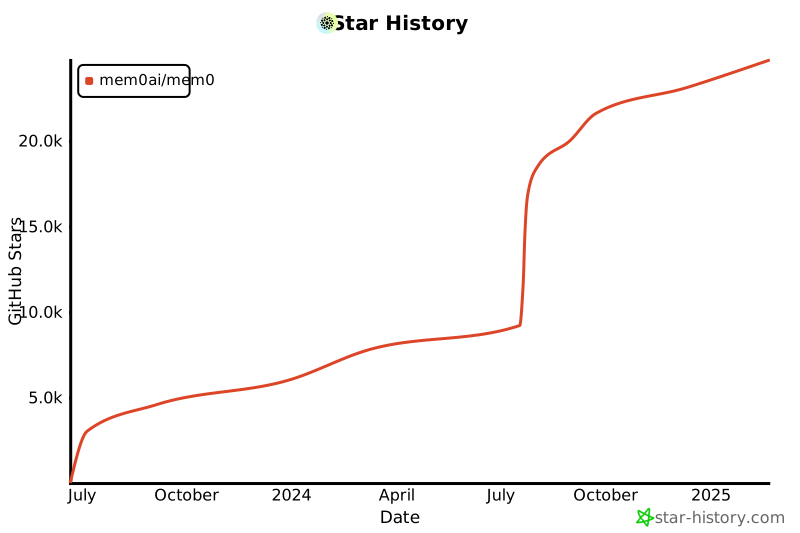](https://star-history.com/#mem0ai/mem0&Date)
|
||||
|
||||
## Support
|
||||
|
||||
Join our community for support and discussions. If you have any questions, feel free to reach out to us using one of the following methods:
|
||||
|
||||
- [Join our Discord](https://mem0.dev/DiG)
|
||||
- [Follow us on Twitter](https://x.com/mem0ai)
|
||||
- [Email founders](mailto:founders@mem0.ai)
|
||||
|
||||
## Contributors
|
||||
|
||||
Join our [Discord community](https://mem0.dev/DiG) to learn about memory management for AI agents and LLMs, and connect with Mem0 users and contributors. Share your ideas, questions, or feedback in our [GitHub Issues](https://github.com/mem0ai/mem0/issues).
|
||||
|
||||
We value and appreciate the contributions of our community. Special thanks to our contributors for helping us improve Mem0.
|
||||
|
||||
<a href="https://github.com/mem0ai/mem0/graphs/contributors">
|
||||
<img src="https://contrib.rocks/image?repo=mem0ai/mem0" />
|
||||
</a>
|
||||
|
||||
## License
|
||||
|
||||
This project is licensed under the Apache 2.0 License - see the [LICENSE](LICENSE) file for details.
|
||||
Apache 2.0 — see the [LICENSE](LICENSE) file for details.
|
||||
@@ -1,36 +0,0 @@
|
||||
# This example shows how to use vector config to use QDRANT CLOUD
|
||||
import os
|
||||
|
||||
from dotenv import load_dotenv
|
||||
|
||||
from mem0 import Memory
|
||||
|
||||
# Loading OpenAI API Key
|
||||
load_dotenv()
|
||||
OPENAI_API_KEY = os.environ.get("OPENAI_API_KEY")
|
||||
USER_ID = "test"
|
||||
quadrant_host = "xx.gcp.cloud.qdrant.io"
|
||||
|
||||
# creating the config attributes
|
||||
collection_name = "memory" # this is the collection I created in QDRANT cloud
|
||||
api_key = os.environ.get("QDRANT_API_KEY") # Getting the QDRANT api KEY
|
||||
host = quadrant_host
|
||||
port = 6333 # Default port for QDRANT cloud
|
||||
|
||||
# Creating the config dict
|
||||
config = {
|
||||
"vector_store": {
|
||||
"provider": "qdrant",
|
||||
"config": {"collection_name": collection_name, "host": host, "port": port, "path": None, "api_key": api_key},
|
||||
}
|
||||
}
|
||||
|
||||
# this is the change, create the memory class using from config
|
||||
memory = Memory().from_config(config)
|
||||
|
||||
USER_DATA = """
|
||||
I am a strong believer in memory architecture.
|
||||
"""
|
||||
|
||||
response = memory.add(USER_DATA, user_id=USER_ID)
|
||||
print(response)
|
||||
@@ -0,0 +1,239 @@
|
||||
{
|
||||
"cells": [
|
||||
{
|
||||
"cell_type": "code",
|
||||
"execution_count": 1,
|
||||
"metadata": {},
|
||||
"outputs": [],
|
||||
"source": [
|
||||
"import os\n",
|
||||
"from typing import List, Dict\n",
|
||||
"from mem0 import Memory\n",
|
||||
"from datetime import datetime\n",
|
||||
"import anthropic\n",
|
||||
"\n",
|
||||
"# Set up environment variables\n",
|
||||
"os.environ[\"OPENAI_API_KEY\"] = \"your_openai_api_key\" # needed for embedding model\n",
|
||||
"os.environ[\"ANTHROPIC_API_KEY\"] = \"your_anthropic_api_key\""
|
||||
]
|
||||
},
|
||||
{
|
||||
"cell_type": "code",
|
||||
"execution_count": 2,
|
||||
"metadata": {},
|
||||
"outputs": [],
|
||||
"source": [
|
||||
"class SupportChatbot:\n",
|
||||
" def __init__(self):\n",
|
||||
" # Initialize Mem0 with Anthropic's Claude\n",
|
||||
" self.config = {\n",
|
||||
" \"llm\": {\n",
|
||||
" \"provider\": \"anthropic\",\n",
|
||||
" \"config\": {\n",
|
||||
" \"model\": \"claude-3-5-sonnet-latest\",\n",
|
||||
" \"temperature\": 0.1,\n",
|
||||
" \"max_tokens\": 2000,\n",
|
||||
" }\n",
|
||||
" }\n",
|
||||
" }\n",
|
||||
" self.client = anthropic.Client(api_key=os.environ[\"ANTHROPIC_API_KEY\"])\n",
|
||||
" self.memory = Memory.from_config(self.config)\n",
|
||||
"\n",
|
||||
" # Define support context\n",
|
||||
" self.system_context = \"\"\"\n",
|
||||
" You are a helpful customer support agent. Use the following guidelines:\n",
|
||||
" - Be polite and professional\n",
|
||||
" - Show empathy for customer issues\n",
|
||||
" - Reference past interactions when relevant\n",
|
||||
" - Maintain consistent information across conversations\n",
|
||||
" - If you're unsure about something, ask for clarification\n",
|
||||
" - Keep track of open issues and follow-ups\n",
|
||||
" \"\"\"\n",
|
||||
"\n",
|
||||
" def store_customer_interaction(self,\n",
|
||||
" user_id: str,\n",
|
||||
" message: str,\n",
|
||||
" response: str,\n",
|
||||
" metadata: Dict = None):\n",
|
||||
" \"\"\"Store customer interaction in memory.\"\"\"\n",
|
||||
" if metadata is None:\n",
|
||||
" metadata = {}\n",
|
||||
"\n",
|
||||
" # Add timestamp to metadata\n",
|
||||
" metadata[\"timestamp\"] = datetime.now().isoformat()\n",
|
||||
"\n",
|
||||
" # Format conversation for storage\n",
|
||||
" conversation = [\n",
|
||||
" {\"role\": \"user\", \"content\": message},\n",
|
||||
" {\"role\": \"assistant\", \"content\": response}\n",
|
||||
" ]\n",
|
||||
"\n",
|
||||
" # Store in Mem0\n",
|
||||
" self.memory.add(\n",
|
||||
" conversation,\n",
|
||||
" user_id=user_id,\n",
|
||||
" metadata=metadata\n",
|
||||
" )\n",
|
||||
"\n",
|
||||
" def get_relevant_history(self, user_id: str, query: str) -> List[Dict]:\n",
|
||||
" \"\"\"Retrieve relevant past interactions.\"\"\"\n",
|
||||
" return self.memory.search(\n",
|
||||
" query=query,\n",
|
||||
" user_id=user_id,\n",
|
||||
" limit=5 # Adjust based on needs\n",
|
||||
" )\n",
|
||||
"\n",
|
||||
" def handle_customer_query(self, user_id: str, query: str) -> str:\n",
|
||||
" \"\"\"Process customer query with context from past interactions.\"\"\"\n",
|
||||
"\n",
|
||||
" # Get relevant past interactions\n",
|
||||
" relevant_history = self.get_relevant_history(user_id, query)\n",
|
||||
"\n",
|
||||
" # Build context from relevant history\n",
|
||||
" context = \"Previous relevant interactions:\\n\"\n",
|
||||
" for memory in relevant_history:\n",
|
||||
" context += f\"Customer: {memory['memory']}\\n\"\n",
|
||||
" context += f\"Support: {memory['memory']}\\n\"\n",
|
||||
" context += \"---\\n\"\n",
|
||||
"\n",
|
||||
" # Prepare prompt with context and current query\n",
|
||||
" prompt = f\"\"\"\n",
|
||||
" {self.system_context}\n",
|
||||
"\n",
|
||||
" {context}\n",
|
||||
"\n",
|
||||
" Current customer query: {query}\n",
|
||||
"\n",
|
||||
" Provide a helpful response that takes into account any relevant past interactions.\n",
|
||||
" \"\"\"\n",
|
||||
"\n",
|
||||
" # Generate response using Claude\n",
|
||||
" response = self.client.messages.create(\n",
|
||||
" model=\"claude-3-5-sonnet-latest\",\n",
|
||||
" messages=[{\"role\": \"user\", \"content\": prompt}],\n",
|
||||
" max_tokens=2000,\n",
|
||||
" temperature=0.1\n",
|
||||
" )\n",
|
||||
"\n",
|
||||
" # Store interaction\n",
|
||||
" self.store_customer_interaction(\n",
|
||||
" user_id=user_id,\n",
|
||||
" message=query,\n",
|
||||
" response=response,\n",
|
||||
" metadata={\"type\": \"support_query\"}\n",
|
||||
" )\n",
|
||||
"\n",
|
||||
" return response.content[0].text"
|
||||
]
|
||||
},
|
||||
{
|
||||
"cell_type": "code",
|
||||
"execution_count": 3,
|
||||
"metadata": {},
|
||||
"outputs": [
|
||||
{
|
||||
"name": "stdout",
|
||||
"output_type": "stream",
|
||||
"text": [
|
||||
"Welcome to Customer Support! Type 'exit' to end the conversation.\n",
|
||||
"Customer: Hi, I'm having trouble connecting my new smartwatch to the mobile app. It keeps showing a connection error.\n"
|
||||
]
|
||||
},
|
||||
{
|
||||
"name": "stderr",
|
||||
"output_type": "stream",
|
||||
"text": [
|
||||
"/var/folders/5x/9kmqjfm947g5yh44m7fjk75r0000gn/T/ipykernel_99777/1076713094.py:55: DeprecationWarning: The current get_all API output format is deprecated. To use the latest format, set `api_version='v1.1'`. The current format will be removed in mem0ai 1.1.0 and later versions.\n",
|
||||
" return self.memory.search(\n",
|
||||
"/var/folders/5x/9kmqjfm947g5yh44m7fjk75r0000gn/T/ipykernel_99777/1076713094.py:47: DeprecationWarning: The current add API output format is deprecated. To use the latest format, set `api_version='v1.1'`. The current format will be removed in mem0ai 1.1.0 and later versions.\n",
|
||||
" self.memory.add(\n"
|
||||
]
|
||||
},
|
||||
{
|
||||
"name": "stdout",
|
||||
"output_type": "stream",
|
||||
"text": [
|
||||
"Support: Hello! Thank you for reaching out about the connection issue with your smartwatch. I understand how frustrating it can be when a new device won't connect properly. I'll be happy to help you resolve this.\n",
|
||||
"\n",
|
||||
"To better assist you, could you please provide me with:\n",
|
||||
"1. The model of your smartwatch\n",
|
||||
"2. The type of phone you're using (iOS or Android)\n",
|
||||
"3. Whether you've already installed the companion app on your phone\n",
|
||||
"4. If you've tried pairing the devices before\n",
|
||||
"\n",
|
||||
"These details will help me provide you with the most accurate troubleshooting steps. In the meantime, here are some general tips that might help:\n",
|
||||
"- Make sure Bluetooth is enabled on your phone\n",
|
||||
"- Keep your smartwatch and phone within close range (within 3 feet) during pairing\n",
|
||||
"- Ensure both devices have sufficient battery power\n",
|
||||
"- Check if your phone's operating system meets the minimum requirements for the smartwatch\n",
|
||||
"\n",
|
||||
"Please provide the requested information, and I'll guide you through the specific steps to resolve the connection error.\n",
|
||||
"\n",
|
||||
"Is there anything else you'd like to share about the issue? \n",
|
||||
"\n",
|
||||
"\n",
|
||||
"Customer: The connection issue is still happening even after trying the steps you suggested.\n",
|
||||
"Support: I apologize that you're still experiencing connection issues with your smartwatch. I understand how frustrating it must be to have this problem persist even after trying the initial troubleshooting steps. Let's try some additional solutions to resolve this.\n",
|
||||
"\n",
|
||||
"Before we proceed, could you please confirm:\n",
|
||||
"1. Which specific steps you've already attempted?\n",
|
||||
"2. Are you seeing any particular error message?\n",
|
||||
"3. What model of smartwatch and phone are you using?\n",
|
||||
"\n",
|
||||
"This information will help me provide more targeted solutions and avoid suggesting steps you've already tried. In the meantime, here are a few advanced troubleshooting steps we can consider:\n",
|
||||
"\n",
|
||||
"1. Completely resetting the Bluetooth connection\n",
|
||||
"2. Checking for any software updates for both the watch and phone\n",
|
||||
"3. Testing the connection with a different mobile device to isolate the issue\n",
|
||||
"\n",
|
||||
"Would you be able to provide those details so I can better assist you? I'll make sure to document this ongoing issue to help track its resolution. \n",
|
||||
"\n",
|
||||
"\n",
|
||||
"Customer: exit\n",
|
||||
"Thank you for using our support service. Goodbye!\n"
|
||||
]
|
||||
}
|
||||
],
|
||||
"source": [
|
||||
"chatbot = SupportChatbot()\n",
|
||||
"user_id = \"customer_bot\"\n",
|
||||
"print(\"Welcome to Customer Support! Type 'exit' to end the conversation.\")\n",
|
||||
"\n",
|
||||
"while True:\n",
|
||||
" # Get user input\n",
|
||||
" query = input()\n",
|
||||
" print(\"Customer:\", query)\n",
|
||||
" \n",
|
||||
" # Check if user wants to exit\n",
|
||||
" if query.lower() == 'exit':\n",
|
||||
" print(\"Thank you for using our support service. Goodbye!\")\n",
|
||||
" break\n",
|
||||
" \n",
|
||||
" # Handle the query and print the response\n",
|
||||
" response = chatbot.handle_customer_query(user_id, query)\n",
|
||||
" print(\"Support:\", response, \"\\n\\n\")"
|
||||
]
|
||||
}
|
||||
],
|
||||
"metadata": {
|
||||
"kernelspec": {
|
||||
"display_name": ".venv",
|
||||
"language": "python",
|
||||
"name": "python3"
|
||||
},
|
||||
"language_info": {
|
||||
"codemirror_mode": {
|
||||
"name": "ipython",
|
||||
"version": 3
|
||||
},
|
||||
"file_extension": ".py",
|
||||
"mimetype": "text/x-python",
|
||||
"name": "python",
|
||||
"nbconvert_exporter": "python",
|
||||
"pygments_lexer": "ipython3",
|
||||
"version": "3.12.4"
|
||||
}
|
||||
},
|
||||
"nbformat": 4,
|
||||
"nbformat_minor": 2
|
||||
}
|
||||
@@ -0,0 +1,172 @@
|
||||
# Copyright (c) 2023 - 2024, Owners of https://github.com/autogen-ai
|
||||
#
|
||||
# SPDX-License-Identifier: Apache-2.0
|
||||
#
|
||||
# Portions derived from https://github.com/microsoft/autogen are under the MIT License.
|
||||
# SPDX-License-Identifier: MIT
|
||||
# forked from autogen.agentchat.contrib.capabilities.teachability.Teachability
|
||||
|
||||
from typing import Dict, Optional, Union
|
||||
|
||||
from autogen.agentchat.assistant_agent import ConversableAgent
|
||||
from autogen.agentchat.contrib.capabilities.agent_capability import AgentCapability
|
||||
from autogen.agentchat.contrib.text_analyzer_agent import TextAnalyzerAgent
|
||||
from termcolor import colored
|
||||
|
||||
from mem0 import Memory
|
||||
|
||||
|
||||
class Mem0Teachability(AgentCapability):
|
||||
def __init__(
|
||||
self,
|
||||
verbosity: Optional[int] = 0,
|
||||
reset_db: Optional[bool] = False,
|
||||
recall_threshold: Optional[float] = 1.5,
|
||||
max_num_retrievals: Optional[int] = 10,
|
||||
llm_config: Optional[Union[Dict, bool]] = None,
|
||||
agent_id: Optional[str] = None,
|
||||
memory_client: Optional[Memory] = None,
|
||||
):
|
||||
self.verbosity = verbosity
|
||||
self.recall_threshold = recall_threshold
|
||||
self.max_num_retrievals = max_num_retrievals
|
||||
self.llm_config = llm_config
|
||||
self.analyzer = None
|
||||
self.teachable_agent = None
|
||||
self.agent_id = agent_id
|
||||
self.memory = memory_client if memory_client else Memory()
|
||||
|
||||
if reset_db:
|
||||
self.memory.reset()
|
||||
|
||||
def add_to_agent(self, agent: ConversableAgent):
|
||||
self.teachable_agent = agent
|
||||
agent.register_hook(hookable_method="process_last_received_message", hook=self.process_last_received_message)
|
||||
|
||||
if self.llm_config is None:
|
||||
self.llm_config = agent.llm_config
|
||||
assert self.llm_config, "Teachability requires a valid llm_config."
|
||||
|
||||
self.analyzer = TextAnalyzerAgent(llm_config=self.llm_config)
|
||||
|
||||
agent.update_system_message(
|
||||
agent.system_message
|
||||
+ "\nYou've been given the special ability to remember user teachings from prior conversations."
|
||||
)
|
||||
|
||||
def process_last_received_message(self, text: Union[Dict, str]):
|
||||
expanded_text = text
|
||||
if self.memory.get_all(agent_id=self.agent_id):
|
||||
expanded_text = self._consider_memo_retrieval(text)
|
||||
self._consider_memo_storage(text)
|
||||
return expanded_text
|
||||
|
||||
def _consider_memo_storage(self, comment: Union[Dict, str]):
|
||||
response = self._analyze(
|
||||
comment,
|
||||
"Does any part of the TEXT ask the agent to perform a task or solve a problem? Answer with just one word, yes or no.",
|
||||
)
|
||||
|
||||
if "yes" in response.lower():
|
||||
advice = self._analyze(
|
||||
comment,
|
||||
"Briefly copy any advice from the TEXT that may be useful for a similar but different task in the future. But if no advice is present, just respond with 'none'.",
|
||||
)
|
||||
|
||||
if "none" not in advice.lower():
|
||||
task = self._analyze(
|
||||
comment,
|
||||
"Briefly copy just the task from the TEXT, then stop. Don't solve it, and don't include any advice.",
|
||||
)
|
||||
|
||||
general_task = self._analyze(
|
||||
task,
|
||||
"Summarize very briefly, in general terms, the type of task described in the TEXT. Leave out details that might not appear in a similar problem.",
|
||||
)
|
||||
|
||||
if self.verbosity >= 1:
|
||||
print(colored("\nREMEMBER THIS TASK-ADVICE PAIR", "light_yellow"))
|
||||
self.memory.add(
|
||||
[{"role": "user", "content": f"Task: {general_task}\nAdvice: {advice}"}], agent_id=self.agent_id
|
||||
)
|
||||
|
||||
response = self._analyze(
|
||||
comment,
|
||||
"Does the TEXT contain information that could be committed to memory? Answer with just one word, yes or no.",
|
||||
)
|
||||
|
||||
if "yes" in response.lower():
|
||||
question = self._analyze(
|
||||
comment,
|
||||
"Imagine that the user forgot this information in the TEXT. How would they ask you for this information? Include no other text in your response.",
|
||||
)
|
||||
|
||||
answer = self._analyze(
|
||||
comment, "Copy the information from the TEXT that should be committed to memory. Add no explanation."
|
||||
)
|
||||
|
||||
if self.verbosity >= 1:
|
||||
print(colored("\nREMEMBER THIS QUESTION-ANSWER PAIR", "light_yellow"))
|
||||
self.memory.add(
|
||||
[{"role": "user", "content": f"Question: {question}\nAnswer: {answer}"}], agent_id=self.agent_id
|
||||
)
|
||||
|
||||
def _consider_memo_retrieval(self, comment: Union[Dict, str]):
|
||||
if self.verbosity >= 1:
|
||||
print(colored("\nLOOK FOR RELEVANT MEMOS, AS QUESTION-ANSWER PAIRS", "light_yellow"))
|
||||
memo_list = self._retrieve_relevant_memos(comment)
|
||||
|
||||
response = self._analyze(
|
||||
comment,
|
||||
"Does any part of the TEXT ask the agent to perform a task or solve a problem? Answer with just one word, yes or no.",
|
||||
)
|
||||
|
||||
if "yes" in response.lower():
|
||||
if self.verbosity >= 1:
|
||||
print(colored("\nLOOK FOR RELEVANT MEMOS, AS TASK-ADVICE PAIRS", "light_yellow"))
|
||||
task = self._analyze(
|
||||
comment, "Copy just the task from the TEXT, then stop. Don't solve it, and don't include any advice."
|
||||
)
|
||||
|
||||
general_task = self._analyze(
|
||||
task,
|
||||
"Summarize very briefly, in general terms, the type of task described in the TEXT. Leave out details that might not appear in a similar problem.",
|
||||
)
|
||||
|
||||
memo_list.extend(self._retrieve_relevant_memos(general_task))
|
||||
|
||||
memo_list = list(set(memo_list))
|
||||
return comment + self._concatenate_memo_texts(memo_list)
|
||||
|
||||
def _retrieve_relevant_memos(self, input_text: str) -> list:
|
||||
search_results = self.memory.search(input_text, agent_id=self.agent_id, limit=self.max_num_retrievals)
|
||||
memo_list = [result["memory"] for result in search_results if result["score"] <= self.recall_threshold]
|
||||
|
||||
if self.verbosity >= 1 and not memo_list:
|
||||
print(colored("\nTHE CLOSEST MEMO IS BEYOND THE THRESHOLD:", "light_yellow"))
|
||||
if search_results["results"]:
|
||||
print(search_results["results"][0])
|
||||
print()
|
||||
|
||||
return memo_list
|
||||
|
||||
def _concatenate_memo_texts(self, memo_list: list) -> str:
|
||||
memo_texts = ""
|
||||
if memo_list:
|
||||
info = "\n# Memories that might help\n"
|
||||
for memo in memo_list:
|
||||
info += f"- {memo}\n"
|
||||
if self.verbosity >= 1:
|
||||
print(colored(f"\nMEMOS APPENDED TO LAST MESSAGE...\n{info}\n", "light_yellow"))
|
||||
memo_texts += "\n" + info
|
||||
return memo_texts
|
||||
|
||||
def _analyze(self, text_to_analyze: Union[Dict, str], analysis_instructions: Union[Dict, str]):
|
||||
self.analyzer.reset()
|
||||
self.teachable_agent.send(
|
||||
recipient=self.analyzer, message=text_to_analyze, request_reply=False, silent=(self.verbosity < 2)
|
||||
)
|
||||
self.teachable_agent.send(
|
||||
recipient=self.analyzer, message=analysis_instructions, request_reply=True, silent=(self.verbosity < 2)
|
||||
)
|
||||
return self.teachable_agent.last_message(self.analyzer)["content"]
|
||||
File diff suppressed because it is too large
Load Diff
File diff suppressed because one or more lines are too long
@@ -1,296 +0,0 @@
|
||||
{
|
||||
"cells": [
|
||||
{
|
||||
"cell_type": "code",
|
||||
"execution_count": null,
|
||||
"metadata": {
|
||||
"id": "fu3euPKZsbaC"
|
||||
},
|
||||
"outputs": [],
|
||||
"source": [
|
||||
"!pip install mem0ai"
|
||||
]
|
||||
},
|
||||
{
|
||||
"cell_type": "code",
|
||||
"execution_count": null,
|
||||
"metadata": {
|
||||
"id": "U2VC_0FElQid"
|
||||
},
|
||||
"outputs": [],
|
||||
"source": [
|
||||
"import os\n",
|
||||
"from openai import OpenAI\n",
|
||||
"from mem0 import MemoryClient\n",
|
||||
"from multion.client import MultiOn\n",
|
||||
"\n",
|
||||
"# Configuration\n",
|
||||
"OPENAI_API_KEY = \"sk-xxx\" # Replace with your actual OpenAI API key\n",
|
||||
"MULTION_API_KEY = \"xx\" # Replace with your actual MultiOn API key\n",
|
||||
"MEM0_API_KEY = \"xx\" # Replace with your actual Mem0 API key\n",
|
||||
"USER_ID = \"test_travel_agent\"\n",
|
||||
"\n",
|
||||
"# Set up OpenAI API key\n",
|
||||
"os.environ[\"OPENAI_API_KEY\"] = OPENAI_API_KEY\n",
|
||||
"\n",
|
||||
"# Initialize Mem0 and MultiOn\n",
|
||||
"memory = MemoryClient(api_key=MEM0_API_KEY)\n",
|
||||
"multion = MultiOn(api_key=MULTION_API_KEY)"
|
||||
]
|
||||
},
|
||||
{
|
||||
"cell_type": "code",
|
||||
"execution_count": null,
|
||||
"metadata": {
|
||||
"id": "sq-OdPHKlQie",
|
||||
"outputId": "1d605222-0bf5-4ac9-99b9-6059b502c20b"
|
||||
},
|
||||
"outputs": [
|
||||
{
|
||||
"data": {
|
||||
"text/plain": [
|
||||
"{'message': 'Memory added successfully!'}"
|
||||
]
|
||||
},
|
||||
"execution_count": 2,
|
||||
"metadata": {},
|
||||
"output_type": "execute_result"
|
||||
}
|
||||
],
|
||||
"source": [
|
||||
"# Add conversation to Mem0\n",
|
||||
"conversation = [\n",
|
||||
" {\"role\": \"user\", \"content\": \"What are the best travel destinations in the world?\"},\n",
|
||||
" {\n",
|
||||
" \"role\": \"assistant\",\n",
|
||||
" \"content\": \"Could you please specify your interests or the type of travel information you are looking for? This will help me find the most relevant information for you.\",\n",
|
||||
" },\n",
|
||||
" {\"role\": \"user\", \"content\": \"Sure, I want to travel to San Francisco.\"},\n",
|
||||
" {\n",
|
||||
" \"role\": \"assistant\",\n",
|
||||
" \"content\": \"\"\"\n",
|
||||
" Based on the information gathered from TripAdvisor, here are some popular attractions, activities, and travel tips for San Francisco:\n",
|
||||
"\n",
|
||||
" 1. **Golden Gate Bridge**: A must-see iconic landmark.\n",
|
||||
" 2. **Alcatraz Island**: Famous former prison offering tours.\n",
|
||||
" 3. **Fisherman's Wharf**: Popular tourist area with shops, restaurants, and sea lions.\n",
|
||||
" 4. **Chinatown**: The largest Chinatown outside of Asia.\n",
|
||||
" 5. **Golden Gate Park**: Large urban park with gardens, museums, and recreational activities.\n",
|
||||
" 6. **Cable Cars**: Historic streetcars offering a unique way to see the city.\n",
|
||||
" 7. **Exploratorium**: Interactive science museum.\n",
|
||||
" 8. **San Francisco Museum of Modern Art (SFMOMA)**: Modern and contemporary art museum.\n",
|
||||
" 9. **Lombard Street**: Known for its steep, one-block section with eight hairpin turns.\n",
|
||||
" 10. **Union Square**: Major shopping and cultural hub.\n",
|
||||
"\n",
|
||||
" Travel Tips:\n",
|
||||
" - **Weather**: San Francisco has a mild climate, but it can be foggy and windy. Dress in layers.\n",
|
||||
" - **Transportation**: Use public transportation like BART, Muni, and cable cars to get around.\n",
|
||||
" - **Safety**: Be aware of your surroundings, especially in crowded tourist areas.\n",
|
||||
" - **Dining**: Try local specialties like sourdough bread, seafood, and Mission-style burritos.\n",
|
||||
" \"\"\",\n",
|
||||
" },\n",
|
||||
" {\"role\": \"user\", \"content\": \"Show me hotels around Golden Gate Bridge.\"},\n",
|
||||
" {\n",
|
||||
" \"role\": \"assistant\",\n",
|
||||
" \"content\": \"\"\"\n",
|
||||
" The search results for hotels around Golden Gate Bridge in San Francisco include:\n",
|
||||
"\n",
|
||||
" 1. Hilton Hotels In San Francisco - Hotel Near Fishermans Wharf (hilton.com)\n",
|
||||
" 2. The 10 Closest Hotels to Golden Gate Bridge (tripadvisor.com)\n",
|
||||
" 3. Hotels near Golden Gate Bridge (expedia.com)\n",
|
||||
" 4. Hotels near Golden Gate Bridge (hotels.com)\n",
|
||||
" 5. Holiday Inn Express & Suites San Francisco Fishermans Wharf, an IHG Hotel $146 (1.8K) 3-star hotel Golden Gate Bridge • 3.5 mi DEAL 19% less than usual\n",
|
||||
" 6. Holiday Inn San Francisco-Golden Gateway, an IHG Hotel $151 (3.5K) 3-star hotel Golden Gate Bridge • 3.7 mi Casual hotel with dining, a bar & a pool\n",
|
||||
" 7. Hotel Zephyr San Francisco $159 (3.8K) 4-star hotel Golden Gate Bridge • 3.7 mi Nautical-themed lodging with bay views\n",
|
||||
" 8. Lodge at the Presidio\n",
|
||||
" 9. The Inn Above Tide\n",
|
||||
" 10. Cavallo Point\n",
|
||||
" 11. Casa Madrona Hotel and Spa\n",
|
||||
" 12. Cow Hollow Inn and Suites\n",
|
||||
" 13. Samesun San Francisco\n",
|
||||
" 14. Inn on Broadway\n",
|
||||
" 15. Coventry Motor Inn\n",
|
||||
" 16. HI San Francisco Fisherman's Wharf Hostel\n",
|
||||
" 17. Loews Regency San Francisco Hotel\n",
|
||||
" 18. Fairmont Heritage Place Ghirardelli Square\n",
|
||||
" 19. Hotel Drisco Pacific Heights\n",
|
||||
" 20. Travelodge by Wyndham Presidio San Francisco\n",
|
||||
" \"\"\",\n",
|
||||
" },\n",
|
||||
"]\n",
|
||||
"\n",
|
||||
"memory.add(conversation, user_id=USER_ID)"
|
||||
]
|
||||
},
|
||||
{
|
||||
"cell_type": "code",
|
||||
"execution_count": null,
|
||||
"metadata": {
|
||||
"id": "hO8z9aNTlQif"
|
||||
},
|
||||
"outputs": [],
|
||||
"source": [
|
||||
"def get_travel_info(question, use_memory=True):\n",
|
||||
" \"\"\"\n",
|
||||
" Get travel information based on user's question and optionally their preferences from memory.\n",
|
||||
"\n",
|
||||
" \"\"\"\n",
|
||||
" if use_memory:\n",
|
||||
" previous_memories = memory.search(question, user_id=USER_ID)\n",
|
||||
" relevant_memories_text = \"\"\n",
|
||||
" if previous_memories:\n",
|
||||
" print(\"Using previous memories to enhance the search...\")\n",
|
||||
" relevant_memories_text = \"\\n\".join(mem[\"memory\"] for mem in previous_memories)\n",
|
||||
"\n",
|
||||
" command = \"Find travel information based on my interests:\"\n",
|
||||
" prompt = f\"{command}\\n Question: {question} \\n My preferences: {relevant_memories_text}\"\n",
|
||||
" else:\n",
|
||||
" command = \"Find travel information based on my interests:\"\n",
|
||||
" prompt = f\"{command}\\n Question: {question}\"\n",
|
||||
"\n",
|
||||
" print(\"Searching for travel information...\")\n",
|
||||
" browse_result = multion.browse(cmd=prompt)\n",
|
||||
" return browse_result.message"
|
||||
]
|
||||
},
|
||||
{
|
||||
"cell_type": "markdown",
|
||||
"metadata": {
|
||||
"id": "Wp2xpzMrlQig"
|
||||
},
|
||||
"source": [
|
||||
"## Example 1"
|
||||
]
|
||||
},
|
||||
{
|
||||
"cell_type": "code",
|
||||
"execution_count": null,
|
||||
"metadata": {
|
||||
"id": "bPRPwqsplQig"
|
||||
},
|
||||
"outputs": [],
|
||||
"source": [
|
||||
"question = \"Show me flight details for it.\"\n",
|
||||
"answer_without_memory = get_travel_info(question, use_memory=False)\n",
|
||||
"answer_with_memory = get_travel_info(question, use_memory=True)"
|
||||
]
|
||||
},
|
||||
{
|
||||
"cell_type": "markdown",
|
||||
"metadata": {
|
||||
"id": "a76ifa2HlQig"
|
||||
},
|
||||
"source": [
|
||||
"| Without Memory | With Memory |\n",
|
||||
"|--------------------------------------------------------------------------------------------------------------------------------------------------------------------------------------------------------------------------------------------|--------------------------------------------------------------------------------------------------------------------------------------------------------------------------------------------------------------------------------------------------------------------------------------|\n",
|
||||
"| I have performed a Google search for \"flight details\" and reviewed the search results. Here are some relevant links and information: | Memorizing the following information: Flight details for San Francisco: |\n",
|
||||
"| 1. **FlightStats Global Flight Tracker** - Track the real-time flight status of your flight. See if your flight has been delayed or cancelled and track the live status. <br> [Flight Tracker - FlightStats](https://www.flightstats.com/flight-tracker/search) | 1. Prices from $232. Depart Thursday, August 22. Return Thursday, August 29. <br> 2. Prices from $216. Depart Friday, August 23. Return Friday, August 30. <br> 3. Prices from $236. Depart Saturday, August 24. Return Saturday, August 31. <br> 4. Prices from $215. Depart Sunday, August 25. Return Sunday, September 1. |\n",
|
||||
"| 2. **FlightAware - Flight Tracker** - Track live flights worldwide, see flight cancellations, and browse by airport. <br> [FlightAware - Flight Tracker](https://www.flightaware.com) | 5. Prices from $218. Depart Monday, August 26. Return Monday, September 2. <br> 6. Prices from $211. Depart Tuesday, August 27. Return Tuesday, September 3. <br> 7. Prices from $198. Depart Wednesday, August 28. Return Wednesday, September 4. <br> 8. Prices from $218. Depart Thursday, August 29. Return Thursday, September 5. |\n",
|
||||
"| 3. **Google Flights** - Show flights based on your search. <br> [Google Flights](https://www.google.com/flights) | 9. Prices from $194. Depart Friday, August 30. Return Friday, September 6. <br> 10. Prices from $218. Depart Saturday, August 31. Return Saturday, September 7. <br> 11. Prices from $212. Depart Sunday, September 1. Return Sunday, September 8. <br> 12. Prices from $247. Depart Monday, September 2. Return Monday, September 9. |\n",
|
||||
"| | 13. Prices from $212. Depart Tuesday, September 3. Return Tuesday, September 10. <br> 14. Prices from $203. Depart Wednesday, September 4. Return Wednesday, September 11. <br> 15. Prices from $242. Depart Thursday, September 5. Return Thursday, September 12. <br> 16. Prices from $191. Depart Friday, September 6. Return Friday, September 13. |\n",
|
||||
"| | 17. Prices from $215. Depart Saturday, September 7. Return Saturday, September 14. <br> 18. Prices from $229. Depart Sunday, September 8. Return Sunday, September 15. <br> 19. Prices from $183. Depart Monday, September 9. Return Monday, September 16. <br> 65. Prices from $194. Depart Friday, October 25. Return Friday, November 1. |\n",
|
||||
"| | 66. Prices from $205. Depart Saturday, October 26. Return Saturday, November 2. <br> 67. Prices from $241. Depart Sunday, October 27. Return Sunday, November 3. |\n"
|
||||
]
|
||||
},
|
||||
{
|
||||
"cell_type": "markdown",
|
||||
"metadata": {
|
||||
"id": "0cXpiAwMlQig"
|
||||
},
|
||||
"source": [
|
||||
"## Example 2"
|
||||
]
|
||||
},
|
||||
{
|
||||
"cell_type": "code",
|
||||
"execution_count": null,
|
||||
"metadata": {
|
||||
"id": "LpprKfpslQih"
|
||||
},
|
||||
"outputs": [],
|
||||
"source": [
|
||||
"question = \"What places to visit there?\"\n",
|
||||
"answer_without_memory = get_travel_info(question, use_memory=False)\n",
|
||||
"answer_with_memory = get_travel_info(question, use_memory=True)"
|
||||
]
|
||||
},
|
||||
{
|
||||
"cell_type": "markdown",
|
||||
"metadata": {
|
||||
"id": "kpfjeY1_lQih"
|
||||
},
|
||||
"source": [
|
||||
"| Without Memory | With Memory |\n",
|
||||
"|---------------------------------------------------------------------------------------------------------------------------------------------------------------------------------------------------------------------------------------------|--------------------------------------------------------------------------------------------------------------------------------------------------------------------------------------------------------------------------------------------------------------------------------------------------------|\n",
|
||||
"| Based on the information gathered, here are some top travel destinations to consider visiting: | Based on the information gathered, here are some top places to visit in San Francisco: |\n",
|
||||
"| 1. **Paris**: Known for its iconic attractions like the Eiffel Tower and the Louvre, Paris offers quaint cafes, trendy shopping districts, and beautiful Haussmann architecture. It's a city where you can always discover something new with each visit. | 1. **Golden Gate Bridge** - An iconic symbol of San Francisco, perfect for walking, biking, or simply enjoying the view. <br> 2. **Alcatraz Island** - The historic former prison offers tours and insights into its storied past. <br> 3. **Fisherman's Wharf** - A bustling waterfront area known for its seafood, shopping, and attractions like Pier 39. <br> 4. **Golden Gate Park** - A large urban park with gardens, museums, and recreational activities. <br> 5. **Chinatown San Francisco** - One of the oldest and most famous Chinatowns in North America, offering unique shops and delicious food. <br> 6. **Coit Tower** - Offers panoramic views of the city and murals depicting San Francisco's history. <br> 7. **Lands End** - A beautiful coastal trail with stunning views of the Pacific Ocean and the Golden Gate Bridge. <br> 8. **Palace of Fine Arts** - A picturesque structure and park, perfect for a leisurely stroll or photo opportunities. <br> 9. **Crissy Field & The Presidio Tunnel Tops** - Great for outdoor activities and scenic views of the bay. |\n",
|
||||
"| 2. **Bora Bora**: This small island in French Polynesia is famous for its stunning turquoise waters, luxurious overwater bungalows, and vibrant coral reefs. It's a popular destination for honeymooners and those seeking a tropical paradise. | |\n",
|
||||
"| 3. **Glacier National Park**: Located in Montana, USA, this park is known for its breathtaking landscapes, including rugged mountains, pristine lakes, and diverse wildlife. It's a haven for outdoor enthusiasts and hikers. | |\n",
|
||||
"| 4. **Rome**: The capital of Italy, Rome is rich in history and culture, featuring landmarks such as the Colosseum, the Vatican, and the Pantheon. It's a city where ancient history meets modern life. | |\n",
|
||||
"| 5. **Swiss Alps**: Renowned for their stunning natural beauty, the Swiss Alps offer opportunities for skiing, hiking, and enjoying picturesque mountain villages. | |\n",
|
||||
"| 6. **Maui**: One of Hawaii's most popular islands, Maui is known for its beautiful beaches, lush rainforests, and the scenic Hana Highway. It's a great destination for both relaxation and adventure. | |\n",
|
||||
"| 7. **London, England**: A vibrant city with a mix of historical landmarks like the Tower of London and modern attractions such as the London Eye. London offers diverse cultural experiences, world-class museums, and a bustling nightlife. | |\n",
|
||||
"| 8. **Maldives**: This tropical paradise in the Indian Ocean is famous for its crystal-clear waters, luxurious resorts, and abundant marine life. It's an ideal destination for snorkeling, diving, and relaxation. | |\n",
|
||||
"| 9. **Turks & Caicos**: Known for its pristine beaches and turquoise waters, this Caribbean destination is perfect for water sports, beach lounging, and exploring coral reefs. | |\n",
|
||||
"| 10. **Tokyo**: Japan's bustling capital offers a unique blend of traditional and modern attractions, from ancient temples to futuristic skyscrapers. Tokyo is also known for its vibrant food scene and shopping districts. | |\n"
|
||||
]
|
||||
},
|
||||
{
|
||||
"cell_type": "markdown",
|
||||
"metadata": {
|
||||
"id": "XdpkcMrclQih"
|
||||
},
|
||||
"source": [
|
||||
"## Example 3"
|
||||
]
|
||||
},
|
||||
{
|
||||
"cell_type": "code",
|
||||
"execution_count": null,
|
||||
"metadata": {
|
||||
"id": "Nntl2FxulQih"
|
||||
},
|
||||
"outputs": [],
|
||||
"source": [
|
||||
"question = \"What the weather there?\"\n",
|
||||
"answer_without_memory = get_travel_info(question, use_memory=False)\n",
|
||||
"answer_with_memory = get_travel_info(question, use_memory=True)"
|
||||
]
|
||||
},
|
||||
{
|
||||
"cell_type": "markdown",
|
||||
"metadata": {
|
||||
"id": "yt2pj1irlQih"
|
||||
},
|
||||
"source": [
|
||||
"| Without Memory | With Memory |\n",
|
||||
"|---------------------------------------------------------------------------------------------------------------------------------------------------------------------------------------------------------------------------------------------|--------------------------------------------------------------------------------------------------------------------------------------------------------------------------------------------------------------------------------------------------------------------------------------------------------|\n",
|
||||
"| The current weather in Paris is light rain with a temperature of 67°F. The precipitation is at 50%, humidity is 95%, and the wind speed is 5 mph. | The current weather in San Francisco is as follows: <br> - **Temperature**: 59°F <br> - **Condition**: Clear with periodic clouds <br> - **Precipitation**: 3% <br> - **Humidity**: 87% <br> - **Wind**: 12 mph |\n"
|
||||
]
|
||||
}
|
||||
],
|
||||
"metadata": {
|
||||
"colab": {
|
||||
"provenance": []
|
||||
},
|
||||
"kernelspec": {
|
||||
"display_name": ".venv",
|
||||
"language": "python",
|
||||
"name": "python3"
|
||||
},
|
||||
"language_info": {
|
||||
"codemirror_mode": {
|
||||
"name": "ipython",
|
||||
"version": 3
|
||||
},
|
||||
"file_extension": ".py",
|
||||
"mimetype": "text/x-python",
|
||||
"name": "python",
|
||||
"nbconvert_exporter": "python",
|
||||
"pygments_lexer": "ipython3",
|
||||
"version": "3.12.3"
|
||||
}
|
||||
},
|
||||
"nbformat": 4,
|
||||
"nbformat_minor": 0
|
||||
}
|
||||
@@ -0,0 +1,3 @@
|
||||
<Note type="info">
|
||||
📢 Announcing our research paper: Mem0 achieves <strong>26%</strong> higher accuracy than OpenAI Memory, <strong>91%</strong> lower latency, and <strong>90%</strong> token savings! [Read the paper](https://mem0.ai/research) to learn how we're revolutionizing AI agent memory.
|
||||
</Note>
|
||||
@@ -1,4 +1,10 @@
|
||||
# Mem0 API Overview
|
||||
---
|
||||
title: Overview
|
||||
icon: "info"
|
||||
iconType: "solid"
|
||||
---
|
||||
|
||||
<Snippet file="paper-release.mdx" />
|
||||
|
||||
Mem0 provides a powerful set of APIs that allow you to integrate advanced memory management capabilities into your applications. Our APIs are designed to be intuitive, efficient, and scalable, enabling you to create, retrieve, update, and delete memories across various entities such as users, agents, apps, and runs.
|
||||
|
||||
@@ -25,30 +31,35 @@ All API requests require authentication using HTTP Basic Auth. Ensure you includ
|
||||
|
||||
## Organizations and projects (optional)
|
||||
|
||||
For users who belong to multiple organizations or are working on multiple projects, you can specify the organization and project for an API request. This is done by initializing the Mem0 client with the appropriate parameters. Usage from these API requests will be attributed to the specified organization and project.
|
||||
Organizations and projects provide the following capabilities:
|
||||
|
||||
- **Multi-org/project Support**: Specify organization and project when initializing the Mem0 client to attribute API usage appropriately
|
||||
- **Member Management**: Control access to data through organization and project membership
|
||||
- **Access Control**: Only members can access memories and data within their organization/project scope
|
||||
- **Team Isolation**: Maintain data separation between different teams and projects for secure collaboration
|
||||
|
||||
Example with the mem0 Python package:
|
||||
|
||||
<Tabs>
|
||||
<Tab title="Python">
|
||||
|
||||
```python
|
||||
from mem0 import MemoryClient
|
||||
|
||||
client = MemoryClient(
|
||||
organization='YOUR_ORG_NAME',
|
||||
project='YOUR_PROJECT_NAME',
|
||||
)
|
||||
client = MemoryClient(org_id='YOUR_ORG_ID', project_id='YOUR_PROJECT_ID')
|
||||
```
|
||||
|
||||
Example with the mem0 Node.js package:
|
||||
</Tab>
|
||||
|
||||
<Tab title="Node.js">
|
||||
|
||||
```javascript
|
||||
import { MemoryClient } from "mem0ai";
|
||||
|
||||
const client = new MemoryClient({
|
||||
organization: "YOUR_ORG_NAME",
|
||||
project: "YOUR_PROJECT_NAME"
|
||||
});
|
||||
const client = new MemoryClient({organizationId: "YOUR_ORG_ID", projectId: "YOUR_PROJECT_ID"});
|
||||
```
|
||||
|
||||
</Tab>
|
||||
</Tabs>
|
||||
|
||||
## Getting Started
|
||||
|
||||
To begin using the Mem0 API, you'll need to:
|
||||
@@ -0,0 +1,4 @@
|
||||
---
|
||||
title: 'Batch Delete Memories'
|
||||
openapi: delete /v1/batch/
|
||||
---
|
||||
@@ -0,0 +1,4 @@
|
||||
---
|
||||
title: 'Batch Update Memories'
|
||||
openapi: put /v1/batch/
|
||||
---
|
||||
@@ -0,0 +1,6 @@
|
||||
---
|
||||
title: 'Create Memory Export'
|
||||
openapi: post /v1/exports/
|
||||
---
|
||||
|
||||
Submit a job to create a structured export of memories using a customizable Pydantic schema. This process may take some time to complete, especially if you’re exporting a large number of memories. You can tailor the export by applying various filters (e.g., user_id, agent_id, run_id, or session_id) and by modifying the Pydantic schema to ensure the final data matches your exact needs.
|
||||
@@ -0,0 +1,4 @@
|
||||
---
|
||||
title: 'Feedback'
|
||||
openapi: post /v1/feedback/
|
||||
---
|
||||
@@ -1,4 +0,0 @@
|
||||
---
|
||||
title: 'Get Memories'
|
||||
openapi: get /v1/memories/
|
||||
---
|
||||
@@ -0,0 +1,6 @@
|
||||
---
|
||||
title: 'Get Memory Export'
|
||||
openapi: post /v1/exports/get
|
||||
---
|
||||
|
||||
Retrieve the latest structured memory export after submitting an export job. You can filter the export by `user_id`, `run_id`, `session_id`, or `app_id` to get the most recent export matching your filters.
|
||||
@@ -0,0 +1,4 @@
|
||||
---
|
||||
title: 'Get Memories (v1 - Deprecated)'
|
||||
openapi: get /v1/memories/
|
||||
---
|
||||
@@ -1,4 +1,4 @@
|
||||
---
|
||||
title: 'V1 Search Memories'
|
||||
title: 'Search Memories (v1 - Deprecated)'
|
||||
openapi: post /v1/memories/search/
|
||||
---
|
||||
---
|
||||
|
||||
@@ -0,0 +1,43 @@
|
||||
---
|
||||
title: 'Get Memories (v2)'
|
||||
openapi: post /v2/memories/
|
||||
---
|
||||
|
||||
The v2 get memories API is powerful and flexible, allowing for more precise memory listing without the need for a search query. It supports complex logical operations (AND, OR) and comparison operators for advanced filtering capabilities. The comparison operators include:
|
||||
- `in`: Matches any of the values specified
|
||||
- `gte`: Greater than or equal to
|
||||
- `lte`: Less than or equal to
|
||||
- `gt`: Greater than
|
||||
- `lt`: Less than
|
||||
|
||||
<CodeGroup>
|
||||
```python Code
|
||||
memories = m.get_all(
|
||||
filters={
|
||||
"AND": [
|
||||
{
|
||||
"user_id": "alex"
|
||||
},
|
||||
{
|
||||
"created_at": {"gte": "2024-07-01", "lte": "2024-07-31"}
|
||||
}
|
||||
]
|
||||
},
|
||||
version="v2"
|
||||
)
|
||||
```
|
||||
|
||||
```json Output
|
||||
[
|
||||
{
|
||||
"id":"f38b689d-6b24-45b7-bced-17fbb4d8bac7",
|
||||
"memory":"Name: Alex. Vegetarian. Allergic to nuts.",
|
||||
"user_id":"alex",
|
||||
"hash":"62bc074f56d1f909f1b4c2b639f56f6a",
|
||||
"metadata":null,
|
||||
"created_at":"2024-07-25T23:57:00.108347-07:00",
|
||||
"updated_at":"2024-07-25T23:57:00.108367-07:00"
|
||||
}
|
||||
]
|
||||
```
|
||||
</CodeGroup>
|
||||
@@ -1,84 +1,51 @@
|
||||
---
|
||||
title: 'V2 Search Memories'
|
||||
title: 'Search Memories (v2)'
|
||||
openapi: post /v2/memories/search/
|
||||
---
|
||||
|
||||
Mem0 offers two versions of the search API: v1 and v2. Here's how they differ:
|
||||
The v2 search API is powerful and flexible, allowing for more precise memory retrieval. It supports complex logical operations (AND, OR) and comparison operators for advanced filtering capabilities. The comparison operators include:
|
||||
- `in`: Matches any of the values specified
|
||||
- `gte`: Greater than or equal to
|
||||
- `lte`: Less than or equal to
|
||||
- `gt`: Greater than
|
||||
- `lt`: Less than
|
||||
- `ne`: Not equal to
|
||||
- `icontains`: Case-insensitive containment check
|
||||
|
||||
<Tabs>
|
||||
<Tab title="v1 Search">
|
||||
<CodeGroup>
|
||||
```python Code
|
||||
related_memories = m.search(query="What are Alice's hobbies?", user_id="alice")
|
||||
```
|
||||
<CodeGroup>
|
||||
```python Code
|
||||
related_memories = m.search(
|
||||
query="What are Alice's hobbies?",
|
||||
version="v2",
|
||||
filters={
|
||||
"OR": [
|
||||
{
|
||||
"user_id": "alice"
|
||||
},
|
||||
{
|
||||
"agent_id": {"in": ["travel-agent", "sports-agent"]}
|
||||
}
|
||||
]
|
||||
},
|
||||
)
|
||||
```
|
||||
|
||||
```json Output
|
||||
[
|
||||
{
|
||||
"id":"ea925981-272f-40dd-b576-be64e4871429",
|
||||
"memory":"Likes to play cricket and plays cricket on weekends.",
|
||||
"hash":"c8809002-25c1-4c97-a3a2-227ce9c20c53",
|
||||
"metadata":{
|
||||
"category":"hobbies"
|
||||
},
|
||||
"score":0.32116443111457704,
|
||||
"created_at":"2024-07-26T10:29:36.630547-07:00",
|
||||
"updated_at":"None",
|
||||
"user_id":"alice"
|
||||
}
|
||||
]
|
||||
```
|
||||
</CodeGroup>
|
||||
</Tab>
|
||||
|
||||
<Tab title="v2 Search">
|
||||
<CodeGroup>
|
||||
```python Code
|
||||
related_memories = m.v2_search(
|
||||
query="What are Alice's hobbies?",
|
||||
filters={
|
||||
"AND":[
|
||||
{
|
||||
"user_id":"alice"
|
||||
},
|
||||
{
|
||||
"agent_id":{
|
||||
"in":[
|
||||
"travelling",
|
||||
"sports"
|
||||
]
|
||||
}
|
||||
}
|
||||
]
|
||||
}
|
||||
)
|
||||
```
|
||||
|
||||
```json Output
|
||||
{
|
||||
"memories": [
|
||||
{
|
||||
"id": "ea925981-272f-40dd-b576-be64e4871429",
|
||||
"memory": "Likes to play cricket and plays cricket on weekends.",
|
||||
"hash": "c8809002-25c1-4c97-a3a2-227ce9c20c53",
|
||||
"metadata": {
|
||||
"category": "hobbies"
|
||||
},
|
||||
"score": 0.32116443111457704,
|
||||
"created_at": "2024-07-26T10:29:36.630547-07:00",
|
||||
"updated_at": null,
|
||||
"user_id": "alice",
|
||||
"agent_id": "sports"
|
||||
}
|
||||
],
|
||||
}
|
||||
```
|
||||
</CodeGroup>
|
||||
</Tab>
|
||||
</Tabs>
|
||||
|
||||
Key difference between v1 and v2 search:
|
||||
|
||||
• **Filters**: v2 allows you to apply filters to narrow down search results based on specific criteria. This includes support for complex logical operations (AND, OR) and comparison operators (IN, gte, lte, gt, lt, ne, icontains) for advanced filtering capabilities.
|
||||
|
||||
The v2 search API is more powerful and flexible, allowing for more precise memory retrieval.
|
||||
```json Output
|
||||
{
|
||||
"memories": [
|
||||
{
|
||||
"id": "ea925981-272f-40dd-b576-be64e4871429",
|
||||
"memory": "Likes to play cricket and plays cricket on weekends.",
|
||||
"metadata": {
|
||||
"category": "hobbies"
|
||||
},
|
||||
"score": 0.32116443111457704,
|
||||
"created_at": "2024-07-26T10:29:36.630547-07:00",
|
||||
"updated_at": null,
|
||||
"user_id": "alice",
|
||||
"agent_id": "sports-agent"
|
||||
}
|
||||
],
|
||||
}
|
||||
```
|
||||
</CodeGroup>
|
||||
|
||||
@@ -1,4 +1,9 @@
|
||||
---
|
||||
title: 'Add Member'
|
||||
openapi: post /api/v1/orgs/organizations/{org_id}/members/
|
||||
---
|
||||
---
|
||||
|
||||
The API provides two roles for organization members:
|
||||
|
||||
- `READER`: Allows viewing of organization resources.
|
||||
- `OWNER`: Grants full administrative access to manage the organization and its resources.
|
||||
|
||||
@@ -1,4 +1,9 @@
|
||||
---
|
||||
title: 'Update Member'
|
||||
openapi: put /api/v1/orgs/organizations/{org_id}/members/
|
||||
---
|
||||
---
|
||||
|
||||
The API provides two roles for organization members:
|
||||
|
||||
- `READER`: Allows viewing of organization resources.
|
||||
- `OWNER`: Grants full administrative access to manage the organization and its resources.
|
||||
@@ -1,4 +1,9 @@
|
||||
---
|
||||
title: 'Add Member'
|
||||
openapi: post /api/v1/orgs/organizations/{org_id}/projects/{project_id}/members/
|
||||
---
|
||||
---
|
||||
|
||||
The API provides two roles for project members:
|
||||
|
||||
- `READER`: Allows viewing of project resources.
|
||||
- `OWNER`: Grants full administrative access to manage the project and its resources.
|
||||
|
||||
@@ -1,4 +1,9 @@
|
||||
---
|
||||
title: 'Update Member'
|
||||
openapi: put /api/v1/orgs/organizations/{org_id}/projects/{project_id}/members/
|
||||
---
|
||||
---
|
||||
|
||||
The API provides two roles for project members:
|
||||
|
||||
- `READER`: Allows viewing of project resources.
|
||||
- `OWNER`: Grants full administrative access to manage the project and its resources.
|
||||
|
||||
@@ -0,0 +1,4 @@
|
||||
---
|
||||
title: 'Update Project'
|
||||
openapi: patch /api/v1/orgs/organizations/{org_id}/projects/{project_id}/
|
||||
---
|
||||
@@ -0,0 +1,9 @@
|
||||
---
|
||||
title: 'Create Webhook'
|
||||
openapi: post /api/v1/webhooks/projects/{project_id}/
|
||||
---
|
||||
|
||||
## Create Webhook
|
||||
|
||||
Create a webhook by providing the project ID and the webhook details.
|
||||
|
||||
@@ -0,0 +1,8 @@
|
||||
---
|
||||
title: 'Delete Webhook'
|
||||
openapi: delete /api/v1/webhooks/{webhook_id}/
|
||||
---
|
||||
|
||||
## Delete Webhook
|
||||
|
||||
Delete a webhook by providing the webhook ID.
|
||||
@@ -0,0 +1,9 @@
|
||||
---
|
||||
title: 'Get Webhook'
|
||||
openapi: get /api/v1/webhooks/projects/{project_id}/
|
||||
---
|
||||
|
||||
## Get Webhook
|
||||
|
||||
Get a webhook by providing the project ID.
|
||||
|
||||
@@ -0,0 +1,9 @@
|
||||
---
|
||||
title: 'Update Webhook'
|
||||
openapi: put /api/v1/webhooks/{webhook_id}/
|
||||
---
|
||||
|
||||
## Update Webhook
|
||||
|
||||
Update a webhook by providing the webhook ID and the fields to update.
|
||||
|
||||
@@ -0,0 +1,503 @@
|
||||
---
|
||||
title: "Product Updates"
|
||||
mode: "wide"
|
||||
---
|
||||
|
||||
<Snippet file="paper-release.mdx" />
|
||||
|
||||
<Tabs>
|
||||
<Tab title="Python">
|
||||
|
||||
<Update label="2025-04-26" description="v0.1.94">
|
||||
|
||||
**New Features:**
|
||||
- **Integrations:** Added Memgraph integration
|
||||
- **Memory:** Added timestamp support
|
||||
- **Vector Stores:** Added reset function for VectorDBs
|
||||
|
||||
**Improvements:**
|
||||
- **Documentation:**
|
||||
- Updated timestamp and expiration_date documentation
|
||||
- Fixed v2 search documentation
|
||||
- Added "memory" in EC "Custom config" section
|
||||
- Fixed typos in the json config sample
|
||||
|
||||
</Update>
|
||||
|
||||
<Update label="2025-04-21" description="v0.1.93">
|
||||
|
||||
**Improvements:**
|
||||
- **Vector Stores:** Initialized embedding_model_dims in all vectordbs
|
||||
|
||||
**Bug Fixes:**
|
||||
- **Documentation:** Fixed agno link
|
||||
|
||||
</Update>
|
||||
|
||||
<Update label="2025-04-18" description="v0.1.92">
|
||||
|
||||
**New Features:**
|
||||
- **Memory:** Added Memory Reset functionality
|
||||
- **Client:** Added support for Custom Instructions
|
||||
- **Examples:** Added Fitness Checker powered by memory
|
||||
|
||||
**Improvements:**
|
||||
- **Core:** Updated capture_event
|
||||
- **Documentation:** Fixed curl for v2 get_all
|
||||
|
||||
**Bug Fixes:**
|
||||
- **Vector Store:** Fixed user_id functionality
|
||||
- **Client:** Various client improvements
|
||||
|
||||
</Update>
|
||||
|
||||
<Update label="2025-04-16" description="v0.1.91">
|
||||
|
||||
**New Features:**
|
||||
- **LLM Integrations:** Added Azure OpenAI Embedding Model
|
||||
- **Examples:**
|
||||
- Added movie recommendation using grok3
|
||||
- Added Voice Assistant using Elevenlabs
|
||||
|
||||
**Improvements:**
|
||||
- **Documentation:**
|
||||
- Added keywords AI
|
||||
- Reformatted navbar page URLs
|
||||
- Updated changelog
|
||||
- Updated openai.mdx
|
||||
- **FAISS:** Silenced FAISS info logs
|
||||
|
||||
</Update>
|
||||
|
||||
<Update label="2025-04-11" description="v0.1.90">
|
||||
|
||||
**New Features:**
|
||||
- **LLM Integrations:** Added Mistral AI as LLM provider
|
||||
|
||||
**Improvements:**
|
||||
- **Documentation:**
|
||||
- Updated changelog
|
||||
- Fixed memory exclusion example
|
||||
- Updated xAI documentation
|
||||
- Updated YouTube Chrome extension example documentation
|
||||
|
||||
**Bug Fixes:**
|
||||
- **Core:** Fixed EmbedderFactory.create() in GraphMemory
|
||||
- **Azure OpenAI:** Added patch to fix Azure OpenAI
|
||||
- **Telemetry:** Fixed telemetry issue
|
||||
|
||||
</Update>
|
||||
|
||||
<Update label="2025-04-11" description="v0.1.89">
|
||||
|
||||
**New Features:**
|
||||
- **Langchain Integration:** Added support for Langchain VectorStores
|
||||
- **Examples:**
|
||||
- Added personal assistant example
|
||||
- Added personal study buddy example
|
||||
- Added YouTube assistant Chrome extension example
|
||||
- Added agno example
|
||||
- Updated OpenAI Responses API examples
|
||||
- **Vector Store:** Added capability to store user_id in vector database
|
||||
- **Async Memory:** Added async support for OSS
|
||||
|
||||
**Improvements:**
|
||||
- **Documentation:** Updated formatting and examples
|
||||
|
||||
</Update>
|
||||
|
||||
<Update label="2025-04-09" description="v0.1.87">
|
||||
|
||||
**New Features:**
|
||||
- **Upstash Vector:** Added support for Upstash Vector store
|
||||
|
||||
**Improvements:**
|
||||
- **Code Quality:** Removed redundant code lines
|
||||
- **Build:** Updated MAKEFILE
|
||||
- **Documentation:** Updated memory export documentation
|
||||
|
||||
</Update>
|
||||
|
||||
<Update label="2025-04-07" description="v0.1.86">
|
||||
|
||||
**Improvements:**
|
||||
- **FAISS:** Added embedding_dims parameter to FAISS vector store
|
||||
|
||||
</Update>
|
||||
|
||||
<Update label="2025-04-07" description="v0.1.84">
|
||||
|
||||
**New Features:**
|
||||
- **Langchain Embedder:** Added Langchain embedder integration
|
||||
|
||||
**Improvements:**
|
||||
- **Langchain LLM:** Updated Langchain LLM integration to directly pass the Langchain object LLM
|
||||
</Update>
|
||||
|
||||
<Update label="2025-04-07" description="v0.1.83">
|
||||
|
||||
**Bug Fixes:**
|
||||
- **Langchain LLM:** Fixed issues with Langchain LLM integration
|
||||
</Update>
|
||||
|
||||
<Update label="2025-04-07" description="v0.1.82">
|
||||
|
||||
**New Features:**
|
||||
- **LLM Integrations:** Added support for Langchain LLMs, Google as new LLM and embedder
|
||||
- **Development:** Added development docker compose
|
||||
|
||||
**Improvements:**
|
||||
- **Output Format:** Set output_format='v1.1' and updated documentation
|
||||
|
||||
**Documentation:**
|
||||
- **Integrations:** Added LMStudio and Together.ai documentation
|
||||
- **API Reference:** Updated output_format documentation
|
||||
- **Integrations:** Added PipeCat integration documentation
|
||||
- **Integrations:** Added Flowise integration documentation for Mem0 memory setup
|
||||
|
||||
**Bug Fixes:**
|
||||
- **Tests:** Fixed failing unit tests
|
||||
</Update>
|
||||
|
||||
<Update label="2025-04-02" description="v0.1.79">
|
||||
|
||||
**New Features:**
|
||||
- **FAISS Support:** Added FAISS vector store support
|
||||
|
||||
</Update>
|
||||
|
||||
<Update label="2025-04-02" description="v0.1.78">
|
||||
|
||||
**New Features:**
|
||||
- **Livekit Integration:** Added Mem0 livekit example
|
||||
- **Evaluation:** Added evaluation framework and tools
|
||||
|
||||
**Documentation:**
|
||||
- **Multimodal:** Updated multimodal documentation
|
||||
- **Examples:** Added examples for email processing
|
||||
- **API Reference:** Updated API reference section
|
||||
- **Elevenlabs:** Added Elevenlabs integration example
|
||||
|
||||
**Bug Fixes:**
|
||||
- **OpenAI Environment Variables:** Fixed issues with OpenAI environment variables
|
||||
- **Deployment Errors:** Added `package.json` file to fix deployment errors
|
||||
- **Tools:** Fixed tools issues and improved formatting
|
||||
- **Docs:** Updated API reference section for `expiration date`
|
||||
</Update>
|
||||
|
||||
<Update label="2025-03-26" description="v0.1.77">
|
||||
|
||||
**Bug Fixes:**
|
||||
- **OpenAI Environment Variables:** Fixed issues with OpenAI environment variables
|
||||
- **Deployment Errors:** Added `package.json` file to fix deployment errors
|
||||
- **Tools:** Fixed tools issues and improved formatting
|
||||
- **Docs:** Updated API reference section for `expiration date`
|
||||
</Update>
|
||||
|
||||
<Update label="2025-03-19" description="v0.1.76">
|
||||
**New Features:**
|
||||
- **Supabase Vector Store:** Added support for Supabase Vector Store
|
||||
- **Supabase History DB:** Added Supabase History DB to run Mem0 OSS on Serverless
|
||||
- **Feedback Method:** Added feedback method to client
|
||||
|
||||
**Bug Fixes:**
|
||||
- **Azure OpenAI:** Fixed issues with Azure OpenAI
|
||||
- **Azure AI Search:** Fixed test cases for Azure AI Search
|
||||
</Update>
|
||||
|
||||
</Tab>
|
||||
|
||||
<Tab title="TypeScript">
|
||||
|
||||
<Update label="2025-05-08" description="v2.1.25">
|
||||
**Improvements:**
|
||||
- **Client:** Improved error handling in client.
|
||||
</Update>
|
||||
|
||||
<Update label="2025-05-06" description="v2.1.24">
|
||||
**New Features:**
|
||||
- **Client:** Added new param `output_format` to match Python SDK.
|
||||
- **Client:** Added new enum `OutputFormat` for `v1.0` and `v1.1`
|
||||
</Update>
|
||||
|
||||
<Update label="2025-05-05" description="v2.1.23">
|
||||
**New Features:**
|
||||
- **Client:** Updated `deleteUsers` to use `v2` API.
|
||||
- **Client:** Deprecated `deleteUser` and added deprecation warning.
|
||||
</Update>
|
||||
|
||||
<Update label="2025-05-02" description="v2.1.22">
|
||||
**New Features:**
|
||||
- **Client:** Updated `deleteUser` to use `entity_id` and `entity_type`
|
||||
</Update>
|
||||
|
||||
<Update label="2025-05-01" description="v2.1.21">
|
||||
**Improvements:**
|
||||
- **OSS SDK:** Bumped version of `@anthropic-ai/sdk` to `0.40.1`
|
||||
</Update>
|
||||
|
||||
<Update label="2025-04-28" description="v2.1.20">
|
||||
**Improvements:**
|
||||
- **Client:** Fixed `organizationId` and `projectId` being asssigned to default in `ping` method
|
||||
</Update>
|
||||
|
||||
<Update label="2025-04-22" description="v2.1.19">
|
||||
**Improvements:**
|
||||
- **Client:** Added support for `timestamps`
|
||||
</Update>
|
||||
|
||||
<Update label="2025-04-17" description="v2.1.18">
|
||||
**Improvements:**
|
||||
- **Client:** Added support for custom instructions
|
||||
</Update>
|
||||
|
||||
<Update label="2025-04-15" description="v2.1.17">
|
||||
**New Features:**
|
||||
- **OSS SDK:** Added support for Langchain LLM
|
||||
- **OSS SDK:** Added support for Langchain Embedder
|
||||
- **OSS SDK:** Added support for Langchain Vector Store
|
||||
- **OSS SDK:** Added support for Azure OpenAI Embedder
|
||||
|
||||
|
||||
**Improvements:**
|
||||
- **OSS SDK:** Changed `model` in LLM and Embedder to use type any from `string` to use langchain llm models
|
||||
- **OSS SDK:** Added client to vector store config for langchain vector store
|
||||
- **OSS SDK:** - Updated Azure OpenAI to use new OpenAI SDK
|
||||
</Update>
|
||||
|
||||
<Update label="2025-04-11" description="v2.1.16-patch.1">
|
||||
**Bug Fixes:**
|
||||
- **Azure OpenAI:** Fixed issues with Azure OpenAI
|
||||
</Update>
|
||||
|
||||
<Update label="2025-04-11" description="v2.1.16">
|
||||
**New Features:**
|
||||
- **Azure OpenAI:** Added support for Azure OpenAI
|
||||
- **Mistral LLM:** Added Mistral LLM integration in OSS
|
||||
|
||||
**Improvements:**
|
||||
- **Zod:** Updated Zod to 3.24.1 to avoid conflicts with other packages
|
||||
</Update>
|
||||
|
||||
<Update label="2025-04-09" description="v2.1.15">
|
||||
**Improvements:**
|
||||
- **Client:** Added support for Mem0 to work with Chrome Extensions
|
||||
</Update>
|
||||
|
||||
<Update label="2025-04-01" description="v2.1.14">
|
||||
**New Features:**
|
||||
- **Mastra Example:** Added Mastra example
|
||||
- **Integrations:** Added Flowise integration documentation for Mem0 memory setup
|
||||
|
||||
**Improvements:**
|
||||
- **Demo:** Updated Demo Mem0AI
|
||||
- **Client:** Enhanced Ping method in Mem0 Client
|
||||
- **AI SDK:** Updated AI SDK implementation
|
||||
</Update>
|
||||
|
||||
<Update label="2025-03-29" description="v2.1.13">
|
||||
**Improvements:**
|
||||
- **Introuced `ping` method to check if API key is valid and populate org/project id**
|
||||
</Update>
|
||||
|
||||
<Update label="2025-03-29" description="AI SDK v1.0.0">
|
||||
**New Features:**
|
||||
- **Vercel AI SDK Update:** Support threshold and rerank
|
||||
|
||||
**Improvements:**
|
||||
- **Made add calls async to avoid blocking**
|
||||
- **Bump `mem0ai` to use `2.1.12`**
|
||||
|
||||
</Update>
|
||||
|
||||
<Update label="2025-03-26" description="v2.1.12">
|
||||
**New Features:**
|
||||
- **Mem0 OSS:** Support infer param
|
||||
|
||||
**Improvements:**
|
||||
- **Updated Supabase TS Docs**
|
||||
- **Made package size smaller**
|
||||
|
||||
</Update>
|
||||
|
||||
<Update label="2025-03-19" description="v2.1.11">
|
||||
**New Features:**
|
||||
- **Supabase Vector Store Integration**
|
||||
- **Feedback Method**
|
||||
</Update>
|
||||
|
||||
</Tab>
|
||||
|
||||
<Tab title="Platform">
|
||||
|
||||
<Update label="2025-04-26" description="">
|
||||
|
||||
**Improvements:**
|
||||
- **Performance:** Parallelized embedding calls
|
||||
- **Monitoring:** Added timing for LLM calls
|
||||
- **Search:** Added category checking in Search V2
|
||||
- **Bug Fixes:** Fixed issues with ADD filters
|
||||
- **Graph:** Implemented new graph updates
|
||||
|
||||
</Update>
|
||||
|
||||
<Update label="2025-04-25" description="">
|
||||
|
||||
**Improvements:**
|
||||
- **Memory:** Fixed memory export functionality
|
||||
- **Analytics:** Added logging for project
|
||||
|
||||
</Update>
|
||||
|
||||
<Update label="2025-04-24" description="">
|
||||
|
||||
**Improvements:**
|
||||
- **Output:** Added memory_type display for ADD output
|
||||
|
||||
</Update>
|
||||
|
||||
<Update label="2025-04-23" description="">
|
||||
|
||||
**New Features:**
|
||||
- **UI:** Added new Pricing Component
|
||||
- **Memory:** Implemented Long/Short term memory categorization
|
||||
- **Output:** Modified serializer to hide memory_type
|
||||
|
||||
**Documentation:**
|
||||
- Updated README for deployment
|
||||
|
||||
</Update>
|
||||
|
||||
<Update label="2025-04-22" description="">
|
||||
|
||||
**New Features:**
|
||||
- **Memory:** Added timestamp to ADD call
|
||||
|
||||
**Bug Fixes:**
|
||||
- Fixed issues with coreV2
|
||||
|
||||
</Update>
|
||||
|
||||
<Update label="2025-04-21" description="">
|
||||
|
||||
**New Features:**
|
||||
- **Memory:** Implemented backdating with migrations and backfilling script
|
||||
|
||||
</Update>
|
||||
|
||||
<Update label="2025-04-17" description="">
|
||||
|
||||
**New Features:**
|
||||
- **Billing:** Integrated Stripe Billing Dashboard
|
||||
- **Admin:** Added webhook creation functionality
|
||||
|
||||
**Bug Fixes:**
|
||||
- Fixed Users Page issues
|
||||
- Fixed Custom Categories
|
||||
- Fixed Table components
|
||||
- Updated Stripe configuration
|
||||
|
||||
</Update>
|
||||
|
||||
<Update label="2025-04-16" description="">
|
||||
|
||||
**Improvements:**
|
||||
- **Performance:** Made Admin panel and Memory Page faster
|
||||
- **Security:** Implemented active session cancellation
|
||||
- **Analytics:** Added Stripe customer ID capture
|
||||
|
||||
</Update>
|
||||
|
||||
<Update label="2025-04-12" description="">
|
||||
|
||||
**New Features:**
|
||||
- **Memory Management:**
|
||||
- Added ability to delete memories from Project level with filters
|
||||
- Added delete memories capability on Memories Page
|
||||
- **Memory Visualization:** Released V1 Graph Memory Visualization
|
||||
- **Graph Playground:** Enabled for @mem0.ai users
|
||||
- **Notifications:** Added email alerts to organization owners when new members join
|
||||
- **Memory Export:** Added date support for filtering memory exports
|
||||
|
||||
**Improvements:**
|
||||
- **Performance:**
|
||||
- Optimized graph for better performance
|
||||
- Optimized database calls in ADD method
|
||||
- **Analytics:** Added flagging of paid users in Posthog
|
||||
- **CI/CD:** Improved CI pipeline and fixed lint issues
|
||||
|
||||
</Update>
|
||||
|
||||
<Update label="2025-04-10" description="">
|
||||
|
||||
**New Features:**
|
||||
- **Notifications:** Implemented email notifications for organization owners when new members join
|
||||
|
||||
**Improvements:**
|
||||
- **CI/CD:** Fixed Dockerfile for CI tests
|
||||
|
||||
</Update>
|
||||
|
||||
<Update label="2025-04-09" description="">
|
||||
|
||||
**Improvements:**
|
||||
- **Integrations:** Updated chat model for Together Qwen
|
||||
- **Platform:** Removed older platforms
|
||||
- **Bug Fixes:** Fixed FILTER_MAPPING
|
||||
|
||||
</Update>
|
||||
|
||||
<Update label="2025-04-03" description="">
|
||||
|
||||
**New Features:**
|
||||
- **Memory:** Added implicit memory capabilities
|
||||
- **API:** Improved implicit lambda and get_all v2 functionality
|
||||
|
||||
</Update>
|
||||
|
||||
<Update label="2025-04-02" description="">
|
||||
|
||||
**New Features:**
|
||||
- **Integrations:** Added Clay integration
|
||||
|
||||
**Improvements:**
|
||||
- **Integrations:** Removed deepseek coder from Together
|
||||
- **API:** Added custom instructions for add v2
|
||||
|
||||
</Update>
|
||||
|
||||
<Update label="2025-03-31" description="">
|
||||
|
||||
**Security:**
|
||||
- **Validation:** Added key validation in messages
|
||||
|
||||
</Update>
|
||||
|
||||
<Update label="2025-03-28" description="">
|
||||
- **Updated Playground Prompt**
|
||||
- **Send Email on User Addition to Org/Proj**
|
||||
- **Fix Search Entity**
|
||||
</Update>
|
||||
|
||||
<Update label="2025-03-19" description="">
|
||||
- **General Stability & Performance Improvements**
|
||||
</Update>
|
||||
|
||||
</Tab>
|
||||
|
||||
<Tab title="Vercel AI SDK">
|
||||
|
||||
<Update label="2025-05-08" description="v1.0.3">
|
||||
**Improvements:**
|
||||
- **Vercel AI SDK:** Added support for graceful failure in cases services are down.
|
||||
</Update>
|
||||
|
||||
<Update label="2025-05-01" description="v1.0.1">
|
||||
**New Features:**
|
||||
- **Vercel AI SDK:** Added support for graph memories
|
||||
</Update>
|
||||
|
||||
</Tab>
|
||||
|
||||
</Tabs>
|
||||
|
||||
@@ -1,19 +1,27 @@
|
||||
## What is Config?
|
||||
---
|
||||
title: Configurations
|
||||
icon: "gear"
|
||||
iconType: "solid"
|
||||
---
|
||||
|
||||
<Snippet file="paper-release.mdx" />
|
||||
|
||||
Config in mem0 is a dictionary that specifies the settings for your embedding models. It allows you to customize the behavior and connection details of your chosen embedder.
|
||||
|
||||
## How to Define Config
|
||||
## How to define configurations?
|
||||
|
||||
The config is defined as a Python dictionary with two main keys:
|
||||
The config is defined as an object (or dictionary) with two main keys:
|
||||
- `embedder`: Specifies the embedder provider and its configuration
|
||||
- `provider`: The name of the embedder (e.g., "openai", "ollama")
|
||||
- `config`: A nested dictionary containing provider-specific settings
|
||||
- `config`: A nested object or dictionary containing provider-specific settings
|
||||
|
||||
## How to Use Config
|
||||
|
||||
## How to use configurations?
|
||||
|
||||
Here's a general example of how to use the config with mem0:
|
||||
|
||||
```python
|
||||
<CodeGroup>
|
||||
```python Python
|
||||
import os
|
||||
from mem0 import Memory
|
||||
|
||||
@@ -32,6 +40,25 @@ m = Memory.from_config(config)
|
||||
m.add("Your text here", user_id="user", metadata={"category": "example"})
|
||||
```
|
||||
|
||||
```typescript TypeScript
|
||||
import { Memory } from 'mem0ai/oss';
|
||||
|
||||
const config = {
|
||||
embedder: {
|
||||
provider: 'openai',
|
||||
config: {
|
||||
apiKey: process.env.OPENAI_API_KEY || '',
|
||||
model: 'text-embedding-3-small',
|
||||
// Provider-specific settings go here
|
||||
},
|
||||
},
|
||||
};
|
||||
|
||||
const memory = new Memory(config);
|
||||
await memory.add("Your text here", { userId: "user", metadata: { category: "example" } });
|
||||
```
|
||||
</CodeGroup>
|
||||
|
||||
## Why is Config Needed?
|
||||
|
||||
Config is essential for:
|
||||
@@ -43,18 +70,32 @@ Config is essential for:
|
||||
|
||||
Here's a comprehensive list of all parameters that can be used across different embedders:
|
||||
|
||||
| Parameter | Description |
|
||||
|-----------|-------------|
|
||||
| `model` | Embedding model to use |
|
||||
| `api_key` | API key of the provider |
|
||||
| `embedding_dims` | Dimensions of the embedding model |
|
||||
| `http_client_proxies` | Allow proxy server settings |
|
||||
| `ollama_base_url` | Base URL for the Ollama embedding model |
|
||||
| `model_kwargs` | Key-Value arguments for the Huggingface embedding model |
|
||||
| `azure_kwargs` | Key-Value arguments for the AzureOpenAI embedding model |
|
||||
<Tabs>
|
||||
<Tab title="Python">
|
||||
| Parameter | Description | Provider |
|
||||
|-----------|-------------|----------|
|
||||
| `model` | Embedding model to use | All |
|
||||
| `api_key` | API key of the provider | All |
|
||||
| `embedding_dims` | Dimensions of the embedding model | All |
|
||||
| `http_client_proxies` | Allow proxy server settings | All |
|
||||
| `ollama_base_url` | Base URL for the Ollama embedding model | Ollama |
|
||||
| `model_kwargs` | Key-Value arguments for the Huggingface embedding model | Huggingface |
|
||||
| `azure_kwargs` | Key-Value arguments for the AzureOpenAI embedding model | Azure OpenAI |
|
||||
| `openai_base_url` | Base URL for OpenAI API | OpenAI |
|
||||
| `vertex_credentials_json` | Path to the Google Cloud credentials JSON file for VertexAI |
|
||||
|
||||
| `vertex_credentials_json` | Path to the Google Cloud credentials JSON file for VertexAI | VertexAI |
|
||||
| `memory_add_embedding_type` | The type of embedding to use for the add memory action | VertexAI |
|
||||
| `memory_update_embedding_type` | The type of embedding to use for the update memory action | VertexAI |
|
||||
| `memory_search_embedding_type` | The type of embedding to use for the search memory action | VertexAI |
|
||||
| `lmstudio_base_url` | Base URL for LM Studio API | LM Studio |
|
||||
</Tab>
|
||||
<Tab title="TypeScript">
|
||||
| Parameter | Description | Provider |
|
||||
|-----------|-------------|----------|
|
||||
| `model` | Embedding model to use | All |
|
||||
| `apiKey` | API key of the provider | All |
|
||||
| `embeddingDims` | Dimensions of the embedding model | All |
|
||||
</Tab>
|
||||
</Tabs>
|
||||
|
||||
## Supported Embedding Models
|
||||
|
||||
|
||||
@@ -0,0 +1,62 @@
|
||||
---
|
||||
title: AWS Bedrock
|
||||
---
|
||||
|
||||
To use AWS Bedrock embedding models, you need to have the appropriate AWS credentials and permissions. The embeddings implementation relies on the `boto3` library.
|
||||
|
||||
### Setup
|
||||
- Ensure you have model access from the [AWS Bedrock Console](https://us-east-1.console.aws.amazon.com/bedrock/home?region=us-east-1#/modelaccess)
|
||||
- Authenticate the boto3 client using a method described in the [AWS documentation](https://boto3.amazonaws.com/v1/documentation/api/latest/guide/credentials.html)
|
||||
- Set up environment variables for authentication:
|
||||
```bash
|
||||
export AWS_REGION=us-east-1
|
||||
export AWS_ACCESS_KEY_ID=your-access-key
|
||||
export AWS_SECRET_ACCESS_KEY=your-secret-key
|
||||
```
|
||||
|
||||
### Usage
|
||||
|
||||
<CodeGroup>
|
||||
```python Python
|
||||
import os
|
||||
from mem0 import Memory
|
||||
|
||||
# For LLM if needed
|
||||
os.environ["OPENAI_API_KEY"] = "your-openai-api-key"
|
||||
|
||||
# AWS credentials
|
||||
os.environ["AWS_REGION"] = "us-east-1"
|
||||
os.environ["AWS_ACCESS_KEY_ID"] = "your-access-key"
|
||||
os.environ["AWS_SECRET_ACCESS_KEY"] = "your-secret-key"
|
||||
|
||||
config = {
|
||||
"embedder": {
|
||||
"provider": "aws_bedrock",
|
||||
"config": {
|
||||
"model": "amazon.titan-embed-text-v1"
|
||||
}
|
||||
}
|
||||
}
|
||||
|
||||
m = Memory.from_config(config)
|
||||
messages = [
|
||||
{"role": "user", "content": "I'm planning to watch a movie tonight. Any recommendations?"},
|
||||
{"role": "assistant", "content": "How about a thriller movies? They can be quite engaging."},
|
||||
{"role": "user", "content": "I'm not a big fan of thriller movies but I love sci-fi movies."},
|
||||
{"role": "assistant", "content": "Got it! I'll avoid thriller recommendations and suggest sci-fi movies in the future."}
|
||||
]
|
||||
m.add(messages, user_id="alice")
|
||||
```
|
||||
</CodeGroup>
|
||||
|
||||
### Config
|
||||
|
||||
Here are the parameters available for configuring AWS Bedrock embedder:
|
||||
|
||||
<Tabs>
|
||||
<Tab title="Python">
|
||||
| Parameter | Description | Default Value |
|
||||
| --- | --- | --- |
|
||||
| `model` | The name of the embedding model to use | `amazon.titan-embed-text-v1` |
|
||||
</Tab>
|
||||
</Tabs>
|
||||
@@ -6,7 +6,8 @@ To use Azure OpenAI embedding models, set the `EMBEDDING_AZURE_OPENAI_API_KEY`,
|
||||
|
||||
### Usage
|
||||
|
||||
```python
|
||||
<CodeGroup>
|
||||
```python Python
|
||||
import os
|
||||
from mem0 import Memory
|
||||
|
||||
@@ -15,26 +16,67 @@ os.environ["EMBEDDING_AZURE_DEPLOYMENT"] = "your-deployment-name"
|
||||
os.environ["EMBEDDING_AZURE_ENDPOINT"] = "your-api-base-url"
|
||||
os.environ["EMBEDDING_AZURE_API_VERSION"] = "version-to-use"
|
||||
|
||||
os.environ["OPENAI_API_KEY"] = "your_api_key" # For LLM
|
||||
|
||||
|
||||
config = {
|
||||
"embedder": {
|
||||
"provider": "azure_openai",
|
||||
"config": {
|
||||
"model": "text-embedding-3-large"
|
||||
"azure_kwargs" : {
|
||||
"api_version" : "",
|
||||
"azure_deployment" : "",
|
||||
"azure_endpoint" : "",
|
||||
"api_key": ""
|
||||
"azure_kwargs": {
|
||||
"api_version": "",
|
||||
"azure_deployment": "",
|
||||
"azure_endpoint": "",
|
||||
"api_key": "",
|
||||
"default_headers": {
|
||||
"CustomHeader": "your-custom-header",
|
||||
}
|
||||
}
|
||||
}
|
||||
}
|
||||
}
|
||||
|
||||
m = Memory.from_config(config)
|
||||
m.add("I'm visiting Paris", user_id="john")
|
||||
messages = [
|
||||
{"role": "user", "content": "I'm planning to watch a movie tonight. Any recommendations?"},
|
||||
{"role": "assistant", "content": "How about a thriller movies? They can be quite engaging."},
|
||||
{"role": "user", "content": "I’m not a big fan of thriller movies but I love sci-fi movies."},
|
||||
{"role": "assistant", "content": "Got it! I'll avoid thriller recommendations and suggest sci-fi movies in the future."}
|
||||
]
|
||||
m.add(messages, user_id="john")
|
||||
```
|
||||
|
||||
```typescript TypeScript
|
||||
import { Memory } from 'mem0ai/oss';
|
||||
|
||||
const config = {
|
||||
embedder: {
|
||||
provider: "azure_openai",
|
||||
config: {
|
||||
model: "text-embedding-3-large",
|
||||
modelProperties: {
|
||||
endpoint: "your-api-base-url",
|
||||
deployment: "your-deployment-name",
|
||||
apiVersion: "version-to-use",
|
||||
}
|
||||
}
|
||||
}
|
||||
}
|
||||
|
||||
const memory = new Memory(config);
|
||||
|
||||
const messages = [
|
||||
{"role": "user", "content": "I'm planning to watch a movie tonight. Any recommendations?"},
|
||||
{"role": "assistant", "content": "How about a thriller movies? They can be quite engaging."},
|
||||
{"role": "user", "content": "I’m not a big fan of thriller movies but I love sci-fi movies."},
|
||||
{"role": "assistant", "content": "Got it! I'll avoid thriller recommendations and suggest sci-fi movies in the future."}
|
||||
]
|
||||
|
||||
await memory.add(messages, { userId: "john" });
|
||||
```
|
||||
</CodeGroup>
|
||||
|
||||
### Config
|
||||
|
||||
Here are the parameters available for configuring Azure OpenAI embedder:
|
||||
|
||||
@@ -11,25 +11,25 @@ import os
|
||||
from mem0 import Memory
|
||||
|
||||
os.environ["GOOGLE_API_KEY"] = "key"
|
||||
os.environ["OPENAI_API_KEY"] = "your_api_key" # For LLM
|
||||
|
||||
config = {
|
||||
"embedder": {
|
||||
"provider": "gemini",
|
||||
"config": {
|
||||
"model": "models/text-embedding-004"
|
||||
"model": "models/text-embedding-004",
|
||||
}
|
||||
},
|
||||
"vector_store": {
|
||||
"provider": "qdrant",
|
||||
"config": {
|
||||
"collection_name": "test",
|
||||
"embedding_model_dims": 768,
|
||||
}
|
||||
},
|
||||
}
|
||||
}
|
||||
|
||||
m = Memory.from_config(config)
|
||||
m.add("I'm visiting Paris", user_id="john")
|
||||
messages = [
|
||||
{"role": "user", "content": "I'm planning to watch a movie tonight. Any recommendations?"},
|
||||
{"role": "assistant", "content": "How about a thriller movies? They can be quite engaging."},
|
||||
{"role": "user", "content": "I’m not a big fan of thriller movies but I love sci-fi movies."},
|
||||
{"role": "assistant", "content": "Got it! I'll avoid thriller recommendations and suggest sci-fi movies in the future."}
|
||||
]
|
||||
m.add(messages, user_id="john")
|
||||
```
|
||||
|
||||
### Config
|
||||
@@ -39,3 +39,5 @@ Here are the parameters available for configuring Gemini embedder:
|
||||
| Parameter | Description | Default Value |
|
||||
| --- | --- | --- |
|
||||
| `model` | The name of the embedding model to use | `models/text-embedding-004` |
|
||||
| `embedding_dims` | Dimensions of the embedding model | `768` |
|
||||
| `api_key` | The Gemini API key | `None` |
|
||||
|
||||
@@ -10,7 +10,7 @@ You can use embedding models from Huggingface to run Mem0 locally.
|
||||
import os
|
||||
from mem0 import Memory
|
||||
|
||||
os.environ["OPENAI_API_KEY"] = "your_api_key"
|
||||
os.environ["OPENAI_API_KEY"] = "your_api_key" # For LLM
|
||||
|
||||
config = {
|
||||
"embedder": {
|
||||
@@ -22,7 +22,45 @@ config = {
|
||||
}
|
||||
|
||||
m = Memory.from_config(config)
|
||||
m.add("I'm visiting Paris", user_id="john")
|
||||
messages = [
|
||||
{"role": "user", "content": "I'm planning to watch a movie tonight. Any recommendations?"},
|
||||
{"role": "assistant", "content": "How about a thriller movies? They can be quite engaging."},
|
||||
{"role": "user", "content": "I'm not a big fan of thriller movies but I love sci-fi movies."},
|
||||
{"role": "assistant", "content": "Got it! I'll avoid thriller recommendations and suggest sci-fi movies in the future."}
|
||||
]
|
||||
m.add(messages, user_id="john")
|
||||
```
|
||||
|
||||
### Using Text Embeddings Inference (TEI)
|
||||
|
||||
You can also use Hugging Face's Text Embeddings Inference service for faster and more efficient embeddings:
|
||||
|
||||
```python
|
||||
import os
|
||||
from mem0 import Memory
|
||||
|
||||
os.environ["OPENAI_API_KEY"] = "your_api_key" # For LLM
|
||||
|
||||
# Using HuggingFace Text Embeddings Inference API
|
||||
config = {
|
||||
"embedder": {
|
||||
"provider": "huggingface",
|
||||
"config": {
|
||||
"huggingface_base_url": "http://localhost:3000/v1"
|
||||
}
|
||||
}
|
||||
}
|
||||
|
||||
m = Memory.from_config(config)
|
||||
m.add("This text will be embedded using the TEI service.", user_id="john")
|
||||
```
|
||||
|
||||
To run the TEI service, you can use Docker:
|
||||
|
||||
```bash
|
||||
docker run -d -p 3000:80 -v huggingfacetei:/data --platform linux/amd64 \
|
||||
ghcr.io/huggingface/text-embeddings-inference:cpu-1.6 \
|
||||
--model-id BAAI/bge-small-en-v1.5
|
||||
```
|
||||
|
||||
### Config
|
||||
@@ -33,4 +71,5 @@ Here are the parameters available for configuring Huggingface embedder:
|
||||
| --- | --- | --- |
|
||||
| `model` | The name of the model to use | `multi-qa-MiniLM-L6-cos-v1` |
|
||||
| `embedding_dims` | Dimensions of the embedding model | `selected_model_dimensions` |
|
||||
| `model_kwargs` | Additional arguments for the model | `None` |
|
||||
| `model_kwargs` | Additional arguments for the model | `None` |
|
||||
| `huggingface_base_url` | URL to connect to Text Embeddings Inference (TEI) API | `None` |
|
||||
@@ -0,0 +1,146 @@
|
||||
---
|
||||
title: LangChain
|
||||
---
|
||||
|
||||
Mem0 supports LangChain as a provider to access a wide range of embedding models. LangChain is a framework for developing applications powered by language models, making it easy to integrate various embedding providers through a consistent interface.
|
||||
|
||||
For a complete list of available embedding models supported by LangChain, refer to the [LangChain Text Embedding documentation](https://python.langchain.com/docs/integrations/text_embedding/).
|
||||
|
||||
## Usage
|
||||
|
||||
<CodeGroup>
|
||||
```python Python
|
||||
import os
|
||||
from mem0 import Memory
|
||||
from langchain_openai import OpenAIEmbeddings
|
||||
|
||||
# Set necessary environment variables for your chosen LangChain provider
|
||||
os.environ["OPENAI_API_KEY"] = "your-api-key"
|
||||
|
||||
# Initialize a LangChain embeddings model directly
|
||||
openai_embeddings = OpenAIEmbeddings(
|
||||
model="text-embedding-3-small",
|
||||
dimensions=1536
|
||||
)
|
||||
|
||||
# Pass the initialized model to the config
|
||||
config = {
|
||||
"embedder": {
|
||||
"provider": "langchain",
|
||||
"config": {
|
||||
"model": openai_embeddings
|
||||
}
|
||||
}
|
||||
}
|
||||
|
||||
m = Memory.from_config(config)
|
||||
messages = [
|
||||
{"role": "user", "content": "I'm planning to watch a movie tonight. Any recommendations?"},
|
||||
{"role": "assistant", "content": "How about a thriller movies? They can be quite engaging."},
|
||||
{"role": "user", "content": "I'm not a big fan of thriller movies but I love sci-fi movies."},
|
||||
{"role": "assistant", "content": "Got it! I'll avoid thriller recommendations and suggest sci-fi movies in the future."}
|
||||
]
|
||||
m.add(messages, user_id="alice", metadata={"category": "movies"})
|
||||
```
|
||||
|
||||
```typescript TypeScript
|
||||
import { Memory } from "mem0ai";
|
||||
import { OpenAIEmbeddings } from "@langchain/openai";
|
||||
|
||||
const embeddings = new OpenAIEmbeddings();
|
||||
const config = {
|
||||
"embedder": {
|
||||
"provider": "langchain",
|
||||
"config": {
|
||||
"model": embeddings
|
||||
}
|
||||
}
|
||||
}
|
||||
|
||||
const memory = new Memory(config);
|
||||
|
||||
const messages = [
|
||||
{ role: "user", content: "I'm planning to watch a movie tonight. Any recommendations?" },
|
||||
{ role: "assistant", content: "How about a thriller movies? They can be quite engaging." },
|
||||
{ role: "user", content: "I'm not a big fan of thriller movies but I love sci-fi movies." },
|
||||
{ role: "assistant", content: "Got it! I'll avoid thriller recommendations and suggest sci-fi movies in the future." }
|
||||
]
|
||||
|
||||
memory.add(messages, user_id="alice", metadata={"category": "movies"})
|
||||
```
|
||||
</CodeGroup>
|
||||
|
||||
## Supported LangChain Embedding Providers
|
||||
|
||||
LangChain supports a wide range of embedding providers, including:
|
||||
|
||||
- OpenAI (`OpenAIEmbeddings`)
|
||||
- Cohere (`CohereEmbeddings`)
|
||||
- Google (`VertexAIEmbeddings`)
|
||||
- Hugging Face (`HuggingFaceEmbeddings`)
|
||||
- Sentence Transformers (`HuggingFaceEmbeddings`)
|
||||
- Azure OpenAI (`AzureOpenAIEmbeddings`)
|
||||
- Ollama (`OllamaEmbeddings`)
|
||||
- Together (`TogetherEmbeddings`)
|
||||
- And many more
|
||||
|
||||
You can use any of these model instances directly in your configuration. For a complete and up-to-date list of available embedding providers, refer to the [LangChain Text Embedding documentation](https://python.langchain.com/docs/integrations/text_embedding/).
|
||||
|
||||
## Provider-Specific Configuration
|
||||
|
||||
When using LangChain as an embedder provider, you'll need to:
|
||||
|
||||
1. Set the appropriate environment variables for your chosen embedding provider
|
||||
2. Import and initialize the specific model class you want to use
|
||||
3. Pass the initialized model instance to the config
|
||||
|
||||
### Examples with Different Providers
|
||||
|
||||
#### HuggingFace Embeddings
|
||||
|
||||
```python
|
||||
from langchain_huggingface import HuggingFaceEmbeddings
|
||||
|
||||
# Initialize a HuggingFace embeddings model
|
||||
hf_embeddings = HuggingFaceEmbeddings(
|
||||
model_name="BAAI/bge-small-en-v1.5",
|
||||
encode_kwargs={"normalize_embeddings": True}
|
||||
)
|
||||
|
||||
config = {
|
||||
"embedder": {
|
||||
"provider": "langchain",
|
||||
"config": {
|
||||
"model": hf_embeddings
|
||||
}
|
||||
}
|
||||
}
|
||||
```
|
||||
|
||||
#### Ollama Embeddings
|
||||
|
||||
```python
|
||||
from langchain_ollama import OllamaEmbeddings
|
||||
|
||||
# Initialize an Ollama embeddings model
|
||||
ollama_embeddings = OllamaEmbeddings(
|
||||
model="nomic-embed-text"
|
||||
)
|
||||
|
||||
config = {
|
||||
"embedder": {
|
||||
"provider": "langchain",
|
||||
"config": {
|
||||
"model": ollama_embeddings
|
||||
}
|
||||
}
|
||||
}
|
||||
```
|
||||
|
||||
<Note>
|
||||
Make sure to install the necessary LangChain packages and any provider-specific dependencies.
|
||||
</Note>
|
||||
|
||||
## Config
|
||||
|
||||
All available parameters for the `langchain` embedder config are present in [Master List of All Params in Config](../config).
|
||||
@@ -0,0 +1,38 @@
|
||||
You can use embedding models from LM Studio to run Mem0 locally.
|
||||
|
||||
### Usage
|
||||
|
||||
```python
|
||||
import os
|
||||
from mem0 import Memory
|
||||
|
||||
os.environ["OPENAI_API_KEY"] = "your_api_key" # For LLM
|
||||
|
||||
config = {
|
||||
"embedder": {
|
||||
"provider": "lmstudio",
|
||||
"config": {
|
||||
"model": "nomic-embed-text-v1.5-GGUF/nomic-embed-text-v1.5.f16.gguf"
|
||||
}
|
||||
}
|
||||
}
|
||||
|
||||
m = Memory.from_config(config)
|
||||
messages = [
|
||||
{"role": "user", "content": "I'm planning to watch a movie tonight. Any recommendations?"},
|
||||
{"role": "assistant", "content": "How about a thriller movies? They can be quite engaging."},
|
||||
{"role": "user", "content": "I’m not a big fan of thriller movies but I love sci-fi movies."},
|
||||
{"role": "assistant", "content": "Got it! I'll avoid thriller recommendations and suggest sci-fi movies in the future."}
|
||||
]
|
||||
m.add(messages, user_id="john")
|
||||
```
|
||||
|
||||
### Config
|
||||
|
||||
Here are the parameters available for configuring Ollama embedder:
|
||||
|
||||
| Parameter | Description | Default Value |
|
||||
| --- | --- | --- |
|
||||
| `model` | The name of the OpenAI model to use | `nomic-embed-text-v1.5-GGUF/nomic-embed-text-v1.5.f16.gguf` |
|
||||
| `embedding_dims` | Dimensions of the embedding model | `1536` |
|
||||
| `lmstudio_base_url` | Base URL for LM Studio connection | `http://localhost:1234/v1` |
|
||||
@@ -6,7 +6,7 @@ You can use embedding models from Ollama to run Mem0 locally.
|
||||
import os
|
||||
from mem0 import Memory
|
||||
|
||||
os.environ["OPENAI_API_KEY"] = "your_api_key"
|
||||
os.environ["OPENAI_API_KEY"] = "your_api_key" # For LLM
|
||||
|
||||
config = {
|
||||
"embedder": {
|
||||
@@ -18,7 +18,13 @@ config = {
|
||||
}
|
||||
|
||||
m = Memory.from_config(config)
|
||||
m.add("I'm visiting Paris", user_id="john")
|
||||
messages = [
|
||||
{"role": "user", "content": "I'm planning to watch a movie tonight. Any recommendations?"},
|
||||
{"role": "assistant", "content": "How about a thriller movies? They can be quite engaging."},
|
||||
{"role": "user", "content": "I’m not a big fan of thriller movies but I love sci-fi movies."},
|
||||
{"role": "assistant", "content": "Got it! I'll avoid thriller recommendations and suggest sci-fi movies in the future."}
|
||||
]
|
||||
m.add(messages, user_id="john")
|
||||
```
|
||||
|
||||
### Config
|
||||
|
||||
@@ -6,7 +6,8 @@ To use OpenAI embedding models, set the `OPENAI_API_KEY` environment variable. Y
|
||||
|
||||
### Usage
|
||||
|
||||
```python
|
||||
<CodeGroup>
|
||||
```python Python
|
||||
import os
|
||||
from mem0 import Memory
|
||||
|
||||
@@ -22,15 +23,50 @@ config = {
|
||||
}
|
||||
|
||||
m = Memory.from_config(config)
|
||||
m.add("I'm visiting Paris", user_id="john")
|
||||
messages = [
|
||||
{"role": "user", "content": "I'm planning to watch a movie tonight. Any recommendations?"},
|
||||
{"role": "assistant", "content": "How about a thriller movies? They can be quite engaging."},
|
||||
{"role": "user", "content": "I’m not a big fan of thriller movies but I love sci-fi movies."},
|
||||
{"role": "assistant", "content": "Got it! I'll avoid thriller recommendations and suggest sci-fi movies in the future."}
|
||||
]
|
||||
m.add(messages, user_id="john")
|
||||
```
|
||||
|
||||
```typescript TypeScript
|
||||
import { Memory } from 'mem0ai/oss';
|
||||
|
||||
const config = {
|
||||
embedder: {
|
||||
provider: 'openai',
|
||||
config: {
|
||||
apiKey: 'your-openai-api-key',
|
||||
model: 'text-embedding-3-large',
|
||||
},
|
||||
},
|
||||
};
|
||||
|
||||
const memory = new Memory(config);
|
||||
await memory.add("I'm visiting Paris", { userId: "john" });
|
||||
```
|
||||
</CodeGroup>
|
||||
|
||||
### Config
|
||||
|
||||
Here are the parameters available for configuring OpenAI embedder:
|
||||
|
||||
<Tabs>
|
||||
<Tab title="Python">
|
||||
| Parameter | Description | Default Value |
|
||||
| --- | --- | --- |
|
||||
| `model` | The name of the embedding model to use | `text-embedding-3-small` |
|
||||
| `embedding_dims` | Dimensions of the embedding model | `1536` |
|
||||
| `api_key` | The OpenAI API key | `None` |
|
||||
</Tab>
|
||||
<Tab title="TypeScript">
|
||||
| Parameter | Description | Default Value |
|
||||
| --- | --- | --- |
|
||||
| `model` | The name of the embedding model to use | `text-embedding-3-small` |
|
||||
| `embeddingDims` | Dimensions of the embedding model | `1536` |
|
||||
| `apiKey` | The OpenAI API key | `None` |
|
||||
</Tab>
|
||||
</Tabs>
|
||||
|
||||
@@ -0,0 +1,45 @@
|
||||
---
|
||||
title: Together
|
||||
---
|
||||
|
||||
To use Together embedding models, set the `TOGETHER_API_KEY` environment variable. You can obtain the Together API key from the [Together Platform](https://api.together.xyz/settings/api-keys).
|
||||
|
||||
### Usage
|
||||
|
||||
<Note> The `embedding_model_dims` parameter for `vector_store` should be set to `768` for Together embedder. </Note>
|
||||
|
||||
```python
|
||||
import os
|
||||
from mem0 import Memory
|
||||
|
||||
os.environ["TOGETHER_API_KEY"] = "your_api_key"
|
||||
os.environ["OPENAI_API_KEY"] = "your_api_key" # For LLM
|
||||
|
||||
config = {
|
||||
"embedder": {
|
||||
"provider": "together",
|
||||
"config": {
|
||||
"model": "togethercomputer/m2-bert-80M-8k-retrieval"
|
||||
}
|
||||
}
|
||||
}
|
||||
|
||||
m = Memory.from_config(config)
|
||||
messages = [
|
||||
{"role": "user", "content": "I'm planning to watch a movie tonight. Any recommendations?"},
|
||||
{"role": "assistant", "content": "How about a thriller movies? They can be quite engaging."},
|
||||
{"role": "user", "content": "I’m not a big fan of thriller movies but I love sci-fi movies."},
|
||||
{"role": "assistant", "content": "Got it! I'll avoid thriller recommendations and suggest sci-fi movies in the future."}
|
||||
]
|
||||
m.add(messages, user_id="john")
|
||||
```
|
||||
|
||||
### Config
|
||||
|
||||
Here are the parameters available for configuring Together embedder:
|
||||
|
||||
| Parameter | Description | Default Value |
|
||||
| --- | --- | --- |
|
||||
| `model` | The name of the embedding model to use | `togethercomputer/m2-bert-80M-8k-retrieval` |
|
||||
| `embedding_dims` | Dimensions of the embedding model | `768` |
|
||||
| `api_key` | The Together API key | `None` |
|
||||
@@ -10,20 +10,37 @@ from mem0 import Memory
|
||||
|
||||
# Set the path to your Google Cloud credentials JSON file
|
||||
os.environ["GOOGLE_APPLICATION_CREDENTIALS"] = "/path/to/your/credentials.json"
|
||||
os.environ["OPENAI_API_KEY"] = "your_api_key" # For LLM
|
||||
|
||||
config = {
|
||||
"embedder": {
|
||||
"provider": "vertexai",
|
||||
"config": {
|
||||
"model": "text-embedding-004"
|
||||
"model": "text-embedding-004",
|
||||
"memory_add_embedding_type": "RETRIEVAL_DOCUMENT",
|
||||
"memory_update_embedding_type": "RETRIEVAL_DOCUMENT",
|
||||
"memory_search_embedding_type": "RETRIEVAL_QUERY"
|
||||
}
|
||||
}
|
||||
}
|
||||
|
||||
m = Memory.from_config(config)
|
||||
m.add("I'm visiting Paris", user_id="john")
|
||||
messages = [
|
||||
{"role": "user", "content": "I'm planning to watch a movie tonight. Any recommendations?"},
|
||||
{"role": "assistant", "content": "How about a thriller movies? They can be quite engaging."},
|
||||
{"role": "user", "content": "I’m not a big fan of thriller movies but I love sci-fi movies."},
|
||||
{"role": "assistant", "content": "Got it! I'll avoid thriller recommendations and suggest sci-fi movies in the future."}
|
||||
]
|
||||
m.add(messages, user_id="john")
|
||||
```
|
||||
|
||||
The embedding types can be one of the following:
|
||||
- SEMANTIC_SIMILARITY
|
||||
- CLASSIFICATION
|
||||
- CLUSTERING
|
||||
- RETRIEVAL_DOCUMENT, RETRIEVAL_QUERY, QUESTION_ANSWERING, FACT_VERIFICATION
|
||||
- CODE_RETRIEVAL_QUERY
|
||||
Check out the [Vertex AI documentation](https://cloud.google.com/vertex-ai/generative-ai/docs/embeddings/task-types#supported_task_types) for more information.
|
||||
|
||||
### Config
|
||||
|
||||
Here are the parameters available for configuring the Vertex AI embedder:
|
||||
@@ -33,3 +50,6 @@ Here are the parameters available for configuring the Vertex AI embedder:
|
||||
| `model` | The name of the Vertex AI embedding model to use | `text-embedding-004` |
|
||||
| `vertex_credentials_json` | Path to the Google Cloud credentials JSON file | `None` |
|
||||
| `embedding_dims` | Dimensions of the embedding model | `256` |
|
||||
| `memory_add_embedding_type` | The type of embedding to use for the add memory action | `RETRIEVAL_DOCUMENT` |
|
||||
| `memory_update_embedding_type` | The type of embedding to use for the update memory action | `RETRIEVAL_DOCUMENT` |
|
||||
| `memory_search_embedding_type` | The type of embedding to use for the search memory action | `RETRIEVAL_QUERY` |
|
||||
|
||||
@@ -1,13 +1,21 @@
|
||||
---
|
||||
title: Overview
|
||||
icon: "info"
|
||||
iconType: "solid"
|
||||
---
|
||||
|
||||
<Snippet file="paper-release.mdx" />
|
||||
|
||||
Mem0 offers support for various embedding models, allowing users to choose the one that best suits their needs.
|
||||
|
||||
## Supported Embedders
|
||||
|
||||
See the list of supported embedders below.
|
||||
|
||||
<Note>
|
||||
The following embedders are supported in the Python implementation. The TypeScript implementation currently only supports OpenAI.
|
||||
</Note>
|
||||
|
||||
<CardGroup cols={4}>
|
||||
<Card title="OpenAI" href="/components/embedders/models/openai"></Card>
|
||||
<Card title="Azure OpenAI" href="/components/embedders/models/azure_openai"></Card>
|
||||
@@ -15,6 +23,10 @@ See the list of supported embedders below.
|
||||
<Card title="Hugging Face" href="/components/embedders/models/huggingface"></Card>
|
||||
<Card title="Gemini" href="/components/embedders/models/gemini"></Card>
|
||||
<Card title="Vertex AI" href="/components/embedders/models/vertexai"></Card>
|
||||
<Card title="Together" href="/components/embedders/models/together"></Card>
|
||||
<Card title="LM Studio" href="/components/embedders/models/lmstudio"></Card>
|
||||
<Card title="Langchain" href="/components/embedders/models/langchain"></Card>
|
||||
<Card title="AWS Bedrock" href="/components/embedders/models/aws_bedrock"></Card>
|
||||
</CardGroup>
|
||||
|
||||
## Usage
|
||||
|
||||
@@ -1,29 +1,47 @@
|
||||
## What is Config?
|
||||
---
|
||||
title: Configurations
|
||||
icon: "gear"
|
||||
iconType: "solid"
|
||||
---
|
||||
|
||||
Config in mem0 is a dictionary that specifies the settings for your llms. It allows you to customize the behavior and connection details of your chosen llm.
|
||||
<Snippet file="paper-release.mdx" />
|
||||
|
||||
## How to Define Config
|
||||
## How to define configurations?
|
||||
|
||||
The config is defined as a Python dictionary with two main keys:
|
||||
- `llm`: Specifies the llm provider and its configuration
|
||||
- `provider`: The name of the llm (e.g., "openai", "groq")
|
||||
- `config`: A nested dictionary containing provider-specific settings
|
||||
<Tabs>
|
||||
<Tab title="Python">
|
||||
The `config` is defined as a Python dictionary with two main keys:
|
||||
- `llm`: Specifies the llm provider and its configuration
|
||||
- `provider`: The name of the llm (e.g., "openai", "groq")
|
||||
- `config`: A nested dictionary containing provider-specific settings
|
||||
</Tab>
|
||||
<Tab title="TypeScript">
|
||||
The `config` is defined as a TypeScript object with these keys:
|
||||
- `llm`: Specifies the LLM provider and its configuration (required)
|
||||
- `provider`: The name of the LLM (e.g., "openai", "groq")
|
||||
- `config`: A nested object containing provider-specific settings
|
||||
- `embedder`: Specifies the embedder provider and its configuration (optional)
|
||||
- `vectorStore`: Specifies the vector store provider and its configuration (optional)
|
||||
- `historyDbPath`: Path to the history database file (optional)
|
||||
</Tab>
|
||||
</Tabs>
|
||||
|
||||
### Config Values Precedence
|
||||
|
||||
Config values are applied in the following order of precedence (from highest to lowest):
|
||||
|
||||
1. Values explicitly set in the `config` dictionary
|
||||
2. Environment variables (e.g., `OPENAI_API_KEY`, `OPENAI_API_BASE`)
|
||||
1. Values explicitly set in the `config` object/dictionary
|
||||
2. Environment variables (e.g., `OPENAI_API_KEY`, `OPENAI_BASE_URL`)
|
||||
3. Default values defined in the LLM implementation
|
||||
|
||||
This means that values specified in the `config` dictionary will override corresponding environment variables, which in turn override default values.
|
||||
This means that values specified in the `config` will override corresponding environment variables, which in turn override default values.
|
||||
|
||||
## How to Use Config
|
||||
|
||||
Here's a general example of how to use the config with mem0:
|
||||
Here's a general example of how to use the config with Mem0:
|
||||
|
||||
```python
|
||||
<CodeGroup>
|
||||
```python Python
|
||||
import os
|
||||
from mem0 import Memory
|
||||
|
||||
@@ -42,38 +60,71 @@ m = Memory.from_config(config)
|
||||
m.add("Your text here", user_id="user", metadata={"category": "example"})
|
||||
```
|
||||
|
||||
```typescript TypeScript
|
||||
import { Memory } from 'mem0ai/oss';
|
||||
|
||||
// Minimal configuration with just the LLM settings
|
||||
const config = {
|
||||
llm: {
|
||||
provider: 'your_chosen_provider',
|
||||
config: {
|
||||
// Provider-specific settings go here
|
||||
}
|
||||
}
|
||||
};
|
||||
|
||||
const memory = new Memory(config);
|
||||
await memory.add("Your text here", { userId: "user123", metadata: { category: "example" } });
|
||||
```
|
||||
</CodeGroup>
|
||||
|
||||
## Why is Config Needed?
|
||||
|
||||
Config is essential for:
|
||||
1. Specifying which llm to use.
|
||||
1. Specifying which LLM to use.
|
||||
2. Providing necessary connection details (e.g., model, api_key, temperature).
|
||||
3. Ensuring proper initialization and connection to your chosen llm.
|
||||
3. Ensuring proper initialization and connection to your chosen LLM.
|
||||
|
||||
## Master List of All Params in Config
|
||||
|
||||
Here's a comprehensive list of all parameters that can be used across different llms:
|
||||
|
||||
Here's the table based on the provided parameters:
|
||||
|
||||
| Parameter | Description | Provider |
|
||||
|----------------------|-----------------------------------------------|-------------------|
|
||||
| `model` | Embedding model to use | All |
|
||||
| `temperature` | Temperature of the model | All |
|
||||
| `api_key` | API key to use | All |
|
||||
| `max_tokens` | Tokens to generate | All |
|
||||
| `top_p` | Probability threshold for nucleus sampling | All |
|
||||
| `top_k` | Number of highest probability tokens to keep | All |
|
||||
| `http_client_proxies`| Allow proxy server settings | AzureOpenAI |
|
||||
| `models` | List of models | Openrouter |
|
||||
| `route` | Routing strategy | Openrouter |
|
||||
| `openrouter_base_url`| Base URL for Openrouter API | Openrouter |
|
||||
| `site_url` | Site URL | Openrouter |
|
||||
| `app_name` | Application name | Openrouter |
|
||||
| `ollama_base_url` | Base URL for Ollama API | Ollama |
|
||||
| `openai_base_url` | Base URL for OpenAI API | OpenAI |
|
||||
| `azure_kwargs` | Azure LLM args for initialization | AzureOpenAI |
|
||||
Here's a comprehensive list of all parameters that can be used across different LLMs:
|
||||
|
||||
<Tabs>
|
||||
<Tab title="Python">
|
||||
| Parameter | Description | Provider |
|
||||
|----------------------|-----------------------------------------------|-------------------|
|
||||
| `model` | Embedding model to use | All |
|
||||
| `temperature` | Temperature of the model | All |
|
||||
| `api_key` | API key to use | All |
|
||||
| `max_tokens` | Tokens to generate | All |
|
||||
| `top_p` | Probability threshold for nucleus sampling | All |
|
||||
| `top_k` | Number of highest probability tokens to keep | All |
|
||||
| `http_client_proxies`| Allow proxy server settings | AzureOpenAI |
|
||||
| `models` | List of models | Openrouter |
|
||||
| `route` | Routing strategy | Openrouter |
|
||||
| `openrouter_base_url`| Base URL for Openrouter API | Openrouter |
|
||||
| `site_url` | Site URL | Openrouter |
|
||||
| `app_name` | Application name | Openrouter |
|
||||
| `ollama_base_url` | Base URL for Ollama API | Ollama |
|
||||
| `openai_base_url` | Base URL for OpenAI API | OpenAI |
|
||||
| `azure_kwargs` | Azure LLM args for initialization | AzureOpenAI |
|
||||
| `deepseek_base_url` | Base URL for DeepSeek API | DeepSeek |
|
||||
| `xai_base_url` | Base URL for XAI API | XAI |
|
||||
| `lmstudio_base_url` | Base URL for LM Studio API | LM Studio |
|
||||
</Tab>
|
||||
<Tab title="TypeScript">
|
||||
| Parameter | Description | Provider |
|
||||
|----------------------|-----------------------------------------------|-------------------|
|
||||
| `model` | Embedding model to use | All |
|
||||
| `temperature` | Temperature of the model | All |
|
||||
| `apiKey` | API key to use | All |
|
||||
| `maxTokens` | Tokens to generate | All |
|
||||
| `topP` | Probability threshold for nucleus sampling | All |
|
||||
| `topK` | Number of highest probability tokens to keep | All |
|
||||
| `openaiBaseUrl` | Base URL for OpenAI API | OpenAI |
|
||||
</Tab>
|
||||
</Tabs>
|
||||
|
||||
## Supported LLMs
|
||||
|
||||
For detailed information on configuring specific llms, please visit the [LLMs](./models) section. There you'll find information for each supported llm with provider-specific usage examples and configuration details.
|
||||
For detailed information on configuring specific LLMs, please visit the [LLMs](./models) section. There you'll find information for each supported LLM with provider-specific usage examples and configuration details.
|
||||
|
||||
@@ -1,8 +1,15 @@
|
||||
---
|
||||
title: Anthropic
|
||||
---
|
||||
|
||||
<Snippet file="paper-release.mdx" />
|
||||
|
||||
To use anthropic's models, please set the `ANTHROPIC_API_KEY` which you find on their [Account Settings Page](https://console.anthropic.com/account/keys).
|
||||
|
||||
## Usage
|
||||
|
||||
```python
|
||||
<CodeGroup>
|
||||
```python Python
|
||||
import os
|
||||
from mem0 import Memory
|
||||
|
||||
@@ -13,7 +20,7 @@ config = {
|
||||
"llm": {
|
||||
"provider": "anthropic",
|
||||
"config": {
|
||||
"model": "claude-3-opus-20240229",
|
||||
"model": "claude-3-7-sonnet-latest",
|
||||
"temperature": 0.1,
|
||||
"max_tokens": 2000,
|
||||
}
|
||||
@@ -21,9 +28,41 @@ config = {
|
||||
}
|
||||
|
||||
m = Memory.from_config(config)
|
||||
m.add("Likes to play cricket on weekends", user_id="alice", metadata={"category": "hobbies"})
|
||||
messages = [
|
||||
{"role": "user", "content": "I'm planning to watch a movie tonight. Any recommendations?"},
|
||||
{"role": "assistant", "content": "How about a thriller movies? They can be quite engaging."},
|
||||
{"role": "user", "content": "I’m not a big fan of thriller movies but I love sci-fi movies."},
|
||||
{"role": "assistant", "content": "Got it! I'll avoid thriller recommendations and suggest sci-fi movies in the future."}
|
||||
]
|
||||
m.add(messages, user_id="alice", metadata={"category": "movies"})
|
||||
```
|
||||
|
||||
```typescript TypeScript
|
||||
import { Memory } from 'mem0ai/oss';
|
||||
|
||||
const config = {
|
||||
llm: {
|
||||
provider: 'anthropic',
|
||||
config: {
|
||||
apiKey: process.env.ANTHROPIC_API_KEY || '',
|
||||
model: 'claude-3-7-sonnet-latest',
|
||||
temperature: 0.1,
|
||||
maxTokens: 2000,
|
||||
},
|
||||
},
|
||||
};
|
||||
|
||||
const memory = new Memory(config);
|
||||
const messages = [
|
||||
{"role": "user", "content": "I'm planning to watch a movie tonight. Any recommendations?"},
|
||||
{"role": "assistant", "content": "How about a thriller movies? They can be quite engaging."},
|
||||
{"role": "user", "content": "I’m not a big fan of thriller movies but I love sci-fi movies."},
|
||||
{"role": "assistant", "content": "Got it! I'll avoid thriller recommendations and suggest sci-fi movies in the future."}
|
||||
]
|
||||
await memory.add(messages, { userId: "alice", metadata: { category: "movies" } });
|
||||
```
|
||||
</CodeGroup>
|
||||
|
||||
## Config
|
||||
|
||||
All available parameters for the `anthropic` config are present in [Master List of All Params in Config](../config).
|
||||
@@ -2,6 +2,8 @@
|
||||
title: AWS Bedrock
|
||||
---
|
||||
|
||||
<Snippet file="paper-release.mdx" />
|
||||
|
||||
### Setup
|
||||
- Before using the AWS Bedrock LLM, make sure you have the appropriate model access from [Bedrock Console](https://us-east-1.console.aws.amazon.com/bedrock/home?region=us-east-1#/modelaccess).
|
||||
- You will also need to authenticate the `boto3` client by using a method in the [AWS documentation](https://boto3.amazonaws.com/v1/documentation/api/latest/guide/credentials.html#configuring-credentials)
|
||||
@@ -24,13 +26,19 @@ config = {
|
||||
"config": {
|
||||
"model": "arn:aws:bedrock:us-east-1:123456789012:model/your-model-name",
|
||||
"temperature": 0.2,
|
||||
"max_tokens": 1500,
|
||||
"max_tokens": 2000,
|
||||
}
|
||||
}
|
||||
}
|
||||
|
||||
m = Memory.from_config(config)
|
||||
m.add("Likes to play cricket on weekends", user_id="alice", metadata={"category": "hobbies"})
|
||||
messages = [
|
||||
{"role": "user", "content": "I'm planning to watch a movie tonight. Any recommendations?"},
|
||||
{"role": "assistant", "content": "How about a thriller movies? They can be quite engaging."},
|
||||
{"role": "user", "content": "I’m not a big fan of thriller movies but I love sci-fi movies."},
|
||||
{"role": "assistant", "content": "Got it! I'll avoid thriller recommendations and suggest sci-fi movies in the future."}
|
||||
]
|
||||
m.add(messages, user_id="alice", metadata={"category": "movies"})
|
||||
```
|
||||
|
||||
### Config
|
||||
|
||||
@@ -2,11 +2,19 @@
|
||||
title: Azure OpenAI
|
||||
---
|
||||
|
||||
<Snippet file="paper-release.mdx" />
|
||||
|
||||
<Note> Mem0 Now Supports Azure OpenAI Models in TypeScript SDK </Note>
|
||||
|
||||
To use Azure OpenAI models, you have to set the `LLM_AZURE_OPENAI_API_KEY`, `LLM_AZURE_ENDPOINT`, `LLM_AZURE_DEPLOYMENT` and `LLM_AZURE_API_VERSION` environment variables. You can obtain the Azure API key from the [Azure](https://azure.microsoft.com/).
|
||||
|
||||
> **Note**: The following are currently unsupported with reasoning models `Parallel tool calling`,`temperature`, `top_p`, `presence_penalty`, `frequency_penalty`, `logprobs`, `top_logprobs`, `logit_bias`, `max_tokens`
|
||||
|
||||
|
||||
## Usage
|
||||
|
||||
```python
|
||||
<CodeGroup>
|
||||
```python Python
|
||||
import os
|
||||
from mem0 import Memory
|
||||
|
||||
@@ -22,21 +30,61 @@ config = {
|
||||
"model": "your-deployment-name",
|
||||
"temperature": 0.1,
|
||||
"max_tokens": 2000,
|
||||
"azure_kwargs" : {
|
||||
"azure_deployment" : "",
|
||||
"api_version" : "",
|
||||
"azure_endpoint" : "",
|
||||
"api_key" : ""
|
||||
"azure_kwargs": {
|
||||
"azure_deployment": "",
|
||||
"api_version": "",
|
||||
"azure_endpoint": "",
|
||||
"api_key": "",
|
||||
"default_headers": {
|
||||
"CustomHeader": "your-custom-header",
|
||||
}
|
||||
}
|
||||
}
|
||||
}
|
||||
}
|
||||
|
||||
m = Memory.from_config(config)
|
||||
m.add("Likes to play cricket on weekends", user_id="alice", metadata={"category": "hobbies"})
|
||||
messages = [
|
||||
{"role": "user", "content": "I'm planning to watch a movie tonight. Any recommendations?"},
|
||||
{"role": "assistant", "content": "How about a thriller movies? They can be quite engaging."},
|
||||
{"role": "user", "content": "I’m not a big fan of thriller movies but I love sci-fi movies."},
|
||||
{"role": "assistant", "content": "Got it! I'll avoid thriller recommendations and suggest sci-fi movies in the future."}
|
||||
]
|
||||
m.add(messages, user_id="alice", metadata={"category": "movies"})
|
||||
```
|
||||
|
||||
We also support the new [OpenAI structured-outputs](https://platform.openai.com/docs/guides/structured-outputs/introduction) model.
|
||||
```typescript TypeScript
|
||||
import { Memory } from 'mem0ai/oss';
|
||||
|
||||
const config = {
|
||||
llm: {
|
||||
provider: 'azure_openai',
|
||||
config: {
|
||||
apiKey: process.env.AZURE_OPENAI_API_KEY || '',
|
||||
modelProperties: {
|
||||
endpoint: 'https://your-api-base-url',
|
||||
deployment: 'your-deployment-name',
|
||||
modelName: 'your-model-name',
|
||||
apiVersion: 'version-to-use',
|
||||
// Any other parameters you want to pass to the Azure OpenAI API
|
||||
},
|
||||
},
|
||||
},
|
||||
};
|
||||
|
||||
const memory = new Memory(config);
|
||||
const messages = [
|
||||
{"role": "user", "content": "I'm planning to watch a movie tonight. Any recommendations?"},
|
||||
{"role": "assistant", "content": "How about a thriller movies? They can be quite engaging."},
|
||||
{"role": "user", "content": "I’m not a big fan of thriller movies but I love sci-fi movies."},
|
||||
{"role": "assistant", "content": "Got it! I'll avoid thriller recommendations and suggest sci-fi movies in the future."}
|
||||
]
|
||||
await memory.add(messages, { userId: "alice", metadata: { category: "movies" } });
|
||||
```
|
||||
</CodeGroup>
|
||||
|
||||
|
||||
We also support the new [OpenAI structured-outputs](https://platform.openai.com/docs/guides/structured-outputs/introduction) model. Typescript SDK does not support the `azure_openai_structured` model yet.
|
||||
|
||||
```python
|
||||
import os
|
||||
@@ -54,11 +102,14 @@ config = {
|
||||
"model": "your-deployment-name",
|
||||
"temperature": 0.1,
|
||||
"max_tokens": 2000,
|
||||
"azure_kwargs" : {
|
||||
"azure_deployment" : "",
|
||||
"api_version" : "",
|
||||
"azure_endpoint" : "",
|
||||
"api_key" : ""
|
||||
"azure_kwargs": {
|
||||
"azure_deployment": "",
|
||||
"api_version": "",
|
||||
"azure_endpoint": "",
|
||||
"api_key": "",
|
||||
"default_headers": {
|
||||
"CustomHeader": "your-custom-header",
|
||||
}
|
||||
}
|
||||
}
|
||||
}
|
||||
|
||||
@@ -0,0 +1,57 @@
|
||||
---
|
||||
title: DeepSeek
|
||||
---
|
||||
|
||||
<Snippet file="paper-release.mdx" />
|
||||
|
||||
To use DeepSeek LLM models, you have to set the `DEEPSEEK_API_KEY` environment variable. You can also optionally set `DEEPSEEK_API_BASE` if you need to use a different API endpoint (defaults to "https://api.deepseek.com").
|
||||
|
||||
## Usage
|
||||
|
||||
```python
|
||||
import os
|
||||
from mem0 import Memory
|
||||
|
||||
os.environ["DEEPSEEK_API_KEY"] = "your-api-key"
|
||||
os.environ["OPENAI_API_KEY"] = "your-api-key" # for embedder model
|
||||
|
||||
config = {
|
||||
"llm": {
|
||||
"provider": "deepseek",
|
||||
"config": {
|
||||
"model": "deepseek-chat", # default model
|
||||
"temperature": 0.2,
|
||||
"max_tokens": 2000,
|
||||
"top_p": 1.0
|
||||
}
|
||||
}
|
||||
}
|
||||
|
||||
m = Memory.from_config(config)
|
||||
messages = [
|
||||
{"role": "user", "content": "I'm planning to watch a movie tonight. Any recommendations?"},
|
||||
{"role": "assistant", "content": "How about a thriller movies? They can be quite engaging."},
|
||||
{"role": "user", "content": "I’m not a big fan of thriller movies but I love sci-fi movies."},
|
||||
{"role": "assistant", "content": "Got it! I'll avoid thriller recommendations and suggest sci-fi movies in the future."}
|
||||
]
|
||||
m.add(messages, user_id="alice", metadata={"category": "movies"})
|
||||
```
|
||||
|
||||
You can also configure the API base URL in the config:
|
||||
|
||||
```python
|
||||
config = {
|
||||
"llm": {
|
||||
"provider": "deepseek",
|
||||
"config": {
|
||||
"model": "deepseek-chat",
|
||||
"deepseek_base_url": "https://your-custom-endpoint.com",
|
||||
"api_key": "your-api-key" # alternatively to using environment variable
|
||||
}
|
||||
}
|
||||
}
|
||||
```
|
||||
|
||||
## Config
|
||||
|
||||
All available parameters for the `deepseek` config are present in [Master List of All Params in Config](../config).
|
||||
@@ -0,0 +1,41 @@
|
||||
---
|
||||
title: Gemini
|
||||
---
|
||||
|
||||
<Snippet file="paper-release.mdx" />
|
||||
|
||||
To use Gemini model, you have to set the `GEMINI_API_KEY` environment variable. You can obtain the Gemini API key from the [Google AI Studio](https://aistudio.google.com/app/apikey)
|
||||
|
||||
## Usage
|
||||
|
||||
```python
|
||||
import os
|
||||
from mem0 import Memory
|
||||
|
||||
os.environ["OPENAI_API_KEY"] = "your-api-key" # used for embedding model
|
||||
os.environ["GEMINI_API_KEY"] = "your-api-key"
|
||||
|
||||
config = {
|
||||
"llm": {
|
||||
"provider": "gemini",
|
||||
"config": {
|
||||
"model": "gemini-1.5-flash-latest",
|
||||
"temperature": 0.2,
|
||||
"max_tokens": 2000,
|
||||
}
|
||||
}
|
||||
}
|
||||
|
||||
m = Memory.from_config(config)
|
||||
messages = [
|
||||
{"role": "user", "content": "I'm planning to watch a movie tonight. Any recommendations?"},
|
||||
{"role": "assistant", "content": "How about a thriller movies? They can be quite engaging."},
|
||||
{"role": "user", "content": "I’m not a big fan of thriller movies but I love sci-fi movies."},
|
||||
{"role": "assistant", "content": "Got it! I'll avoid thriller recommendations and suggest sci-fi movies in the future."}
|
||||
]
|
||||
m.add(messages, user_id="alice", metadata={"category": "movies"})
|
||||
```
|
||||
|
||||
## Config
|
||||
|
||||
All available parameters for the `Gemini` config are present in [Master List of All Params in Config](../config).
|
||||
@@ -2,6 +2,8 @@
|
||||
title: Google AI
|
||||
---
|
||||
|
||||
<Snippet file="paper-release.mdx" />
|
||||
|
||||
To use Google AI model, you have to set the `GOOGLE_API_KEY` environment variable. You can obtain the Google API key from the [Google Maker Suite](https://makersuite.google.com/app/apikey)
|
||||
|
||||
## Usage
|
||||
@@ -19,13 +21,19 @@ config = {
|
||||
"config": {
|
||||
"model": "gemini/gemini-pro",
|
||||
"temperature": 0.2,
|
||||
"max_tokens": 1500,
|
||||
"max_tokens": 2000,
|
||||
}
|
||||
}
|
||||
}
|
||||
|
||||
m = Memory.from_config(config)
|
||||
m.add("Likes to play cricket on weekends", user_id="alice", metadata={"category": "hobbies"})
|
||||
messages = [
|
||||
{"role": "user", "content": "I'm planning to watch a movie tonight. Any recommendations?"},
|
||||
{"role": "assistant", "content": "How about a thriller movies? They can be quite engaging."},
|
||||
{"role": "user", "content": "I’m not a big fan of thriller movies but I love sci-fi movies."},
|
||||
{"role": "assistant", "content": "Got it! I'll avoid thriller recommendations and suggest sci-fi movies in the future."}
|
||||
]
|
||||
m.add(messages, user_id="alice", metadata={"category": "movies"})
|
||||
```
|
||||
|
||||
## Config
|
||||
|
||||
@@ -1,10 +1,17 @@
|
||||
---
|
||||
title: Groq
|
||||
---
|
||||
|
||||
<Snippet file="paper-release.mdx" />
|
||||
|
||||
[Groq](https://groq.com/) is the creator of the world's first Language Processing Unit (LPU), providing exceptional speed performance for AI workloads running on their LPU Inference Engine.
|
||||
|
||||
In order to use LLMs from Groq, go to their [platform](https://console.groq.com/keys) and get the API key. Set the API key as `GROQ_API_KEY` environment variable to use the model as given below in the example.
|
||||
|
||||
## Usage
|
||||
|
||||
```python
|
||||
<CodeGroup>
|
||||
```python Python
|
||||
import os
|
||||
from mem0 import Memory
|
||||
|
||||
@@ -17,15 +24,47 @@ config = {
|
||||
"config": {
|
||||
"model": "mixtral-8x7b-32768",
|
||||
"temperature": 0.1,
|
||||
"max_tokens": 1000,
|
||||
"max_tokens": 2000,
|
||||
}
|
||||
}
|
||||
}
|
||||
|
||||
m = Memory.from_config(config)
|
||||
m.add("Likes to play cricket on weekends", user_id="alice", metadata={"category": "hobbies"})
|
||||
messages = [
|
||||
{"role": "user", "content": "I'm planning to watch a movie tonight. Any recommendations?"},
|
||||
{"role": "assistant", "content": "How about a thriller movies? They can be quite engaging."},
|
||||
{"role": "user", "content": "I’m not a big fan of thriller movies but I love sci-fi movies."},
|
||||
{"role": "assistant", "content": "Got it! I'll avoid thriller recommendations and suggest sci-fi movies in the future."}
|
||||
]
|
||||
m.add(messages, user_id="alice", metadata={"category": "movies"})
|
||||
```
|
||||
|
||||
```typescript TypeScript
|
||||
import { Memory } from 'mem0ai/oss';
|
||||
|
||||
const config = {
|
||||
llm: {
|
||||
provider: 'groq',
|
||||
config: {
|
||||
apiKey: process.env.GROQ_API_KEY || '',
|
||||
model: 'mixtral-8x7b-32768',
|
||||
temperature: 0.1,
|
||||
maxTokens: 1000,
|
||||
},
|
||||
},
|
||||
};
|
||||
|
||||
const memory = new Memory(config);
|
||||
const messages = [
|
||||
{"role": "user", "content": "I'm planning to watch a movie tonight. Any recommendations?"},
|
||||
{"role": "assistant", "content": "How about a thriller movies? They can be quite engaging."},
|
||||
{"role": "user", "content": "I’m not a big fan of thriller movies but I love sci-fi movies."},
|
||||
{"role": "assistant", "content": "Got it! I'll avoid thriller recommendations and suggest sci-fi movies in the future."}
|
||||
]
|
||||
await memory.add(messages, { userId: "alice", metadata: { category: "movies" } });
|
||||
```
|
||||
</CodeGroup>
|
||||
|
||||
## Config
|
||||
|
||||
All available parameters for the `groq` config are present in [Master List of All Params in Config](../config).
|
||||
@@ -0,0 +1,110 @@
|
||||
---
|
||||
title: LangChain
|
||||
---
|
||||
|
||||
<Snippet file="paper-release.mdx" />
|
||||
|
||||
Mem0 supports LangChain as a provider to access a wide range of LLM models. LangChain is a framework for developing applications powered by language models, making it easy to integrate various LLM providers through a consistent interface.
|
||||
|
||||
For a complete list of available chat models supported by LangChain, refer to the [LangChain Chat Models documentation](https://python.langchain.com/docs/integrations/chat).
|
||||
|
||||
## Usage
|
||||
|
||||
<CodeGroup>
|
||||
```python Python
|
||||
import os
|
||||
from mem0 import Memory
|
||||
from langchain_openai import ChatOpenAI
|
||||
|
||||
# Set necessary environment variables for your chosen LangChain provider
|
||||
os.environ["OPENAI_API_KEY"] = "your-api-key"
|
||||
|
||||
# Initialize a LangChain model directly
|
||||
openai_model = ChatOpenAI(
|
||||
model="gpt-4o",
|
||||
temperature=0.2,
|
||||
max_tokens=2000
|
||||
)
|
||||
|
||||
# Pass the initialized model to the config
|
||||
config = {
|
||||
"llm": {
|
||||
"provider": "langchain",
|
||||
"config": {
|
||||
"model": openai_model
|
||||
}
|
||||
}
|
||||
}
|
||||
|
||||
m = Memory.from_config(config)
|
||||
messages = [
|
||||
{"role": "user", "content": "I'm planning to watch a movie tonight. Any recommendations?"},
|
||||
{"role": "assistant", "content": "How about a thriller movies? They can be quite engaging."},
|
||||
{"role": "user", "content": "I'm not a big fan of thriller movies but I love sci-fi movies."},
|
||||
{"role": "assistant", "content": "Got it! I'll avoid thriller recommendations and suggest sci-fi movies in the future."}
|
||||
]
|
||||
m.add(messages, user_id="alice", metadata={"category": "movies"})
|
||||
```
|
||||
|
||||
```typescript TypeScript
|
||||
import { Memory } from "mem0ai";
|
||||
import { ChatOpenAI } from "@langchain/openai";
|
||||
|
||||
const openai_model = new ChatOpenAI({
|
||||
model: "gpt-4o",
|
||||
temperature: 0.2,
|
||||
max_tokens: 2000
|
||||
})
|
||||
|
||||
const config = {
|
||||
"llm": {
|
||||
"provider": "langchain",
|
||||
"config": {
|
||||
"model": openai_model
|
||||
}
|
||||
}
|
||||
}
|
||||
|
||||
const memory = new Memory(config);
|
||||
|
||||
const messages = [
|
||||
{ role: "user", content: "I'm planning to watch a movie tonight. Any recommendations?" },
|
||||
{ role: "assistant", content: "How about a thriller movies? They can be quite engaging." },
|
||||
{ role: "user", content: "I'm not a big fan of thriller movies but I love sci-fi movies." },
|
||||
{ role: "assistant", content: "Got it! I'll avoid thriller recommendations and suggest sci-fi movies in the future." }
|
||||
]
|
||||
|
||||
memory.add(messages, user_id="alice", metadata={"category": "movies"})
|
||||
```
|
||||
</CodeGroup>
|
||||
|
||||
## Supported LangChain Providers
|
||||
|
||||
LangChain supports a wide range of LLM providers, including:
|
||||
|
||||
- OpenAI (`ChatOpenAI`)
|
||||
- Anthropic (`ChatAnthropic`)
|
||||
- Google (`ChatGoogleGenerativeAI`, `ChatGooglePalm`)
|
||||
- Mistral (`ChatMistralAI`)
|
||||
- Ollama (`ChatOllama`)
|
||||
- Azure OpenAI (`AzureChatOpenAI`)
|
||||
- HuggingFace (`HuggingFaceChatEndpoint`)
|
||||
- And many more
|
||||
|
||||
You can use any of these model instances directly in your configuration. For a complete and up-to-date list of available providers, refer to the [LangChain Chat Models documentation](https://python.langchain.com/docs/integrations/chat).
|
||||
|
||||
## Provider-Specific Configuration
|
||||
|
||||
When using LangChain as a provider, you'll need to:
|
||||
|
||||
1. Set the appropriate environment variables for your chosen LLM provider
|
||||
2. Import and initialize the specific model class you want to use
|
||||
3. Pass the initialized model instance to the config
|
||||
|
||||
<Note>
|
||||
Make sure to install the necessary LangChain packages and any provider-specific dependencies.
|
||||
</Note>
|
||||
|
||||
## Config
|
||||
|
||||
All available parameters for the `langchain` config are present in [Master List of All Params in Config](../config).
|
||||
@@ -1,3 +1,5 @@
|
||||
<Snippet file="paper-release.mdx" />
|
||||
|
||||
[Litellm](https://litellm.vercel.app/docs/) is compatible with over 100 large language models (LLMs), all using a standardized input/output format. You can explore the [available models](https://litellm.vercel.app/docs/providers) to use with Litellm. Ensure you set the `API_KEY` for the model you choose to use.
|
||||
|
||||
## Usage
|
||||
@@ -14,13 +16,19 @@ config = {
|
||||
"config": {
|
||||
"model": "gpt-4o-mini",
|
||||
"temperature": 0.2,
|
||||
"max_tokens": 1500,
|
||||
"max_tokens": 2000,
|
||||
}
|
||||
}
|
||||
}
|
||||
|
||||
m = Memory.from_config(config)
|
||||
m.add("Likes to play cricket on weekends", user_id="alice", metadata={"category": "hobbies"})
|
||||
messages = [
|
||||
{"role": "user", "content": "I'm planning to watch a movie tonight. Any recommendations?"},
|
||||
{"role": "assistant", "content": "How about a thriller movies? They can be quite engaging."},
|
||||
{"role": "user", "content": "I’m not a big fan of thriller movies but I love sci-fi movies."},
|
||||
{"role": "assistant", "content": "Got it! I'll avoid thriller recommendations and suggest sci-fi movies in the future."}
|
||||
]
|
||||
m.add(messages, user_id="alice", metadata={"category": "movies"})
|
||||
```
|
||||
|
||||
## Config
|
||||
|
||||
@@ -0,0 +1,84 @@
|
||||
---
|
||||
title: LM Studio
|
||||
---
|
||||
|
||||
<Snippet file="paper-release.mdx" />
|
||||
|
||||
To use LM Studio with Mem0, you'll need to have LM Studio running locally with its server enabled. LM Studio provides a way to run local LLMs with an OpenAI-compatible API.
|
||||
|
||||
## Usage
|
||||
|
||||
<CodeGroup>
|
||||
```python Python
|
||||
import os
|
||||
from mem0 import Memory
|
||||
|
||||
os.environ["OPENAI_API_KEY"] = "your-api-key" # used for embedding model
|
||||
|
||||
config = {
|
||||
"llm": {
|
||||
"provider": "lmstudio",
|
||||
"config": {
|
||||
"model": "lmstudio-community/Meta-Llama-3.1-70B-Instruct-GGUF/Meta-Llama-3.1-70B-Instruct-IQ2_M.gguf",
|
||||
"temperature": 0.2,
|
||||
"max_tokens": 2000,
|
||||
"lmstudio_base_url": "http://localhost:1234/v1", # default LM Studio API URL
|
||||
}
|
||||
}
|
||||
}
|
||||
|
||||
m = Memory.from_config(config)
|
||||
messages = [
|
||||
{"role": "user", "content": "I'm planning to watch a movie tonight. Any recommendations?"},
|
||||
{"role": "assistant", "content": "How about a thriller movies? They can be quite engaging."},
|
||||
{"role": "user", "content": "I'm not a big fan of thriller movies but I love sci-fi movies."},
|
||||
{"role": "assistant", "content": "Got it! I'll avoid thriller recommendations and suggest sci-fi movies in the future."}
|
||||
]
|
||||
m.add(messages, user_id="alice", metadata={"category": "movies"})
|
||||
```
|
||||
</CodeGroup>
|
||||
|
||||
### Running Completely Locally
|
||||
|
||||
You can also use LM Studio for both LLM and embedding to run Mem0 entirely locally:
|
||||
|
||||
```python
|
||||
from mem0 import Memory
|
||||
|
||||
# No external API keys needed!
|
||||
config = {
|
||||
"llm": {
|
||||
"provider": "lmstudio"
|
||||
},
|
||||
"embedder": {
|
||||
"provider": "lmstudio"
|
||||
}
|
||||
}
|
||||
|
||||
m = Memory.from_config(config)
|
||||
messages = [
|
||||
{"role": "user", "content": "I'm planning to watch a movie tonight. Any recommendations?"},
|
||||
{"role": "assistant", "content": "How about a thriller movies? They can be quite engaging."},
|
||||
{"role": "user", "content": "I'm not a big fan of thriller movies but I love sci-fi movies."},
|
||||
{"role": "assistant", "content": "Got it! I'll avoid thriller recommendations and suggest sci-fi movies in the future."}
|
||||
]
|
||||
m.add(messages, user_id="alice123", metadata={"category": "movies"})
|
||||
```
|
||||
|
||||
<Note>
|
||||
When using LM Studio for both LLM and embedding, make sure you have:
|
||||
1. An LLM model loaded for generating responses
|
||||
2. An embedding model loaded for vector embeddings
|
||||
3. The server enabled with the correct endpoints accessible
|
||||
</Note>
|
||||
|
||||
<Note>
|
||||
To use LM Studio, you need to:
|
||||
1. Download and install [LM Studio](https://lmstudio.ai/)
|
||||
2. Start a local server from the "Server" tab
|
||||
3. Set the appropriate `lmstudio_base_url` in your configuration (default is usually http://localhost:1234/v1)
|
||||
</Note>
|
||||
|
||||
## Config
|
||||
|
||||
All available parameters for the `lmstudio` config are present in [Master List of All Params in Config](../config).
|
||||
@@ -2,11 +2,14 @@
|
||||
title: Mistral AI
|
||||
---
|
||||
|
||||
To use mistral's models, please Obtain the Mistral AI api key from their [console](https://console.mistral.ai/). Set the `MISTRAL_API_KEY` environment variable to use the model as given below in the example.
|
||||
<Snippet file="paper-release.mdx" />
|
||||
|
||||
To use mistral's models, please obtain the Mistral AI api key from their [console](https://console.mistral.ai/). Set the `MISTRAL_API_KEY` environment variable to use the model as given below in the example.
|
||||
|
||||
## Usage
|
||||
|
||||
```python
|
||||
<CodeGroup>
|
||||
```python Python
|
||||
import os
|
||||
from mem0 import Memory
|
||||
|
||||
@@ -25,9 +28,41 @@ config = {
|
||||
}
|
||||
|
||||
m = Memory.from_config(config)
|
||||
m.add("Likes to play cricket on weekends", user_id="alice", metadata={"category": "hobbies"})
|
||||
messages = [
|
||||
{"role": "user", "content": "I'm planning to watch a movie tonight. Any recommendations?"},
|
||||
{"role": "assistant", "content": "How about a thriller movies? They can be quite engaging."},
|
||||
{"role": "user", "content": "I’m not a big fan of thriller movies but I love sci-fi movies."},
|
||||
{"role": "assistant", "content": "Got it! I'll avoid thriller recommendations and suggest sci-fi movies in the future."}
|
||||
]
|
||||
m.add(messages, user_id="alice", metadata={"category": "movies"})
|
||||
```
|
||||
|
||||
```typescript TypeScript
|
||||
import { Memory } from 'mem0ai/oss';
|
||||
|
||||
const config = {
|
||||
llm: {
|
||||
provider: 'mistral',
|
||||
config: {
|
||||
apiKey: process.env.MISTRAL_API_KEY || '',
|
||||
model: 'mistral-tiny-latest', // Or 'mistral-small-latest', 'mistral-medium-latest', etc.
|
||||
temperature: 0.1,
|
||||
maxTokens: 2000,
|
||||
},
|
||||
},
|
||||
};
|
||||
|
||||
const memory = new Memory(config);
|
||||
const messages = [
|
||||
{"role": "user", "content": "I'm planning to watch a movie tonight. Any recommendations?"},
|
||||
{"role": "assistant", "content": "How about a thriller movies? They can be quite engaging."},
|
||||
{"role": "user", "content": "I'm not a big fan of thriller movies but I love sci-fi movies."},
|
||||
{"role": "assistant", "content": "Got it! I'll avoid thriller recommendations and suggest sci-fi movies in the future."}
|
||||
]
|
||||
await memory.add(messages, { userId: "alice", metadata: { category: "movies" } });
|
||||
```
|
||||
</CodeGroup>
|
||||
|
||||
## Config
|
||||
|
||||
All available parameters for the `litellm` config are present in [Master List of All Params in Config](../config).
|
||||
@@ -1,3 +1,5 @@
|
||||
<Snippet file="paper-release.mdx" />
|
||||
|
||||
You can use LLMs from Ollama to run Mem0 locally. These [models](https://ollama.com/search?c=tools) support tool support.
|
||||
|
||||
## Usage
|
||||
@@ -20,7 +22,13 @@ config = {
|
||||
}
|
||||
|
||||
m = Memory.from_config(config)
|
||||
m.add("Likes to play cricket on weekends", user_id="alice", metadata={"category": "hobbies"})
|
||||
messages = [
|
||||
{"role": "user", "content": "I'm planning to watch a movie tonight. Any recommendations?"},
|
||||
{"role": "assistant", "content": "How about a thriller movies? They can be quite engaging."},
|
||||
{"role": "user", "content": "I’m not a big fan of thriller movies but I love sci-fi movies."},
|
||||
{"role": "assistant", "content": "Got it! I'll avoid thriller recommendations and suggest sci-fi movies in the future."}
|
||||
]
|
||||
m.add(messages, user_id="alice", metadata={"category": "movies"})
|
||||
```
|
||||
|
||||
## Config
|
||||
|
||||
@@ -2,11 +2,14 @@
|
||||
title: OpenAI
|
||||
---
|
||||
|
||||
<Snippet file="paper-release.mdx" />
|
||||
|
||||
To use OpenAI LLM models, you have to set the `OPENAI_API_KEY` environment variable. You can obtain the OpenAI API key from the [OpenAI Platform](https://platform.openai.com/account/api-keys).
|
||||
|
||||
## Usage
|
||||
|
||||
```python
|
||||
<CodeGroup>
|
||||
```python Python
|
||||
import os
|
||||
from mem0 import Memory
|
||||
|
||||
@@ -18,7 +21,7 @@ config = {
|
||||
"config": {
|
||||
"model": "gpt-4o",
|
||||
"temperature": 0.2,
|
||||
"max_tokens": 1500,
|
||||
"max_tokens": 2000,
|
||||
}
|
||||
}
|
||||
}
|
||||
@@ -35,9 +38,41 @@ config = {
|
||||
# }
|
||||
|
||||
m = Memory.from_config(config)
|
||||
m.add("Likes to play cricket on weekends", user_id="alice", metadata={"category": "hobbies"})
|
||||
messages = [
|
||||
{"role": "user", "content": "I'm planning to watch a movie tonight. Any recommendations?"},
|
||||
{"role": "assistant", "content": "How about a thriller movies? They can be quite engaging."},
|
||||
{"role": "user", "content": "I’m not a big fan of thriller movies but I love sci-fi movies."},
|
||||
{"role": "assistant", "content": "Got it! I'll avoid thriller recommendations and suggest sci-fi movies in the future."}
|
||||
]
|
||||
m.add(messages, user_id="alice", metadata={"category": "movies"})
|
||||
```
|
||||
|
||||
```typescript TypeScript
|
||||
import { Memory } from 'mem0ai/oss';
|
||||
|
||||
const config = {
|
||||
llm: {
|
||||
provider: 'openai',
|
||||
config: {
|
||||
apiKey: process.env.OPENAI_API_KEY || '',
|
||||
model: 'gpt-4-turbo-preview',
|
||||
temperature: 0.2,
|
||||
maxTokens: 1500,
|
||||
},
|
||||
},
|
||||
};
|
||||
|
||||
const memory = new Memory(config);
|
||||
const messages = [
|
||||
{"role": "user", "content": "I'm planning to watch a movie tonight. Any recommendations?"},
|
||||
{"role": "assistant", "content": "How about a thriller movies? They can be quite engaging."},
|
||||
{"role": "user", "content": "I’m not a big fan of thriller movies but I love sci-fi movies."},
|
||||
{"role": "assistant", "content": "Got it! I'll avoid thriller recommendations and suggest sci-fi movies in the future."}
|
||||
]
|
||||
await memory.add(messages, { userId: "alice", metadata: { category: "movies" } });
|
||||
```
|
||||
</CodeGroup>
|
||||
|
||||
We also support the new [OpenAI structured-outputs](https://platform.openai.com/docs/guides/structured-outputs/introduction) model.
|
||||
|
||||
```python
|
||||
@@ -59,8 +94,6 @@ config = {
|
||||
m = Memory.from_config(config)
|
||||
```
|
||||
|
||||
|
||||
|
||||
## Config
|
||||
|
||||
All available parameters for the `openai` config are present in [Master List of All Params in Config](../config).
|
||||
All available parameters for the `openai` config are present in [Master List of All Params in Config](../config).
|
||||
|
||||
@@ -1,3 +1,5 @@
|
||||
<Snippet file="paper-release.mdx" />
|
||||
|
||||
To use TogetherAI LLM models, you have to set the `TOGETHER_API_KEY` environment variable. You can obtain the TogetherAI API key from their [Account settings page](https://api.together.xyz/settings/api-keys).
|
||||
|
||||
## Usage
|
||||
@@ -15,13 +17,19 @@ config = {
|
||||
"config": {
|
||||
"model": "mistralai/Mixtral-8x7B-Instruct-v0.1",
|
||||
"temperature": 0.2,
|
||||
"max_tokens": 1500,
|
||||
"max_tokens": 2000,
|
||||
}
|
||||
}
|
||||
}
|
||||
|
||||
m = Memory.from_config(config)
|
||||
m.add("Likes to play cricket on weekends", user_id="alice", metadata={"category": "hobbies"})
|
||||
messages = [
|
||||
{"role": "user", "content": "I'm planning to watch a movie tonight. Any recommendations?"},
|
||||
{"role": "assistant", "content": "How about a thriller movies? They can be quite engaging."},
|
||||
{"role": "user", "content": "I’m not a big fan of thriller movies but I love sci-fi movies."},
|
||||
{"role": "assistant", "content": "Got it! I'll avoid thriller recommendations and suggest sci-fi movies in the future."}
|
||||
]
|
||||
m.add(messages, user_id="alice", metadata={"category": "movies"})
|
||||
```
|
||||
|
||||
## Config
|
||||
|
||||
@@ -0,0 +1,43 @@
|
||||
---
|
||||
title: xAI
|
||||
---
|
||||
|
||||
<Snippet file="paper-release.mdx" />
|
||||
|
||||
[xAI](https://x.ai/) is a new AI company founded by Elon Musk that develops large language models, including Grok. Grok is trained on real-time data from X (formerly Twitter) and aims to provide accurate, up-to-date responses with a touch of wit and humor.
|
||||
|
||||
In order to use LLMs from xAI, go to their [platform](https://console.x.ai) and get the API key. Set the API key as `XAI_API_KEY` environment variable to use the model as given below in the example.
|
||||
|
||||
## Usage
|
||||
|
||||
```python
|
||||
import os
|
||||
from mem0 import Memory
|
||||
|
||||
os.environ["OPENAI_API_KEY"] = "your-api-key" # used for embedding model
|
||||
os.environ["XAI_API_KEY"] = "your-api-key"
|
||||
|
||||
config = {
|
||||
"llm": {
|
||||
"provider": "xai",
|
||||
"config": {
|
||||
"model": "grok-3-beta",
|
||||
"temperature": 0.1,
|
||||
"max_tokens": 2000,
|
||||
}
|
||||
}
|
||||
}
|
||||
|
||||
m = Memory.from_config(config)
|
||||
messages = [
|
||||
{"role": "user", "content": "I'm planning to watch a movie tonight. Any recommendations?"},
|
||||
{"role": "assistant", "content": "How about a thriller movies? They can be quite engaging."},
|
||||
{"role": "user", "content": "I’m not a big fan of thriller movies but I love sci-fi movies."},
|
||||
{"role": "assistant", "content": "Got it! I'll avoid thriller recommendations and suggest sci-fi movies in the future."}
|
||||
]
|
||||
m.add(messages, user_id="alice", metadata={"category": "movies"})
|
||||
```
|
||||
|
||||
## Config
|
||||
|
||||
All available parameters for the `xai` config are present in [Master List of All Params in Config](../config).
|
||||
@@ -1,7 +1,11 @@
|
||||
---
|
||||
title: Overview
|
||||
icon: "info"
|
||||
iconType: "solid"
|
||||
---
|
||||
|
||||
<Snippet file="paper-release.mdx" />
|
||||
|
||||
Mem0 includes built-in support for various popular large language models. Memory can utilize the LLM provided by the user, ensuring efficient use for specific needs.
|
||||
|
||||
## Usage
|
||||
@@ -12,17 +16,26 @@ For a comprehensive list of available parameters for llm configuration, please r
|
||||
|
||||
To view all supported llms, visit the [Supported LLMs](./models).
|
||||
|
||||
<Note>
|
||||
All LLMs are supported in Python. The following LLMs are also supported in TypeScript: **OpenAI**, **Anthropic**, and **Groq**.
|
||||
</Note>
|
||||
|
||||
<CardGroup cols={4}>
|
||||
<Card title="OpenAI" href="/components/llms/models/openai"></Card>
|
||||
<Card title="Ollama" href="/components/llms/models/ollama"></Card>
|
||||
<Card title="Azure OpenAI" href="/components/llms/models/azure_openai"></Card>
|
||||
<Card title="Anthropic" href="/components/llms/models/anthropic"></Card>
|
||||
<Card title="Together" href="/components/llms/models/together"></Card>
|
||||
<Card title="Groq" href="/components/llms/models/groq"></Card>
|
||||
<Card title="Litellm" href="/components/llms/models/litellm"></Card>
|
||||
<Card title="Mistral AI" href="/components/llms/models/mistral_ai"></Card>
|
||||
<Card title="Google AI" href="/components/llms/models/google_ai"></Card>
|
||||
<Card title="AWS bedrock" href="/components/llms/models/aws_bedrock"></Card>
|
||||
<Card title="OpenAI" href="/components/llms/models/openai" />
|
||||
<Card title="Ollama" href="/components/llms/models/ollama" />
|
||||
<Card title="Azure OpenAI" href="/components/llms/models/azure_openai" />
|
||||
<Card title="Anthropic" href="/components/llms/models/anthropic" />
|
||||
<Card title="Together" href="/components/llms/models/together" />
|
||||
<Card title="Groq" href="/components/llms/models/groq" />
|
||||
<Card title="Litellm" href="/components/llms/models/litellm" />
|
||||
<Card title="Mistral AI" href="/components/llms/models/mistral_ai" />
|
||||
<Card title="Google AI" href="/components/llms/models/google_ai" />
|
||||
<Card title="AWS bedrock" href="/components/llms/models/aws_bedrock" />
|
||||
<Card title="Gemini" href="/components/llms/models/gemini" />
|
||||
<Card title="DeepSeek" href="/components/llms/models/deepseek" />
|
||||
<Card title="xAI" href="/components/llms/models/xAI" />
|
||||
<Card title="LM Studio" href="/components/llms/models/lmstudio" />
|
||||
<Card title="Langchain" href="/components/llms/models/langchain" />
|
||||
</CardGroup>
|
||||
|
||||
## Structured vs Unstructured Outputs
|
||||
|
||||
@@ -1,19 +1,25 @@
|
||||
## What is Config?
|
||||
---
|
||||
title: Configurations
|
||||
icon: "gear"
|
||||
iconType: "solid"
|
||||
---
|
||||
|
||||
Config in mem0 is a dictionary that specifies the settings for your vector database. It allows you to customize the behavior and connection details of your chosen vector store.
|
||||
<Snippet file="paper-release.mdx" />
|
||||
|
||||
## How to Define Config
|
||||
## How to define configurations?
|
||||
|
||||
The config is defined as a Python dictionary with two main keys:
|
||||
The `config` is defined as an object with two main keys:
|
||||
- `vector_store`: Specifies the vector database provider and its configuration
|
||||
- `provider`: The name of the vector database (e.g., "chroma", "pgvector", "qdrant", "milvus")
|
||||
- `provider`: The name of the vector database (e.g., "chroma", "pgvector", "qdrant", "milvus", "upstash_vector", "azure_ai_search", "vertex_ai_vector_search")
|
||||
- `config`: A nested dictionary containing provider-specific settings
|
||||
|
||||
|
||||
## How to Use Config
|
||||
|
||||
Here's a general example of how to use the config with mem0:
|
||||
|
||||
```python
|
||||
<CodeGroup>
|
||||
```python Python
|
||||
import os
|
||||
from mem0 import Memory
|
||||
|
||||
@@ -32,6 +38,29 @@ m = Memory.from_config(config)
|
||||
m.add("Your text here", user_id="user", metadata={"category": "example"})
|
||||
```
|
||||
|
||||
```typescript TypeScript
|
||||
// Example for in-memory vector database (Only supported in TypeScript)
|
||||
import { Memory } from 'mem0ai/oss';
|
||||
|
||||
const configMemory = {
|
||||
vector_store: {
|
||||
provider: 'memory',
|
||||
config: {
|
||||
collectionName: 'memories',
|
||||
dimension: 1536,
|
||||
},
|
||||
},
|
||||
};
|
||||
|
||||
const memory = new Memory(configMemory);
|
||||
await memory.add("Your text here", { userId: "user", metadata: { category: "example" } });
|
||||
```
|
||||
</CodeGroup>
|
||||
|
||||
<Note>
|
||||
The in-memory vector database is only supported in the TypeScript implementation.
|
||||
</Note>
|
||||
|
||||
## Why is Config Needed?
|
||||
|
||||
Config is essential for:
|
||||
@@ -44,6 +73,8 @@ Config is essential for:
|
||||
|
||||
Here's a comprehensive list of all parameters that can be used across different vector databases:
|
||||
|
||||
<Tabs>
|
||||
<Tab title="Python">
|
||||
| Parameter | Description |
|
||||
|-----------|-------------|
|
||||
| `collection_name` | Name of the collection |
|
||||
@@ -58,6 +89,33 @@ Here's a comprehensive list of all parameters that can be used across different
|
||||
| `url` | Full URL for the server |
|
||||
| `api_key` | API key for the server |
|
||||
| `on_disk` | Enable persistent storage |
|
||||
| `endpoint_id` | Endpoint ID (vertex_ai_vector_search) |
|
||||
| `index_id` | Index ID (vertex_ai_vector_search) |
|
||||
| `deployment_index_id` | Deployment index ID (vertex_ai_vector_search) |
|
||||
| `project_id` | Project ID (vertex_ai_vector_search) |
|
||||
| `project_number` | Project number (vertex_ai_vector_search) |
|
||||
| `vector_search_api_endpoint` | Vector search API endpoint (vertex_ai_vector_search) |
|
||||
| `connection_string` | PostgreSQL connection string (for Supabase/PGVector) |
|
||||
| `index_method` | Vector index method (for Supabase) |
|
||||
| `index_measure` | Distance measure for similarity search (for Supabase) |
|
||||
</Tab>
|
||||
<Tab title="TypeScript">
|
||||
| Parameter | Description |
|
||||
|-----------|-------------|
|
||||
| `collectionName` | Name of the collection |
|
||||
| `embeddingModelDims` | Dimensions of the embedding model |
|
||||
| `dimension` | Dimensions of the embedding model (for memory provider) |
|
||||
| `host` | Host where the server is running |
|
||||
| `port` | Port where the server is running |
|
||||
| `url` | URL for the server |
|
||||
| `apiKey` | API key for the server |
|
||||
| `path` | Path for the database |
|
||||
| `onDisk` | Enable persistent storage |
|
||||
| `redisUrl` | URL for the Redis server |
|
||||
| `username` | Username for database connection |
|
||||
| `password` | Password for database connection |
|
||||
</Tab>
|
||||
</Tabs>
|
||||
|
||||
## Customizing Config
|
||||
|
||||
|
||||
@@ -0,0 +1,99 @@
|
||||
---
|
||||
title: Azure AI Search
|
||||
---
|
||||
|
||||
[Azure AI Search](https://learn.microsoft.com/azure/search/search-what-is-azure-search/) (formerly known as "Azure Cognitive Search") provides secure information retrieval at scale over user-owned content in traditional and generative AI search applications.
|
||||
|
||||
## Usage
|
||||
|
||||
```python
|
||||
import os
|
||||
from mem0 import Memory
|
||||
|
||||
os.environ["OPENAI_API_KEY"] = "sk-xx" # This key is used for embedding purpose
|
||||
|
||||
config = {
|
||||
"vector_store": {
|
||||
"provider": "azure_ai_search",
|
||||
"config": {
|
||||
"service_name": "ai-search-test",
|
||||
"api_key": "*****",
|
||||
"collection_name": "mem0",
|
||||
"embedding_model_dims": 1536
|
||||
}
|
||||
}
|
||||
}
|
||||
|
||||
m = Memory.from_config(config)
|
||||
messages = [
|
||||
{"role": "user", "content": "I'm planning to watch a movie tonight. Any recommendations?"},
|
||||
{"role": "assistant", "content": "How about a thriller movies? They can be quite engaging."},
|
||||
{"role": "user", "content": "I'm not a big fan of thriller movies but I love sci-fi movies."},
|
||||
{"role": "assistant", "content": "Got it! I'll avoid thriller recommendations and suggest sci-fi movies in the future."}
|
||||
]
|
||||
m.add(messages, user_id="alice", metadata={"category": "movies"})
|
||||
```
|
||||
|
||||
## Using binary compression for large vector collections
|
||||
|
||||
```python
|
||||
config = {
|
||||
"vector_store": {
|
||||
"provider": "azure_ai_search",
|
||||
"config": {
|
||||
"service_name": "ai-search-test",
|
||||
"api_key": "*****",
|
||||
"collection_name": "mem0",
|
||||
"embedding_model_dims": 1536,
|
||||
"compression_type": "binary",
|
||||
"use_float16": True # Use half precision for storage efficiency
|
||||
}
|
||||
}
|
||||
}
|
||||
```
|
||||
|
||||
## Using hybrid search
|
||||
|
||||
```python
|
||||
config = {
|
||||
"vector_store": {
|
||||
"provider": "azure_ai_search",
|
||||
"config": {
|
||||
"service_name": "ai-search-test",
|
||||
"api_key": "*****",
|
||||
"collection_name": "mem0",
|
||||
"embedding_model_dims": 1536,
|
||||
"hybrid_search": True,
|
||||
"vector_filter_mode": "postFilter"
|
||||
}
|
||||
}
|
||||
}
|
||||
```
|
||||
|
||||
## Configuration Parameters
|
||||
|
||||
| Parameter | Description | Default Value | Options |
|
||||
| --- | --- | --- | --- |
|
||||
| `service_name` | Azure AI Search service name | Required | - |
|
||||
| `api_key` | API key of the Azure AI Search service | Required | - |
|
||||
| `collection_name` | The name of the collection/index to store vectors | `mem0` | Any valid index name |
|
||||
| `embedding_model_dims` | Dimensions of the embedding model | `1536` | Any integer value |
|
||||
| `compression_type` | Type of vector compression to use | `none` | `none`, `scalar`, `binary` |
|
||||
| `use_float16` | Store vectors in half precision (Edm.Half) | `False` | `True`, `False` |
|
||||
| `vector_filter_mode` | Vector filter mode to use | `preFilter` | `postFilter`, `preFilter` |
|
||||
| `hybrid_search` | Use hybrid search | `False` | `True`, `False` |
|
||||
|
||||
## Notes on Configuration Options
|
||||
|
||||
- **compression_type**:
|
||||
- `none`: No compression, uses full vector precision
|
||||
- `scalar`: Scalar quantization with reasonable balance of speed and accuracy
|
||||
- `binary`: Binary quantization for maximum compression with some accuracy trade-off
|
||||
|
||||
- **vector_filter_mode**:
|
||||
- `preFilter`: Applies filters before vector search (faster)
|
||||
- `postFilter`: Applies filters after vector search (may provide better relevance)
|
||||
|
||||
- **use_float16**: Using half precision (float16) reduces storage requirements but may slightly impact accuracy. Useful for very large vector collections.
|
||||
|
||||
- **Filterable Fields**: The implementation automatically extracts `user_id`, `run_id`, and `agent_id` fields from payloads for filtering.
|
||||
@@ -19,7 +19,13 @@ config = {
|
||||
}
|
||||
|
||||
m = Memory.from_config(config)
|
||||
m.add("Likes to play cricket on weekends", user_id="alice", metadata={"category": "hobbies"})
|
||||
messages = [
|
||||
{"role": "user", "content": "I'm planning to watch a movie tonight. Any recommendations?"},
|
||||
{"role": "assistant", "content": "How about a thriller movies? They can be quite engaging."},
|
||||
{"role": "user", "content": "I’m not a big fan of thriller movies but I love sci-fi movies."},
|
||||
{"role": "assistant", "content": "Got it! I'll avoid thriller recommendations and suggest sci-fi movies in the future."}
|
||||
]
|
||||
m.add(messages, user_id="alice", metadata={"category": "movies"})
|
||||
```
|
||||
|
||||
### Config
|
||||
|
||||
@@ -0,0 +1,108 @@
|
||||
[Elasticsearch](https://www.elastic.co/) is a distributed, RESTful search and analytics engine that can efficiently store and search vector data using dense vectors and k-NN search.
|
||||
|
||||
### Installation
|
||||
|
||||
Elasticsearch support requires additional dependencies. Install them with:
|
||||
|
||||
```bash
|
||||
pip install elasticsearch>=8.0.0
|
||||
```
|
||||
|
||||
### Usage
|
||||
|
||||
```python
|
||||
import os
|
||||
from mem0 import Memory
|
||||
|
||||
os.environ["OPENAI_API_KEY"] = "sk-xx"
|
||||
|
||||
config = {
|
||||
"vector_store": {
|
||||
"provider": "elasticsearch",
|
||||
"config": {
|
||||
"collection_name": "mem0",
|
||||
"host": "localhost",
|
||||
"port": 9200,
|
||||
"embedding_model_dims": 1536
|
||||
}
|
||||
}
|
||||
}
|
||||
|
||||
m = Memory.from_config(config)
|
||||
messages = [
|
||||
{"role": "user", "content": "I'm planning to watch a movie tonight. Any recommendations?"},
|
||||
{"role": "assistant", "content": "How about a thriller movies? They can be quite engaging."},
|
||||
{"role": "user", "content": "I’m not a big fan of thriller movies but I love sci-fi movies."},
|
||||
{"role": "assistant", "content": "Got it! I'll avoid thriller recommendations and suggest sci-fi movies in the future."}
|
||||
]
|
||||
m.add(messages, user_id="alice", metadata={"category": "movies"})
|
||||
```
|
||||
|
||||
### Config
|
||||
|
||||
Let's see the available parameters for the `elasticsearch` config:
|
||||
|
||||
| Parameter | Description | Default Value |
|
||||
| ---------------------- | -------------------------------------------------- | ------------- |
|
||||
| `collection_name` | The name of the index to store the vectors | `mem0` |
|
||||
| `embedding_model_dims` | Dimensions of the embedding model | `1536` |
|
||||
| `host` | The host where the Elasticsearch server is running | `localhost` |
|
||||
| `port` | The port where the Elasticsearch server is running | `9200` |
|
||||
| `cloud_id` | Cloud ID for Elastic Cloud deployment | `None` |
|
||||
| `api_key` | API key for authentication | `None` |
|
||||
| `user` | Username for basic authentication | `None` |
|
||||
| `password` | Password for basic authentication | `None` |
|
||||
| `verify_certs` | Whether to verify SSL certificates | `True` |
|
||||
| `auto_create_index` | Whether to automatically create the index | `True` |
|
||||
| `custom_search_query` | Function returning a custom search query | `None` |
|
||||
|
||||
### Features
|
||||
|
||||
- Efficient vector search using Elasticsearch's native k-NN search
|
||||
- Support for both local and cloud deployments (Elastic Cloud)
|
||||
- Multiple authentication methods (Basic Auth, API Key)
|
||||
- Automatic index creation with optimized mappings for vector search
|
||||
- Memory isolation through payload filtering
|
||||
- Custom search query function to customize the search query
|
||||
|
||||
### Custom Search Query
|
||||
|
||||
The `custom_search_query` parameter allows you to customize the search query when `Memory.search` is called.
|
||||
|
||||
__Example__
|
||||
```python
|
||||
import os
|
||||
from typing import List, Optional, Dict
|
||||
from mem0 import Memory
|
||||
|
||||
def custom_search_query(query: List[float], limit: int, filters: Optional[Dict]) -> Dict:
|
||||
return {
|
||||
"knn": {
|
||||
"field": "vector",
|
||||
"query_vector": query,
|
||||
"k": limit,
|
||||
"num_candidates": limit * 2
|
||||
}
|
||||
}
|
||||
|
||||
os.environ["OPENAI_API_KEY"] = "sk-xx"
|
||||
|
||||
config = {
|
||||
"vector_store": {
|
||||
"provider": "elasticsearch",
|
||||
"config": {
|
||||
"collection_name": "mem0",
|
||||
"host": "localhost",
|
||||
"port": 9200,
|
||||
"embedding_model_dims": 1536,
|
||||
"custom_search_query": custom_search_query
|
||||
}
|
||||
}
|
||||
}
|
||||
```
|
||||
It should be a function that takes the following parameters:
|
||||
- `query`: a query vector used in `Memory.search`
|
||||
- `limit`: a number of results used in `Memory.search`
|
||||
- `filters`: a dictionary of key-value pairs used in `Memory.search`. You can add custom pairs for the custom search query.
|
||||
|
||||
The function should return a query body for the Elasticsearch search API.
|
||||
@@ -0,0 +1,72 @@
|
||||
[FAISS](https://github.com/facebookresearch/faiss) is a library for efficient similarity search and clustering of dense vectors. It is designed to work with large-scale datasets and provides a high-performance search engine for vector data. FAISS is optimized for memory usage and search speed, making it an excellent choice for production environments.
|
||||
|
||||
### Usage
|
||||
|
||||
```python
|
||||
import os
|
||||
from mem0 import Memory
|
||||
|
||||
os.environ["OPENAI_API_KEY"] = "sk-xx"
|
||||
|
||||
config = {
|
||||
"vector_store": {
|
||||
"provider": "faiss",
|
||||
"config": {
|
||||
"collection_name": "test",
|
||||
"path": "/tmp/faiss_memories",
|
||||
"distance_strategy": "euclidean"
|
||||
}
|
||||
}
|
||||
}
|
||||
|
||||
m = Memory.from_config(config)
|
||||
messages = [
|
||||
{"role": "user", "content": "I'm planning to watch a movie tonight. Any recommendations?"},
|
||||
{"role": "assistant", "content": "How about a thriller movies? They can be quite engaging."},
|
||||
{"role": "user", "content": "I'm not a big fan of thriller movies but I love sci-fi movies."},
|
||||
{"role": "assistant", "content": "Got it! I'll avoid thriller recommendations and suggest sci-fi movies in the future."}
|
||||
]
|
||||
m.add(messages, user_id="alice", metadata={"category": "movies"})
|
||||
```
|
||||
|
||||
### Installation
|
||||
|
||||
To use FAISS in your mem0 project, you need to install the appropriate FAISS package for your environment:
|
||||
|
||||
```bash
|
||||
# For CPU version
|
||||
pip install faiss-cpu
|
||||
|
||||
# For GPU version (requires CUDA)
|
||||
pip install faiss-gpu
|
||||
```
|
||||
|
||||
### Config
|
||||
|
||||
Here are the parameters available for configuring FAISS:
|
||||
|
||||
| Parameter | Description | Default Value |
|
||||
| --- | --- | --- |
|
||||
| `collection_name` | The name of the collection | `mem0` |
|
||||
| `path` | Path to store FAISS index and metadata | `/tmp/faiss/<collection_name>` |
|
||||
| `distance_strategy` | Distance metric strategy to use (options: 'euclidean', 'inner_product', 'cosine') | `euclidean` |
|
||||
| `normalize_L2` | Whether to normalize L2 vectors (only applicable for euclidean distance) | `False` |
|
||||
|
||||
### Performance Considerations
|
||||
|
||||
FAISS offers several advantages for vector search:
|
||||
|
||||
1. **Efficiency**: FAISS is optimized for memory usage and speed, making it suitable for large-scale applications.
|
||||
2. **Offline Support**: FAISS works entirely locally, with no need for external servers or API calls.
|
||||
3. **Storage Options**: Vectors can be stored in-memory for maximum speed or persisted to disk.
|
||||
4. **Multiple Index Types**: FAISS supports different index types optimized for various use cases (though mem0 currently uses the basic flat index).
|
||||
|
||||
### Distance Strategies
|
||||
|
||||
FAISS in mem0 supports three distance strategies:
|
||||
|
||||
- **euclidean**: L2 distance, suitable for most embedding models
|
||||
- **inner_product**: Dot product similarity, useful for some specialized embeddings
|
||||
- **cosine**: Cosine similarity, best for comparing semantic similarity regardless of vector magnitude
|
||||
|
||||
When using `cosine` or `inner_product` with normalized vectors, you may want to set `normalize_L2=True` for better results.
|
||||
@@ -0,0 +1,112 @@
|
||||
---
|
||||
title: LangChain
|
||||
---
|
||||
|
||||
Mem0 supports LangChain as a provider for vector store integration. LangChain provides a unified interface to various vector databases, making it easy to integrate different vector store providers through a consistent API.
|
||||
|
||||
<Note>
|
||||
When using LangChain as your vector store provider, you must set the collection name to "mem0". This is a required configuration for proper integration with Mem0.
|
||||
</Note>
|
||||
|
||||
## Usage
|
||||
|
||||
<CodeGroup>
|
||||
```python Python
|
||||
import os
|
||||
from mem0 import Memory
|
||||
from langchain_community.vectorstores import Chroma
|
||||
from langchain_openai import OpenAIEmbeddings
|
||||
|
||||
# Initialize a LangChain vector store
|
||||
embeddings = OpenAIEmbeddings()
|
||||
vector_store = Chroma(
|
||||
persist_directory="./chroma_db",
|
||||
embedding_function=embeddings,
|
||||
collection_name="mem0" # Required collection name
|
||||
)
|
||||
|
||||
# Pass the initialized vector store to the config
|
||||
config = {
|
||||
"vector_store": {
|
||||
"provider": "langchain",
|
||||
"config": {
|
||||
"client": vector_store
|
||||
}
|
||||
}
|
||||
}
|
||||
|
||||
m = Memory.from_config(config)
|
||||
messages = [
|
||||
{"role": "user", "content": "I'm planning to watch a movie tonight. Any recommendations?"},
|
||||
{"role": "assistant", "content": "How about a thriller movies? They can be quite engaging."},
|
||||
{"role": "user", "content": "I'm not a big fan of thriller movies but I love sci-fi movies."},
|
||||
{"role": "assistant", "content": "Got it! I'll avoid thriller recommendations and suggest sci-fi movies in the future."}
|
||||
]
|
||||
m.add(messages, user_id="alice", metadata={"category": "movies"})
|
||||
```
|
||||
|
||||
```typescript TypeScript
|
||||
import { Memory } from "mem0ai";
|
||||
import { OpenAIEmbeddings } from "@langchain/openai";
|
||||
import { MemoryVectorStore as LangchainMemoryStore } from "langchain/vectorstores/memory";
|
||||
|
||||
const embeddings = new OpenAIEmbeddings();
|
||||
const vectorStore = new LangchainVectorStore(embeddings);
|
||||
|
||||
const config = {
|
||||
"vector_store": {
|
||||
"provider": "langchain",
|
||||
"config": { "client": vectorStore }
|
||||
}
|
||||
}
|
||||
|
||||
const memory = new Memory(config);
|
||||
|
||||
const messages = [
|
||||
{ role: "user", content: "I'm planning to watch a movie tonight. Any recommendations?" },
|
||||
{ role: "assistant", content: "How about a thriller movies? They can be quite engaging." },
|
||||
{ role: "user", content: "I'm not a big fan of thriller movies but I love sci-fi movies." },
|
||||
{ role: "assistant", content: "Got it! I'll avoid thriller recommendations and suggest sci-fi movies in the future." }
|
||||
]
|
||||
|
||||
memory.add(messages, user_id="alice", metadata={"category": "movies"})
|
||||
```
|
||||
</CodeGroup>
|
||||
|
||||
## Supported LangChain Vector Stores
|
||||
|
||||
LangChain supports a wide range of vector store providers, including:
|
||||
|
||||
- Chroma
|
||||
- FAISS
|
||||
- Pinecone
|
||||
- Weaviate
|
||||
- Milvus
|
||||
- Qdrant
|
||||
- And many more
|
||||
|
||||
You can use any of these vector store instances directly in your configuration. For a complete and up-to-date list of available providers, refer to the [LangChain Vector Stores documentation](https://python.langchain.com/docs/integrations/vectorstores).
|
||||
|
||||
## Limitations
|
||||
|
||||
When using LangChain as a vector store provider, there are some limitations to be aware of:
|
||||
|
||||
1. **Bulk Operations**: The `get_all` and `delete_all` operations are not supported when using LangChain as the vector store provider. This is because LangChain's vector store interface doesn't provide standardized methods for these bulk operations across all providers.
|
||||
|
||||
2. **Provider-Specific Features**: Some advanced features may not be available depending on the specific vector store implementation you're using through LangChain.
|
||||
|
||||
## Provider-Specific Configuration
|
||||
|
||||
When using LangChain as a vector store provider, you'll need to:
|
||||
|
||||
1. Set the appropriate environment variables for your chosen vector store provider
|
||||
2. Import and initialize the specific vector store class you want to use
|
||||
3. Pass the initialized vector store instance to the config
|
||||
|
||||
<Note>
|
||||
Make sure to install the necessary LangChain packages and any provider-specific dependencies.
|
||||
</Note>
|
||||
|
||||
## Config
|
||||
|
||||
All available parameters for the `langchain` vector store config are present in [Master List of All Params in Config](../config).
|
||||
@@ -19,7 +19,13 @@ config = {
|
||||
}
|
||||
|
||||
m = Memory.from_config(config)
|
||||
m.add("Likes to play cricket on weekends", user_id="alice", metadata={"category": "hobbies"})
|
||||
messages = [
|
||||
{"role": "user", "content": "I'm planning to watch a movie tonight. Any recommendations?"},
|
||||
{"role": "assistant", "content": "How about a thriller movies? They can be quite engaging."},
|
||||
{"role": "user", "content": "I’m not a big fan of thriller movies but I love sci-fi movies."},
|
||||
{"role": "assistant", "content": "Got it! I'll avoid thriller recommendations and suggest sci-fi movies in the future."}
|
||||
]
|
||||
m.add(messages, user_id="alice", metadata={"category": "movies"})
|
||||
```
|
||||
|
||||
### Config
|
||||
|
||||
@@ -0,0 +1,65 @@
|
||||
[OpenSearch](https://opensearch.org/) is an open-source, enterprise-grade search and observability suite that brings order to unstructured data at scale. OpenSearch supports k-NN (k-Nearest Neighbors) and allows you to store and retrieve high-dimensional vector embeddings efficiently.
|
||||
|
||||
### Installation
|
||||
|
||||
OpenSearch support requires additional dependencies. Install them with:
|
||||
|
||||
```bash
|
||||
pip install opensearch>=2.8.0
|
||||
```
|
||||
|
||||
### Usage
|
||||
|
||||
```python
|
||||
import os
|
||||
from mem0 import Memory
|
||||
|
||||
os.environ["OPENAI_API_KEY"] = "sk-xx"
|
||||
|
||||
config = {
|
||||
"vector_store": {
|
||||
"provider": "opensearch",
|
||||
"config": {
|
||||
"collection_name": "mem0",
|
||||
"host": "localhost",
|
||||
"port": 9200,
|
||||
"embedding_model_dims": 1536
|
||||
}
|
||||
}
|
||||
}
|
||||
|
||||
m = Memory.from_config(config)
|
||||
messages = [
|
||||
{"role": "user", "content": "I'm planning to watch a movie tonight. Any recommendations?"},
|
||||
{"role": "assistant", "content": "How about a thriller movies? They can be quite engaging."},
|
||||
{"role": "user", "content": "I’m not a big fan of thriller movies but I love sci-fi movies."},
|
||||
{"role": "assistant", "content": "Got it! I'll avoid thriller recommendations and suggest sci-fi movies in the future."}
|
||||
]
|
||||
m.add(messages, user_id="alice", metadata={"category": "movies"})
|
||||
```
|
||||
|
||||
### Config
|
||||
|
||||
Let's see the available parameters for the `opensearch` config:
|
||||
|
||||
| Parameter | Description | Default Value |
|
||||
| ---------------------- | -------------------------------------------------- | ------------- |
|
||||
| `collection_name` | The name of the index to store the vectors | `mem0` |
|
||||
| `embedding_model_dims` | Dimensions of the embedding model | `1536` |
|
||||
| `host` | The host where the OpenSearch server is running | `localhost` |
|
||||
| `port` | The port where the OpenSearch server is running | `9200` |
|
||||
| `api_key` | API key for authentication | `None` |
|
||||
| `user` | Username for basic authentication | `None` |
|
||||
| `password` | Password for basic authentication | `None` |
|
||||
| `verify_certs` | Whether to verify SSL certificates | `False` |
|
||||
| `auto_create_index` | Whether to automatically create the index | `True` |
|
||||
| `use_ssl` | Whether to use SSL for connection | `False` |
|
||||
|
||||
### Features
|
||||
|
||||
- Fast and Efficient Vector Search
|
||||
- Can be deployed on-premises, in containers, or on cloud platforms like AWS OpenSearch Service.
|
||||
- Multiple Authentication and Security Methods (Basic Authentication, API Keys, LDAP, SAML, and OpenID Connect)
|
||||
- Automatic index creation with optimized mappings for vector search
|
||||
- Memory Optimization through Disk-Based Vector Search and Quantization
|
||||
- Real-Time Analytics and Observability
|
||||
@@ -21,7 +21,13 @@ config = {
|
||||
}
|
||||
|
||||
m = Memory.from_config(config)
|
||||
m.add("Likes to play cricket on weekends", user_id="alice", metadata={"category": "hobbies"})
|
||||
messages = [
|
||||
{"role": "user", "content": "I'm planning to watch a movie tonight. Any recommendations?"},
|
||||
{"role": "assistant", "content": "How about a thriller movies? They can be quite engaging."},
|
||||
{"role": "user", "content": "I’m not a big fan of thriller movies but I love sci-fi movies."},
|
||||
{"role": "assistant", "content": "Got it! I'll avoid thriller recommendations and suggest sci-fi movies in the future."}
|
||||
]
|
||||
m.add(messages, user_id="alice", metadata={"category": "movies"})
|
||||
```
|
||||
|
||||
### Config
|
||||
@@ -30,11 +36,12 @@ Here's the parameters available for configuring pgvector:
|
||||
|
||||
| Parameter | Description | Default Value |
|
||||
| --- | --- | --- |
|
||||
| `dbname` | The name of the database | `postgres` |
|
||||
| `dbname` | The name of the | `postgres` |
|
||||
| `collection_name` | The name of the collection | `mem0` |
|
||||
| `embedding_model_dims` | Dimensions of the embedding model | `1536` |
|
||||
| `user` | User name to connect to the database | `None` |
|
||||
| `password` | Password to connect to the database | `None` |
|
||||
| `host` | The host where the Postgres server is running | `None` |
|
||||
| `port` | The port where the Postgres server is running | `None` |
|
||||
| `diskann` | Whether to use diskann for vector similarity search (requires pgvectorscale) | `True` |
|
||||
| `diskann` | Whether to use diskann for vector similarity search (requires pgvectorscale) | `True` |
|
||||
| `hnsw` | Whether to use hnsw for vector similarity search | `False` |
|
||||
@@ -0,0 +1,92 @@
|
||||
[Pinecone](https://www.pinecone.io/) is a fully managed vector database designed for machine learning applications, offering high performance vector search with low latency at scale. It's particularly well-suited for semantic search, recommendation systems, and other AI-powered applications.
|
||||
|
||||
> **Note**: Before configuring Pinecone, you need to select an embedding model (e.g., OpenAI, Cohere, or custom models) and ensure the `embedding_model_dims` in your config matches your chosen model's dimensions. For example, OpenAI's text-embedding-3-small uses 1536 dimensions.
|
||||
|
||||
### Usage
|
||||
|
||||
```python
|
||||
import os
|
||||
from mem0 import Memory
|
||||
|
||||
os.environ["OPENAI_API_KEY"] = "sk-xx"
|
||||
os.environ["PINECONE_API_KEY"] = "your-api-key"
|
||||
|
||||
# Example using serverless configuration
|
||||
config = {
|
||||
"vector_store": {
|
||||
"provider": "pinecone",
|
||||
"config": {
|
||||
"collection_name": "testing",
|
||||
"embedding_model_dims": 1536, # Matches OpenAI's text-embedding-3-small
|
||||
"serverless_config": {
|
||||
"cloud": "aws", # Choose between 'aws' or 'gcp' or 'azure'
|
||||
"region": "us-east-1"
|
||||
},
|
||||
"metric": "cosine"
|
||||
}
|
||||
}
|
||||
}
|
||||
|
||||
m = Memory.from_config(config)
|
||||
messages = [
|
||||
{"role": "user", "content": "I'm planning to watch a movie tonight. Any recommendations?"},
|
||||
{"role": "assistant", "content": "How about a thriller movies? They can be quite engaging."},
|
||||
{"role": "user", "content": "I'm not a big fan of thriller movies but I love sci-fi movies."},
|
||||
{"role": "assistant", "content": "Got it! I'll avoid thriller recommendations and suggest sci-fi movies in the future."}
|
||||
]
|
||||
m.add(messages, user_id="alice", metadata={"category": "movies"})
|
||||
```
|
||||
|
||||
### Config
|
||||
|
||||
Here are the parameters available for configuring Pinecone:
|
||||
|
||||
| Parameter | Description | Default Value |
|
||||
| --- | --- | --- |
|
||||
| `collection_name` | Name of the index/collection | Required |
|
||||
| `embedding_model_dims` | Dimensions of the embedding model (must match your chosen embedding model) | Required |
|
||||
| `client` | Existing Pinecone client instance | `None` |
|
||||
| `api_key` | API key for Pinecone | Environment variable: `PINECONE_API_KEY` |
|
||||
| `environment` | Pinecone environment | `None` |
|
||||
| `serverless_config` | Configuration for serverless deployment (AWS or GCP or Azure) | `None` |
|
||||
| `pod_config` | Configuration for pod-based deployment | `None` |
|
||||
| `hybrid_search` | Whether to enable hybrid search | `False` |
|
||||
| `metric` | Distance metric for vector similarity | `"cosine"` |
|
||||
| `batch_size` | Batch size for operations | `100` |
|
||||
|
||||
> **Important**: You must choose either `serverless_config` or `pod_config` for your deployment, but not both.
|
||||
|
||||
#### Serverless Config Example
|
||||
```python
|
||||
config = {
|
||||
"vector_store": {
|
||||
"provider": "pinecone",
|
||||
"config": {
|
||||
"collection_name": "memory_index",
|
||||
"embedding_model_dims": 1536, # For OpenAI's text-embedding-3-small
|
||||
"serverless_config": {
|
||||
"cloud": "aws", # or "gcp" or "azure"
|
||||
"region": "us-east-1" # Choose appropriate region
|
||||
}
|
||||
}
|
||||
}
|
||||
}
|
||||
```
|
||||
|
||||
#### Pod Config Example
|
||||
```python
|
||||
config = {
|
||||
"vector_store": {
|
||||
"provider": "pinecone",
|
||||
"config": {
|
||||
"collection_name": "memory_index",
|
||||
"embedding_model_dims": 1536, # For OpenAI's text-embedding-ada-002
|
||||
"pod_config": {
|
||||
"environment": "gcp-starter",
|
||||
"replicas": 1,
|
||||
"pod_type": "starter"
|
||||
}
|
||||
}
|
||||
}
|
||||
}
|
||||
```
|
||||
@@ -2,7 +2,8 @@
|
||||
|
||||
### Usage
|
||||
|
||||
```python
|
||||
<CodeGroup>
|
||||
```python Python
|
||||
import os
|
||||
from mem0 import Memory
|
||||
|
||||
@@ -20,13 +21,47 @@ config = {
|
||||
}
|
||||
|
||||
m = Memory.from_config(config)
|
||||
m.add("Likes to play cricket on weekends", user_id="alice", metadata={"category": "hobbies"})
|
||||
messages = [
|
||||
{"role": "user", "content": "I'm planning to watch a movie tonight. Any recommendations?"},
|
||||
{"role": "assistant", "content": "How about a thriller movies? They can be quite engaging."},
|
||||
{"role": "user", "content": "I’m not a big fan of thriller movies but I love sci-fi movies."},
|
||||
{"role": "assistant", "content": "Got it! I'll avoid thriller recommendations and suggest sci-fi movies in the future."}
|
||||
]
|
||||
m.add(messages, user_id="alice", metadata={"category": "movies"})
|
||||
```
|
||||
|
||||
```typescript TypeScript
|
||||
import { Memory } from 'mem0ai/oss';
|
||||
|
||||
const config = {
|
||||
vectorStore: {
|
||||
provider: 'qdrant',
|
||||
config: {
|
||||
collectionName: 'memories',
|
||||
embeddingModelDims: 1536,
|
||||
host: 'localhost',
|
||||
port: 6333,
|
||||
},
|
||||
},
|
||||
};
|
||||
|
||||
const memory = new Memory(config);
|
||||
const messages = [
|
||||
{"role": "user", "content": "I'm planning to watch a movie tonight. Any recommendations?"},
|
||||
{"role": "assistant", "content": "How about a thriller movies? They can be quite engaging."},
|
||||
{"role": "user", "content": "I’m not a big fan of thriller movies but I love sci-fi movies."},
|
||||
{"role": "assistant", "content": "Got it! I'll avoid thriller recommendations and suggest sci-fi movies in the future."}
|
||||
]
|
||||
await memory.add(messages, { userId: "alice", metadata: { category: "movies" } });
|
||||
```
|
||||
</CodeGroup>
|
||||
|
||||
### Config
|
||||
|
||||
Let's see the available parameters for the `qdrant` config:
|
||||
|
||||
<Tabs>
|
||||
<Tab title="Python">
|
||||
| Parameter | Description | Default Value |
|
||||
| --- | --- | --- |
|
||||
| `collection_name` | The name of the collection to store the vectors | `mem0` |
|
||||
@@ -37,4 +72,18 @@ Let's see the available parameters for the `qdrant` config:
|
||||
| `path` | Path for the qdrant database | `/tmp/qdrant` |
|
||||
| `url` | Full URL for the qdrant server | `None` |
|
||||
| `api_key` | API key for the qdrant server | `None` |
|
||||
| `on_disk` | For enabling persistent storage | `False` |
|
||||
| `on_disk` | For enabling persistent storage | `False` |
|
||||
</Tab>
|
||||
<Tab title="TypeScript">
|
||||
| Parameter | Description | Default Value |
|
||||
| --- | --- | --- |
|
||||
| `collectionName` | The name of the collection to store the vectors | `mem0` |
|
||||
| `embeddingModelDims` | Dimensions of the embedding model | `1536` |
|
||||
| `host` | The host where the Qdrant server is running | `None` |
|
||||
| `port` | The port where the Qdrant server is running | `None` |
|
||||
| `path` | Path for the Qdrant database | `/tmp/qdrant` |
|
||||
| `url` | Full URL for the Qdrant server | `None` |
|
||||
| `apiKey` | API key for the Qdrant server | `None` |
|
||||
| `onDisk` | For enabling persistent storage | `False` |
|
||||
</Tab>
|
||||
</Tabs>
|
||||
@@ -0,0 +1,92 @@
|
||||
[Redis](https://redis.io/) is a scalable, real-time database that can store, search, and analyze vector data.
|
||||
|
||||
### Installation
|
||||
```bash
|
||||
pip install redis redisvl
|
||||
```
|
||||
|
||||
Redis Stack using Docker:
|
||||
```bash
|
||||
docker run -d --name redis-stack -p 6379:6379 -p 8001:8001 redis/redis-stack:latest
|
||||
```
|
||||
|
||||
### Usage
|
||||
|
||||
<CodeGroup>
|
||||
```python Python
|
||||
import os
|
||||
from mem0 import Memory
|
||||
|
||||
os.environ["OPENAI_API_KEY"] = "sk-xx"
|
||||
|
||||
config = {
|
||||
"vector_store": {
|
||||
"provider": "redis",
|
||||
"config": {
|
||||
"collection_name": "mem0",
|
||||
"embedding_model_dims": 1536,
|
||||
"redis_url": "redis://localhost:6379"
|
||||
}
|
||||
},
|
||||
"version": "v1.1"
|
||||
}
|
||||
|
||||
m = Memory.from_config(config)
|
||||
messages = [
|
||||
{"role": "user", "content": "I'm planning to watch a movie tonight. Any recommendations?"},
|
||||
{"role": "assistant", "content": "How about a thriller movies? They can be quite engaging."},
|
||||
{"role": "user", "content": "I’m not a big fan of thriller movies but I love sci-fi movies."},
|
||||
{"role": "assistant", "content": "Got it! I'll avoid thriller recommendations and suggest sci-fi movies in the future."}
|
||||
]
|
||||
m.add(messages, user_id="alice", metadata={"category": "movies"})
|
||||
```
|
||||
|
||||
```typescript TypeScript
|
||||
import { Memory } from 'mem0ai/oss';
|
||||
|
||||
const config = {
|
||||
vectorStore: {
|
||||
provider: 'redis',
|
||||
config: {
|
||||
collectionName: 'memories',
|
||||
embeddingModelDims: 1536,
|
||||
redisUrl: 'redis://localhost:6379',
|
||||
username: 'your-redis-username',
|
||||
password: 'your-redis-password',
|
||||
},
|
||||
},
|
||||
};
|
||||
|
||||
const memory = new Memory(config);
|
||||
const messages = [
|
||||
{"role": "user", "content": "I'm planning to watch a movie tonight. Any recommendations?"},
|
||||
{"role": "assistant", "content": "How about a thriller movies? They can be quite engaging."},
|
||||
{"role": "user", "content": "I’m not a big fan of thriller movies but I love sci-fi movies."},
|
||||
{"role": "assistant", "content": "Got it! I'll avoid thriller recommendations and suggest sci-fi movies in the future."}
|
||||
]
|
||||
await memory.add(messages, { userId: "alice", metadata: { category: "movies" } });
|
||||
```
|
||||
</CodeGroup>
|
||||
|
||||
### Config
|
||||
|
||||
Let's see the available parameters for the `redis` config:
|
||||
|
||||
<Tabs>
|
||||
<Tab title="Python">
|
||||
| Parameter | Description | Default Value |
|
||||
| --- | --- | --- |
|
||||
| `collection_name` | The name of the collection to store the vectors | `mem0` |
|
||||
| `embedding_model_dims` | Dimensions of the embedding model | `1536` |
|
||||
| `redis_url` | The URL of the Redis server | `None` |
|
||||
</Tab>
|
||||
<Tab title="TypeScript">
|
||||
| Parameter | Description | Default Value |
|
||||
| --- | --- | --- |
|
||||
| `collectionName` | The name of the collection to store the vectors | `mem0` |
|
||||
| `embeddingModelDims` | Dimensions of the embedding model | `1536` |
|
||||
| `redisUrl` | The URL of the Redis server | `None` |
|
||||
| `username` | Username for Redis connection | `None` |
|
||||
| `password` | Password for Redis connection | `None` |
|
||||
</Tab>
|
||||
</Tabs>
|
||||
@@ -0,0 +1,170 @@
|
||||
[Supabase](https://supabase.com/) is an open-source Firebase alternative that provides a PostgreSQL database with pgvector extension for vector similarity search. It offers a powerful and scalable solution for storing and querying vector embeddings.
|
||||
|
||||
Create a [Supabase](https://supabase.com/dashboard/projects) account and project, then get your connection string from Project Settings > Database. See the [docs](https://supabase.github.io/vecs/hosting/) for details.
|
||||
|
||||
### Usage
|
||||
|
||||
<CodeGroup>
|
||||
```python Python
|
||||
import os
|
||||
from mem0 import Memory
|
||||
|
||||
os.environ["OPENAI_API_KEY"] = "sk-xx"
|
||||
|
||||
config = {
|
||||
"vector_store": {
|
||||
"provider": "supabase",
|
||||
"config": {
|
||||
"connection_string": "postgresql://user:password@host:port/database",
|
||||
"collection_name": "memories",
|
||||
"index_method": "hnsw", # Optional: defaults to "auto"
|
||||
"index_measure": "cosine_distance" # Optional: defaults to "cosine_distance"
|
||||
}
|
||||
}
|
||||
}
|
||||
|
||||
m = Memory.from_config(config)
|
||||
messages = [
|
||||
{"role": "user", "content": "I'm planning to watch a movie tonight. Any recommendations?"},
|
||||
{"role": "assistant", "content": "How about a thriller movies? They can be quite engaging."},
|
||||
{"role": "user", "content": "I'm not a big fan of thriller movies but I love sci-fi movies."},
|
||||
{"role": "assistant", "content": "Got it! I'll avoid thriller recommendations and suggest sci-fi movies in the future."}
|
||||
]
|
||||
m.add(messages, user_id="alice", metadata={"category": "movies"})
|
||||
```
|
||||
|
||||
```typescript Typescript
|
||||
import { Memory } from "mem0ai/oss";
|
||||
|
||||
const config = {
|
||||
vectorStore: {
|
||||
provider: "supabase",
|
||||
config: {
|
||||
collectionName: "memories",
|
||||
embeddingModelDims: 1536,
|
||||
supabaseUrl: process.env.SUPABASE_URL || "",
|
||||
supabaseKey: process.env.SUPABASE_KEY || "",
|
||||
tableName: "memories",
|
||||
},
|
||||
},
|
||||
}
|
||||
|
||||
const memory = new Memory(config);
|
||||
|
||||
const messages = [
|
||||
{"role": "user", "content": "I'm planning to watch a movie tonight. Any recommendations?"},
|
||||
{"role": "assistant", "content": "How about a thriller movies? They can be quite engaging."},
|
||||
{"role": "user", "content": "I'm not a big fan of thriller movies but I love sci-fi movies."},
|
||||
{"role": "assistant", "content": "Got it! I'll avoid thriller recommendations and suggest sci-fi movies in the future."}
|
||||
]
|
||||
|
||||
await memory.add(messages, { userId: "alice", metadata: { category: "movies" } });
|
||||
```
|
||||
</CodeGroup>
|
||||
|
||||
### SQL Migrations for TypeScript Implementation
|
||||
|
||||
The following SQL migrations are required to enable the vector extension and create the memories table:
|
||||
|
||||
```sql
|
||||
-- Enable the vector extension
|
||||
create extension if not exists vector;
|
||||
|
||||
-- Create the memories table
|
||||
create table if not exists memories (
|
||||
id text primary key,
|
||||
embedding vector(1536),
|
||||
metadata jsonb,
|
||||
created_at timestamp with time zone default timezone('utc', now()),
|
||||
updated_at timestamp with time zone default timezone('utc', now())
|
||||
);
|
||||
|
||||
-- Create the vector similarity search function
|
||||
create or replace function match_vectors(
|
||||
query_embedding vector(1536),
|
||||
match_count int,
|
||||
filter jsonb default '{}'::jsonb
|
||||
)
|
||||
returns table (
|
||||
id text,
|
||||
similarity float,
|
||||
metadata jsonb
|
||||
)
|
||||
language plpgsql
|
||||
as $$
|
||||
begin
|
||||
return query
|
||||
select
|
||||
t.id::text,
|
||||
1 - (t.embedding <=> query_embedding) as similarity,
|
||||
t.metadata
|
||||
from memories t
|
||||
where case
|
||||
when filter::text = '{}'::text then true
|
||||
else t.metadata @> filter
|
||||
end
|
||||
order by t.embedding <=> query_embedding
|
||||
limit match_count;
|
||||
end;
|
||||
$$;
|
||||
```
|
||||
|
||||
Goto [Supabase](https://supabase.com/dashboard/projects) and run the above SQL migrations inside the SQL Editor.
|
||||
|
||||
### Config
|
||||
|
||||
Here are the parameters available for configuring Supabase:
|
||||
|
||||
<Tabs>
|
||||
<Tab title="Python">
|
||||
| Parameter | Description | Default Value |
|
||||
| --- | --- | --- |
|
||||
| `connection_string` | PostgreSQL connection string (required) | None |
|
||||
| `collection_name` | Name for the vector collection | `mem0` |
|
||||
| `embedding_model_dims` | Dimensions of the embedding model | `1536` |
|
||||
| `index_method` | Vector index method to use | `auto` |
|
||||
| `index_measure` | Distance measure for similarity search | `cosine_distance` |
|
||||
</Tab>
|
||||
<Tab title="TypeScript">
|
||||
| Parameter | Description | Default Value |
|
||||
| --- | --- | --- |
|
||||
| `collectionName` | Name for the vector collection | `mem0` |
|
||||
| `embeddingModelDims` | Dimensions of the embedding model | `1536` |
|
||||
| `supabaseUrl` | Supabase URL | None |
|
||||
| `supabaseKey` | Supabase key | None |
|
||||
| `tableName` | Name for the vector table | `memories` |
|
||||
</Tab>
|
||||
</Tabs>
|
||||
|
||||
### Index Methods
|
||||
|
||||
The following index methods are supported:
|
||||
|
||||
- `auto`: Automatically selects the best available index method
|
||||
- `hnsw`: Hierarchical Navigable Small World graph index (faster search, more memory usage)
|
||||
- `ivfflat`: Inverted File Flat index (good balance of speed and memory)
|
||||
|
||||
### Distance Measures
|
||||
|
||||
Available distance measures for similarity search:
|
||||
|
||||
- `cosine_distance`: Cosine similarity (recommended for most embedding models)
|
||||
- `l2_distance`: Euclidean distance
|
||||
- `l1_distance`: Manhattan distance
|
||||
- `max_inner_product`: Maximum inner product similarity
|
||||
|
||||
### Best Practices
|
||||
|
||||
1. **Index Method Selection**:
|
||||
- Use `hnsw` for fastest search performance when memory is not a constraint
|
||||
- Use `ivfflat` for a good balance of search speed and memory usage
|
||||
- Use `auto` if unsure, it will select the best method based on your data
|
||||
|
||||
2. **Distance Measure Selection**:
|
||||
- Use `cosine_distance` for most embedding models (OpenAI, Hugging Face, etc.)
|
||||
- Use `max_inner_product` if your vectors are normalized
|
||||
- Use `l2_distance` or `l1_distance` if working with raw feature vectors
|
||||
|
||||
3. **Connection String**:
|
||||
- Always use environment variables for sensitive information in the connection string
|
||||
- Format: `postgresql://user:password@host:port/database`
|
||||
@@ -0,0 +1,70 @@
|
||||
[Upstash Vector](https://upstash.com/docs/vector) is a serverless vector database with built-in embedding models.
|
||||
|
||||
### Usage with Upstash embeddings
|
||||
|
||||
You can enable the built-in embedding models by setting `enable_embeddings` to `True`. This allows you to use Upstash's embedding models for vectorization.
|
||||
|
||||
```python
|
||||
import os
|
||||
from mem0 import Memory
|
||||
|
||||
os.environ["UPSTASH_VECTOR_REST_URL"] = "..."
|
||||
os.environ["UPSTASH_VECTOR_REST_TOKEN"] = "..."
|
||||
|
||||
config = {
|
||||
"vector_store": {
|
||||
"provider": "upstash_vector",
|
||||
"enable_embeddings": True,
|
||||
}
|
||||
}
|
||||
|
||||
m = Memory.from_config(config)
|
||||
m.add("Likes to play cricket on weekends", user_id="alice", metadata={"category": "hobbies"})
|
||||
```
|
||||
|
||||
<Note>
|
||||
Setting `enable_embeddings` to `True` will bypass any external embedding provider you have configured.
|
||||
</Note>
|
||||
|
||||
### Usage with external embedding providers
|
||||
|
||||
```python
|
||||
import os
|
||||
from mem0 import Memory
|
||||
|
||||
os.environ["OPENAI_API_KEY"] = "..."
|
||||
os.environ["UPSTASH_VECTOR_REST_URL"] = "..."
|
||||
os.environ["UPSTASH_VECTOR_REST_TOKEN"] = "..."
|
||||
|
||||
config = {
|
||||
"vector_store": {
|
||||
"provider": "upstash_vector",
|
||||
},
|
||||
"embedder": {
|
||||
"provider": "openai",
|
||||
"config": {
|
||||
"model": "text-embedding-3-large"
|
||||
},
|
||||
}
|
||||
}
|
||||
|
||||
m = Memory.from_config(config)
|
||||
m.add("Likes to play cricket on weekends", user_id="alice", metadata={"category": "hobbies"})
|
||||
```
|
||||
|
||||
### Config
|
||||
|
||||
Here are the parameters available for configuring Upstash Vector:
|
||||
|
||||
| Parameter | Description | Default Value |
|
||||
| ------------------- | ---------------------------------- | ------------- |
|
||||
| `url` | URL for the Upstash Vector index | `None` |
|
||||
| `token` | Token for the Upstash Vector index | `None` |
|
||||
| `client` | An `upstash_vector.Index` instance | `None` |
|
||||
| `collection_name` | The default namespace used | `""` |
|
||||
| `enable_embeddings` | Whether to use Upstash embeddings | `False` |
|
||||
|
||||
<Note>
|
||||
When `url` and `token` are not provided, the `UPSTASH_VECTOR_REST_URL` and
|
||||
`UPSTASH_VECTOR_REST_TOKEN` environment variables are used.
|
||||
</Note>
|
||||
@@ -0,0 +1,48 @@
|
||||
---
|
||||
title: Vertex AI Vector Search
|
||||
---
|
||||
|
||||
|
||||
### Usage
|
||||
|
||||
To use Google Cloud Vertex AI Vector Search with `mem0`, you need to configure the `vector_store` in your `mem0` config:
|
||||
|
||||
|
||||
```python
|
||||
import os
|
||||
from mem0 import Memory
|
||||
|
||||
os.environ["GEMINI_API_KEY"] = = "sk-xx"
|
||||
|
||||
config = {
|
||||
"vector_store": {
|
||||
"provider": "vertex_ai_vector_search",
|
||||
"config": {
|
||||
"endpoint_id": "YOUR_ENDPOINT_ID", # Required: Vector Search endpoint ID
|
||||
"index_id": "YOUR_INDEX_ID", # Required: Vector Search index ID
|
||||
"deployment_index_id": "YOUR_DEPLOYMENT_INDEX_ID", # Required: Deployment-specific ID
|
||||
"project_id": "YOUR_PROJECT_ID", # Required: Google Cloud project ID
|
||||
"project_number": "YOUR_PROJECT_NUMBER", # Required: Google Cloud project number
|
||||
"region": "YOUR_REGION", # Optional: Defaults to GOOGLE_CLOUD_REGION
|
||||
"credentials_path": "path/to/credentials.json", # Optional: Defaults to GOOGLE_APPLICATION_CREDENTIALS
|
||||
"vector_search_api_endpoint": "YOUR_API_ENDPOINT" # Required for get operations
|
||||
}
|
||||
}
|
||||
}
|
||||
m = Memory.from_config(config)
|
||||
m.add("Your text here", user_id="user", metadata={"category": "example"})
|
||||
```
|
||||
|
||||
|
||||
### Required Parameters
|
||||
|
||||
| Parameter | Description | Required |
|
||||
|-----------|-------------|----------|
|
||||
| `endpoint_id` | Vector Search endpoint ID | Yes |
|
||||
| `index_id` | Vector Search index ID | Yes |
|
||||
| `deployment_index_id` | Deployment-specific index ID | Yes |
|
||||
| `project_id` | Google Cloud project ID | Yes |
|
||||
| `project_number` | Google Cloud project number | Yes |
|
||||
| `vector_search_api_endpoint` | Vector search API endpoint | Yes (for get operations) |
|
||||
| `region` | Google Cloud region | No (defaults to GOOGLE_CLOUD_REGION) |
|
||||
| `credentials_path` | Path to service account credentials | No (defaults to GOOGLE_APPLICATION_CREDENTIALS) |
|
||||
@@ -0,0 +1,47 @@
|
||||
[Weaviate](https://weaviate.io/) is an open-source vector search engine. It allows efficient storage and retrieval of high-dimensional vector embeddings, enabling powerful search and retrieval capabilities.
|
||||
|
||||
|
||||
### Installation
|
||||
```bash
|
||||
pip install weaviate weaviate-client
|
||||
```
|
||||
|
||||
### Usage
|
||||
|
||||
```python Python
|
||||
import os
|
||||
from mem0 import Memory
|
||||
|
||||
os.environ["OPENAI_API_KEY"] = "sk-xx"
|
||||
|
||||
config = {
|
||||
"vector_store": {
|
||||
"provider": "weaviate",
|
||||
"config": {
|
||||
"collection_name": "test",
|
||||
"cluster_url": "http://localhost:8080",
|
||||
"auth_client_secret": None,
|
||||
}
|
||||
}
|
||||
}
|
||||
|
||||
m = Memory.from_config(config)
|
||||
messages = [
|
||||
{"role": "user", "content": "I'm planning to watch a movie tonight. Any recommendations?"},
|
||||
{"role": "assistant", "content": "How about a thriller movie? They can be quite engaging."},
|
||||
{"role": "user", "content": "I’m not a big fan of thriller movies but I love sci-fi movies."},
|
||||
{"role": "assistant", "content": "Got it! I'll avoid thriller recommendations and suggest sci-fi movies in the future."}
|
||||
]
|
||||
m.add(messages, user_id="alice", metadata={"category": "movies"})
|
||||
```
|
||||
|
||||
### Config
|
||||
|
||||
Let's see the available parameters for the `weaviate` config:
|
||||
|
||||
| Parameter | Description | Default Value |
|
||||
| --- | --- | --- |
|
||||
| `collection_name` | The name of the collection to store the vectors | `mem0` |
|
||||
| `embedding_model_dims` | Dimensions of the embedding model | `1536` |
|
||||
| `cluster_url` | URL for the Weaviate server | `None` |
|
||||
| `auth_client_secret` | API key for Weaviate authentication | `None` |
|
||||
@@ -1,17 +1,37 @@
|
||||
---
|
||||
title: Overview
|
||||
icon: "info"
|
||||
iconType: "solid"
|
||||
---
|
||||
|
||||
<Snippet file="paper-release.mdx" />
|
||||
|
||||
Mem0 includes built-in support for various popular databases. Memory can utilize the database provided by the user, ensuring efficient use for specific needs.
|
||||
|
||||
## Supported Vector Databases
|
||||
|
||||
See the list of supported vector databases below.
|
||||
|
||||
<Note>
|
||||
The following vector databases are supported in the Python implementation. The TypeScript implementation currently only supports Qdrant, Redis and in-memory vector database.
|
||||
</Note>
|
||||
|
||||
<CardGroup cols={3}>
|
||||
<Card title="Qdrant" href="/components/vectordbs/dbs/qdrant"></Card>
|
||||
<Card title="Chroma" href="/components/vectordbs/dbs/chroma"></Card>
|
||||
<Card title="Pgvector" href="/components/vectordbs/dbs/pgvector"></Card>
|
||||
<Card title="Upstash Vector" href="/components/vectordbs/dbs/upstash-vector"></Card>
|
||||
<Card title="Milvus" href="/components/vectordbs/dbs/milvus"></Card>
|
||||
<Card title="Pinecone" href="/components/vectordbs/dbs/pinecone"></Card>
|
||||
<Card title="Azure" href="/components/vectordbs/dbs/azure"></Card>
|
||||
<Card title="Redis" href="/components/vectordbs/dbs/redis"></Card>
|
||||
<Card title="Elasticsearch" href="/components/vectordbs/dbs/elasticsearch"></Card>
|
||||
<Card title="OpenSearch" href="/components/vectordbs/dbs/opensearch"></Card>
|
||||
<Card title="Supabase" href="/components/vectordbs/dbs/supabase"></Card>
|
||||
<Card title="Vertex AI" href="/components/vectordbs/dbs/vertex_ai"></Card>
|
||||
<Card title="Weaviate" href="/components/vectordbs/dbs/weaviate"></Card>
|
||||
<Card title="FAISS" href="/components/vectordbs/dbs/faiss"></Card>
|
||||
<Card title="LangChain" href="/components/vectordbs/dbs/langchain"></Card>
|
||||
</CardGroup>
|
||||
|
||||
## Usage
|
||||
|
||||
@@ -0,0 +1,89 @@
|
||||
---
|
||||
title: Development
|
||||
icon: "code"
|
||||
---
|
||||
|
||||
<Snippet file="paper-release.mdx" />
|
||||
|
||||
# Development Contributions
|
||||
|
||||
We strive to make contributions **easy, collaborative, and enjoyable**. Follow the steps below to ensure a smooth contribution process.
|
||||
|
||||
## Submitting Your Contribution through PR
|
||||
|
||||
To contribute, follow these steps:
|
||||
|
||||
1. **Fork & Clone** the repository: [Mem0 on GitHub](https://github.com/mem0ai/mem0)
|
||||
2. **Create a Feature Branch**: Use a dedicated branch for your changes, e.g., `feature/my-new-feature`
|
||||
3. **Implement Changes**: If adding a feature or fixing a bug, ensure to:
|
||||
- Write necessary **tests**
|
||||
- Add **documentation, docstrings, and runnable examples**
|
||||
4. **Code Quality Checks**:
|
||||
- Run **linting** to catch style issues
|
||||
- Ensure **all tests pass**
|
||||
5. **Submit a Pull Request** 🚀
|
||||
|
||||
For detailed guidance on pull requests, refer to [GitHub's documentation](https://docs.github.com/en/pull-requests/collaborating-with-pull-requests/proposing-changes-to-your-work-with-pull-requests/creating-a-pull-request).
|
||||
|
||||
---
|
||||
|
||||
## 📦 Dependency Management
|
||||
|
||||
We use `poetry` as our package manager. Install it by following the [official instructions](https://python-poetry.org/docs/#installation).
|
||||
|
||||
⚠️ **Do NOT use `pip` or `conda` for dependency management.** Instead, run:
|
||||
|
||||
```bash
|
||||
make install_all
|
||||
|
||||
# Activate virtual environment
|
||||
poetry shell
|
||||
```
|
||||
|
||||
---
|
||||
|
||||
## 🛠️ Development Standards
|
||||
|
||||
### ✅ Pre-commit Hooks
|
||||
|
||||
Ensure `pre-commit` is installed before contributing:
|
||||
|
||||
```bash
|
||||
pre-commit install
|
||||
```
|
||||
|
||||
### 🔍 Linting with `ruff`
|
||||
|
||||
Run the linter and fix any reported issues before submitting your PR:
|
||||
|
||||
```bash
|
||||
make lint
|
||||
```
|
||||
|
||||
### 🎨 Code Formatting with `black`
|
||||
|
||||
To maintain a consistent code style, format your code using `black`:
|
||||
|
||||
```bash
|
||||
make format
|
||||
```
|
||||
|
||||
### 🧪 Testing with `pytest`
|
||||
|
||||
Run tests to verify functionality before submitting your PR:
|
||||
|
||||
```bash
|
||||
make test
|
||||
```
|
||||
|
||||
💡 **Note:** Some dependencies have been removed from Poetry to reduce package size. Run `make install_all` to install necessary dependencies before running tests.
|
||||
|
||||
---
|
||||
|
||||
## 🚀 Release Process
|
||||
|
||||
Currently, releases are handled manually. We aim for frequent releases, typically when new features or bug fixes are introduced.
|
||||
|
||||
---
|
||||
|
||||
Thank you for contributing to Mem0! 🎉
|
||||
@@ -0,0 +1,57 @@
|
||||
---
|
||||
title: Documentation
|
||||
icon: "book"
|
||||
---
|
||||
|
||||
<Snippet file="paper-release.mdx" />
|
||||
|
||||
# Documentation Contributions
|
||||
|
||||
## 📌 Prerequisites
|
||||
|
||||
Before getting started, ensure you have **Node.js (version 23.6.0 or higher)** installed on your system.
|
||||
|
||||
---
|
||||
|
||||
## 🚀 Setting Up Mintlify
|
||||
|
||||
### Step 1: Install Mintlify
|
||||
|
||||
Install Mintlify globally using your preferred package manager:
|
||||
|
||||
<CodeGroup>
|
||||
|
||||
```bash npm
|
||||
npm i -g mintlify
|
||||
```
|
||||
|
||||
```bash yarn
|
||||
yarn global add mintlify
|
||||
```
|
||||
|
||||
</CodeGroup>
|
||||
|
||||
### Step 2: Run the Documentation Server
|
||||
|
||||
Navigate to the `docs/` directory (where `docs.json` is located) and start the development server:
|
||||
|
||||
```bash
|
||||
mintlify dev
|
||||
```
|
||||
|
||||
The documentation website will be available at: [http://localhost:3000](http://localhost:3000).
|
||||
|
||||
---
|
||||
|
||||
## 🔧 Custom Ports
|
||||
|
||||
By default, Mintlify runs on **port 3000**. To use a different port, add the `--port` flag:
|
||||
|
||||
```bash
|
||||
mintlify dev --port 3333
|
||||
```
|
||||
|
||||
---
|
||||
|
||||
By following these steps, you can efficiently contribute to **Mem0's documentation**. Happy documenting! ✍️
|
||||
|
||||
@@ -0,0 +1,62 @@
|
||||
---
|
||||
title: Memory Operations
|
||||
description: Understanding the core operations for managing memories in AI applications
|
||||
icon: "gear"
|
||||
iconType: "solid"
|
||||
---
|
||||
|
||||
<Snippet file="paper-release.mdx" />
|
||||
|
||||
Mem0 provides two core operations for managing memories in AI applications: adding new memories and searching existing ones. This guide covers how these operations work and how to use them effectively in your application.
|
||||
|
||||
|
||||
## Core Operations
|
||||
|
||||
Mem0 exposes two main endpoints for interacting with memories:
|
||||
- The `add` endpoint for ingesting conversations and storing them as memories
|
||||
- The `search` endpoint for retrieving relevant memories based on queries
|
||||
|
||||
### Adding Memories
|
||||
|
||||
<Frame caption="Architecture diagram illustrating the process of adding memories.">
|
||||
<img src="../images/add_architecture.png" />
|
||||
</Frame>
|
||||
|
||||
The add operation processes conversations through several steps:
|
||||
|
||||
1. **Information Extraction**
|
||||
* An LLM extracts relevant memories from the conversation
|
||||
* It identifies important entities and their relationships
|
||||
|
||||
2. **Conflict Resolution**
|
||||
* The system compares new information with existing data
|
||||
* It identifies and resolves any contradictions
|
||||
|
||||
3. **Memory Storage**
|
||||
* Vector database stores the actual memories
|
||||
* Graph database maintains relationship information
|
||||
* Information is continuously updated with each interaction
|
||||
|
||||
### Searching Memories
|
||||
|
||||
<Frame caption="Architecture diagram illustrating the memory search process.">
|
||||
<img src="../images/search_architecture.png" />
|
||||
</Frame>
|
||||
|
||||
The search operation retrieves memories through a multi-step process:
|
||||
|
||||
1. **Query Processing**
|
||||
* LLM processes and optimizes the search query
|
||||
* System prepares filters for targeted search
|
||||
|
||||
2. **Vector Search**
|
||||
* Performs semantic search using the optimized query
|
||||
* Ranks results by relevance to the query
|
||||
* Applies specified filters (user, agent, metadata, etc.)
|
||||
|
||||
3. **Result Processing**
|
||||
* Combines and ranks the search results
|
||||
* Returns memories with relevance scores
|
||||
* Includes associated metadata and timestamps
|
||||
|
||||
This semantic search approach ensures accurate memory retrieval, whether you're looking for specific information or exploring related concepts.
|
||||
@@ -0,0 +1,51 @@
|
||||
---
|
||||
title: Memory Types
|
||||
description: Understanding different types of memory in AI Applications
|
||||
icon: "memory"
|
||||
iconType: "solid"
|
||||
---
|
||||
|
||||
<Snippet file="paper-release.mdx" />
|
||||
|
||||
To build useful AI applications, we need to understand how different memory systems work together. This guide explores the fundamental types of memory in AI systems and shows how Mem0 implements these concepts.
|
||||
|
||||
## Why Memory Matters
|
||||
|
||||
AI systems need memory for three key purposes:
|
||||
1. Maintaining context during conversations
|
||||
2. Learning from past interactions
|
||||
3. Building personalized experiences over time
|
||||
|
||||
Without proper memory systems, AI applications would treat each interaction as completely new, losing valuable context and personalization opportunities.
|
||||
|
||||
## Short-Term Memory
|
||||
|
||||
The most basic form of memory in AI systems holds immediate context - like a person remembering what was just said in a conversation. This includes:
|
||||
|
||||
- **Conversation History**: Recent messages and their order
|
||||
- **Working Memory**: Temporary variables and state
|
||||
- **Attention Context**: Current focus of the conversation
|
||||
|
||||
## Long-Term Memory
|
||||
|
||||
More sophisticated AI applications implement long-term memory to retain information across conversations. This includes:
|
||||
|
||||
- **Factual Memory**: Stored knowledge about users, preferences, and domain-specific information
|
||||
- **Episodic Memory**: Past interactions and experiences
|
||||
- **Semantic Memory**: Understanding of concepts and their relationships
|
||||
|
||||
## Memory Characteristics
|
||||
|
||||
Each memory type has distinct characteristics:
|
||||
|
||||
| Type | Persistence | Access Speed | Use Case |
|
||||
|------|-------------|--------------|-----------|
|
||||
| Short-Term | Temporary | Instant | Active conversations |
|
||||
| Long-Term | Persistent | Fast | User preferences and history |
|
||||
|
||||
## How Mem0 Implements Long-Term Memory
|
||||
Mem0's long-term memory system builds on these foundations by:
|
||||
|
||||
1. Using vector embeddings to store and retrieve semantic information
|
||||
2. Maintaining user-specific context across sessions
|
||||
3. Implementing efficient retrieval mechanisms for relevant past interactions
|
||||
+396
@@ -0,0 +1,396 @@
|
||||
{
|
||||
"$schema": "https://mintlify.com/docs.json",
|
||||
"theme": "maple",
|
||||
"name": "Mem0",
|
||||
"description": "Mem0 is a self-improving memory layer for LLM applications, enabling personalized AI experiences that save costs and delight users.",
|
||||
"colors": {
|
||||
"primary": "#6c60f0",
|
||||
"light": "#E6FFA2",
|
||||
"dark": "#a3df02"
|
||||
},
|
||||
"favicon": "/logo/favicon.png",
|
||||
"navigation": {
|
||||
"anchors": [
|
||||
{
|
||||
"anchor": "Documentation",
|
||||
"icon": "book-open",
|
||||
"tabs": [
|
||||
{
|
||||
"tab": "Documentation",
|
||||
"groups": [
|
||||
{
|
||||
"group": "Get Started",
|
||||
"icon": "rocket",
|
||||
"pages": [
|
||||
"overview",
|
||||
"quickstart",
|
||||
"faqs"
|
||||
]
|
||||
},
|
||||
{
|
||||
"group": "Core Concepts",
|
||||
"icon": "brain",
|
||||
"pages": [
|
||||
"core-concepts/memory-types",
|
||||
"core-concepts/memory-operations"
|
||||
]
|
||||
},
|
||||
{
|
||||
"group": "Platform",
|
||||
"icon": "cogs",
|
||||
"pages": [
|
||||
"platform/overview",
|
||||
"platform/quickstart",
|
||||
{
|
||||
"group": "Features",
|
||||
"icon": "star",
|
||||
"pages": [
|
||||
"features/platform-overview",
|
||||
"features/advanced-retrieval",
|
||||
"features/contextual-add",
|
||||
"features/multimodal-support",
|
||||
"features/timestamp",
|
||||
"features/selective-memory",
|
||||
"features/custom-categories",
|
||||
"features/custom-instructions",
|
||||
"features/direct-import",
|
||||
"features/async-client",
|
||||
"features/memory-export",
|
||||
"features/webhooks",
|
||||
"features/graph-memory",
|
||||
"features/feedback-mechanism",
|
||||
"features/expiration-date"
|
||||
]
|
||||
}
|
||||
]
|
||||
},
|
||||
{
|
||||
"group": "Open Source",
|
||||
"icon": "code-branch",
|
||||
"pages": [
|
||||
"open-source/quickstart",
|
||||
"open-source/python-quickstart",
|
||||
"open-source/node-quickstart",
|
||||
{
|
||||
"group": "Features",
|
||||
"icon": "wrench",
|
||||
"pages": [
|
||||
"open-source/features/async-memory",
|
||||
"features/openai_compatibility",
|
||||
"features/custom-fact-extraction-prompt",
|
||||
"features/custom-update-memory-prompt",
|
||||
"open-source/multimodal-support",
|
||||
"open-source/features/rest-api"
|
||||
]
|
||||
},
|
||||
{
|
||||
"group": "Graph Memory",
|
||||
"icon": "spider-web",
|
||||
"pages": [
|
||||
"open-source/graph_memory/overview",
|
||||
"open-source/graph_memory/features"
|
||||
]
|
||||
},
|
||||
{
|
||||
"group": "LLMs",
|
||||
"icon": "brain",
|
||||
"pages": [
|
||||
"components/llms/overview",
|
||||
"components/llms/config",
|
||||
{
|
||||
"group": "Supported LLMs",
|
||||
"icon": "list",
|
||||
"pages": [
|
||||
"components/llms/models/openai",
|
||||
"components/llms/models/anthropic",
|
||||
"components/llms/models/azure_openai",
|
||||
"components/llms/models/ollama",
|
||||
"components/llms/models/together",
|
||||
"components/llms/models/groq",
|
||||
"components/llms/models/litellm",
|
||||
"components/llms/models/mistral_AI",
|
||||
"components/llms/models/google_AI",
|
||||
"components/llms/models/aws_bedrock",
|
||||
"components/llms/models/gemini",
|
||||
"components/llms/models/deepseek",
|
||||
"components/llms/models/xAI",
|
||||
"components/llms/models/lmstudio",
|
||||
"components/llms/models/langchain"
|
||||
]
|
||||
}
|
||||
]
|
||||
},
|
||||
{
|
||||
"group": "Vector Databases",
|
||||
"icon": "database",
|
||||
"pages": [
|
||||
"components/vectordbs/overview",
|
||||
"components/vectordbs/config",
|
||||
{
|
||||
"group": "Supported Vector Databases",
|
||||
"icon": "server",
|
||||
"pages": [
|
||||
"components/vectordbs/dbs/qdrant",
|
||||
"components/vectordbs/dbs/chroma",
|
||||
"components/vectordbs/dbs/pgvector",
|
||||
"components/vectordbs/dbs/milvus",
|
||||
"components/vectordbs/dbs/pinecone",
|
||||
"components/vectordbs/dbs/azure",
|
||||
"components/vectordbs/dbs/redis",
|
||||
"components/vectordbs/dbs/elasticsearch",
|
||||
"components/vectordbs/dbs/opensearch",
|
||||
"components/vectordbs/dbs/supabase",
|
||||
"components/vectordbs/dbs/vertex_ai",
|
||||
"components/vectordbs/dbs/weaviate",
|
||||
"components/vectordbs/dbs/faiss",
|
||||
"components/vectordbs/dbs/langchain"
|
||||
]
|
||||
}
|
||||
]
|
||||
},
|
||||
{
|
||||
"group": "Embedding Models",
|
||||
"icon": "layer-group",
|
||||
"pages": [
|
||||
"components/embedders/overview",
|
||||
"components/embedders/config",
|
||||
{
|
||||
"group": "Supported Embedding Models",
|
||||
"icon": "list",
|
||||
"pages": [
|
||||
"components/embedders/models/openai",
|
||||
"components/embedders/models/azure_openai",
|
||||
"components/embedders/models/ollama",
|
||||
"components/embedders/models/huggingface",
|
||||
"components/embedders/models/vertexai",
|
||||
"components/embedders/models/gemini",
|
||||
"components/embedders/models/lmstudio",
|
||||
"components/embedders/models/together",
|
||||
"components/embedders/models/langchain",
|
||||
"components/embedders/models/aws_bedrock"
|
||||
]
|
||||
}
|
||||
]
|
||||
}
|
||||
]
|
||||
},
|
||||
{
|
||||
"group": "Contribution",
|
||||
"icon": "handshake",
|
||||
"pages": [
|
||||
"contributing/development",
|
||||
"contributing/documentation"
|
||||
]
|
||||
}
|
||||
]
|
||||
},
|
||||
{
|
||||
"tab": "Examples",
|
||||
"groups": [
|
||||
{
|
||||
"group": "💡 Examples",
|
||||
"icon": "lightbulb",
|
||||
"pages": [
|
||||
"examples",
|
||||
"examples/mem0-demo",
|
||||
"examples/ai_companion_js",
|
||||
"examples/mem0-mastra",
|
||||
"examples/mem0-with-ollama",
|
||||
"examples/personal-ai-tutor",
|
||||
"examples/customer-support-agent",
|
||||
"examples/personal-travel-assistant",
|
||||
"examples/llama-index-mem0",
|
||||
"examples/chrome-extension",
|
||||
"examples/document-writing",
|
||||
"examples/multimodal-demo",
|
||||
"examples/personalized-deep-research",
|
||||
"examples/mem0-agentic-tool",
|
||||
"examples/openai-inbuilt-tools",
|
||||
"examples/mem0-openai-voice-demo",
|
||||
"examples/email_processing",
|
||||
"examples/youtube-assistant"
|
||||
]
|
||||
}
|
||||
]
|
||||
},
|
||||
{
|
||||
"tab": "Integrations",
|
||||
"groups": [
|
||||
{
|
||||
"group": "Integrations",
|
||||
"icon": "plug",
|
||||
"pages": [
|
||||
"integrations",
|
||||
"integrations/vercel-ai-sdk",
|
||||
"integrations/flowise",
|
||||
"integrations/crewai",
|
||||
"integrations/autogen",
|
||||
"integrations/langchain",
|
||||
"integrations/langgraph",
|
||||
"integrations/llama-index",
|
||||
"integrations/langchain-tools",
|
||||
"integrations/dify",
|
||||
"integrations/mcp-server",
|
||||
"integrations/livekit",
|
||||
"integrations/elevenlabs",
|
||||
"integrations/pipecat",
|
||||
"integrations/agno",
|
||||
"integrations/keywords"
|
||||
]
|
||||
}
|
||||
]
|
||||
},
|
||||
{
|
||||
"tab": "API Reference",
|
||||
"icon": "square-terminal",
|
||||
"groups": [
|
||||
{
|
||||
"group": "API Reference",
|
||||
"icon": "terminal",
|
||||
"pages": [
|
||||
"api-reference",
|
||||
{
|
||||
"group": "Memory APIs",
|
||||
"icon": "microchip",
|
||||
"pages": [
|
||||
"api-reference/memory/add-memories",
|
||||
"api-reference/memory/v2-search-memories",
|
||||
"api-reference/memory/v1-search-memories",
|
||||
"api-reference/memory/v2-get-memories",
|
||||
"api-reference/memory/v1-get-memories",
|
||||
"api-reference/memory/history-memory",
|
||||
"api-reference/memory/get-memory",
|
||||
"api-reference/memory/update-memory",
|
||||
"api-reference/memory/batch-update",
|
||||
"api-reference/memory/delete-memory",
|
||||
"api-reference/memory/batch-delete",
|
||||
"api-reference/memory/delete-memories",
|
||||
"api-reference/memory/create-memory-export",
|
||||
"api-reference/memory/get-memory-export",
|
||||
"api-reference/memory/feedback"
|
||||
]
|
||||
},
|
||||
{
|
||||
"group": "Entities APIs",
|
||||
"icon": "users",
|
||||
"pages": [
|
||||
"api-reference/entities/get-users",
|
||||
"api-reference/entities/delete-user"
|
||||
]
|
||||
},
|
||||
{
|
||||
"group": "Organizations APIs",
|
||||
"icon": "building",
|
||||
"pages": [
|
||||
"api-reference/organization/create-org",
|
||||
"api-reference/organization/get-orgs",
|
||||
"api-reference/organization/get-org",
|
||||
"api-reference/organization/get-org-members",
|
||||
"api-reference/organization/add-org-member",
|
||||
"api-reference/organization/delete-org"
|
||||
]
|
||||
},
|
||||
{
|
||||
"group": "Project APIs",
|
||||
"icon": "folder",
|
||||
"pages": [
|
||||
"api-reference/project/create-project",
|
||||
"api-reference/project/get-projects",
|
||||
"api-reference/project/get-project",
|
||||
"api-reference/project/get-project-members",
|
||||
"api-reference/project/add-project-member",
|
||||
"api-reference/project/delete-project"
|
||||
]
|
||||
},
|
||||
{
|
||||
"group": "Webhook APIs",
|
||||
"icon": "webhook",
|
||||
"pages": [
|
||||
"api-reference/webhook/create-webhook",
|
||||
"api-reference/webhook/get-webhook",
|
||||
"api-reference/webhook/update-webhook",
|
||||
"api-reference/webhook/delete-webhook"
|
||||
]
|
||||
}
|
||||
]
|
||||
}
|
||||
]
|
||||
},
|
||||
{
|
||||
"tab": "Changelog",
|
||||
"icon": "clock",
|
||||
"groups": [
|
||||
{
|
||||
"group": "Product Updates",
|
||||
"icon": "rocket",
|
||||
"pages": [
|
||||
"changelog"
|
||||
]
|
||||
}
|
||||
]
|
||||
}
|
||||
]
|
||||
},
|
||||
{
|
||||
"anchor": "Your Dashboard",
|
||||
"href": "https://app.mem0.ai",
|
||||
"icon": "chart-simple"
|
||||
},
|
||||
{
|
||||
"anchor": "Demo",
|
||||
"href": "https://mem0.dev/demo",
|
||||
"icon": "play"
|
||||
},
|
||||
{
|
||||
"anchor": "Discord",
|
||||
"href": "https://mem0.dev/DiD",
|
||||
"icon": "discord"
|
||||
},
|
||||
{
|
||||
"anchor": "GitHub",
|
||||
"href": "https://github.com/mem0ai/mem0",
|
||||
"icon": "github"
|
||||
},
|
||||
{
|
||||
"anchor": "Support",
|
||||
"href": "mailto:founders@mem0.ai",
|
||||
"icon": "envelope"
|
||||
}
|
||||
]
|
||||
},
|
||||
"logo": {
|
||||
"light": "/logo/light.svg",
|
||||
"dark": "/logo/dark.svg",
|
||||
"href": "https://github.com/mem0ai/mem0"
|
||||
},
|
||||
"background": {
|
||||
"color": {
|
||||
"light": "#fff",
|
||||
"dark": "#0f1117"
|
||||
}
|
||||
},
|
||||
"navbar": {
|
||||
"primary": {
|
||||
"type": "button",
|
||||
"label": "Your Dashboard",
|
||||
"href": "https://app.mem0.ai"
|
||||
}
|
||||
},
|
||||
"footer": {
|
||||
"socials": {
|
||||
"discord": "https://mem0.dev/DiD",
|
||||
"x": "https://x.com/mem0ai",
|
||||
"github": "https://github.com/mem0ai",
|
||||
"linkedin": "https://www.linkedin.com/company/mem0/"
|
||||
}
|
||||
},
|
||||
"integrations": {
|
||||
"posthog": {
|
||||
"apiKey": "phc_hgJkUVJFYtmaJqrvf6CYN67TIQ8yhXAkWzUn9AMU4yX",
|
||||
"apiHost": "https://mango.mem0.ai"
|
||||
},
|
||||
"intercom": {
|
||||
"appId": "jjv2r0tt"
|
||||
}
|
||||
}
|
||||
}
|
||||
@@ -0,0 +1,83 @@
|
||||
---
|
||||
title: Overview
|
||||
description: How to use mem0 in your existing applications?
|
||||
---
|
||||
|
||||
<Snippet file="paper-release.mdx" />
|
||||
|
||||
|
||||
With Mem0, you can create stateful LLM-based applications such as chatbots, virtual assistants, or AI agents. Mem0 enhances your applications by providing a memory layer that makes responses:
|
||||
|
||||
- More personalized
|
||||
- More reliable
|
||||
- Cost-effective by reducing the number of LLM interactions
|
||||
- More engaging
|
||||
- Enables long-term memory
|
||||
|
||||
Here are some examples of how Mem0 can be integrated into various applications:
|
||||
|
||||
## Examples
|
||||
|
||||
Explore how **Mem0** can power real-world applications and bring personalized, intelligent experiences to life:
|
||||
|
||||
<CardGroup cols={2}>
|
||||
<Card title="AI Companion in Node.js" icon="node" href="/examples/ai_companion_js">
|
||||
Build a personalized AI Companion in **Node.js** that remembers conversations and adapts over time using Mem0.
|
||||
</Card>
|
||||
|
||||
<Card title="Mem0 with Ollama" icon="server" href="/examples/mem0-with-ollama">
|
||||
Run **Mem0 locally** with **Ollama** to create private, stateful AI experiences without relying on cloud APIs.
|
||||
</Card>
|
||||
|
||||
<Card title="Personal AI Tutor" icon="graduation-cap" href="/examples/personal-ai-tutor">
|
||||
Create an **AI Tutor** that adapts to student progress, learning style, and history — for a truly customized learning experience.
|
||||
</Card>
|
||||
|
||||
<Card title="Personal Travel Assistant" icon="plane" href="/examples/personal-travel-assistant">
|
||||
Develop a **Personal Travel Assistant** that remembers your preferences, past trips, and helps plan future adventures.
|
||||
</Card>
|
||||
|
||||
<Card title="Customer Support Agent" icon="headset" href="/examples/customer-support-agent">
|
||||
Build a **Customer Support AI** that recalls user preferences, past chats, and provides context-aware, efficient help.
|
||||
</Card>
|
||||
|
||||
<Card title="LlamaIndex + Mem0" icon="book-open" href="/examples/llama-index-mem0">
|
||||
Combine **LlamaIndex** and Mem0 to create a powerful **ReAct Agent** with persistent memory for smarter interactions.
|
||||
</Card>
|
||||
|
||||
<Card title="Chrome Extension" icon="puzzle-piece" href="/examples/chrome-extension">
|
||||
Add **long-term memory** to ChatGPT, Claude, or Perplexity via the **Mem0 Chrome Extension** — personalize your AI chats anywhere.
|
||||
</Card>
|
||||
|
||||
<Card title="YouTube Assistant" icon="puzzle-piece" href="/examples/youtube-assistant">
|
||||
Integrate **Mem0** into **YouTube's** native UI, providing personalized responses with video context.
|
||||
</Card>
|
||||
|
||||
<Card title="Document Writing Assistant" icon="pen" href="/examples/document-writing">
|
||||
Create a **Writing Assistant** that understands and adapts to your unique style, improving consistency and productivity.
|
||||
</Card>
|
||||
|
||||
<Card title="Multimodal AI Demo" icon="image" href="/examples/multimodal-demo">
|
||||
Supercharge AI with **Mem0's multimodal memory** — blend text, images, and more for richer, context-aware interactions.
|
||||
</Card>
|
||||
|
||||
<Card title="Personalized Research Agent" icon="magnifying-glass" href="/examples/personalized-deep-research">
|
||||
Build a **Deep Research AI** that remembers your research goals and compiles insights from vast information sources.
|
||||
</Card>
|
||||
|
||||
<Card title="Mem0 as an Agentic Tool" icon="robot" href="/examples/mem0-agentic-tool">
|
||||
Integrate Mem0's memory capabilities with OpenAI's Agents SDK to create AI agents with persistent memory.
|
||||
</Card>
|
||||
|
||||
<Card title="OpenAI Inbuilt Tools" icon="robot" href="/examples/openai-inbuilt-tools">
|
||||
Use Mem0's memory capabilities with OpenAI's Inbuilt Tools to create AI agents with persistent memory.
|
||||
</Card>
|
||||
|
||||
<Card title="Mem0 OpenAI Voice Demo" icon="microphone" href="/examples/mem0-openai-voice-demo">
|
||||
Use Mem0's memory capabilities with OpenAI's Inbuilt Tools to create AI agents with persistent memory.
|
||||
</Card>
|
||||
|
||||
<Card title="Email Processing" icon="envelope" href="/examples/email_processing">
|
||||
Use Mem0's memory capabilities to process emails and create AI agents with persistent memory.
|
||||
</Card>
|
||||
</CardGroup>
|
||||
@@ -2,6 +2,8 @@
|
||||
title: AI Companion
|
||||
---
|
||||
|
||||
<Snippet file="paper-release.mdx" />
|
||||
|
||||
You can create a personalised AI Companion using Mem0. This guide will walk you through the necessary steps and provide the complete code to get you started.
|
||||
|
||||
## Overview
|
||||
|
||||
@@ -0,0 +1,128 @@
|
||||
---
|
||||
title: AI Companion in Node.js
|
||||
---
|
||||
|
||||
<Snippet file="paper-release.mdx" />
|
||||
|
||||
You can create a personalised AI Companion using Mem0. This guide will walk you through the necessary steps and provide the complete code to get you started.
|
||||
|
||||
## Overview
|
||||
|
||||
The Personalized AI Companion leverages Mem0 to retain information across interactions, enabling a tailored learning experience. It creates memories for each user interaction and integrates with OpenAI's GPT models to provide detailed and context-aware responses to user queries.
|
||||
|
||||
## Setup
|
||||
|
||||
Before you begin, ensure you have Node.js installed and create a new project. Install the required dependencies using npm:
|
||||
|
||||
```bash
|
||||
npm install openai mem0ai
|
||||
```
|
||||
|
||||
## Full Code Example
|
||||
|
||||
Below is the complete code to create and interact with an AI Companion using Mem0:
|
||||
|
||||
```javascript
|
||||
import { OpenAI } from 'openai';
|
||||
import { Memory } from 'mem0ai/oss';
|
||||
import * as readline from 'readline';
|
||||
|
||||
const openaiClient = new OpenAI();
|
||||
const memory = new Memory();
|
||||
|
||||
async function chatWithMemories(message, userId = "default_user") {
|
||||
const relevantMemories = await memory.search(message, { userId: userId });
|
||||
|
||||
const memoriesStr = relevantMemories.results
|
||||
.map(entry => `- ${entry.memory}`)
|
||||
.join('\n');
|
||||
|
||||
const systemPrompt = `You are a helpful AI. Answer the question based on query and memories.
|
||||
User Memories:
|
||||
${memoriesStr}`;
|
||||
|
||||
const messages = [
|
||||
{ role: "system", content: systemPrompt },
|
||||
{ role: "user", content: message }
|
||||
];
|
||||
|
||||
const response = await openaiClient.chat.completions.create({
|
||||
model: "gpt-4o-mini",
|
||||
messages: messages
|
||||
});
|
||||
|
||||
const assistantResponse = response.choices[0].message.content || "";
|
||||
|
||||
messages.push({ role: "assistant", content: assistantResponse });
|
||||
await memory.add(messages, { userId: userId });
|
||||
|
||||
return assistantResponse;
|
||||
}
|
||||
|
||||
async function main() {
|
||||
const rl = readline.createInterface({
|
||||
input: process.stdin,
|
||||
output: process.stdout
|
||||
});
|
||||
|
||||
console.log("Chat with AI (type 'exit' to quit)");
|
||||
|
||||
const askQuestion = () => {
|
||||
return new Promise((resolve) => {
|
||||
rl.question("You: ", (input) => {
|
||||
resolve(input.trim());
|
||||
});
|
||||
});
|
||||
};
|
||||
|
||||
try {
|
||||
while (true) {
|
||||
const userInput = await askQuestion();
|
||||
|
||||
if (userInput.toLowerCase() === 'exit') {
|
||||
console.log("Goodbye!");
|
||||
rl.close();
|
||||
break;
|
||||
}
|
||||
|
||||
const response = await chatWithMemories(userInput, "sample_user");
|
||||
console.log(`AI: ${response}`);
|
||||
}
|
||||
} catch (error) {
|
||||
console.error("An error occurred:", error);
|
||||
rl.close();
|
||||
}
|
||||
}
|
||||
|
||||
main().catch(console.error);
|
||||
```
|
||||
|
||||
### Key Components
|
||||
|
||||
1. **Initialization**
|
||||
- The code initializes both OpenAI and Mem0 Memory clients
|
||||
- Uses Node.js's built-in readline module for command-line interaction
|
||||
|
||||
2. **Memory Management (chatWithMemories function)**
|
||||
- Retrieves relevant memories using Mem0's search functionality
|
||||
- Constructs a system prompt that includes past memories
|
||||
- Makes API calls to OpenAI for generating responses
|
||||
- Stores new interactions in memory
|
||||
|
||||
3. **Interactive Chat Interface (main function)**
|
||||
- Creates a command-line interface for user interaction
|
||||
- Handles user input and displays AI responses
|
||||
- Includes graceful exit functionality
|
||||
|
||||
### Environment Setup
|
||||
|
||||
Make sure to set up your environment variables:
|
||||
```bash
|
||||
export OPENAI_API_KEY=your_api_key
|
||||
```
|
||||
|
||||
### Conclusion
|
||||
|
||||
This implementation demonstrates how to create an AI Companion that maintains context across conversations using Mem0's memory capabilities. The system automatically stores and retrieves relevant information, creating a more personalized and context-aware interaction experience.
|
||||
|
||||
As users interact with the system, Mem0's memory system continuously learns and adapts, making future responses more relevant and personalized. This setup is ideal for creating long-term learning AI assistants that can maintain context and provide increasingly personalized responses over time.
|
||||
@@ -0,0 +1,57 @@
|
||||
# Mem0 Chrome Extension
|
||||
|
||||
<Snippet file="paper-release.mdx" />
|
||||
|
||||
Enhance your AI interactions with **Mem0**, a Chrome extension that introduces a universal memory layer across platforms like `ChatGPT`, `Claude`, and `Perplexity`. Mem0 ensures seamless context sharing, making your AI experiences more personalized and efficient.
|
||||
|
||||
<Note>
|
||||
🎉 We now support Grok! The Mem0 Chrome Extension has been updated to work with Grok, bringing the same powerful memory capabilities to your Grok conversations.
|
||||
</Note>
|
||||
|
||||
|
||||
## Features
|
||||
|
||||
- **Universal Memory Layer**: Share context seamlessly across ChatGPT, Claude, Perplexity, and Grok.
|
||||
- **Smart Context Detection**: Automatically captures relevant information from your conversations.
|
||||
- **Intelligent Memory Retrieval**: Surfaces pertinent memories at the right time.
|
||||
- **One-Click Sync**: Easily synchronize with existing ChatGPT memories.
|
||||
- **Memory Dashboard**: Manage all your memories in one centralized location.
|
||||
|
||||
## Installation
|
||||
|
||||
You can install the Mem0 Chrome Extension using one of the following methods:
|
||||
|
||||
### Method 1: Chrome Web Store Installation
|
||||
|
||||
1. **Download the Extension**: Open Google Chrome and navigate to the [Mem0 Chrome Extension page](https://chromewebstore.google.com/detail/mem0/onihkkbipkfeijkadecaafbgagkhglop?hl=en).
|
||||
2. **Add to Chrome**: Click on the "Add to Chrome" button.
|
||||
3. **Confirm Installation**: In the pop-up dialog, click "Add extension" to confirm. The Mem0 icon should now appear in your Chrome toolbar.
|
||||
|
||||
### Method 2: Manual Installation
|
||||
|
||||
1. **Download the Extension**: Clone or download the extension files from the [Mem0 Chrome Extension GitHub repository](https://github.com/mem0ai/mem0-chrome-extension).
|
||||
2. **Access Chrome Extensions**: Open Google Chrome and navigate to `chrome://extensions`.
|
||||
3. **Enable Developer Mode**: Toggle the "Developer mode" switch in the top right corner.
|
||||
4. **Load Unpacked Extension**: Click "Load unpacked" and select the directory containing the extension files.
|
||||
5. **Confirm Installation**: The Mem0 Chrome Extension should now appear in your Chrome toolbar.
|
||||
|
||||
## Usage
|
||||
|
||||
1. **Locate the Mem0 Icon**: After installation, find the Mem0 icon in your Chrome toolbar.
|
||||
2. **Sign In**: Click the icon and sign in with your Google account.
|
||||
3. **Interact with AI Assistants**:
|
||||
- **ChatGPT and Perplexity**: Continue your conversations as usual; Mem0 operates seamlessly in the background.
|
||||
- **Claude**: Click the Mem0 button or use the shortcut `Ctrl + M` to activate memory functions.
|
||||
|
||||
## Configuration
|
||||
|
||||
- **API Key**: Obtain your API key from the Mem0 Dashboard to connect the extension to the Mem0 API.
|
||||
- **User ID**: This is your unique identifier in the Mem0 system. If not provided, it defaults to 'chrome-extension-user'.
|
||||
|
||||
## Demo Video
|
||||
|
||||
<iframe width="700" height="400" src="https://www.youtube.com/embed/dqenCMMlfwQ?si=zhGVrkq6IS_0Jwyj" title="YouTube video player" frameborder="0" allow="accelerometer; autoplay; clipboard-write; encrypted-media; gyroscope; picture-in-picture; web-share" referrerpolicy="strict-origin-when-cross-origin" allowfullscreen></iframe>
|
||||
|
||||
## Privacy and Data Security
|
||||
|
||||
Your messages are sent to the Mem0 API for extracting and retrieving memories. Mem0 is committed to ensuring your data's privacy and security.
|
||||
@@ -2,6 +2,8 @@
|
||||
title: Customer Support AI Agent
|
||||
---
|
||||
|
||||
<Snippet file="paper-release.mdx" />
|
||||
|
||||
You can create a personalized Customer Support AI Agent using Mem0. This guide will walk you through the necessary steps and provide the complete code to get you started.
|
||||
|
||||
## Overview
|
||||
@@ -94,8 +96,8 @@ You can fetch all the memories at any point in time using the following code:
|
||||
|
||||
```python
|
||||
memories = support_agent.get_memories(user_id=customer_id)
|
||||
for m in memories:
|
||||
print(m['text'])
|
||||
for m in memories['results']:
|
||||
print(m['memory'])
|
||||
```
|
||||
|
||||
### Key Points
|
||||
|
||||
@@ -0,0 +1,185 @@
|
||||
---
|
||||
title: Document Editing with Mem0
|
||||
---
|
||||
<Snippet file="paper-release.mdx" />
|
||||
|
||||
This guide demonstrates how to leverage **Mem0** to edit documents efficiently, ensuring they align with your unique writing style and preferences.
|
||||
|
||||
## **Why Use Mem0?**
|
||||
|
||||
By integrating Mem0 into your workflow, you can streamline your document editing process with:
|
||||
|
||||
1. **Persistent Writing Preferences**: Mem0 stores and recalls your style preferences, ensuring consistency across all documents.
|
||||
2. **Automated Enhancements**: Your stored preferences guide document refinements, making edits seamless and efficient.
|
||||
3. **Scalability & Reusability**: Your writing style can be applied to multiple documents, saving time and effort.
|
||||
|
||||
---
|
||||
## **Setup**
|
||||
|
||||
```python
|
||||
import os
|
||||
from mem0 import MemoryClient
|
||||
|
||||
# Set up Mem0 client
|
||||
os.environ["MEM0_API_KEY"] = "your-mem0-api-key"
|
||||
client = MemoryClient()
|
||||
|
||||
# Define constants
|
||||
USER_ID = "content_writer"
|
||||
RUN_ID = "smart_editing_session"
|
||||
```
|
||||
|
||||
---
|
||||
## **Storing Your Writing Preferences in Mem0**
|
||||
|
||||
```python
|
||||
def store_writing_preferences():
|
||||
"""Store your writing preferences in Mem0."""
|
||||
|
||||
# Define writing preferences
|
||||
preferences = """My writing preferences:
|
||||
1. Use headings and sub-headings for structure.
|
||||
2. Keep paragraphs concise (8-10 sentences max).
|
||||
3. Incorporate specific numbers and statistics.
|
||||
4. Provide concrete examples.
|
||||
5. Use bullet points for clarity.
|
||||
6. Avoid jargon and buzzwords."""
|
||||
|
||||
# Store preferences in Mem0
|
||||
preference_message = [
|
||||
{"role": "user", "content": "Here are my writing style preferences"},
|
||||
{"role": "assistant", "content": preferences}
|
||||
]
|
||||
|
||||
response = client.add(preference_message, user_id=USER_ID, run_id=RUN_ID, metadata={"type": "preferences", "category": "writing_style"})
|
||||
|
||||
print("Writing preferences stored successfully.")
|
||||
return response
|
||||
```
|
||||
|
||||
---
|
||||
## **Editing Documents with Mem0**
|
||||
|
||||
```python
|
||||
def edit_document_based_on_preferences(original_content):
|
||||
"""Edit a document using Mem0-based stored preferences."""
|
||||
|
||||
# Retrieve stored preferences
|
||||
query = "What are my writing style preferences?"
|
||||
preferences_results = client.search(query, user_id=USER_ID, run_id=RUN_ID)
|
||||
|
||||
if not preferences_results:
|
||||
print("No writing preferences found.")
|
||||
return None
|
||||
|
||||
# Extract preferences
|
||||
preferences = ' '.join(memory["memory"] for memory in preferences_results)
|
||||
|
||||
# Apply stored preferences to refine the document
|
||||
edited_content = f"Applying stored preferences:\n{preferences}\n\nEdited Document:\n{original_content}"
|
||||
|
||||
return edited_content
|
||||
```
|
||||
|
||||
---
|
||||
## **Complete Workflow: Document Editing**
|
||||
|
||||
```python
|
||||
def document_editing_workflow(content):
|
||||
"""Automated workflow for editing a document based on writing preferences."""
|
||||
|
||||
# Step 1: Store writing preferences (if not already stored)
|
||||
store_writing_preferences()
|
||||
|
||||
# Step 2: Edit the document with Mem0 preferences
|
||||
edited_content = edit_document_based_on_preferences(content)
|
||||
|
||||
if not edited_content:
|
||||
return "Failed to edit document."
|
||||
|
||||
# Step 3: Display results
|
||||
print("\n=== ORIGINAL DOCUMENT ===\n")
|
||||
print(content)
|
||||
|
||||
print("\n=== EDITED DOCUMENT ===\n")
|
||||
print(edited_content)
|
||||
|
||||
return edited_content
|
||||
```
|
||||
|
||||
---
|
||||
## **Example Usage**
|
||||
|
||||
```python
|
||||
# Define your document
|
||||
original_content = """Project Proposal
|
||||
|
||||
The following proposal outlines our strategy for the Q3 marketing campaign.
|
||||
We believe this approach will significantly increase our market share.
|
||||
|
||||
Increase brand awareness
|
||||
Boost sales by 15%
|
||||
Expand our social media following
|
||||
|
||||
We plan to launch the campaign in July and continue through September.
|
||||
"""
|
||||
|
||||
# Run the workflow
|
||||
result = document_editing_workflow(original_content)
|
||||
```
|
||||
|
||||
---
|
||||
## **Expected Output**
|
||||
|
||||
Your document will be transformed into a structured, well-formatted version based on your preferences.
|
||||
|
||||
### **Original Document**
|
||||
```
|
||||
Project Proposal
|
||||
|
||||
The following proposal outlines our strategy for the Q3 marketing campaign.
|
||||
We believe this approach will significantly increase our market share.
|
||||
|
||||
Increase brand awareness
|
||||
Boost sales by 15%
|
||||
Expand our social media following
|
||||
|
||||
We plan to launch the campaign in July and continue through September.
|
||||
```
|
||||
|
||||
### **Edited Document**
|
||||
```
|
||||
# **Project Proposal**
|
||||
|
||||
## **Q3 Marketing Campaign Strategy**
|
||||
|
||||
This proposal outlines our strategy for the Q3 marketing campaign. We aim to significantly increase our market share with this approach.
|
||||
|
||||
### **Objectives**
|
||||
|
||||
- **Increase Brand Awareness**: Implement targeted advertising and community engagement to enhance visibility.
|
||||
- **Boost Sales by 15%**: Increase sales by 15% compared to Q2 figures.
|
||||
- **Expand Social Media Following**: Grow our social media audience by 20%.
|
||||
|
||||
### **Timeline**
|
||||
|
||||
- **Launch Date**: July
|
||||
- **Duration**: July – September
|
||||
|
||||
### **Key Actions**
|
||||
|
||||
- **Targeted Advertising**: Utilize platforms like Google Ads and Facebook to reach specific demographics.
|
||||
- **Community Engagement**: Host webinars and live Q&A sessions.
|
||||
- **Content Creation**: Produce engaging videos and infographics.
|
||||
|
||||
### **Supporting Data**
|
||||
|
||||
- **Previous Campaign Success**: Our Q2 campaign increased sales by 12%. We will refine similar strategies for Q3.
|
||||
- **Social Media Growth**: Last year, our Instagram followers grew by 25% during a similar campaign.
|
||||
|
||||
### **Conclusion**
|
||||
|
||||
We believe this strategy will effectively increase our market share. To achieve these goals, we need your support and collaboration. Let’s work together to make this campaign a success. Please review the proposal and provide your feedback by the end of the week.
|
||||
```
|
||||
|
||||
Mem0 creates a seamless, intelligent document editing experience—perfect for content creators, technical writers, and businesses alike!
|
||||
@@ -0,0 +1,188 @@
|
||||
---
|
||||
title: Email Processing with Mem0
|
||||
---
|
||||
|
||||
<Snippet file="paper-release.mdx" />
|
||||
|
||||
This guide demonstrates how to build an intelligent email processing system using Mem0's memory capabilities. You'll learn how to store, categorize, retrieve, and analyze emails to create a smart email management solution.
|
||||
|
||||
## Overview
|
||||
|
||||
Email overload is a common challenge for many professionals. By leveraging Mem0's memory capabilities, you can build an intelligent system that:
|
||||
|
||||
- Stores emails as searchable memories
|
||||
- Categorizes emails automatically
|
||||
- Retrieves relevant past conversations
|
||||
- Prioritizes messages based on importance
|
||||
- Generates summaries and action items
|
||||
|
||||
## Setup
|
||||
|
||||
Before you begin, ensure you have the required dependencies installed:
|
||||
|
||||
```bash
|
||||
pip install mem0ai openai
|
||||
```
|
||||
|
||||
## Implementation
|
||||
|
||||
### Basic Email Memory System
|
||||
|
||||
The following example shows how to create a basic email processing system with Mem0:
|
||||
|
||||
```python
|
||||
import os
|
||||
from mem0 import MemoryClient
|
||||
from email.parser import Parser
|
||||
|
||||
# Configure API keys
|
||||
os.environ["MEM0_API_KEY"] = "your-mem0-api-key"
|
||||
|
||||
# Initialize Mem0 client
|
||||
client = MemoryClient()
|
||||
|
||||
class EmailProcessor:
|
||||
def __init__(self):
|
||||
"""Initialize the Email Processor with Mem0 memory client"""
|
||||
self.client = client
|
||||
|
||||
def process_email(self, email_content, user_id):
|
||||
"""
|
||||
Process an email and store it in Mem0 memory
|
||||
|
||||
Args:
|
||||
email_content (str): Raw email content
|
||||
user_id (str): User identifier for memory association
|
||||
"""
|
||||
# Parse email
|
||||
parser = Parser()
|
||||
email = parser.parsestr(email_content)
|
||||
|
||||
# Extract email details
|
||||
sender = email['from']
|
||||
recipient = email['to']
|
||||
subject = email['subject']
|
||||
date = email['date']
|
||||
body = self._get_email_body(email)
|
||||
|
||||
# Create message object for Mem0
|
||||
message = {
|
||||
"role": "user",
|
||||
"content": f"Email from {sender}: {subject}\n\n{body}"
|
||||
}
|
||||
|
||||
# Create metadata for better retrieval
|
||||
metadata = {
|
||||
"email_type": "incoming",
|
||||
"sender": sender,
|
||||
"recipient": recipient,
|
||||
"subject": subject,
|
||||
"date": date
|
||||
}
|
||||
|
||||
# Store in Mem0 with appropriate categories
|
||||
response = self.client.add(
|
||||
messages=[message],
|
||||
user_id=user_id,
|
||||
metadata=metadata,
|
||||
categories=["email", "correspondence"],
|
||||
version="v2"
|
||||
)
|
||||
|
||||
return response
|
||||
|
||||
def _get_email_body(self, email):
|
||||
"""Extract the body content from an email"""
|
||||
# Simplified extraction - in real-world, handle multipart emails
|
||||
if email.is_multipart():
|
||||
for part in email.walk():
|
||||
if part.get_content_type() == "text/plain":
|
||||
return part.get_payload(decode=True).decode()
|
||||
else:
|
||||
return email.get_payload(decode=True).decode()
|
||||
|
||||
def search_emails(self, query, user_id):
|
||||
"""
|
||||
Search through stored emails
|
||||
|
||||
Args:
|
||||
query (str): Search query
|
||||
user_id (str): User identifier
|
||||
"""
|
||||
# Search Mem0 for relevant emails
|
||||
results = self.client.search(
|
||||
query=query,
|
||||
user_id=user_id,
|
||||
categories=["email"],
|
||||
output_format="v1.1",
|
||||
version="v2"
|
||||
)
|
||||
|
||||
return results
|
||||
|
||||
def get_email_thread(self, subject, user_id):
|
||||
"""
|
||||
Retrieve all emails in a thread based on subject
|
||||
|
||||
Args:
|
||||
subject (str): Email subject to match
|
||||
user_id (str): User identifier
|
||||
"""
|
||||
filters = {
|
||||
"AND": [
|
||||
{"user_id": user_id},
|
||||
{"categories": {"contains": "email"}},
|
||||
{"metadata": {"subject": {"contains": subject}}}
|
||||
]
|
||||
}
|
||||
|
||||
thread = self.client.get_all(
|
||||
version="v2",
|
||||
filters=filters,
|
||||
output_format="v1.1"
|
||||
)
|
||||
|
||||
return thread
|
||||
|
||||
# Initialize the processor
|
||||
processor = EmailProcessor()
|
||||
|
||||
# Example raw email
|
||||
sample_email = """From: alice@example.com
|
||||
To: bob@example.com
|
||||
Subject: Meeting Schedule Update
|
||||
Date: Mon, 15 Jul 2024 14:22:05 -0700
|
||||
|
||||
Hi Bob,
|
||||
|
||||
I wanted to update you on the schedule for our upcoming project meeting.
|
||||
We'll be meeting this Thursday at 2pm instead of Friday.
|
||||
|
||||
Could you please prepare your section of the presentation?
|
||||
|
||||
Thanks,
|
||||
Alice
|
||||
"""
|
||||
|
||||
# Process and store the email
|
||||
user_id = "bob@example.com"
|
||||
processor.process_email(sample_email, user_id)
|
||||
|
||||
# Later, search for emails about meetings
|
||||
meeting_emails = processor.search_emails("meeting schedule", user_id)
|
||||
print(f"Found {len(meeting_emails['results'])} relevant emails")
|
||||
```
|
||||
|
||||
## Key Features and Benefits
|
||||
|
||||
- **Long-term Email Memory**: Store and retrieve email conversations across long periods
|
||||
- **Semantic Search**: Find relevant emails even if they don't contain exact keywords
|
||||
- **Intelligent Categorization**: Automatically sort emails into meaningful categories
|
||||
- **Action Item Extraction**: Identify and track tasks mentioned in emails
|
||||
- **Priority Management**: Focus on important emails based on AI-determined priority
|
||||
- **Context Awareness**: Maintain thread context for more relevant interactions
|
||||
|
||||
## Conclusion
|
||||
|
||||
By combining Mem0's memory capabilities with email processing, you can create intelligent email management systems that help users organize, prioritize, and act on their inbox effectively. The advanced capabilities like automatic categorization, action item extraction, and priority management can significantly reduce the time spent on email management, allowing users to focus on more important tasks.
|
||||
|
||||
@@ -0,0 +1,174 @@
|
||||
---
|
||||
title: LlamaIndex ReAct Agent
|
||||
---
|
||||
<Snippet file="paper-release.mdx" />
|
||||
|
||||
Create a ReAct Agent with LlamaIndex which uses Mem0 as the memory store.
|
||||
|
||||
### Overview
|
||||
A ReAct agent combines reasoning and action capabilities, making it versatile for tasks requiring both thought processes (reasoning) and interaction with tools or APIs (acting). Mem0 as memory enhances these capabilities by allowing the agent to store and retrieve contextual information from past interactions.
|
||||
|
||||
### Setup
|
||||
```bash
|
||||
pip install llama-index-core llama-index-memory-mem0
|
||||
```
|
||||
|
||||
Initialize the LLM.
|
||||
```python
|
||||
import os
|
||||
from llama_index.llms.openai import OpenAI
|
||||
|
||||
os.environ["OPENAI_API_KEY"] = "<your-openai-api-key>"
|
||||
llm = OpenAI(model="gpt-4o")
|
||||
```
|
||||
|
||||
Initialize the Mem0 client. You can find your API key [here](https://app.mem0.ai/dashboard/). Read about Mem0 [Open Source](https://docs.mem0.ai/open-source/quickstart).
|
||||
```python
|
||||
os.environ["MEM0_API_KEY"] = "<your-mem0-api-key>"
|
||||
|
||||
from llama_index.memory.mem0 import Mem0Memory
|
||||
|
||||
context = {"user_id": "david"}
|
||||
memory_from_client = Mem0Memory.from_client(
|
||||
context=context,
|
||||
api_key=os.environ["MEM0_API_KEY"],
|
||||
search_msg_limit=4, # optional, default is 5
|
||||
)
|
||||
```
|
||||
|
||||
Create the tools. These tools will be used by the agent to perform actions.
|
||||
```python
|
||||
from llama_index.core.tools import FunctionTool
|
||||
|
||||
def call_fn(name: str):
|
||||
"""Call the provided name.
|
||||
Args:
|
||||
name: str (Name of the person)
|
||||
"""
|
||||
return f"Calling... {name}"
|
||||
|
||||
def email_fn(name: str):
|
||||
"""Email the provided name.
|
||||
Args:
|
||||
name: str (Name of the person)
|
||||
"""
|
||||
return f"Emailing... {name}"
|
||||
|
||||
def order_food(name: str, dish: str):
|
||||
"""Order food for the provided name.
|
||||
Args:
|
||||
name: str (Name of the person)
|
||||
dish: str (Name of the dish)
|
||||
"""
|
||||
return f"Ordering {dish} for {name}"
|
||||
|
||||
call_tool = FunctionTool.from_defaults(fn=call_fn)
|
||||
email_tool = FunctionTool.from_defaults(fn=email_fn)
|
||||
order_food_tool = FunctionTool.from_defaults(fn=order_food)
|
||||
```
|
||||
|
||||
Initialize the agent with tools and memory.
|
||||
```python
|
||||
from llama_index.core.agent import FunctionCallingAgent
|
||||
|
||||
agent = FunctionCallingAgent.from_tools(
|
||||
[call_tool, email_tool, order_food_tool],
|
||||
llm=llm,
|
||||
memory=memory_from_client, # or memory_from_config
|
||||
verbose=True,
|
||||
)
|
||||
```
|
||||
|
||||
Start the chat.
|
||||
<Note> The agent will use the Mem0 to store the relavant memories from the chat. </Note>
|
||||
|
||||
Input
|
||||
```python
|
||||
response = agent.chat("Hi, My name is David")
|
||||
print(response)
|
||||
```
|
||||
Output
|
||||
```text
|
||||
> Running step bf44a75a-a920-4cf3-944e-b6e6b5695043. Step input: Hi, My name is David
|
||||
Added user message to memory: Hi, My name is David
|
||||
=== LLM Response ===
|
||||
Hello, David! How can I assist you today?
|
||||
```
|
||||
|
||||
Input
|
||||
```python
|
||||
response = agent.chat("I love to eat pizza on weekends")
|
||||
print(response)
|
||||
```
|
||||
Output
|
||||
```text
|
||||
> Running step 845783b0-b85b-487c-baee-8460ebe8b38d. Step input: I love to eat pizza on weekends
|
||||
Added user message to memory: I love to eat pizza on weekends
|
||||
=== LLM Response ===
|
||||
Pizza is a great choice for the weekend! If you'd like, I can help you order some. Just let me know what kind of pizza you prefer!
|
||||
```
|
||||
Input
|
||||
```python
|
||||
response = agent.chat("My preferred way of communication is email")
|
||||
print(response)
|
||||
```
|
||||
Output
|
||||
```text
|
||||
> Running step 345842f0-f8a0-42ea-a1b7-612265d72a92. Step input: My preferred way of communication is email
|
||||
Added user message to memory: My preferred way of communication is email
|
||||
=== LLM Response ===
|
||||
Got it! If you need any assistance or have any requests, feel free to let me know, and I can communicate with you via email.
|
||||
```
|
||||
|
||||
### Using the agent WITHOUT memory
|
||||
Input
|
||||
```python
|
||||
agent = FunctionCallingAgent.from_tools(
|
||||
[call_tool, email_tool, order_food_tool],
|
||||
# memory is not provided
|
||||
llm=llm,
|
||||
verbose=True,
|
||||
)
|
||||
response = agent.chat("I am feeling hungry, order me something and send me the bill")
|
||||
print(response)
|
||||
```
|
||||
Output
|
||||
```text
|
||||
> Running step e89eb75d-75e1-4dea-a8c8-5c3d4b77882d. Step input: I am feeling hungry, order me something and send me the bill
|
||||
Added user message to memory: I am feeling hungry, order me something and send me the bill
|
||||
=== LLM Response ===
|
||||
Please let me know your name and the dish you'd like to order, and I'll take care of it for you!
|
||||
```
|
||||
<Note> The agent is not able to remember the past prefernces that user shared in previous chats. </Note>
|
||||
|
||||
### Using the agent WITH memory
|
||||
Input
|
||||
```python
|
||||
agent = FunctionCallingAgent.from_tools(
|
||||
[call_tool, email_tool, order_food_tool],
|
||||
llm=llm,
|
||||
# memory is provided
|
||||
memory=memory_from_client, # or memory_from_config
|
||||
verbose=True,
|
||||
)
|
||||
response = agent.chat("I am feeling hungry, order me something and send me the bill")
|
||||
print(response)
|
||||
```
|
||||
|
||||
Output
|
||||
```text
|
||||
> Running step 5e473db9-3973-4cb1-a5fd-860be0ab0006. Step input: I am feeling hungry, order me something and send me the bill
|
||||
Added user message to memory: I am feeling hungry, order me something and send me the bill
|
||||
=== Calling Function ===
|
||||
Calling function: order_food with args: {"name": "David", "dish": "pizza"}
|
||||
=== Function Output ===
|
||||
Ordering pizza for David
|
||||
=== Calling Function ===
|
||||
Calling function: email_fn with args: {"name": "David"}
|
||||
=== Function Output ===
|
||||
Emailing... David
|
||||
> Running step 38080544-6b37-4bb2-aab2-7670100d926e. Step input: None
|
||||
=== LLM Response ===
|
||||
I've ordered a pizza for you, and the bill has been sent to your email. Enjoy your meal! If there's anything else you need, feel free to let me know.
|
||||
```
|
||||
<Note> The agent is able to remember the past prefernces that user shared and use them to perform actions. </Note>
|
||||
@@ -0,0 +1,228 @@
|
||||
---
|
||||
title: Mem0 as an Agentic Tool
|
||||
---
|
||||
|
||||
<Snippet file="paper-release.mdx" />
|
||||
|
||||
Integrate Mem0's memory capabilities with OpenAI's Agents SDK to create AI agents with persistent memory.
|
||||
You can create agents that remember past conversations and use that context to provide better responses.
|
||||
|
||||
## Installation
|
||||
|
||||
First, install the required packages:
|
||||
```bash
|
||||
pip install mem0ai pydantic openai-agents
|
||||
```
|
||||
|
||||
You'll also need a custom agents framework for this implementation.
|
||||
|
||||
## Setting Up Environment Variables
|
||||
|
||||
Store your Mem0 API key as an environment variable:
|
||||
|
||||
```bash
|
||||
export MEM0_API_KEY="your_mem0_api_key"
|
||||
```
|
||||
|
||||
Or in your Python script:
|
||||
|
||||
```python
|
||||
import os
|
||||
os.environ["MEM0_API_KEY"] = "your_mem0_api_key"
|
||||
```
|
||||
|
||||
## Code Structure
|
||||
|
||||
The integration consists of three main components:
|
||||
|
||||
1. **Context Manager**: Defines user context for memory operations
|
||||
2. **Memory Tools**: Functions to add, search, and retrieve memories
|
||||
3. **Memory Agent**: An agent configured to use these memory tools
|
||||
|
||||
## Step-by-Step Implementation
|
||||
|
||||
### 1. Import Dependencies
|
||||
|
||||
```python
|
||||
from __future__ import annotations
|
||||
import os
|
||||
import asyncio
|
||||
from pydantic import BaseModel
|
||||
try:
|
||||
from mem0 import AsyncMemoryClient
|
||||
except ImportError:
|
||||
raise ImportError("mem0 is not installed. Please install it using 'pip install mem0ai'.")
|
||||
from agents import (
|
||||
Agent,
|
||||
ItemHelpers,
|
||||
MessageOutputItem,
|
||||
RunContextWrapper,
|
||||
Runner,
|
||||
ToolCallItem,
|
||||
ToolCallOutputItem,
|
||||
TResponseInputItem,
|
||||
function_tool,
|
||||
)
|
||||
```
|
||||
|
||||
### 2. Define Memory Context
|
||||
|
||||
```python
|
||||
class Mem0Context(BaseModel):
|
||||
user_id: str | None = None
|
||||
```
|
||||
|
||||
### 3. Initialize the Mem0 Client
|
||||
|
||||
```python
|
||||
client = AsyncMemoryClient(api_key=os.getenv("MEM0_API_KEY"))
|
||||
```
|
||||
|
||||
### 4. Create Memory Tools
|
||||
|
||||
#### Add to Memory
|
||||
|
||||
```python
|
||||
@function_tool
|
||||
async def add_to_memory(
|
||||
context: RunContextWrapper[Mem0Context],
|
||||
content: str,
|
||||
) -> str:
|
||||
"""
|
||||
Add a message to Mem0
|
||||
Args:
|
||||
content: The content to store in memory.
|
||||
"""
|
||||
messages = [{"role": "user", "content": content}]
|
||||
user_id = context.context.user_id or "default_user"
|
||||
await client.add(messages, user_id=user_id)
|
||||
return f"Stored message: {content}"
|
||||
```
|
||||
|
||||
#### Search Memory
|
||||
|
||||
```python
|
||||
@function_tool
|
||||
async def search_memory(
|
||||
context: RunContextWrapper[Mem0Context],
|
||||
query: str,
|
||||
) -> str:
|
||||
"""
|
||||
Search for memories in Mem0
|
||||
Args:
|
||||
query: The search query.
|
||||
"""
|
||||
user_id = context.context.user_id or "default_user"
|
||||
memories = await client.search(query, user_id=user_id, output_format="v1.1")
|
||||
results = '\n'.join([result["memory"] for result in memories["results"]])
|
||||
return str(results)
|
||||
```
|
||||
|
||||
#### Get All Memories
|
||||
|
||||
```python
|
||||
@function_tool
|
||||
async def get_all_memory(
|
||||
context: RunContextWrapper[Mem0Context],
|
||||
) -> str:
|
||||
"""Retrieve all memories from Mem0"""
|
||||
user_id = context.context.user_id or "default_user"
|
||||
memories = await client.get_all(user_id=user_id, output_format="v1.1")
|
||||
results = '\n'.join([result["memory"] for result in memories["results"]])
|
||||
return str(results)
|
||||
```
|
||||
|
||||
### 5. Configure the Memory Agent
|
||||
|
||||
```python
|
||||
memory_agent = Agent[Mem0Context](
|
||||
name="Memory Assistant",
|
||||
instructions="""You are a helpful assistant with memory capabilities. You can:
|
||||
1. Store new information using add_to_memory
|
||||
2. Search existing information using search_memory
|
||||
3. Retrieve all stored information using get_all_memory
|
||||
When users ask questions:
|
||||
- If they want to store information, use add_to_memory
|
||||
- If they're searching for specific information, use search_memory
|
||||
- If they want to see everything stored, use get_all_memory""",
|
||||
tools=[add_to_memory, search_memory, get_all_memory],
|
||||
)
|
||||
```
|
||||
|
||||
### 6. Implement the Main Runtime Loop
|
||||
|
||||
```python
|
||||
async def main():
|
||||
current_agent: Agent[Mem0Context] = memory_agent
|
||||
input_items: list[TResponseInputItem] = []
|
||||
context = Mem0Context()
|
||||
while True:
|
||||
user_input = input("Enter your message (or 'quit' to exit): ")
|
||||
if user_input.lower() == 'quit':
|
||||
break
|
||||
input_items.append({"content": user_input, "role": "user"})
|
||||
result = await Runner.run(current_agent, input_items, context=context)
|
||||
for new_item in result.new_items:
|
||||
agent_name = new_item.agent.name
|
||||
if isinstance(new_item, MessageOutputItem):
|
||||
print(f"{agent_name}: {ItemHelpers.text_message_output(new_item)}")
|
||||
elif isinstance(new_item, ToolCallItem):
|
||||
print(f"{agent_name}: Calling a tool")
|
||||
elif isinstance(new_item, ToolCallOutputItem):
|
||||
print(f"{agent_name}: Tool call output: {new_item.output}")
|
||||
else:
|
||||
print(f"{agent_name}: Skipping item: {new_item.__class__.__name__}")
|
||||
input_items = result.to_input_list()
|
||||
|
||||
if __name__ == "__main__":
|
||||
asyncio.run(main())
|
||||
```
|
||||
|
||||
## Usage Examples
|
||||
|
||||
### Storing Information
|
||||
|
||||
```
|
||||
User: Remember that my favorite color is blue
|
||||
Agent: Calling a tool
|
||||
Agent: Tool call output: Stored message: my favorite color is blue
|
||||
Agent: I've stored that your favorite color is blue in my memory. I'll remember that for future conversations.
|
||||
```
|
||||
|
||||
### Searching Memory
|
||||
|
||||
```
|
||||
User: What's my favorite color?
|
||||
Agent: Calling a tool
|
||||
Agent: Tool call output: my favorite color is blue
|
||||
Agent: Your favorite color is blue, based on what you've told me earlier.
|
||||
```
|
||||
|
||||
### Retrieving All Memories
|
||||
|
||||
```
|
||||
User: What do you know about me?
|
||||
Agent: Calling a tool
|
||||
Agent: Tool call output: favorite color is blue
|
||||
my birthday is on March 15
|
||||
Agent: Based on our previous conversations, I know that:
|
||||
1. Your favorite color is blue
|
||||
2. Your birthday is on March 15
|
||||
```
|
||||
|
||||
## Advanced Configuration
|
||||
|
||||
### Custom User IDs
|
||||
|
||||
You can specify different user IDs to maintain separate memory stores for multiple users:
|
||||
|
||||
```python
|
||||
context = Mem0Context(user_id="user123")
|
||||
```
|
||||
|
||||
|
||||
## Resources
|
||||
|
||||
- [Mem0 Documentation](https://docs.mem0.ai)
|
||||
- [Mem0 Dashboard](https://app.mem0.ai/dashboard)
|
||||
- [API Reference](https://docs.mem0.ai/api-reference)
|
||||
@@ -0,0 +1,71 @@
|
||||
---
|
||||
title: Mem0 Demo
|
||||
---
|
||||
|
||||
|
||||
<Snippet file="paper-release.mdx" />
|
||||
|
||||
You can create a personalized AI Companion using Mem0. This guide will walk you through the necessary steps and provide the complete setup instructions to get you started.
|
||||
|
||||
<video
|
||||
autoPlay
|
||||
muted
|
||||
loop
|
||||
playsInline
|
||||
className="w-full aspect-video rounded-lg"
|
||||
src="https://github.com/user-attachments/assets/cebc4f8e-bdb9-4837-868d-13c5ab7bb433"
|
||||
></video>
|
||||
|
||||
You can try the [Mem0 Demo](https://mem0.dev/demo) live here.
|
||||
|
||||
## Overview
|
||||
|
||||
The Personalized AI Companion leverages Mem0 to retain information across interactions, enabling a tailored learning experience. It creates memories for each user interaction and integrates with OpenAI's GPT models to provide detailed and context-aware responses to user queries.
|
||||
|
||||
## Setup
|
||||
|
||||
Before you begin, follow these steps to set up the demo application:
|
||||
|
||||
1. Clone the Mem0 repository:
|
||||
```bash
|
||||
git clone https://github.com/mem0ai/mem0.git
|
||||
```
|
||||
|
||||
2. Navigate to the demo application folder:
|
||||
```bash
|
||||
cd mem0/examples/mem0-demo
|
||||
```
|
||||
|
||||
3. Install dependencies:
|
||||
```bash
|
||||
pnpm install
|
||||
```
|
||||
|
||||
4. Set up environment variables by creating a `.env` file in the project root with the following content:
|
||||
```bash
|
||||
OPENAI_API_KEY=your_openai_api_key
|
||||
MEM0_API_KEY=your_mem0_api_key
|
||||
```
|
||||
You can obtain your `MEM0_API_KEY` by signing up at [Mem0 API Dashboard](https://app.mem0.ai/dashboard/api-keys).
|
||||
|
||||
5. Start the development server:
|
||||
```bash
|
||||
pnpm run dev
|
||||
```
|
||||
|
||||
## Enhancing the Next.js Application
|
||||
|
||||
Once the demo is running, you can customize and enhance the Next.js application by modifying the components in the `mem0-demo` folder. Consider:
|
||||
- Adding new memory features to improve contextual retention.
|
||||
- Customizing the UI to better suit your application needs.
|
||||
- Integrating additional APIs or third-party services to extend functionality.
|
||||
|
||||
## Full Code
|
||||
|
||||
You can find the complete source code for this demo on GitHub:
|
||||
[Mem0 Demo GitHub](https://github.com/mem0ai/mem0/tree/main/examples/mem0-demo)
|
||||
|
||||
## Conclusion
|
||||
|
||||
This setup demonstrates how to build an AI Companion that maintains memory across interactions using Mem0. The system continuously adapts to user interactions, making future responses more relevant and personalized. Experiment with the application and enhance it further to suit your use case!
|
||||
|
||||
@@ -0,0 +1,128 @@
|
||||
---
|
||||
title: Mem0 with Mastra
|
||||
---
|
||||
|
||||
<Snippet file="paper-release.mdx" />
|
||||
|
||||
In this example you'll learn how to use the Mem0 to add long-term memory capabilities to [Mastra's agent](https://mastra.ai/) via tool-use.
|
||||
This memory integration can work alongside Mastra's [agent memory features](https://mastra.ai/docs/agents/01-agent-memory).
|
||||
|
||||
You can find the complete example code in the [Mastra repository](https://github.com/mastra-ai/mastra/tree/main/examples/memory-with-mem0).
|
||||
|
||||
## Overview
|
||||
|
||||
This guide will show you how to integrate Mem0 with Mastra to add long-term memory capabilities to your agents. We'll create tools that allow agents to save and retrieve memories using Mem0's API.
|
||||
|
||||
### Installation
|
||||
|
||||
1. **Install the Integration Package**
|
||||
|
||||
To install the Mem0 integration, run:
|
||||
|
||||
```bash
|
||||
npm install @mastra/mem0
|
||||
```
|
||||
|
||||
2. **Add the Integration to Your Project**
|
||||
|
||||
Create a new file for your integrations and import the integration:
|
||||
|
||||
```typescript integrations/index.ts
|
||||
import { Mem0Integration } from "@mastra/mem0";
|
||||
|
||||
export const mem0 = new Mem0Integration({
|
||||
config: {
|
||||
apiKey: process.env.MEM0_API_KEY!,
|
||||
userId: "alice",
|
||||
},
|
||||
});
|
||||
```
|
||||
|
||||
3. **Use the Integration in Tools or Workflows**
|
||||
|
||||
You can now use the integration when defining tools for your agents or in workflows.
|
||||
|
||||
```typescript tools/index.ts
|
||||
import { createTool } from "@mastra/core";
|
||||
import { z } from "zod";
|
||||
import { mem0 } from "../integrations";
|
||||
|
||||
export const mem0RememberTool = createTool({
|
||||
id: "Mem0-remember",
|
||||
description:
|
||||
"Remember your agent memories that you've previously saved using the Mem0-memorize tool.",
|
||||
inputSchema: z.object({
|
||||
question: z
|
||||
.string()
|
||||
.describe("Question used to look up the answer in saved memories."),
|
||||
}),
|
||||
outputSchema: z.object({
|
||||
answer: z.string().describe("Remembered answer"),
|
||||
}),
|
||||
execute: async ({ context }) => {
|
||||
console.log(`Searching memory "${context.question}"`);
|
||||
const memory = await mem0.searchMemory(context.question);
|
||||
console.log(`\nFound memory "${memory}"\n`);
|
||||
|
||||
return {
|
||||
answer: memory,
|
||||
};
|
||||
},
|
||||
});
|
||||
|
||||
export const mem0MemorizeTool = createTool({
|
||||
id: "Mem0-memorize",
|
||||
description:
|
||||
"Save information to mem0 so you can remember it later using the Mem0-remember tool.",
|
||||
inputSchema: z.object({
|
||||
statement: z.string().describe("A statement to save into memory"),
|
||||
}),
|
||||
execute: async ({ context }) => {
|
||||
console.log(`\nCreating memory "${context.statement}"\n`);
|
||||
// to reduce latency memories can be saved async without blocking tool execution
|
||||
void mem0.createMemory(context.statement).then(() => {
|
||||
console.log(`\nMemory "${context.statement}" saved.\n`);
|
||||
});
|
||||
return { success: true };
|
||||
},
|
||||
});
|
||||
```
|
||||
|
||||
4. **Create a new agent**
|
||||
|
||||
```typescript agents/index.ts
|
||||
import { openai } from '@ai-sdk/openai';
|
||||
import { Agent } from '@mastra/core/agent';
|
||||
import { mem0MemorizeTool, mem0RememberTool } from '../tools';
|
||||
|
||||
export const mem0Agent = new Agent({
|
||||
name: 'Mem0 Agent',
|
||||
instructions: `
|
||||
You are a helpful assistant that has the ability to memorize and remember facts using Mem0.
|
||||
`,
|
||||
model: openai('gpt-4o'),
|
||||
tools: { mem0RememberTool, mem0MemorizeTool },
|
||||
});
|
||||
```
|
||||
|
||||
5. **Run the agent**
|
||||
|
||||
```typescript index.ts
|
||||
import { Mastra } from '@mastra/core/mastra';
|
||||
import { createLogger } from '@mastra/core/logger';
|
||||
|
||||
import { mem0Agent } from './agents';
|
||||
|
||||
export const mastra = new Mastra({
|
||||
agents: { mem0Agent },
|
||||
logger: createLogger({
|
||||
name: 'Mastra',
|
||||
level: 'error',
|
||||
}),
|
||||
});
|
||||
```
|
||||
|
||||
In the example above:
|
||||
- We import the `@mastra/mem0` integration.
|
||||
- We define two tools that uses the Mem0 API client to create new memories and recall previously saved memories.
|
||||
- The tool accepts `question` as an input and returns the memory as a string.
|
||||
@@ -0,0 +1,540 @@
|
||||
---
|
||||
title: 'Mem0 with OpenAI Agents SDK for Voice'
|
||||
description: 'Integrate memory capabilities into your voice agents using Mem0 and OpenAI Agents SDK'
|
||||
---
|
||||
|
||||
<Snippet file="paper-release.mdx" />
|
||||
|
||||
# Building Voice Agents with Memory using Mem0 and OpenAI Agents SDK
|
||||
|
||||
This guide demonstrates how to combine OpenAI's Agents SDK for voice applications with Mem0's memory capabilities to create a voice assistant that remembers user preferences and past interactions.
|
||||
|
||||
## Prerequisites
|
||||
|
||||
Before you begin, make sure you have:
|
||||
|
||||
1. Installed OpenAI Agents SDK with voice dependencies:
|
||||
```bash
|
||||
pip install 'openai-agents[voice]'
|
||||
```
|
||||
|
||||
2. Installed Mem0 SDK:
|
||||
```bash
|
||||
pip install mem0ai
|
||||
```
|
||||
|
||||
3. Installed other required dependencies:
|
||||
```bash
|
||||
pip install numpy sounddevice pydantic
|
||||
```
|
||||
|
||||
4. Set up your API keys:
|
||||
- OpenAI API key for the Agents SDK
|
||||
- Mem0 API key from the Mem0 Platform
|
||||
|
||||
## Code Breakdown
|
||||
|
||||
Let's break down the key components of this implementation:
|
||||
|
||||
### 1. Setting Up Dependencies and Environment
|
||||
|
||||
```python
|
||||
# OpenAI Agents SDK imports
|
||||
from agents import (
|
||||
Agent,
|
||||
function_tool
|
||||
)
|
||||
from agents.voice import (
|
||||
AudioInput,
|
||||
SingleAgentVoiceWorkflow,
|
||||
VoicePipeline
|
||||
)
|
||||
from agents.extensions.handoff_prompt import prompt_with_handoff_instructions
|
||||
|
||||
# Mem0 imports
|
||||
from mem0 import AsyncMemoryClient
|
||||
|
||||
# Set up API keys (replace with your actual keys)
|
||||
os.environ["OPENAI_API_KEY"] = "your-openai-api-key"
|
||||
os.environ["MEM0_API_KEY"] = "your-mem0-api-key"
|
||||
|
||||
# Define a global user ID for simplicity
|
||||
USER_ID = "voice_user"
|
||||
|
||||
# Initialize Mem0 client
|
||||
mem0_client = AsyncMemoryClient()
|
||||
```
|
||||
|
||||
This section handles:
|
||||
- Importing required modules from OpenAI Agents SDK and Mem0
|
||||
- Setting up environment variables for API keys
|
||||
- Defining a simple user identification system (using a global variable)
|
||||
- Initializing the Mem0 client that will handle memory operations
|
||||
|
||||
### 2. Memory Tools with Function Decorators
|
||||
|
||||
The `@function_tool` decorator transforms Python functions into callable tools for the OpenAI agent. Here are the key memory tools:
|
||||
|
||||
#### Storing User Memories
|
||||
|
||||
```python
|
||||
import logging
|
||||
|
||||
# Set up logging at the top of your file
|
||||
logging.basicConfig(
|
||||
level=logging.DEBUG,
|
||||
format='%(asctime)s - %(name)s - %(levelname)s - %(message)s',
|
||||
force=True
|
||||
)
|
||||
logger = logging.getLogger("memory_voice_agent")
|
||||
|
||||
# Then use logger in your function tools
|
||||
@function_tool
|
||||
async def save_memories(
|
||||
memory: str
|
||||
) -> str:
|
||||
"""Store a user memory in memory."""
|
||||
# This will be visible in your console
|
||||
logger.debug(f"Saving memory: {memory} for user {USER_ID}")
|
||||
|
||||
# Store the preference in Mem0
|
||||
memory_content = f"User memory - {memory}"
|
||||
await mem0_client.add(
|
||||
memory_content,
|
||||
user_id=USER_ID,
|
||||
)
|
||||
|
||||
return f"I've saved your memory: {memory}"
|
||||
```
|
||||
|
||||
This function:
|
||||
- Takes a memory string
|
||||
- Creates a formatted memory string
|
||||
- Stores it in Mem0 using the `add()` method
|
||||
- Includes metadata to categorize the memory for easier retrieval
|
||||
- Returns a confirmation message that the agent will speak
|
||||
|
||||
#### Finding Relevant Memories
|
||||
|
||||
```python
|
||||
@function_tool
|
||||
async def search_memories(
|
||||
query: str
|
||||
) -> str:
|
||||
"""
|
||||
Find memories relevant to the current conversation.
|
||||
Args:
|
||||
query: The search query to find relevant memories
|
||||
"""
|
||||
print(f"Finding memories related to: {query}")
|
||||
results = await mem0_client.search(
|
||||
query,
|
||||
user_id=USER_ID,
|
||||
limit=5,
|
||||
threshold=0.7, # Higher threshold for more relevant results
|
||||
output_format="v1.1"
|
||||
)
|
||||
|
||||
# Format and return the results
|
||||
if not results.get('results', []):
|
||||
return "I don't have any relevant memories about this topic."
|
||||
|
||||
memories = [f"• {result['memory']}" for result in results.get('results', [])]
|
||||
return "Here's what I remember that might be relevant:\n" + "\n".join(memories)
|
||||
```
|
||||
|
||||
This tool:
|
||||
- Takes a search query string
|
||||
- Passes it to Mem0's semantic search to find related memories
|
||||
- Sets a threshold for relevance to ensure quality results
|
||||
- Returns a formatted list of relevant memories or a default message
|
||||
|
||||
### 3. Creating the Voice Agent
|
||||
|
||||
```python
|
||||
def create_memory_voice_agent():
|
||||
# Create the agent with memory-enabled tools
|
||||
agent = Agent(
|
||||
name="Memory Assistant",
|
||||
instructions=prompt_with_handoff_instructions(
|
||||
"""You're speaking to a human, so be polite and concise.
|
||||
Always respond in clear, natural English.
|
||||
You have the ability to remember information about the user.
|
||||
Use the save_memories tool when the user shares an important information worth remembering.
|
||||
Use the search_memories tool when you need context from past conversations or user asks you to recall something.
|
||||
""",
|
||||
),
|
||||
model="gpt-4o",
|
||||
tools=[save_memories, search_memories],
|
||||
)
|
||||
|
||||
return agent
|
||||
```
|
||||
|
||||
This function:
|
||||
- Creates an OpenAI Agent with specific instructions
|
||||
- Configures it to use gpt-4o (you can use other models)
|
||||
- Registers the memory-related tools with the agent
|
||||
- Uses `prompt_with_handoff_instructions` to include standard voice agent behaviors
|
||||
|
||||
### 4. Microphone Recording Functionality
|
||||
|
||||
```python
|
||||
async def record_from_microphone(duration=5, samplerate=24000):
|
||||
"""Record audio from the microphone for a specified duration."""
|
||||
print(f"Recording for {duration} seconds...")
|
||||
|
||||
# Create a buffer to store the recorded audio
|
||||
frames = []
|
||||
|
||||
# Callback function to store audio data
|
||||
def callback(indata, frames_count, time_info, status):
|
||||
frames.append(indata.copy())
|
||||
|
||||
# Start recording
|
||||
with sd.InputStream(samplerate=samplerate, channels=1, callback=callback, dtype=np.int16):
|
||||
await asyncio.sleep(duration)
|
||||
|
||||
# Combine all frames into a single numpy array
|
||||
audio_data = np.concatenate(frames)
|
||||
return audio_data
|
||||
```
|
||||
|
||||
This function:
|
||||
- Creates a simple asynchronous microphone recording function
|
||||
- Uses the sounddevice library to capture audio input
|
||||
- Stores frames in a buffer during recording
|
||||
- Combines frames into a single numpy array when complete
|
||||
- Returns the audio data for processing
|
||||
|
||||
### 5. Main Loop and Voice Processing
|
||||
|
||||
```python
|
||||
async def main():
|
||||
# Create the agent
|
||||
agent = create_memory_voice_agent()
|
||||
|
||||
# Set up the voice pipeline
|
||||
pipeline = VoicePipeline(
|
||||
workflow=SingleAgentVoiceWorkflow(agent)
|
||||
)
|
||||
|
||||
# Configure TTS settings
|
||||
pipeline.config.tts_settings.voice = "alloy"
|
||||
pipeline.config.tts_settings.speed = 1.0
|
||||
|
||||
try:
|
||||
while True:
|
||||
# Get user input
|
||||
print("\nPress Enter to start recording (or 'q' to quit)...")
|
||||
user_input = input()
|
||||
if user_input.lower() == 'q':
|
||||
break
|
||||
|
||||
# Record and process audio
|
||||
audio_data = await record_from_microphone(duration=5)
|
||||
audio_input = AudioInput(buffer=audio_data)
|
||||
result = await pipeline.run(audio_input)
|
||||
|
||||
# Play response and handle events
|
||||
player = sd.OutputStream(samplerate=24000, channels=1, dtype=np.int16)
|
||||
player.start()
|
||||
|
||||
agent_response = ""
|
||||
print("\nAgent response:")
|
||||
|
||||
async for event in result.stream():
|
||||
if event.type == "voice_stream_event_audio":
|
||||
player.write(event.data)
|
||||
elif event.type == "voice_stream_event_content":
|
||||
content = event.data
|
||||
agent_response += content
|
||||
print(content, end="", flush=True)
|
||||
|
||||
# Save the agent's response to memory
|
||||
if agent_response:
|
||||
try:
|
||||
await mem0_client.add(
|
||||
f"Agent response: {agent_response}",
|
||||
user_id=USER_ID,
|
||||
metadata={"type": "agent_response"}
|
||||
)
|
||||
except Exception as e:
|
||||
print(f"Failed to store memory: {e}")
|
||||
|
||||
except KeyboardInterrupt:
|
||||
print("\nExiting...")
|
||||
```
|
||||
|
||||
This main function orchestrates the entire process:
|
||||
1. Creates the memory-enabled voice agent
|
||||
2. Sets up the voice pipeline with TTS settings
|
||||
3. Implements an interactive loop for recording and processing voice input
|
||||
4. Handles streaming of response events (both audio and text)
|
||||
5. Automatically saves the agent's responses to memory
|
||||
6. Includes proper error handling and exit mechanisms
|
||||
|
||||
## Create a Memory-Enabled Voice Agent
|
||||
|
||||
Now that we've explained each component, here's the complete implementation that combines OpenAI Agents SDK for voice with Mem0's memory capabilities:
|
||||
|
||||
```python
|
||||
import asyncio
|
||||
import os
|
||||
import logging
|
||||
from typing import Optional, List, Dict, Any
|
||||
import numpy as np
|
||||
import sounddevice as sd
|
||||
from pydantic import BaseModel
|
||||
|
||||
# OpenAI Agents SDK imports
|
||||
from agents import (
|
||||
Agent,
|
||||
function_tool
|
||||
)
|
||||
from agents.voice import (
|
||||
AudioInput,
|
||||
SingleAgentVoiceWorkflow,
|
||||
VoicePipeline
|
||||
)
|
||||
from agents.extensions.handoff_prompt import prompt_with_handoff_instructions
|
||||
|
||||
# Mem0 imports
|
||||
from mem0 import AsyncMemoryClient
|
||||
|
||||
# Set up API keys (replace with your actual keys)
|
||||
os.environ["OPENAI_API_KEY"] = "your-openai-api-key"
|
||||
os.environ["MEM0_API_KEY"] = "your-mem0-api-key"
|
||||
|
||||
# Define a global user ID for simplicity
|
||||
USER_ID = "voice_user"
|
||||
|
||||
# Initialize Mem0 client
|
||||
mem0_client = AsyncMemoryClient()
|
||||
|
||||
# Create tools that utilize Mem0's memory
|
||||
@function_tool
|
||||
async def save_memories(
|
||||
memory: str
|
||||
) -> str:
|
||||
"""
|
||||
Store a user memory in memory.
|
||||
Args:
|
||||
memory: The memory to save
|
||||
"""
|
||||
print(f"Saving memory: {memory} for user {USER_ID}")
|
||||
|
||||
# Store the preference in Mem0
|
||||
memory_content = f"User memory - {memory}"
|
||||
await mem0_client.add(
|
||||
memory_content,
|
||||
user_id=USER_ID,
|
||||
)
|
||||
|
||||
return f"I've saved your memory: {memory}"
|
||||
|
||||
@function_tool
|
||||
async def search_memories(
|
||||
query: str
|
||||
) -> str:
|
||||
"""
|
||||
Find memories relevant to the current conversation.
|
||||
Args:
|
||||
query: The search query to find relevant memories
|
||||
"""
|
||||
print(f"Finding memories related to: {query}")
|
||||
results = await mem0_client.search(
|
||||
query,
|
||||
user_id=USER_ID,
|
||||
limit=5,
|
||||
threshold=0.7, # Higher threshold for more relevant results
|
||||
output_format="v1.1"
|
||||
)
|
||||
|
||||
# Format and return the results
|
||||
if not results.get('results', []):
|
||||
return "I don't have any relevant memories about this topic."
|
||||
|
||||
memories = [f"• {result['memory']}" for result in results.get('results', [])]
|
||||
return "Here's what I remember that might be relevant:\n" + "\n".join(memories)
|
||||
|
||||
# Create the agent with memory-enabled tools
|
||||
def create_memory_voice_agent():
|
||||
# Create the agent with memory-enabled tools
|
||||
agent = Agent(
|
||||
name="Memory Assistant",
|
||||
instructions=prompt_with_handoff_instructions(
|
||||
"""You're speaking to a human, so be polite and concise.
|
||||
Always respond in clear, natural English.
|
||||
You have the ability to remember information about the user.
|
||||
Use the save_memories tool when the user shares an important information worth remembering.
|
||||
Use the search_memories tool when you need context from past conversations or user asks you to recall something.
|
||||
""",
|
||||
),
|
||||
model="gpt-4o",
|
||||
tools=[save_memories, search_memories],
|
||||
)
|
||||
|
||||
return agent
|
||||
|
||||
async def record_from_microphone(duration=5, samplerate=24000):
|
||||
"""Record audio from the microphone for a specified duration."""
|
||||
print(f"Recording for {duration} seconds...")
|
||||
|
||||
# Create a buffer to store the recorded audio
|
||||
frames = []
|
||||
|
||||
# Callback function to store audio data
|
||||
def callback(indata, frames_count, time_info, status):
|
||||
frames.append(indata.copy())
|
||||
|
||||
# Start recording
|
||||
with sd.InputStream(samplerate=samplerate, channels=1, callback=callback, dtype=np.int16):
|
||||
await asyncio.sleep(duration)
|
||||
|
||||
# Combine all frames into a single numpy array
|
||||
audio_data = np.concatenate(frames)
|
||||
return audio_data
|
||||
|
||||
async def main():
|
||||
print("Starting Memory Voice Agent")
|
||||
|
||||
# Create the agent and context
|
||||
agent = create_memory_voice_agent()
|
||||
|
||||
# Set up the voice pipeline
|
||||
pipeline = VoicePipeline(
|
||||
workflow=SingleAgentVoiceWorkflow(agent)
|
||||
)
|
||||
|
||||
# Configure TTS settings
|
||||
pipeline.config.tts_settings.voice = "alloy"
|
||||
pipeline.config.tts_settings.speed = 1.0
|
||||
|
||||
try:
|
||||
while True:
|
||||
# Get user input
|
||||
print("\nPress Enter to start recording (or 'q' to quit)...")
|
||||
user_input = input()
|
||||
if user_input.lower() == 'q':
|
||||
break
|
||||
|
||||
# Record and process audio
|
||||
audio_data = await record_from_microphone(duration=5)
|
||||
audio_input = AudioInput(buffer=audio_data)
|
||||
|
||||
print("Processing your request...")
|
||||
|
||||
# Process the audio input
|
||||
result = await pipeline.run(audio_input)
|
||||
|
||||
# Create an audio player
|
||||
player = sd.OutputStream(samplerate=24000, channels=1, dtype=np.int16)
|
||||
player.start()
|
||||
|
||||
# Store the agent's response for adding to memory
|
||||
agent_response = ""
|
||||
|
||||
print("\nAgent response:")
|
||||
# Play the audio stream as it comes in
|
||||
async for event in result.stream():
|
||||
if event.type == "voice_stream_event_audio":
|
||||
player.write(event.data)
|
||||
elif event.type == "voice_stream_event_content":
|
||||
# Accumulate and print the text response
|
||||
content = event.data
|
||||
agent_response += content
|
||||
print(content, end="", flush=True)
|
||||
|
||||
print("\n")
|
||||
|
||||
# Example of saving the conversation to Mem0 after completion
|
||||
if agent_response:
|
||||
try:
|
||||
await mem0_client.add(
|
||||
f"Agent response: {agent_response}",
|
||||
user_id=USER_ID,
|
||||
metadata={"type": "agent_response"}
|
||||
)
|
||||
except Exception as e:
|
||||
print(f"Failed to store memory: {e}")
|
||||
|
||||
except KeyboardInterrupt:
|
||||
print("\nExiting...")
|
||||
|
||||
if __name__ == "__main__":
|
||||
asyncio.run(main())
|
||||
```
|
||||
|
||||
## Key Features of This Implementation
|
||||
|
||||
This implementation offers several key features:
|
||||
|
||||
1. **Simplified User Management**: Uses a global `USER_ID` variable for simplicity, but can be extended to manage multiple users.
|
||||
|
||||
2. **Real Microphone Input**: Includes a `record_from_microphone()` function that captures actual voice input from your microphone.
|
||||
|
||||
3. **Interactive Voice Loop**: Implements a continuous interaction loop, allowing for multiple back-and-forth exchanges.
|
||||
|
||||
4. **Memory Management Tools**:
|
||||
- `save_memories`: Stores user memories in Mem0
|
||||
- `search_memories`: Searches for relevant past information
|
||||
|
||||
5. **Voice Configuration**: Demonstrates how to configure TTS settings for the voice response.
|
||||
|
||||
## Running the Example
|
||||
|
||||
To run this example:
|
||||
|
||||
1. Replace the placeholder API keys with your actual keys
|
||||
2. Make sure your microphone is properly connected
|
||||
3. Run the script with Python 3.8 or newer
|
||||
4. Press Enter to start recording, then speak your request
|
||||
5. Press 'q' to quit the application
|
||||
|
||||
The agent will listen to your request, process it through the OpenAI model, utilize Mem0 for memory operations as needed, and respond both through text output and voice speech.
|
||||
|
||||
## Best Practices for Voice Agents with Memory
|
||||
|
||||
1. **Optimizing Memory for Voice**: Keep memories concise and relevant for voice responses.
|
||||
|
||||
2. **Forgetting Mechanism**: Implement a way to delete or expire memories that are no longer relevant.
|
||||
|
||||
3. **Context Preservation**: Store enough context with each memory to make retrieval effective.
|
||||
|
||||
4. **Error Handling**: Implement robust error handling for memory operations, as voice interactions should continue smoothly even if memory operations fail.
|
||||
|
||||
## Conclusion
|
||||
|
||||
By combining OpenAI's Agents SDK with Mem0's memory capabilities, you can create voice agents that maintain persistent memory of user preferences and past interactions. This significantly enhances the user experience by making conversations more natural and personalized.
|
||||
|
||||
As you build your voice application, experiment with different memory strategies and filtering approaches to find the optimal balance between comprehensive memory and efficient retrieval for your specific use case.
|
||||
|
||||
## Debugging Function Tools
|
||||
|
||||
When working with the OpenAI Agents SDK, you might notice that regular `print()` statements inside `@function_tool` decorated functions don't appear in your console output. This is because the Agents SDK captures and redirects standard output when executing these functions.
|
||||
|
||||
To effectively debug your function tools, use Python's `logging` module instead:
|
||||
|
||||
```python
|
||||
import logging
|
||||
|
||||
# Set up logging at the top of your file
|
||||
logging.basicConfig(
|
||||
level=logging.DEBUG,
|
||||
format='%(asctime)s - %(name)s - %(levelname)s - %(message)s',
|
||||
force=True
|
||||
)
|
||||
logger = logging.getLogger("memory_voice_agent")
|
||||
|
||||
# Then use logger in your function tools
|
||||
@function_tool
|
||||
async def save_memories(
|
||||
memory: str
|
||||
) -> str:
|
||||
"""Store a user memory in memory."""
|
||||
# This will be visible in your console
|
||||
logger.debug(f"Saving memory: {memory} for user {USER_ID}")
|
||||
|
||||
# Rest of your function...
|
||||
```
|
||||
@@ -2,6 +2,8 @@
|
||||
title: Mem0 with Ollama
|
||||
---
|
||||
|
||||
<Snippet file="paper-release.mdx" />
|
||||
|
||||
## Running Mem0 Locally with Ollama
|
||||
|
||||
Mem0 can be utilized entirely locally by leveraging Ollama for both the embedding model and the language model (LLM). This guide will walk you through the necessary steps and provide the complete code to get you started.
|
||||
@@ -37,7 +39,7 @@ config = {
|
||||
"config": {
|
||||
"model": "llama3.1:latest",
|
||||
"temperature": 0,
|
||||
"max_tokens": 8000,
|
||||
"max_tokens": 2000,
|
||||
"ollama_base_url": "http://localhost:11434", # Ensure this URL is correct
|
||||
},
|
||||
},
|
||||
|
||||
@@ -0,0 +1,33 @@
|
||||
---
|
||||
title: Multimodal Demo with Mem0
|
||||
---
|
||||
|
||||
<Snippet file="paper-release.mdx" />
|
||||
|
||||
Enhance your AI interactions with **Mem0**'s multimodal capabilities. Mem0 now supports image understanding, allowing for richer context and more natural interactions across supported AI platforms.
|
||||
|
||||
> 🎉 Experience the power of multimodal AI! Test out Mem0's image understanding capabilities at [multimodal-demo.mem0.ai](https://multimodal-demo.mem0.ai)
|
||||
|
||||
## 🚀 Features
|
||||
|
||||
- **🖼️ Image Understanding**: Share and discuss images with AI assistants while maintaining context.
|
||||
- **🔍 Smart Visual Context**: Automatically capture and reference visual elements in conversations.
|
||||
- **🔗 Cross-Modal Memory**: Link visual and textual information seamlessly in your memory layer.
|
||||
- **📌 Cross-Session Recall**: Reference previously discussed visual content across different conversations.
|
||||
- **⚡ Seamless Integration**: Works naturally with existing chat interfaces for a smooth experience.
|
||||
|
||||
## 📖 How It Works
|
||||
|
||||
1. **📂 Upload Visual Content**: Simply drag and drop or paste images into your conversations.
|
||||
2. **💬 Natural Interaction**: Discuss the visual content naturally with AI assistants.
|
||||
3. **📚 Memory Integration**: Visual context is automatically stored and linked with your conversation history.
|
||||
4. **🔄 Persistent Recall**: Retrieve and reference past visual content effortlessly.
|
||||
|
||||
## Demo Video
|
||||
|
||||
<iframe width="700" height="400" src="https://www.youtube.com/embed/2Md5AEFVpmg?si=rXXupn6CiDUPJsi3" title="YouTube video player" frameborder="0" allow="accelerometer; autoplay; clipboard-write; encrypted-media; gyroscope; picture-in-picture; web-share" referrerpolicy="strict-origin-when-cross-origin" allowfullscreen></iframe>
|
||||
|
||||
## 🔥 Try It Out
|
||||
|
||||
Visit [multimodal-demo.mem0.ai](https://multimodal-demo.mem0.ai) to experience Mem0's multimodal capabilities firsthand. Upload images and see how Mem0 understands and remembers visual context across your conversations.
|
||||
|
||||
@@ -0,0 +1,314 @@
|
||||
---
|
||||
title: OpenAI Inbuilt Tools
|
||||
---
|
||||
|
||||
<Snippet file="paper-release.mdx" />
|
||||
|
||||
Integrate Mem0’s memory capabilities with OpenAI’s Inbuilt Tools to create AI agents with persistent memory.
|
||||
|
||||
## Getting Started
|
||||
|
||||
### Installation
|
||||
|
||||
```bash
|
||||
npm install mem0ai openai zod
|
||||
```
|
||||
|
||||
## Environment Setup
|
||||
|
||||
Save your Mem0 and OpenAI API keys in a `.env` file:
|
||||
|
||||
```
|
||||
MEM0_API_KEY=your_mem0_api_key
|
||||
OPENAI_API_KEY=your_openai_api_key
|
||||
```
|
||||
|
||||
Get your Mem0 API key from the [Mem0 Dashboard](https://app.mem0.ai/dashboard/api-keys).
|
||||
|
||||
### Configuration
|
||||
|
||||
```javascript
|
||||
const mem0Config = {
|
||||
apiKey: process.env.MEM0_API_KEY,
|
||||
user_id: "sample-user",
|
||||
};
|
||||
|
||||
const openAIClient = new OpenAI();
|
||||
const mem0Client = new MemoryClient(mem0Config);
|
||||
```
|
||||
|
||||
### Adding Memories
|
||||
|
||||
Store user preferences, past interactions, or any relevant information:
|
||||
<CodeGroup>
|
||||
```javascript JavaScript
|
||||
async function addUserPreferences() {
|
||||
const mem0Client = new MemoryClient(mem0Config);
|
||||
|
||||
const userPreferences = "I Love BMW, Audi and Porsche. I Hate Mercedes. I love Red cars and Maroon cars. I have a budget of 120K to 150K USD. I like Audi the most.";
|
||||
|
||||
await mem0Client.add([{
|
||||
role: "user",
|
||||
content: userPreferences,
|
||||
}], mem0Config);
|
||||
}
|
||||
|
||||
await addUserPreferences();
|
||||
```
|
||||
|
||||
```json Output (Memories)
|
||||
[
|
||||
{
|
||||
"id": "ff9f3367-9e83-415d-b9c5-dc8befd9a4b4",
|
||||
"data": { "memory": "Loves BMW, Audi, and Porsche" },
|
||||
"event": "ADD"
|
||||
},
|
||||
{
|
||||
"id": "04172ce6-3d7b-45a3-b4a1-ee9798593cb4",
|
||||
"data": { "memory": "Hates Mercedes" },
|
||||
"event": "ADD"
|
||||
},
|
||||
{
|
||||
"id": "db363a5d-d258-4953-9e4c-777c120de34d",
|
||||
"data": { "memory": "Loves red cars and maroon cars" },
|
||||
"event": "ADD"
|
||||
},
|
||||
{
|
||||
"id": "5519aaad-a2ac-4c0d-81d7-0d55c6ecdba8",
|
||||
"data": { "memory": "Has a budget of 120K to 150K USD" },
|
||||
"event": "ADD"
|
||||
},
|
||||
{
|
||||
"id": "523b7693-7344-4563-922f-5db08edc8634",
|
||||
"data": { "memory": "Likes Audi the most" },
|
||||
"event": "ADD"
|
||||
}
|
||||
]
|
||||
```
|
||||
</CodeGroup>
|
||||
### Retrieving Memories
|
||||
|
||||
Search for relevant memories based on the current user input:
|
||||
|
||||
```javascript
|
||||
const relevantMemories = await mem0Client.search(userInput, mem0Config);
|
||||
```
|
||||
|
||||
### Structured Responses with Zod
|
||||
|
||||
Define structured response schemas to get consistent output formats:
|
||||
|
||||
```javascript
|
||||
// Define the schema for a car recommendation
|
||||
const CarSchema = z.object({
|
||||
car_name: z.string(),
|
||||
car_price: z.string(),
|
||||
car_url: z.string(),
|
||||
car_image: z.string(),
|
||||
car_description: z.string(),
|
||||
});
|
||||
|
||||
// Schema for a list of car recommendations
|
||||
const Cars = z.object({
|
||||
cars: z.array(CarSchema),
|
||||
});
|
||||
|
||||
// Create a function tool based on the schema
|
||||
const carRecommendationTool = zodResponsesFunction({
|
||||
name: "carRecommendations",
|
||||
parameters: Cars
|
||||
});
|
||||
|
||||
// Use the tool in your OpenAI request
|
||||
const response = await openAIClient.responses.create({
|
||||
model: "gpt-4o",
|
||||
tools: [{ type: "web_search_preview" }, carRecommendationTool],
|
||||
input: `${getMemoryString(relevantMemories)}\n${userInput}`,
|
||||
});
|
||||
```
|
||||
|
||||
### Using Web Search
|
||||
|
||||
Combine memory with web search for up-to-date recommendations:
|
||||
|
||||
```javascript
|
||||
const response = await openAIClient.responses.create({
|
||||
model: "gpt-4o",
|
||||
tools: [{ type: "web_search_preview" }, carRecommendationTool],
|
||||
input: `${getMemoryString(relevantMemories)}\n${userInput}`,
|
||||
});
|
||||
```
|
||||
|
||||
## Examples
|
||||
|
||||
### Complete Car Recommendation System
|
||||
|
||||
```javascript
|
||||
import MemoryClient from "mem0ai";
|
||||
import { OpenAI } from "openai";
|
||||
import { zodResponsesFunction } from "openai/helpers/zod";
|
||||
import { z } from "zod";
|
||||
import dotenv from 'dotenv';
|
||||
|
||||
dotenv.config();
|
||||
|
||||
const mem0Config = {
|
||||
apiKey: process.env.MEM0_API_KEY,
|
||||
user_id: "sample-user",
|
||||
};
|
||||
|
||||
async function run() {
|
||||
// Responses without memories
|
||||
console.log("\n\nRESPONSES WITHOUT MEMORIES\n\n");
|
||||
await main();
|
||||
|
||||
// Adding sample memories
|
||||
await addSampleMemories();
|
||||
|
||||
// Responses with memories
|
||||
console.log("\n\nRESPONSES WITH MEMORIES\n\n");
|
||||
await main(true);
|
||||
}
|
||||
|
||||
// OpenAI Response Schema
|
||||
const CarSchema = z.object({
|
||||
car_name: z.string(),
|
||||
car_price: z.string(),
|
||||
car_url: z.string(),
|
||||
car_image: z.string(),
|
||||
car_description: z.string(),
|
||||
});
|
||||
|
||||
const Cars = z.object({
|
||||
cars: z.array(CarSchema),
|
||||
});
|
||||
|
||||
async function main(memory = false) {
|
||||
const openAIClient = new OpenAI();
|
||||
const mem0Client = new MemoryClient(mem0Config);
|
||||
|
||||
const input = "Suggest me some cars that I can buy today.";
|
||||
|
||||
const tool = zodResponsesFunction({ name: "carRecommendations", parameters: Cars });
|
||||
|
||||
// Store the user input as a memory
|
||||
await mem0Client.add([{
|
||||
role: "user",
|
||||
content: input,
|
||||
}], mem0Config);
|
||||
|
||||
// Search for relevant memories
|
||||
let relevantMemories = []
|
||||
if (memory) {
|
||||
relevantMemories = await mem0Client.search(input, mem0Config);
|
||||
}
|
||||
|
||||
const response = await openAIClient.responses.create({
|
||||
model: "gpt-4o",
|
||||
tools: [{ type: "web_search_preview" }, tool],
|
||||
input: `${getMemoryString(relevantMemories)}\n${input}`,
|
||||
});
|
||||
|
||||
console.log(response.output);
|
||||
}
|
||||
|
||||
async function addSampleMemories() {
|
||||
const mem0Client = new MemoryClient(mem0Config);
|
||||
|
||||
const myInterests = "I Love BMW, Audi and Porsche. I Hate Mercedes. I love Red cars and Maroon cars. I have a budget of 120K to 150K USD. I like Audi the most.";
|
||||
|
||||
await mem0Client.add([{
|
||||
role: "user",
|
||||
content: myInterests,
|
||||
}], mem0Config);
|
||||
}
|
||||
|
||||
const getMemoryString = (memories) => {
|
||||
const MEMORY_STRING_PREFIX = "These are the memories I have stored. Give more weightage to the question by users and try to answer that first. You have to modify your answer based on the memories I have provided. If the memories are irrelevant you can ignore them. Also don't reply to this section of the prompt, or the memories, they are only for your reference. The MEMORIES of the USER are: \n\n";
|
||||
const memoryString = memories.map((mem) => `${mem.memory}`).join("\n") ?? "";
|
||||
return memoryString.length > 0 ? `${MEMORY_STRING_PREFIX}${memoryString}` : "";
|
||||
};
|
||||
|
||||
run().catch(console.error);
|
||||
```
|
||||
|
||||
### Responses
|
||||
|
||||
<CodeGroup>
|
||||
```json Without Memories
|
||||
{
|
||||
"cars": [
|
||||
{
|
||||
"car_name": "Toyota Camry",
|
||||
"car_price": "$25,000",
|
||||
"car_url": "https://www.toyota.com/camry/",
|
||||
"car_image": "https://link-to-toyota-camry-image.com",
|
||||
"car_description": "Reliable mid-size sedan with great fuel efficiency."
|
||||
},
|
||||
{
|
||||
"car_name": "Honda Accord",
|
||||
"car_price": "$26,000",
|
||||
"car_url": "https://www.honda.com/accord/",
|
||||
"car_image": "https://link-to-honda-accord-image.com",
|
||||
"car_description": "Comfortable and spacious with advanced safety features."
|
||||
},
|
||||
{
|
||||
"car_name": "Ford Mustang",
|
||||
"car_price": "$28,000",
|
||||
"car_url": "https://www.ford.com/mustang/",
|
||||
"car_image": "https://link-to-ford-mustang-image.com",
|
||||
"car_description": "Iconic sports car with powerful engine options."
|
||||
},
|
||||
{
|
||||
"car_name": "Tesla Model 3",
|
||||
"car_price": "$38,000",
|
||||
"car_url": "https://www.tesla.com/model3",
|
||||
"car_image": "https://link-to-tesla-model3-image.com",
|
||||
"car_description": "Electric vehicle with advanced technology and long range."
|
||||
},
|
||||
{
|
||||
"car_name": "Chevrolet Equinox",
|
||||
"car_price": "$24,000",
|
||||
"car_url": "https://www.chevrolet.com/equinox/",
|
||||
"car_image": "https://link-to-chevron-equinox-image.com",
|
||||
"car_description": "Compact SUV with a spacious interior and user-friendly technology."
|
||||
}
|
||||
]
|
||||
}
|
||||
```
|
||||
|
||||
```json With Memories
|
||||
{
|
||||
"cars": [
|
||||
{
|
||||
"car_name": "Audi RS7",
|
||||
"car_price": "$118,500",
|
||||
"car_url": "https://www.audiusa.com/us/web/en/models/rs7/2023/overview.html",
|
||||
"car_image": "https://www.audiusa.com/content/dam/nemo/us/models/rs7/my23/gallery/1920x1080_AOZ_A717_191004.jpg",
|
||||
"car_description": "The Audi RS7 is a high-performance hatchback with a sleek design, powerful 591-hp twin-turbo V8, and luxurious interior. It's available in various colors including red."
|
||||
},
|
||||
{
|
||||
"car_name": "Porsche Panamera GTS",
|
||||
"car_price": "$129,300",
|
||||
"car_url": "https://www.porsche.com/usa/models/panamera/panamera-models/panamera-gts/",
|
||||
"car_image": "https://files.porsche.com/filestore/image/multimedia/noneporsche-panamera-gts-sample-m02-high/normal/8a6327c3-6c7f-4c6f-a9a8-fb9f58b21795;sP;twebp/porsche-normal.webp",
|
||||
"car_description": "The Porsche Panamera GTS is a luxury sports sedan with a 473-hp V8 engine, exquisite handling, and available in stunning red. Balances sportiness and comfort."
|
||||
},
|
||||
{
|
||||
"car_name": "BMW M5",
|
||||
"car_price": "$105,500",
|
||||
"car_url": "https://www.bmwusa.com/vehicles/m-models/m5/sedan/overview.html",
|
||||
"car_image": "https://www.bmwusa.com/content/dam/bmwusa/M/m5/2023/bmw-my23-m5-sapphire-black-twilight-purple-exterior-02.jpg",
|
||||
"car_description": "The BMW M5 is a powerhouse sedan with a 600-hp V8 engine, known for its great handling and luxury. It comes in several distinctive colors including maroon."
|
||||
}
|
||||
]
|
||||
}
|
||||
```
|
||||
</CodeGroup>
|
||||
|
||||
## Resources
|
||||
|
||||
- [Mem0 Documentation](https://docs.mem0.ai)
|
||||
- [Mem0 Dashboard](https://app.mem0.ai/dashboard)
|
||||
- [API Reference](https://docs.mem0.ai/api-reference)
|
||||
- [OpenAI Documentation](https://platform.openai.com/docs)
|
||||
Some files were not shown because too many files have changed in this diff Show More
Reference in New Issue
Block a user