Compare commits
165 Commits
| Author | SHA1 | Date | |
|---|---|---|---|
 Dev Khant Dev Khant
|
8476ce5d8e | ||
|
Deshraj Yadav
|
047a85711e | ||
|
Dev Khant
|
32ea60a5fc | ||
|
Dev Khant
|
1e39a22c52 | ||
|
Dev Khant
|
daa65e7b02 | ||
|
Dev Khant
|
eb7a7e09eb | ||
|
从零开始学AI
|
c0232a7d97 | ||
|
Deshraj Yadav
|
a8ba7abb7d | ||
|
rajib
|
e35786e567 | ||
|
Dev Khant
|
214a1ddca5 | ||
|
Dev Khant
|
10cbee943c | ||
|
Dev Khant
|
aba5bb052d | ||
|
dbcontributions
|
a461091ba5 | ||
|
Dev Khant
|
64218db7bd | ||
|
Dev Khant
|
2180b83a8b | ||
|
Dev Khant
|
f19dfe70d7 | ||
|
Samuel Devdas
|
31ef9135e7 | ||
|
Taranjeet Singh
|
5cea47947c | ||
|
Taranjeet Singh
|
883ffd7de0 | ||
|
Dev Khant
|
e66f277324 | ||
|
Dev Khant
|
01cfad62b1 | ||
|
Dev Khant
|
6cc4a31e91 | ||
|
Dev Khant
|
629bb5bb63 | ||
|
Dev Khant
|
b245309242 | ||
|
Mitul Kataria
|
464a188662 | ||
|
dbcontributions
|
4aae2b5cca | ||
|
Deshraj Yadav
|
442f6d72d0 | ||
|
Deshraj Yadav
|
d1c5c70b4c | ||
|
krescent
|
e570888437 | ||
|
Dev Khant
|
38965ab6bf | ||
|
Shlok Khemani
|
7a2fd70184 | ||
|
cat
|
388c70789a | ||
|
freshield.eth
|
d5b3eda16c | ||
|
krescent
|
8c8f4120f4 | ||
|
Taranjeet Singh
|
e190445492 | ||
|
Taranjeet Singh
|
2dcbcdf7a5 | ||
|
Taranjeet Singh
|
0ccb1124bd | ||
|
Taranjeet Singh
|
874c2e96ca | ||
|
Taranjeet Singh
|
4a643a8449 | ||
|
Taranjeet Singh
|
37cacb27ec | ||
|
Taranjeet Singh
|
a14a4405db | ||
|
Taranjeet Singh
|
7ba46ec5ec | ||
|
Dev Khant
|
296327793c | ||
|
Taranjeet Singh
|
4af6288adb | ||
|
Taranjeet Singh
|
de7ee38e45 | ||
|
Dev Khant
|
9f6ec325fb | ||
|
Dev-Khant
|
b10ec8c34a | ||
|
dbcontributions
|
b6cfd960d1 | ||
|
Dev Khant
|
5aa7bedabe | ||
|
Dev Khant
|
04b4807145 | ||
|
Dev Khant
|
5837991e5c | ||
|
Mitul Kataria
|
81b4431c9b | ||
|
Dev Khant
|
504a87d799 | ||
|
Dev Khant
|
024089d33e | ||
|
Dev Khant
|
1c46fddce1 | ||
|
dbcontributions
|
784b607613 | ||
|
Dev Khant
|
44aa16a0f8 | ||
|
Dev Khant
|
3eff82082e | ||
|
Dev Khant
|
d2f6fce52e | ||
|
Dev Khant
|
419dc6598c | ||
|
krescent
|
51092b0b64 | ||
|
Mathew Shen
|
918823d805 | ||
|
Mitul Kataria
|
e287fb9a89 | ||
|
Pranav Puranik
|
ab4f872502 | ||
|
Kirk Lin
|
8be831f7ed | ||
|
Dev Khant
|
67c775276f | ||
|
Xie Yanbo
|
12a4934112 | ||
|
Pranav Puranik
|
b386e24f5d | ||
|
Dev Khant
|
58b6887bf5 | ||
|
Mathew Shen
|
2269194662 | ||
|
Ikko Eltociear Ashimine
|
1290c1bb2e | ||
|
Pranav Puranik
|
c197a5fe93 | ||
|
andrewghlee
|
563a130141 | ||
|
Dev Khant
|
80945df4ca | ||
|
Dev Khant
|
45ae1f0313 | ||
|
Dev Khant
|
e585d3c1cc | ||
|
Pranav Puranik
|
abd4ec64eb | ||
|
Dev Khant
|
47afe52296 | ||
|
Dev Khant
|
f2ddc573f6 | ||
|
Dev Khant
|
6f42a95aab | ||
|
Taranjeet Singh
|
ac6b53ed0a | ||
|
Taranjeet Singh
|
c39436ae74 | ||
|
Taranjeet Singh
|
607c689cb0 | ||
|
Taranjeet Singh
|
914feb65a0 | ||
|
Dev Khant
|
ab3c9f889d | ||
|
Taranjeet Singh
|
bb2efb8b8b | ||
|
Taranjeet Singh
|
9148cce8fc | ||
|
Prateek Chhikara
|
cbb2b2991d | ||
|
Dev Khant
|
fd1d5e0e2b | ||
|
Deshraj Yadav
|
04b0297ae4 | ||
|
Deshraj Yadav
|
ef706ad976 | ||
|
Taranjeet Singh
|
d9f09c1819 | ||
|
Dev Khant
|
0773b37197 | ||
|
Dev Khant
|
c8a5c6f0e9 | ||
|
Deshraj Yadav
|
c7b9498693 | ||
|
Dev Khant
|
c27ab0585c | ||
|
Dev Khant
|
e913c96926 | ||
|
Dev Khant
|
0c9c5fe9c2 | ||
|
Dev Khant
|
51fd7db205 | ||
|
Dev Khant
|
e9136c1aa0 | ||
|
Dev Khant
|
a546a9f56a | ||
|
Dev Khant
|
40c9abe484 | ||
|
Dev Khant
|
c411dc294e | ||
|
Deshraj Yadav
|
fb5a3bfd95 | ||
|
Dev Khant
|
7441f1462d | ||
|
Deshraj Yadav
|
c9240e7ca6 | ||
|
Dev Khant
|
1e7618dfa4 | ||
|
Deshraj Yadav
|
4e5d34103f | ||
|
Dev Khant
|
da435bc025 | ||
|
Deshraj Yadav
|
2a43aa6902 | ||
|
Dev Khant
|
b620f8fae3 | ||
|
Deshraj Yadav
|
03f787d5cb | ||
|
Dev Khant
|
19637804b3 | ||
|
Dev Khant
|
80f145fceb | ||
|
Deshraj Yadav
|
34477d4936 | ||
|
Deshraj Yadav
|
4ec51f2dd6 | ||
|
Taranjeet Singh
|
f842a92e25 | ||
|
Vatsal Rathod
|
83e8c97295 | ||
|
Dev Khant
|
1a5d0d236a | ||
|
Dev Khant
|
ebbf90f4aa | ||
|
Stefan Bokarev
|
4f119692f1 | ||
|
Dev Khant
|
bbe56107fb | ||
|
Parshva Daftari
|
bd654e7aac | ||
|
Dev Khant
|
33500a7ce2 | ||
|
Dev Khant
|
4880557d51 | ||
|
Dev Khant
|
ea09b5f7f0 | ||
|
Pranav Puranik
|
5258fd91ea | ||
|
João Moura
|
b305d674de | ||
|
Pranav Puranik
|
7c24601d0f | ||
|
Dev Khant
|
50c0285cb2 | ||
|
Dev Khant
|
0a78198bb5 | ||
|
Vatsal Rathod
|
edaeb78ccf | ||
|
Dev Khant
|
f80be2d2ea | ||
|
Halan Marques
|
8700165b42 | ||
|
Prashant Dixit
|
18fb92f1f8 | ||
|
Nikhil Sharma
|
14fc6bbadd | ||
|
Dev Khant
|
5070a1d83e | ||
|
Dev Khant
|
8a9088ea9d | ||
|
Prashant Dixit
|
48b24f6f12 | ||
|
Dev Khant
|
f6ddd5ffc5 | ||
|
Dev Khant
|
b43a116b3c | ||
|
Dev Khant
|
50512a5f03 | ||
|
Dev Khant
|
e3e107b31d | ||
|
Dev Khant
|
21a04541ea | ||
|
Dev Khant
|
cdd5d8ac76 | ||
|
Dev Khant
|
11094f504e | ||
|
mogith-pn
|
5acaae5f56 | ||
|
Pranav Puranik
|
4547d870af | ||
|
Aditya Veer Parmar
|
dc0d8e0932 | ||
|
patcher9
|
c558eae9ce | ||
|
patcher9
|
abb9af66a6 | ||
|
Ananto Joyoadikusumo
|
4800e0344c | ||
|
Dev Khant
|
439b425c61 | ||
|
Dev Khant
|
2855f1635b | ||
|
Dev Khant
|
08b67b4a78 | ||
|
Dev Khant
|
1bddd46ed2 | ||
|
Pranav Puranik
|
6ecdadfd97 | ||
|
Dimitra Gerontaki
|
4119040005 | ||
|
Taranjeet Singh
|
873eef6ef8 | ||
|
Taranjeet Singh
|
445fed4d3f | ||
|
Dev Khant
|
52fd3e0dd4 | ||
|
Saurabh Misra
|
8fd0e1f3b0 | ||
|
golemus
|
11fc4a8451 | ||
|
shuo
|
e22293294e | ||
|
Dev Khant
|
73e53aaff1 |
@@ -1 +0,0 @@
|
||||
OPENAI_API_KEY="your-openai-api-key"
|
||||
@@ -2,14 +2,13 @@ name: Publish Python 🐍 distributions 📦 to PyPI and TestPyPI
|
||||
|
||||
on:
|
||||
release:
|
||||
types: [published] # This will trigger the workflow when you create a new release
|
||||
types: [published]
|
||||
|
||||
jobs:
|
||||
build-n-publish:
|
||||
name: Build and publish Python 🐍 distributions 📦 to PyPI and TestPyPI
|
||||
runs-on: ubuntu-latest
|
||||
permissions:
|
||||
# IMPORTANT: this permission is mandatory for trusted publishing
|
||||
id-token: write
|
||||
steps:
|
||||
- uses: actions/checkout@v2
|
||||
@@ -25,16 +24,23 @@ jobs:
|
||||
echo "$HOME/.local/bin" >> $GITHUB_PATH
|
||||
|
||||
- name: Install dependencies
|
||||
run: poetry install
|
||||
run: |
|
||||
cd embedchain
|
||||
poetry install
|
||||
|
||||
- name: Build a binary wheel and a source tarball
|
||||
run: poetry build
|
||||
run: |
|
||||
cd embedchain
|
||||
poetry build
|
||||
|
||||
- name: Publish distribution 📦 to Test PyPI
|
||||
uses: pypa/gh-action-pypi-publish@release/v1
|
||||
with:
|
||||
repository_url: https://test.pypi.org/legacy/
|
||||
packages_dir: embedchain/dist/
|
||||
|
||||
- name: Publish distribution 📦 to PyPI
|
||||
if: startsWith(github.ref, 'refs/tags')
|
||||
uses: pypa/gh-action-pypi-publish@release/v1
|
||||
uses: pypa/gh-action-pypi-publish@release/v1
|
||||
with:
|
||||
packages_dir: embedchain/dist/
|
||||
@@ -4,22 +4,40 @@ on:
|
||||
push:
|
||||
branches: [main]
|
||||
paths:
|
||||
- 'embedchain/**'
|
||||
- 'mem0/**'
|
||||
- 'tests/**'
|
||||
- 'examples/**'
|
||||
- 'embedchain/**'
|
||||
pull_request:
|
||||
paths:
|
||||
- 'embedchain/**'
|
||||
- 'mem0/**'
|
||||
- 'tests/**'
|
||||
- 'examples/**'
|
||||
- 'embedchain/**'
|
||||
|
||||
jobs:
|
||||
build:
|
||||
check_changes:
|
||||
runs-on: ubuntu-latest
|
||||
outputs:
|
||||
mem0_changed: ${{ steps.filter.outputs.mem0 }}
|
||||
embedchain_changed: ${{ steps.filter.outputs.embedchain }}
|
||||
steps:
|
||||
- uses: actions/checkout@v3
|
||||
- uses: dorny/paths-filter@v2
|
||||
id: filter
|
||||
with:
|
||||
filters: |
|
||||
mem0:
|
||||
- 'mem0/**'
|
||||
- 'tests/**'
|
||||
embedchain:
|
||||
- 'embedchain/**'
|
||||
|
||||
build_mem0:
|
||||
needs: check_changes
|
||||
if: needs.check_changes.outputs.mem0_changed == 'true'
|
||||
runs-on: ubuntu-latest
|
||||
strategy:
|
||||
matrix:
|
||||
python-version: ["3.9", "3.10", "3.11"]
|
||||
|
||||
python-version: ["3.10", "3.11"]
|
||||
steps:
|
||||
- uses: actions/checkout@v3
|
||||
- name: Set up Python ${{ matrix.python-version }}
|
||||
@@ -37,17 +55,48 @@ jobs:
|
||||
uses: actions/cache@v2
|
||||
with:
|
||||
path: .venv
|
||||
key: venv-${{ runner.os }}-${{ hashFiles('**/poetry.lock') }}
|
||||
key: venv-mem0-${{ runner.os }}-${{ hashFiles('**/poetry.lock') }}
|
||||
- name: Install dependencies
|
||||
run: make install_all
|
||||
if: steps.cached-poetry-dependencies.outputs.cache-hit != 'true'
|
||||
- name: Lint with ruff
|
||||
run: make lint
|
||||
- name: Run tests and generate coverage report
|
||||
run: make coverage
|
||||
run: make test
|
||||
|
||||
build_embedchain:
|
||||
needs: check_changes
|
||||
if: needs.check_changes.outputs.embedchain_changed == 'true'
|
||||
runs-on: ubuntu-latest
|
||||
strategy:
|
||||
matrix:
|
||||
python-version: ["3.9", "3.10", "3.11"]
|
||||
steps:
|
||||
- uses: actions/checkout@v3
|
||||
- name: Set up Python ${{ matrix.python-version }}
|
||||
uses: actions/setup-python@v4
|
||||
with:
|
||||
python-version: ${{ matrix.python-version }}
|
||||
- name: Install poetry
|
||||
uses: snok/install-poetry@v1
|
||||
with:
|
||||
version: 1.4.2
|
||||
virtualenvs-create: true
|
||||
virtualenvs-in-project: true
|
||||
- name: Load cached venv
|
||||
id: cached-poetry-dependencies
|
||||
uses: actions/cache@v2
|
||||
with:
|
||||
path: .venv
|
||||
key: venv-embedchain-${{ runner.os }}-${{ hashFiles('**/poetry.lock') }}
|
||||
- name: Install dependencies
|
||||
run: cd embedchain && make install_all
|
||||
if: steps.cached-poetry-dependencies.outputs.cache-hit != 'true'
|
||||
- name: Lint with ruff
|
||||
run: cd embedchain && make lint
|
||||
- name: Run tests and generate coverage report
|
||||
run: cd embedchain && make coverage
|
||||
- name: Upload coverage reports to Codecov
|
||||
uses: codecov/codecov-action@v3
|
||||
with:
|
||||
file: coverage.xml
|
||||
env:
|
||||
CODECOV_TOKEN: ${{ secrets.CODECOV_TOKEN }}
|
||||
CODECOV_TOKEN: ${{ secrets.CODECOV_TOKEN }}
|
||||
@@ -165,7 +165,7 @@ cython_debug/
|
||||
# Database
|
||||
db
|
||||
test-db
|
||||
!embedchain/core/db/
|
||||
!embedchain/embedchain/core/db/
|
||||
|
||||
.vscode
|
||||
.idea/
|
||||
@@ -179,3 +179,8 @@ notebooks/*.yaml
|
||||
|
||||
# cache db
|
||||
*.db
|
||||
|
||||
# local directories for testing
|
||||
eval/
|
||||
qdrant_storage/
|
||||
.crossnote
|
||||
|
||||
@@ -1,20 +0,0 @@
|
||||
repos:
|
||||
- repo: https://github.com/psf/black
|
||||
rev: 23.3.0
|
||||
hooks:
|
||||
- id: black
|
||||
- repo: https://github.com/charliermarsh/ruff-pre-commit
|
||||
rev: 'v0.0.252'
|
||||
hooks:
|
||||
- id: ruff
|
||||
name: ruff
|
||||
# Respect `exclude` and `extend-exclude` settings.
|
||||
args: ["--force-exclude"]
|
||||
- repo: local
|
||||
hooks:
|
||||
- id: pytest-check
|
||||
name: pytest-check
|
||||
entry: poetry run pytest
|
||||
language: system
|
||||
pass_filenames: false
|
||||
always_run: true
|
||||
@@ -1,52 +1,42 @@
|
||||
# Variables
|
||||
PYTHON := python3
|
||||
PIP := $(PYTHON) -m pip
|
||||
PROJECT_NAME := embedchain
|
||||
.PHONY: format sort lint
|
||||
|
||||
# Targets
|
||||
.PHONY: install format lint clean test ci_lint ci_test coverage
|
||||
# Variables
|
||||
ISORT_OPTIONS = --profile black
|
||||
PROJECT_NAME := mem0ai
|
||||
|
||||
# Default target
|
||||
all: format sort lint
|
||||
|
||||
install:
|
||||
poetry install
|
||||
|
||||
install_all:
|
||||
poetry install --all-extras
|
||||
poetry run pip install pinecone-text pinecone-client langchain-anthropic "unstructured[local-inference, all-docs]"
|
||||
|
||||
install_es:
|
||||
poetry install --extras elasticsearch
|
||||
|
||||
install_opensearch:
|
||||
poetry install --extras opensearch
|
||||
|
||||
install_milvus:
|
||||
poetry install --extras milvus
|
||||
|
||||
shell:
|
||||
poetry shell
|
||||
|
||||
py_shell:
|
||||
poetry run python
|
||||
poetry install
|
||||
poetry run pip install groq together boto3 litellm ollama
|
||||
|
||||
# Format code with ruff
|
||||
format:
|
||||
$(PYTHON) -m black .
|
||||
$(PYTHON) -m isort .
|
||||
poetry run ruff check . --fix $(RUFF_OPTIONS)
|
||||
|
||||
clean:
|
||||
rm -rf dist build *.egg-info
|
||||
# Sort imports with isort
|
||||
sort:
|
||||
poetry run isort . $(ISORT_OPTIONS)
|
||||
|
||||
# Lint code with ruff
|
||||
lint:
|
||||
poetry run ruff .
|
||||
|
||||
docs:
|
||||
cd docs && mintlify dev
|
||||
|
||||
build:
|
||||
poetry build
|
||||
|
||||
publish:
|
||||
poetry publish
|
||||
|
||||
# for example: make test file=tests/test_factory.py
|
||||
test:
|
||||
poetry run pytest $(file)
|
||||
clean:
|
||||
poetry run rm -rf dist
|
||||
|
||||
coverage:
|
||||
poetry run pytest --cov=$(PROJECT_NAME) --cov-report=xml
|
||||
test:
|
||||
poetry run pytest tests
|
||||
|
||||
@@ -1,125 +1,171 @@
|
||||
<p align="center">
|
||||
<img src="docs/logo/dark.svg" width="400px" alt="Embedchain Logo">
|
||||
<a href="https://github.com/mem0ai/mem0">
|
||||
<img src="docs/images/banner-sm.png" width="800px" alt="Mem0 - The Memory Layer for Personalized AI">
|
||||
</a>
|
||||
<p align="center">
|
||||
<a href="https://mem0.ai">Learn more</a>
|
||||
·
|
||||
<a href="https://mem0.ai/discord">Join Discord</a>
|
||||
</p>
|
||||
</p>
|
||||
|
||||
<p align="center">
|
||||
<a href="https://pypi.org/project/embedchain/">
|
||||
<img src="https://img.shields.io/pypi/v/embedchain" alt="PyPI">
|
||||
<a href="https://mem0.ai/discord">
|
||||
<img src="https://dcbadge.vercel.app/api/server/6PzXDgEjG5?style=flat" alt="Mem0 Discord">
|
||||
</a>
|
||||
<a href="https://pepy.tech/project/embedchain">
|
||||
<img src="https://static.pepy.tech/badge/embedchain" alt="Downloads">
|
||||
<a href="https://pepy.tech/project/mem0ai">
|
||||
<img src="https://img.shields.io/pypi/dm/mem0ai" alt="Mem0 PyPI - Downloads" >
|
||||
</a>
|
||||
<a href="https://embedchain.ai/slack">
|
||||
<img src="https://img.shields.io/badge/slack-embedchain-brightgreen.svg?logo=slack" alt="Slack">
|
||||
</a>
|
||||
<a href="https://embedchain.ai/discord">
|
||||
<img src="https://dcbadge.vercel.app/api/server/6PzXDgEjG5?style=flat" alt="Discord">
|
||||
</a>
|
||||
<a href="https://twitter.com/embedchain">
|
||||
<img src="https://img.shields.io/twitter/follow/embedchain" alt="Twitter">
|
||||
</a>
|
||||
<a href="https://colab.research.google.com/drive/138lMWhENGeEu7Q1-6lNbNTHGLZXBBz_B?usp=sharing">
|
||||
<img src="https://colab.research.google.com/assets/colab-badge.svg" alt="Open in Colab">
|
||||
</a>
|
||||
<a href="https://codecov.io/gh/embedchain/embedchain">
|
||||
<img src="https://codecov.io/gh/embedchain/embedchain/graph/badge.svg?token=EMRRHZXW1Q" alt="codecov">
|
||||
<a href="https://www.ycombinator.com/companies/mem0">
|
||||
<img src="https://img.shields.io/badge/Y%20Combinator-S24-orange?style=flat-square" alt="Y Combinator S24">
|
||||
</a>
|
||||
</p>
|
||||
|
||||
<hr />
|
||||
# Introduction
|
||||
|
||||
## What is Embedchain?
|
||||
[Mem0](https://mem0.ai)(pronounced "mem-zero") enhances AI assistants and agents with an intelligent memory layer, enabling personalized AI interactions. Mem0 remembers user preferences, adapts to individual needs, and continuously improves over time, making it ideal for customer support chatbots, AI assistants, and autonomous systems.
|
||||
|
||||
Embedchain is an Open Source Framework for personalizing LLM responses. It makes it easy to create and deploy personalized AI apps. At its core, Embedchain follows the design principle of being *"Conventional but Configurable"* to serve both software engineers and machine learning engineers.
|
||||
### Core Features
|
||||
|
||||
Embedchain streamlines the creation of personalized LLM applications, offering a seamless process for managing various types of unstructured data. It efficiently segments data into manageable chunks, generates relevant embeddings, and stores them in a vector database for optimized retrieval. With a suite of diverse APIs, it enables users to extract contextual information, find precise answers, or engage in interactive chat conversations, all tailored to their own data.
|
||||
- **Multi-Level Memory**: User, Session, and AI Agent memory retention
|
||||
- **Adaptive Personalization**: Continuous improvement based on interactions
|
||||
- **Developer-Friendly API**: Simple integration into various applications
|
||||
- **Cross-Platform Consistency**: Uniform behavior across devices
|
||||
- **Managed Service**: Hassle-free hosted solution
|
||||
|
||||
## 🔧 Quick install
|
||||
### How Mem0 works?
|
||||
|
||||
### Python API
|
||||
Mem0 leverages a hybrid database approach to manage and retrieve long-term memories for AI agents and assistants. Each memory is associated with a unique identifier, such as a user ID or agent ID, allowing Mem0 to organize and access memories specific to an individual or context.
|
||||
|
||||
When a message is added to the Mem0 using add() method, the system extracts relevant facts and preferences and stores it across data stores: a vector database, a key-value database, and a graph database. This hybrid approach ensures that different types of information are stored in the most efficient manner, making subsequent searches quick and effective.
|
||||
|
||||
When an AI agent or LLM needs to recall memories, it uses the search() method. Mem0 then performs search across these data stores, retrieving relevant information from each source. This information is then passed through a scoring layer, which evaluates their importance based on relevance, importance, and recency. This ensures that only the most personalized and useful context is surfaced.
|
||||
|
||||
The retrieved memories can then be appended to the LLM's prompt as needed, enhancing the personalization and relevance of its responses.
|
||||
|
||||
### Use Cases
|
||||
|
||||
Mem0 empowers organizations and individuals to enhance:
|
||||
|
||||
- **AI Assistants and agents**: Seamless conversations with a touch of déjà vu
|
||||
- **Personalized Learning**: Tailored content recommendations and progress tracking
|
||||
- **Customer Support**: Context-aware assistance with user preference memory
|
||||
- **Healthcare**: Patient history and treatment plan management
|
||||
- **Virtual Companions**: Deeper user relationships through conversation memory
|
||||
- **Productivity**: Streamlined workflows based on user habits and task history
|
||||
- **Gaming**: Adaptive environments reflecting player choices and progress
|
||||
|
||||
## Get Started
|
||||
|
||||
The easiest way to set up Mem0 is through the managed [Mem0 Platform](https://app.mem0.ai). This hosted solution offers automatic updates, advanced analytics, and dedicated support. [Sign up](https://app.mem0.ai) to get started.
|
||||
|
||||
If you prefer to self-host, use the open-source Mem0 package. Follow the [installation instructions](#install) to get started.
|
||||
|
||||
## Installation Instructions <a name="install"></a>
|
||||
|
||||
Install the Mem0 package via pip:
|
||||
|
||||
```bash
|
||||
pip install embedchain
|
||||
pip install mem0ai
|
||||
```
|
||||
|
||||
## ✨ Live demo
|
||||
Alternatively, you can use Mem0 with one click on the hosted platform [here](https://app.mem0.ai/).
|
||||
|
||||
Checkout the [Chat with PDF](https://embedchain.ai/demo/chat-pdf) live demo we created using Embedchain. You can find the source code [here](https://github.com/embedchain/embedchain/tree/main/examples/chat-pdf).
|
||||
### Basic Usage
|
||||
|
||||
## 🔍 Usage
|
||||
Mem0 requires an LLM to function, with `gpt-4o` from OpenAI as the default. However, it supports a variety of LLMs; for details, refer to our [Supported LLMs documentation](https://docs.mem0.ai/llms).
|
||||
|
||||
<!-- Demo GIF or Image -->
|
||||
<p align="center">
|
||||
<img src="docs/images/cover.gif" width="900px" alt="Embedchain Demo">
|
||||
</p>
|
||||
First step is to instantiate the memory:
|
||||
|
||||
For example, you can create an Elon Musk bot using the following code:
|
||||
```python
|
||||
from mem0 import Memory
|
||||
|
||||
m = Memory()
|
||||
```
|
||||
|
||||
<details>
|
||||
<summary>How to set OPENAI_API_KEY</summary>
|
||||
|
||||
```python
|
||||
import os
|
||||
from embedchain import App
|
||||
os.environ["OPENAI_API_KEY"] = "sk-xxx"
|
||||
```
|
||||
</details>
|
||||
|
||||
# Create a bot instance
|
||||
os.environ["OPENAI_API_KEY"] = "<YOUR_API_KEY>"
|
||||
app = App()
|
||||
|
||||
# Embed online resources
|
||||
app.add("https://en.wikipedia.org/wiki/Elon_Musk")
|
||||
app.add("https://www.forbes.com/profile/elon-musk")
|
||||
You can perform the following task on the memory:
|
||||
|
||||
# Query the app
|
||||
app.query("How many companies does Elon Musk run and name those?")
|
||||
# Answer: Elon Musk currently runs several companies. As of my knowledge, he is the CEO and lead designer of SpaceX, the CEO and product architect of Tesla, Inc., the CEO and founder of Neuralink, and the CEO and founder of The Boring Company. However, please note that this information may change over time, so it's always good to verify the latest updates.
|
||||
1. Add: Store a memory from any unstructured text
|
||||
2. Update: Update memory of a given memory_id
|
||||
3. Search: Fetch memories based on a query
|
||||
4. Get: Return memories for a certain user/agent/session
|
||||
5. History: Describe how a memory has changed over time for a specific memory ID
|
||||
|
||||
```python
|
||||
# 1. Add: Store a memory from any unstructured text
|
||||
result = m.add("I am working on improving my tennis skills. Suggest some online courses.", user_id="alice", metadata={"category": "hobbies"})
|
||||
|
||||
# Created memory --> 'Improving her tennis skills.' and 'Looking for online suggestions.'
|
||||
```
|
||||
|
||||
You can also try it in your browser with Google Colab:
|
||||
```python
|
||||
# 2. Update: update the memory
|
||||
result = m.update(memory_id=<memory_id_1>, data="Likes to play tennis on weekends")
|
||||
|
||||
[](https://colab.research.google.com/drive/17ON1LPonnXAtLaZEebnOktstB_1cJJmh?usp=sharing)
|
||||
# Updated memory --> 'Likes to play tennis on weekends.' and 'Looking for online suggestions.'
|
||||
```
|
||||
|
||||
## 📖 Documentation
|
||||
Comprehensive guides and API documentation are available to help you get the most out of Embedchain:
|
||||
```python
|
||||
# 3. Search: search related memories
|
||||
related_memories = m.search(query="What are Alice's hobbies?", user_id="alice")
|
||||
|
||||
- [Introduction](https://docs.embedchain.ai/get-started/introduction#what-is-embedchain)
|
||||
- [Getting Started](https://docs.embedchain.ai/get-started/quickstart)
|
||||
- [Examples](https://docs.embedchain.ai/examples)
|
||||
- [Supported data types](https://docs.embedchain.ai/components/data-sources/overview)
|
||||
# Retrieved memory --> 'Likes to play tennis on weekends'
|
||||
```
|
||||
|
||||
## 🔗 Join the Community
|
||||
```python
|
||||
# 4. Get all memories
|
||||
all_memories = m.get_all()
|
||||
memory_id = all_memories[0]["id"] # get a memory_id
|
||||
|
||||
* Connect with fellow developers by joining our [Slack Community](https://embedchain.ai/slack) or [Discord Community](https://embedchain.ai/discord).
|
||||
# All memory items --> 'Likes to play tennis on weekends.' and 'Looking for online suggestions.'
|
||||
```
|
||||
|
||||
* Dive into [GitHub Discussions](https://github.com/embedchain/embedchain/discussions), ask questions, or share your experiences.
|
||||
```python
|
||||
# 5. Get memory history for a particular memory_id
|
||||
history = m.history(memory_id=<memory_id_1>)
|
||||
|
||||
## 🤝 Schedule a 1-on-1 Session
|
||||
# Logs corresponding to memory_id_1 --> {'prev_value': 'Working on improving tennis skills and interested in online courses for tennis.', 'new_value': 'Likes to play tennis on weekends' }
|
||||
```
|
||||
|
||||
Book a [1-on-1 Session](https://cal.com/taranjeetio/ec) with the founders, to discuss any issues, provide feedback, or explore how we can improve Embedchain for you.
|
||||
> [!TIP]
|
||||
> If you prefer a hosted version without the need to set up infrastructure yourself, check out the [Mem0 Platform](https://app.mem0.ai/) to get started in minutes.
|
||||
|
||||
## 🌐 Contributing
|
||||
## Documentation
|
||||
|
||||
Contributions are welcome! Please check out the issues on the repository, and feel free to open a pull request.
|
||||
For more information, please see the [contributing guidelines](CONTRIBUTING.md).
|
||||
For detailed usage instructions and API reference, visit our documentation at [docs.mem0.ai](https://docs.mem0.ai). Here, you can find more information on both the open-source version and the hosted [Mem0 Platform](https://app.mem0.ai).
|
||||
|
||||
For more reference, please go through [Development Guide](https://docs.embedchain.ai/contribution/dev) and [Documentation Guide](https://docs.embedchain.ai/contribution/docs).
|
||||
## Star History
|
||||
|
||||
<a href="https://github.com/embedchain/embedchain/graphs/contributors">
|
||||
<img src="https://contrib.rocks/image?repo=embedchain/embedchain" />
|
||||
[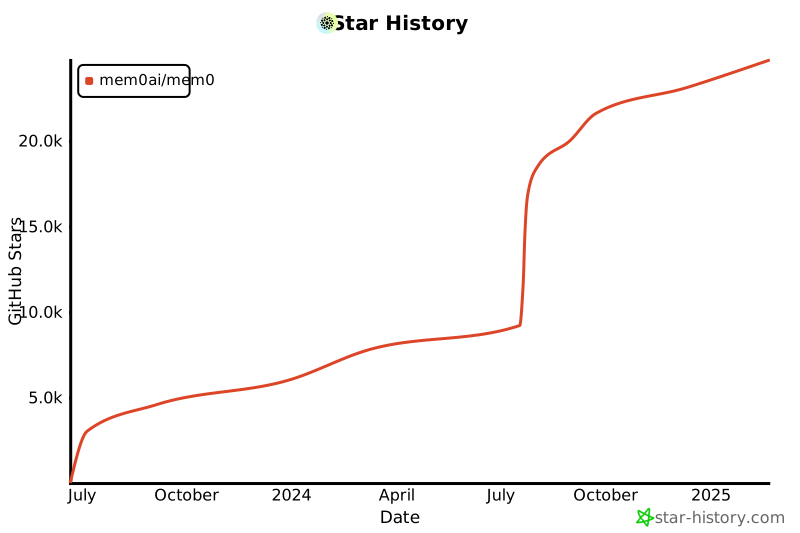](https://star-history.com/#mem0ai/mem0&Date)
|
||||
|
||||
## Support
|
||||
|
||||
Join our community for support and discussions. If you have any questions, feel free to reach out to us using one of the following methods:
|
||||
|
||||
- [Join our Discord](https://mem0.ai/discord)
|
||||
- [Follow us on Twitter](https://x.com/mem0ai)
|
||||
- [Email founders](mailto:founders@mem0.ai)
|
||||
|
||||
## Contributors
|
||||
|
||||
Join our [Discord community](https://mem0.ai/discord) to learn about memory management for AI agents and LLMs, and connect with Mem0 users and contributors. Share your ideas, questions, or feedback in our [GitHub Issues](https://github.com/mem0ai/mem0/issues).
|
||||
|
||||
We value and appreciate the contributions of our community. Special thanks to our contributors for helping us improve Mem0.
|
||||
|
||||
<a href="https://github.com/mem0ai/mem0/graphs/contributors">
|
||||
<img src="https://contrib.rocks/image?repo=mem0ai/mem0" />
|
||||
</a>
|
||||
|
||||
## Anonymous Telemetry
|
||||
## License
|
||||
|
||||
We collect anonymous usage metrics to enhance our package's quality and user experience. This includes data like feature usage frequency and system info, but never personal details. The data helps us prioritize improvements and ensure compatibility. If you wish to opt-out, set the environment variable `EC_TELEMETRY=false`. We prioritize data security and don't share this data externally.
|
||||
|
||||
## Citation
|
||||
|
||||
If you utilize this repository, please consider citing it with:
|
||||
|
||||
```
|
||||
@misc{embedchain,
|
||||
author = {Taranjeet Singh, Deshraj Yadav},
|
||||
title = {Embedchain: The Open Source RAG Framework},
|
||||
year = {2023},
|
||||
publisher = {GitHub},
|
||||
journal = {GitHub repository},
|
||||
howpublished = {\url{https://github.com/embedchain/embedchain}},
|
||||
}
|
||||
```
|
||||
This project is licensed under the Apache 2.0 License - see the [LICENSE](LICENSE) file for details.
|
||||
@@ -0,0 +1,40 @@
|
||||
# This example shows how to use vector config to use QDRANT CLOUD
|
||||
import os
|
||||
from dotenv import load_dotenv
|
||||
from mem0 import Memory
|
||||
|
||||
# Loading OpenAI API Key
|
||||
load_dotenv()
|
||||
OPENAI_API_KEY = os.environ.get('OPENAI_API_KEY')
|
||||
USER_ID = "test"
|
||||
quadrant_host="xx.gcp.cloud.qdrant.io"
|
||||
|
||||
# creating the config attributes
|
||||
collection_name="memory" # this is the collection I created in QDRANT cloud
|
||||
api_key=os.environ.get("QDRANT_API_KEY") # Getting the QDRANT api KEY
|
||||
host=quadrant_host
|
||||
port=6333 #Default port for QDRANT cloud
|
||||
|
||||
# Creating the config dict
|
||||
config = {
|
||||
"vector_store": {
|
||||
"provider": "qdrant",
|
||||
"config": {
|
||||
"collection_name": collection_name,
|
||||
"host": host,
|
||||
"port": port,
|
||||
"path": None,
|
||||
"api_key":api_key
|
||||
}
|
||||
}
|
||||
}
|
||||
|
||||
# this is the change, create the memory class using from config
|
||||
memory = Memory().from_config(config)
|
||||
|
||||
USER_DATA = """
|
||||
I am a strong believer in memory architecture.
|
||||
"""
|
||||
|
||||
response = memory.add(USER_DATA, user_id=USER_ID)
|
||||
print(response)
|
||||
@@ -0,0 +1,306 @@
|
||||
{
|
||||
"cells": [
|
||||
{
|
||||
"cell_type": "code",
|
||||
"source": [
|
||||
"!pip install mem0ai"
|
||||
],
|
||||
"metadata": {
|
||||
"id": "fu3euPKZsbaC"
|
||||
},
|
||||
"execution_count": null,
|
||||
"outputs": []
|
||||
},
|
||||
{
|
||||
"cell_type": "code",
|
||||
"execution_count": null,
|
||||
"metadata": {
|
||||
"id": "U2VC_0FElQid"
|
||||
},
|
||||
"outputs": [],
|
||||
"source": [
|
||||
"import os\n",
|
||||
"from openai import OpenAI\n",
|
||||
"from mem0 import MemoryClient\n",
|
||||
"from multion.client import MultiOn\n",
|
||||
"\n",
|
||||
"# Configuration\n",
|
||||
"OPENAI_API_KEY = 'sk-xxx' # Replace with your actual OpenAI API key\n",
|
||||
"MULTION_API_KEY = 'xx' # Replace with your actual MultiOn API key\n",
|
||||
"MEM0_API_KEY = 'xx' # Replace with your actual Mem0 API key\n",
|
||||
"USER_ID = \"test_travel_agent\"\n",
|
||||
"\n",
|
||||
"# Set up OpenAI API key\n",
|
||||
"os.environ['OPENAI_API_KEY'] = OPENAI_API_KEY\n",
|
||||
"\n",
|
||||
"# Initialize Mem0 and MultiOn\n",
|
||||
"memory = MemoryClient(api_key=MEM0_API_KEY)\n",
|
||||
"multion = MultiOn(api_key=MULTION_API_KEY)"
|
||||
]
|
||||
},
|
||||
{
|
||||
"cell_type": "code",
|
||||
"execution_count": null,
|
||||
"metadata": {
|
||||
"id": "sq-OdPHKlQie",
|
||||
"outputId": "1d605222-0bf5-4ac9-99b9-6059b502c20b"
|
||||
},
|
||||
"outputs": [
|
||||
{
|
||||
"data": {
|
||||
"text/plain": [
|
||||
"{'message': 'Memory added successfully!'}"
|
||||
]
|
||||
},
|
||||
"execution_count": 2,
|
||||
"metadata": {},
|
||||
"output_type": "execute_result"
|
||||
}
|
||||
],
|
||||
"source": [
|
||||
"# Add conversation to Mem0\n",
|
||||
"conversation = [\n",
|
||||
" {\n",
|
||||
" \"role\": \"user\",\n",
|
||||
" \"content\": \"What are the best travel destinations in the world?\"\n",
|
||||
" },\n",
|
||||
" {\n",
|
||||
" \"role\": \"assistant\",\n",
|
||||
" \"content\": \"Could you please specify your interests or the type of travel information you are looking for? This will help me find the most relevant information for you.\"\n",
|
||||
" },\n",
|
||||
" {\n",
|
||||
" \"role\": \"user\",\n",
|
||||
" \"content\": \"Sure, I want to travel to San Francisco.\"\n",
|
||||
" },\n",
|
||||
" {\n",
|
||||
" \"role\": \"assistant\",\n",
|
||||
" \"content\": \"\"\"\n",
|
||||
" Based on the information gathered from TripAdvisor, here are some popular attractions, activities, and travel tips for San Francisco:\n",
|
||||
"\n",
|
||||
" 1. **Golden Gate Bridge**: A must-see iconic landmark.\n",
|
||||
" 2. **Alcatraz Island**: Famous former prison offering tours.\n",
|
||||
" 3. **Fisherman's Wharf**: Popular tourist area with shops, restaurants, and sea lions.\n",
|
||||
" 4. **Chinatown**: The largest Chinatown outside of Asia.\n",
|
||||
" 5. **Golden Gate Park**: Large urban park with gardens, museums, and recreational activities.\n",
|
||||
" 6. **Cable Cars**: Historic streetcars offering a unique way to see the city.\n",
|
||||
" 7. **Exploratorium**: Interactive science museum.\n",
|
||||
" 8. **San Francisco Museum of Modern Art (SFMOMA)**: Modern and contemporary art museum.\n",
|
||||
" 9. **Lombard Street**: Known for its steep, one-block section with eight hairpin turns.\n",
|
||||
" 10. **Union Square**: Major shopping and cultural hub.\n",
|
||||
"\n",
|
||||
" Travel Tips:\n",
|
||||
" - **Weather**: San Francisco has a mild climate, but it can be foggy and windy. Dress in layers.\n",
|
||||
" - **Transportation**: Use public transportation like BART, Muni, and cable cars to get around.\n",
|
||||
" - **Safety**: Be aware of your surroundings, especially in crowded tourist areas.\n",
|
||||
" - **Dining**: Try local specialties like sourdough bread, seafood, and Mission-style burritos.\n",
|
||||
" \"\"\"\n",
|
||||
" },\n",
|
||||
" {\n",
|
||||
" \"role\": \"user\",\n",
|
||||
" \"content\": \"Show me hotels around Golden Gate Bridge.\"\n",
|
||||
" },\n",
|
||||
" {\n",
|
||||
" \"role\": \"assistant\",\n",
|
||||
" \"content\": \"\"\"\n",
|
||||
" The search results for hotels around Golden Gate Bridge in San Francisco include:\n",
|
||||
"\n",
|
||||
" 1. Hilton Hotels In San Francisco - Hotel Near Fishermans Wharf (hilton.com)\n",
|
||||
" 2. The 10 Closest Hotels to Golden Gate Bridge (tripadvisor.com)\n",
|
||||
" 3. Hotels near Golden Gate Bridge (expedia.com)\n",
|
||||
" 4. Hotels near Golden Gate Bridge (hotels.com)\n",
|
||||
" 5. Holiday Inn Express & Suites San Francisco Fishermans Wharf, an IHG Hotel $146 (1.8K) 3-star hotel Golden Gate Bridge • 3.5 mi DEAL 19% less than usual\n",
|
||||
" 6. Holiday Inn San Francisco-Golden Gateway, an IHG Hotel $151 (3.5K) 3-star hotel Golden Gate Bridge • 3.7 mi Casual hotel with dining, a bar & a pool\n",
|
||||
" 7. Hotel Zephyr San Francisco $159 (3.8K) 4-star hotel Golden Gate Bridge • 3.7 mi Nautical-themed lodging with bay views\n",
|
||||
" 8. Lodge at the Presidio\n",
|
||||
" 9. The Inn Above Tide\n",
|
||||
" 10. Cavallo Point\n",
|
||||
" 11. Casa Madrona Hotel and Spa\n",
|
||||
" 12. Cow Hollow Inn and Suites\n",
|
||||
" 13. Samesun San Francisco\n",
|
||||
" 14. Inn on Broadway\n",
|
||||
" 15. Coventry Motor Inn\n",
|
||||
" 16. HI San Francisco Fisherman's Wharf Hostel\n",
|
||||
" 17. Loews Regency San Francisco Hotel\n",
|
||||
" 18. Fairmont Heritage Place Ghirardelli Square\n",
|
||||
" 19. Hotel Drisco Pacific Heights\n",
|
||||
" 20. Travelodge by Wyndham Presidio San Francisco\n",
|
||||
" \"\"\"\n",
|
||||
" }\n",
|
||||
"]\n",
|
||||
"\n",
|
||||
"memory.add(conversation, user_id=USER_ID)\n"
|
||||
]
|
||||
},
|
||||
{
|
||||
"cell_type": "code",
|
||||
"execution_count": null,
|
||||
"metadata": {
|
||||
"id": "hO8z9aNTlQif"
|
||||
},
|
||||
"outputs": [],
|
||||
"source": [
|
||||
"def get_travel_info(question, use_memory=True):\n",
|
||||
" \"\"\"\n",
|
||||
" Get travel information based on user's question and optionally their preferences from memory.\n",
|
||||
"\n",
|
||||
" \"\"\"\n",
|
||||
" if use_memory:\n",
|
||||
" previous_memories = memory.search(question, user_id=USER_ID)\n",
|
||||
" relevant_memories_text = \"\"\n",
|
||||
" if previous_memories:\n",
|
||||
" print(\"Using previous memories to enhance the search...\")\n",
|
||||
" relevant_memories_text = '\\n'.join(mem[\"memory\"] for mem in previous_memories)\n",
|
||||
"\n",
|
||||
" command = \"Find travel information based on my interests:\"\n",
|
||||
" prompt = f\"{command}\\n Question: {question} \\n My preferences: {relevant_memories_text}\"\n",
|
||||
" else:\n",
|
||||
" command = \"Find travel information based on my interests:\"\n",
|
||||
" prompt = f\"{command}\\n Question: {question}\"\n",
|
||||
"\n",
|
||||
"\n",
|
||||
" print(\"Searching for travel information...\")\n",
|
||||
" browse_result = multion.browse(cmd=prompt)\n",
|
||||
" return browse_result.message"
|
||||
]
|
||||
},
|
||||
{
|
||||
"cell_type": "markdown",
|
||||
"metadata": {
|
||||
"id": "Wp2xpzMrlQig"
|
||||
},
|
||||
"source": [
|
||||
"## Example 1"
|
||||
]
|
||||
},
|
||||
{
|
||||
"cell_type": "code",
|
||||
"execution_count": null,
|
||||
"metadata": {
|
||||
"id": "bPRPwqsplQig"
|
||||
},
|
||||
"outputs": [],
|
||||
"source": [
|
||||
"question = \"Show me flight details for it.\"\n",
|
||||
"answer_without_memory = get_travel_info(question, use_memory=False)\n",
|
||||
"answer_with_memory = get_travel_info(question, use_memory=True)"
|
||||
]
|
||||
},
|
||||
{
|
||||
"cell_type": "markdown",
|
||||
"metadata": {
|
||||
"id": "a76ifa2HlQig"
|
||||
},
|
||||
"source": [
|
||||
"| Without Memory | With Memory |\n",
|
||||
"|--------------------------------------------------------------------------------------------------------------------------------------------------------------------------------------------------------------------------------------------|--------------------------------------------------------------------------------------------------------------------------------------------------------------------------------------------------------------------------------------------------------------------------------------|\n",
|
||||
"| I have performed a Google search for \"flight details\" and reviewed the search results. Here are some relevant links and information: | Memorizing the following information: Flight details for San Francisco: |\n",
|
||||
"| 1. **FlightStats Global Flight Tracker** - Track the real-time flight status of your flight. See if your flight has been delayed or cancelled and track the live status. <br> [Flight Tracker - FlightStats](https://www.flightstats.com/flight-tracker/search) | 1. Prices from $232. Depart Thursday, August 22. Return Thursday, August 29. <br> 2. Prices from $216. Depart Friday, August 23. Return Friday, August 30. <br> 3. Prices from $236. Depart Saturday, August 24. Return Saturday, August 31. <br> 4. Prices from $215. Depart Sunday, August 25. Return Sunday, September 1. |\n",
|
||||
"| 2. **FlightAware - Flight Tracker** - Track live flights worldwide, see flight cancellations, and browse by airport. <br> [FlightAware - Flight Tracker](https://www.flightaware.com) | 5. Prices from $218. Depart Monday, August 26. Return Monday, September 2. <br> 6. Prices from $211. Depart Tuesday, August 27. Return Tuesday, September 3. <br> 7. Prices from $198. Depart Wednesday, August 28. Return Wednesday, September 4. <br> 8. Prices from $218. Depart Thursday, August 29. Return Thursday, September 5. |\n",
|
||||
"| 3. **Google Flights** - Show flights based on your search. <br> [Google Flights](https://www.google.com/flights) | 9. Prices from $194. Depart Friday, August 30. Return Friday, September 6. <br> 10. Prices from $218. Depart Saturday, August 31. Return Saturday, September 7. <br> 11. Prices from $212. Depart Sunday, September 1. Return Sunday, September 8. <br> 12. Prices from $247. Depart Monday, September 2. Return Monday, September 9. |\n",
|
||||
"| | 13. Prices from $212. Depart Tuesday, September 3. Return Tuesday, September 10. <br> 14. Prices from $203. Depart Wednesday, September 4. Return Wednesday, September 11. <br> 15. Prices from $242. Depart Thursday, September 5. Return Thursday, September 12. <br> 16. Prices from $191. Depart Friday, September 6. Return Friday, September 13. |\n",
|
||||
"| | 17. Prices from $215. Depart Saturday, September 7. Return Saturday, September 14. <br> 18. Prices from $229. Depart Sunday, September 8. Return Sunday, September 15. <br> 19. Prices from $183. Depart Monday, September 9. Return Monday, September 16. <br> 65. Prices from $194. Depart Friday, October 25. Return Friday, November 1. |\n",
|
||||
"| | 66. Prices from $205. Depart Saturday, October 26. Return Saturday, November 2. <br> 67. Prices from $241. Depart Sunday, October 27. Return Sunday, November 3. |\n"
|
||||
]
|
||||
},
|
||||
{
|
||||
"cell_type": "markdown",
|
||||
"metadata": {
|
||||
"id": "0cXpiAwMlQig"
|
||||
},
|
||||
"source": [
|
||||
"## Example 2"
|
||||
]
|
||||
},
|
||||
{
|
||||
"cell_type": "code",
|
||||
"execution_count": null,
|
||||
"metadata": {
|
||||
"id": "LpprKfpslQih"
|
||||
},
|
||||
"outputs": [],
|
||||
"source": [
|
||||
"question = \"What places to visit there?\"\n",
|
||||
"answer_without_memory = get_travel_info(question, use_memory=False)\n",
|
||||
"answer_with_memory = get_travel_info(question, use_memory=True)"
|
||||
]
|
||||
},
|
||||
{
|
||||
"cell_type": "markdown",
|
||||
"metadata": {
|
||||
"id": "kpfjeY1_lQih"
|
||||
},
|
||||
"source": [
|
||||
"| Without Memory | With Memory |\n",
|
||||
"|---------------------------------------------------------------------------------------------------------------------------------------------------------------------------------------------------------------------------------------------|--------------------------------------------------------------------------------------------------------------------------------------------------------------------------------------------------------------------------------------------------------------------------------------------------------|\n",
|
||||
"| Based on the information gathered, here are some top travel destinations to consider visiting: | Based on the information gathered, here are some top places to visit in San Francisco: |\n",
|
||||
"| 1. **Paris**: Known for its iconic attractions like the Eiffel Tower and the Louvre, Paris offers quaint cafes, trendy shopping districts, and beautiful Haussmann architecture. It's a city where you can always discover something new with each visit. | 1. **Golden Gate Bridge** - An iconic symbol of San Francisco, perfect for walking, biking, or simply enjoying the view. <br> 2. **Alcatraz Island** - The historic former prison offers tours and insights into its storied past. <br> 3. **Fisherman's Wharf** - A bustling waterfront area known for its seafood, shopping, and attractions like Pier 39. <br> 4. **Golden Gate Park** - A large urban park with gardens, museums, and recreational activities. <br> 5. **Chinatown San Francisco** - One of the oldest and most famous Chinatowns in North America, offering unique shops and delicious food. <br> 6. **Coit Tower** - Offers panoramic views of the city and murals depicting San Francisco's history. <br> 7. **Lands End** - A beautiful coastal trail with stunning views of the Pacific Ocean and the Golden Gate Bridge. <br> 8. **Palace of Fine Arts** - A picturesque structure and park, perfect for a leisurely stroll or photo opportunities. <br> 9. **Crissy Field & The Presidio Tunnel Tops** - Great for outdoor activities and scenic views of the bay. |\n",
|
||||
"| 2. **Bora Bora**: This small island in French Polynesia is famous for its stunning turquoise waters, luxurious overwater bungalows, and vibrant coral reefs. It's a popular destination for honeymooners and those seeking a tropical paradise. | |\n",
|
||||
"| 3. **Glacier National Park**: Located in Montana, USA, this park is known for its breathtaking landscapes, including rugged mountains, pristine lakes, and diverse wildlife. It's a haven for outdoor enthusiasts and hikers. | |\n",
|
||||
"| 4. **Rome**: The capital of Italy, Rome is rich in history and culture, featuring landmarks such as the Colosseum, the Vatican, and the Pantheon. It's a city where ancient history meets modern life. | |\n",
|
||||
"| 5. **Swiss Alps**: Renowned for their stunning natural beauty, the Swiss Alps offer opportunities for skiing, hiking, and enjoying picturesque mountain villages. | |\n",
|
||||
"| 6. **Maui**: One of Hawaii's most popular islands, Maui is known for its beautiful beaches, lush rainforests, and the scenic Hana Highway. It's a great destination for both relaxation and adventure. | |\n",
|
||||
"| 7. **London, England**: A vibrant city with a mix of historical landmarks like the Tower of London and modern attractions such as the London Eye. London offers diverse cultural experiences, world-class museums, and a bustling nightlife. | |\n",
|
||||
"| 8. **Maldives**: This tropical paradise in the Indian Ocean is famous for its crystal-clear waters, luxurious resorts, and abundant marine life. It's an ideal destination for snorkeling, diving, and relaxation. | |\n",
|
||||
"| 9. **Turks & Caicos**: Known for its pristine beaches and turquoise waters, this Caribbean destination is perfect for water sports, beach lounging, and exploring coral reefs. | |\n",
|
||||
"| 10. **Tokyo**: Japan's bustling capital offers a unique blend of traditional and modern attractions, from ancient temples to futuristic skyscrapers. Tokyo is also known for its vibrant food scene and shopping districts. | |\n"
|
||||
]
|
||||
},
|
||||
{
|
||||
"cell_type": "markdown",
|
||||
"metadata": {
|
||||
"id": "XdpkcMrclQih"
|
||||
},
|
||||
"source": [
|
||||
"## Example 3"
|
||||
]
|
||||
},
|
||||
{
|
||||
"cell_type": "code",
|
||||
"execution_count": null,
|
||||
"metadata": {
|
||||
"id": "Nntl2FxulQih"
|
||||
},
|
||||
"outputs": [],
|
||||
"source": [
|
||||
"question = \"What the weather there?\"\n",
|
||||
"answer_without_memory = get_travel_info(question, use_memory=False)\n",
|
||||
"answer_with_memory = get_travel_info(question, use_memory=True)"
|
||||
]
|
||||
},
|
||||
{
|
||||
"cell_type": "markdown",
|
||||
"metadata": {
|
||||
"id": "yt2pj1irlQih"
|
||||
},
|
||||
"source": [
|
||||
"| Without Memory | With Memory |\n",
|
||||
"|---------------------------------------------------------------------------------------------------------------------------------------------------------------------------------------------------------------------------------------------|--------------------------------------------------------------------------------------------------------------------------------------------------------------------------------------------------------------------------------------------------------------------------------------------------------|\n",
|
||||
"| The current weather in Paris is light rain with a temperature of 67°F. The precipitation is at 50%, humidity is 95%, and the wind speed is 5 mph. | The current weather in San Francisco is as follows: <br> - **Temperature**: 59°F <br> - **Condition**: Clear with periodic clouds <br> - **Precipitation**: 3% <br> - **Humidity**: 87% <br> - **Wind**: 12 mph |\n"
|
||||
]
|
||||
}
|
||||
],
|
||||
"metadata": {
|
||||
"kernelspec": {
|
||||
"display_name": ".venv",
|
||||
"language": "python",
|
||||
"name": "python3"
|
||||
},
|
||||
"language_info": {
|
||||
"codemirror_mode": {
|
||||
"name": "ipython",
|
||||
"version": 3
|
||||
},
|
||||
"file_extension": ".py",
|
||||
"mimetype": "text/x-python",
|
||||
"name": "python",
|
||||
"nbconvert_exporter": "python",
|
||||
"pygments_lexer": "ipython3",
|
||||
"version": "3.12.3"
|
||||
},
|
||||
"colab": {
|
||||
"provenance": []
|
||||
}
|
||||
},
|
||||
"nbformat": 4,
|
||||
"nbformat_minor": 0
|
||||
}
|
||||
@@ -1,7 +1,14 @@
|
||||
# Contributing to embedchain docs
|
||||
# Mintlify Starter Kit
|
||||
|
||||
Click on `Use this template` to copy the Mintlify starter kit. The starter kit contains examples including
|
||||
|
||||
### 👩💻 Development
|
||||
- Guide pages
|
||||
- Navigation
|
||||
- Customizations
|
||||
- API Reference pages
|
||||
- Use of popular components
|
||||
|
||||
### Development
|
||||
|
||||
Install the [Mintlify CLI](https://www.npmjs.com/package/mintlify) to preview the documentation changes locally. To install, use the following command
|
||||
|
||||
@@ -15,9 +22,9 @@ Run the following command at the root of your documentation (where mint.json is)
|
||||
mintlify dev
|
||||
```
|
||||
|
||||
### 😎 Publishing Changes
|
||||
### Publishing Changes
|
||||
|
||||
Changes will be deployed to production automatically after your PR is merged to the main branch.
|
||||
Install our Github App to auto propagate changes from your repo to your deployment. Changes will be deployed to production automatically after pushing to the default branch. Find the link to install on your dashboard.
|
||||
|
||||
#### Troubleshooting
|
||||
|
||||
|
||||
@@ -1,11 +1,11 @@
|
||||
<CardGroup cols={3}>
|
||||
<Card title="Talk to founders" icon="calendar" href="https://cal.com/taranjeetio/ec">
|
||||
Schedule a call
|
||||
<Card title="Discord" icon="discord" href="https://mem0.ai/discord" color="#7289DA">
|
||||
Join our community
|
||||
</Card>
|
||||
<Card title="Slack" icon="slack" href="https://embedchain.ai/slack" color="#4A154B">
|
||||
Join our slack community
|
||||
<Card title="GitHub" icon="github" href="https://github.com/mem0ai/mem0">
|
||||
Star us on GitHub
|
||||
</Card>
|
||||
<Card title="Discord" icon="discord" href="https://discord.gg/6PzXDgEjG5" color="#7289DA">
|
||||
Join our discord community
|
||||
<Card title="Support" icon="calendar" href="mailto:taranjeet@mem0.ai">
|
||||
Talk to founders
|
||||
</Card>
|
||||
</CardGroup>
|
||||
|
||||
@@ -0,0 +1,57 @@
|
||||
## What is Config?
|
||||
|
||||
Config in mem0 is a dictionary that specifies the settings for your embedding models. It allows you to customize the behavior and connection details of your chosen embedder.
|
||||
|
||||
## How to Define Config
|
||||
|
||||
The config is defined as a Python dictionary with two main keys:
|
||||
- `embedder`: Specifies the embedder provider and its configuration
|
||||
- `provider`: The name of the embedder (e.g., "openai", "ollama")
|
||||
- `config`: A nested dictionary containing provider-specific settings
|
||||
|
||||
## How to Use Config
|
||||
|
||||
Here's a general example of how to use the config with mem0:
|
||||
|
||||
```python
|
||||
import os
|
||||
from mem0 import Memory
|
||||
|
||||
os.environ["OPENAI_API_KEY"] = "sk-xx"
|
||||
|
||||
config = {
|
||||
"embedder": {
|
||||
"provider": "your_chosen_provider",
|
||||
"config": {
|
||||
# Provider-specific settings go here
|
||||
}
|
||||
}
|
||||
}
|
||||
|
||||
m = Memory.from_config(config)
|
||||
m.add("Your text here", user_id="user", metadata={"category": "example"})
|
||||
```
|
||||
|
||||
## Why is Config Needed?
|
||||
|
||||
Config is essential for:
|
||||
1. Specifying which embedding model to use.
|
||||
2. Providing necessary connection details (e.g., model, api_key, embedding_dims).
|
||||
3. Ensuring proper initialization and connection to your chosen embedder.
|
||||
|
||||
## Master List of All Params in Config
|
||||
|
||||
Here's a comprehensive list of all parameters that can be used across different embedders:
|
||||
|
||||
| Parameter | Description |
|
||||
|-----------|-------------|
|
||||
| `model` | Embedding model to use |
|
||||
| `api_key` | API key of the provider |
|
||||
| `embedding_dims` | Dimensions of the embedding model |
|
||||
| `ollama_base_url` | Base URL for the Ollama embedding model |
|
||||
| `model_kwargs` | Key-Value arguments for the Huggingface embedding model |
|
||||
|
||||
|
||||
## Supported Embedding Models
|
||||
|
||||
For detailed information on configuring specific embedders, please visit the [Embedding Models](./models) section. There you'll find information for each supported embedder with provider-specific usage examples and configuration details.
|
||||
@@ -0,0 +1,34 @@
|
||||
To use Azure OpenAI embedding models, set the `AZURE_OPENAI_API_KEY` environment variable. You can obtain the Azure OpenAI API key from the Azure.
|
||||
|
||||
### Usage
|
||||
|
||||
```python
|
||||
import os
|
||||
from mem0 import Memory
|
||||
|
||||
os.environ["OPENAI_API_KEY"] = "your_api_key"
|
||||
os.environ["AZURE_OPENAI_API_KEY"] = "your_api_key"
|
||||
|
||||
|
||||
config = {
|
||||
"embedder": {
|
||||
"provider": "azure_openai",
|
||||
"config": {
|
||||
"model": "text-embedding-3-large"
|
||||
}
|
||||
}
|
||||
}
|
||||
|
||||
m = Memory.from_config(config)
|
||||
m.add("I'm visiting Paris", user_id="john")
|
||||
```
|
||||
|
||||
### Config
|
||||
|
||||
Here are the parameters available for configuring Azure OpenAI embedder:
|
||||
|
||||
| Parameter | Description | Default Value |
|
||||
| --- | --- | --- |
|
||||
| `model` | The name of the embedding model to use | `text-embedding-3-small` |
|
||||
| `embedding_dims` | Dimensions of the embedding model | `1536` |
|
||||
| `api_key` | The Azure OpenAI API key | `None` |
|
||||
@@ -0,0 +1,32 @@
|
||||
You can use embedding models from Huggingface to run Mem0 locally.
|
||||
|
||||
### Usage
|
||||
|
||||
```python
|
||||
import os
|
||||
from mem0 import Memory
|
||||
|
||||
os.environ["OPENAI_API_KEY"] = "your_api_key"
|
||||
|
||||
config = {
|
||||
"embedder": {
|
||||
"provider": "huggingface",
|
||||
"config": {
|
||||
"model": "multi-qa-MiniLM-L6-cos-v1"
|
||||
}
|
||||
}
|
||||
}
|
||||
|
||||
m = Memory.from_config(config)
|
||||
m.add("I'm visiting Paris", user_id="john")
|
||||
```
|
||||
|
||||
### Config
|
||||
|
||||
Here are the parameters available for configuring Huggingface embedder:
|
||||
|
||||
| Parameter | Description | Default Value |
|
||||
| --- | --- | --- |
|
||||
| `model` | The name of the model to use | `multi-qa-MiniLM-L6-cos-v1` |
|
||||
| `embedding_dims` | Dimensions of the embedding model | `selected_model_dimensions` |
|
||||
| `model_kwargs` | Additional arguments for the model | `None` |
|
||||
@@ -0,0 +1,32 @@
|
||||
You can use embedding models from Ollama to run Mem0 locally.
|
||||
|
||||
### Usage
|
||||
|
||||
```python
|
||||
import os
|
||||
from mem0 import Memory
|
||||
|
||||
os.environ["OPENAI_API_KEY"] = "your_api_key"
|
||||
|
||||
config = {
|
||||
"embedder": {
|
||||
"provider": "ollama",
|
||||
"config": {
|
||||
"model": "mxbai-embed-large"
|
||||
}
|
||||
}
|
||||
}
|
||||
|
||||
m = Memory.from_config(config)
|
||||
m.add("I'm visiting Paris", user_id="john")
|
||||
```
|
||||
|
||||
### Config
|
||||
|
||||
Here are the parameters available for configuring Ollama embedder:
|
||||
|
||||
| Parameter | Description | Default Value |
|
||||
| --- | --- | --- |
|
||||
| `model` | The name of the OpenAI model to use | `nomic-embed-text` |
|
||||
| `embedding_dims` | Dimensions of the embedding model | `512` |
|
||||
| `ollama_base_url` | Base URL for ollama connection | `None` |
|
||||
@@ -0,0 +1,32 @@
|
||||
To use OpenAI embedding models, set the `OPENAI_API_KEY` environment variable. You can obtain the OpenAI API key from the [OpenAI Platform](https://platform.openai.com/account/api-keys).
|
||||
|
||||
### Usage
|
||||
|
||||
```python
|
||||
import os
|
||||
from mem0 import Memory
|
||||
|
||||
os.environ["OPENAI_API_KEY"] = "your_api_key"
|
||||
|
||||
config = {
|
||||
"embedder": {
|
||||
"provider": "openai",
|
||||
"config": {
|
||||
"model": "text-embedding-3-large"
|
||||
}
|
||||
}
|
||||
}
|
||||
|
||||
m = Memory.from_config(config)
|
||||
m.add("I'm visiting Paris", user_id="john")
|
||||
```
|
||||
|
||||
### Config
|
||||
|
||||
Here are the parameters available for configuring OpenAI embedder:
|
||||
|
||||
| Parameter | Description | Default Value |
|
||||
| --- | --- | --- |
|
||||
| `model` | The name of the embedding model to use | `text-embedding-3-small` |
|
||||
| `embedding_dims` | Dimensions of the embedding model | `1536` |
|
||||
| `api_key` | The OpenAI API key | `None` |
|
||||
@@ -0,0 +1,15 @@
|
||||
---
|
||||
title: Overview
|
||||
---
|
||||
|
||||
Mem0 offers support for various embedding models, allowing users to choose the one that best suits their needs.
|
||||
|
||||
## Usage
|
||||
|
||||
To utilize a embedder, you must provide a configuration to customize its usage. If no configuration is supplied, a default configuration will be applied, and `OpenAI` will be used as the embedder.
|
||||
|
||||
For a comprehensive list of available parameters for embedder configuration, please refer to [Config](./config).
|
||||
|
||||
To view all supported embedders, visit the [Supported embedders](./models).
|
||||
|
||||
|
||||
@@ -0,0 +1,66 @@
|
||||
## What is Config?
|
||||
|
||||
Config in mem0 is a dictionary that specifies the settings for your llms. It allows you to customize the behavior and connection details of your chosen llm.
|
||||
|
||||
## How to Define Config
|
||||
|
||||
The config is defined as a Python dictionary with two main keys:
|
||||
- `llm`: Specifies the llm provider and its configuration
|
||||
- `provider`: The name of the llm (e.g., "openai", "groq")
|
||||
- `config`: A nested dictionary containing provider-specific settings
|
||||
|
||||
## How to Use Config
|
||||
|
||||
Here's a general example of how to use the config with mem0:
|
||||
|
||||
```python
|
||||
import os
|
||||
from mem0 import Memory
|
||||
|
||||
os.environ["OPENAI_API_KEY"] = "sk-xx" # for embedder
|
||||
|
||||
config = {
|
||||
"llm": {
|
||||
"provider": "your_chosen_provider",
|
||||
"config": {
|
||||
# Provider-specific settings go here
|
||||
}
|
||||
}
|
||||
}
|
||||
|
||||
m = Memory.from_config(config)
|
||||
m.add("Your text here", user_id="user", metadata={"category": "example"})
|
||||
```
|
||||
|
||||
## Why is Config Needed?
|
||||
|
||||
Config is essential for:
|
||||
1. Specifying which llm to use.
|
||||
2. Providing necessary connection details (e.g., model, api_key, temperature).
|
||||
3. Ensuring proper initialization and connection to your chosen llm.
|
||||
|
||||
## Master List of All Params in Config
|
||||
|
||||
Here's a comprehensive list of all parameters that can be used across different llms:
|
||||
|
||||
Here's the table based on the provided parameters:
|
||||
|
||||
| Parameter | Description | Provider |
|
||||
|----------------------|-----------------------------------------------|-------------------|
|
||||
| `model` | Embedding model to use | All |
|
||||
| `temperature` | Temperature of the model | All |
|
||||
| `api_key` | API key to use | All |
|
||||
| `max_tokens` | Tokens to generate | All |
|
||||
| `top_p` | Probability threshold for nucleus sampling | All |
|
||||
| `top_k` | Number of highest probability tokens to keep | All |
|
||||
| `models` | List of models | Openrouter |
|
||||
| `route` | Routing strategy | Openrouter |
|
||||
| `openrouter_base_url`| Base URL for Openrouter API | Openrouter |
|
||||
| `site_url` | Site URL | Openrouter |
|
||||
| `app_name` | Application name | Openrouter |
|
||||
| `ollama_base_url` | Base URL for Ollama API | Ollama |
|
||||
|
||||
|
||||
## Supported LLMs
|
||||
|
||||
For detailed information on configuring specific llms, please visit the [LLMs](./models) section. There you'll find information for each supported llm with provider-specific usage examples and configuration details.
|
||||
@@ -0,0 +1,29 @@
|
||||
To use anthropic's models, please set the `ANTHROPIC_API_KEY` which you find on their [Account Settings Page](https://console.anthropic.com/account/keys).
|
||||
|
||||
## Usage
|
||||
|
||||
```python
|
||||
import os
|
||||
from mem0 import Memory
|
||||
|
||||
os.environ["OPENAI_API_KEY"] = "your-api-key" # used for embedding model
|
||||
os.environ["ANTHROPIC_API_KEY"] = "your-api-key"
|
||||
|
||||
config = {
|
||||
"llm": {
|
||||
"provider": "litellm",
|
||||
"config": {
|
||||
"model": "claude-3-opus-20240229",
|
||||
"temperature": 0.1,
|
||||
"max_tokens": 2000,
|
||||
}
|
||||
}
|
||||
}
|
||||
|
||||
m = Memory.from_config(config)
|
||||
m.add("Likes to play cricket on weekends", user_id="alice", metadata={"category": "hobbies"})
|
||||
```
|
||||
|
||||
## Config
|
||||
|
||||
All available parameters for the `anthropic` config are present in [Master List of All Params in Config](../config).
|
||||
@@ -0,0 +1,34 @@
|
||||
### Setup
|
||||
- Before using the AWS Bedrock LLM, make sure you have the appropriate model access from [Bedrock Console](https://us-east-1.console.aws.amazon.com/bedrock/home?region=us-east-1#/modelaccess).
|
||||
- You will also need to authenticate the `boto3` client by using a method in the [AWS documentation](https://boto3.amazonaws.com/v1/documentation/api/latest/guide/credentials.html#configuring-credentials)
|
||||
- You will have to export `AWS_REGION`, `AWS_ACCESS_KEY`, and `AWS_SECRET_ACCESS_KEY` to set environment variables.
|
||||
|
||||
### Usage
|
||||
|
||||
```python
|
||||
import os
|
||||
from mem0 import Memory
|
||||
|
||||
os.environ["OPENAI_API_KEY"] = "your-api-key" # used for embedding model
|
||||
os.environ['AWS_REGION'] = 'us-east-1'
|
||||
os.environ["AWS_ACCESS_KEY"] = "xx"
|
||||
os.environ["AWS_SECRET_ACCESS_KEY"] = "xx"
|
||||
|
||||
config = {
|
||||
"llm": {
|
||||
"provider": "aws_bedrock",
|
||||
"config": {
|
||||
"model": "arn:aws:bedrock:us-east-1:123456789012:model/your-model-name",
|
||||
"temperature": 0.2,
|
||||
"max_tokens": 1500,
|
||||
}
|
||||
}
|
||||
}
|
||||
|
||||
m = Memory.from_config(config)
|
||||
m.add("Likes to play cricket on weekends", user_id="alice", metadata={"category": "hobbies"})
|
||||
```
|
||||
|
||||
### Config
|
||||
|
||||
All available parameters for the `aws_bedrock` config are present in [Master List of All Params in Config](../config).
|
||||
@@ -0,0 +1,30 @@
|
||||
To use Azure OpenAI models, you have to set the `AZURE_OPENAI_API_KEY`, `AZURE_OPENAI_ENDPOINT`, and `OPENAI_API_VERSION` environment variables. You can obtain the Azure API key from the [Azure](https://azure.microsoft.com/).
|
||||
|
||||
## Usage
|
||||
|
||||
```python
|
||||
import os
|
||||
from mem0 import Memory
|
||||
|
||||
os.environ["AZURE_OPENAI_API_KEY"] = "your-api-key"
|
||||
os.environ["AZURE_OPENAI_ENDPOINT"] = "your-api-base-url"
|
||||
os.environ["OPENAI_API_VERSION"] = "version-to-use"
|
||||
|
||||
config = {
|
||||
"llm": {
|
||||
"provider": "azure_openai",
|
||||
"config": {
|
||||
"model": "your-deployment-name",
|
||||
"temperature": 0.1,
|
||||
"max_tokens": 2000,
|
||||
}
|
||||
}
|
||||
}
|
||||
|
||||
m = Memory.from_config(config)
|
||||
m.add("Likes to play cricket on weekends", user_id="alice", metadata={"category": "hobbies"})
|
||||
```
|
||||
|
||||
## Config
|
||||
|
||||
All available parameters for the `azure_openai` config are present in [Master List of All Params in Config](../config).
|
||||
@@ -0,0 +1,29 @@
|
||||
To use Google AI model, you have to set the `GOOGLE_API_KEY` environment variable. You can obtain the Google API key from the [Google Maker Suite](https://makersuite.google.com/app/apikey)
|
||||
|
||||
## Usage
|
||||
|
||||
```python
|
||||
import os
|
||||
from mem0 import Memory
|
||||
|
||||
os.environ["OPENAI_API_KEY"] = "your-api-key" # used for embedding model
|
||||
os.environ["GEMINI_API_KEY"] = "your-api-key"
|
||||
|
||||
config = {
|
||||
"llm": {
|
||||
"provider": "litellm",
|
||||
"config": {
|
||||
"model": "gemini/gemini-pro",
|
||||
"temperature": 0.2,
|
||||
"max_tokens": 1500,
|
||||
}
|
||||
}
|
||||
}
|
||||
|
||||
m = Memory.from_config(config)
|
||||
m.add("Likes to play cricket on weekends", user_id="alice", metadata={"category": "hobbies"})
|
||||
```
|
||||
|
||||
## Config
|
||||
|
||||
All available parameters for the `litellm` config are present in [Master List of All Params in Config](../config).
|
||||
@@ -0,0 +1,31 @@
|
||||
[Groq](https://groq.com/) is the creator of the world's first Language Processing Unit (LPU), providing exceptional speed performance for AI workloads running on their LPU Inference Engine.
|
||||
|
||||
In order to use LLMs from Groq, go to their [platform](https://console.groq.com/keys) and get the API key. Set the API key as `GROQ_API_KEY` environment variable to use the model as given below in the example.
|
||||
|
||||
## Usage
|
||||
|
||||
```python
|
||||
import os
|
||||
from mem0 import Memory
|
||||
|
||||
os.environ["OPENAI_API_KEY"] = "your-api-key" # used for embedding model
|
||||
os.environ["GROQ_API_KEY"] = "your-api-key"
|
||||
|
||||
config = {
|
||||
"llm": {
|
||||
"provider": "groq",
|
||||
"config": {
|
||||
"model": "mixtral-8x7b-32768",
|
||||
"temperature": 0.1,
|
||||
"max_tokens": 1000,
|
||||
}
|
||||
}
|
||||
}
|
||||
|
||||
m = Memory.from_config(config)
|
||||
m.add("Likes to play cricket on weekends", user_id="alice", metadata={"category": "hobbies"})
|
||||
```
|
||||
|
||||
## Config
|
||||
|
||||
All available parameters for the `groq` config are present in [Master List of All Params in Config](../config).
|
||||
@@ -0,0 +1,28 @@
|
||||
[Litellm](https://litellm.vercel.app/docs/) is compatible with over 100 large language models (LLMs), all using a standardized input/output format. You can explore the [available models](https://litellm.vercel.app/docs/providers) to use with Litellm. Ensure you set the `API_KEY` for the model you choose to use.
|
||||
|
||||
## Usage
|
||||
|
||||
```python
|
||||
import os
|
||||
from mem0 import Memory
|
||||
|
||||
os.environ["OPENAI_API_KEY"] = "your-api-key"
|
||||
|
||||
config = {
|
||||
"llm": {
|
||||
"provider": "litellm",
|
||||
"config": {
|
||||
"model": "gpt-3.5-turbo",
|
||||
"temperature": 0.2,
|
||||
"max_tokens": 1500,
|
||||
}
|
||||
}
|
||||
}
|
||||
|
||||
m = Memory.from_config(config)
|
||||
m.add("Likes to play cricket on weekends", user_id="alice", metadata={"category": "hobbies"})
|
||||
```
|
||||
|
||||
## Config
|
||||
|
||||
All available parameters for the `litellm` config are present in [Master List of All Params in Config](../config).
|
||||
@@ -0,0 +1,29 @@
|
||||
To use mistral's models, please Obtain the Mistral AI api key from their [console](https://console.mistral.ai/). Set the `MISTRAL_API_KEY` environment variable to use the model as given below in the example.
|
||||
|
||||
## Usage
|
||||
|
||||
```python
|
||||
import os
|
||||
from mem0 import Memory
|
||||
|
||||
os.environ["OPENAI_API_KEY"] = "your-api-key" # used for embedding model
|
||||
os.environ["MISTRAL_API_KEY"] = "your-api-key"
|
||||
|
||||
config = {
|
||||
"llm": {
|
||||
"provider": "litellm",
|
||||
"config": {
|
||||
"model": "open-mixtral-8x7b",
|
||||
"temperature": 0.1,
|
||||
"max_tokens": 2000,
|
||||
}
|
||||
}
|
||||
}
|
||||
|
||||
m = Memory.from_config(config)
|
||||
m.add("Likes to play cricket on weekends", user_id="alice", metadata={"category": "hobbies"})
|
||||
```
|
||||
|
||||
## Config
|
||||
|
||||
All available parameters for the `litellm` config are present in [Master List of All Params in Config](../config).
|
||||
@@ -0,0 +1,28 @@
|
||||
You can use LLMs from Ollama to run Mem0 locally. These [models](https://ollama.com/search?c=tools) support tool support.
|
||||
|
||||
## Usage
|
||||
|
||||
```python
|
||||
import os
|
||||
from mem0 import Memory
|
||||
|
||||
os.environ["OPENAI_API_KEY"] = "your-api-key" # for embedder
|
||||
|
||||
config = {
|
||||
"llm": {
|
||||
"provider": "ollama",
|
||||
"config": {
|
||||
"model": "mixtral:8x7b",
|
||||
"temperature": 0.1,
|
||||
"max_tokens": 2000,
|
||||
}
|
||||
}
|
||||
}
|
||||
|
||||
m = Memory.from_config(config)
|
||||
m.add("Likes to play cricket on weekends", user_id="alice", metadata={"category": "hobbies"})
|
||||
```
|
||||
|
||||
## Config
|
||||
|
||||
All available parameters for the `ollama` config are present in [Master List of All Params in Config](../config).
|
||||
@@ -0,0 +1,39 @@
|
||||
To use OpenAI LLM models, you have to set the `OPENAI_API_KEY` environment variable. You can obtain the OpenAI API key from the [OpenAI Platform](https://platform.openai.com/account/api-keys).
|
||||
|
||||
## Usage
|
||||
|
||||
```python
|
||||
import os
|
||||
from mem0 import Memory
|
||||
|
||||
os.environ["OPENAI_API_KEY"] = "your-api-key"
|
||||
|
||||
config = {
|
||||
"llm": {
|
||||
"provider": "openai",
|
||||
"config": {
|
||||
"model": "gpt-4o",
|
||||
"temperature": 0.2,
|
||||
"max_tokens": 1500,
|
||||
}
|
||||
}
|
||||
}
|
||||
|
||||
# Use Openrouter by passing it's api key
|
||||
# os.environ["OPENROUTER_API_KEY"] = "your-api-key"
|
||||
# config = {
|
||||
# "llm": {
|
||||
# "provider": "openai",
|
||||
# "config": {
|
||||
# "model": "meta-llama/llama-3.1-70b-instruct",
|
||||
# }
|
||||
# }
|
||||
# }
|
||||
|
||||
m = Memory.from_config(config)
|
||||
m.add("Likes to play cricket on weekends", user_id="alice", metadata={"category": "hobbies"})
|
||||
```
|
||||
|
||||
## Config
|
||||
|
||||
All available parameters for the `openai` config are present in [Master List of All Params in Config](../config).
|
||||
@@ -0,0 +1,29 @@
|
||||
To use TogetherAI LLM models, you have to set the `TOGETHER_API_KEY` environment variable. You can obtain the TogetherAI API key from their [Account settings page](https://api.together.xyz/settings/api-keys).
|
||||
|
||||
## Usage
|
||||
|
||||
```python
|
||||
import os
|
||||
from mem0 import Memory
|
||||
|
||||
os.environ["OPENAI_API_KEY"] = "your-api-key" # used for embedding model
|
||||
os.environ["TOGETHER_API_KEY"] = "your-api-key"
|
||||
|
||||
config = {
|
||||
"llm": {
|
||||
"provider": "togetherai",
|
||||
"config": {
|
||||
"model": "mistralai/Mixtral-8x7B-Instruct-v0.1",
|
||||
"temperature": 0.2,
|
||||
"max_tokens": 1500,
|
||||
}
|
||||
}
|
||||
}
|
||||
|
||||
m = Memory.from_config(config)
|
||||
m.add("Likes to play cricket on weekends", user_id="alice", metadata={"category": "hobbies"})
|
||||
```
|
||||
|
||||
## Config
|
||||
|
||||
All available parameters for the `togetherai` config are present in [Master List of All Params in Config](../config).
|
||||
@@ -0,0 +1,13 @@
|
||||
---
|
||||
title: Overview
|
||||
---
|
||||
|
||||
Mem0 includes built-in support for various popular large language models. Memory can utilize the LLM provided by the user, ensuring efficient use for specific needs.
|
||||
|
||||
## Usage
|
||||
|
||||
To use a llm, you must provide a configuration to customize its usage. If no configuration is supplied, a default configuration will be applied, and `OpenAI` will be used as the llm.
|
||||
|
||||
For a comprehensive list of available parameters for llm configuration, please refer to [Config](./config).
|
||||
|
||||
To view all supported llms, visit the [Supported LLMs](./models).
|
||||
@@ -0,0 +1,72 @@
|
||||
## What is Config?
|
||||
|
||||
Config in mem0 is a dictionary that specifies the settings for your vector database. It allows you to customize the behavior and connection details of your chosen vector store.
|
||||
|
||||
## How to Define Config
|
||||
|
||||
The config is defined as a Python dictionary with two main keys:
|
||||
- `vector_store`: Specifies the vector database provider and its configuration
|
||||
- `provider`: The name of the vector database (e.g., "chroma", "pgvector", "qdrant")
|
||||
- `config`: A nested dictionary containing provider-specific settings
|
||||
|
||||
## How to Use Config
|
||||
|
||||
Here's a general example of how to use the config with mem0:
|
||||
|
||||
```python
|
||||
import os
|
||||
from mem0 import Memory
|
||||
|
||||
os.environ["OPENAI_API_KEY"] = "sk-xx"
|
||||
|
||||
config = {
|
||||
"vector_store": {
|
||||
"provider": "your_chosen_provider",
|
||||
"config": {
|
||||
# Provider-specific settings go here
|
||||
}
|
||||
}
|
||||
}
|
||||
|
||||
m = Memory.from_config(config)
|
||||
m.add("Your text here", user_id="user", metadata={"category": "example"})
|
||||
```
|
||||
|
||||
## Why is Config Needed?
|
||||
|
||||
Config is essential for:
|
||||
1. Specifying which vector database to use.
|
||||
2. Providing necessary connection details (e.g., host, port, credentials).
|
||||
3. Customizing database-specific settings (e.g., collection name, path).
|
||||
4. Ensuring proper initialization and connection to your chosen vector store.
|
||||
|
||||
## Master List of All Params in Config
|
||||
|
||||
Here's a comprehensive list of all parameters that can be used across different vector databases:
|
||||
|
||||
| Parameter | Description |
|
||||
|-----------|-------------|
|
||||
| `collection_name` | Name of the collection |
|
||||
| `embedding_model_dims` | Dimensions of the embedding model |
|
||||
| `client` | Custom client for the database |
|
||||
| `path` | Path for the database |
|
||||
| `host` | Host where the server is running |
|
||||
| `port` | Port where the server is running |
|
||||
| `user` | Username for database connection |
|
||||
| `password` | Password for database connection |
|
||||
| `dbname` | Name of the database |
|
||||
| `url` | Full URL for the server |
|
||||
| `api_key` | API key for the server |
|
||||
| `on_disk` | Enable persistent storage |
|
||||
|
||||
## Customizing Config
|
||||
|
||||
Each vector database has its own specific configuration requirements. To customize the config for your chosen vector store:
|
||||
|
||||
1. Identify the vector database you want to use from [supported vector databases](./dbs).
|
||||
2. Refer to the `Config` section in the respective vector database's documentation.
|
||||
3. Include only the relevant parameters for your chosen database in the `config` dictionary.
|
||||
|
||||
## Supported Vector Databases
|
||||
|
||||
For detailed information on configuring specific vector databases, please visit the [Supported Vector Databases](./dbs) section. There you'll find individual pages for each supported vector store with provider-specific usage examples and configuration details.
|
||||
@@ -0,0 +1,35 @@
|
||||
[Chroma](https://www.trychroma.com/) is an AI-native open-source vector database that simplifies building LLM apps by providing tools for storing, embedding, and searching embeddings with a focus on simplicity and speed.
|
||||
|
||||
### Usage
|
||||
|
||||
```python
|
||||
import os
|
||||
from mem0 import Memory
|
||||
|
||||
os.environ["OPENAI_API_KEY"] = "sk-xx"
|
||||
|
||||
config = {
|
||||
"vector_store": {
|
||||
"provider": "chroma",
|
||||
"config": {
|
||||
"collection_name": "test",
|
||||
"path": "db",
|
||||
}
|
||||
}
|
||||
}
|
||||
|
||||
m = Memory.from_config(config)
|
||||
m.add("Likes to play cricket on weekends", user_id="alice", metadata={"category": "hobbies"})
|
||||
```
|
||||
|
||||
### Config
|
||||
|
||||
Here are the parameters available for configuring Chroma:
|
||||
|
||||
| Parameter | Description | Default Value |
|
||||
| --- | --- | --- |
|
||||
| `collection_name` | The name of the collection | `mem0` |
|
||||
| `client` | Custom client for Chroma | `None` |
|
||||
| `path` | Path for the Chroma database | `db` |
|
||||
| `host` | The host where the Chroma server is running | `None` |
|
||||
| `port` | The port where the Chroma server is running | `None` |
|
||||
@@ -0,0 +1,39 @@
|
||||
[pgvector](https://github.com/pgvector/pgvector) is open-source vector similarity search for Postgres. After connecting with postgres run `CREATE EXTENSION IF NOT EXISTS vector;` to create the vector extension.
|
||||
|
||||
### Usage
|
||||
|
||||
```python
|
||||
import os
|
||||
from mem0 import Memory
|
||||
|
||||
os.environ["OPENAI_API_KEY"] = "sk-xx"
|
||||
|
||||
config = {
|
||||
"vector_store": {
|
||||
"provider": "pgvector",
|
||||
"config": {
|
||||
"user": "test",
|
||||
"password": "123",
|
||||
"host": "127.0.0.1",
|
||||
"port": "5432",
|
||||
}
|
||||
}
|
||||
}
|
||||
|
||||
m = Memory.from_config(config)
|
||||
m.add("Likes to play cricket on weekends", user_id="alice", metadata={"category": "hobbies"})
|
||||
```
|
||||
|
||||
### Config
|
||||
|
||||
Here's the parameters available for configuring pgvector:
|
||||
|
||||
| Parameter | Description | Default Value |
|
||||
| --- | --- | --- |
|
||||
| `dbname` | The name of the database | `postgres` |
|
||||
| `collection_name` | The name of the collection | `mem0` |
|
||||
| `embedding_model_dims` | Dimensions of the embedding model | `1536` |
|
||||
| `user` | User name to connect to the database | `None` |
|
||||
| `password` | Password to connect to the database | `None` |
|
||||
| `host` | The host where the Postgres server is running | `None` |
|
||||
| `port` | The port where the Postgres server is running | `None` |
|
||||
@@ -0,0 +1,40 @@
|
||||
[Qdrant](https://qdrant.tech/) is an open-source vector search engine. It is designed to work with large-scale datasets and provides a high-performance search engine for vector data.
|
||||
|
||||
### Usage
|
||||
|
||||
```python
|
||||
import os
|
||||
from mem0 import Memory
|
||||
|
||||
os.environ["OPENAI_API_KEY"] = "sk-xx"
|
||||
|
||||
config = {
|
||||
"vector_store": {
|
||||
"provider": "qdrant",
|
||||
"config": {
|
||||
"collection_name": "test",
|
||||
"host": "localhost",
|
||||
"port": 6333,
|
||||
}
|
||||
}
|
||||
}
|
||||
|
||||
m = Memory.from_config(config)
|
||||
m.add("Likes to play cricket on weekends", user_id="alice", metadata={"category": "hobbies"})
|
||||
```
|
||||
|
||||
### Config
|
||||
|
||||
Let's see the available parameters for the `qdrant` config:
|
||||
|
||||
| Parameter | Description | Default Value |
|
||||
| --- | --- | --- |
|
||||
| `collection_name` | The name of the collection to store the vectors | `mem0` |
|
||||
| `embedding_model_dims` | Dimensions of the embedding model | `1536` |
|
||||
| `client` | Custom client for qdrant | `None` |
|
||||
| `host` | The host where the qdrant server is running | `None` |
|
||||
| `port` | The port where the qdrant server is running | `None` |
|
||||
| `path` | Path for the qdrant database | `/tmp/qdrant` |
|
||||
| `url` | Full URL for the qdrant server | `None` |
|
||||
| `api_key` | API key for the qdrant server | `None` |
|
||||
| `on_disk` | For enabling persistent storage | `False` |
|
||||
@@ -0,0 +1,24 @@
|
||||
---
|
||||
title: Overview
|
||||
---
|
||||
|
||||
Mem0 includes built-in support for various popular databases. Memory can utilize the database provided by the user, ensuring efficient use for specific needs.
|
||||
|
||||
## Usage
|
||||
|
||||
To utilize a vector database, you must provide a configuration to customize its usage. If no configuration is supplied, a default configuration will be applied, and `Qdrant` will be used as the vector database.
|
||||
|
||||
For a comprehensive list of available parameters for vector database configuration, please refer to [Config](./config).
|
||||
|
||||
To view all supported vector databases, visit the [Supported Vector Databases](./dbs).
|
||||
|
||||
## Common issues
|
||||
|
||||
### Using model with different dimensions
|
||||
|
||||
If you are using customized model, which is having different dimensions other than 1536
|
||||
for example 768, you may encounter below error:
|
||||
|
||||
`ValueError: shapes (0,1536) and (768,) not aligned: 1536 (dim 1) != 768 (dim 0)`
|
||||
|
||||
you could add `"embedding_model_dims": 768,` to the config of the vector_store to overcome this issue.
|
||||
@@ -1,4 +0,0 @@
|
||||
---
|
||||
title: '📋 Guidelines'
|
||||
url: https://github.com/embedchain/embedchain/blob/main/CONTRIBUTING.md
|
||||
---
|
||||
@@ -1,4 +0,0 @@
|
||||
---
|
||||
title: ' 🟨 Javascript'
|
||||
url: https://github.com/embedchain/embedchain/tree/main/embedchain-js
|
||||
---
|
||||
@@ -1,17 +0,0 @@
|
||||
---
|
||||
title: 'Embedchain.ai'
|
||||
description: 'Deploy your RAG application to embedchain.ai platform'
|
||||
---
|
||||
|
||||
## Deploy on Embedchain Platform
|
||||
|
||||
Embedchain enables developers to deploy their LLM-powered apps in production using the Embedchain platform. The platform offers free access to context on your data through its REST API. Once the pipeline is deployed, you can update your data sources anytime after deployment.
|
||||
|
||||
Deployment to Embedchain Platform is currently available on an invitation-only basis. To request access, please submit your information via the provided [Google Form](https://forms.gle/vigN11h7b4Ywat668). We will review your request and respond promptly.
|
||||
|
||||
|
||||
## Seeking help?
|
||||
|
||||
If you run into issues with deployment, please feel free to reach out to us via any of the following methods:
|
||||
|
||||
<Snippet file="get-help.mdx" />
|
||||
@@ -0,0 +1,166 @@
|
||||
---
|
||||
title: AI Companion
|
||||
---
|
||||
|
||||
You can create a personalised AI Companion using Mem0. This guide will walk you through the necessary steps and provide the complete code to get you started.
|
||||
|
||||
## Overview
|
||||
|
||||
The Personalized AI Companion leverages Mem0 to retain information across interactions, enabling a tailored learning experience. It creates separate memories for both the user and the companion. By integrating with OpenAI's GPT-4 model, the companion can provide detailed and context-aware responses to user queries.
|
||||
|
||||
## Setup
|
||||
Before you begin, ensure you have the required dependencies installed. You can install the necessary packages using pip:
|
||||
|
||||
```bash
|
||||
pip install openai mem0ai
|
||||
```
|
||||
|
||||
## Full Code Example
|
||||
|
||||
Below is the complete code to create and interact with an AI Companion using Mem0:
|
||||
|
||||
```python
|
||||
from openai import OpenAI
|
||||
from mem0 import Memory
|
||||
import os
|
||||
|
||||
# Set the OpenAI API key
|
||||
os.environ['OPENAI_API_KEY'] = 'sk-xxx'
|
||||
|
||||
# Initialize the OpenAI client
|
||||
client = OpenAI()
|
||||
|
||||
class Companion:
|
||||
def __init__(self, user_id, companion_id):
|
||||
"""
|
||||
Initialize the Companion with memory configuration, OpenAI client, and user IDs.
|
||||
:param user_id: ID for storing user-related memories
|
||||
:param companion_id: ID for storing companion-related memories
|
||||
"""
|
||||
config = {
|
||||
"vector_store": {
|
||||
"provider": "qdrant",
|
||||
"config": {
|
||||
"host": "localhost",
|
||||
"port": 6333,
|
||||
}
|
||||
},
|
||||
}
|
||||
self.memory = Memory.from_config(config)
|
||||
self.client = client
|
||||
self.app_id = "app-1"
|
||||
self.USER_ID = user_id
|
||||
self.companion_id = companion_id
|
||||
|
||||
def analyze_question(self, question):
|
||||
"""
|
||||
Analyze the question to determine whether it's about the user or the companion.
|
||||
"""
|
||||
check_prompt = f"""
|
||||
Analyze the given input and determine whether the user is primarily:
|
||||
1) Talking about themselves or asking for personal advice. They may use words like "I" for this.
|
||||
2) Inquiring about the AI companions's capabilities or characteristics They may use words like "you" for this.
|
||||
|
||||
Respond with a single word:
|
||||
- 'user' if the input is focused on the user
|
||||
- 'companion' if the input is focused on the AI companion
|
||||
|
||||
If the input is ambiguous or doesn't clearly fit either category, respond with 'user'.
|
||||
|
||||
Input: {question}
|
||||
"""
|
||||
response = self.client.chat.completions.create(
|
||||
model="gpt-4",
|
||||
messages=[{"role": "user", "content": check_prompt}]
|
||||
)
|
||||
return response.choices[0].message.content
|
||||
|
||||
def ask(self, question):
|
||||
"""
|
||||
Ask a question to the AI and store the relevant facts in memory
|
||||
:param question: The question to ask the AI.
|
||||
"""
|
||||
check_answer = self.analyze_question(question)
|
||||
user_id_to_use = self.USER_ID if check_answer == "user" else self.companion_id
|
||||
|
||||
previous_memories = self.memory.search(question, user_id=user_id_to_use)
|
||||
relevant_memories_text = ""
|
||||
if previous_memories:
|
||||
relevant_memories_text = '\n'.join(mem["memory"] for mem in previous_memories)
|
||||
|
||||
prompt = f"User input: {question}\nPrevious {check_answer} memories: {relevant_memories_text}"
|
||||
|
||||
messages = [
|
||||
{
|
||||
"role": "system",
|
||||
"content": "You are the user's romantic companion. Use the user's input and previous memories to respond. Answer based on the context provided."
|
||||
},
|
||||
{
|
||||
"role": "user",
|
||||
"content": prompt
|
||||
}
|
||||
]
|
||||
|
||||
stream = self.client.chat.completions.create(
|
||||
model="gpt-4",
|
||||
stream=True,
|
||||
messages=messages
|
||||
)
|
||||
|
||||
answer = ""
|
||||
for chunk in stream:
|
||||
if chunk.choices[0].delta.content is not None:
|
||||
content = chunk.choices[0].delta.content
|
||||
print(content, end="")
|
||||
answer += content
|
||||
# Store the question and answer in memory
|
||||
self.memory.add(question, user_id=self.USER_ID, metadata={"app_id": self.app_id})
|
||||
self.memory.add(answer, user_id=self.companion_id, metadata={"app_id": self.app_id})
|
||||
|
||||
def get_memories(self, user_id=None):
|
||||
"""
|
||||
Retrieve all memories associated with the given user ID.
|
||||
:param user_id: Optional user ID to filter memories.
|
||||
:return: List of memories.
|
||||
"""
|
||||
return self.memory.get_all(user_id=user_id)
|
||||
|
||||
# Example usage:
|
||||
user_id = "user"
|
||||
companion_id = "companion"
|
||||
ai_companion = Companion(user_id, companion_id)
|
||||
|
||||
# Ask a question
|
||||
ai_companion.ask("Ive been missing you. What have you been up to off late?")
|
||||
```
|
||||
|
||||
### Fetching Memories
|
||||
|
||||
You can fetch all the memories at any point in time using the following code:
|
||||
|
||||
```python
|
||||
def print_memories(user_id, label):
|
||||
print(f"\n{label} Memories:")
|
||||
memories = ai_companion.get_memories(user_id=user_id)
|
||||
if memories:
|
||||
for m in memories:
|
||||
print(f"- {m['text']}")
|
||||
else:
|
||||
print("No memories found.")
|
||||
|
||||
# Print user memories
|
||||
print_memories(user_id, "User")
|
||||
|
||||
# Print companion memories
|
||||
print_memories(companion_id, "Companion")
|
||||
```
|
||||
|
||||
### Key Points
|
||||
|
||||
- **Initialization**: The Companion class is initialized with the necessary memory configuration and OpenAI client setup.
|
||||
- **Asking Questions**: The ask method sends a question to the AI and stores the relevant information in memory.
|
||||
- **Retrieving Memories**: The get_memories method fetches all stored memories associated with a user.
|
||||
|
||||
### Conclusion
|
||||
|
||||
As the conversation progresses, Mem0's memory automatically updates based on the interactions, providing a continuously improving personalized experience. This setup ensures that the AI Companion can offer contextually relevant and accurate responses, enhancing the user's experience.
|
||||
@@ -0,0 +1,109 @@
|
||||
---
|
||||
title: Customer Support AI Agent
|
||||
---
|
||||
|
||||
You can create a personalized Customer Support AI Agent using Mem0. This guide will walk you through the necessary steps and provide the complete code to get you started.
|
||||
|
||||
## Overview
|
||||
|
||||
The Customer Support AI Agent leverages Mem0 to retain information across interactions, enabling a personalized and efficient support experience.
|
||||
|
||||
## Setup
|
||||
|
||||
Install the necessary packages using pip:
|
||||
|
||||
```bash
|
||||
pip install openai mem0ai
|
||||
```
|
||||
|
||||
## Full Code Example
|
||||
|
||||
Below is the simplified code to create and interact with a Customer Support AI Agent using Mem0:
|
||||
|
||||
```python
|
||||
from openai import OpenAI
|
||||
from mem0 import Memory
|
||||
|
||||
# Set the OpenAI API key
|
||||
os.environ['OPENAI_API_KEY'] = 'sk-xxx'
|
||||
|
||||
class CustomerSupportAIAgent:
|
||||
def __init__(self):
|
||||
"""
|
||||
Initialize the CustomerSupportAIAgent with memory configuration and OpenAI client.
|
||||
"""
|
||||
config = {
|
||||
"vector_store": {
|
||||
"provider": "qdrant",
|
||||
"config": {
|
||||
"host": "localhost",
|
||||
"port": 6333,
|
||||
}
|
||||
},
|
||||
}
|
||||
self.memory = Memory.from_config(config)
|
||||
self.client = OpenAI()
|
||||
self.app_id = "customer-support"
|
||||
|
||||
def handle_query(self, query, user_id=None):
|
||||
"""
|
||||
Handle a customer query and store the relevant information in memory.
|
||||
|
||||
:param query: The customer query to handle.
|
||||
:param user_id: Optional user ID to associate with the memory.
|
||||
"""
|
||||
# Start a streaming chat completion request to the AI
|
||||
stream = self.client.chat.completions.create(
|
||||
model="gpt-4",
|
||||
stream=True,
|
||||
messages=[
|
||||
{"role": "system", "content": "You are a customer support AI agent."},
|
||||
{"role": "user", "content": query}
|
||||
]
|
||||
)
|
||||
# Store the query in memory
|
||||
self.memory.add(query, user_id=user_id, metadata={"app_id": self.app_id})
|
||||
|
||||
# Print the response from the AI in real-time
|
||||
for chunk in stream:
|
||||
if chunk.choices[0].delta.content is not None:
|
||||
print(chunk.choices[0].delta.content, end="")
|
||||
|
||||
def get_memories(self, user_id=None):
|
||||
"""
|
||||
Retrieve all memories associated with the given customer ID.
|
||||
|
||||
:param user_id: Optional user ID to filter memories.
|
||||
:return: List of memories.
|
||||
"""
|
||||
return self.memory.get_all(user_id=user_id)
|
||||
|
||||
# Instantiate the CustomerSupportAIAgent
|
||||
support_agent = CustomerSupportAIAgent()
|
||||
|
||||
# Define a customer ID
|
||||
customer_id = "jane_doe"
|
||||
|
||||
# Handle a customer query
|
||||
support_agent.handle_query("I need help with my recent order. It hasn't arrived yet.", user_id=customer_id)
|
||||
```
|
||||
|
||||
### Fetching Memories
|
||||
|
||||
You can fetch all the memories at any point in time using the following code:
|
||||
|
||||
```python
|
||||
memories = support_agent.get_memories(user_id=customer_id)
|
||||
for m in memories:
|
||||
print(m['text'])
|
||||
```
|
||||
|
||||
### Key Points
|
||||
|
||||
- **Initialization**: The CustomerSupportAIAgent class is initialized with the necessary memory configuration and OpenAI client setup.
|
||||
- **Handling Queries**: The handle_query method sends a query to the AI and stores the relevant information in memory.
|
||||
- **Retrieving Memories**: The get_memories method fetches all stored memories associated with a customer.
|
||||
|
||||
### Conclusion
|
||||
|
||||
As the conversation progresses, Mem0's memory automatically updates based on the interactions, providing a continuously improving personalized support experience.
|
||||
@@ -0,0 +1,123 @@
|
||||
---
|
||||
title: LangGraph with Mem0
|
||||
---
|
||||
|
||||
This guide demonstrates how to create a personalized Customer Support AI Agent using LangGraph and Mem0. The agent retains information across interactions, enabling a personalized and efficient support experience.
|
||||
|
||||
## Overview
|
||||
The Customer Support AI Agent leverages LangGraph for conversational flow and Mem0 for memory retention, creating a more context-aware and personalized support experience.
|
||||
|
||||
## Setup
|
||||
Install the necessary packages using pip:
|
||||
|
||||
```bash
|
||||
pip install langgraph langchain-openai mem0ai
|
||||
```
|
||||
|
||||
## Full Code Example
|
||||
Below is the complete code to create and interact with a Customer Support AI Agent using LangGraph and Mem0:
|
||||
|
||||
```python
|
||||
from typing import Annotated, TypedDict, List
|
||||
from langgraph.graph import StateGraph, START
|
||||
from langgraph.graph.message import add_messages
|
||||
from langchain_openai import ChatOpenAI
|
||||
from mem0 import Memory
|
||||
from langchain_core.messages import SystemMessage, HumanMessage, AIMessage
|
||||
|
||||
llm = ChatOpenAI(model="gpt-4o")
|
||||
mem0 = Memory()
|
||||
|
||||
# Define the State
|
||||
class State(TypedDict):
|
||||
messages: Annotated[List[HumanMessage | AIMessage], add_messages]
|
||||
mem0_user_id: str
|
||||
|
||||
graph = StateGraph(State)
|
||||
|
||||
|
||||
def chatbot(state: State):
|
||||
messages = state["messages"]
|
||||
user_id = state["mem0_user_id"]
|
||||
|
||||
# Retrieve relevant memories
|
||||
memories = mem0.search(messages[-1].content, user_id=user_id)
|
||||
|
||||
context = "Relevant information from previous conversations:\n"
|
||||
for memory in memories:
|
||||
context += f"- {memory['memory']}\n"
|
||||
|
||||
system_message = SystemMessage(content=f"""You are a helpful customer support assistant. Use the provided context to personalize your responses and remember user preferences and past interactions.
|
||||
{context}""")
|
||||
|
||||
full_messages = [system_message] + messages
|
||||
response = llm.invoke(full_messages)
|
||||
|
||||
# Store the interaction in Mem0
|
||||
mem0.add(f"User: {messages[-1].content}\nAssistant: {response.content}", user_id=user_id)
|
||||
return {"messages": [response]}
|
||||
|
||||
# Add nodes to the graph
|
||||
graph.add_node("chatbot", chatbot)
|
||||
|
||||
# Add edge from START to chatbot
|
||||
graph.add_edge(START, "chatbot")
|
||||
|
||||
# Add edge from chatbot back to itself
|
||||
graph.add_edge("chatbot", "chatbot")
|
||||
|
||||
compiled_graph = graph.compile()
|
||||
|
||||
def run_conversation(user_input: str, mem0_user_id: str):
|
||||
config = {"configurable": {"thread_id": mem0_user_id}}
|
||||
state = {"messages": [HumanMessage(content=user_input)], "mem0_user_id": mem0_user_id}
|
||||
|
||||
for event in compiled_graph.stream(state, config):
|
||||
for value in event.values():
|
||||
if value.get("messages"):
|
||||
print("Customer Support:", value["messages"][-1].content)
|
||||
return # Exit after printing the response
|
||||
|
||||
|
||||
if __name__ == "__main__":
|
||||
print("Welcome to Customer Support! How can I assist you today?")
|
||||
mem0_user_id = "test123"
|
||||
while True:
|
||||
user_input = input("You: ")
|
||||
if user_input.lower() in ['quit', 'exit', 'bye']:
|
||||
print("Customer Support: Thank you for contacting us. Have a great day!")
|
||||
break
|
||||
run_conversation(user_input, mem0_user_id)
|
||||
```
|
||||
|
||||
## Key Components
|
||||
|
||||
1. **State Definition**: The `State` class defines the structure of the conversation state, including messages and user ID.
|
||||
|
||||
2. **Chatbot Node**: The `chatbot` function handles the core logic, including:
|
||||
- Retrieving relevant memories
|
||||
- Preparing context and system message
|
||||
- Generating responses
|
||||
- Storing interactions in Mem0
|
||||
|
||||
3. **Graph Setup**: The code sets up a `StateGraph` with the chatbot node and necessary edges.
|
||||
|
||||
4. **Conversation Runner**: The `run_conversation` function manages the flow of the conversation, processing user input and displaying responses.
|
||||
|
||||
## Usage
|
||||
|
||||
To use the Customer Support AI Agent:
|
||||
|
||||
1. Run the script.
|
||||
2. Enter your queries when prompted.
|
||||
3. Type 'quit', 'exit', or 'bye' to end the conversation.
|
||||
|
||||
## Key Points
|
||||
|
||||
- **Memory Integration**: Mem0 is used to store and retrieve relevant information from past interactions.
|
||||
- **Personalization**: The agent uses past interactions to provide more contextual and personalized responses.
|
||||
- **Flexible Architecture**: The LangGraph structure allows for easy expansion and modification of the conversation flow.
|
||||
|
||||
## Conclusion
|
||||
|
||||
This Customer Support AI Agent demonstrates the power of combining LangGraph for conversation management and Mem0 for memory retention. As the conversation progresses, the agent's responses become increasingly personalized, providing an improved support experience.
|
||||
@@ -0,0 +1,73 @@
|
||||
---
|
||||
title: Mem0 with Ollama
|
||||
---
|
||||
|
||||
## Running Mem0 Locally with Ollama
|
||||
|
||||
Mem0 can be utilized entirely locally by leveraging Ollama for both the embedding model and the language model (LLM). This guide will walk you through the necessary steps and provide the complete code to get you started.
|
||||
|
||||
### Overview
|
||||
|
||||
By using Ollama, you can run Mem0 locally, which allows for greater control over your data and models. This setup uses Ollama for both the embedding model and the language model, providing a fully local solution.
|
||||
|
||||
### Setup
|
||||
|
||||
Before you begin, ensure you have Mem0 and Ollama installed and properly configured on your local machine.
|
||||
|
||||
### Full Code Example
|
||||
|
||||
Below is the complete code to set up and use Mem0 locally with Ollama:
|
||||
|
||||
```python
|
||||
import os
|
||||
from mem0 import Memory
|
||||
|
||||
config = {
|
||||
"vector_store": {
|
||||
"provider": "qdrant",
|
||||
"config": {
|
||||
"collection_name": "test",
|
||||
"host": "localhost",
|
||||
"port": 6333,
|
||||
"embedding_model_dims": 768, # Change this according to your local model's dimensions
|
||||
},
|
||||
},
|
||||
"llm": {
|
||||
"provider": "ollama",
|
||||
"config": {
|
||||
"model": "llama3.1:latest",
|
||||
"temperature": 0,
|
||||
"max_tokens": 8000,
|
||||
"ollama_base_url": "http://localhost:11434", # Ensure this URL is correct
|
||||
},
|
||||
},
|
||||
"embedder": {
|
||||
"provider": "ollama",
|
||||
"config": {
|
||||
"model": "nomic-embed-text:latest",
|
||||
# Alternatively, you can use "snowflake-arctic-embed:latest"
|
||||
"ollama_base_url": "http://localhost:11434",
|
||||
},
|
||||
},
|
||||
}
|
||||
|
||||
# Initialize Memory with the configuration
|
||||
m = Memory.from_config(config)
|
||||
|
||||
# Add a memory
|
||||
m.add("I'm visiting Paris", user_id="john")
|
||||
|
||||
# Retrieve memories
|
||||
memories = m.get_all(user_id="john")
|
||||
```
|
||||
|
||||
### Key Points
|
||||
|
||||
- **Configuration**: The setup involves configuring the vector store, language model, and embedding model to use local resources.
|
||||
- **Vector Store**: Qdrant is used as the vector store, running on localhost.
|
||||
- **Language Model**: Ollama is used as the LLM provider, with the "llama3.1:latest" model.
|
||||
- **Embedding Model**: Ollama is also used for embeddings, with the "nomic-embed-text:latest" model.
|
||||
|
||||
### Conclusion
|
||||
|
||||
This local setup of Mem0 using Ollama provides a fully self-contained solution for memory management and AI interactions. It allows for greater control over your data and models while still leveraging the powerful capabilities of Mem0.
|
||||
@@ -0,0 +1,32 @@
|
||||
---
|
||||
title: Overview
|
||||
description: How to use mem0 in your existing applications?
|
||||
---
|
||||
|
||||
|
||||
With Mem0, you can create stateful LLM-based applications such as chatbots, virtual assistants, or AI agents. Mem0 enhances your applications by providing a memory layer that makes responses:
|
||||
|
||||
- More personalized
|
||||
- More reliable
|
||||
- Cost-effective by reducing the number of LLM interactions
|
||||
- More engaging
|
||||
- Enables long-term memory
|
||||
|
||||
Here are some examples of how Mem0 can be integrated into various applications:
|
||||
|
||||
## Example Use Cases
|
||||
|
||||
<CardGroup cols={1}>
|
||||
<Card title="Personal AI Tutor" icon="square-1" href="/examples/personal-ai-tutor">
|
||||
<img width="100%" src="/images/ai-tutor.png" />
|
||||
Create a Personalized AI Tutor that adapts to student progress and learning preferences.
|
||||
</Card>
|
||||
<Card title="Personal Travel Assistant" icon="square-2" href="/examples/personal-travel-assistant">
|
||||
<img src="/images/personal-travel-agent.png" />
|
||||
Build a Personalized AI Travel Assistant that understands your travel preferences and past itineraries.
|
||||
</Card>
|
||||
<Card title="Customer Support Agent" icon="square-3" href="/examples/customer-support-agent">
|
||||
<img width="100%" src="/images/customer-support-agent.png" />
|
||||
Develop a Personal AI Assistant that remembers user preferences, past interactions, and context to provide personalized and efficient assistance.
|
||||
</Card>
|
||||
</CardGroup>
|
||||
@@ -0,0 +1,111 @@
|
||||
---
|
||||
title: Personalized AI Tutor
|
||||
---
|
||||
|
||||
You can create a personalized AI Tutor using Mem0. This guide will walk you through the necessary steps and provide the complete code to get you started.
|
||||
|
||||
## Overview
|
||||
|
||||
The Personalized AI Tutor leverages Mem0 to retain information across interactions, enabling a tailored learning experience. By integrating with OpenAI's GPT-4 model, the tutor can provide detailed and context-aware responses to user queries.
|
||||
|
||||
## Setup
|
||||
Before you begin, ensure you have the required dependencies installed. You can install the necessary packages using pip:
|
||||
|
||||
```bash
|
||||
pip install openai mem0ai
|
||||
```
|
||||
|
||||
## Full Code Example
|
||||
|
||||
Below is the complete code to create and interact with a Personalized AI Tutor using Mem0:
|
||||
|
||||
```python
|
||||
from openai import OpenAI
|
||||
from mem0 import Memory
|
||||
|
||||
# Set the OpenAI API key
|
||||
os.environ['OPENAI_API_KEY'] = 'sk-xxx'
|
||||
|
||||
# Initialize the OpenAI client
|
||||
client = OpenAI()
|
||||
|
||||
class PersonalAITutor:
|
||||
def __init__(self):
|
||||
"""
|
||||
Initialize the PersonalAITutor with memory configuration and OpenAI client.
|
||||
"""
|
||||
config = {
|
||||
"vector_store": {
|
||||
"provider": "qdrant",
|
||||
"config": {
|
||||
"host": "localhost",
|
||||
"port": 6333,
|
||||
}
|
||||
},
|
||||
}
|
||||
self.memory = Memory.from_config(config)
|
||||
self.client = client
|
||||
self.app_id = "app-1"
|
||||
|
||||
def ask(self, question, user_id=None):
|
||||
"""
|
||||
Ask a question to the AI and store the relevant facts in memory
|
||||
|
||||
:param question: The question to ask the AI.
|
||||
:param user_id: Optional user ID to associate with the memory.
|
||||
"""
|
||||
# Start a streaming chat completion request to the AI
|
||||
stream = self.client.chat.completions.create(
|
||||
model="gpt-4",
|
||||
stream=True,
|
||||
messages=[
|
||||
{"role": "system", "content": "You are a personal AI Tutor."},
|
||||
{"role": "user", "content": question}
|
||||
]
|
||||
)
|
||||
# Store the question in memory
|
||||
self.memory.add(question, user_id=user_id, metadata={"app_id": self.app_id})
|
||||
|
||||
# Print the response from the AI in real-time
|
||||
for chunk in stream:
|
||||
if chunk.choices[0].delta.content is not None:
|
||||
print(chunk.choices[0].delta.content, end="")
|
||||
|
||||
def get_memories(self, user_id=None):
|
||||
"""
|
||||
Retrieve all memories associated with the given user ID.
|
||||
|
||||
:param user_id: Optional user ID to filter memories.
|
||||
:return: List of memories.
|
||||
"""
|
||||
return self.memory.get_all(user_id=user_id)
|
||||
|
||||
# Instantiate the PersonalAITutor
|
||||
ai_tutor = PersonalAITutor()
|
||||
|
||||
# Define a user ID
|
||||
user_id = "john_doe"
|
||||
|
||||
# Ask a question
|
||||
ai_tutor.ask("I am learning introduction to CS. What is queue? Briefly explain.", user_id=user_id)
|
||||
```
|
||||
|
||||
### Fetching Memories
|
||||
|
||||
You can fetch all the memories at any point in time using the following code:
|
||||
|
||||
```python
|
||||
memories = ai_tutor.get_memories(user_id=user_id)
|
||||
for m in memories:
|
||||
print(m['text'])
|
||||
```
|
||||
|
||||
### Key Points
|
||||
|
||||
- **Initialization**: The PersonalAITutor class is initialized with the necessary memory configuration and OpenAI client setup.
|
||||
- **Asking Questions**: The ask method sends a question to the AI and stores the relevant information in memory.
|
||||
- **Retrieving Memories**: The get_memories method fetches all stored memories associated with a user.
|
||||
|
||||
### Conclusion
|
||||
|
||||
As the conversation progresses, Mem0's memory automatically updates based on the interactions, providing a continuously improving personalized learning experience. This setup ensures that the AI Tutor can offer contextually relevant and accurate responses, enhancing the overall educational process.
|
||||
@@ -0,0 +1,101 @@
|
||||
---
|
||||
title: Personal AI Travel Assistant
|
||||
---
|
||||
Create a personalized AI Travel Assistant using Mem0. This guide provides step-by-step instructions and the complete code to get you started.
|
||||
|
||||
## Overview
|
||||
|
||||
The Personalized AI Travel Assistant uses Mem0 to store and retrieve information across interactions, enabling a tailored travel planning experience. It integrates with OpenAI's GPT-4 model to provide detailed and context-aware responses to user queries.
|
||||
|
||||
## Setup
|
||||
|
||||
Install the required dependencies using pip:
|
||||
|
||||
```bash
|
||||
pip install openai mem0ai
|
||||
```
|
||||
|
||||
## Full Code Example
|
||||
|
||||
Here's the complete code to create and interact with a Personalized AI Travel Assistant using Mem0:
|
||||
|
||||
```python
|
||||
import os
|
||||
from openai import OpenAI
|
||||
from mem0 import Memory
|
||||
|
||||
# Set the OpenAI API key
|
||||
os.environ['OPENAI_API_KEY'] = 'sk-xxx'
|
||||
|
||||
class PersonalTravelAssistant:
|
||||
def __init__(self):
|
||||
self.client = OpenAI()
|
||||
self.memory = Memory()
|
||||
self.messages = [{"role": "system", "content": "You are a personal AI Assistant."}]
|
||||
|
||||
def ask_question(self, question, user_id):
|
||||
# Fetch previous related memories
|
||||
previous_memories = self.search_memories(question, user_id=user_id)
|
||||
prompt = question
|
||||
if previous_memories:
|
||||
prompt = f"User input: {question}\n Previous memories: {previous_memories}"
|
||||
self.messages.append({"role": "user", "content": prompt})
|
||||
|
||||
# Generate response using GPT-4o
|
||||
response = self.client.chat.completions.create(
|
||||
model="gpt-4o",
|
||||
messages=self.messages
|
||||
)
|
||||
answer = response.choices[0].message.content
|
||||
self.messages.append({"role": "assistant", "content": answer})
|
||||
|
||||
# Store the question in memory
|
||||
self.memory.add(question, user_id=user_id)
|
||||
return answer
|
||||
|
||||
def get_memories(self, user_id):
|
||||
memories = self.memory.get_all(user_id=user_id)
|
||||
return [m['text'] for m in memories]
|
||||
|
||||
def search_memories(self, query, user_id):
|
||||
memories = self.memory.search(query, user_id=user_id)
|
||||
return [m['text'] for m in memories]
|
||||
|
||||
# Usage example
|
||||
user_id = "traveler_123"
|
||||
ai_assistant = PersonalTravelAssistant()
|
||||
|
||||
def main():
|
||||
while True:
|
||||
question = input("Question: ")
|
||||
if question.lower() in ['q', 'exit']:
|
||||
print("Exiting...")
|
||||
break
|
||||
|
||||
answer = ai_assistant.ask_question(question, user_id=user_id)
|
||||
print(f"Answer: {answer}")
|
||||
memories = ai_assistant.get_memories(user_id=user_id)
|
||||
print("Memories:")
|
||||
for memory in memories:
|
||||
print(f"- {memory}")
|
||||
print("-----")
|
||||
|
||||
if __name__ == "__main__":
|
||||
main()
|
||||
```
|
||||
|
||||
## Key Components
|
||||
|
||||
- **Initialization**: The `PersonalTravelAssistant` class is initialized with the OpenAI client and Mem0 memory setup.
|
||||
- **Asking Questions**: The `ask_question` method sends a question to the AI, incorporates previous memories, and stores new information.
|
||||
- **Memory Management**: The `get_memories` and search_memories methods handle retrieval and searching of stored memories.
|
||||
|
||||
## Usage
|
||||
|
||||
1. Set your OpenAI API key in the environment variable.
|
||||
2. Instantiate the `PersonalTravelAssistant`.
|
||||
3. Use the `main()` function to interact with the assistant in a loop.
|
||||
|
||||
## Conclusion
|
||||
|
||||
This Personalized AI Travel Assistant leverages Mem0's memory capabilities to provide context-aware responses. As you interact with it, the assistant learns and improves, offering increasingly personalized travel advice and information.
|
||||

@@ -0,0 +1,49 @@
|
||||
<svg width="24" height="24" viewBox="0 0 24 24" fill="none" xmlns="http://www.w3.org/2000/svg">
|
||||
<path d="M7.95343 21.1394C4.89586 21.1304 2.25471 19.458 0.987296 16.2895C-0.280118 13.121 0.108924 9.16314 1.74363 5.61505C4.8012 5.62409 7.44235 7.29648 8.70976 10.465C9.97718 13.6335 9.58814 17.5914 7.95343 21.1394Z" fill="white"/>
|
||||
<path d="M7.95343 21.1394C4.89586 21.1304 2.25471 19.458 0.987296 16.2895C-0.280118 13.121 0.108924 9.16314 1.74363 5.61505C4.8012 5.62409 7.44235 7.29648 8.70976 10.465C9.97718 13.6335 9.58814 17.5914 7.95343 21.1394Z" fill="url(#paint0_radial_101_2703)"/>
|
||||
<path d="M7.95343 21.1394C4.89586 21.1304 2.25471 19.458 0.987296 16.2895C-0.280118 13.121 0.108924 9.16314 1.74363 5.61505C4.8012 5.62409 7.44235 7.29648 8.70976 10.465C9.97718 13.6335 9.58814 17.5914 7.95343 21.1394Z" fill="black" fill-opacity="0.5" style="mix-blend-mode:hard-light"/>
|
||||
<path d="M7.95343 21.1394C4.89586 21.1304 2.25471 19.458 0.987296 16.2895C-0.280118 13.121 0.108924 9.16314 1.74363 5.61505C4.8012 5.62409 7.44235 7.29648 8.70976 10.465C9.97718 13.6335 9.58814 17.5914 7.95343 21.1394Z" fill="url(#paint1_linear_101_2703)" fill-opacity="0.5" style="mix-blend-mode:hard-light"/>
|
||||
<path d="M8.68359 10.4755C9.94543 13.63 9.56145 17.5723 7.9354 21.1112C4.89702 21.0957 2.27411 19.4306 1.01347 16.279C-0.248375 13.1245 0.135612 9.18218 1.76165 5.64328C4.80004 5.65883 7.42295 7.32386 8.68359 10.4755Z" stroke="url(#paint2_linear_101_2703)" stroke-opacity="0.05" stroke-width="0.056338"/>
|
||||
<path d="M7.31038 21.2574C11.3543 20.2215 14.8836 17.3754 16.6285 13.2361C18.3735 9.09671 17.9448 4.58749 15.8598 0.976291C11.8159 2.01214 8.2866 4.85826 6.54167 8.99762C4.79674 13.137 5.2254 17.6462 7.31038 21.2574Z" fill="white"/>
|
||||
<path d="M7.31038 21.2574C11.3543 20.2215 14.8836 17.3754 16.6285 13.2361C18.3735 9.09671 17.9448 4.58749 15.8598 0.976291C11.8159 2.01214 8.2866 4.85826 6.54167 8.99762C4.79674 13.137 5.2254 17.6462 7.31038 21.2574Z" fill="url(#paint3_radial_101_2703)"/>
|
||||
<path d="M16.6026 13.2251C14.8642 17.349 11.3512 20.1866 7.32411 21.2248C5.25257 17.624 4.82926 13.1324 6.56764 9.00855C8.30603 4.88472 11.819 2.04706 15.8461 1.00889C17.9176 4.60967 18.3409 9.10131 16.6026 13.2251Z" stroke="url(#paint4_linear_101_2703)" stroke-opacity="0.05" stroke-width="0.056338"/>
|
||||
<path d="M7.23368 21.2069C9.78906 23.2373 13.2102 23.9506 16.5772 22.8141C19.9441 21.6775 22.5058 18.9445 23.7304 15.6382C21.175 13.6078 17.7538 12.8944 14.3869 14.031C11.0199 15.1676 8.45822 17.9006 7.23368 21.2069Z" fill="white"/>
|
||||
<path d="M7.23368 21.2069C9.78906 23.2373 13.2102 23.9506 16.5772 22.8141C19.9441 21.6775 22.5058 18.9445 23.7304 15.6382C21.175 13.6078 17.7538 12.8944 14.3869 14.031C11.0199 15.1676 8.45822 17.9006 7.23368 21.2069Z" fill="url(#paint5_radial_101_2703)"/>
|
||||
<path d="M7.23368 21.2069C9.78906 23.2373 13.2102 23.9506 16.5772 22.8141C19.9441 21.6775 22.5058 18.9445 23.7304 15.6382C21.175 13.6078 17.7538 12.8944 14.3869 14.031C11.0199 15.1676 8.45822 17.9006 7.23368 21.2069Z" fill="black" fill-opacity="0.2" style="mix-blend-mode:hard-light"/>
|
||||
<path d="M7.23368 21.2069C9.78906 23.2373 13.2102 23.9506 16.5772 22.8141C19.9441 21.6775 22.5058 18.9445 23.7304 15.6382C21.175 13.6078 17.7538 12.8944 14.3869 14.031C11.0199 15.1676 8.45822 17.9006 7.23368 21.2069Z" fill="url(#paint6_linear_101_2703)" fill-opacity="0.5" style="mix-blend-mode:hard-light"/>
|
||||
<path d="M16.5682 22.7874C13.2176 23.9184 9.81361 23.2124 7.2672 21.1975C8.49194 17.9068 11.0444 15.189 14.3959 14.0577C17.7465 12.9266 21.1504 13.6326 23.6968 15.6476C22.4721 18.9383 19.9196 21.656 16.5682 22.7874Z" stroke="url(#paint7_linear_101_2703)" stroke-opacity="0.05" stroke-width="0.056338"/>
|
||||
<defs>
|
||||
<radialGradient id="paint0_radial_101_2703" cx="0" cy="0" r="1" gradientUnits="userSpaceOnUse" gradientTransform="translate(-3.00503 15.023) rotate(-10.029) scale(17.9572 17.784)">
|
||||
<stop stop-color="#00B0BB"/>
|
||||
<stop offset="1" stop-color="#00DB65"/>
|
||||
</radialGradient>
|
||||
<linearGradient id="paint1_linear_101_2703" x1="7.39036" y1="4.81308" x2="1.62975" y2="18.6894" gradientUnits="userSpaceOnUse">
|
||||
<stop stop-color="#18E299"/>
|
||||
<stop offset="1"/>
|
||||
</linearGradient>
|
||||
<linearGradient id="paint2_linear_101_2703" x1="7.94816" y1="8.01563" x2="1.7612" y2="18.746" gradientUnits="userSpaceOnUse">
|
||||
<stop/>
|
||||
<stop offset="1" stop-opacity="0"/>
|
||||
</linearGradient>
|
||||
<radialGradient id="paint3_radial_101_2703" cx="0" cy="0" r="1" gradientUnits="userSpaceOnUse" gradientTransform="translate(8.11404 20.8822) rotate(-75.7542) scale(21.6246 23.7772)">
|
||||
<stop stop-color="#00BBBB"/>
|
||||
<stop offset="0.712616" stop-color="#00DB65"/>
|
||||
</radialGradient>
|
||||
<linearGradient id="paint4_linear_101_2703" x1="7.60205" y1="5.8709" x2="15.5561" y2="16.3719" gradientUnits="userSpaceOnUse">
|
||||
<stop/>
|
||||
<stop offset="1" stop-opacity="0"/>
|
||||
</linearGradient>
|
||||
<radialGradient id="paint5_radial_101_2703" cx="0" cy="0" r="1" gradientUnits="userSpaceOnUse" gradientTransform="translate(7.84537 21.5181) rotate(-20.3525) scale(18.5603 17.32)">
|
||||
<stop stop-color="#00B0BB"/>
|
||||
<stop offset="1" stop-color="#00DB65"/>
|
||||
</radialGradient>
|
||||
<linearGradient id="paint6_linear_101_2703" x1="16.8078" y1="13.0071" x2="10.0409" y2="22.9937" gradientUnits="userSpaceOnUse">
|
||||
<stop stop-color="#00B1BC"/>
|
||||
<stop offset="1"/>
|
||||
</linearGradient>
|
||||
<linearGradient id="paint7_linear_101_2703" x1="16.8078" y1="13.0071" x2="14.1687" y2="23.841" gradientUnits="userSpaceOnUse">
|
||||
<stop/>
|
||||
<stop offset="1" stop-opacity="0"/>
|
||||
</linearGradient>
|
||||
</defs>
|
||||
</svg>
|
||||
|
After Width: | Height: | Size: 5.3 KiB |
@@ -0,0 +1,57 @@
|
||||
---
|
||||
title: Features
|
||||
---
|
||||
|
||||
## Core features
|
||||
|
||||
- **User, Session, and AI Agent Memory**: Retains information across user sessions, interactions, and AI agents, ensuring continuity and context.
|
||||
- **Adaptive Personalization**: Continuously improves personalization based on user interactions and feedback.
|
||||
- **Developer-Friendly API**: Offers a straightforward API for seamless integration into various applications.
|
||||
- **Platform Consistency**: Ensures consistent behavior and data across different platforms and devices.
|
||||
- **Managed Service**: Provides a hosted solution for easy deployment and maintenance.
|
||||
|
||||
|
||||
## How Mem0 Works?
|
||||
|
||||
Mem0 leverages a hybrid database approach to manage and retrieve long-term memories for AI agents and assistants. Each memory is associated with a unique identifier, such as a user ID or agent ID, allowing Mem0 to organize and access memories specific to an individual or context.
|
||||
|
||||
When a message is added to the Mem0 using add() method, the system extracts relevant facts and preferences and stores it across data stores: a vector database, a key-value database, and a graph database. This hybrid approach ensures that different types of information are stored in the most efficient manner, making subsequent searches quick and effective.
|
||||
|
||||
When an AI agent or LLM needs to recall memories, it uses the search() method. Mem0 then performs search across these data stores, retrieving relevant information from each source. This information is then passed through a scoring layer, which evaluates their importance based on relevance, importance, and recency. This ensures that only the most personalized and useful context is surfaced.
|
||||
|
||||
The retrieved memories can then be appended to the LLM's prompt as needed, enhancing the personalization and relevance of its responses.
|
||||
|
||||
|
||||
## Common Use Cases
|
||||
|
||||
- **Personalized Learning Assistants**: Long-term memory allows learning assistants to remember user preferences, past interactions, and progress, providing a more tailored and effective learning experience.
|
||||
|
||||
- **Customer Support AI Agents**: By retaining information from previous interactions, customer support bots can offer more accurate and context-aware assistance, improving customer satisfaction and reducing resolution times.
|
||||
|
||||
- **Healthcare Assistants**: Long-term memory enables healthcare assistants to keep track of patient history, medication schedules, and treatment plans, ensuring personalized and consistent care.
|
||||
|
||||
- **Virtual Companions**: Virtual companions can use long-term memory to build deeper relationships with users by remembering personal details, preferences, and past conversations, making interactions more meaningful.
|
||||
|
||||
- **Productivity Tools**: Long-term memory helps productivity tools remember user habits, frequently used documents, and task history, streamlining workflows and enhancing efficiency.
|
||||
|
||||
- **Gaming AI**: In gaming, AI with long-term memory can create more immersive experiences by remembering player choices, strategies, and progress, adapting the game environment accordingly.
|
||||
|
||||
## How is Mem0 different from RAG?
|
||||
|
||||
Mem0's memory implementation for Large Language Models (LLMs) offers several advantages over Retrieval-Augmented Generation (RAG):
|
||||
|
||||
- **Entity Relationships**: Mem0 can understand and relate entities across different interactions, unlike RAG which retrieves information from static documents. This leads to a deeper understanding of context and relationships.
|
||||
|
||||
- **Recency, Relevancy, and Decay**: Mem0 prioritizes recent interactions and gradually forgets outdated information, ensuring the memory remains relevant and up-to-date for more accurate responses.
|
||||
|
||||
- **Contextual Continuity**: Mem0 retains information across sessions, maintaining continuity in conversations and interactions, which is essential for long-term engagement applications like virtual companions or personalized learning assistants.
|
||||
|
||||
- **Adaptive Learning**: Mem0 improves its personalization based on user interactions and feedback, making the memory more accurate and tailored to individual users over time.
|
||||
|
||||
- **Dynamic Updates**: Mem0 can dynamically update its memory with new information and interactions, unlike RAG which relies on static data. This allows for real-time adjustments and improvements, enhancing the user experience.
|
||||
|
||||
These advanced memory capabilities make Mem0 a powerful tool for developers aiming to create personalized and context-aware AI applications.
|
||||
|
||||
If you have any questions, please feel free to reach out to us using one of the following methods:
|
||||
|
||||
<Snippet file="get-help.mdx" />
|
||||
@@ -0,0 +1,22 @@
|
||||
---
|
||||
title: OpenAI Compatibility
|
||||
---
|
||||
|
||||
Mem0 seamlessly offers an OpenAI-compatible API, making it easy to incorporate into existing projects.
|
||||
|
||||
## Mem0 Params for Chat Completion
|
||||
|
||||
- `user_id` (Optional[str]): Identifier for the user.
|
||||
|
||||
- `agent_id` (Optional[str]): Identifier for the agent.
|
||||
|
||||
- `run_id` (Optional[str]): Identifier for the run.
|
||||
|
||||
- `metadata` (Optional[dict]): Additional metadata to be stored with the memory.
|
||||
|
||||
- `filters` (Optional[dict]): Filters to apply when searching for relevant memories.
|
||||
|
||||
- `limit` (Optional[int]): Maximum number of relevant memories to retrieve. Default is 10.
|
||||
|
||||
|
||||
Other parameters are similar to OpenAI's API, making it easy to integrate Mem0 into your existing applications.
|
||||

|
After Width: | Height: | Size: 2.8 MiB |

|
After Width: | Height: | Size: 843 KiB |

|
After Width: | Height: | Size: 293 KiB |

|
After Width: | Height: | Size: 4.6 MiB |

|
After Width: | Height: | Size: 13 KiB |

|
After Width: | Height: | Size: 13 KiB |

|
After Width: | Height: | Size: 565 KiB |

|
After Width: | Height: | Size: 3.9 MiB |

|
After Width: | Height: | Size: 180 KiB |

|
After Width: | Height: | Size: 169 KiB |
@@ -0,0 +1,211 @@
|
||||
---
|
||||
title: MultiOn
|
||||
---
|
||||
|
||||
Build personal browser agent remembers user preferences and automates web tasks. It integrates Mem0 for memory management with MultiOn for executing browser actions, enabling personalized and efficient web interactions.
|
||||
|
||||
## Overview
|
||||
|
||||
In this guide, we'll explore two examples of creating Browser-based AI Agents:
|
||||
1. An agent that searches [arxiv.org](https://arxiv.org) for research papers relevant to user's research interests.
|
||||
2. A travel agent that provides personalized travel information based on user preferences. Refer the [notebook](https://github.com/MULTI-ON/cookbook/blob/main/personalized-travel-agent/mem0_travel_agent.ipynb) for detailed code.
|
||||
|
||||
## Setup and Configuration
|
||||
|
||||
Install necessary libraries:
|
||||
|
||||
```bash
|
||||
pip install mem0ai multion openai
|
||||
```
|
||||
|
||||
First, we'll import the necessary libraries and set up our configurations.
|
||||
|
||||
```python
|
||||
import os
|
||||
from mem0 import Memory, MemoryClient
|
||||
from multion.client import MultiOn
|
||||
from openai import OpenAI
|
||||
|
||||
# Configuration
|
||||
OPENAI_API_KEY = 'sk-xxx' # Replace with your actual OpenAI API key
|
||||
MULTION_API_KEY = 'your-multion-key' # Replace with your actual MultiOn API key
|
||||
MEM0_API_KEY = 'your-mem0-key' # Replace with your actual Mem0 API key
|
||||
USER_ID = "your-user-id"
|
||||
|
||||
# Set up OpenAI API key
|
||||
os.environ['OPENAI_API_KEY'] = OPENAI_API_KEY
|
||||
|
||||
# Initialize Mem0 and MultiOn
|
||||
memory = Memory() # For local usage
|
||||
memory_client = MemoryClient(api_key=MEM0_API_KEY) # For API usage
|
||||
multion = MultiOn(api_key=MULTION_API_KEY)
|
||||
```
|
||||
|
||||
## Example 1: Research Paper Search Agent
|
||||
|
||||
### Add memories to Mem0
|
||||
|
||||
Define user data and add it to Mem0.
|
||||
|
||||
```python
|
||||
USER_DATA = """
|
||||
About me
|
||||
- I'm Deshraj Yadav, Co-founder and CTO at Mem0, interested in AI and ML Infrastructure.
|
||||
- Previously, I was a Senior Autopilot Engineer at Tesla, leading the AI Platform for Autopilot.
|
||||
- I built EvalAI at Georgia Tech, an open-source platform for evaluating ML algorithms.
|
||||
- Outside of work, I enjoy playing cricket in two leagues in the San Francisco.
|
||||
"""
|
||||
|
||||
memory.add(USER_DATA, user_id=USER_ID)
|
||||
print("User data added to memory.")
|
||||
```
|
||||
|
||||
### Retrieving Relevant Memories
|
||||
|
||||
Define search command and retrieve relevant memories from Mem0.
|
||||
|
||||
```python
|
||||
command = "Find papers on arxiv that I should read based on my interests."
|
||||
|
||||
relevant_memories = memory.search(command, user_id=USER_ID, limit=3)
|
||||
relevant_memories_text = '\n'.join(mem['text'] for mem in relevant_memories)
|
||||
print(f"Relevant memories:")
|
||||
print(relevant_memories_text)
|
||||
```
|
||||
|
||||
### Browsing arXiv
|
||||
|
||||
Use MultiOn to browse arXiv based on the command and relevant memories.
|
||||
|
||||
```python
|
||||
prompt = f"{command}\n My past memories: {relevant_memories_text}"
|
||||
browse_result = multion.browse(cmd=prompt, url="https://arxiv.org/")
|
||||
print(browse_result)
|
||||
```
|
||||
|
||||
## Example 2: Travel Agent
|
||||
|
||||
### Get Travel Information
|
||||
|
||||
Add conversation to Mem0 and create a function to get travel information based on user's question and optionally their preferences from memory.
|
||||
|
||||
<CodeGroup>
|
||||
```python Code
|
||||
def get_travel_info(question, use_memory=True):
|
||||
if use_memory:
|
||||
previous_memories = memory_client.search(question, user_id=USER_ID)
|
||||
relevant_memories_text = ""
|
||||
if previous_memories:
|
||||
print("Using previous memories to enhance the search...")
|
||||
relevant_memories_text = '\n'.join(mem["memory"] for mem in previous_memories)
|
||||
|
||||
command = "Find travel information based on my interests:"
|
||||
prompt = f"{command}\n Question: {question} \n My preferences: {relevant_memories_text}"
|
||||
else:
|
||||
command = "Find travel information based on my interests:"
|
||||
prompt = f"{command}\n Question: {question}"
|
||||
|
||||
print("Searching for travel information...")
|
||||
browse_result = multion.browse(cmd=prompt)
|
||||
return browse_result.message
|
||||
|
||||
# Example usage
|
||||
question = "Show me flight details for it."
|
||||
answer_without_memory = get_travel_info(question, use_memory=False)
|
||||
answer_with_memory = get_travel_info(question, use_memory=True)
|
||||
|
||||
print("Answer without memory:", answer_without_memory)
|
||||
print("Answer with memory:", answer_with_memory)
|
||||
|
||||
# Another example
|
||||
question = "What is the best place to eat there?"
|
||||
answer_without_memory = get_travel_info(question, use_memory=False)
|
||||
answer_with_memory = get_travel_info(question, use_memory=True)
|
||||
|
||||
print("Answer without memory:", answer_without_memory)
|
||||
print("Answer with memory:", answer_with_memory)
|
||||
```
|
||||
|
||||
```json Conversation
|
||||
# Add conversation to Mem0
|
||||
conversation = [
|
||||
{
|
||||
"role": "user",
|
||||
"content": "What are the best travel destinations in the world?"
|
||||
},
|
||||
{
|
||||
"role": "assistant",
|
||||
"content": "Could you please specify your interests or the type of travel information you are looking for? This will help me find the most relevant information for you."
|
||||
},
|
||||
{
|
||||
"role": "user",
|
||||
"content": "Sure, I want to travel to San Francisco."
|
||||
},
|
||||
{
|
||||
"role": "assistant",
|
||||
"content": """
|
||||
Based on the information gathered from TripAdvisor, here are some popular attractions, activities, and travel tips for San Francisco: \
|
||||
|
||||
1. **Golden Gate Bridge**: A must-see iconic landmark. \
|
||||
2. **Alcatraz Island**: Famous former prison offering tours. \
|
||||
3. **Fisherman's Wharf**: Popular tourist area with shops, restaurants, and sea lions. \
|
||||
4. **Chinatown**: The largest Chinatown outside of Asia. \
|
||||
5. **Golden Gate Park**: Large urban park with gardens, museums, and recreational activities. \
|
||||
6. **Cable Cars**: Historic streetcars offering a unique way to see the city. \
|
||||
7. **Exploratorium**: Interactive science museum. \
|
||||
8. **San Francisco Museum of Modern Art (SFMOMA)**: Modern and contemporary art museum. \
|
||||
9. **Lombard Street**: Known for its steep, one-block section with eight hairpin turns. \
|
||||
10. **Union Square**: Major shopping and cultural hub. \
|
||||
|
||||
Travel Tips: \
|
||||
- **Weather**: San Francisco has a mild climate, but it can be foggy and windy. Dress in layers. \
|
||||
- **Transportation**: Use public transportation like BART, Muni, and cable cars to get around. \
|
||||
- **Safety**: Be aware of your surroundings, especially in crowded tourist areas. \
|
||||
- **Dining**: Try local specialties like sourdough bread, seafood, and Mission-style burritos. \
|
||||
"""
|
||||
},
|
||||
{
|
||||
"role": "user",
|
||||
"content": "Show me hotels around Golden Gate Bridge."
|
||||
},
|
||||
{
|
||||
"role": "assistant",
|
||||
"content": """The search results for hotels around Golden Gate Bridge in San Francisco include: \
|
||||
|
||||
1. Hilton Hotels In San Francisco - Hotel Near Fishermans Wharf (hilton.com) \
|
||||
2. The 10 Closest Hotels to Golden Gate Bridge (tripadvisor.com) \
|
||||
3. Hotels near Golden Gate Bridge (expedia.com) \
|
||||
4. Hotels near Golden Gate Bridge (hotels.com) \
|
||||
5. Holiday Inn Express & Suites San Francisco Fishermans Wharf, an IHG Hotel $146 (1.8K) 3-star hotel Golden Gate Bridge • 3.5 mi DEAL 19% less than usual \
|
||||
6. Holiday Inn San Francisco-Golden Gateway, an IHG Hotel $151 (3.5K) 3-star hotel Golden Gate Bridge • 3.7 mi Casual hotel with dining, a bar & a pool \
|
||||
7. Hotel Zephyr San Francisco $159 (3.8K) 4-star hotel Golden Gate Bridge • 3.7 mi Nautical-themed lodging with bay views \
|
||||
8. Lodge at the Presidio \
|
||||
9. The Inn Above Tide \
|
||||
10. Cavallo Point \
|
||||
11. Casa Madrona Hotel and Spa \
|
||||
12. Cow Hollow Inn and Suites \
|
||||
13. Samesun San Francisco \
|
||||
14. Inn on Broadway \
|
||||
15. Coventry Motor Inn \
|
||||
16. HI San Francisco Fisherman's Wharf Hostel \
|
||||
17. Loews Regency San Francisco Hotel \
|
||||
18. Fairmont Heritage Place Ghirardelli Square \
|
||||
19. Hotel Drisco Pacific Heights \
|
||||
20. Travelodge by Wyndham Presidio San Francisco \
|
||||
"""
|
||||
}
|
||||
]
|
||||
```
|
||||
</CodeGroup>
|
||||
|
||||
## Conclusion
|
||||
|
||||
By integrating Mem0 with MultiOn, you've created personalized browser agents that remember user preferences and automate web tasks. The first example demonstrates a research-focused agent, while the second example shows a travel agent capable of providing personalized recommendations.
|
||||
|
||||
These examples illustrate how combining memory management with web browsing capabilities can create powerful, context-aware AI agents for various applications.
|
||||
|
||||
## Help
|
||||
|
||||
- For more details and advanced usage, refer to the full [cookbooks here](https://github.com/mem0ai/mem0/blob/main/cookbooks).
|
||||
- Feel free to visit our [Github](https://github.com/mem0ai/mem0) or [Mem0 Platform](https://app.mem0.ai/).
|
||||
- For any questions or assistance, please reach out to `taranjeetio` on [Discord](https://mem0.ai/discord).
|
||||
@@ -0,0 +1,6 @@
|
||||
---
|
||||
title: Introduction
|
||||
description: A collection of answers to Frequently asked questions about Mem0.
|
||||
---
|
||||
|
||||
Coming soon.
|
||||

|
Before Width: | Height: | Size: 2.8 KiB After Width: | Height: | Size: 13 KiB |

|
After Width: | Height: | Size: 66 KiB |

|
Before Width: | Height: | Size: 2.8 KiB After Width: | Height: | Size: 13 KiB |
@@ -1,12 +1,7 @@
|
||||
{
|
||||
"$schema": "https://mintlify.com/schema.json",
|
||||
"name": "Embedchain",
|
||||
"logo": {
|
||||
"dark": "/logo/dark-rt.svg",
|
||||
"light": "/logo/light-rt.svg",
|
||||
"href": "https://github.com/embedchain/embedchain"
|
||||
},
|
||||
"favicon": "/favicon.png",
|
||||
"name": "Mem0.ai",
|
||||
"favicon": "/logo/favicon.png",
|
||||
"colors": {
|
||||
"primary": "#3B2FC9",
|
||||
"light": "#6673FF",
|
||||
@@ -16,270 +11,150 @@
|
||||
"light": "#fff"
|
||||
}
|
||||
},
|
||||
"modeToggle": {
|
||||
"default": "dark"
|
||||
"logo": {
|
||||
"dark": "/logo/dark.svg",
|
||||
"light": "/logo/light.svg",
|
||||
"href": "https://github.com/mem0ai/mem0"
|
||||
},
|
||||
"openapi": [
|
||||
"/rest-api.json"
|
||||
],
|
||||
"metadata": {
|
||||
"og:image": "/images/og.png",
|
||||
"twitter:site": "@embedchain"
|
||||
"topbarCtaButton": {
|
||||
"name": "Your Dashboard",
|
||||
"url": "https://app.mem0.ai"
|
||||
},
|
||||
"tabs": [
|
||||
{
|
||||
"name": "Examples",
|
||||
"url": "examples"
|
||||
},
|
||||
{
|
||||
"name": "API Reference",
|
||||
"url": "api-reference"
|
||||
}
|
||||
],
|
||||
"anchors": [
|
||||
{
|
||||
"name": "Talk to founders",
|
||||
"icon": "calendar",
|
||||
"url": "https://cal.com/taranjeetio/ec"
|
||||
}
|
||||
],
|
||||
"topbarLinks": [
|
||||
"name": "Your Dashboard",
|
||||
"icon": "chart-simple",
|
||||
"url": "https://app.mem0.ai"
|
||||
},
|
||||
{
|
||||
"name": "Discord",
|
||||
"icon": "discord",
|
||||
"url": "https://mem0.ai/discord"
|
||||
},
|
||||
{
|
||||
"name": "GitHub",
|
||||
"url": "https://github.com/embedchain/embedchain"
|
||||
"icon": "github",
|
||||
"url": "https://github.com/mem0ai/mem0"
|
||||
},
|
||||
{
|
||||
"name": "Support",
|
||||
"icon": "envelope",
|
||||
"url": "mailto:taranjeet@mem0.ai"
|
||||
}
|
||||
],
|
||||
"topbarCtaButton": {
|
||||
"name": "Join our slack",
|
||||
"url": "https://embedchain.ai/slack"
|
||||
},
|
||||
"primaryTab": {
|
||||
"name": "Documentation"
|
||||
},
|
||||
"navigation": [
|
||||
{
|
||||
"group": "Get Started",
|
||||
"pages": [
|
||||
"get-started/quickstart",
|
||||
"get-started/introduction",
|
||||
"get-started/faq",
|
||||
"get-started/full-stack",
|
||||
"overview",
|
||||
"features"
|
||||
]
|
||||
},
|
||||
{
|
||||
"group": "Platform",
|
||||
"pages": [
|
||||
"platform/overview",
|
||||
"platform/quickstart"
|
||||
]
|
||||
},
|
||||
{
|
||||
"group": "Open Source",
|
||||
"pages": [
|
||||
"open-source/quickstart",
|
||||
{
|
||||
"group": "🔗 Integrations",
|
||||
"group": "LLMs",
|
||||
"pages": [
|
||||
"integration/langsmith",
|
||||
"integration/chainlit",
|
||||
"integration/streamlit-mistral"
|
||||
"components/llms/overview",
|
||||
"components/llms/config",
|
||||
{
|
||||
"group": "Supported LLMs",
|
||||
"pages": [
|
||||
"components/llms/models/openai",
|
||||
"components/llms/models/anthropic",
|
||||
"components/llms/models/azure_openai",
|
||||
"components/llms/models/ollama",
|
||||
"components/llms/models/together",
|
||||
"components/llms/models/groq",
|
||||
"components/llms/models/litellm",
|
||||
"components/llms/models/mistral_AI",
|
||||
"components/llms/models/google_AI",
|
||||
"components/llms/models/aws_bedrock"
|
||||
]
|
||||
}
|
||||
]
|
||||
},
|
||||
{
|
||||
"group": "Vector Databases",
|
||||
"pages": [
|
||||
"components/vectordbs/overview",
|
||||
"components/vectordbs/config",
|
||||
{
|
||||
"group": "Supported Vector Databases",
|
||||
"pages": [
|
||||
"components/vectordbs/dbs/chroma",
|
||||
"components/vectordbs/dbs/pgvector",
|
||||
"components/vectordbs/dbs/qdrant"
|
||||
]
|
||||
}
|
||||
]
|
||||
},
|
||||
{
|
||||
"group": "Embedding Models",
|
||||
"pages": [
|
||||
"components/embedders/overview",
|
||||
"components/embedders/config",
|
||||
{
|
||||
"group": "Supported Embedding Models",
|
||||
"pages": [
|
||||
"components/embedders/models/openai",
|
||||
"components/embedders/models/azure_openai",
|
||||
"components/embedders/models/ollama",
|
||||
"components/embedders/models/huggingface"
|
||||
]
|
||||
}
|
||||
]
|
||||
},
|
||||
{
|
||||
"group": "Features",
|
||||
"pages": ["features/openai_compatibility"]
|
||||
}
|
||||
]
|
||||
},
|
||||
{
|
||||
"group": "Use cases",
|
||||
"group": "💡 Examples",
|
||||
"pages": [
|
||||
"use-cases/introduction",
|
||||
"use-cases/chatbots",
|
||||
"use-cases/question-answering",
|
||||
"use-cases/semantic-search"
|
||||
"examples/overview",
|
||||
"examples/mem0-with-ollama",
|
||||
"examples/personal-ai-tutor",
|
||||
"examples/customer-support-agent",
|
||||
"examples/langgraph",
|
||||
"examples/personal-travel-assistant"
|
||||
]
|
||||
},
|
||||
{
|
||||
"group": "Components",
|
||||
"group": "Knowledge Base",
|
||||
"pages": [
|
||||
"components/introduction",
|
||||
{
|
||||
"group": "🗂️ Data sources",
|
||||
"pages": [
|
||||
"components/data-sources/overview",
|
||||
{
|
||||
"group": "Data types",
|
||||
"pages": [
|
||||
"components/data-sources/pdf-file",
|
||||
"components/data-sources/csv",
|
||||
"components/data-sources/json",
|
||||
"components/data-sources/text",
|
||||
"components/data-sources/directory",
|
||||
"components/data-sources/web-page",
|
||||
"components/data-sources/youtube-channel",
|
||||
"components/data-sources/youtube-video",
|
||||
"components/data-sources/docs-site",
|
||||
"components/data-sources/mdx",
|
||||
"components/data-sources/docx",
|
||||
"components/data-sources/notion",
|
||||
"components/data-sources/sitemap",
|
||||
"components/data-sources/xml",
|
||||
"components/data-sources/qna",
|
||||
"components/data-sources/openapi",
|
||||
"components/data-sources/gmail",
|
||||
"components/data-sources/github",
|
||||
"components/data-sources/postgres",
|
||||
"components/data-sources/mysql",
|
||||
"components/data-sources/slack",
|
||||
"components/data-sources/discord",
|
||||
"components/data-sources/discourse",
|
||||
"components/data-sources/substack",
|
||||
"components/data-sources/beehiiv",
|
||||
"components/data-sources/directory",
|
||||
"components/data-sources/dropbox",
|
||||
"components/data-sources/image",
|
||||
"components/data-sources/custom"
|
||||
]
|
||||
},
|
||||
"components/data-sources/data-type-handling"
|
||||
]
|
||||
},
|
||||
{
|
||||
"group": "🗄️ Vector databases",
|
||||
"pages": [
|
||||
"components/vector-databases/chromadb",
|
||||
"components/vector-databases/elasticsearch",
|
||||
"components/vector-databases/pinecone",
|
||||
"components/vector-databases/opensearch",
|
||||
"components/vector-databases/qdrant",
|
||||
"components/vector-databases/weaviate",
|
||||
"components/vector-databases/zilliz"
|
||||
]
|
||||
},
|
||||
"components/llms",
|
||||
"components/embedding-models",
|
||||
"components/evaluation"
|
||||
"knowledge-base/introduction"
|
||||
]
|
||||
},
|
||||
{
|
||||
"group": "Deployment",
|
||||
"group": "Integrations",
|
||||
"pages": [
|
||||
"get-started/deployment",
|
||||
"deployment/fly_io",
|
||||
"deployment/modal_com",
|
||||
"deployment/render_com",
|
||||
"deployment/railway",
|
||||
"deployment/streamlit_io",
|
||||
"deployment/gradio_app",
|
||||
"deployment/huggingface_spaces",
|
||||
"deployment/embedchain_ai"
|
||||
]
|
||||
},
|
||||
{
|
||||
"group": "Community",
|
||||
"pages": [
|
||||
"community/connect-with-us"
|
||||
]
|
||||
},
|
||||
{
|
||||
"group": "Examples",
|
||||
"pages": [
|
||||
"examples/chat-with-PDF",
|
||||
"examples/notebooks-and-replits",
|
||||
{
|
||||
"group": "REST API Service",
|
||||
"pages": [
|
||||
"examples/rest-api/getting-started",
|
||||
"examples/rest-api/create",
|
||||
"examples/rest-api/get-all-apps",
|
||||
"examples/rest-api/add-data",
|
||||
"examples/rest-api/get-data",
|
||||
"examples/rest-api/query",
|
||||
"examples/rest-api/deploy",
|
||||
"examples/rest-api/delete",
|
||||
"examples/rest-api/check-status"
|
||||
]
|
||||
},
|
||||
"examples/full_stack",
|
||||
"examples/openai-assistant",
|
||||
"examples/opensource-assistant",
|
||||
"examples/nextjs-assistant",
|
||||
"examples/slack-AI"
|
||||
]
|
||||
},
|
||||
{
|
||||
"group": "Chatbots",
|
||||
"pages": [
|
||||
"examples/discord_bot",
|
||||
"examples/slack_bot",
|
||||
"examples/telegram_bot",
|
||||
"examples/whatsapp_bot",
|
||||
"examples/poe_bot"
|
||||
]
|
||||
},
|
||||
{
|
||||
"group": "Showcase",
|
||||
"pages": [
|
||||
"examples/showcase"
|
||||
]
|
||||
},
|
||||
{
|
||||
"group": "API Reference",
|
||||
"pages": [
|
||||
"api-reference/app/overview",
|
||||
{
|
||||
"group": "App methods",
|
||||
"pages": [
|
||||
"api-reference/app/add",
|
||||
"api-reference/app/query",
|
||||
"api-reference/app/chat",
|
||||
"api-reference/app/search",
|
||||
"api-reference/app/get",
|
||||
"api-reference/app/evaluate",
|
||||
"api-reference/app/deploy",
|
||||
"api-reference/app/reset",
|
||||
"api-reference/app/delete"
|
||||
]
|
||||
},
|
||||
"api-reference/store/openai-assistant",
|
||||
"api-reference/store/ai-assistants",
|
||||
"api-reference/advanced/configuration"
|
||||
]
|
||||
},
|
||||
{
|
||||
"group": "Contributing",
|
||||
"pages": [
|
||||
"contribution/guidelines",
|
||||
"contribution/dev",
|
||||
"contribution/docs",
|
||||
"contribution/python",
|
||||
"contribution/javascript"
|
||||
]
|
||||
},
|
||||
{
|
||||
"group": "Product",
|
||||
"pages": [
|
||||
"product/release-notes"
|
||||
"integrations/multion"
|
||||
]
|
||||
}
|
||||
|
||||
],
|
||||
"footerSocials": {
|
||||
"website": "https://embedchain.ai",
|
||||
"github": "https://github.com/embedchain/embedchain",
|
||||
"slack": "https://embedchain.ai/slack",
|
||||
"discord": "https://discord.gg/6PzXDgEjG5",
|
||||
"twitter": "https://twitter.com/embedchain",
|
||||
"linkedin": "https://www.linkedin.com/company/embedchain"
|
||||
"discord": "https://mem0.ai/discord",
|
||||
"x": "https://x.com/mem0ai",
|
||||
"github": "https://github.com/mem0ai",
|
||||
"linkedin": "https://www.linkedin.com/company/mem0/"
|
||||
},
|
||||
"isWhiteLabeled": true,
|
||||
"analytics": {
|
||||
"posthog": {
|
||||
"apiKey": "phc_PHQDA5KwztijnSojsxJ2c1DuJd52QCzJzT2xnSGvjN2",
|
||||
"apiHost": "https://app.embedchain.ai/ingest"
|
||||
},
|
||||
"ga4": {
|
||||
"measurementId": "G-4QK7FJE6T3"
|
||||
"apiKey": "phc_hgJkUVJFYtmaJqrvf6CYN67TIQ8yhXAkWzUn9AMU4yX",
|
||||
"apiHost": "https://us.i.posthog.com"
|
||||
}
|
||||
},
|
||||
"feedback": {
|
||||
"suggestEdit": true,
|
||||
"raiseIssue": true,
|
||||
"thumbsRating": true
|
||||
},
|
||||
"search": {
|
||||
"prompt": "✨ Search embedchain docs..."
|
||||
},
|
||||
"api": {
|
||||
"baseUrl": "http://localhost:8080"
|
||||
},
|
||||
"redirects": [
|
||||
{
|
||||
"source": "/changelog/command-line",
|
||||
"destination": "/get-started/introduction"
|
||||
}
|
||||
]
|
||||
}
|
||||
}
|
||||
@@ -0,0 +1,303 @@
|
||||
---
|
||||
title: Quickstart
|
||||
description: 'Get started with Mem0 quickly!'
|
||||
---
|
||||
|
||||
> Welcome to the Mem0 quickstart guide. This guide will help you get up and running with Mem0 in no time.
|
||||
|
||||
## Installation
|
||||
|
||||
To install Mem0, you can use pip. Run the following command in your terminal:
|
||||
|
||||
```bash
|
||||
pip install mem0ai
|
||||
```
|
||||
|
||||
## Basic Usage
|
||||
|
||||
### Initialize Mem0
|
||||
|
||||
<Tabs>
|
||||
<Tab title="Basic">
|
||||
```python
|
||||
from mem0 import Memory
|
||||
m = Memory()
|
||||
```
|
||||
</Tab>
|
||||
<Tab title="Advanced">
|
||||
If you want to run Mem0 in production, initialize using the following method:
|
||||
|
||||
Run Qdrant first:
|
||||
|
||||
```bash
|
||||
docker pull qdrant/qdrant
|
||||
|
||||
docker run -p 6333:6333 -p 6334:6334 \
|
||||
-v $(pwd)/qdrant_storage:/qdrant/storage:z \
|
||||
qdrant/qdrant
|
||||
```
|
||||
|
||||
Then, instantiate memory with qdrant server:
|
||||
|
||||
```python
|
||||
from mem0 import Memory
|
||||
|
||||
config = {
|
||||
"vector_store": {
|
||||
"provider": "qdrant",
|
||||
"config": {
|
||||
"host": "localhost",
|
||||
"port": 6333,
|
||||
}
|
||||
},
|
||||
}
|
||||
|
||||
m = Memory.from_config(config)
|
||||
```
|
||||
</Tab>
|
||||
</Tabs>
|
||||
|
||||
|
||||
### Store a Memory
|
||||
|
||||
<CodeGroup>
|
||||
```python Code
|
||||
# For a user
|
||||
result = m.add("Likes to play cricket on weekends", user_id="alice", metadata={"category": "hobbies"})
|
||||
```
|
||||
|
||||
```json Output
|
||||
{'message': 'ok'}
|
||||
```
|
||||
</CodeGroup>
|
||||
|
||||
### Retrieve Memories
|
||||
|
||||
<CodeGroup>
|
||||
```python Code
|
||||
# Get all memories
|
||||
all_memories = m.get_all()
|
||||
```
|
||||
|
||||
```json Output
|
||||
[
|
||||
{
|
||||
"id":"13efe83b-a8df-4ec0-814e-428d6e8451eb",
|
||||
"memory":"Likes to play cricket on weekends",
|
||||
"hash":"87bcddeb-fe45-4353-bc22-15a841c50308",
|
||||
"metadata":"None",
|
||||
"created_at":"2024-07-26T08:44:41.039788-07:00",
|
||||
"updated_at":"None",
|
||||
"user_id":"alice"
|
||||
}
|
||||
]
|
||||
```
|
||||
</CodeGroup>
|
||||
|
||||
<CodeGroup>
|
||||
```python Code
|
||||
# Get a single memory by ID
|
||||
specific_memory = m.get("m1")
|
||||
```
|
||||
|
||||
```json Output
|
||||
{
|
||||
"id":"13efe83b-a8df-4ec0-814e-428d6e8451eb",
|
||||
"memory":"Likes to play cricket on weekends",
|
||||
"hash":"87bcddeb-fe45-4353-bc22-15a841c50308",
|
||||
"metadata":"None",
|
||||
"created_at":"2024-07-26T08:44:41.039788-07:00",
|
||||
"updated_at":"None",
|
||||
"user_id":"alice"
|
||||
}
|
||||
```
|
||||
</CodeGroup>
|
||||
|
||||
### Search Memories
|
||||
|
||||
<CodeGroup>
|
||||
```python Code
|
||||
related_memories = m.search(query="What are Alice's hobbies?", user_id="alice")
|
||||
```
|
||||
|
||||
```json Output
|
||||
[
|
||||
{
|
||||
"id":"ea925981-272f-40dd-b576-be64e4871429",
|
||||
"memory":"Likes to play cricket and plays cricket on weekends.",
|
||||
"hash":"c8809002-25c1-4c97-a3a2-227ce9c20c53",
|
||||
"metadata":{
|
||||
"category":"hobbies"
|
||||
},
|
||||
"score":0.32116443111457704,
|
||||
"created_at":"2024-07-26T10:29:36.630547-07:00",
|
||||
"updated_at":"None",
|
||||
"user_id":"alice"
|
||||
}
|
||||
]
|
||||
```
|
||||
</CodeGroup>
|
||||
|
||||
### Update a Memory
|
||||
|
||||
<CodeGroup>
|
||||
```python Code
|
||||
result = m.update(memory_id="m1", data="Likes to play tennis on weekends")
|
||||
```
|
||||
|
||||
```json Output
|
||||
{'message': 'Memory updated successfully!'}
|
||||
```
|
||||
</CodeGroup>
|
||||
|
||||
### Memory History
|
||||
|
||||
<CodeGroup>
|
||||
```python Code
|
||||
history = m.history(memory_id="m1")
|
||||
```
|
||||
|
||||
```json Output
|
||||
[
|
||||
{
|
||||
"id":"4e0e63d6-a9c6-43c0-b11c-a1bad3fc7abb",
|
||||
"memory_id":"ea925981-272f-40dd-b576-be64e4871429",
|
||||
"old_memory":"None",
|
||||
"new_memory":"Likes to play cricket and plays cricket on weekends.",
|
||||
"event":"ADD",
|
||||
"created_at":"2024-07-26T10:29:36.630547-07:00",
|
||||
"updated_at":"None"
|
||||
},
|
||||
{
|
||||
"id":"548b75f0-f442-44b9-9ca1-772a105abb12",
|
||||
"memory_id":"ea925981-272f-40dd-b576-be64e4871429",
|
||||
"old_memory":"Likes to play cricket and plays cricket on weekends.",
|
||||
"new_memory":"Likes to play tennis on weekends",
|
||||
"event":"UPDATE",
|
||||
"created_at":"2024-07-26T10:29:36.630547-07:00",
|
||||
"updated_at":"2024-07-26T10:32:46.332336-07:00"
|
||||
}
|
||||
]
|
||||
```
|
||||
</CodeGroup>
|
||||
|
||||
### Delete Memory
|
||||
|
||||
```python
|
||||
m.delete(memory_id="m1") # Delete a memory
|
||||
|
||||
m.delete_all(user_id="alice") # Delete all memories
|
||||
```
|
||||
|
||||
### Reset Memory
|
||||
|
||||
```python
|
||||
m.reset() # Reset all memories
|
||||
```
|
||||
|
||||
## Run Mem0 Locally
|
||||
|
||||
Please refer the example [Mem0 with Ollama](../examples/mem0-with-ollama) to run Mem0 locally.
|
||||
|
||||
|
||||
## Chat Completion
|
||||
|
||||
Mem0 can be easily integrate into chat applications to enhance conversational agents with structured memory. Mem0's APIs are designed to be compatible with OpenAI's, with the goal of making it easy to leverage Mem0 in applications you may have already built.
|
||||
|
||||
If you have a `Mem0 API key`, you can use it to initialize the client. Alternatively, you can initialize Mem0 without an API key if you're using it locally.
|
||||
|
||||
Mem0 supports several language models (LLMs) through integration with various [providers](https://litellm.vercel.app/docs/providers).
|
||||
|
||||
## Use Mem0 Platform
|
||||
|
||||
```python
|
||||
from mem0.proxy.main import Mem0
|
||||
|
||||
client = Mem0(api_key="m0-xxx")
|
||||
|
||||
# First interaction: Storing user preferences
|
||||
messages = [
|
||||
{
|
||||
"role": "user",
|
||||
"content": "I love indian food but I cannot eat pizza since allergic to cheese."
|
||||
},
|
||||
]
|
||||
user_id = "deshraj"
|
||||
chat_completion = client.chat.completions.create(messages=messages, model="gpt-4o-mini", user_id=user_id)
|
||||
# Memory saved after this will look like: "Loves Indian food. Allergic to cheese and cannot eat pizza."
|
||||
|
||||
# Second interaction: Leveraging stored memory
|
||||
messages = [
|
||||
{
|
||||
"role": "user",
|
||||
"content": "Suggest restaurants in San Francisco to eat.",
|
||||
}
|
||||
]
|
||||
|
||||
chat_completion = client.chat.completions.create(messages=messages, model="gpt-4o-mini", user_id=user_id)
|
||||
print(chat_completion.choices[0].message.content)
|
||||
# Answer: You might enjoy Indian restaurants in San Francisco, such as Amber India, Dosa, or Curry Up Now, which offer delicious options without cheese.
|
||||
```
|
||||
|
||||
In this example, you can see how the second response is tailored based on the information provided in the first interaction. Mem0 remembers the user's preference for Indian food and their cheese allergy, using this information to provide more relevant and personalized restaurant suggestions in San Francisco.
|
||||
|
||||
### Use Mem0 OSS
|
||||
|
||||
```python
|
||||
config = {
|
||||
"vector_store": {
|
||||
"provider": "qdrant",
|
||||
"config": {
|
||||
"host": "localhost",
|
||||
"port": 6333,
|
||||
}
|
||||
},
|
||||
}
|
||||
|
||||
client = Mem0(config=config)
|
||||
|
||||
chat_completion = client.chat.completions.create(
|
||||
messages=[
|
||||
{
|
||||
"role": "user",
|
||||
"content": "What's the capital of France?",
|
||||
}
|
||||
],
|
||||
model="gpt-4o",
|
||||
)
|
||||
```
|
||||
|
||||
## APIs
|
||||
|
||||
Get started with using Mem0 APIs in your applications. For more details, refer to the [Platform](/platform/quickstart.mdx).
|
||||
|
||||
Here is an example of how to use Mem0 APIs:
|
||||
|
||||
```python
|
||||
from mem0 import MemoryClient
|
||||
client = MemoryClient(api_key="your-api-key") # get api_key from https://app.mem0.ai/
|
||||
|
||||
# Store messages
|
||||
messages = [
|
||||
{"role": "user", "content": "Hi, I'm Alex. I'm a vegetarian and I'm allergic to nuts."},
|
||||
{"role": "assistant", "content": "Hello Alex! I've noted that you're a vegetarian and have a nut allergy. I'll keep this in mind for any food-related recommendations or discussions."}
|
||||
]
|
||||
result = client.add(messages, user_id="alex")
|
||||
print(result)
|
||||
|
||||
# Retrieve memories
|
||||
all_memories = client.get_all(user_id="alex")
|
||||
print(all_memories)
|
||||
|
||||
# Search memories
|
||||
query = "What do you know about me?"
|
||||
related_memories = client.search(query, user_id="alex")
|
||||
|
||||
# Get memory history
|
||||
history = client.history(memory_id="m1")
|
||||
print(history)
|
||||
```
|
||||
|
||||
If you have any questions, please feel free to reach out to us using one of the following methods:
|
||||
|
||||
<Snippet file="get-help.mdx" />
|
||||
@@ -0,0 +1,321 @@
|
||||
---
|
||||
title: Overview
|
||||
---
|
||||
|
||||
[Mem0](https://mem0.ai) (pronounced "mem-zero") enhances AI assistants and agents with an intelligent memory layer, enabling personalized AI interactions. Mem0 remembers user preferences, adapts to individual needs, and continuously improves over time, making it ideal for customer support chatbots, AI assistants, and autonomous systems.
|
||||
|
||||
Mem0 offers two powerful ways to leverage our technology: [our managed Platform](#mem0-platform-managed-solution) and [our Open Source solution](#mem0-open-source).
|
||||
|
||||
<CardGroup cols={2}>
|
||||
<Card title="Mem0 Platform" icon="chart-simple" href="#mem0-platform-managed-solution">
|
||||
Better, faster and fully managed, hassle free solution.
|
||||
</Card>
|
||||
<Card title="Mem0 Open Source" icon="code-branch" href="#mem0-open-source">
|
||||
Self hosted, fully customizable and open source.
|
||||
</Card>
|
||||
</CardGroup>
|
||||
|
||||
|
||||
## Mem0 Platform (Managed Solution)
|
||||
|
||||
Our fully managed platform provides a hassle-free way to integrate Mem0's capabilities into your AI agents and assistants. Sign up for Mem0 platform [here](https://app.mem0.ai).
|
||||
|
||||
Follow the steps below to get started with Mem0 Platform:
|
||||
|
||||
1. [Install Mem0](#1-install-mem0)
|
||||
2. [Add Memories](#2-add-memories)
|
||||
3. [Retrieve Memories](#3-retrieve-memories)
|
||||
|
||||
### 1. Install Mem0
|
||||
|
||||
<AccordionGroup>
|
||||
<Accordion title="Install package">
|
||||
<CodeGroup>
|
||||
```bash pip
|
||||
pip install mem0ai
|
||||
```
|
||||
|
||||
```bash npm
|
||||
npm install mem0ai
|
||||
```
|
||||
</CodeGroup>
|
||||
</Accordion>
|
||||
<Accordion title="Get API Key">
|
||||
|
||||
1. Sign in to [Mem0 Platform](https://app.mem0.ai/dashboard/api-keys)
|
||||
2. Copy your API Key from the dashboard
|
||||
|
||||

|
||||
|
||||
</Accordion>
|
||||
</AccordionGroup>
|
||||
|
||||
### 2. Add Memories
|
||||
|
||||
<AccordionGroup>
|
||||
<Accordion title="Instantiate client">
|
||||
<CodeGroup>
|
||||
```python Python
|
||||
from mem0 import MemoryClient
|
||||
client = MemoryClient(api_key="your-api-key")
|
||||
```
|
||||
|
||||
```javascript JavaScript
|
||||
const MemoryClient = require('mem0ai');
|
||||
const client = new MemoryClient('your-api-key');
|
||||
```
|
||||
</CodeGroup>
|
||||
</Accordion>
|
||||
<Accordion title="Add memories">
|
||||
<CodeGroup>
|
||||
|
||||
```python Python
|
||||
messages = [
|
||||
{"role": "user", "content": "Hi, I'm Alex. I'm a vegetarian and I'm allergic to nuts."},
|
||||
{"role": "assistant", "content": "Hello Alex! I've noted that you're a vegetarian and have a nut allergy. I'll keep this in mind for any food-related recommendations or discussions."}
|
||||
]
|
||||
client.add(messages, user_id="alex")
|
||||
```
|
||||
|
||||
```javascript JavaScript
|
||||
const messages = [
|
||||
{"role": "user", "content": "Hi, I'm Alex. I'm a vegetarian and I'm allergic to nuts."},
|
||||
{"role": "assistant", "content": "Hello Alex! I've noted that you're a vegetarian and have a nut allergy. I'll keep this in mind for any food-related recommendations or discussions."}
|
||||
];
|
||||
client.add(messages, { user_id: "alex" })
|
||||
.then(response => console.log(response))
|
||||
.catch(error => console.error(error));
|
||||
```
|
||||
|
||||
```bash cURL
|
||||
curl -X POST "https://api.mem0.ai/v1/memories/" \
|
||||
-H "Authorization: Token your-api-key" \
|
||||
-H "Content-Type: application/json" \
|
||||
-d '{
|
||||
"messages": [
|
||||
{"role": "user", "content": "Hi, I'm Alex. I'm a vegetarian and I'm allergic to nuts."},
|
||||
{"role": "assistant", "content": "Hello Alex! I've noted that you're a vegetarian and have a nut allergy. I'll keep this in mind for any food-related recommendations or discussions."}
|
||||
],
|
||||
"user_id": "alex"
|
||||
}'
|
||||
```
|
||||
|
||||
```json Output
|
||||
{'message': 'ok'}
|
||||
```
|
||||
</CodeGroup>
|
||||
</Accordion>
|
||||
</AccordionGroup>
|
||||
|
||||
### 3. Retrieve Memories
|
||||
|
||||
<AccordionGroup>
|
||||
<Accordion title="Search for relevant memories">
|
||||
<CodeGroup>
|
||||
|
||||
```python Python
|
||||
query = "What do you know about me?"
|
||||
client.search(query, user_id="alex")
|
||||
```
|
||||
|
||||
```javascript JavaScript
|
||||
const query = "What do you know about me?";
|
||||
client.search(query, { user_id: "alex" })
|
||||
.then(results => console.log(results))
|
||||
.catch(error => console.error(error));
|
||||
```
|
||||
|
||||
```bash cURL
|
||||
curl -X POST "https://api.mem0.ai/v1/memories/search/" \
|
||||
-H "Authorization: Token your-api-key" \
|
||||
-H "Content-Type: application/json" \
|
||||
-d '{
|
||||
"query": "What do you know about me?",
|
||||
"user_id": "alex"
|
||||
}'
|
||||
```
|
||||
|
||||
```json Output
|
||||
[
|
||||
{
|
||||
"id": "7f165f7e-b411-4afe-b7e5-35789b72c4a5",
|
||||
"memory": "Name: Alex. Vegetarian. Allergic to nuts.",
|
||||
"input": [
|
||||
{
|
||||
"role": "user",
|
||||
"content": "Hi, I'm Alex. I'm a vegetarian and I'm allergic to nuts."
|
||||
},
|
||||
{
|
||||
"role": "assistant",
|
||||
"content": "Hello Alex! I've noted that you're a vegetarian and have a nut allergy. I'll keep this in mind for any food-related recommendations or discussions."
|
||||
}
|
||||
],
|
||||
"user_id": "alex",
|
||||
"hash": "9ee7e1455e84d1dab700ed8749aed75a",
|
||||
"metadata": null,
|
||||
"created_at": "2024-07-20T01:30:36.275141-07:00",
|
||||
"updated_at": "2024-07-20T01:30:36.275172-07:00"
|
||||
}
|
||||
]
|
||||
```
|
||||
</CodeGroup>
|
||||
|
||||
</Accordion>
|
||||
<Accordion title="Get all memories of a user">
|
||||
|
||||
<CodeGroup>
|
||||
|
||||
```python Python
|
||||
user_memories = client.get_all(user_id="alex")
|
||||
```
|
||||
|
||||
```javascript JavaScript
|
||||
client.getAll({ user_id: "alex" })
|
||||
.then(memories => console.log(memories))
|
||||
.catch(error => console.error(error));
|
||||
```
|
||||
|
||||
```bash cURL
|
||||
curl -X GET "https://api.mem0.ai/v1/memories/?user_id=alex" \
|
||||
-H "Authorization: Token your-api-key"
|
||||
```
|
||||
|
||||
```json Output
|
||||
[
|
||||
{
|
||||
"id":"f38b689d-6b24-45b7-bced-17fbb4d8bac7",
|
||||
"memory":"是素食主义者,对坚果过敏。",
|
||||
"agent_id":"travel-assistant",
|
||||
"hash":"62bc074f56d1f909f1b4c2b639f56f6a",
|
||||
"metadata":"None",
|
||||
"created_at":"2024-07-25T23:57:00.108347-07:00",
|
||||
"updated_at":"2024-07-25T23:57:00.108367-07:00"
|
||||
},
|
||||
{
|
||||
"id":"0a14d8f0-e364-4f5c-b305-10da1f0d0878",
|
||||
"memory":"Will maintain personalized travel preferences for each user. Provide customized recommendations based on dietary restrictions, interests, and past interactions.",
|
||||
"agent_id":"travel-assistant",
|
||||
"hash":"35a305373d639b0bffc6c2a3e2eb4244",
|
||||
"metadata":"None",
|
||||
"created_at":"2024-07-26T00:31:03.543759-07:00",
|
||||
"updated_at":"2024-07-26T00:31:03.543778-07:00"
|
||||
}
|
||||
]
|
||||
```
|
||||
</CodeGroup>
|
||||
</Accordion>
|
||||
</AccordionGroup>
|
||||
|
||||
<Card title="Mem0 Platform" icon="chart-simple" href="/platform/overview">
|
||||
Learn more about Mem0 platform
|
||||
</Card>
|
||||
|
||||
## Mem0 Open Source
|
||||
|
||||
Our open-source version is available for those who prefer full control and customization. You can self-host Mem0 on your infrastructure and integrate it with your AI agents and assistants. Checkout the [GitHub repository](https://github.com/mem0ai/mem0)
|
||||
|
||||
Follow the steps below to get started with Mem0 Open Source:
|
||||
|
||||
1. [Install Mem0 Open Source](#1-install-mem0-open-source)
|
||||
2. [Add Memories](#2-add-memories-open-source)
|
||||
3. [Retrieve Memories](#3-retrieve-memories-open-source)
|
||||
|
||||
### 1. Install Mem0 Open Source
|
||||
|
||||
<AccordionGroup>
|
||||
<Accordion title="Install package">
|
||||
```bash
|
||||
pip install mem0ai
|
||||
```
|
||||
</Accordion>
|
||||
</AccordionGroup>
|
||||
|
||||
### 2. Add Memories <a name="2-add-memories-open-source"></a>
|
||||
|
||||
<AccordionGroup>
|
||||
<Accordion title="Instantiate client">
|
||||
```python Python
|
||||
from mem0 import Memory
|
||||
m = Memory()
|
||||
```
|
||||
</Accordion>
|
||||
<Accordion title="Add memories">
|
||||
<CodeGroup>
|
||||
```python Code
|
||||
# For a user
|
||||
result = m.add("Likes to play cricket on weekends", user_id="alice", metadata={"category": "hobbies"})
|
||||
```
|
||||
|
||||
```json Output
|
||||
{'message': 'ok'}
|
||||
```
|
||||
</CodeGroup>
|
||||
</Accordion>
|
||||
</AccordionGroup>
|
||||
|
||||
### 3. Retrieve Memories <a name="3-retrieve-memories-open-source"></a>
|
||||
|
||||
<AccordionGroup>
|
||||
<Accordion title="Search for relevant memories">
|
||||
<CodeGroup>
|
||||
```python Code
|
||||
related_memories = m.search(query="What are Alice's hobbies?", user_id="alice")
|
||||
```
|
||||
|
||||
```json Output
|
||||
[
|
||||
{
|
||||
"id":"ea925981-272f-40dd-b576-be64e4871429",
|
||||
"memory":"Likes to play cricket and plays cricket on weekends.",
|
||||
"hash":"c8809002-25c1-4c97-a3a2-227ce9c20c53",
|
||||
"metadata":{
|
||||
"category":"hobbies"
|
||||
},
|
||||
"score":0.32116443111457704,
|
||||
"created_at":"2024-07-26T10:29:36.630547-07:00",
|
||||
"updated_at":"None",
|
||||
"user_id":"alice"
|
||||
}
|
||||
]
|
||||
```
|
||||
</CodeGroup>
|
||||
</Accordion>
|
||||
<Accordion title="Get all memories of a user">
|
||||
<CodeGroup>
|
||||
```python Code
|
||||
# Get all memories
|
||||
all_memories = m.get_all()
|
||||
```
|
||||
|
||||
```json Output
|
||||
[
|
||||
{
|
||||
"id":"13efe83b-a8df-4ec0-814e-428d6e8451eb",
|
||||
"memory":"Likes to play cricket on weekends",
|
||||
"hash":"87bcddeb-fe45-4353-bc22-15a841c50308",
|
||||
"metadata":"None",
|
||||
"created_at":"2024-07-26T08:44:41.039788-07:00",
|
||||
"updated_at":"None",
|
||||
"user_id":"alice"
|
||||
}
|
||||
]
|
||||
```
|
||||
</CodeGroup>
|
||||
</Accordion>
|
||||
</AccordionGroup>
|
||||
|
||||
<Card title="Mem0 Open source" icon="code-branch" href="/open-source/overview">
|
||||
Learn more about Mem0 open source
|
||||
</Card>
|
||||
|
||||
## Key Features
|
||||
|
||||
- OpenAI-compatible API: Easily switch between OpenAI and Mem0
|
||||
- Advanced memory management: Efficient handling of long-term context
|
||||
- Flexible deployment: Choose between managed platform or self-hosted solution
|
||||
|
||||
Discover all features →
|
||||
|
||||
## Need help?
|
||||
|
||||
<Snippet file="get-help.mdx"/>
|
||||
@@ -0,0 +1,45 @@
|
||||
---
|
||||
title: Introduction
|
||||
description: 'Empower your AI applications with long-term memory and personalization'
|
||||
---
|
||||
|
||||
## Welcome to Mem0 Platform
|
||||
|
||||
Mem0 Platform is a managed service that revolutionizes the way AI applications handle memory. By providing a smart, self-improving memory layer for Large Language Models (LLMs), we enable developers to create personalized AI experiences that evolve with each user interaction.
|
||||
|
||||
## Why Choose Mem0 Platform?
|
||||
|
||||
1. **Enhanced User Experience**: Deliver tailored interactions that make your AI applications truly stand out.
|
||||
2. **Simplified Development**: Our API-first approach streamlines integration, allowing you to focus on building great features.
|
||||
3. **Scalable Solution**: Designed to grow with your application, from prototypes to production-ready systems.
|
||||
|
||||
## Key Features
|
||||
|
||||
- **Comprehensive Memory Management**: Easily manage long-term, short-term, semantic, and episodic memories for individual users, agents, and sessions through our robust APIs.
|
||||
- **Self-Improving Memory**: Our adaptive system continuously learns from user interactions, refining its understanding over time.
|
||||
- **Cross-Platform Consistency**: Ensure a unified user experience across various AI platforms and applications.
|
||||
- **Centralized Memory Control**: Store, update, and delete memories effortlessly, taking away the hassle of memory management.
|
||||
|
||||
## Common Use Cases
|
||||
|
||||
- Personalized Learning Assistants
|
||||
- Customer Support AI Agents
|
||||
- Healthcare Assistants
|
||||
- Virtual Companions
|
||||
- Productivity Tools
|
||||
- Gaming AI
|
||||
|
||||
## Getting Started
|
||||
Ready to supercharge your AI application with Mem0? Follow these steps:
|
||||
|
||||
1. **Sign Up**: Create your Mem0 account at our platform.
|
||||
2. **API Key**: Generate your API key in the dashboard.
|
||||
3. **Installation**: Install our Python SDK using pip: `pip install mem0ai`
|
||||
4. **Quick Implementation**: Check out our [Quickstart Guide](/platform/quickstart) to start using Mem0 quickly.
|
||||
|
||||
## Next Steps
|
||||
|
||||
- Explore our API Reference for detailed endpoint documentation.
|
||||
- Join our [slack](https://mem0.ai/slack) or [discord](https://mem0.ai/discord) with other developers and get support.
|
||||
|
||||
We're excited to see what you'll build with Mem0 Platform. Let's create smarter, more personalized AI experiences together!
|
||||
@@ -0,0 +1,695 @@
|
||||
---
|
||||
title: Quickstart
|
||||
description: 'Get started with Mem0 Platform in minutes'
|
||||
---
|
||||
|
||||
## 1. Installation
|
||||
|
||||
<CodeGroup>
|
||||
```bash pip
|
||||
pip install mem0ai
|
||||
```
|
||||
|
||||
```bash npm
|
||||
npm install mem0ai
|
||||
```
|
||||
|
||||
</CodeGroup>
|
||||
|
||||
## 2. API Key Setup
|
||||
|
||||
1. Sign in to [Mem0 Platform](https://app.mem0.ai/dashboard/api-keys)
|
||||
2. Copy your API Key from the dashboard
|
||||
|
||||

|
||||
|
||||
## 3. Instantiate Client
|
||||
|
||||
<CodeGroup>
|
||||
```python Python
|
||||
from mem0 import MemoryClient
|
||||
client = MemoryClient(api_key="your-api-key")
|
||||
```
|
||||
|
||||
```javascript JavaScript
|
||||
const MemoryClient = require('mem0ai');
|
||||
const client = new MemoryClient('your-api-key');
|
||||
```
|
||||
|
||||
</CodeGroup>
|
||||
|
||||
## 4. Memory Operations
|
||||
|
||||
Mem0 provides a simple and customizable interface for performing CRUD operations on memory.
|
||||
|
||||
### 4.1 Create Memories
|
||||
|
||||
You can create long-term and short-term memories for your users, AI Agents, etc. Here are some examples:
|
||||
|
||||
#### Long-term memory for a user
|
||||
|
||||
<CodeGroup>
|
||||
|
||||
```python Python
|
||||
messages = [
|
||||
{"role": "user", "content": "Hi, I'm Alex. I'm a vegetarian and I'm allergic to nuts."},
|
||||
{"role": "assistant", "content": "Hello Alex! I've noted that you're a vegetarian and have a nut allergy. I'll keep this in mind for any food-related recommendations or discussions."}
|
||||
]
|
||||
client.add(messages, user_id="alex")
|
||||
```
|
||||
|
||||
```javascript JavaScript
|
||||
const messages = [
|
||||
{"role": "user", "content": "Hi, I'm Alex. I'm a vegetarian and I'm allergic to nuts."},
|
||||
{"role": "assistant", "content": "Hello Alex! I've noted that you're a vegetarian and have a nut allergy. I'll keep this in mind for any food-related recommendations or discussions."}
|
||||
];
|
||||
client.add(messages, { user_id: "alex" })
|
||||
.then(response => console.log(response))
|
||||
.catch(error => console.error(error));
|
||||
```
|
||||
|
||||
```bash cURL
|
||||
curl -X POST "https://api.mem0.ai/v1/memories/" \
|
||||
-H "Authorization: Token your-api-key" \
|
||||
-H "Content-Type: application/json" \
|
||||
-d '{
|
||||
"messages": [
|
||||
{"role": "user", "content": "Hi, I'm Alex. I'm a vegetarian and I'm allergic to nuts."},
|
||||
{"role": "assistant", "content": "Hello Alex! I've noted that you're a vegetarian and have a nut allergy. I'll keep this in mind for any food-related recommendations or discussions."}
|
||||
],
|
||||
"user_id": "alex"
|
||||
}'
|
||||
```
|
||||
|
||||
```json Output
|
||||
{'message': 'ok'}
|
||||
```
|
||||
</CodeGroup>
|
||||
|
||||
#### Short-term memory for a user session
|
||||
|
||||
<CodeGroup>
|
||||
|
||||
```python Python
|
||||
messages = [
|
||||
{"role": "user", "content": "I'm planning a trip to Japan next month."},
|
||||
{"role": "assistant", "content": "That's exciting, Alex! A trip to Japan next month sounds wonderful. Would you like some recommendations for vegetarian-friendly restaurants in Japan?"},
|
||||
{"role": "user", "content": "Yes, please! Especially in Tokyo."},
|
||||
{"role": "assistant", "content": "Great! I'll remember that you're interested in vegetarian restaurants in Tokyo for your upcoming trip. I'll prepare a list for you in our next interaction."}
|
||||
]
|
||||
client.add(messages, user_id="alex123", session_id="trip-planning-2024")
|
||||
```
|
||||
|
||||
```javascript JavaScript
|
||||
const messages = [
|
||||
{"role": "user", "content": "I'm planning a trip to Japan next month."},
|
||||
{"role": "assistant", "content": "That's exciting, Alex! A trip to Japan next month sounds wonderful. Would you like some recommendations for vegetarian-friendly restaurants in Japan?"},
|
||||
{"role": "user", "content": "Yes, please! Especially in Tokyo."},
|
||||
{"role": "assistant", "content": "Great! I'll remember that you're interested in vegetarian restaurants in Tokyo for your upcoming trip. I'll prepare a list for you in our next interaction."}
|
||||
];
|
||||
client.add(messages, { user_id: "alex123", session_id: "trip-planning-2024" })
|
||||
.then(response => console.log(response))
|
||||
.catch(error => console.error(error));
|
||||
```
|
||||
|
||||
```bash cURL
|
||||
curl -X POST "https://api.mem0.ai/v1/memories/" \
|
||||
-H "Authorization: Token your-api-key" \
|
||||
-H "Content-Type: application/json" \
|
||||
-d '{
|
||||
"messages": [
|
||||
{"role": "user", "content": "I'm planning a trip to Japan next month."},
|
||||
{"role": "assistant", "content": "That's exciting, Alex! A trip to Japan next month sounds wonderful. Would you like some recommendations for vegetarian-friendly restaurants in Japan?"},
|
||||
{"role": "user", "content": "Yes, please! Especially in Tokyo."},
|
||||
{"role": "assistant", "content": "Great! I'll remember that you're interested in vegetarian restaurants in Tokyo for your upcoming trip. I'll prepare a list for you in our next interaction."}
|
||||
],
|
||||
"user_id": "alex123",
|
||||
"session_id": "trip-planning-2024"
|
||||
}'
|
||||
```
|
||||
|
||||
```json Output
|
||||
{'message': 'ok'}
|
||||
```
|
||||
</CodeGroup>
|
||||
|
||||
#### Long-term memory for agents
|
||||
|
||||
<CodeGroup>
|
||||
|
||||
```python Python
|
||||
messages = [
|
||||
{"role": "system", "content": "You are a personalized travel assistant. Remember user preferences and provide tailored recommendations."},
|
||||
{"role": "assistant", "content": "Understood. I'll maintain personalized travel preferences for each user and provide customized recommendations based on their dietary restrictions, interests, and past interactions."}
|
||||
]
|
||||
client.add(messages, agent_id="travel-assistant")
|
||||
```
|
||||
|
||||
```javascript JavaScript
|
||||
const messages = [
|
||||
{"role": "system", "content": "You are a personalized travel assistant. Remember user preferences and provide tailored recommendations."},
|
||||
{"role": "assistant", "content": "Understood. I'll maintain personalized travel preferences for each user and provide customized recommendations based on their dietary restrictions, interests, and past interactions."}
|
||||
];
|
||||
client.add(messages, { agent_id: "travel-assistant" })
|
||||
.then(response => console.log(response))
|
||||
.catch(error => console.error(error));
|
||||
```
|
||||
|
||||
```bash cURL
|
||||
curl -X POST "https://api.mem0.ai/v1/memories/" \
|
||||
-H "Authorization: Token your-api-key" \
|
||||
-H "Content-Type: application/json" \
|
||||
-d '{
|
||||
"messages": [
|
||||
{"role": "system", "content": "You are a personalized travel assistant. Remember user preferences and provide tailored recommendations."},
|
||||
{"role": "assistant", "content": "Understood. I'll maintain personalized travel preferences for each user and provide customized recommendations based on their dietary restrictions, interests, and past interactions."}
|
||||
],
|
||||
"agent_id": "travel-assistant"
|
||||
}'
|
||||
```
|
||||
|
||||
```json Output
|
||||
{'message': 'ok'}
|
||||
```
|
||||
</CodeGroup>
|
||||
|
||||
You can monitor memory operations on the platform:
|
||||
|
||||

|
||||
|
||||
### 4.2 Search Relevant Memories
|
||||
|
||||
You can also get related memories for a given natural language question using our search method.
|
||||
|
||||
<CodeGroup>
|
||||
|
||||
```python Python
|
||||
query = "What do you know about me?"
|
||||
client.search(query, user_id="alex")
|
||||
```
|
||||
|
||||
```javascript JavaScript
|
||||
const query = "What do you know about me?";
|
||||
client.search(query, { user_id: "alex" })
|
||||
.then(results => console.log(results))
|
||||
.catch(error => console.error(error));
|
||||
```
|
||||
|
||||
```bash cURL
|
||||
curl -X POST "https://api.mem0.ai/v1/memories/search/" \
|
||||
-H "Authorization: Token your-api-key" \
|
||||
-H "Content-Type: application/json" \
|
||||
-d '{
|
||||
"query": "What do you know about me?",
|
||||
"user_id": "alex"
|
||||
}'
|
||||
```
|
||||
|
||||
```json Output
|
||||
[
|
||||
{
|
||||
"id": "7f165f7e-b411-4afe-b7e5-35789b72c4a5",
|
||||
"memory": "Name: Alex. Vegetarian. Allergic to nuts.",
|
||||
"input": [
|
||||
{
|
||||
"role": "user",
|
||||
"content": "Hi, I'm Alex. I'm a vegetarian and I'm allergic to nuts."
|
||||
},
|
||||
{
|
||||
"role": "assistant",
|
||||
"content": "Hello Alex! I've noted that you're a vegetarian and have a nut allergy. I'll keep this in mind for any food-related recommendations or discussions."
|
||||
}
|
||||
],
|
||||
"user_id": "alex",
|
||||
"hash": "9ee7e1455e84d1dab700ed8749aed75a",
|
||||
"metadata": null,
|
||||
"created_at": "2024-07-20T01:30:36.275141-07:00",
|
||||
"updated_at": "2024-07-20T01:30:36.275172-07:00"
|
||||
}
|
||||
]
|
||||
```
|
||||
</CodeGroup>
|
||||
|
||||
|
||||
### 4.3 Get All Users
|
||||
|
||||
Get all users, agents, and sessions for which memories exist.
|
||||
|
||||
<CodeGroup>
|
||||
|
||||
```python Python
|
||||
client.users()
|
||||
```
|
||||
|
||||
```javascript JavaScript
|
||||
client.users()
|
||||
.then(users => console.log(users))
|
||||
.catch(error => console.error(error));
|
||||
```
|
||||
|
||||
```bash cURL
|
||||
curl -X GET "https://api.mem0.ai/v1/entities/" \
|
||||
-H "Authorization: Token your-api-key"
|
||||
```
|
||||
|
||||
|
||||
```json Output
|
||||
[
|
||||
{
|
||||
"id": "1",
|
||||
"name": "user123",
|
||||
"created_at": "2024-07-17T16:47:23.899900-07:00",
|
||||
"updated_at": "2024-07-17T16:47:23.899918-07:00",
|
||||
"total_memories": 5,
|
||||
"owner": "alex",
|
||||
"organization": "alex-org",
|
||||
"metadata": {"foo": "bar"},
|
||||
"type": "user"
|
||||
},
|
||||
{
|
||||
"id": "2",
|
||||
"name": "travel-agent",
|
||||
"created_at": "2024-07-01T17:59:08.187250-07:00",
|
||||
"updated_at": "2024-07-01T17:59:08.187266-07:00",
|
||||
"total_memories": 10,
|
||||
"owner": "alex",
|
||||
"organization": "alex-org",
|
||||
"metadata": {"agent_id": "123"},
|
||||
"type": "agent"
|
||||
}
|
||||
]
|
||||
```
|
||||
|
||||
</CodeGroup>
|
||||
|
||||
|
||||
### 4.4 Get All Memories
|
||||
|
||||
Fetch all memories for a user, agent, or session using the getAll() method.
|
||||
|
||||
#### Get all memories of an AI Agent
|
||||
|
||||
<CodeGroup>
|
||||
```python Python
|
||||
client.get_all(agent_id="travel-assistant")
|
||||
```
|
||||
|
||||
```javascript JavaScript
|
||||
client.getAll({ agent_id: "travel-assistant" })
|
||||
.then(memories => console.log(memories))
|
||||
.catch(error => console.error(error));
|
||||
```
|
||||
|
||||
```bash cURL
|
||||
curl -X GET "https://api.mem0.ai/v1/memories/?agent_id=travel-assistant" \
|
||||
-H "Authorization: Token your-api-key"
|
||||
```
|
||||
|
||||
```json Output
|
||||
[
|
||||
{
|
||||
"id":"f38b689d-6b24-45b7-bced-17fbb4d8bac7",
|
||||
"memory":"是素食主义者,对坚果过敏。",
|
||||
"agent_id":"travel-assistant",
|
||||
"hash":"62bc074f56d1f909f1b4c2b639f56f6a",
|
||||
"metadata":"None",
|
||||
"created_at":"2024-07-25T23:57:00.108347-07:00",
|
||||
"updated_at":"2024-07-25T23:57:00.108367-07:00"
|
||||
},
|
||||
{
|
||||
"id":"0a14d8f0-e364-4f5c-b305-10da1f0d0878",
|
||||
"memory":"Will maintain personalized travel preferences for each user. Provide customized recommendations based on dietary restrictions, interests, and past interactions.",
|
||||
"agent_id":"travel-assistant",
|
||||
"hash":"35a305373d639b0bffc6c2a3e2eb4244",
|
||||
"metadata":"None",
|
||||
"created_at":"2024-07-26T00:31:03.543759-07:00",
|
||||
"updated_at":"2024-07-26T00:31:03.543778-07:00"
|
||||
}
|
||||
]
|
||||
```
|
||||
</CodeGroup>
|
||||
|
||||
#### Get all memories of user
|
||||
|
||||
<CodeGroup>
|
||||
|
||||
```python Python
|
||||
user_memories = client.get_all(user_id="alex")
|
||||
```
|
||||
|
||||
```javascript JavaScript
|
||||
client.getAll({ user_id: "alex" })
|
||||
.then(memories => console.log(memories))
|
||||
.catch(error => console.error(error));
|
||||
```
|
||||
|
||||
```bash cURL
|
||||
curl -X GET "https://api.mem0.ai/v1/memories/?user_id=alex" \
|
||||
-H "Authorization: Token your-api-key"
|
||||
```
|
||||
|
||||
```json Output
|
||||
[
|
||||
{
|
||||
"id":"f38b689d-6b24-45b7-bced-17fbb4d8bac7",
|
||||
"memory":"是素食主义者,对坚果过敏。",
|
||||
"agent_id":"travel-assistant",
|
||||
"hash":"62bc074f56d1f909f1b4c2b639f56f6a",
|
||||
"metadata":"None",
|
||||
"created_at":"2024-07-25T23:57:00.108347-07:00",
|
||||
"updated_at":"2024-07-25T23:57:00.108367-07:00"
|
||||
},
|
||||
{
|
||||
"id":"0a14d8f0-e364-4f5c-b305-10da1f0d0878",
|
||||
"memory":"Will maintain personalized travel preferences for each user. Provide customized recommendations based on dietary restrictions, interests, and past interactions.",
|
||||
"agent_id":"travel-assistant",
|
||||
"hash":"35a305373d639b0bffc6c2a3e2eb4244",
|
||||
"metadata":"None",
|
||||
"created_at":"2024-07-26T00:31:03.543759-07:00",
|
||||
"updated_at":"2024-07-26T00:31:03.543778-07:00"
|
||||
}
|
||||
]
|
||||
```
|
||||
</CodeGroup>
|
||||
|
||||
#### Get short-term memories for a session
|
||||
|
||||
<CodeGroup>
|
||||
|
||||
```python Python
|
||||
short_term_memories = client.get_all(user_id="alex123", session_id="trip-planning-2024")
|
||||
```
|
||||
|
||||
```javascript JavaScript
|
||||
client.getAll({ user_id: "alex123", session_id: "trip-planning-2024" })
|
||||
.then(memories => console.log(memories))
|
||||
.catch(error => console.error(error));
|
||||
```
|
||||
|
||||
```bash cURL
|
||||
curl -X GET "https://api.mem0.ai/v1/memories/?user_id=alex123&session_id=trip-planning-2024" \
|
||||
-H "Authorization: Token your-api-key"
|
||||
```
|
||||
|
||||
```json Output
|
||||
[
|
||||
{
|
||||
"id":"06d8df63-7bd2-4fad-9acb-60871bcecee0",
|
||||
"memory":"Planning a trip to Japan next month. Interested in vegetarian restaurants in Tokyo.",
|
||||
"user_id":"alex123",
|
||||
"hash":"d2088c936e259f2f5d2d75543d31401c",
|
||||
"metadata":"None",
|
||||
"created_at":"2024-07-26T00:25:16.566471-07:00",
|
||||
"updated_at":"2024-07-26T00:25:16.566492-07:00"
|
||||
},
|
||||
{
|
||||
"id":"b4229775-d860-4ccb-983f-0f628ca112f5",
|
||||
"memory":"Planning a trip to Japan next month. Interested in vegetarian restaurants in Tokyo.",
|
||||
"user_id":"alex123",
|
||||
"hash":"d2088c936e259f2f5d2d75543d31401c",
|
||||
"metadata":"None",
|
||||
"created_at":"2024-07-26T00:33:20.350542-07:00",
|
||||
"updated_at":"2024-07-26T00:33:20.350560-07:00"
|
||||
},
|
||||
{
|
||||
"id":"df1aca24-76cf-4b92-9f58-d03857efcb64",
|
||||
"memory":"Planning a trip to Japan next month. Interested in vegetarian restaurants in Tokyo.",
|
||||
"user_id":"alex123",
|
||||
"hash":"d2088c936e259f2f5d2d75543d31401c",
|
||||
"metadata":"None",
|
||||
"created_at":"2024-07-26T00:51:09.642275-07:00",
|
||||
"updated_at":"2024-07-26T00:51:09.642295-07:00"
|
||||
}
|
||||
]
|
||||
```
|
||||
</CodeGroup>
|
||||
|
||||
#### Get specific memory
|
||||
|
||||
<CodeGroup>
|
||||
|
||||
```python Python
|
||||
memory = client.get(memory_id="582bbe6d-506b-48c6-a4c6-5df3b1e63428")
|
||||
```
|
||||
|
||||
```javascript JavaScript
|
||||
client.get("582bbe6d-506b-48c6-a4c6-5df3b1e63428")
|
||||
.then(memory => console.log(memory))
|
||||
.catch(error => console.error(error));
|
||||
```
|
||||
|
||||
```bash cURL
|
||||
curl -X GET "https://api.mem0.ai/v1/memories/582bbe6d-506b-48c6-a4c6-5df3b1e63428" \
|
||||
-H "Authorization: Token your-api-key"
|
||||
```
|
||||
|
||||
```json Output
|
||||
{
|
||||
"id":"06d8df63-7bd2-4fad-9acb-60871bcecee0",
|
||||
"memory":"Planning a trip to Japan next month. Interested in vegetarian restaurants in Tokyo.",
|
||||
"user_id":"alex123",
|
||||
"hash":"d2088c936e259f2f5d2d75543d31401c",
|
||||
"metadata":"None",
|
||||
"created_at":"2024-07-26T00:25:16.566471-07:00",
|
||||
"updated_at":"2024-07-26T00:25:16.566492-07:00"
|
||||
}
|
||||
```
|
||||
</CodeGroup>
|
||||
|
||||
### 4.5 Memory History
|
||||
|
||||
Get history of how a memory has changed over time
|
||||
|
||||
<CodeGroup>
|
||||
|
||||
```python Python
|
||||
# Add some message to create history
|
||||
messages = [{"role": "user", "content": "I recently tried chicken and I loved it. I'm thinking of trying more non-vegetarian dishes.."}]
|
||||
client.add(messages, user_id="alex")
|
||||
|
||||
# Add second message to update history
|
||||
messages.append({'role': 'user', 'content': 'I turned vegetarian now.'})
|
||||
client.add(messages, user_id="alex")
|
||||
|
||||
# Get history of how memory changed over time
|
||||
memory_id = "<memory-id-here>"
|
||||
history = client.history(memory_id)
|
||||
```
|
||||
|
||||
```javascript JavaScript
|
||||
// Add some message to create history
|
||||
let messages = [{ role: "user", content: "I recently tried chicken and I loved it. I'm thinking of trying more non-vegetarian dishes.." }];
|
||||
client.add(messages, { user_id: "alex" })
|
||||
.then(result => {
|
||||
// Add second message to update history
|
||||
messages.push({ role: 'user', content: 'I turned vegetarian now.' });
|
||||
return client.add(messages, { user_id: "alex" });
|
||||
})
|
||||
.then(result => {
|
||||
// Get history of how memory changed over time
|
||||
const memoryId = result.id; // Assuming the API returns the memory ID
|
||||
return client.history(memoryId);
|
||||
})
|
||||
.then(history => console.log(history))
|
||||
.catch(error => console.error(error));
|
||||
```
|
||||
|
||||
```bash cURL
|
||||
# First, add the initial memory
|
||||
curl -X POST "https://api.mem0.ai/v1/memories/" \
|
||||
-H "Authorization: Token your-api-key" \
|
||||
-H "Content-Type: application/json" \
|
||||
-d '{
|
||||
"messages": [{"role": "user", "content": "I recently tried chicken and I loved it. I'm thinking of trying more non-vegetarian dishes.."}],
|
||||
"user_id": "alex"
|
||||
}'
|
||||
|
||||
# Then, update the memory
|
||||
curl -X POST "https://api.mem0.ai/v1/memories/" \
|
||||
-H "Authorization: Token your-api-key" \
|
||||
-H "Content-Type: application/json" \
|
||||
-d '{
|
||||
"messages": [
|
||||
{"role": "user", "content": "I recently tried chicken and I loved it. I'm thinking of trying more non-vegetarian dishes.."},
|
||||
{"role": "user", "content": "I turned vegetarian now."}
|
||||
],
|
||||
"user_id": "alex"
|
||||
}'
|
||||
|
||||
# Finally, get the history (replace <memory-id-here> with the actual memory ID)
|
||||
curl -X GET "https://api.mem0.ai/v1/memories/<memory-id-here>/history/" \
|
||||
-H "Authorization: Token your-api-key"
|
||||
```
|
||||
|
||||
```json Output
|
||||
[
|
||||
{
|
||||
"id":"d6306e85-eaa6-400c-8c2f-ab994a8c4d09",
|
||||
"memory_id":"b163df0e-ebc8-4098-95df-3f70a733e198",
|
||||
"input":[
|
||||
{
|
||||
"role":"user",
|
||||
"content":"I recently tried chicken and I loved it. I'm thinking of trying more non-vegetarian dishes.."
|
||||
},
|
||||
{
|
||||
"role":"user",
|
||||
"content":"I turned vegetarian now."
|
||||
}
|
||||
],
|
||||
"old_memory":"None",
|
||||
"new_memory":"Turned vegetarian.",
|
||||
"user_id":"alex123456",
|
||||
"event":"ADD",
|
||||
"metadata":"None",
|
||||
"created_at":"2024-07-26T01:02:41.737310-07:00",
|
||||
"updated_at":"2024-07-26T01:02:41.726073-07:00"
|
||||
}
|
||||
]
|
||||
```
|
||||
</CodeGroup>
|
||||
|
||||
### 4.6 Update Memory
|
||||
|
||||
Update a memory with new data.
|
||||
|
||||
<CodeGroup>
|
||||
|
||||
```python Python
|
||||
message = "I recently tried chicken and I loved it. I'm thinking of trying more non-vegetarian dishes.."
|
||||
client.update(memory_id, message)
|
||||
```
|
||||
|
||||
```javascript JavaScript
|
||||
const message = "I recently tried chicken and I loved it. I'm thinking of trying more non-vegetarian dishes..";
|
||||
client.update("memory-id-here", message)
|
||||
.then(result => console.log(result))
|
||||
.catch(error => console.error(error));
|
||||
```
|
||||
|
||||
```bash cURL
|
||||
curl -X PUT "https://api.mem0.ai/v1/memories/memory-id-here" \
|
||||
-H "Authorization: Token your-api-key" \
|
||||
-H "Content-Type: application/json" \
|
||||
-d '{
|
||||
"message": "I recently tried chicken and I loved it. I'm thinking of trying more non-vegetarian dishes.."
|
||||
}'
|
||||
```
|
||||
|
||||
```json Output
|
||||
{
|
||||
"id":"c190ab1a-a2f1-4f6f-914a-495e9a16b76e",
|
||||
"memory":"I recently tried chicken and I loved it. I'm thinking of trying more non-vegetarian dishes..",
|
||||
"agent_id":"travel-assistant",
|
||||
"hash":"af1161983e03667063d1abb60e6d5c06",
|
||||
"metadata":"None",
|
||||
"created_at":"2024-07-30T22:46:40.455758-07:00",
|
||||
"updated_at":"2024-07-30T22:48:35.257828-07:00"
|
||||
}
|
||||
```
|
||||
|
||||
</CodeGroup>
|
||||
|
||||
### 4.7 Delete Memory
|
||||
|
||||
Delete specific memory:
|
||||
|
||||
<CodeGroup>
|
||||
|
||||
```python Python
|
||||
client.delete(memory_id)
|
||||
```
|
||||
|
||||
```javascript JavaScript
|
||||
client.delete("memory-id-here")
|
||||
.then(result => console.log(result))
|
||||
.catch(error => console.error(error));
|
||||
```
|
||||
|
||||
```bash cURL
|
||||
curl -X DELETE "https://api.mem0.ai/v1/memories/memory-id-here" \
|
||||
-H "Authorization: Token your-api-key"
|
||||
```
|
||||
|
||||
```json Output
|
||||
{'message': 'Memory deleted successfully'}
|
||||
```
|
||||
</CodeGroup>
|
||||
|
||||
Delete all memories of a user:
|
||||
|
||||
<CodeGroup>
|
||||
|
||||
```python Python
|
||||
client.delete_all(user_id="alex")
|
||||
```
|
||||
|
||||
```javascript JavaScript
|
||||
client.deleteAll({ user_id: "alex" })
|
||||
.then(result => console.log(result))
|
||||
.catch(error => console.error(error));
|
||||
```
|
||||
|
||||
```bash cURL
|
||||
curl -X DELETE "https://api.mem0.ai/v1/memories/?user_id=alex" \
|
||||
-H "Authorization: Token your-api-key"
|
||||
```
|
||||
|
||||
```json Output
|
||||
{'message': 'Memories deleted successfully!'}
|
||||
```
|
||||
</CodeGroup>
|
||||
|
||||
Delete all users:
|
||||
|
||||
<CodeGroup>
|
||||
|
||||
```python Python
|
||||
client.delete_users()
|
||||
```
|
||||
|
||||
```javascript JavaScript
|
||||
client.delete_users()
|
||||
.then(users => console.log(users))
|
||||
.catch(error => console.error(error));
|
||||
```
|
||||
|
||||
```json Output
|
||||
{'message': 'All users, agents, and sessions deleted.'}
|
||||
```
|
||||
|
||||
</CodeGroup>
|
||||
|
||||
|
||||
|
||||
Fun fact: You can also delete the memory using the `add()` method by passing a natural language command:
|
||||
|
||||
<CodeGroup>
|
||||
|
||||
```python Python
|
||||
client.add("Delete all of my food preferences", user_id="alex")
|
||||
```
|
||||
|
||||
```javascript JavaScript
|
||||
client.add("Delete all of my food preferences", { user_id: "alex" })
|
||||
.then(result => console.log(result))
|
||||
.catch(error => console.error(error));
|
||||
```
|
||||
|
||||
```bash cURL
|
||||
curl -X POST "https://api.mem0.ai/v1/memories/" \
|
||||
-H "Authorization: Token your-api-key" \
|
||||
-H "Content-Type: application/json" \
|
||||
-d '{
|
||||
"messages": [{"role": "user", "content": "Delete all of my food preferences"}],
|
||||
"user_id": "alex"
|
||||
}'
|
||||
```
|
||||
|
||||
```json Output
|
||||
{'message': 'ok'}
|
||||
```
|
||||
</CodeGroup>
|
||||
|
||||
If you have any questions, please feel free to reach out to us using one of the following methods:
|
||||
|
||||
<Snippet file="get-help.mdx" />
|
||||
@@ -0,0 +1,4 @@
|
||||
One of the core principles of software development is DRY (Don't Repeat
|
||||
Yourself). This is a principle that apply to documentation as
|
||||
well. If you find yourself repeating the same content in multiple places, you
|
||||
should consider creating a custom snippet to keep your content in sync.
|
||||
@@ -1,2 +0,0 @@
|
||||
node_modules
|
||||
dist
|
||||
@@ -1,56 +0,0 @@
|
||||
{
|
||||
// Configuration for JavaScript files
|
||||
"extends": [
|
||||
"airbnb-base",
|
||||
"plugin:prettier/recommended"
|
||||
],
|
||||
"rules": {
|
||||
"prettier/prettier": [
|
||||
"error",
|
||||
{
|
||||
"singleQuote": true,
|
||||
"endOfLine": "auto"
|
||||
}
|
||||
]
|
||||
},
|
||||
"overrides": [
|
||||
// Configuration for TypeScript files
|
||||
{
|
||||
"files": ["**/*.ts", "**/__tests__/*.test.ts"],
|
||||
"plugins": [
|
||||
"@typescript-eslint",
|
||||
"unused-imports",
|
||||
"simple-import-sort"
|
||||
],
|
||||
"extends": [
|
||||
"airbnb-typescript",
|
||||
"plugin:prettier/recommended"
|
||||
],
|
||||
"parserOptions": {
|
||||
"project": "./tsconfig.json"
|
||||
},
|
||||
"rules": {
|
||||
"prettier/prettier": [
|
||||
"error",
|
||||
{
|
||||
"singleQuote": true,
|
||||
"endOfLine": "auto"
|
||||
}
|
||||
],
|
||||
"@typescript-eslint/comma-dangle": "off", // Avoid conflict rule between Eslint and Prettier
|
||||
"@typescript-eslint/consistent-type-imports": "error", // Ensure `import type` is used when it's necessary
|
||||
"import/prefer-default-export": "off", // Named export is easier to refactor automatically
|
||||
"simple-import-sort/imports": "error", // Import configuration for `eslint-plugin-simple-import-sort`
|
||||
"simple-import-sort/exports": "error", // Export configuration for `eslint-plugin-simple-import-sort`
|
||||
"@typescript-eslint/no-unused-vars": "off",
|
||||
"react/jsx-filename-extension": "off", // Gives error
|
||||
"unused-imports/no-unused-imports": "error",
|
||||
"unused-imports/no-unused-vars": [
|
||||
"error",
|
||||
{ "argsIgnorePattern": "^_" }
|
||||
]
|
||||
}
|
||||
}
|
||||
]
|
||||
}
|
||||
|
||||
@@ -1,47 +0,0 @@
|
||||
name: Node.js Package
|
||||
|
||||
on:
|
||||
release:
|
||||
types: [created]
|
||||
|
||||
jobs:
|
||||
build:
|
||||
runs-on: ubuntu-latest
|
||||
steps:
|
||||
- uses: actions/checkout@v3
|
||||
- uses: actions/setup-node@v3
|
||||
with:
|
||||
node-version: 16
|
||||
- run: npm ci
|
||||
- run: npm test
|
||||
- run: npm run build
|
||||
- uses: actions/upload-artifact@v3
|
||||
with:
|
||||
name: dist
|
||||
path: dist
|
||||
- uses: actions/upload-artifact@v3
|
||||
with:
|
||||
name: types
|
||||
path: types
|
||||
|
||||
publish-npm:
|
||||
needs: build
|
||||
runs-on: ubuntu-latest
|
||||
steps:
|
||||
- uses: actions/checkout@v3
|
||||
- uses: actions/setup-node@v3
|
||||
with:
|
||||
node-version: 16
|
||||
registry-url: https://registry.npmjs.org/
|
||||
- uses: actions/download-artifact@v3
|
||||
with:
|
||||
name: dist
|
||||
path: dist
|
||||
- uses: actions/download-artifact@v3
|
||||
with:
|
||||
name: types
|
||||
path: types
|
||||
- run: npm ci
|
||||
- run: npm publish
|
||||
env:
|
||||
NODE_AUTH_TOKEN: ${{secrets.npm_token}}
|
||||
@@ -1,138 +0,0 @@
|
||||
# Logs
|
||||
logs
|
||||
*.log
|
||||
npm-debug.log*
|
||||
yarn-debug.log*
|
||||
yarn-error.log*
|
||||
lerna-debug.log*
|
||||
.pnpm-debug.log*
|
||||
|
||||
# Diagnostic reports (https://nodejs.org/api/report.html)
|
||||
report.[0-9]*.[0-9]*.[0-9]*.[0-9]*.json
|
||||
|
||||
# Runtime data
|
||||
pids
|
||||
*.pid
|
||||
*.seed
|
||||
*.pid.lock
|
||||
|
||||
# Directory for instrumented libs generated by jscoverage/JSCover
|
||||
lib-cov
|
||||
|
||||
# Coverage directory used by tools like istanbul
|
||||
coverage
|
||||
*.lcov
|
||||
|
||||
# nyc test coverage
|
||||
.nyc_output
|
||||
|
||||
# Grunt intermediate storage (https://gruntjs.com/creating-plugins#storing-task-files)
|
||||
.grunt
|
||||
|
||||
# Bower dependency directory (https://bower.io/)
|
||||
bower_components
|
||||
|
||||
# node-waf configuration
|
||||
.lock-wscript
|
||||
|
||||
# Compiled binary addons (https://nodejs.org/api/addons.html)
|
||||
build/Release
|
||||
|
||||
# Dependency directories
|
||||
node_modules/
|
||||
jspm_packages/
|
||||
|
||||
# Snowpack dependency directory (https://snowpack.dev/)
|
||||
web_modules/
|
||||
|
||||
# TypeScript cache
|
||||
*.tsbuildinfo
|
||||
|
||||
# Optional npm cache directory
|
||||
.npm
|
||||
|
||||
# Optional eslint cache
|
||||
.eslintcache
|
||||
|
||||
# Optional stylelint cache
|
||||
.stylelintcache
|
||||
|
||||
# Microbundle cache
|
||||
.rpt2_cache/
|
||||
.rts2_cache_cjs/
|
||||
.rts2_cache_es/
|
||||
.rts2_cache_umd/
|
||||
|
||||
# Optional REPL history
|
||||
.node_repl_history
|
||||
|
||||
# Output of 'npm pack'
|
||||
*.tgz
|
||||
|
||||
# Yarn Integrity file
|
||||
.yarn-integrity
|
||||
|
||||
# dotenv environment variable files
|
||||
.env
|
||||
.env.development.local
|
||||
.env.test.local
|
||||
.env.production.local
|
||||
.env.local
|
||||
|
||||
# parcel-bundler cache (https://parceljs.org/)
|
||||
.cache
|
||||
.parcel-cache
|
||||
|
||||
# Next.js build output
|
||||
.next
|
||||
out
|
||||
|
||||
# Nuxt.js build / generate output
|
||||
.nuxt
|
||||
dist
|
||||
|
||||
# Gatsby files
|
||||
.cache/
|
||||
# Comment in the public line in if your project uses Gatsby and not Next.js
|
||||
# https://nextjs.org/blog/next-9-1#public-directory-support
|
||||
# public
|
||||
|
||||
# vuepress build output
|
||||
.vuepress/dist
|
||||
|
||||
# vuepress v2.x temp and cache directory
|
||||
.temp
|
||||
.cache
|
||||
|
||||
# Docusaurus cache and generated files
|
||||
.docusaurus
|
||||
|
||||
# Serverless directories
|
||||
.serverless/
|
||||
|
||||
# FuseBox cache
|
||||
.fusebox/
|
||||
|
||||
# DynamoDB Local files
|
||||
.dynamodb/
|
||||
|
||||
# TernJS port file
|
||||
.tern-port
|
||||
|
||||
# Stores VSCode versions used for testing VSCode extensions
|
||||
.vscode-test
|
||||
|
||||
# yarn v2
|
||||
.yarn/cache
|
||||
.yarn/unplugged
|
||||
.yarn/build-state.yml
|
||||
.yarn/install-state.gz
|
||||
.pnp.*
|
||||
|
||||
.ideas.md
|
||||
.todos.md
|
||||
|
||||
# Custom
|
||||
dist
|
||||
types
|
||||
build
|
||||
@@ -1,4 +0,0 @@
|
||||
#!/bin/sh
|
||||
. "$(dirname "$0")/_/husky.sh"
|
||||
|
||||
npx --no -- commitlint --edit $1
|
||||
@@ -1,5 +0,0 @@
|
||||
#!/bin/sh
|
||||
. "$(dirname "$0")/_/husky.sh"
|
||||
|
||||
# Disable concurent to run `check-types` after ESLint in lint-staged
|
||||
npx lint-staged --concurrent false
|
||||
@@ -1,8 +0,0 @@
|
||||
cff-version: 1.2.0
|
||||
message: "If you use this software, please cite it as below."
|
||||
authors:
|
||||
- family-names: "Singh"
|
||||
given-names: "Taranjeet"
|
||||
title: "Embedchain"
|
||||
date-released: 2023-06-25
|
||||
url: "https://github.com/embedchain/embedchainjs"
|
||||
@@ -1,254 +0,0 @@
|
||||
# embedchainjs
|
||||
|
||||
[](https://discord.gg/CUU9FPhRNt)
|
||||
[](https://twitter.com/embedchain)
|
||||
[](https://embedchain.substack.com/)
|
||||
|
||||
embedchain is a framework to easily create LLM powered bots over any dataset. embedchainjs is Javascript version of embedchain. If you want a python version, check out [embedchain-python](https://github.com/embedchain/embedchain)
|
||||
|
||||
# 🤝 Let's Talk Embedchain!
|
||||
|
||||
Schedule a [Feedback Session](https://cal.com/taranjeetio/ec) with Taranjeet, the founder, to discuss any issues, provide feedback, or explore improvements.
|
||||
|
||||
# How it works
|
||||
|
||||
It abstracts the entire process of loading dataset, chunking it, creating embeddings and then storing in vector database.
|
||||
|
||||
You can add a single or multiple dataset using `.add` and `.addLocal` function and then use `.query` function to find an answer from the added datasets.
|
||||
|
||||
If you want to create a Naval Ravikant bot which has 2 of his blog posts, as well as a question and answer pair you supply, all you need to do is add the links to the blog posts and the QnA pair and embedchain will create a bot for you.
|
||||
|
||||
```javascript
|
||||
const dotenv = require("dotenv");
|
||||
dotenv.config();
|
||||
const { App } = require("embedchain");
|
||||
|
||||
//Run the app commands inside an async function only
|
||||
async function testApp() {
|
||||
const navalChatBot = await App();
|
||||
|
||||
// Embed Online Resources
|
||||
await navalChatBot.add("web_page", "https://nav.al/feedback");
|
||||
await navalChatBot.add("web_page", "https://nav.al/agi");
|
||||
await navalChatBot.add(
|
||||
"pdf_file",
|
||||
"https://navalmanack.s3.amazonaws.com/Eric-Jorgenson_The-Almanack-of-Naval-Ravikant_Final.pdf"
|
||||
);
|
||||
|
||||
// Embed Local Resources
|
||||
await navalChatBot.addLocal("qna_pair", [
|
||||
"Who is Naval Ravikant?",
|
||||
"Naval Ravikant is an Indian-American entrepreneur and investor.",
|
||||
]);
|
||||
|
||||
const result = await navalChatBot.query(
|
||||
"What unique capacity does Naval argue humans possess when it comes to understanding explanations or concepts?"
|
||||
);
|
||||
console.log(result);
|
||||
// answer: Naval argues that humans possess the unique capacity to understand explanations or concepts to the maximum extent possible in this physical reality.
|
||||
}
|
||||
|
||||
testApp();
|
||||
```
|
||||
|
||||
# Getting Started
|
||||
|
||||
## Installation
|
||||
|
||||
- First make sure that you have the package installed. If not, then install it using `npm`
|
||||
|
||||
```bash
|
||||
npm install embedchain && npm install -S openai@^3.3.0
|
||||
```
|
||||
|
||||
- Currently, it is only compatible with openai 3.X, not the latest version 4.X. Please make sure to use the right version, otherwise you will see the `ChromaDB` error `TypeError: OpenAIApi.Configuration is not a constructor`
|
||||
|
||||
- Make sure that dotenv package is installed and your `OPENAI_API_KEY` in a file called `.env` in the root folder. You can install dotenv by
|
||||
|
||||
```js
|
||||
npm install dotenv
|
||||
```
|
||||
|
||||
- Download and install Docker on your device by visiting [this link](https://www.docker.com/). You will need this to run Chroma vector database on your machine.
|
||||
|
||||
- Run the following commands to setup Chroma container in Docker
|
||||
|
||||
```bash
|
||||
git clone https://github.com/chroma-core/chroma.git
|
||||
cd chroma
|
||||
docker-compose up -d --build
|
||||
```
|
||||
|
||||
- Once Chroma container has been set up, run it inside Docker
|
||||
|
||||
## Usage
|
||||
|
||||
- We use OpenAI's embedding model to create embeddings for chunks and ChatGPT API as LLM to get answer given the relevant docs. Make sure that you have an OpenAI account and an API key. If you have dont have an API key, you can create one by visiting [this link](https://platform.openai.com/account/api-keys).
|
||||
|
||||
- Once you have the API key, set it in an environment variable called `OPENAI_API_KEY`
|
||||
|
||||
```js
|
||||
// Set this inside your .env file
|
||||
OPENAI_API_KEY = "sk-xxxx";
|
||||
```
|
||||
|
||||
- Load the environment variables inside your .js file using the following commands
|
||||
|
||||
```js
|
||||
const dotenv = require("dotenv");
|
||||
dotenv.config();
|
||||
```
|
||||
|
||||
- Next import the `App` class from embedchain and use `.add` function to add any dataset.
|
||||
- Now your app is created. You can use `.query` function to get the answer for any query.
|
||||
|
||||
```js
|
||||
const dotenv = require("dotenv");
|
||||
dotenv.config();
|
||||
const { App } = require("embedchain");
|
||||
|
||||
async function testApp() {
|
||||
const navalChatBot = await App();
|
||||
|
||||
// Embed Online Resources
|
||||
await navalChatBot.add("web_page", "https://nav.al/feedback");
|
||||
await navalChatBot.add("web_page", "https://nav.al/agi");
|
||||
await navalChatBot.add(
|
||||
"pdf_file",
|
||||
"https://navalmanack.s3.amazonaws.com/Eric-Jorgenson_The-Almanack-of-Naval-Ravikant_Final.pdf"
|
||||
);
|
||||
|
||||
// Embed Local Resources
|
||||
await navalChatBot.addLocal("qna_pair", [
|
||||
"Who is Naval Ravikant?",
|
||||
"Naval Ravikant is an Indian-American entrepreneur and investor.",
|
||||
]);
|
||||
|
||||
const result = await navalChatBot.query(
|
||||
"What unique capacity does Naval argue humans possess when it comes to understanding explanations or concepts?"
|
||||
);
|
||||
console.log(result);
|
||||
// answer: Naval argues that humans possess the unique capacity to understand explanations or concepts to the maximum extent possible in this physical reality.
|
||||
}
|
||||
|
||||
testApp();
|
||||
```
|
||||
|
||||
- If there is any other app instance in your script or app, you can change the import as
|
||||
|
||||
```javascript
|
||||
const { App: EmbedChainApp } = require("embedchain");
|
||||
|
||||
// or
|
||||
|
||||
const { App: ECApp } = require("embedchain");
|
||||
```
|
||||
|
||||
## Format supported
|
||||
|
||||
We support the following formats:
|
||||
|
||||
### PDF File
|
||||
|
||||
To add any pdf file, use the data_type as `pdf_file`. Eg:
|
||||
|
||||
```javascript
|
||||
await app.add("pdf_file", "a_valid_url_where_pdf_file_can_be_accessed");
|
||||
```
|
||||
|
||||
### Web Page
|
||||
|
||||
To add any web page, use the data_type as `web_page`. Eg:
|
||||
|
||||
```javascript
|
||||
await app.add("web_page", "a_valid_web_page_url");
|
||||
```
|
||||
|
||||
### QnA Pair
|
||||
|
||||
To supply your own QnA pair, use the data_type as `qna_pair` and enter a tuple. Eg:
|
||||
|
||||
```javascript
|
||||
await app.addLocal("qna_pair", ["Question", "Answer"]);
|
||||
```
|
||||
|
||||
### More Formats coming soon
|
||||
|
||||
- If you want to add any other format, please create an [issue](https://github.com/embedchain/embedchainjs/issues) and we will add it to the list of supported formats.
|
||||
|
||||
## Testing
|
||||
|
||||
Before you consume valuable tokens, you should make sure that the embedding you have done works and that it's receiving the correct document from the database.
|
||||
|
||||
For this you can use the `dryRun` method.
|
||||
|
||||
Following the example above, add this to your script:
|
||||
|
||||
```js
|
||||
let result = await naval_chat_bot.dryRun("What unique capacity does Naval argue humans possess when it comes to understanding explanations or concepts?");console.log(result);
|
||||
|
||||
'''
|
||||
Use the following pieces of context to answer the query at the end. If you don't know the answer, just say that you don't know, don't try to make up an answer.
|
||||
terms of the unseen. And I think that’s critical. That is what humans do uniquely that no other creature, no other computer, no other intelligence—biological or artificial—that we have ever encountered does. And not only do we do it uniquely, but if we were to meet an alien species that also had the power to generate these good explanations, there is no explanation that they could generate that we could not understand. We are maximally capable of understanding. There is no concept out there that is possible in this physical reality that a human being, given sufficient time and resources and
|
||||
Query: What unique capacity does Naval argue humans possess when it comes to understanding explanations or concepts?
|
||||
Helpful Answer:
|
||||
'''
|
||||
```
|
||||
|
||||
_The embedding is confirmed to work as expected. It returns the right document, even if the question is asked slightly different. No prompt tokens have been consumed._
|
||||
|
||||
**The dry run will still consume tokens to embed your query, but it is only ~1/15 of the prompt.**
|
||||
|
||||
# How does it work?
|
||||
|
||||
Creating a chat bot over any dataset needs the following steps to happen
|
||||
|
||||
- load the data
|
||||
- create meaningful chunks
|
||||
- create embeddings for each chunk
|
||||
- store the chunks in vector database
|
||||
|
||||
Whenever a user asks any query, following process happens to find the answer for the query
|
||||
|
||||
- create the embedding for query
|
||||
- find similar documents for this query from vector database
|
||||
- pass similar documents as context to LLM to get the final answer.
|
||||
|
||||
The process of loading the dataset and then querying involves multiple steps and each steps has nuances of it is own.
|
||||
|
||||
- How should I chunk the data? What is a meaningful chunk size?
|
||||
- How should I create embeddings for each chunk? Which embedding model should I use?
|
||||
- How should I store the chunks in vector database? Which vector database should I use?
|
||||
- Should I store meta data along with the embeddings?
|
||||
- How should I find similar documents for a query? Which ranking model should I use?
|
||||
|
||||
These questions may be trivial for some but for a lot of us, it needs research, experimentation and time to find out the accurate answers.
|
||||
|
||||
embedchain is a framework which takes care of all these nuances and provides a simple interface to create bots over any dataset.
|
||||
|
||||
In the first release, we are making it easier for anyone to get a chatbot over any dataset up and running in less than a minute. All you need to do is create an app instance, add the data sets using `.add` function and then use `.query` function to get the relevant answer.
|
||||
|
||||
# Team
|
||||
|
||||
## Author
|
||||
|
||||
- Taranjeet Singh ([@taranjeetio](https://twitter.com/taranjeetio))
|
||||
|
||||
## Maintainer
|
||||
|
||||
- [cachho](https://github.com/cachho)
|
||||
- [sahilyadav902](https://github.com/sahilyadav902)
|
||||
|
||||
## Citation
|
||||
|
||||
If you utilize this repository, please consider citing it with:
|
||||
```
|
||||
@misc{embedchain,
|
||||
author = {Taranjeet Singh},
|
||||
title = {Embechain: Framework to easily create LLM powered bots over any dataset},
|
||||
year = {2023},
|
||||
publisher = {GitHub},
|
||||
journal = {GitHub repository},
|
||||
howpublished = {\url{https://github.com/embedchain/embedchainjs}},
|
||||
}
|
||||
```
|
||||
@@ -1 +0,0 @@
|
||||
module.exports = { extends: ['@commitlint/config-conventional'] };
|
||||
@@ -1,66 +0,0 @@
|
||||
import { EmbedChainApp } from '../embedchain';
|
||||
|
||||
const mockAdd = jest.fn();
|
||||
const mockAddLocal = jest.fn();
|
||||
const mockQuery = jest.fn();
|
||||
|
||||
jest.mock('../embedchain', () => {
|
||||
return {
|
||||
EmbedChainApp: jest.fn().mockImplementation(() => {
|
||||
return {
|
||||
add: mockAdd,
|
||||
addLocal: mockAddLocal,
|
||||
query: mockQuery,
|
||||
};
|
||||
}),
|
||||
};
|
||||
});
|
||||
|
||||
describe('Test App', () => {
|
||||
beforeEach(() => {
|
||||
jest.clearAllMocks();
|
||||
});
|
||||
|
||||
it('tests the App', async () => {
|
||||
mockQuery.mockResolvedValue(
|
||||
'Naval argues that humans possess the unique capacity to understand explanations or concepts to the maximum extent possible in this physical reality.'
|
||||
);
|
||||
|
||||
const navalChatBot = await new EmbedChainApp(undefined, false);
|
||||
|
||||
// Embed Online Resources
|
||||
await navalChatBot.add('web_page', 'https://nav.al/feedback');
|
||||
await navalChatBot.add('web_page', 'https://nav.al/agi');
|
||||
await navalChatBot.add(
|
||||
'pdf_file',
|
||||
'https://navalmanack.s3.amazonaws.com/Eric-Jorgenson_The-Almanack-of-Naval-Ravikant_Final.pdf'
|
||||
);
|
||||
|
||||
// Embed Local Resources
|
||||
await navalChatBot.addLocal('qna_pair', [
|
||||
'Who is Naval Ravikant?',
|
||||
'Naval Ravikant is an Indian-American entrepreneur and investor.',
|
||||
]);
|
||||
|
||||
const result = await navalChatBot.query(
|
||||
'What unique capacity does Naval argue humans possess when it comes to understanding explanations or concepts?'
|
||||
);
|
||||
|
||||
expect(mockAdd).toHaveBeenCalledWith('web_page', 'https://nav.al/feedback');
|
||||
expect(mockAdd).toHaveBeenCalledWith('web_page', 'https://nav.al/agi');
|
||||
expect(mockAdd).toHaveBeenCalledWith(
|
||||
'pdf_file',
|
||||
'https://navalmanack.s3.amazonaws.com/Eric-Jorgenson_The-Almanack-of-Naval-Ravikant_Final.pdf'
|
||||
);
|
||||
expect(mockAddLocal).toHaveBeenCalledWith('qna_pair', [
|
||||
'Who is Naval Ravikant?',
|
||||
'Naval Ravikant is an Indian-American entrepreneur and investor.',
|
||||
]);
|
||||
expect(mockQuery).toHaveBeenCalledWith(
|
||||
'What unique capacity does Naval argue humans possess when it comes to understanding explanations or concepts?'
|
||||
);
|
||||
expect(result).toBe(
|
||||
'Naval argues that humans possess the unique capacity to understand explanations or concepts to the maximum extent possible in this physical reality.'
|
||||
);
|
||||
});
|
||||
});
|
||||
@@ -1,44 +0,0 @@
|
||||
import { createHash } from 'crypto';
|
||||
import type { RecursiveCharacterTextSplitter } from 'langchain/text_splitter';
|
||||
|
||||
import type { BaseLoader } from '../loaders';
|
||||
import type { Input, LoaderResult } from '../models';
|
||||
import type { ChunkResult } from '../models/ChunkResult';
|
||||
|
||||
class BaseChunker {
|
||||
textSplitter: RecursiveCharacterTextSplitter;
|
||||
|
||||
constructor(textSplitter: RecursiveCharacterTextSplitter) {
|
||||
this.textSplitter = textSplitter;
|
||||
}
|
||||
|
||||
async createChunks(loader: BaseLoader, url: Input): Promise<ChunkResult> {
|
||||
const documents: ChunkResult['documents'] = [];
|
||||
const ids: ChunkResult['ids'] = [];
|
||||
const datas: LoaderResult = await loader.loadData(url);
|
||||
const metadatas: ChunkResult['metadatas'] = [];
|
||||
|
||||
const dataPromises = datas.map(async (data) => {
|
||||
const { content, metaData } = data;
|
||||
const chunks: string[] = await this.textSplitter.splitText(content);
|
||||
chunks.forEach((chunk) => {
|
||||
const chunkId = createHash('sha256')
|
||||
.update(chunk + metaData.url)
|
||||
.digest('hex');
|
||||
ids.push(chunkId);
|
||||
documents.push(chunk);
|
||||
metadatas.push(metaData);
|
||||
});
|
||||
});
|
||||
|
||||
await Promise.all(dataPromises);
|
||||
|
||||
return {
|
||||
documents,
|
||||
ids,
|
||||
metadatas,
|
||||
};
|
||||
}
|
||||
}
|
||||
|
||||
export { BaseChunker };
|
||||
@@ -1,26 +0,0 @@
|
||||
import { RecursiveCharacterTextSplitter } from 'langchain/text_splitter';
|
||||
|
||||
import { BaseChunker } from './BaseChunker';
|
||||
|
||||
interface TextSplitterChunkParams {
|
||||
chunkSize: number;
|
||||
chunkOverlap: number;
|
||||
keepSeparator: boolean;
|
||||
}
|
||||
|
||||
const TEXT_SPLITTER_CHUNK_PARAMS: TextSplitterChunkParams = {
|
||||
chunkSize: 1000,
|
||||
chunkOverlap: 0,
|
||||
keepSeparator: false,
|
||||
};
|
||||
|
||||
class PdfFileChunker extends BaseChunker {
|
||||
constructor() {
|
||||
const textSplitter = new RecursiveCharacterTextSplitter(
|
||||
TEXT_SPLITTER_CHUNK_PARAMS
|
||||
);
|
||||
super(textSplitter);
|
||||
}
|
||||
}
|
||||
|
||||
export { PdfFileChunker };
|
||||
@@ -1,26 +0,0 @@
|
||||
import { RecursiveCharacterTextSplitter } from 'langchain/text_splitter';
|
||||
|
||||
import { BaseChunker } from './BaseChunker';
|
||||
|
||||
interface TextSplitterChunkParams {
|
||||
chunkSize: number;
|
||||
chunkOverlap: number;
|
||||
keepSeparator: boolean;
|
||||
}
|
||||
|
||||
const TEXT_SPLITTER_CHUNK_PARAMS: TextSplitterChunkParams = {
|
||||
chunkSize: 300,
|
||||
chunkOverlap: 0,
|
||||
keepSeparator: false,
|
||||
};
|
||||
|
||||
class QnaPairChunker extends BaseChunker {
|
||||
constructor() {
|
||||
const textSplitter = new RecursiveCharacterTextSplitter(
|
||||
TEXT_SPLITTER_CHUNK_PARAMS
|
||||
);
|
||||
super(textSplitter);
|
||||
}
|
||||
}
|
||||
|
||||
export { QnaPairChunker };
|
||||
@@ -1,26 +0,0 @@
|
||||
import { RecursiveCharacterTextSplitter } from 'langchain/text_splitter';
|
||||
|
||||
import { BaseChunker } from './BaseChunker';
|
||||
|
||||
interface TextSplitterChunkParams {
|
||||
chunkSize: number;
|
||||
chunkOverlap: number;
|
||||
keepSeparator: boolean;
|
||||
}
|
||||
|
||||
const TEXT_SPLITTER_CHUNK_PARAMS: TextSplitterChunkParams = {
|
||||
chunkSize: 500,
|
||||
chunkOverlap: 0,
|
||||
keepSeparator: false,
|
||||
};
|
||||
|
||||
class WebPageChunker extends BaseChunker {
|
||||
constructor() {
|
||||
const textSplitter = new RecursiveCharacterTextSplitter(
|
||||
TEXT_SPLITTER_CHUNK_PARAMS
|
||||
);
|
||||
super(textSplitter);
|
||||
}
|
||||
}
|
||||
|
||||
export { WebPageChunker };
|
||||
@@ -1,6 +0,0 @@
|
||||
import { BaseChunker } from './BaseChunker';
|
||||
import { PdfFileChunker } from './PdfFile';
|
||||
import { QnaPairChunker } from './QnaPair';
|
||||
import { WebPageChunker } from './WebPage';
|
||||
|
||||
export { BaseChunker, PdfFileChunker, QnaPairChunker, WebPageChunker };
|
||||
@@ -1,317 +0,0 @@
|
||||
/* eslint-disable max-classes-per-file */
|
||||
import type { Collection } from 'chromadb';
|
||||
import type { QueryResponse } from 'chromadb/dist/main/types';
|
||||
import * as fs from 'fs';
|
||||
import { Document } from 'langchain/document';
|
||||
import OpenAI from 'openai';
|
||||
import * as path from 'path';
|
||||
import { v4 as uuidv4 } from 'uuid';
|
||||
|
||||
import type { BaseChunker } from './chunkers';
|
||||
import { PdfFileChunker, QnaPairChunker, WebPageChunker } from './chunkers';
|
||||
import type { BaseLoader } from './loaders';
|
||||
import { LocalQnaPairLoader, PdfFileLoader, WebPageLoader } from './loaders';
|
||||
import type {
|
||||
DataDict,
|
||||
DataType,
|
||||
FormattedResult,
|
||||
Input,
|
||||
LocalInput,
|
||||
Metadata,
|
||||
Method,
|
||||
RemoteInput,
|
||||
} from './models';
|
||||
import { ChromaDB } from './vectordb';
|
||||
import type { BaseVectorDB } from './vectordb/BaseVectorDb';
|
||||
|
||||
const openai = new OpenAI({
|
||||
apiKey: process.env.OPENAI_API_KEY,
|
||||
});
|
||||
|
||||
class EmbedChain {
|
||||
dbClient: any;
|
||||
|
||||
// TODO: Definitely assign
|
||||
collection!: Collection;
|
||||
|
||||
userAsks: [DataType, Input][] = [];
|
||||
|
||||
initApp: Promise<void>;
|
||||
|
||||
collectMetrics: boolean;
|
||||
|
||||
sId: string; // sessionId
|
||||
|
||||
constructor(db?: BaseVectorDB, collectMetrics: boolean = true) {
|
||||
if (!db) {
|
||||
this.initApp = this.setupChroma();
|
||||
} else {
|
||||
this.initApp = this.setupOther(db);
|
||||
}
|
||||
|
||||
this.collectMetrics = collectMetrics;
|
||||
|
||||
// Send anonymous telemetry
|
||||
this.sId = uuidv4();
|
||||
this.sendTelemetryEvent('init');
|
||||
}
|
||||
|
||||
async setupChroma(): Promise<void> {
|
||||
const db = new ChromaDB();
|
||||
await db.initDb;
|
||||
this.dbClient = db.client;
|
||||
if (db.collection) {
|
||||
this.collection = db.collection;
|
||||
} else {
|
||||
// TODO: Add proper error handling
|
||||
console.error('No collection');
|
||||
}
|
||||
}
|
||||
|
||||
async setupOther(db: BaseVectorDB): Promise<void> {
|
||||
await db.initDb;
|
||||
// TODO: Figure out how we can initialize an unknown database.
|
||||
// this.dbClient = db.client;
|
||||
// this.collection = db.collection;
|
||||
this.userAsks = [];
|
||||
}
|
||||
|
||||
static getLoader(dataType: DataType) {
|
||||
const loaders: { [t in DataType]: BaseLoader } = {
|
||||
pdf_file: new PdfFileLoader(),
|
||||
web_page: new WebPageLoader(),
|
||||
qna_pair: new LocalQnaPairLoader(),
|
||||
};
|
||||
return loaders[dataType];
|
||||
}
|
||||
|
||||
static getChunker(dataType: DataType) {
|
||||
const chunkers: { [t in DataType]: BaseChunker } = {
|
||||
pdf_file: new PdfFileChunker(),
|
||||
web_page: new WebPageChunker(),
|
||||
qna_pair: new QnaPairChunker(),
|
||||
};
|
||||
return chunkers[dataType];
|
||||
}
|
||||
|
||||
public async add(dataType: DataType, url: RemoteInput) {
|
||||
const loader = EmbedChain.getLoader(dataType);
|
||||
const chunker = EmbedChain.getChunker(dataType);
|
||||
this.userAsks.push([dataType, url]);
|
||||
const { documents, countNewChunks } = await this.loadAndEmbed(
|
||||
loader,
|
||||
chunker,
|
||||
url
|
||||
);
|
||||
|
||||
if (this.collectMetrics) {
|
||||
const wordCount = documents.reduce(
|
||||
(sum, document) => sum + document.split(' ').length,
|
||||
0
|
||||
);
|
||||
|
||||
this.sendTelemetryEvent('add', {
|
||||
data_type: dataType,
|
||||
word_count: wordCount,
|
||||
chunks_count: countNewChunks,
|
||||
});
|
||||
}
|
||||
}
|
||||
|
||||
public async addLocal(dataType: DataType, content: LocalInput) {
|
||||
const loader = EmbedChain.getLoader(dataType);
|
||||
const chunker = EmbedChain.getChunker(dataType);
|
||||
this.userAsks.push([dataType, content]);
|
||||
const { documents, countNewChunks } = await this.loadAndEmbed(
|
||||
loader,
|
||||
chunker,
|
||||
content
|
||||
);
|
||||
|
||||
if (this.collectMetrics) {
|
||||
const wordCount = documents.reduce(
|
||||
(sum, document) => sum + document.split(' ').length,
|
||||
0
|
||||
);
|
||||
|
||||
this.sendTelemetryEvent('add_local', {
|
||||
data_type: dataType,
|
||||
word_count: wordCount,
|
||||
chunks_count: countNewChunks,
|
||||
});
|
||||
}
|
||||
}
|
||||
|
||||
protected async loadAndEmbed(
|
||||
loader: any,
|
||||
chunker: BaseChunker,
|
||||
src: Input
|
||||
): Promise<{
|
||||
documents: string[];
|
||||
metadatas: Metadata[];
|
||||
ids: string[];
|
||||
countNewChunks: number;
|
||||
}> {
|
||||
const embeddingsData = await chunker.createChunks(loader, src);
|
||||
let { documents, ids, metadatas } = embeddingsData;
|
||||
|
||||
const existingDocs = await this.collection.get({ ids });
|
||||
const existingIds = new Set(existingDocs.ids);
|
||||
|
||||
if (existingIds.size > 0) {
|
||||
const dataDict: DataDict = {};
|
||||
for (let i = 0; i < ids.length; i += 1) {
|
||||
const id = ids[i];
|
||||
if (!existingIds.has(id)) {
|
||||
dataDict[id] = { doc: documents[i], meta: metadatas[i] };
|
||||
}
|
||||
}
|
||||
|
||||
if (Object.keys(dataDict).length === 0) {
|
||||
console.log(`All data from ${src} already exists in the database.`);
|
||||
return { documents: [], metadatas: [], ids: [], countNewChunks: 0 };
|
||||
}
|
||||
ids = Object.keys(dataDict);
|
||||
const dataValues = Object.values(dataDict);
|
||||
documents = dataValues.map(({ doc }) => doc);
|
||||
metadatas = dataValues.map(({ meta }) => meta);
|
||||
}
|
||||
|
||||
const countBeforeAddition = await this.count();
|
||||
await this.collection.add({ documents, metadatas, ids });
|
||||
const countNewChunks = (await this.count()) - countBeforeAddition;
|
||||
console.log(
|
||||
`Successfully saved ${src}. New chunks count: ${countNewChunks}`
|
||||
);
|
||||
return { documents, metadatas, ids, countNewChunks };
|
||||
}
|
||||
|
||||
static async formatResult(
|
||||
results: QueryResponse
|
||||
): Promise<FormattedResult[]> {
|
||||
return results.documents[0].map((document: any, index: number) => {
|
||||
const metadata = results.metadatas[0][index] || {};
|
||||
// TODO: Add proper error handling
|
||||
const distance = results.distances ? results.distances[0][index] : null;
|
||||
return [new Document({ pageContent: document, metadata }), distance];
|
||||
});
|
||||
}
|
||||
|
||||
static async getOpenAiAnswer(prompt: string) {
|
||||
const messages: OpenAI.Chat.CreateChatCompletionRequestMessage[] = [
|
||||
{ role: 'user', content: prompt },
|
||||
];
|
||||
const response = await openai.chat.completions.create({
|
||||
model: 'gpt-3.5-turbo',
|
||||
messages,
|
||||
temperature: 0,
|
||||
max_tokens: 1000,
|
||||
top_p: 1,
|
||||
});
|
||||
return (
|
||||
response.choices[0].message?.content ?? 'Response could not be processed.'
|
||||
);
|
||||
}
|
||||
|
||||
protected async retrieveFromDatabase(inputQuery: string) {
|
||||
const result = await this.collection.query({
|
||||
nResults: 1,
|
||||
queryTexts: [inputQuery],
|
||||
});
|
||||
const resultFormatted = await EmbedChain.formatResult(result);
|
||||
const content = resultFormatted[0][0].pageContent;
|
||||
return content;
|
||||
}
|
||||
|
||||
static generatePrompt(inputQuery: string, context: any) {
|
||||
const prompt = `Use the following pieces of context to answer the query at the end. If you don't know the answer, just say that you don't know, don't try to make up an answer.\n${context}\nQuery: ${inputQuery}\nHelpful Answer:`;
|
||||
return prompt;
|
||||
}
|
||||
|
||||
static async getAnswerFromLlm(prompt: string) {
|
||||
const answer = await EmbedChain.getOpenAiAnswer(prompt);
|
||||
return answer;
|
||||
}
|
||||
|
||||
public async query(inputQuery: string) {
|
||||
const context = await this.retrieveFromDatabase(inputQuery);
|
||||
const prompt = EmbedChain.generatePrompt(inputQuery, context);
|
||||
const answer = await EmbedChain.getAnswerFromLlm(prompt);
|
||||
this.sendTelemetryEvent('query');
|
||||
return answer;
|
||||
}
|
||||
|
||||
public async dryRun(input_query: string) {
|
||||
const context = await this.retrieveFromDatabase(input_query);
|
||||
const prompt = EmbedChain.generatePrompt(input_query, context);
|
||||
return prompt;
|
||||
}
|
||||
|
||||
/**
|
||||
* Count the number of embeddings.
|
||||
* @returns {Promise<number>}: The number of embeddings.
|
||||
*/
|
||||
public count(): Promise<number> {
|
||||
return this.collection.count();
|
||||
}
|
||||
|
||||
protected async sendTelemetryEvent(method: Method, extraMetadata?: object) {
|
||||
if (!this.collectMetrics) {
|
||||
return;
|
||||
}
|
||||
const url = 'https://api.embedchain.ai/api/v1/telemetry/';
|
||||
|
||||
// Read package version from filesystem (because it's not in the ts root dir)
|
||||
const packageJsonPath = path.join(__dirname, '..', 'package.json');
|
||||
const packageJson = JSON.parse(fs.readFileSync(packageJsonPath, 'utf8'));
|
||||
|
||||
const metadata = {
|
||||
s_id: this.sId,
|
||||
version: packageJson.version,
|
||||
method,
|
||||
language: 'js',
|
||||
...extraMetadata,
|
||||
};
|
||||
|
||||
const maxRetries = 3;
|
||||
|
||||
// Retry the fetch
|
||||
for (let i = 0; i < maxRetries; i += 1) {
|
||||
try {
|
||||
// eslint-disable-next-line no-await-in-loop
|
||||
const response = await fetch(url, {
|
||||
method: 'POST',
|
||||
body: JSON.stringify({ metadata }),
|
||||
});
|
||||
|
||||
if (response.ok) {
|
||||
// Break out of the loop if the request was successful
|
||||
break;
|
||||
} else {
|
||||
// Log the unsuccessful response (optional)
|
||||
console.error(
|
||||
`Telemetry: Attempt ${i + 1} failed with status:`,
|
||||
response.status
|
||||
);
|
||||
}
|
||||
} catch (error) {
|
||||
// Log the error (optional)
|
||||
console.error(`Telemetry: Attempt ${i + 1} failed with error:`, error);
|
||||
}
|
||||
|
||||
// If this was the last attempt, throw an error or handle the failure
|
||||
if (i === maxRetries - 1) {
|
||||
console.error('Telemetry: Max retries reached');
|
||||
}
|
||||
}
|
||||
}
|
||||
}
|
||||
|
||||
class EmbedChainApp extends EmbedChain {
|
||||
// The EmbedChain app.
|
||||
// Has two functions: add and query.
|
||||
// adds(dataType, url): adds the data from the given URL to the vector db.
|
||||
// query(query): finds answer to the given query using vector database and LLM.
|
||||
}
|
||||
|
||||
export { EmbedChainApp };
|
||||
@@ -1,7 +0,0 @@
|
||||
import { EmbedChainApp } from './embedchain';
|
||||
|
||||
export const App = async () => {
|
||||
const app = new EmbedChainApp();
|
||||
await app.initApp;
|
||||
return app;
|
||||
};
|
||||
@@ -1,5 +0,0 @@
|
||||
import type { Input, LoaderResult } from '../models';
|
||||
|
||||
export abstract class BaseLoader {
|
||||
abstract loadData(src: Input): Promise<LoaderResult>;
|
||||
}
|
||||
@@ -1,21 +0,0 @@
|
||||
import type { LoaderResult, QnaPair } from '../models';
|
||||
import { BaseLoader } from './BaseLoader';
|
||||
|
||||
class LocalQnaPairLoader extends BaseLoader {
|
||||
// eslint-disable-next-line class-methods-use-this
|
||||
async loadData(content: QnaPair): Promise<LoaderResult> {
|
||||
const [question, answer] = content;
|
||||
const contentText = `Q: ${question}\nA: ${answer}`;
|
||||
const metaData = {
|
||||
url: 'local',
|
||||
};
|
||||
return [
|
||||
{
|
||||
content: contentText,
|
||||
metaData,
|
||||
},
|
||||
];
|
||||
}
|
||||
}
|
||||
|
||||
export { LocalQnaPairLoader };
|
||||
@@ -1,58 +0,0 @@
|
||||
import type { TextContent } from 'pdfjs-dist/types/src/display/api';
|
||||
|
||||
import type { LoaderResult, Metadata } from '../models';
|
||||
import { cleanString } from '../utils';
|
||||
import { BaseLoader } from './BaseLoader';
|
||||
|
||||
const pdfjsLib = require('pdfjs-dist');
|
||||
|
||||
interface Page {
|
||||
page_content: string;
|
||||
}
|
||||
|
||||
class PdfFileLoader extends BaseLoader {
|
||||
static async getPagesFromPdf(url: string): Promise<Page[]> {
|
||||
const loadingTask = pdfjsLib.getDocument(url);
|
||||
const pdf = await loadingTask.promise;
|
||||
const { numPages } = pdf;
|
||||
|
||||
const promises = Array.from({ length: numPages }, async (_, i) => {
|
||||
const page = await pdf.getPage(i + 1);
|
||||
const pageText: TextContent = await page.getTextContent();
|
||||
const pageContent: string = pageText.items
|
||||
.map((item) => ('str' in item ? item.str : ''))
|
||||
.join(' ');
|
||||
|
||||
return {
|
||||
page_content: pageContent,
|
||||
};
|
||||
});
|
||||
|
||||
return Promise.all(promises);
|
||||
}
|
||||
|
||||
// eslint-disable-next-line class-methods-use-this
|
||||
async loadData(url: string): Promise<LoaderResult> {
|
||||
const pages: Page[] = await PdfFileLoader.getPagesFromPdf(url);
|
||||
const output: LoaderResult = [];
|
||||
|
||||
if (!pages.length) {
|
||||
throw new Error('No data found');
|
||||
}
|
||||
|
||||
pages.forEach((page) => {
|
||||
let content: string = page.page_content;
|
||||
content = cleanString(content);
|
||||
const metaData: Metadata = {
|
||||
url,
|
||||
};
|
||||
output.push({
|
||||
content,
|
||||
metaData,
|
||||
});
|
||||
});
|
||||
return output;
|
||||
}
|
||||
}
|
||||
|
||||
export { PdfFileLoader };
|
||||
@@ -1,51 +0,0 @@
|
||||
import axios from 'axios';
|
||||
import { JSDOM } from 'jsdom';
|
||||
|
||||
import { cleanString } from '../utils';
|
||||
import { BaseLoader } from './BaseLoader';
|
||||
|
||||
class WebPageLoader extends BaseLoader {
|
||||
// eslint-disable-next-line class-methods-use-this
|
||||
async loadData(url: string) {
|
||||
const response = await axios.get(url);
|
||||
const html = response.data;
|
||||
const dom = new JSDOM(html);
|
||||
const { document } = dom.window;
|
||||
const unwantedTags = [
|
||||
'nav',
|
||||
'aside',
|
||||
'form',
|
||||
'header',
|
||||
'noscript',
|
||||
'svg',
|
||||
'canvas',
|
||||
'footer',
|
||||
'script',
|
||||
'style',
|
||||
];
|
||||
unwantedTags.forEach((tagName) => {
|
||||
const elements = document.getElementsByTagName(tagName);
|
||||
Array.from(elements).forEach((element) => {
|
||||
// eslint-disable-next-line no-param-reassign
|
||||
(element as HTMLElement).textContent = ' ';
|
||||
});
|
||||
});
|
||||
|
||||
const output = [];
|
||||
let content = document.body.textContent;
|
||||
if (!content) {
|
||||
throw new Error('Web page content is empty.');
|
||||
}
|
||||
content = cleanString(content);
|
||||
const metaData = {
|
||||
url,
|
||||
};
|
||||
output.push({
|
||||
content,
|
||||
metaData,
|
||||
});
|
||||
return output;
|
||||
}
|
||||
}
|
||||
|
||||
export { WebPageLoader };
|
||||
@@ -1,6 +0,0 @@
|
||||
import { BaseLoader } from './BaseLoader';
|
||||
import { LocalQnaPairLoader } from './LocalQnaPair';
|
||||
import { PdfFileLoader } from './PdfFile';
|
||||
import { WebPageLoader } from './WebPage';
|
||||
|
||||
export { BaseLoader, LocalQnaPairLoader, PdfFileLoader, WebPageLoader };
|
||||
@@ -1,7 +0,0 @@
|
||||
import type { Metadata } from './Metadata';
|
||||
|
||||
export type ChunkResult = {
|
||||
documents: string[];
|
||||
ids: string[];
|
||||
metadatas: Metadata[];
|
||||
};
|
||||
@@ -1,10 +0,0 @@
|
||||
import type { ChunkResult } from './ChunkResult';
|
||||
|
||||
type Data = {
|
||||
doc: ChunkResult['documents'][0];
|
||||
meta: ChunkResult['metadatas'][0];
|
||||
};
|
||||
|
||||
export type DataDict = {
|
||||
[id: string]: Data;
|
||||
};
|
||||
@@ -1 +0,0 @@
|
||||
export type DataType = 'pdf_file' | 'web_page' | 'qna_pair';
|
||||
@@ -1,3 +0,0 @@
|
||||
import type { Document } from 'langchain/document';
|
||||
|
||||
export type FormattedResult = [Document, number | null];
|
||||
@@ -1,7 +0,0 @@
|
||||
import type { QnaPair } from './QnAPair';
|
||||
|
||||
export type RemoteInput = string;
|
||||
|
||||
export type LocalInput = QnaPair;
|
||||
|
||||
export type Input = RemoteInput | LocalInput;
|
||||
@@ -1,3 +0,0 @@
|
||||
import type { Metadata } from './Metadata';
|
||||
|
||||
export type LoaderResult = { content: any; metaData: Metadata }[];
|
||||
@@ -1,3 +0,0 @@
|
||||
export type Metadata = {
|
||||
url: string;
|
||||
};
|
||||