 kartik-mem0
@mem0/openclaw-mem0
Long-term memory for OpenClaw agents, powered by Mem0.
Your agent forgets everything between sessions. This plugin fixes that — it watches conversations, extracts what matters, and brings it back when relevant. Automatically.
Quick Start
openclaw plugins install @mem0/openclaw-mem0
Platform (Mem0 Cloud)
Get an API key from app.mem0.ai:
openclaw mem0 init --api-key <your-key> --user-id <your-user-id>
Or configure manually in openclaw.json:
"openclaw-mem0": {
  "enabled": true,
  "config": {
    "apiKey": "${MEM0_API_KEY}",
    "userId": "alice"
  }
}
Open-Source (Self-hosted)
No Mem0 key needed. Requires OPENAI_API_KEY for default embeddings and LLM.
"openclaw-mem0": {
  "enabled": true,
  "config": {
    "mode": "open-source",
    "userId": "alice"
  }
}
Customize the embedder, vector store, or LLM via the oss block:
"config": {
  "mode": "open-source",
  "userId": "alice",
  "oss": {
    "embedder": { "provider": "openai", "config": { "model": "text-embedding-3-small" } },
    "vectorStore": { "provider": "qdrant", "config": { "host": "localhost", "port": 6333 } },
    "llm": { "provider": "openai", "config": { "model": "gpt-4o" } }
  }
}
All oss fields are optional. See the Mem0 OSS docs for supported providers.
How It Works
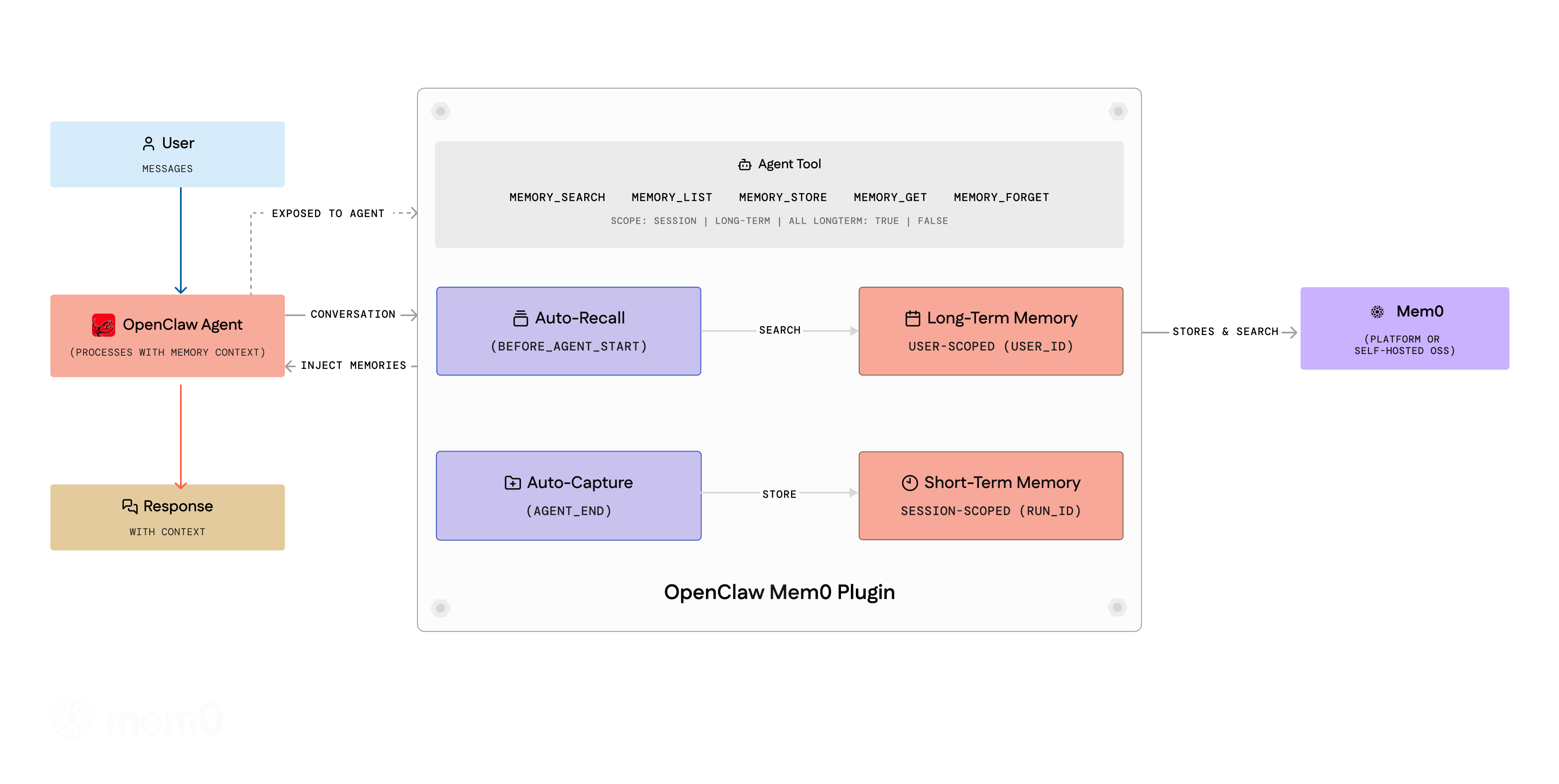
Auto-Recall — Before the agent responds, the plugin searches Mem0 for relevant memories and injects them into context.
Auto-Capture — After the agent responds, the conversation is filtered through a noise-removal pipeline and sent to Mem0. New facts get stored, stale ones updated, duplicates merged.
Both run silently. No prompting, no manual calls required.
Memory Scopes
| Scope | Description |
|---|---|
| Session (short-term) | Memories scoped to the current conversation via run_id. Automatically recalled alongside long-term memories. |
| User (long-term) | Persistent memories that span all sessions. Stored via memory_add with longTerm: true (the default). |
During auto-recall, both scopes are searched and presented separately — long-term first, then session — so the agent has full context.
Multi-Agent Isolation
In multi-agent setups, each agent gets its own memory namespace automatically. Session keys matching agent:<name>:<uuid> route memories to userId:agent:<name>. Single-agent deployments are unaffected.
All memory tools accept an optional agentId parameter for cross-agent queries:
memory_search({ query: "user's tech stack", agentId: "researcher" })
Agent Tools
Seven tools are available to the agent during conversations:
| Tool | Description |
|---|---|
memory_search |
Search memories by natural language query. Supports scope (session, long-term, all) and agentId filtering. |
memory_add |
Save a fact to memory. Supports category, importance, longTerm, and agentId. |
memory_get |
Retrieve a specific memory by ID. |
memory_list |
List stored memories with optional userId, agentId, and limit filters. |
memory_update |
Update an existing memory's text in place. Preserves edit history. |
memory_delete |
Delete by ID, search query, or bulk (all: true). Requires confirm: true for bulk. |
memory_history |
View the edit history of a specific memory. |
CLI
All commands follow the pattern openclaw mem0 <command>.
Memory Operations
# Add a memory
openclaw mem0 add "User prefers TypeScript over JavaScript"

# Search memories
openclaw mem0 search "what languages does the user know"
openclaw mem0 search "preferences" --scope long-term
openclaw mem0 search "context" --scope session

# Get, list, update, delete
openclaw mem0 get <memory_id>
openclaw mem0 list --user-id alice --top-k 20
openclaw mem0 update <memory_id> "Updated preference text"
openclaw mem0 delete <memory_id>
openclaw mem0 delete --all --user-id alice --confirm

# View edit history
openclaw mem0 history <memory_id>
Management
# Authenticate and configure
openclaw mem0 init
openclaw mem0 init --api-key <key> --user-id alice

# Check connectivity
openclaw mem0 status

# Manage configuration
openclaw mem0 config show
openclaw mem0 config get api_key
openclaw mem0 config set user_id alice

# Memory consolidation (review, merge, prune)
openclaw mem0 dream
openclaw mem0 dream --dry-run
Configuration Reference
General
| Key | Type | Default | Description |
|---|---|---|---|
mode |
"platform" | "open-source" |
"platform" |
Backend mode |
userId |
string |
"default" |
Unique identifier for the user. You define this — it's not found in any dashboard. All memories are scoped to this value. |
autoRecall |
boolean |
true |
Inject relevant memories before each turn |
autoCapture |
boolean |
true |
Extract and store facts after each turn |
topK |
number |
5 |
Max memories returned per recall |
searchThreshold |
number |
0.5 |
Minimum similarity score (0-1) |
Platform Mode
| Key | Type | Default | Description |
|---|---|---|---|
apiKey |
string |
— | Required. Mem0 API key (supports ${MEM0_API_KEY}) |
orgId |
string |
— | Organization ID |
projectId |
string |
— | Project ID |
enableGraph |
boolean |
false |
Enable entity graph for relationship tracking |
customInstructions |
string |
(built-in) | Custom extraction rules for what to store and how to format |
customCategories |
object |
(12 defaults) | Category name to description map for memory tagging |
Open-Source Mode
All fields below are optional. Defaults use OpenAI embeddings, in-memory vector store, and OpenAI LLM.
| Key | Type | Default | Description |
|---|---|---|---|
customPrompt |
string |
(built-in) | Extraction prompt for memory processing |
oss.embedder.provider |
string |
"openai" |
Embedding provider |
oss.embedder.config |
object |
— | Provider config (apiKey, model, baseURL) |
oss.vectorStore.provider |
string |
"memory" |
Vector store provider |
oss.vectorStore.config |
object |
— | Provider config (host, port, collectionName) |
oss.llm.provider |
string |
"openai" |
LLM provider |
oss.llm.config |
object |
— | Provider config (apiKey, model, baseURL) |
oss.historyDbPath |
string |
— | SQLite path for memory edit history |
oss.disableHistory |
boolean |
false |
Skip history DB initialization |
Supported providers: openai, anthropic, ollama, lmstudio, qdrant, chroma, and more. See the Mem0 OSS docs for the full list.
License
Apache 2.0